DOM Invader on a Real Bug Bounty Target
The author tested a real e-commerce bug bounty target for DOM XSS using Burp's DOM Invader. Ten sink hits were found, but none were exploitable because the input was either in a non-executable context or lacked scheme control.
 Published on medium.com
Cybersecurity
The full write-up lives on its author's site
It belongs to its author, so we link to it rather than copy it. The other two tabs are our own rewrites, checked against it.
Context
This is a triage walkthrough rather than a vulnerability disclosure. The target was a mid-sized e-commerce application in a public bug bounty program hosted on Intigriti. The author describes it as not being a huge target like Amazon, but still carrying a lot of products. The feature under examination is the site's search bar, which reflects the search term back into the page in several places.
The point of the exercise is to show what DOM Invader looks like against a real application rather than a deliberately vulnerable lab: the same techniques apply, but the environment does not cooperate. Instead of a handful of JavaScript files there may be dozens, and instead of a few sink matches there may be thousands. The work becomes separating the interesting results from the noise.
Setup
The only tool used is Burp's DOM Invader, running in Burp's built-in browser. The author points readers who are unfamiliar with it to PortSwigger's Testing for DOM XSS documentation for basic setup and usage. No accounts, roles or versions are described.
The precondition for everything that follows is a canary string that is unlikely to appear naturally in the application. The author's usual short search string is:
M4rduk
and the longer canary used for the rest of the exercise is:
M4rduk!J4m3s!W4s!H3r3!
Finding it
After starting initial recon, the author browsed the site manually and found the search bar. Searching for M4rduk returned:
200 results for "M4rduk"
To narrow the results, the longer canary was submitted. The site again returned:
200 results for "M4rduk!J4m3s!W4s!H3r3!"
A search term with no plausible matches still produced 200 results. The page source contained over 250 reflections of the canary, too many to track by hand. The DevTools Inspector returned 10 results for the string, which the author judged insignificant and moved past.
Attention then turned to the JavaScript files, of which there were around 30 in total. Simple text searches gave the following counts:
| Search string | Matches |
|---|---|
M4rduk!J4m3s!W4s!H3r3! |
0 |
innerHTML |
1020 |
message |
3585 |
location |
1889 |
location.href |
207 |
setTimeout( |
307 |
location.hash |
36 |
location.search |
17 |
The first group is far too noisy for manual review. The last two, location.hash with 36 matches and location.search with 17, are small enough to trace by hand, which the author notes will be covered in a later article. The canary itself appears zero times in the JavaScript files.
This is where DOM Invader comes in. The author's framing is that the biggest time killer in DOM XSS hunting is not finding sinks but investigating the wrong ones. DOM Invader does not declare a sink vulnerable; it reports that attacker-controlled input reached a sink it monitors. Deciding whether that sink can actually change browser behaviour is the researcher's job.
Exploitation
Step 1: run DOM Invader with the canary
In Burp's browser, after searching for M4rduk!J4m3s!W4s!H3r3!, the DevTools > Invader tab showed the following sink hits:
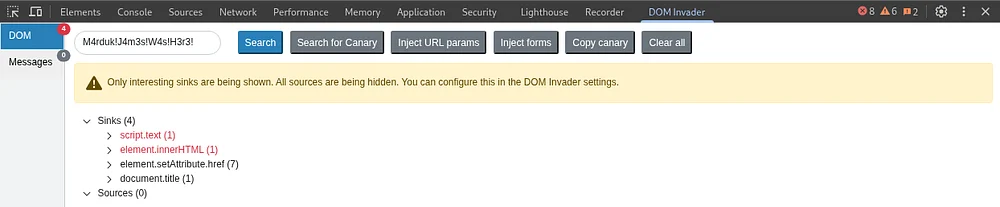
The screenshot shows the initial DOM Invader results with the canary in use: four sink categories, script.text (1), element.innerHTML (1), element.setAttribute.href (7) and document.title (1), for 10 hits in total. The author works through the four categories in turn.
Step 2: rule out document.title (1 hit)
document.title is unusual as a sink because it only accepts a string. No HTML parsing happens when the property is set, so the contents are treated as text rather than parsed as markup. DOM Invader correctly flagged that attacker input reaches the property, but that flag does not mean the sink is dangerous. The author marks it as a confirmed reflection that can be deprioritised as non-exploitable in this context and moves on.
Step 3: rule out element.setAttribute.href (7 hits)
This is the noisy category. setAttribute.href can be a dangerous navigation sink, but exploitability depends entirely on which portion of the URL the attacker controls. Seven hits sound like seven problems; they are not. The first triage move is to group them by outerHTML pattern before reading anything closely:
- 1 x
<link rel="canonical" href="..."> - 6 x
<a class="pagination-link ..." href="...">
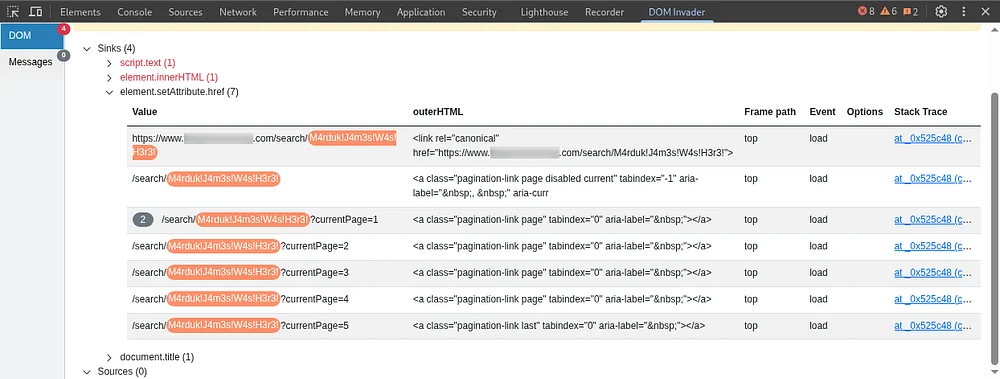
The screenshot shows the element.setAttribute.href group expanded with all seven sinks listed.
The canonical link element specifies the preferred URL for the page. Browsers do not navigate to it, execute it, or do anything with its href other than tell search engines which URL to index. The author calls this the fastest kind of dead end: recognise the tag and attribute combination and move on without reading the value at all.
The remaining six are pagination links. They all resolve to a URL of the form:
/search/M4rduk!J4m3s!W4s!H3r3!/search/M4rduk!J4m3s!W4s!H3r3!?currentPage=1...through currentPage=5
Every value shares a fixed prefix, /search/. A representative element from the page source looks like this:
<a class="pagination-link page" tabindex="0" aria-label=" " href="/search/M4rduk!J4m3s!W4s!H3r3!?currentPage=1" data-uw-rm-brl="PR" data-uw-original-href="/search/M4rduk!J4m3s!W4s!H3r3!?currentPage=1"> 2 </a>
Even in the best case the input starts after that prefix, never at position zero.
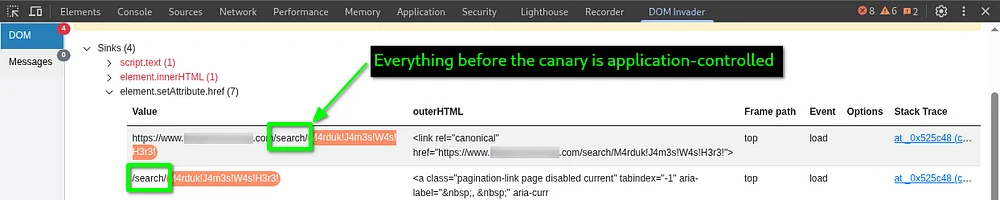
The screenshot highlights /search/ with a green box and an arrow, captioned to the effect that everything before the canary is application-controlled.
This is the same principle the author covers in a separate article on why location.href is not just a redirect: navigation sinks become dangerous when you control the scheme, not merely part of the path. A fixed prefix such as /search/ structurally prevents scheme control. It does not matter how permissive the rest of the string is, because something is always in front of the payload and the browser can never see javascript: as the protocol. No scheme control means no navigation XSS, so this category is closed.
Step 4: rule out script.text (1 hit) and element.innerHTML (1 hit)
At first glance these two look promising. They stand out in red, and expanding either one presents a prominent Exploit button.
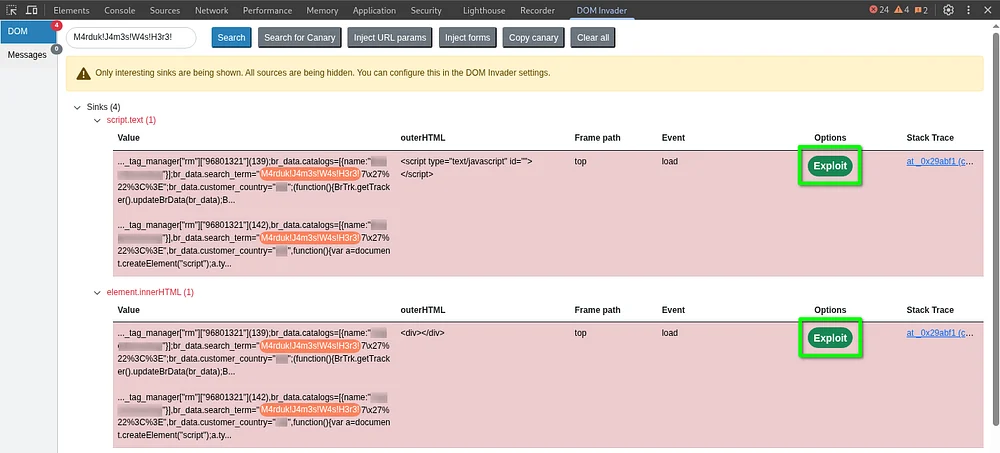
The screenshot shows the script.text results expanded with the Exploit button highlighted, with redactions applied to keep the target private.
Both share a trait that makes them quick to investigate and, here, to deprioritise.
script.text
The first few lines of the Value column show a br_data/BrTrk payload. Bloomreach is a third-party search analytics vendor, so this is tracking and analytics data being constructed, not application logic.

The screenshot shows the first lines of the Value column with green boxes around window.BrTrk, br_data=br_data||{};br_data and google_tag_manager, plus a box marking where to click to view the stack trace.
The stack trace gives another clue. The gtm.js, Jd.<anonymous>, Kd.apply and eb/db chained calls are characteristic of the Google Tag Manager container evaluation pipeline.
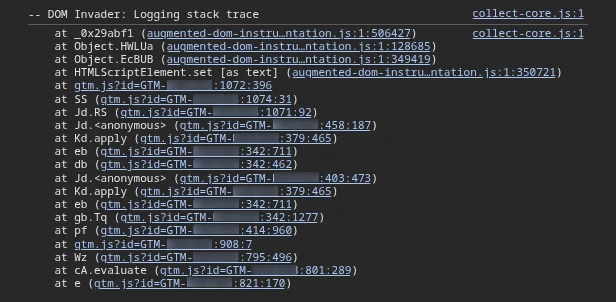
The screenshot shows the script.text stack trace with those calls chained.
At this point there is enough evidence to strongly suspect the sink belongs to a third-party tracking pipeline rather than the application's own functionality. That does not mean it should be ignored automatically. It is still worth clicking Exploit, which takes a few seconds, because third-party integrations can contain custom configurations, legacy code or unexpected behaviour. The goal is not to trust the stack trace blindly but to use the available evidence to decide how much time the sink deserves.
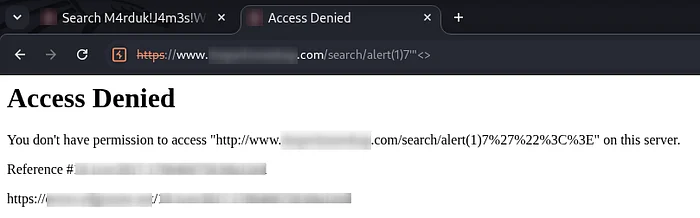
The screenshot shows the result of the Exploit attempt: a new tab reading Access Denied, a 403 error.
If the exploit attempt fails with a 403, produces no observable behaviour, or results in the payload being handled as data inside a non-executable context, there is little reason to spend significant additional time on payload variations against that sink. If it succeeds or produces unexpected behaviour, the opposite applies and the time should be invested in understanding exactly what is happening.
element.innerHTML
The innerHTML result is another example of why the context of a sink matters more than its name. The first lines of the Value column again show the br_data/BrTrk payload, and more importantly contain:
<script type="text/gtmscript">

The screenshot shows the first lines of the Value column, redacted, with br_data/BrTrk alongside the <script type="text/gtmscript"> element.
text/gtmscript is a custom script type used by Google Tag Manager. The browser does not treat it as executable JavaScript; it treats the contents as a data block, which GTM's own JavaScript can read and process. That distinction matters. An innerHTML sink would normally deserve attention because HTML inserted through innerHTML can be parsed by the browser and can potentially create executable markup depending on context. Here the canary is being inserted into an inert <script type="text/gtmscript"> element, and the browser will not execute the contents as JavaScript simply because they arrived through innerHTML.
The stack trace reinforces the conclusion: again gtm.js, Jd.<anonymous>, Kd.apply and the eb/db call chain, the same third-party GTM tracking pipeline seen with script.text. It is still worth a quick sanity check with the Exploit button.
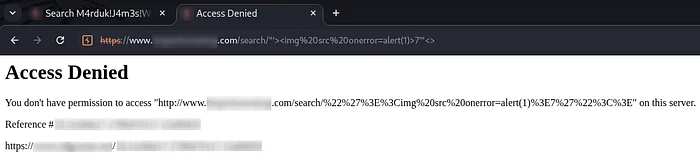
The screenshot shows the result: Access Denied again, a 403 error.
That is not by itself proof that the sink is impossible to exploit. But combined with the execution context, the inert text/gtmscript element and the GTM stack trace, there is no compelling reason to spend more time on payload variations here.
Step 5: consolidate the triage
The ten hits reduce to a handful of quick decisions, summarised in a table of sink name, count, triage reason and result.
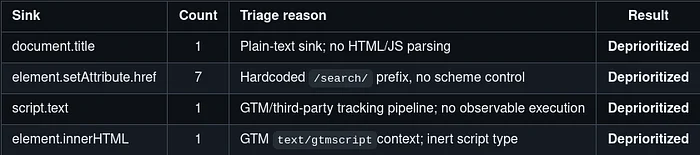
The screenshot shows that summary table.
Root cause
There is no vulnerability in this report, so there is no root cause to fix. What the exercise demonstrates is why DOM Invader's output needs interpretation. The tool flags any sink that attacker-controlled input reaches, and on this target the canary reached ten of them. Each was benign for a specific structural reason:
document.titleis string-valued and never parsed as HTML.- The canonical link's
hrefis never navigated to or executed by the browser. - The pagination links always place the input after the fixed
/search/prefix, so the scheme cannot be controlled. script.textandelement.innerHTMLwere both reached inside a third-party GTM and Bloomreach analytics pipeline, with theinnerHTMLcase landing inside an inerttext/gtmscriptdata block.
The report notes the 200-results response but does not analyse the backend.
Impact
No impact was demonstrated. The author is explicit that the goal was not to find a DOM XSS vulnerability but to show DOM Invader against a real application. Every sink that can be confidently deprioritised frees time for another feature, endpoint or source/sink combination, and knowing when not to chase something matters as much as finding issues on a noisy real-world target.
Fix
No fix is proposed, because no vulnerability was reported. The practical change is to the researcher's workflow: group results by outerHTML pattern before reading values, recognise third-party analytics and tag manager patterns from the value and stack trace, and use the Exploit button as a fast sanity check rather than a verdict.
Variants to test
- Search reflections with a fixed path prefix. Submit a canary and inspect every
hrefsink for what precedes your input. A positive result is a sink where your input reaches position zero or controls the scheme; a fixed prefix such as/search/means the sink is not navigable tojavascript:. - Canonical and other metadata links. Check whether
link rel="canonical"and similar tags appear in DOM Invader output. They are dead ends unless something else consumes the value, so treat them as noise and move on. - Third-party tag manager pipelines. When a sink's value contains vendor identifiers such as
br_data/BrTrkand the stack trace showsgtm.js,Jd.<anonymous>,Kd.applyandeb/db, treat it as analytics code. A positive result for further work is an Exploit attempt that executes or produces unexpected behaviour rather than a 403 or no observable change. - Custom script types inside
innerHTML. Look for<script type="text/gtmscript">or similar non-executable types wrapping your canary. A positive result is your input landing outside the inert data block, in markup the browser will actually parse and execute. - String-only sinks. Check
document.titleand comparable properties. They confirm reflection but not exploitability, so record them and move on. - Search-term reflection counts. Submit a canary with no plausible matches and compare the reported result count with reality. A fixed count such as 200 suggests the number is not derived from the term, which is worth noting when judging how the page is built.
What happened, in plain words
A security researcher spent some time testing the search box of a real online shop. The shop is part of a public bug bounty programme, which is a scheme where companies invite people to look for security problems in their websites and pay for genuine findings. The researcher was not looking for a specific known bug. They were demonstrating a tool called DOM Invader, and showing what happens when you point it at a real, busy website instead of a practice site built to be broken.
The tool found ten places where the text the researcher typed into the search box ended up somewhere in the page. Ten sounds alarming. It is not. Each of the ten turned out to be harmless, and the article is about why, and about how you can tell quickly. The title of the piece says it plainly: ten hits, zero vulnerabilities.
If you have never done any security work, the important idea to take away is this. A tool that says "your input arrived here" is not the same as a tool that says "this is a bug". It is more like a smoke alarm that beeps whenever air moves. You still have to go and look.
The background: what a bug bounty target is
A bug bounty programme is a public invitation. A company publishes a set of rules and a scope (which websites and features are fair game), and researchers who find real security problems report them privately and usually get paid. Intigriti is one of the platforms that hosts these programmes, in the same way a job board hosts job adverts.
The target here was a mid-sized e-commerce application: an online shop. The author describes it as not being a giant like Amazon, but still carrying a lot of products. That detail matters, because a big catalogue means a big search feature, and a big search feature means a lot of places on the page where your search words get shown back to you.
Before going further, two terms that come up constantly:
- Recon (reconnaissance) is the early phase of getting to know a target: what pages exist, what technologies it uses, what it looks like when you browse it normally. It is the equivalent of walking around a building before you try any doors.
- Reflection is when something you typed is sent to the server and then comes back to you inside the page. A search results page is the classic example: you search for "red shoes" and the page says Results for "red shoes". Your words have been reflected.
The researcher started their recon tools running, then browsed the site by hand. That is a deliberate choice: automated tools find pages, but a human notices features. They noticed a search bar.
Finding it: the canary string
A canary (sometimes called a canary token) is a made-up piece of text that is extremely unlikely to appear on a real website by accident. You type it into a feature, then search the page for it. Wherever it turns up, you know your input travelled there. The name comes from the canary in a coal mine: a small, sensitive thing whose distress tells you something is wrong.
The researcher's usual short search string is:
M4rduk
This is just a handle with numbers substituted for letters, the kind of thing people do to make a username. It is short and easy to type.
They searched for it, and the site replied:
200 results for "M4rduk"
Read that literally: the shop is claiming it found two hundred products matching the word "M4rduk". That is already odd, because "M4rduk" is not a product name. So they tried something even less likely to exist, a longer canary:
M4rduk!J4m3s!W4s!H3r3!
This spells out a phrase with numbers swapped in for letters and exclamation marks between the words. The point of the exclamation marks is that they are special characters: they are not letters or digits, and in some contexts they have meaning to a browser or a database. A canary with punctuation in it tests more than a canary made only of letters.
The site replied:
200 results for "M4rduk!J4m3s!W4s!H3r3!"
Exactly the same number. A search term that cannot plausibly match anything still produces two hundred results. The report notes the identical 200 figure but does not explain it. The report does not dig into the server side, so we cannot say for certain, but the observation is worth making: the page is telling you something about itself.
Next, the researcher looked at the page's source code. Page source is the raw text the server sends to your browser before the browser draws anything: the HTML, plus links to scripts and stylesheets. You can view it in any browser with a right-click and "View Page Source", or through the developer tools.
In that source, the canary appeared more than 250 times. That is far too many to check by hand. So they used the browser's Inspector, the part of the developer tools that shows the live page structure after the browser has built it, and searched there. The Inspector returned 10 results. The author judged those insignificant and moved on, which is a normal triage decision: ten hits in the visible page structure, with nothing obviously interesting about them, is not where the story is.
Attention then turned to the JavaScript files. JavaScript is the programming language that runs inside your browser and makes pages interactive: it is what happens when you click a button and something changes without the page reloading. A modern shop loads a lot of it. Here there were around thirty separate JavaScript files.
Searching inside thirty files by hand is impractical, so the researcher ran simple text searches and counted matches. These are plain string searches, the same as pressing Ctrl+F in a document, not security tools:
| Search string | Matches |
|---|---|
M4rduk!J4m3s!W4s!H3r3! |
0 |
innerHTML |
1020 |
message |
3585 |
location |
1889 |
location.href |
207 |
setTimeout( |
307 |
location.hash |
36 |
location.search |
17 |
What do those search terms mean, and why search for them?
innerHTMLis a JavaScript property that lets code put HTML into a page. It is one of the classic places where injected content can turn into a real problem, so people search for it. 1020 matches is far too many to review one by one.messageis a common word in code and also the name of a browser feature for passing messages between windows. 3585 matches is pure noise.locationis the browser object that holds the current URL. 1889 matches is again too many.location.hrefis the full URL of the current page. 207 matches is still a lot.setTimeout(is a function that runs code after a delay. It is sometimes abused, and 307 matches is a lot to read.location.hashis the part of a URL after the#symbol, the bit that usually points at a section of a page. 36 matches is small enough to read by hand.location.searchis the part of a URL after the?, the query string, which is where search terms often live. 17 matches is very manageable.
The canary itself appears zero times in the JavaScript files. That is exactly the kind of behaviour DOM Invader is built to watch.
The author's framing is worth repeating because it is the whole point of the article. The biggest time killer in this kind of hunting is not finding candidate spots. It is investigating the wrong ones. Every hour spent on a dead end is an hour not spent on a live feature.
What DOM Invader is, and what it is not
DOM Invader is a feature built into Burp Suite, a popular security testing tool. It runs inside Burp's own built-in browser, which is a normal browser with extra instrumentation attached. You give it a canary string, browse the site, and it watches the page as it runs.
Two pieces of vocabulary first:
- The DOM (Document Object Model) is the browser's in-memory model of the page. When the browser reads HTML, it builds a tree of objects: this is a heading, this is a link, this is a script. JavaScript then changes that tree. When people say "DOM-based", they mean the problem happens in that in-memory tree, in the browser, rather than on the server.
- A sink is a place in the code where data ends up and where, in the wrong circumstances, it could do damage. Think of a sink as a drain: water arriving at a drain is normal, but what goes down the drain matters. Examples include setting a link's destination, or inserting HTML into the page.
DOM Invader does not tell you a sink is vulnerable. It tells you that your canary reached a sink it monitors. That is a much weaker statement. The tool has done the tedious part, which is watching thousands of code paths at once. Deciding whether the arrival actually changes what the browser does is your job.
If you are unfamiliar with the tool, the author points to PortSwigger's Testing for DOM XSS documentation for setup and basic usage. No accounts, roles or version numbers are described in the report.
Step 1: run DOM Invader with the canary
In Burp's browser, the researcher searched for M4rduk!J4m3s!W4s!H3r3! and then opened the Invader tab inside the browser's developer tools.
The screenshot shows the initial results with the canary in use. There are four categories of sink, and ten hits in total:
script.textwith 1 hitelement.innerHTMLwith 1 hitelement.setAttribute.hrefwith 7 hitsdocument.titlewith 1 hit
The author works through the four categories in turn.
Step 2: rule out document.title (1 hit)
document.title is the property that sets the text shown in the browser tab. If a page runs document.title = "Hello", the tab says Hello.
It is an unusual sink because it only accepts a string. When you assign text to it, the browser does not parse that text as HTML. It does not look for tags, it does not build elements, it just displays the characters. So if your canary arrives there, the worst that happens is that your canary appears in the tab title.
DOM Invader was right to flag it: attacker-controlled input did reach the property. But "input reached here" and "this is dangerous" are different claims. The author marks it as a confirmed reflection, deprioritises it as non-exploitable in this context, and moves on.
Takeaway: a string-only property can confirm that your input travels, but it cannot turn that input into code.
Step 3: rule out element.setAttribute.href (7 hits)
This is the noisy category, and the one that teaches the most.
setAttribute is a JavaScript method for setting an attribute on an HTML element. An attribute is an extra piece of information attached to a tag, like the destination of a link. href is the attribute that holds a link's destination. So element.setAttribute.href means "code is setting where this element points".
That can be dangerous. If an attacker can make a link point at javascript:..., then clicking the link runs code. This is called a navigation sink, because the browser navigates somewhere when the link is used. But whether it is exploitable depends entirely on which part of the URL the attacker controls. That is the key sentence of this section.
Seven hits sound like seven problems. They are not. The first triage move is to group them by their outerHTML pattern before reading any values closely. outerHTML is the full HTML of an element including its own tag, so grouping by it means "what kind of element is this, and what does its markup look like". The seven hits fall into two groups:
- 1 x
<link rel="canonical" href="..."> - 6 x
<a class="pagination-link ..." href="...">
Two categories, not seven. That is the first real saving.
The screenshot shows the element.setAttribute.href group expanded with all seven sinks listed.
Now each group in turn.
A canonical link is a <link rel="canonical" href="..."> element that tells search engines which URL is the preferred version of a page. It exists for search engine optimisation, not for users. Browsers do not navigate to it, do not execute it, and do nothing with its href except hand it to search engines. The author calls this the fastest kind of dead end: you recognise the tag and attribute combination and move on without even reading the value. There is nothing to read, because nothing consumes it.
The remaining six are pagination links: the numbered links at the bottom of a results page that let you jump to page 2, page 3 and so on. They all resolve to a URL of this shape:
/search/M4rduk!J4m3s!W4s!H3r3!/search/M4rduk!J4m3s!W4s!H3r3!?currentPage=1...through currentPage=5
Read that carefully. The canary appears twice, and then there is a query parameter currentPage that runs from 1 through 5. The important part is what comes before the canary.
Every value shares a fixed prefix, /search/. A representative element from the page source looks like this:
<a class="pagination-link page" tabindex="0" aria-label=" " href="/search/M4rduk!J4m3s!W4s!H3r3!?currentPage=1" data-uw-rm-brl="PR" data-uw-original-href="/search/M4rduk!J4m3s!W4s!H3r3!?currentPage=1"> 2 </a>
Line by line, in plain words:
<a ...>opens a link element. Everything until</a>is the link.class="pagination-link page"gives the link CSS classes, which are just styling labels.pagination-linksays it is a page-number link.tabindex="0"makes the link reachable with the keyboard's Tab key.aria-label=" "provides a label for screen readers. is a non-breaking space, so the label is effectively blank.href="/search/M4rduk!J4m3s!W4s!H3r3!?currentPage=1"is the destination. It starts with/search/, then the canary, then?currentPage=1.data-uw-rm-brl="PR"anddata-uw-original-href="..."are customdata-attributes. Attributes beginning withdata-are free-form storage for the page's own scripts; they do not do anything on their own. These are custom data- attributes, which do not do anything on their own.> 2 </a>is the visible text of the link, the number 2, and then the closing tag.
Even in the best case, your input starts after that /search/ prefix. It never starts at position zero.
The screenshot highlights /search/ with a green box and an arrow, captioned to the effect that everything before the canary is application-controlled.
Why does position zero matter so much? Because of how a browser reads a URL. The part before the first colon is the scheme: http, https, javascript, mailto and so on. The scheme tells the browser what kind of thing the URL is. If the scheme is javascript, the browser runs the rest as code. If the scheme is https, it fetches a page.
If the application always puts /search/ in front of your input, then the browser sees /search/ first. There is no colon before your text, so your text cannot become the scheme. You can type javascript: as much as you like; it lands after /search/, and the browser reads the whole thing as a path on the same site. The author compares this to a separate article of theirs on why location.href is not just a redirect: navigation sinks become dangerous when you control the scheme, not merely part of the path.
A fixed prefix is a structural defence. It does not matter how permissive the rest of the string is. Something is always in front of the payload, so the browser can never see javascript: as the protocol. No scheme control means no navigation cross-site scripting here, and the category is closed.
Takeaway: before reading any href value, ask what comes before your input. If the answer is a fixed prefix, you are done.
Step 4: rule out script.text (1 hit) and element.innerHTML (1 hit)
At first glance these two look promising. They stand out in red in the tool, and expanding either one presents a prominent Exploit button. Red and a big button are exactly the things that make a beginner's pulse quicken, which is why the author spends the most time here.
The screenshot shows the script.text results expanded with the Exploit button highlighted, with redactions applied to keep the target private. Redactions are blacked-out areas: the researcher is showing the technique without exposing the client's site.
Both sinks share a trait that makes them quick to investigate and, in this case, to deprioritise. That trait is context.
script.text
script.text is the text content of a <script> element. A <script> element is how a page includes JavaScript. If code writes text into a script element, that text can become code.
The first few lines of the Value column show a br_data/BrTrk payload. Bloomreach is a third-party search analytics vendor: a company whose software shops embed to measure what people search for. So this is tracking and analytics data being constructed, not the shop's own logic. br_data and BrTrk are the vendor's own variable names, which is how you recognise whose code you are looking at.
The screenshot shows the first lines of the Value column with green boxes around window.BrTrk, br_data=br_data||{};br_data and google_tag_manager, plus a box marking where to click to view the stack trace.
A stack trace is the list of function calls that led to the current line of code, newest first. When something goes wrong in JavaScript, the browser prints one. It is the closest thing to a receipt you get: it tells you which code called which code to get here.
The stack trace gives another clue. The gtm.js, Jd.<anonymous>, Kd.apply and eb/db chained calls are characteristic of the Google Tag Manager container evaluation pipeline. Google Tag Manager, usually shortened to GTM, is a tool that lets a site owner add tracking and marketing tags without editing the site's own code. A tag here means a small snippet of third-party code. GTM loads a container, which is a bundle of those tags, and evaluates them.
The screenshot shows the script.text stack trace with those calls chained.
At this point there is enough evidence to strongly suspect the sink belongs to a third-party tracking pipeline rather than the shop's own functionality. That does not mean it should be ignored automatically. Third-party integrations can contain custom configurations, legacy code or unexpected behaviour, and "it's probably the analytics vendor" is a suspicion, not a proof.
So it is still worth clicking Exploit, which takes a few seconds. The goal is not to trust the stack trace blindly but to use the available evidence to decide how much time the sink deserves. That is a subtle but important habit: cheap checks are worth doing even when you expect them to fail, because they convert a suspicion into an observation.
The screenshot shows the result of the Exploit attempt: a new tab reading Access Denied, a 403 error. 403 is the HTTP status code for "forbidden": the server understood the request and refused it.
How to read that result. If the exploit attempt fails with a 403, produces no observable behaviour, or results in the payload being handled as data inside a non-executable context, there is little reason to spend significant additional time on payload variations against that sink. If it succeeds or produces unexpected behaviour, the opposite applies, and the time should be invested in understanding exactly what is happening.
Takeaway: the evidence points to a third-party analytics pipeline. After a quick validation attempt, deprioritise it.
element.innerHTML
innerHTML is the property that lets JavaScript set the HTML inside an element. If code does `element.innerHTML = "<b>hi</b>", the browser parses that string and creates a bold element. Because it parses HTML, it is a classic place where injected markup can become real elements, and sometimes real code.
The innerHTML result is another example of why the context of a sink matters more than its name. The first lines of the Value column again show the br_data/BrTrk payload, and more importantly contain:
<script type="text/gtmscript">
Line by line: <script opens a script element. type="text/gtmscript" sets its type to a custom value. > closes the opening tag. There is no closing </script> shown because we are only looking at the first lines.
The screenshot shows the first lines of the Value column, redacted, with br_data/BrTrk alongside the <script type="text/gtmscript"> element.
text/gtmscript is a custom script type used by Google Tag Manager. The browser does not treat it as executable JavaScript. Instead it treats the contents as a data block: inert text that GTM's own JavaScript can read and process later. The browser's rule is simple: if a <script> element's type is not a JavaScript type it recognises, the browser does not run it. It just stores the text.
That distinction matters. An innerHTML sink would normally deserve attention because HTML inserted through innerHTML can be parsed by the browser and can potentially create executable markup depending on context. Here the canary is being inserted into an inert <script type="text/gtmscript"> element. The browser will not execute the contents as JavaScript simply because they arrived through innerHTML.
The stack trace reinforces the conclusion: again gtm.js, Jd.<anonymous>, Kd.apply and the eb/db call chain, the same third-party GTM tracking pipeline seen with script.text. It is still worth a quick sanity check with the Exploit button.
The screenshot shows the result: Access Denied again, a 403 error.
That is not by itself proof that the sink is impossible to exploit. But combined with the execution context, the inert text/gtmscript element and the GTM stack trace, there is no compelling reason to spend more time on payload variations here.
Takeaway: the canary reaches an innerHTML sink, but the surrounding context makes it a poor candidate. Recognise the third-party GTM pattern, validate it quickly, move on.
Step 5: consolidate the triage
The ten hits reduce to a handful of quick decisions, summarised in a table of sink name, count, triage reason and result.
The screenshot shows that summary table. Writing the table is part of the method, not an afterthought: it forces you to state, in one line each, why you are dropping something. If you cannot state the reason, you have not finished looking.
Root cause
There is no vulnerability in this report, so there is no root cause to fix. What the exercise demonstrates is why DOM Invader's output needs interpretation. The tool flags any sink that attacker-controlled input reaches, and on this target the canary reached ten of them. Each was benign for a specific structural reason:
document.titleis string-valued and never parsed as HTML.- The canonical link's
hrefis never navigated to or executed by the browser. - The pagination links always place the input after the fixed
/search/prefix, so the scheme cannot be controlled. script.textandelement.innerHTMLwere both reached inside a third-party GTM and Bloomreach analytics pipeline, with theinnerHTMLcase landing inside an inerttext/gtmscriptdata block.
The report notes the 200-results response but does not analyse the backend.
Impact
No impact was demonstrated. The author is explicit that the goal was not to find a DOM XSS vulnerability but to show DOM Invader against a real application. Every sink that can be confidently deprioritised frees time for another feature, endpoint or source/sink combination, and knowing when not to chase something matters as much as finding issues on a noisy real-world target.
Fix
No fix is proposed, because no vulnerability was reported. The practical change is to the researcher's workflow: group results by outerHTML pattern before reading values, recognise third-party analytics and tag manager patterns from the value and stack trace, and use the Exploit button as a fast sanity check rather than a verdict.
Variants to test
These are the same ideas turned into things you can try yourself on a target you are authorised to test.
- Search reflections with a fixed path prefix. Submit a canary and inspect every
hrefsink for what precedes your input. A positive result is a sink where your input reaches position zero or controls the scheme; a fixed prefix such as/search/means the sink is not navigable tojavascript:. - Canonical and other metadata links. Check whether
link rel="canonical"and similar tags appear in DOM Invader output. They are dead ends unless something else consumes the value, so treat them as noise and move on. - Third-party tag manager pipelines. When a sink's value contains vendor identifiers such as
br_data/BrTrkand the stack trace showsgtm.js,Jd.<anonymous>,Kd.applyandeb/db, treat it as analytics code. A positive result for further work is an Exploit attempt that executes or produces unexpected behaviour rather than a 403 or no observable change. - Custom script types inside
innerHTML. Look for<script type="text/gtmscript">or similar non-executable types wrapping your canary. A positive result is your input landing outside the inert data block, in markup the browser will actually parse and execute. - String-only sinks. Check
document.titleand comparable properties. They confirm reflection but not exploitability, so record them and move on. - Search-term reflection counts. Submit a canary with no plausible matches and compare the reported result count with reality. A fixed count such as 200 suggests the number is not derived from the term, which is worth noting when judging how the page is built.
Glossary
- 403: an HTTP status code meaning "forbidden"; the server understood the request and refused to serve it.
- Attribute: an extra piece of information attached to an HTML tag, such as a link's destination.
- Bloomreach: a third-party search analytics vendor whose code appears in the page;
br_dataandBrTrkare its identifiers. - Bug bounty programme: a public scheme where a company invites researchers to report security problems, usually for a reward.
- Burp Suite: a security testing tool; its built-in browser is where DOM Invader runs.
- Canary: a made-up string unlikely to appear naturally, typed into a feature so you can find where it travels.
- Canonical link: a
<link rel="canonical" href="...">element that tells search engines the preferred URL of a page; browsers do not navigate to or execute it. - Container (GTM): a bundle of tracking tags managed by Google Tag Manager and evaluated by its script.
- Cross-site scripting (XSS): a class of bug where an attacker's input ends up being treated as code by a browser.
- Data block: the contents of a
<script>element whose type the browser does not recognise as JavaScript; stored as inert text rather than executed. - DOM: the browser's in-memory tree model of the page, which JavaScript changes as the page runs.
- DOM Invader: a Burp feature that watches for a canary reaching sinks in the page and offers an Exploit button to test them.
- DOM XSS: cross-site scripting where the problem happens in the browser's DOM rather than on the server.
document.title: the property holding the text shown in the browser tab; string-only, never parsed as HTML.- E-commerce application: an online shop.
- Exploit button: DOM Invader's one-click attempt to see whether a flagged sink can actually be made to do something.
- Google Tag Manager (GTM): a tool for adding tracking and marketing tags to a site without editing its own code.
href: the attribute holding a link's destination.- HTML: the markup language that describes a page's structure.
innerHTML: the property that sets the HTML inside an element; the browser parses what you assign.- Inspector: the part of browser developer tools that shows the live page structure.
- Intigriti: a platform that hosts public bug bounty programmes.
- JavaScript: the programming language that runs in the browser and makes pages interactive.
location.hash: the part of a URL after#.location.href: the full URL of the current page.location.search: the part of a URL after?, the query string.- Navigation sink: a sink where data ends up controlling where the browser goes, such as a link destination.
outerHTML: the full HTML of an element including its own tag; used here to group sinks by kind.- Page source: the raw HTML the server sends before the browser renders it.
- Pagination links: the numbered links that move between pages of results.
- Recon (reconnaissance): the early phase of learning about a target: pages, technologies, normal behaviour.
- Reflection: when input you supplied comes back to you inside the page.
- Scheme: the part of a URL before the first colon, such as
httpsorjavascript, which tells the browser what kind of URL it is. script.text: the text content of a<script>element.setAttribute: the JavaScript method for setting an attribute on an element.- Sink: a place in code where data ends up and where, in the wrong circumstances, it could do damage.
- Stack trace: the list of function calls that led to the current line of code.
- Tag (marketing): a small snippet of third-party code added to a site, often for tracking.
text/gtmscript: a custom script type used by Google Tag Manager; the browser treats its contents as inert data.- Triage: sorting findings by how much attention each deserves, and recording why.



