What Is An XSS Vulnerability ?
 Published on medium.com
I was checking my email and i found a DOM XSS vulnerability that I have reported to a program long time ago which isn’t patched yet , and i thought why not writing about this …
The full write-up lives on its author's site
It belongs to its author, so we link to it rather than copy it. The other two tabs are our own rewrites, checked against it.
Context
This is a walkthrough of DOM-based cross-site scripting, built around two examples: a deliberately vulnerable page from a public firing range, and a real page the author found while doing reconnaissance on a target. The author does not name the real target, and notes that the vulnerability was not patched at the time of writing. The page in question is a simple HTML page that shows a simple link. Behind that link, JavaScript reads a url parameter and uses its value to build a javascript: URI in the href attribute of an a tag, so clicking the link opens a new tab at whatever URL the parameter supplied.
The article also recaps the general model of DOM XSS: a source (a place where attacker-controllable data enters the application) is passed to a sink (a place where that data is executed). The author groups sources into URL-based (document.url, document.location.hash), navigation-based (document.referer, window.name), communication-based (AJAX, WebSockets, web messaging) and storage-based (cookies, local storage, session storage). Sinks are grouped into JavaScript execution sinks (eval(payload), setTimout(payload,100), <div onclick="payload">), HTML execution sinks (htmlElement.innerHTML = payload, document.write(payload)), JavaScript URI sinks (document.location = payload, location.href = payload) and HTML modification that changes behaviour ((element).src or (element).href on certain elements). Finding DOM XSS means finding a way to pass a source into a sink.
Setup
No accounts, roles or special tooling are needed. The demonstration uses a public instance of the Google firing range, and the browser's developer tools console. For the real-world case, the payload sits in the href of an anchor and runs when the victim clicks the crafted link.
Finding it
The author starts with a minimal example of the pattern. A page contains this script:
<html> <head> <title>dom xss example</title> </head> <body> <script> var x = document.location.hash.substr(1); window.location=x; </script></body></html>
The script takes whatever follows the hash in the URL and assigns it to window.location, which redirects the user to it. If the attacker supplies javascript:alert(1) after the hash, the alert(1) function executes, which proves the DOM XSS. The exploit URL in the article is:
http://victim/domxss.html#javascript:alert(1)
For the firing range, the author points at the postMessage example at https://public-firing-range.appspot.com/dom/toxicdom/postMessage/complexMessageDocumentWriteEval. Opened in a browser, the page renders no content and shows nothing of what is in it. The source code is where the problem is.
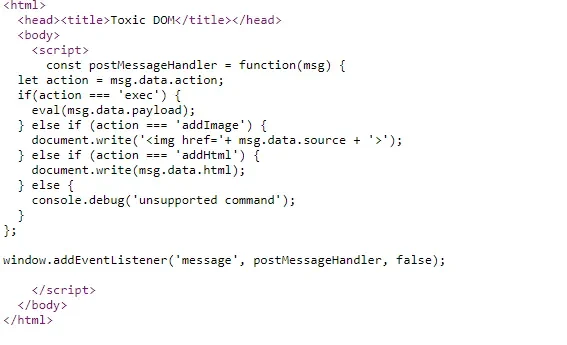
The page registers a postMessage() event listener that expects a message in JSON format. It checks the value of msg.data.action, and if that value equals exec, it executes eval(msg.data.payload).
For the real-world case, the author came across a simple HTML page during reconnaissance. It showed a simple link, and the source code revealed the handling described above.
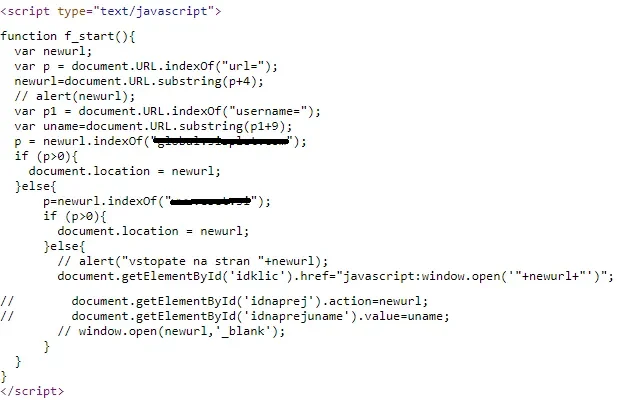
The JavaScript expects a url parameter, takes its value, checks whether it matches some predefined values, and if it does not, includes the value in the href attribute of an a tag as javascript:window.open('"+newurl+"'), where newurl is the value of the url parameter. Clicking the link makes the browser open a new tab at the supplied value.
Exploitation
Step 1: trigger the postMessage sink from the console
With the firing range page open, the author uses the console tab of the Chrome developer tools and sends:
window.postMessage({"action":"exec","payload":"alert(document.domain)"},"*")
The message object carries action set to exec, which satisfies the listener's check, and payload set to alert(document.domain), which is what eval receives. The JavaScript in the payload executes.
Step 2: deliver the message from an attacker page
To exploit the vulnerability against a victim, the author hosts a malicious HTML page publicly with this content:
<iframe onload="send()" id="f" src="https://public-firing-range.appspot.com/dom/toxicdom/postMessage/complexMessageDocumentWriteEval"></iframe><script> function send(){ var x = {"action":"exec","payload":"alert(document.domain)"} document.getElementById('f').contentWindow.postMessage(x,"*"); }</script>Bad sender
The iframe loads the vulnerable page, and its onload handler calls send(). That function builds the same message object and posts it to the iframe's contentWindow with target origin *. Visiting the attacker page produces an alert box containing the value of document.domain, which is the proof of XSS.
Step 3: exploit the real-world page
Because the url value ends up inside a javascript: URI in the anchor's href, the author appends a payload to the parameter:
?url=javascript:alert(document.domain)
The full exploit URL given in the article is:
https://victim.com/vulnerable.html?url=javascript:alert(1)
When the link is clicked, the JavaScript in the parameter executes. The author closes with a tip: do not ignore HTML pages, they might be vulnerable.
Root cause
The firing range page takes data from a web messaging source and passes it to eval, a JavaScript execution sink, without any sanitisation of the payload. The listener validates only the action field, so any value in payload reaches the evaluator. The * target origin in the attacker's postMessage call means the message is delivered to the receiving window whatever its origin.
In the real-world case, the url parameter is a URL-based source that is placed into a JavaScript URI sink, the href of an anchor. The value is checked against some predefined values, and if it does not match, it is still written into the href, so a javascript: URI executes on click. The report does not describe any other defence on that page.
Impact
In both examples the attacker's JavaScript runs in the context of the vulnerable page, as shown by alert(document.domain). For the real-world page, execution requires the victim to click the crafted link, since the payload lives in the anchor's href. The author does not state what data or actions the affected page exposes, so the practical consequences beyond script execution in the page's origin are not described. The vulnerability was reported to the program a long time before the article and was still unpatched at the time of writing.
Fix
The report does not say what fix was applied, if any. Based on the described behaviour, the page should not build a javascript: URI from user input at all: the url value should be validated against an allowlist of permitted destinations and rejected otherwise, rather than only checked against predefined values and then inserted anyway. On the firing range side, the listener should not pass message data to eval; the action should be dispatched to fixed handlers, and the message origin should be checked instead of accepting any sender.
Variants to test
- Look for
postMessagelisteners that passevent.dataintoeval,setTimeout,innerHTMLordocument.write. A positive result is script execution when you post a crafted message from another origin, as in the firing range example. - Look for parameters reflected into
hreforsrcattributes, especially where the value is prefixed withjavascript:. A positive result is an alert on click of the generated link. - Look for hash-based redirects such as
window.location = location.hash.substr(1). A positive result is execution of ajavascript:URI placed after the hash. - Look for values taken from
document.referer,window.name, cookies, local storage or session storage and written into an HTML or JavaScript sink. A positive result is execution when you control that storage or navigation value. - Do not skip plain HTML pages during reconnaissance: a page that only shows a simple link can still hide a source-to-sink path in its source code.
What happened, in plain words
A security researcher was going through his email and found an old report he had sent to a bug bounty program a long time before. The vulnerability he had reported was still not patched at the time of writing. He decided to write about it so other people could learn from it.
The bug is called DOM-based cross-site scripting, usually shortened to DOM XSS. In plain words: a website can be tricked into running JavaScript code that the attacker wrote, and that code runs as if it belonged to the website itself. JavaScript is the programming language that runs inside your browser and makes web pages interactive. When an attacker can make a site run their JavaScript, they can do things in the page that the site's own code could do.
The article teaches the idea with two examples. The first is a deliberately vulnerable page from a public instance of the firing range, a practice site. The second is a real page the researcher found while looking around a target, which he does not name because the bug was still open when he wrote the article. That real page was a simple HTML page showing a simple link. HTML is the language web pages are written in. Behind the link, some JavaScript read a url value from the address bar and included it in the link's href as javascript:window.open('"+newurl+"'). Clicking the link then ran whatever code the address bar had supplied.
Before the examples, the article explains the general model: a source is a place where data the attacker can control gets into the page, and a sink is a place where that data gets executed. Finding DOM XSS means finding a path from a source to a sink. The article lists the common sources and sinks, then walks through the practice page and the real page, and ends with a list of references.
What is an XSS vulnerability?
If you can get your JavaScript code to run inside a web page, you have found an XSS. XSS stands for cross-site scripting. The name is a bit odd, but the idea is simple: code from one place ends up running in the context of another page.
There are basically three types of XSS: reflected, stored and DOM-based. This article is about the DOM-based type only.
A quick comparison helps. Think of a website as an office building with a reception desk. In a reflected XSS, the attacker hands the receptionist a note and the receptionist reads it back out loud immediately. In a stored XSS, the attacker pins the note on the noticeboard and every visitor reads it later. In a DOM-based XSS, the note never reaches the receptionist at all: the building's own internal staff pick it up from a tray near the door and act on it themselves. The server is not involved; the browser does all the work.
What is DOM XSS?
DOM XSS is a client-side vulnerability. Client-side means it happens in your browser, on your computer, rather than on the website's server. It happens when JavaScript code takes a value from a source and mishandles it in a way that causes that value to be executed in a sink. A sink is an execution function, a place where the browser will run or render whatever it is given.
Enough theory. Here is an example:
<html> <head> <title>dom xss example</title> </head> <body> <script> var x = document.location.hash.substr(1); window.location=x; </script></body></html>
Line by line:
<html> <head> <title>dom xss example</title> </head> <body>is the ordinary skeleton of a web page. The title is what appears in the browser tab.<script>starts a block of JavaScript that the browser will run.var x = document.location.hash.substr(1);creates a variable calledx.document.location.hashis the part of the address bar that comes after a#symbol. For example, inexample.com/page#hello, the hash is#hello..substr(1)cuts off the first character, which is the#itself, soxends up holdinghello.window.location=x;tells the browser to navigate to whatever is inx. This is the sink: the browser treats the value as a destination and goes there.</script></body></html>closes everything.
Suppose a page uses this code. It takes whatever comes after the hash in the URL and uses it to redirect the user there. If the attacker supplies the value javascript:alert(1) after the hash, the browser will treat that as a piece of JavaScript and run alert(1), which pops up a small dialog box with the number 1 in it. That popup is the standard proof that code ran. So the exploit would be:
http://victim/domxss.html#javascript:alert(1)
Why does this work? Because javascript: at the start of a value tells the browser "the rest of this is code, not an address". The page trusted the hash and handed it straight to the browser's navigation, so the browser obeyed the code.
Source and sink concept
In the previous part I used two keywords I did not explain yet: source and sink. What are they, and how do they help you find a DOM XSS vulnerability?
There are two main things to focus on when you look for DOM XSS:
- Source: the location from which untrusted data is taken by the application. Untrusted means it can be controlled by a user, and therefore by an attacker. The address bar, a cookie, a message from another window: all of these can carry attacker-supplied values.
- Sink: a place where that untrusted value is actually executed or rendered.
A useful comparison: a source is like a mail slot in a front door, and a sink is like a machine inside the house that acts on whatever comes through the slot. If the machine is a paper shredder, no harm. If the machine is a robot that follows written instructions, then anyone who can post a letter can give the robot orders. Finding DOM XSS means finding a way to pass a source into a sink.
When we talk about JavaScript, there are mainly four categories of sources:
- URL-based sources such as
document.urlanddocument.location.hash - Navigation-based sources such as
document.refererandwindow.name - Communication sources such as AJAX, WebSockets and web messaging
- Storage sources such as cookies, local storage and session storage
And four main categories of sinks:
- JavaScript execution sinks such as
eval(payload),setTimout(payload,100)and<div onclick="payload"> - HTML execution sinks such as
htmlElement.innerHTML = payloadanddocument.write(payload) - JavaScript URI sinks such as
document.location = payloadandlocation.href = payload - HTML modification to change behaviour:
(element).srcor(element).hrefon certain elements
A few of those terms deserve a plain explanation. AJAX is the technique a page uses to fetch data from a server in the background without reloading. A WebSocket is a two-way connection that stays open between the browser and a server. Web messaging, also called postMessage, is a way for one browser window or frame to send a message to another. A cookie is a small piece of data a site stores in your browser, often to remember who you are. Local storage and session storage are similar small storage areas that JavaScript can read and write. eval is a JavaScript function that takes a string and runs it as code. innerHTML is a property that lets JavaScript replace the contents of an element on the page, and document.write writes text directly into the page as it loads.
DOM XSS example
For the sake of demonstration, we are going to use a public instance of the firing range. The firing range is a set of pages that are intentionally vulnerable, so you can practise on them without breaking any real site.
Let's look at this example: https://public-firing-range.appspot.com/dom/toxicdom/postMessage/complexMessageDocumentWriteEval.
If you open this simple HTML page in the browser, it will not render any content and you will not see anything from what is in it. But when you look at the source code, things become much more interesting:
The screenshot shows the page's source code. It seems there is a postMessage() event listener. An event listener is a piece of code that waits for something to happen and then reacts. Here it waits for a message to arrive from another window. It expects the message to be in JSON format. JSON is a plain text way of writing structured data, like {"name":"value"}. The listener checks the value of msg.data.action, and if it is equal to exec, it executes the function eval(msg.data.payload).
In other words: the page accepts a message from anyone, looks at one field to decide whether to act, and then runs another field as code. The check on action is like a bouncer who asks for a password and, once it is said, lets in whatever is behind the person saying it.
Open the console tab in Chrome's developer tools and try:
window.postMessage({"action":"exec","payload":"alert(document.domain)"},"*")
Line by line:
window.postMessage(...)sends a message from the current window to a target window. Here the target is the same window, so the page sends a message to itself.{"action":"exec","payload":"alert(document.domain)"}is the message body, written in JSON.actionis set toexec, which is the value the listener is waiting for.payloadis set toalert(document.domain), which is the code we want to run.document.domainis the site's own domain name, so the popup will show which site the code is running on."*"is the target origin. An origin is the combination of scheme, host and port, roughly "which site".*means "any site is fine", so the browser does not restrict delivery.
As you will see, the JavaScript code we provided gets executed. A popup appears showing the domain of the page. That is the proof of the vulnerability.
So all we have to do to exploit this vulnerability is host a malicious HTML page publicly, containing the following code:
<iframe onload="send()" id="f" src="https://public-firing-range.appspot.com/dom/toxicdom/postMessage/complexMessageDocumentWriteEval"></iframe><script> function send(){ var x = {"action":"exec","payload":"alert(document.domain)"} document.getElementById('f').contentWindow.postMessage(x,"*"); }</script>Bad sender
Line by line:
<iframe ...>is an inline frame: a small window embedded inside a page that loads another page.id="f"gives it a name so the script can find it.src="..."is the address it loads, which is the vulnerable firing range page.onload="send()"means "when this frame has finished loading, call the functionsend".<script>starts the script block.function send(){defines the function that will run when the frame loads.var x = {"action":"exec","payload":"alert(document.domain)"}builds the same message object as before.document.getElementById('f').contentWindow.postMessage(x,"*");finds the frame by its id, reaches into the window it contains withcontentWindow, and posts the message to it. The"*"again means any origin is accepted.}closes the function,</script>closes the script block, and the trailingBad senderis just text on the page.
Visit the page and you will get an alert box containing the document.domain value, as proof of XSS. Visiting the attacker's page produces an alert box containing the document.domain value, as proof of XSS.
Real world example of DOM XSS
Notice: I am not going to mention the target here, since the vulnerability is not patched yet. Naming a site with an open bug would tell attackers where to look.
While doing reconnaissance on the target, I came across a simple HTML page which shows a simple link. Reconnaissance means looking around a target to map what it has: pages, parameters, features. After investigating the source code I saw this:
The screenshot shows the page's source. It seems JavaScript is expecting a url parameter. A parameter is a named value in the address bar, the part after the ?, like ?name=value. The code takes the value of url, checks whether it matches some predefined values, and if it does not, includes that value in the href attribute of an a tag as javascript:window.open('"+newurl+"'), where newurl is the value of the url parameter. An a tag is a link, and its href is the address the link points to. window.open is a browser function that opens a new tab or window.
Once you click the link, the browser opens a new tab with the url value we provided. So all we have to do is add:
?url=javascript:alert(document.domain)
And the exploit will be:
https://victim.com/vulnerable.html?url=javascript:alert(1)
Line by line:
https://victim.com/vulnerable.htmlis the page itself, the one with the link.?url=starts the parameter list and names the parameterurl.javascript:alert(1)is the value. Because it starts withjavascript:, the browser treats it as code rather than as an address.
Once you click that link, the JavaScript code we entered gets executed. The check against predefined values did not stop it, because a value that does not match is still written into the link.
It is worth mentioning a small tip here: do not ignore HTML pages, they might be vulnerable. A page that looks boring and static can still have a source-to-sink path hidden in its source code.
Why it works
In the firing range page, data arrives through web messaging, which is a source, and is passed to eval, which is a JavaScript execution sink, with no cleaning of the payload. The listener validates only the action field, so any value in payload reaches the evaluator. The * target origin in the attacker's postMessage call means the sender accepts delivery to a window of any origin.
In the real-world case, the url parameter is a URL-based source placed into a JavaScript URI sink, the href of an anchor. The value is checked against some predefined values, and if it does not match, it is still written into the href, so a javascript: URI runs on click. The report does not describe any other defence on that page.
What it means in practice
In both examples the attacker's JavaScript runs in the context of the vulnerable page, as shown by alert(document.domain). Running in the context of the page means the code can do what the page's own code can do: read what the page shows, act on the user's behalf in that page, and so on. For the real-world page, execution requires the victim to click the crafted link, since the payload lives in the anchor's href. The author does not state what data or actions the affected page exposes, so the practical consequences beyond script execution in the page's origin are not described. The vulnerability was reported to the program a long time before the article and was still unpatched at the time of writing.
How to fix it
The report does not say what fix was applied, if any. Based on the described behaviour, the page should not build a javascript: URI from user input at all. The url value should be validated against an allowlist of permitted destinations and rejected otherwise, rather than only checked against predefined values and then inserted anyway. An allowlist means a list of things that are allowed, and everything else is refused. On the firing range side, the listener should not pass message data to eval. The action should be dispatched to fixed handlers, and the message origin should be checked instead of accepting any sender.
Variants to test
- Look for
postMessagelisteners that passevent.dataintoeval,setTimeout,innerHTMLordocument.write. A positive result is script execution when you post a crafted message from another origin, as in the firing range example. - Look for parameters reflected into
hreforsrcattributes, especially where the value is prefixed withjavascript:. A positive result is an alert on click of the generated link. - Look for hash-based redirects such as
window.location = location.hash.substr(1). A positive result is execution of ajavascript:URI placed after the hash. - Look for values taken from
document.referer,window.name, cookies, local storage or session storage and written into an HTML or JavaScript sink. A positive result is execution when you control that storage or navigation value. - Do not skip plain HTML pages during reconnaissance: a page that only shows a simple link can still hide a source-to-sink path in its source code.
References
- https://hackerone.com/reports/297968
- https://public-firing-range.appspot.com/dom/index.html
- https://domgo.at/cxss/intro
- https://portswigger.net/web-security/cross-site-scripting/dom-based
- https://opnsec.com/2020/05/dom-xss-in-gmail-with-a-little-help-from-chrome/
- https://github.com/wisec/domxsswiki/wiki
Glossary
- AJAX: a technique a web page uses to fetch data from a server in the background, without reloading the page.
- Allowlist: a list of values that are permitted; anything not on the list is refused.
- Anchor (
atag): the HTML element that creates a link; itshrefattribute holds the destination. - Blocklist: a list of values that are forbidden; anything not on the list is allowed through.
- Client-side: happening in the browser on the user's computer, rather than on the website's server.
- Console: a panel in the browser's developer tools where you can type JavaScript and see messages.
- Cookie: a small piece of data a website stores in your browser, often used to remember who you are.
- Cross-site scripting (XSS): a bug where an attacker's JavaScript runs inside a web page, as if it belonged to that page.
- Developer tools: the built-in panel in browsers for inspecting pages, source code, network traffic and the console.
- DOM: the browser's in-memory model of a web page, which JavaScript reads and changes.
- DOM XSS: cross-site scripting where the browser-side JavaScript takes attacker-controlled data from a source and passes it to a sink, without the server being involved.
document.domain: a JavaScript property holding the domain name of the current page.document.location.hash: the part of the address bar after the#symbol.document.referer: a JavaScript property holding the address of the page that linked to the current one.document.write: a JavaScript function that writes text directly into the page as it loads.eval: a JavaScript function that takes a string and runs it as code.- Event listener: code that waits for something to happen (a click, a message, a load) and then reacts.
- Firing range: a public set of intentionally vulnerable pages used for practising security testing.
- Hash: the part of a URL after
#, normally used to jump to a section of a page. href: the attribute of a link that holds its destination.- HTML: the language web pages are written in.
innerHTML: a JavaScript property that replaces the contents of an element on the page.- Iframe: a small window embedded inside a page that loads another page.
- JavaScript: the programming language that runs in browsers and makes pages interactive.
- JavaScript URI: a value starting with
javascript:that tells the browser the rest is code to run rather than an address to visit. - JSON: a plain text format for structured data, such as
{"name":"value"}. - Local storage: a small storage area in the browser that JavaScript can read and write, persisting across visits.
- Origin: the combination of scheme, host and port that identifies which site something belongs to.
- Parameter: a named value in a URL, appearing after the
?, like?name=value. postMessage: a browser function that lets one window or frame send a message to another.- Reconnaissance: looking around a target to map its pages, parameters and features.
- Reflected XSS: XSS where the attacker's input is immediately echoed back by the server into the response.
- Session storage: like local storage, but cleared when the browser tab is closed.
- Sink: a place in the code where data is executed or rendered, such as
evalorinnerHTML. - Source: a place where attacker-controllable data enters the page, such as the URL, a cookie or a message.
- Stored XSS: XSS where the attacker's input is saved on the server and served to later visitors.
- Target origin: in
postMessage, the origin the sender is willing to deliver to;*means any origin. - Untrusted data: data that a user, and therefore an attacker, can control.
- WebSocket: a two-way connection that stays open between the browser and a server.
window.name: a JavaScript property on a window that persists across navigations and can carry data.window.open: a browser function that opens a new tab or window at a given address.window.postMessage: the function used to send a message to another window or frame.



