Duo Twofactor Authentication Bypass
Duo's two-factor authentication could be bypassed by replacing the session identifier or transaction ID in a push notification request with one from an attacker-controlled account, causing the push to be sent to the attacker's device while the victim's login was approved. An attacker with valid credentials for the victim account and their own Duo-enabled account could therefore complete 2FA without the victim's device.

sensepost.com
Published on sensepost.com
It’s too easy when hacking, to assume something is invulnerable and not interrogate it. This was the case for me when it came to Duo’s two-factor authentication solution.
The full write-up lives on its author's site
It belongs to its author, so we link to it rather than copy it. The other two tabs are our own rewrites, checked against it.
Context
Duo is a two-factor authentication product. In a typical login flow, an application that uses Duo eventually triggers a 2FA verification, which is sent to a Duo endpoint as a POST request. Duo then sends a push notification to the device enrolled for the account, and the user accepts it to complete the login.
The author had previously read an older report describing a Duo 2FA bypass and, while preparing for a client assessment, decided to check whether the vulnerability still existed. It did not: both the request and the server response were now very different from those in the older report, and the old bypass was no longer possible. Looking more closely at the traffic produced two variants of a new bypass, both of which redirect a victim's push notification to an attacker-controlled device so that the attacker can authorise access to the victim's account.
Setup
The testing was done against a client application that used Duo, with HTTP traffic inspected in Burp. The key precondition was having extra application accounts available for testing: at minimum an attacker account with Duo enabled on a device the attacker controls, and a separate victim account. The bypass was later reproduced on a second Duo instance the team had access to, to establish whether the problem lay with Duo or with the client's implementation.
For the bypass to succeed, an attacker needs a valid application account with Duo enabled on a device in their control, plus access to the victim's credentials. The second factor is what the attack removes; the password is still required.
Finding it
During a normal authentication flow, the application sends a 2FA verification request to a Duo endpoint via a POST request:
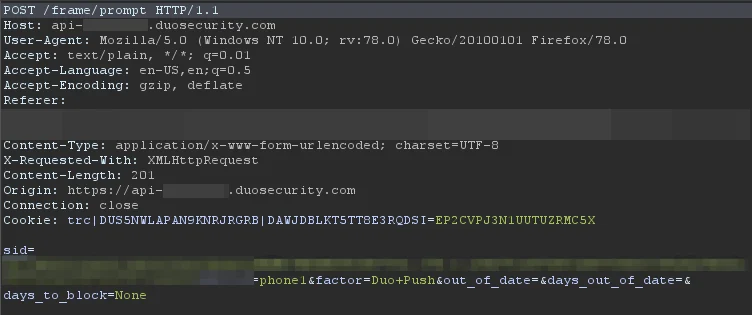
Figure 1, Request to Duo API
The researcher logged in with the attacker account, captured that 2FA request, copied it (everything from the Cookie header down) and dropped it so it never reached Duo. Then he logged in with the victim account, intercepted the victim's 2FA request, and replaced it with the copied attacker request. The result was that the 2FA request went to the attacker's device, while the session that completed was the victim's. The verification had been sent to the wrong person's phone.
Because this looked like it could be a fluke, the team repeated it with other accounts and devices.
Exploitation
Step 1: confirm the full-request swap
- Log in with the attacker account and capture the 2FA POST request.
- Copy the request from the Cookie header down, then drop it so no push is triggered.
- Log in with the victim's credentials and intercept the 2FA request.
- Replace the victim's request with the attacker's copied request and submit it.
The push notification is delivered to the attacker's device, the attacker accepts it, and the session ends up authenticated as the victim.
Step 2: reduce the swap to the sid parameter
The next question was which part of the request identifies the user who receives the push. The team first compared Cookie values across several requests, looking for a component that identified the user, without success. They then examined the sid parameter in the request body. With no clear indication of which part of the sid mattered, they copied the entire value, and that was enough: the bypass worked using only the sid value rather than the whole request.
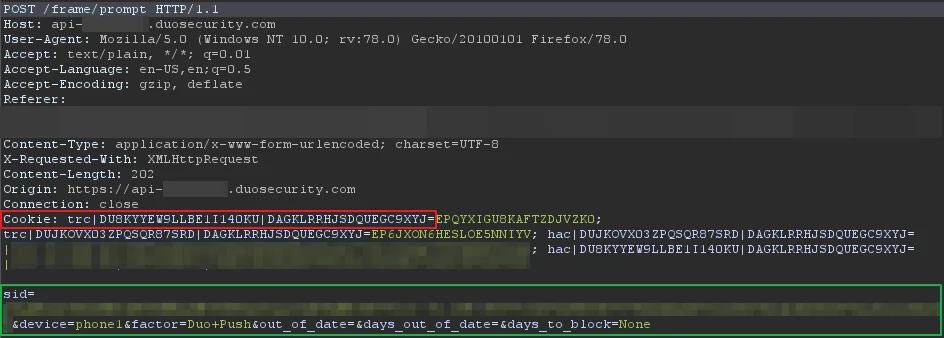
Figure 2, Original victim push notification request.
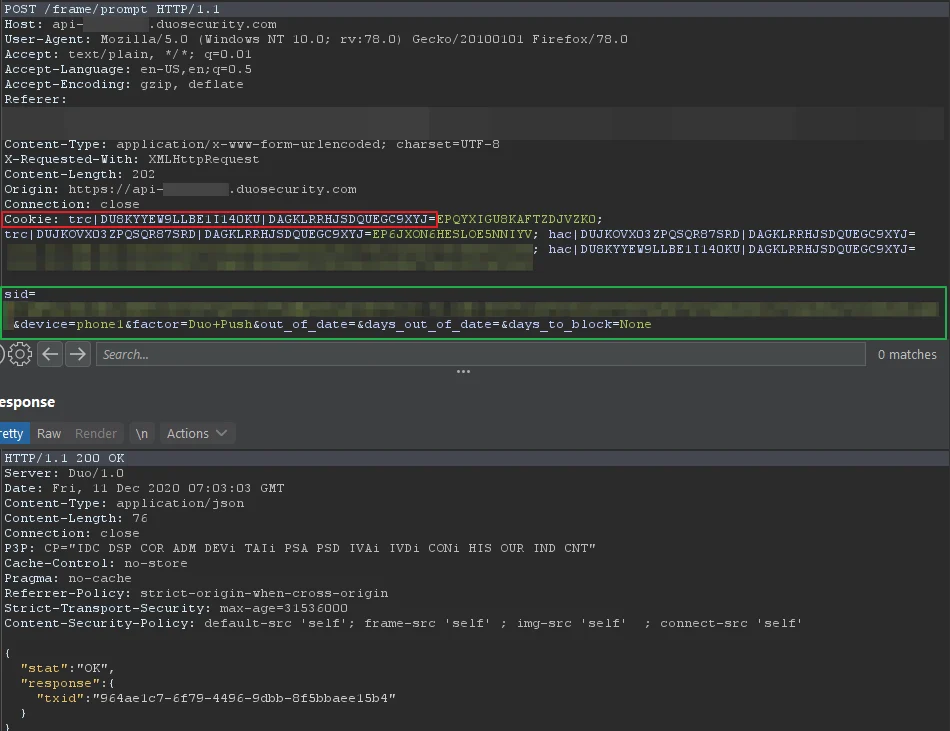
Figure 3, Victim sid replaced with that of the attacker.
The reduced process:
- The attacker logs in and requests a 2FA push to their own device.
- The attacker copies the
sidfrom that request and drops the request, so the push is never triggered. - The attacker logs in with the victim's credentials and requests a 2FA push.
- The attacker intercepts that request, replaces its
sidwith the copied attackersid, and forwards it. - The push goes to the attacker's device; the attacker accepts it and the victim's login is approved.
This variant was unreliable in practice: the sid values timed out aggressively, so the attack was very time sensitive and failed if the copy and paste took too long.
Step 3: the txid variant
With one semi-reliable bypass in hand, Michael Kruger looked for an alternative. When 2FA verification is requested, the server returns a transaction ID (txid), which is then polled continuously to confirm whether the user has accepted the push.
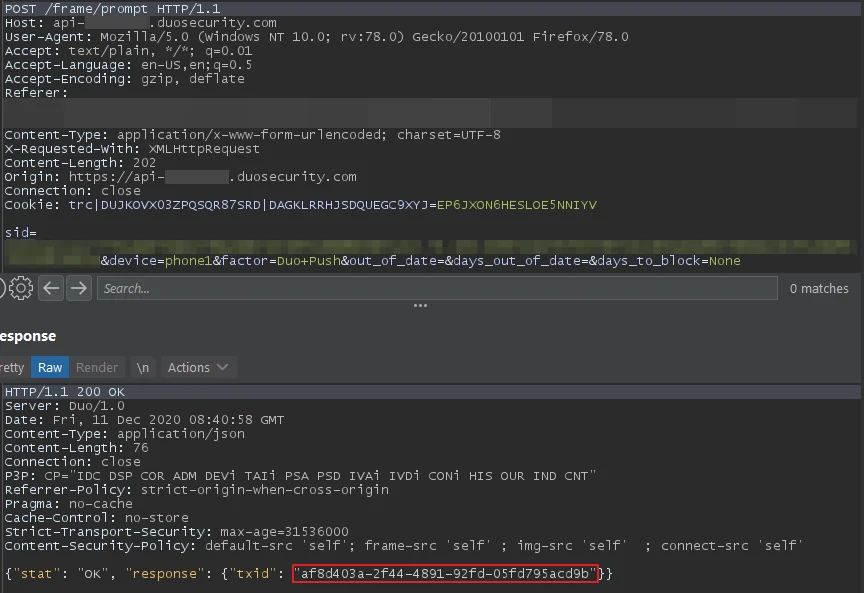
Figure 4, Transaction ID in server response.
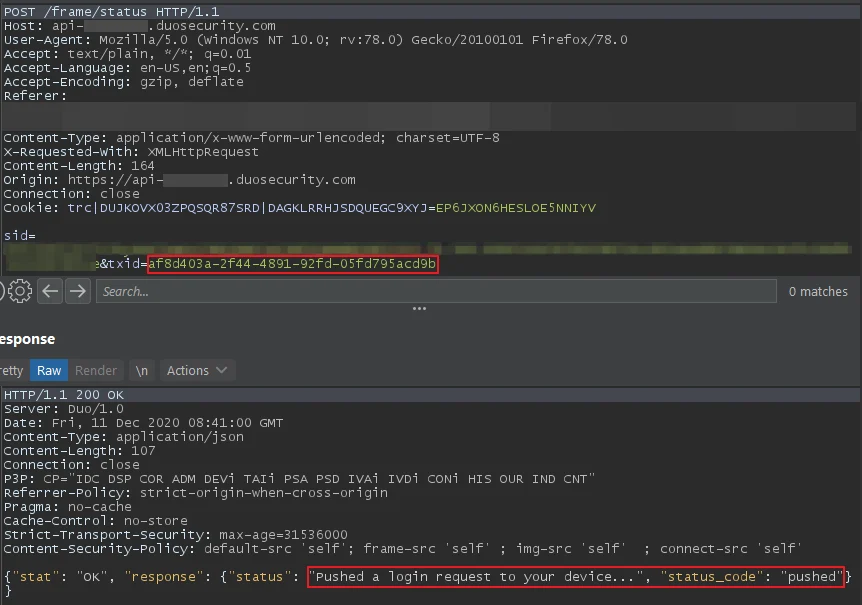
Figure 5, Push notification sent to user device.
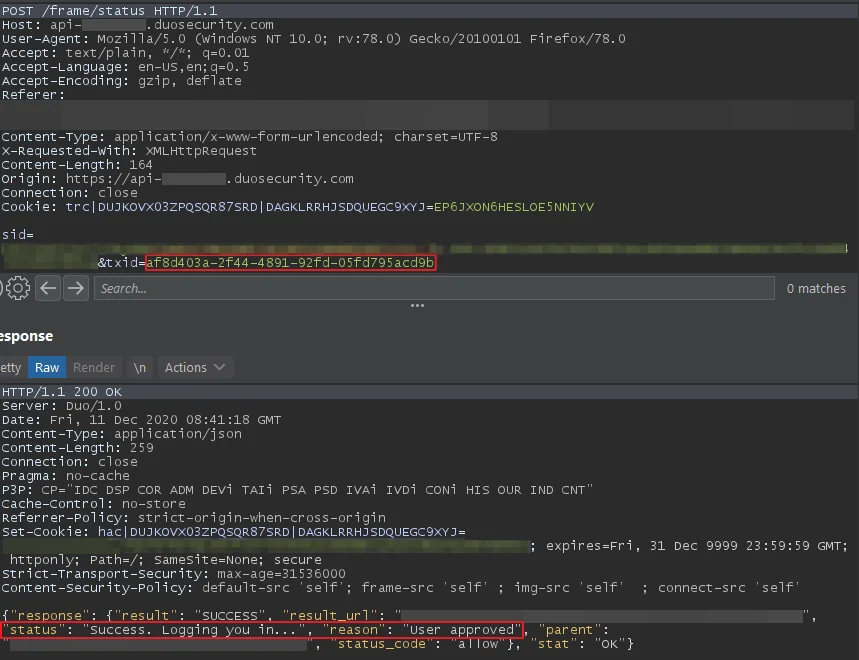
Figure 6, User accepted push notification and login approved.
The screenshots show the txid coming back from the server when a push is requested, and then being used in subsequent requests to query the status. By accepting the push on one device, dropping the request, and copying the txid into a second user's request, the attacker could make Duo believe the second user had accepted the push.
This method was more stable than the sid swap, and it also allowed the attacker to accept the push before making use of the txid, which removed the tight timing constraint.
Root cause
The report does not describe the server-side code. What the behaviour shows is that the value identifying which device or transaction a push belongs to (sid, and separately txid) was accepted from the client request without being bound to the session or account that was authenticating. Swapping the value in one user's request for a value belonging to another user's request caused Duo to act on the other user's device or transaction. Because the bypass reproduced on a second Duo instance, it was a flaw in Duo rather than in the client's integration.
Impact
An attacker who holds a victim's credentials but not their second factor can complete the login by having the push sent to, and accepted on, their own device. The conditions are that the attacker has a valid application account with Duo enabled on a device they control, plus access to the victim's credentials. The sid variant is time sensitive because the values timed out aggressively; the txid variant is more reliable and lets the attacker accept the push before using the token.
Fix
Duo fixed the bug quickly. When the researcher retested both methods after the temporary fix, neither worked: each attempt returned the server response "Invalid txid".
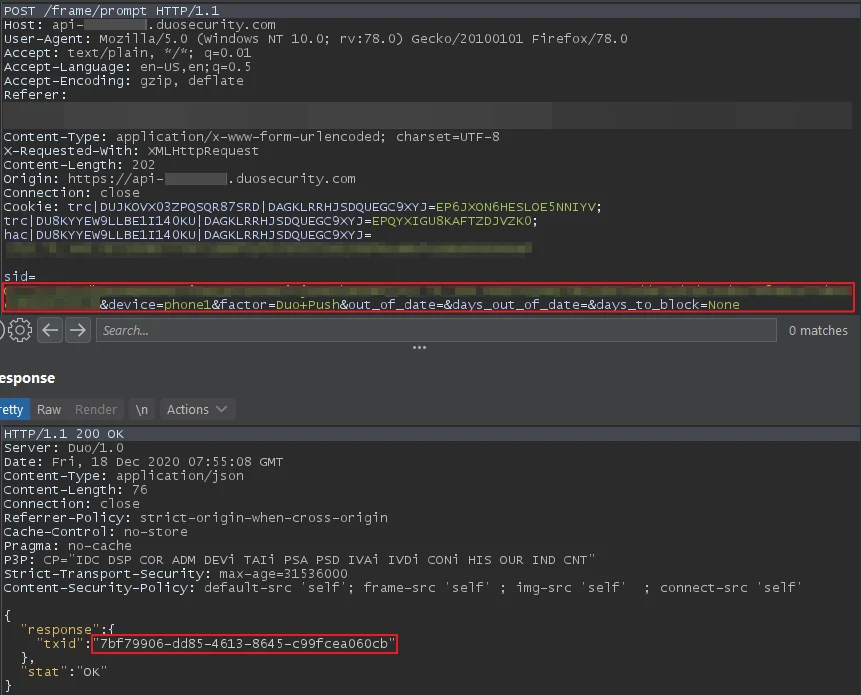
Figure 7, Victim user 2FA request.
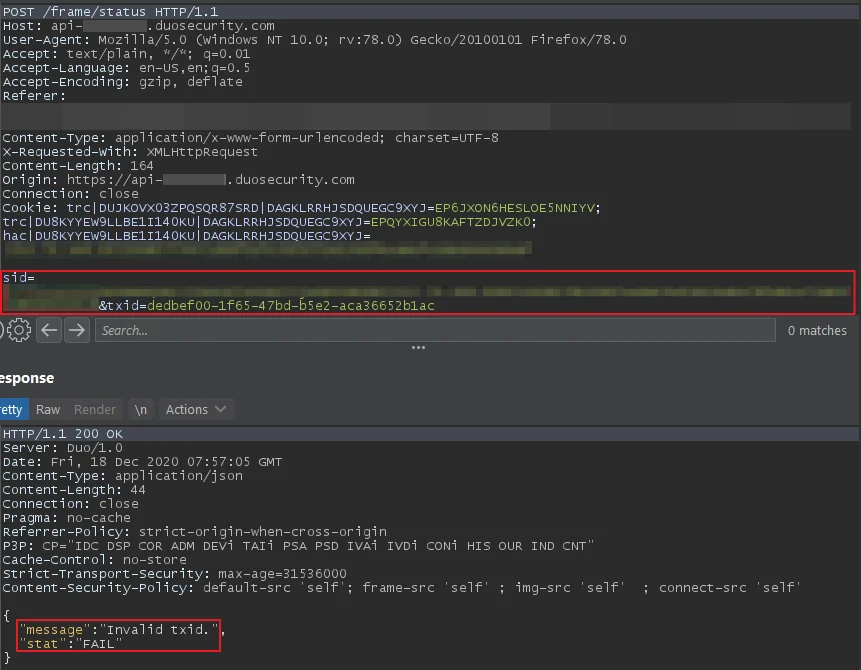
Figure 8, Victim request with txid of the attacker.
Duo also started an incident response process to identify prior exploitation attempts, and found the team's testing. The report does not describe the code change itself.
Variants to test
- Swap the whole 2FA request between two accounts. A positive result is a push arriving on the attacker's device while the session completes as the victim.
- Swap only the
sidin the request body. A positive result is the same outcome with a much smaller change, though expect short expiry windows. - Swap only the
txidreturned when a push is requested, then poll the status. A positive result is the status endpoint reporting acceptance for a transaction the attacker accepted on their own device. - Repeat the tests against a second instance of the same product. A positive result there shows the flaw is in the product, not the integration.
- Compare Cookie values across requests to see whether any component identifies the push recipient, as the team tried before moving to the body parameters.
Timeline
| Date | Event |
|---|---|
| 11/12/2020 | Vulnerability discovery |
| 14/12/2020 | Reported to Duo Security |
| 18/12/2020 | Duo confirmed the fix had been in place for a few days; the team confirmed it independently |
| 07/04/2021 | Public disclosure |
What happened, in plain words
Duo is a service that adds a second check to a login: after you type your password, it sends a push notification to your phone, and you tap to approve. The idea is that a stolen password alone is not enough to get in. This article describes two ways the researchers found to make Duo send that push to the wrong phone, so that an attacker could approve a login to someone else's account. The attack does not break the password; it breaks the second check. Duo fixed it quickly, and the researchers confirmed the fix.
Background: what Duo does and what we are testing
When you log in to a website that uses Duo, the website asks Duo to verify you. The website sends a request to Duo's servers (an API call) saying, in effect, "this user is trying to log in; please check with their phone". Duo then sends a push notification to the phone that is registered for that account. The user taps "approve", and Duo tells the website that the check passed. The website then lets the user in.
An API is just a way for two computer programs to talk to each other over the internet, like a waiter taking your order to the kitchen and bringing back your food. The website is the customer, Duo is the kitchen, and the API is the ordering system.
A cookie is a small piece of data that a website stores in your browser and that your browser sends back with every request to that site. It often acts like a name badge: it tells the server who you are. A token is similar: a short string of characters that stands for something, like a claim ticket at a cloakroom. You give the ticket back and get your coat; the server gives you a token and later uses it to look up your session or transaction.
A POST request is one of the ways a browser (or a tool) sends data to a server. It is used when you submit a form or when a program sends information that should not just be appended to the URL. The data is carried in the body of the request.
Burp (short for Burp Suite) is a tool that sits between your browser and the website and lets you look at, pause, and change the requests and responses. Think of it as a mail intercept service: you can open letters, read them, rewrite them, and send them on.
Two-factor authentication (2FA) means logging in with two different things: something you know (your password) and something you have (your phone, which receives the push). The attack described here bypasses the second factor: the attacker still needs the victim's password, but does not need the victim's phone.
The setup: accounts and tools
The researchers were testing a client's application that used Duo. They had more than one account: an attacker account (controlled by them, with Duo enabled on a phone they owned) and a victim account (a separate account they could also log in to, to play the role of the victim). Having extra accounts is important because the attack involves moving a verification from one account to another.
They used Burp to watch and modify the HTTP traffic between the browser and the application.
First finding: swapping the whole request
During a normal login, the application sends a request to Duo to start the 2FA check. The request looks something like this (the exact contents are shown in the figure):
Figure 1, Request to Duo API
This is a POST request to a Duo endpoint. It contains headers (like the Cookie header, which carries the session cookie) and a body with parameters. The body includes a parameter called sid, which we will come back to.
The researcher logged in with the attacker account, captured this 2FA request in Burp, copied it (everything from the Cookie header down), and then dropped it. Dropping means telling Burp not to forward the request to the server, so Duo never sees it and no push is sent. This is like writing down the order but not handing it to the waiter.
Next, the researcher logged in with the victim account. When the victim's 2FA request appeared in Burp, he replaced it with the copied attacker request and let it go. The result: Duo sent the push to the attacker's phone, but the login that was being completed was the victim's. The attacker tapped approve on their own phone, and the victim's session was authenticated.
The request that tells Duo to send a push was taken from the attacker's session and used in the victim's session, and the push went to the attacker's phone.
Because this seemed too easy, the team repeated it with other accounts and devices to make sure it was not a one-off.
Making it smaller: swapping only the sid
The next question was: which part of the request actually tells Duo which phone to send the push to? If they could find that, they could change just that piece instead of the whole request.
They first looked at the Cookie header. They compared cookies from several requests to see if any part of the cookie identified the user. They found nothing useful.
Then they looked at the sid parameter in the request body. They compared several requests but could not tell which part of the sid mattered, so they simply copied the entire sid value. That was enough: the bypass worked by replacing only the sid in the victim's request with the attacker's sid.
The following screenshots show the flow:
Figure 2, Original victim push notification request.
This is the request that the victim's browser sends when the victim tries to log in and triggers 2FA. It contains the victim's sid.
Figure 3, Victim sid replaced with that of the attacker.
Here the sid value has been changed to the attacker's sid. When this request is sent, Duo sends the push to the attacker's phone, but the login being approved is still the victim's.
To summarise the steps:
- The attacker logs in and requests a 2FA push to their own phone.
- The attacker copies the
sidfrom that request and drops the request, so no push is actually sent. - The attacker logs in with the victim's credentials and requests a 2FA push.
- The attacker intercepts that request, replaces its
sidwith the copied attackersid, and forwards it. - The push goes to the attacker's phone; the attacker approves it, and the victim's login is approved.
This version was less reliable: the sid values expired quickly, so the attacker had to copy and paste fast. If they took too long, the sid would time out and the attack would fail.
A more stable variant: the txid
A colleague, Michael Kruger, looked for a better way. When a 2FA verification is requested, the server returns a transaction ID, called txid. This is like a receipt number for that particular push request. The application then repeatedly asks the server (polls) with that txid to find out whether the user has approved the push yet.
The screenshots show this:
Figure 4, Transaction ID in server response.
Here the server's response to the 2FA request includes the txid.
Figure 5, Push notification sent to user device.
This shows the push notification arriving on the user's phone.
Figure 6, User accepted push notification and login approved.
And here the user has approved the push, and the login is approved.
The attack works like this: the attacker requests a push for their own account, gets the txid, and approves the push on their own phone. Then the attacker logs in as the victim, intercepts the victim's 2FA request, and replaces the victim's txid with the attacker's txid. When the application polls the status using that txid, Duo reports that the push was approved, so the victim's login is approved.
This method was more stable, and the attacker could approve the push before using the txid, removing the timing pressure.
Why it worked
The report does not include the server-side code, but the behaviour shows that Duo accepted the sid (and separately the txid) from the request without checking that it belonged to the same user who was logging in. In other words, the value that identifies which phone or which transaction should be used was taken at face value from the client. By swapping that value from one user's request into another's, the attacker made Duo act on the wrong device or transaction.
Because the same bypass worked on a second, independent Duo instance, the problem was in Duo itself, not in how the client had integrated it.
What an attacker could do
An attacker who has a victim's password but not their phone could complete the login by having the push sent to their own phone and approving it. The conditions are: the attacker has a valid account with Duo enabled on a phone they control, and access to the victim's credentials. The sid variant is time-sensitive because the values timed out aggressively; the txid variant is more reliable and lets the attacker approve the push before using the token.
The fix
Duo fixed the bug quickly. When the researcher retested both methods after the fix, neither worked: each attempt returned the server response "Invalid txid".
Figure 7, Victim user 2FA request.
This shows a victim's 2FA request after the fix.
Figure 8, Victim request with txid of the attacker.
Here the victim's request has been modified with the attacker's txid, but the server rejects it with "Invalid txid".
Duo also started an incident response process to look for any prior exploitation attempts, and they found the team's testing. The report does not describe the code change itself.
Things to test if you are looking at a similar system
- Swap the whole 2FA request between two accounts. If the push arrives on the attacker's phone while the session completes as the victim, the bypass works.
- Swap only the
sidin the request body. The same outcome with a smaller change, but expect short expiry windows. - Swap only the
txidreturned when a push is requested, then poll the status. If the status endpoint reports acceptance for a transaction the attacker approved on their own device, the bypass works. - Repeat the tests against a second instance of the same product. If it works there too, the flaw is in the product, not the integration.
- Compare Cookie values across requests to see whether any component identifies the push recipient, as the team tried before moving to the body parameters.
Timeline
| Date | Event |
|---|---|
| 11/12/2020 | Vulnerability discovery |
| 14/12/2020 | Reported to Duo Security |
| 18/12/2020 | Duo confirmed the fix had been in place for a few days; the team confirmed it independently |
| 07/04/2021 | Public disclosure |
Glossary
- 2FA (two-factor authentication): logging in with two different kinds of proof, typically a password plus a code or push on your phone.
- API: a way for two programs to talk to each other over a network, like a waiter taking orders between a customer and a kitchen.
- Burp (Burp Suite): a tool that lets you intercept, inspect, and modify HTTP traffic between your browser and a website.
- Cookie: a small piece of data stored by your browser and sent with requests to a site, often used to identify your session.
- Drop (a request): in Burp, to stop a request from being sent to the server.
- Endpoint: a specific URL that an API exposes, like a particular counter at a service desk.
- HTTP: the protocol used by browsers and servers to exchange requests and responses.
- Parameter: a named value sent in a request, either in the URL or in the body.
- Poll: to repeatedly ask a server for the status of something.
- POST request: an HTTP request that carries data in its body, used for submitting forms and API calls.
- Push notification: a message sent by a service to a user's phone or device.
- Session: a period of interaction between a user and a website, usually identified by a cookie or token.
sid: a parameter in the 2FA request that Duo uses to identify the push request or device.- Token: a short string that stands for something else, like a claim ticket; here, a value used to look up a session or transaction.
txid(transaction ID): an identifier returned by Duo for a particular 2FA push request, used to check whether it was approved.- Vulnerability: a weakness in a system that can be exploited to cause harm.
- Bypass: a way to get around a security control, here the second factor.


