“Exploiting a Single Parameter”
The whiteboard application's 'Import by URL' feature fetched and executed content from a user-supplied URL, allowing an attacker to host a malicious HTML file with a script that would run in the context of the vulnerable site. This led to cross-site scripting (XSS) and the ability to set cookies via a fetched PHP file.
 Published on medium.com
Hello There Friends and All Community Members. It's been Ages Since i Did a Write Up As I like to Work Silently.
The full write-up lives on its author's site
It belongs to its author, so we link to it rather than copy it. The other two tabs are our own rewrites, checked against it.
Context
The target was a private HackerOne program. The researcher had already hunted there, found several low to medium severity bugs and moved on, then came back to the site and noticed a whiteboard sketching web application that ran on Flash. That application, like most online whiteboard software, offered features such as adding an image and uploading a video, and among them an Import by URL feature. That feature is the subject of the whole write-up: it takes a URL supplied by the user, fetches the resource at that URL on the server side and brings the content into the whiteboard.
Setup
The researcher worked against the private program with a browser and a server of his own. The request he captured carries a token value and a url value, and the endpoint is a GET on /fetch. The host name in the request is shown as Site.com, so the real host is not published. The client details in the request are Firefox 47 on 64-bit Windows 7 (Windows NT 10.0; WOW64; rv:47.0). On his own side he used nc to listen for incoming connections, and later hosted an HTML file and a PHP file on his own server. He also used Scanme.nmap.org as an external host for port testing.
Finding it
The starting point was the Import by URL feature of the Flash whiteboard. Any feature that makes the server fetch a URL chosen by the user is a candidate for server-side request forgery, so the researcher pointed it at a listener he controlled to see whether the request would come from the server rather than from his browser.
Exploitation
Step 1: Confirm the server makes the request
He started a listener on port 11111 and sent the following request, with the url parameter pointing at his own host:
GET /fetch?[redacted]&url=http://[redacted]:11111 HTTP/1.1
Host: Site.com
User-Agent: Mozilla/5.0 (Windows NT 10.0; WOW64; rv:47.0) Gecko/20100101 Firefox/47.0
Accept: text/html,application/xhtml+xml,application/xml;q=0.9,*/*;q=0.8 Accept-Language: en-US,en;q=0.5
Accept-Encoding: gzip, deflate, br
Referer: [REDACTED]
Cookie: [COOKIES HERE] Connection: keep-alive
The url parameter is the resource the server is asked to import. The listener was started with:
nc -v -l 11111
and the terminal showed:
hishammir@hishammir:~$ nc -v -l 11111
Listening on [[redacted]] (family 0, port 11111)
Connection from [54.xxx.xxx.xxx] port 11111 [tcp/*] accepted (family 2, sport 41400)
The connection arrived from an address shown as 54.xxx.xxx.xxx, which the researcher took as success. That is the SSRF condition.
Step 2: Probe ports on an external host
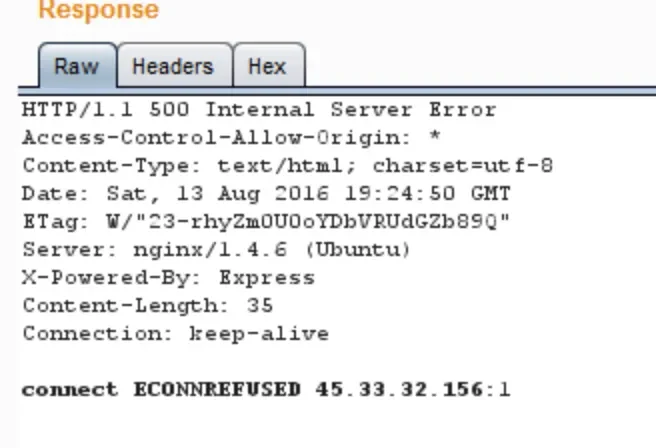
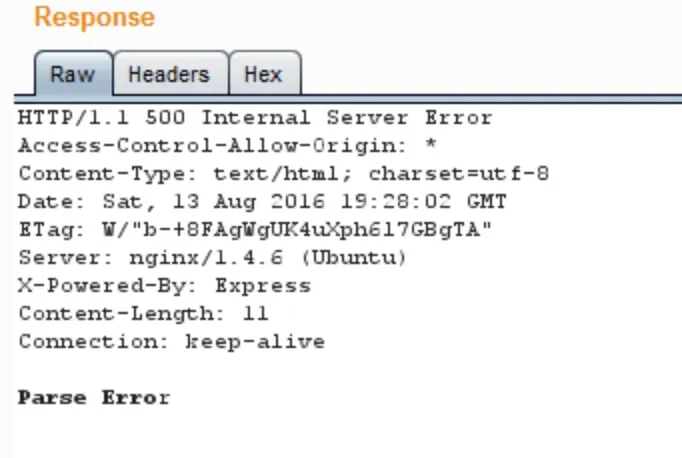
To see whether the fetch could be used to distinguish open from closed ports, he used Scanme.nmap.org, where port 22 is open, and compared the responses.
Response when hitting a closed port:
Response when hitting an open port:
Step 3: Check which protocols are allowed
He then tested which schemes the endpoint would connect with. Only HTTP and HTTPS worked, so the classic escalation through other schemes was not available and the SSRF stayed limited to web protocols.
Step 4: Open the endpoint in the browser
Because the image fetch endpoint was a GET request, he opened the endpoint URL directly in the browser:
/fetch?[redacted]&url=http://[redacted]:11111
The url parameter fetched data from the URL he supplied and the result was executed locally. As a demonstration, entering google.com in the parameter loaded the Google homepage locally. That behaviour, fetched content being rendered in the context of the application, is what led him to look for cross-site scripting through the same parameter. His first attempts returned an Invalid URL error, so plain URL tricks did not produce XSS.
Step 5: Serve a script and let the server fetch it
Since the parameter fetched the source of whatever site was supplied, he created an HTML file containing a simple payload and hosted it on his own server:
<script>alert(document.domain)</script>
He passed that file's URL to the parameter, and the result was:
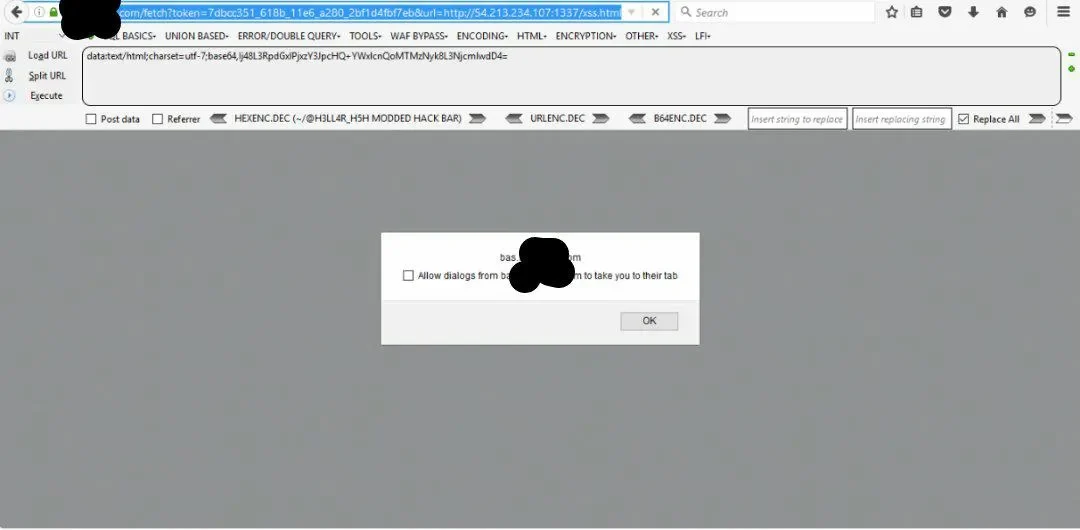
The script executed, which the researcher marked as XSS.
Step 6: Show that response headers from the fetched resource are honoured
He then created a PHP file on his server with the following code and gave its URL to the parameter so that it would be fetched and executed:
<?php
header('Set-Cookie: Game over');
?>
The response was:
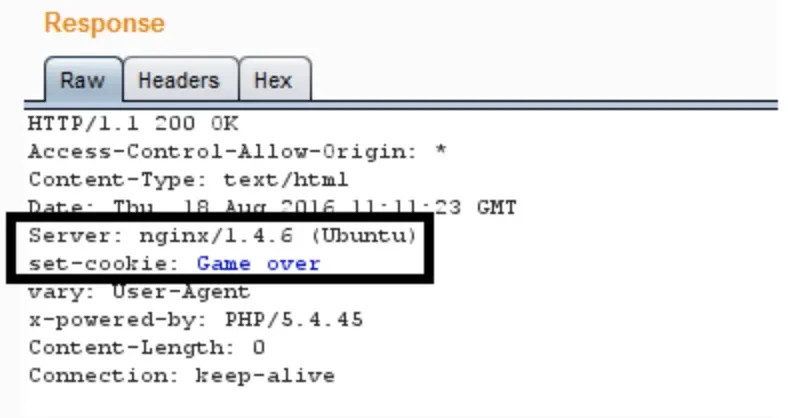
The response was:
Step 7: Attempts at file read and RCE
He tried for remote code execution and for reading server files. $_POST was blocked, and gopher://, file:// and dict:// appeared to be blocked as well, with only http and https usable. To get around the file:// blocking he hosted a script that redirects the fetcher to a local file:
<?php
header('Location: file:///etc/passwd');
?>
The idea was that the server would follow the redirect itself and read file:///etc/passwd, bypassing the initial scheme check. The result was an Internal Server Error. He took that as a strong indication that brute forcing the Location header with path traversal, in the style of header('Location site.com/../../etc/passwd);, or further enumeration, could have led to successful file reading, but it would take time to enumerate and he had no luck.
Step 8: Out-of-band data and internal addresses
He then looked at out-of-band data exfiltration using his own server, since HTTP worked. He retrieved data that arrived in chunks from an internal server whose address was 54.82.xxx.xxx, which he describes as a strong signal of OOB. The internal host was an EC2 instance, and its common ports were closed; port 80 opened only when a file was requested through file_get_contents(). Using that, he tried reading EC2 instance metadata from the internal server through the URL parameter, for example:
https://75.101.xxx.xx/latest/user-data/
That address is not publicly accessible when opened directly in a browser, but the response through the url= parameter was different, which suggested some form of whitelisting or filtering was in play. He also resolved the website's IP addresses with nslookup and passed those IPs to the URL parameter, hoping to reach an intranet host.
Root cause
The application takes a user-supplied URL in the url parameter of /fetch and requests it from the server without restricting where the request may go, so the server can be pointed at arbitrary hosts and ports. The fetched content is then rendered in the application's own origin, so a script in the fetched resource runs as the application. Only HTTP and HTTPS worked, and $_POST was blocked, which limited the SSRF but did not stop the XSS; the redirect to file:// produced an Internal Server Error.
Impact
An attacker who can reach the import feature can make the application server send requests to hosts and ports of the attacker's choosing, which allows internal reconnaissance and out-of-band exfiltration of data from internal hosts. By hosting a resource with script content, the attacker can execute JavaScript in the application's origin. The report does not describe what an attacker could do with that script beyond the demonstration, and file read and RCE were not achieved. The program rewarded the issue with $2.5k.
Fix
The report does not say what was changed. The controls it describes as present, an HTTP/HTTPS-only scheme allowlist and blocking of $_POST, did not prevent the XSS, so the fix would need to stop fetched content from being rendered as active content in the application's origin, for example by serving it from a separate origin or sanitising it, and to restrict the fetch to expected destinations.
Variants to test
- Point an import-by-URL parameter at a listener you control and watch for a connection from an address that is not yours. A positive result is an inbound request from the application server.
- Compare responses for an open and a closed port on an external host such as
Scanme.nmap.org. A positive result is a clear difference in response or timing between the two. - Host an HTML file containing
<script>alert(document.domain)</script>and pass its URL to the parameter. A positive result is the alert showing the application's domain. - Host a PHP file that sets a header with
header('Set-Cookie: Game over');and fetch it. A positive result is the cookie appearing in the application's context. - Host a PHP file that redirects with
header('Location: file:///etc/passwd');and fetch it. A positive result is the contents of the file rather than an error. - Pass internal addresses such as EC2 metadata URLs to the parameter and compare with opening them directly. A positive result is a different response through the parameter than from the browser.
- Resolve the target's IP addresses and pass them to the parameter. A positive result is a response from an internal host that is not reachable directly.
What happened, in plain words
A security researcher was hunting for bugs on a private bug bounty program on HackerOne. A bug bounty program is a scheme where a company invites independent researchers to look for security problems in its systems and pays them for reporting what they find. "Private" means only invited researchers can take part. He had already found several small to medium problems there and moved on, as many hunters do. Later he came back to the site and noticed a web application for sketching on a whiteboard that ran on Flash. Flash was a browser plugin, now retired, that let websites run rich interactive content such as animations and drawing tools.
Like most online whiteboard software, that application had features for adding an image and uploading a video. Among them was an Import by URL feature. A URL is a web address, the thing you type in a browser's address bar, like https://example.com/page. "Import by URL" means: instead of uploading a file from your computer, you paste a web address and the application goes and fetches whatever is at that address and puts it on the whiteboard.
That single feature is the whole subject of this write-up. The reason it is interesting is simple. When you paste a URL into a normal website, usually your own browser fetches the page. Here, the application's server does the fetching. A server is the computer somewhere in a data centre that runs the website. If the server will fetch any address a user gives it, then a user can make the server visit places the user cannot reach directly, such as internal machines. That class of bug is called server-side request forgery, or SSRF: the server is tricked into making requests on the attacker's behalf.
A useful everyday comparison: imagine a hotel concierge who will go and fetch anything you ask for from anywhere in the city. Normally that is a helpful service. But if the concierge will also walk into the staff-only back rooms and bring you what is there, the service has become a way to see things guests are not supposed to see. SSRF is that: the server is the concierge, and the attacker is the guest asking for odd things.
Setting the scene
The researcher worked against the private program with a browser and a server of his own. Having your own server matters a lot in this kind of testing: it gives you a place you fully control, where you can watch for incoming connections and host files for the target to fetch.
The request he captured carries two values in the address: a token and a url. The endpoint is a GET on /fetch. An endpoint is a specific address on a website that does one job, like a counter in a shop; /fetch is the counter that fetches things. GET is one of the basic methods of the web protocol HTTP: a GET request asks a server to give you something, as opposed to sending data to it. A token here is a short string carried in the request. The url value is the address the server is being asked to import.
The host name in the request is shown as Site.com, so the real host is not published. The client details in the request are Firefox 47 on 64-bit Windows 7 (Windows NT 10.0; WOW64; rv:47.0). On his own side he used nc to listen for incoming connections, and later hosted an HTML file and a PHP file on his own server. nc (short for netcat) is a small command-line tool that can open a network port and print whatever arrives on it, which makes it a simple way to see whether someone connected to you. HTML is the language web pages are written in; PHP is a programming language commonly used on web servers to generate pages and set response headers. He also used Scanme.nmap.org as an external host for port testing. That is a host the Nmap project provides publicly so people can practise scanning it. A port is a numbered channel on a computer, like an extension number on a phone line: one machine can run many services, each listening on its own port.
Finding it
The starting point was the Import by URL feature of the Flash whiteboard. Any feature that makes the server fetch a URL chosen by the user is a candidate for SSRF, so the researcher pointed it at a listener he controlled to see whether the request would come from the server rather than from his browser. The logic is: if I ask the application to import http://my-server, and my server sees a connection, who made that connection? If it came from my own browser, the feature is harmless. If it came from the application's server, the server is doing what I say, and that is the bug.
Exploitation
Step 1: Confirm the server makes the request
He started a listener on port 11111 and sent the following request, with the url parameter pointing at his own host:
GET /fetch?[redacted]&url=http://[redacted]:11111 HTTP/1.1
Host: Site.com
User-Agent: Mozilla/5.0 (Windows NT 10.0; WOW64; rv:47.0) Gecko/20100101 Firefox/47.0
Accept: text/html,application/xhtml+xml,application/xml;q=0.9,*/*;q=0.8 Accept-Language: en-US,en;q=0.5
Accept-Encoding: gzip, deflate, br
Referer: [REDACTED]
Cookie: [COOKIES HERE] Connection: keep-alive
Line by line:
GET /fetch?token=...&url=http://[redacted]:11111 HTTP/1.1is the request line.GETis the method, asking for something./fetchis the endpoint. Everything after the?is the query string, a set of name and value pairs sent along with the address.tokenidentifies the session or job, andurlis the resource the server is asked to import, here the researcher's own machine on port 11111.HTTP/1.1is the version of the protocol being spoken.Host: Site.comtells the server which website name the request is for. One server can host many sites, so this header says which one is wanted.User-Agent: ...describes the browser making the request. It is how the server knows it is talking to Firefox 47 on 64-bit Windows 7.Accept: ...lists the kinds of content the client is willing to receive, with quality values after the semicolons.Accept-Language: en-US,en;q=0.5says the client prefers English.Accept-Encoding: gzip, deflate, brsays the client can accept compressed responses, which saves bandwidth.Referer: [REDACTED]normally says which page the request came from. It has been blanked out here.Cookie: [COOKIES HERE] Connection: keep-alivecarries the cookies. A cookie is a small piece of data the browser stores for a site and sends back with each request, typically used to remember who you are.Connection: keep-aliveasks to keep the network connection open for further requests instead of closing it after each one.
The listener was started with:
nc -v -l 11111
nc is netcat. -v means verbose, so it prints extra detail about what happens. -l means listen, so it waits for incoming connections instead of making outgoing ones. 11111 is the port to listen on. In plain words: "open port 11111 and tell me when anyone connects."
and the terminal showed:
hishammir@hishammir:~$ nc -v -l 11111
Listening on [[redacted]] (family 0, port 11111)
Connection from [54.xxx.xxx.xxx] port 11111 [tcp/*] accepted (family 2, sport 41400)
Line by line:
- The first line is the shell prompt followed by the command that was typed.
Listening on [[redacted]] (family 0, port 11111)means netcat is now waiting on all of the machine's network addresses, on port 11111.Connection from [54.xxx.xxx.xxx] port 11111 [tcp/*] accepted (family 2, sport 41400)means somebody connected. The address it came from is partly hidden, and the source port on their side was 41400. The important part is that the address was not the researcher's own.
The connection arrived from an address shown as 54.xxx.xxx.xxx, which the researcher took as success. That is the SSRF condition. In everyday terms: the concierge really did walk to the address on the card, and the doorman at that address saw him arrive.
Step 2: Probe ports on an external host
To see whether the fetch could be used to distinguish open from closed ports, he used Scanme.nmap.org, where port 22 is open, and compared the responses. Port 22 is the standard port for SSH, a way to log in to a machine remotely. The idea is that if the application reports different results for an open port and a closed one, then the feature can be used as a kind of scanner: an attacker could map which services are running on machines they cannot reach directly.
Response when hitting a closed port:
Response when hitting an open port:
Step 3: Check which protocols are allowed
He then tested which schemes the endpoint would connect with. A scheme is the first part of a URL, the bit before ://, such as http, https, file or gopher. Different schemes reach different kinds of resources: http and https are web pages, file is a file on the local disk, and gopher is an older protocol that has been abused to send arbitrary data to other services. Only HTTP and HTTPS worked, so the classic escalation through other schemes was not available and the SSRF stayed limited to web protocols. That is a meaningful restriction: it means the server would only talk to web servers, not read local files or speak to other kinds of services.
Step 4: Open the endpoint in the browser
Because the image fetch endpoint was a GET request, he opened the endpoint URL directly in the browser:
/fetch?[redacted]&url=http://[redacted]:11111
This is the same address as before, minus the protocol version and headers, because a browser fills those in for you. The point of opening it in the browser is that a GET request can be made just by visiting an address, so anything the endpoint returns is shown to you directly.
The url parameter fetched data from the URL he supplied and the result was executed locally. As a demonstration, entering google.com in the parameter loaded the Google homepage locally. That behaviour, fetched content being rendered in the context of the application, is what led him to look for cross-site scripting through the same parameter. Cross-site scripting, or XSS, is a bug where an attacker gets their own script to run inside someone else's website, so that the browser treats it as part of that site. A script here means JavaScript, the programming language browsers run to make pages interactive. His first attempts returned an Invalid URL error, so plain URL tricks did not produce XSS.
Step 5: Serve a script and let the server fetch it
Since the parameter fetched the source of whatever site was supplied, he created an HTML file containing a simple payload and hosted it on his own server:
<script>alert(document.domain)</script>
Line by line: <script> opens a script block, so the browser knows the text inside is code rather than page content. alert(document.domain) calls the browser's alert function, which pops up a small dialog box, and passes it document.domain, which is the domain name of the page the script is running on. </script> closes the block. In plain words: "show me a popup containing the name of the site I am running on." It is the standard harmless way to prove that a script ran and to show whose site it ran as.
He passed that file's URL to the parameter, and the result was:
The script executed, which the researcher marked as XSS. The origin is the combination of scheme, host and port that a browser uses to decide what a page is allowed to touch.
Step 6: Show that response headers from the fetched resource are honoured
He then created a PHP file on his server with the following code and gave its URL to the parameter so that it would be fetched and executed:
<?php
header('Set-Cookie: Game over');
?>
Line by line: <?php and ?> mark the start and end of PHP code inside a file. header('Set-Cookie: Game over'); tells the web server to send a response header called Set-Cookie with the value Game over. A response header is a line of metadata a server sends back alongside the page, and Set-Cookie is the header that tells a browser to store a cookie. So this file, when fetched, asks the browser to save a cookie named or valued Game over.
The response was:
The response was:
Step 7: Attempts at file read and RCE
He tried for remote code execution and for reading server files. Remote code execution, or RCE, is the most serious class of bug: it means an attacker can make the target machine run commands of their choosing. $_POST was blocked, and gopher://, file:// and dict:// appeared to be blocked as well, with only http and https usable. $_POST is PHP's way of reading data submitted in the body of a POST request, the method used when you submit a form; blocking it means the endpoint would not accept data sent that way. To get around the file:// blocking he hosted a script that redirects the fetcher to a local file:
<?php
header('Location: file:///etc/passwd');
?>
Line by line: <?php and ?> again mark PHP code. header('Location: file:///etc/passwd'); sends a Location header, which is how a server tells a client "the thing you want is over there, go and get it instead". The destination given is file:///etc/passwd, a local file on the server. /etc/passwd is a standard file on Unix-like systems that lists user accounts; it is a classic target because reading it proves local file access.
The idea was that the server would follow the redirect itself and read file:///etc/passwd, bypassing the initial scheme check. The check only looks at the URL the user supplied, which is http; the redirect happens afterwards, and the server follows it. The result was an Internal Server Error. He took that as a strong indication that brute forcing the Location header with path traversal, in the style of header('Location site.com/../../etc/passwd);, or further enumeration, could have led to successful file reading, but it would take time to enumerate and he had no luck. Path traversal means using ../ sequences in a path to climb out of the intended folder and reach other files, the way ../../ in a file path walks up two directories.
Step 8: Out-of-band data and internal addresses
He then looked at out-of-band data exfiltration using his own server, since HTTP worked. Out-of-band means the data comes back through a different channel than the normal response: instead of the application showing you the result, the target server is made to connect out to a server you control, and you read the data there. It is like asking someone to post you a copy of a document rather than reading it over their shoulder. He retrieved data that arrived in chunks from an internal server whose address was 54.82.xxx.xxx, which he describes as a strong signal of OOB. The internal host was an EC2 instance, meaning a virtual machine rented from Amazon Web Services, and its common ports were closed; port 80 opened only when a file was requested through file_get_contents(). file_get_contents() is a PHP function that reads the contents of a file or URL; the fact that it triggered the connection tells you which code path on the server was making the request. Using that, he tried reading EC2 instance metadata from the internal server through the URL parameter, for example:
https://75.101.xxx.xx/latest/user-data/
EC2 instances have a special internal address that serves information about the instance itself, including startup configuration data. That address is only reachable from inside the cloud environment, which is exactly why an SSRF is useful: the server can reach it even when the researcher cannot. That address is not publicly accessible when opened directly in a browser, but the response through the url= parameter was different, which suggested some form of whitelisting or filtering was in play. Whitelisting means only allowing a known list of things and refusing everything else. He also resolved the website's IP addresses with nslookup and passed those IPs to the URL parameter, hoping to reach an intranet host. nslookup is a command that asks the domain name system which numeric address belongs to a name; an intranet is a company's internal network, not reachable from the public internet.
Root cause
The application takes a user-supplied URL in the url parameter of /fetch and requests it from the server without restricting where the request may go, so the server can be pointed at arbitrary hosts and ports. The fetched content is then rendered in the application's own origin, so a script in the fetched resource runs as the application. Only HTTP and HTTPS worked, and $_POST was blocked, which limited the SSRF but did not stop the XSS; the redirect to file:// produced an Internal Server Error.
Impact
An attacker who can reach the import feature can make the application server send requests to hosts and ports of the attacker's choosing, which allows internal reconnaissance and out-of-band exfiltration of data from internal hosts. By hosting a resource with script content, the attacker can execute JavaScript in the application's origin. The report does not describe what an attacker could do with that script beyond the demonstration, and file read and RCE were not achieved. The program rewarded the issue with $2.5k.
Fix
The report does not say what was changed. The controls it describes as present, an HTTP/HTTPS-only scheme allowlist and blocking of $_POST, did not prevent the XSS, so the fix would need to stop fetched content from being rendered as active content in the application's origin, for example by serving it from a separate origin or sanitising it, and to restrict the fetch to expected destinations.
Variants to test
- Point an import-by-URL parameter at a listener you control and watch for a connection from an address that is not yours. A positive result is an inbound request from the application server.
- Compare responses for an open and a closed port on an external host such as
Scanme.nmap.org. A positive result is a clear difference in response or timing between the two. - Host an HTML file containing
<script>alert(document.domain)</script>and pass its URL to the parameter. A positive result is the alert showing the application's domain. - Host a PHP file that sets a header with
header('Set-Cookie: Game over');and fetch it. A positive result is the cookie appearing in the application's context. - Host a PHP file that redirects with
header('Location: file:///etc/passwd');and fetch it. A positive result is the contents of the file rather than an error. - Pass internal addresses such as EC2 metadata URLs to the parameter and compare with opening them directly. A positive result is a different response through the parameter than from the browser.
- Resolve the target's IP addresses and pass them to the parameter. A positive result is a response from an internal host that is not reachable directly.
Glossary
- Bug bounty program: a scheme where a company pays independent researchers for reporting security problems in its systems.
- Private program: a bug bounty program open only to invited researchers.
- Flash: a retired browser plugin that let websites run rich interactive content such as drawing tools.
- URL: a web address, such as
https://example.com/page. - Server: the computer in a data centre that runs a website and answers requests.
- Import by URL: a feature that takes a web address from the user and fetches whatever is at that address on the server side.
- SSRF (server-side request forgery): a bug where an attacker makes a server send requests to addresses of the attacker's choosing.
- Endpoint: a specific address on a website that performs one job.
- GET: an HTTP method that asks a server to give you something.
- HTTP: the protocol browsers and servers use to exchange requests and responses.
- Token: a short string that identifies a session or job, like a claim ticket.
nc(netcat): a command-line tool that can open a port and print whatever arrives on it.- Port: a numbered channel on a computer, like an extension number on a phone line.
- HTML: the language web pages are written in.
- PHP: a programming language commonly used on web servers.
Scanme.nmap.org: a public host provided by the Nmap project for practising scanning.- Query string: the part of a URL after the
?, made of name and value pairs. - Header: a line of metadata sent with a request or response.
- User-Agent: a header describing the browser making a request.
- Cookie: a small piece of data a browser stores for a site and sends back with each request.
- Scheme: the first part of a URL before
://, such ashttp,httpsorfile. - XSS (cross-site scripting): a bug where an attacker's script runs inside someone else's website.
- Script / JavaScript: code that browsers run to make pages interactive.
- Origin: the scheme, host and port combination a browser uses to decide what a page may touch.
- Response header: metadata a server sends back alongside a page.
Set-Cookie: the response header that tells a browser to store a cookie.Location: the response header that tells a client to go and fetch something else instead.- RCE (remote code execution): a bug that lets an attacker make the target machine run commands of their choosing.
$_POST: PHP's way of reading data submitted in the body of a POST request.- POST: an HTTP method used to send data to a server, as when submitting a form.
/etc/passwd: a standard file on Unix-like systems listing user accounts.- Path traversal: using
../sequences in a path to climb out of the intended folder. - Out-of-band (OOB): getting data back through a different channel than the normal response, typically a server you control.
- EC2 instance: a virtual machine rented from Amazon Web Services.
file_get_contents(): a PHP function that reads the contents of a file or URL.- Instance metadata: information an EC2 instance serves about itself on a special internal address.
- Whitelisting: allowing only a known list of things and refusing everything else.
nslookup: a command that asks the domain name system which numeric address belongs to a name.- Intranet: a company's internal network, not reachable from the public internet.




