Exploiting Cache Poisoning via Unkeyed Parameters and Headers in a Drupal Application
The application cached responses based on unkeyed URL parameters and the unkeyed header x-forwarded-port, allowing an attacker to inject a payload that was reflected in social media links and then cached. An attacker could poison the cache so that users clicking a cached URL would execute the payload, leading to DNS/HTTP interactions to an attacker-controlled server.
 Published on medium.com
During a recent bug hunting session, I came across a fascinating cache poisoning vulnerability in a Drupal application. This post will detail the steps I took to uncover the vulnerability, the technical specifics of the exploit, and the impact it had on the application.
The full write-up lives on its author's site
It belongs to its author, so we link to it rather than copy it. The other two tabs are our own rewrites, checked against it.
Context
During a bug hunting session I came across a cache poisoning vulnerability in a Drupal application. Drupal is a content management system that ships with its own page cache, and the X-Drupal-Cache response header reports whether a given response was served from that cache. The application under test was public and cacheable, and the value of an unkeyed URL parameter together with the unkeyed header x-forwarded-port ended up stored in the cached response and reflected into the social media links of the site.
Setup
The report does not describe any accounts, roles or authentication. The main tool was Burp Suite with the Param Miner extension, which identifies hidden, unlinked parameters and is useful for finding web cache poisoning vulnerabilities. Param Miner requires Burp Suite v2021.9 or later. A Burp Suite Collaborator was used to observe DNS and HTTP interactions triggered by the cached payload.
Finding it
While testing the application I noticed the following headers in the response:
X-Drupal-Cache: MISS & Cache-Control: max-age=3600, public & Expires: Sun, 19 Nov 1978 05:00:00 GMT
HTTP/1.1 200 OKDate: Wed, 26 Jun 2024 07:43:45 GMTServer: <redacted>Cache-Control: max-age=3600, publicX-Content-Type-Options: nosniffX-Frame-Options: SAMEORIGINExpires: Sun, 19 Nov 1978 05:00:00 GMTVary: CookieX-XSS-Protection: 1Strict-Transport-Security: max-age=31536000; includeSubDomainsFrom-Origin: sameReferrer-Policy: no-referrer-when-downgradeX-Drupal-Cache: MISS
The Expires: Sun, 19 Nov 1978 05:00:00 GMT header indicates when the content expires. The date is set to a time far in the past, which is a common way to indicate that the response should not be cached without respecting the Cache-Control directives. The headers also indicated that the application was using Drupal's default caching mechanism and that the content was public and cacheable for an hour.
Drupal's caching works in two phases:
- Cache Generation: when a page is requested and it is not found in the cache (MISS), Drupal generates the page content and stores it in the cache for subsequent requests.
- Cache Serving: on subsequent requests for the same page, if the content is still valid in the cache (HIT), Drupal serves the cached version, which is faster and more efficient.
The X-Drupal-Cache header indicates the cache status of a response:
X-Drupal-Cache: HITmeans the response was served from the cache. The requested page or resource was already stored, so Drupal did not need to regenerate the content. Serving from the cache is faster and reduces load on the server because it bypasses the underlying code and database queries.X-Drupal-Cache: MISSmeans the response was not served from the cache. The page or resource was not found in the cache, so Drupal had to generate the content from scratch, which usually involves executing PHP code and database queries. This content may then be stored in the cache for future requests.
Being curious about the caching behaviour, I started experimenting with various URL parameters and headers. Upon further analysis, it became evident that the application was caching the value provided via an unkeyed URL parameter and the unkeyed header x-forwarded-port. Param Miner is very handy for figuring out the possibility of cache poisoning.
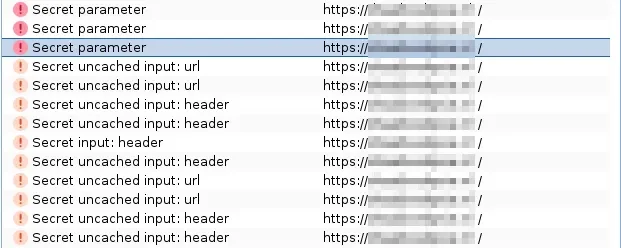
The screenshot shows the evidence of possible cache poisoning observed by Param Miner.
Exploitation
Step 1: Identify the unkeyed inputs
Param Miner was used to find the unkeyed URL parameter and the unkeyed x-forwarded-port header whose values were being cached.
Step 2: Craft the payload
To exploit this, I crafted a payload that included both an unkeyed parameter and the unkeyed header:
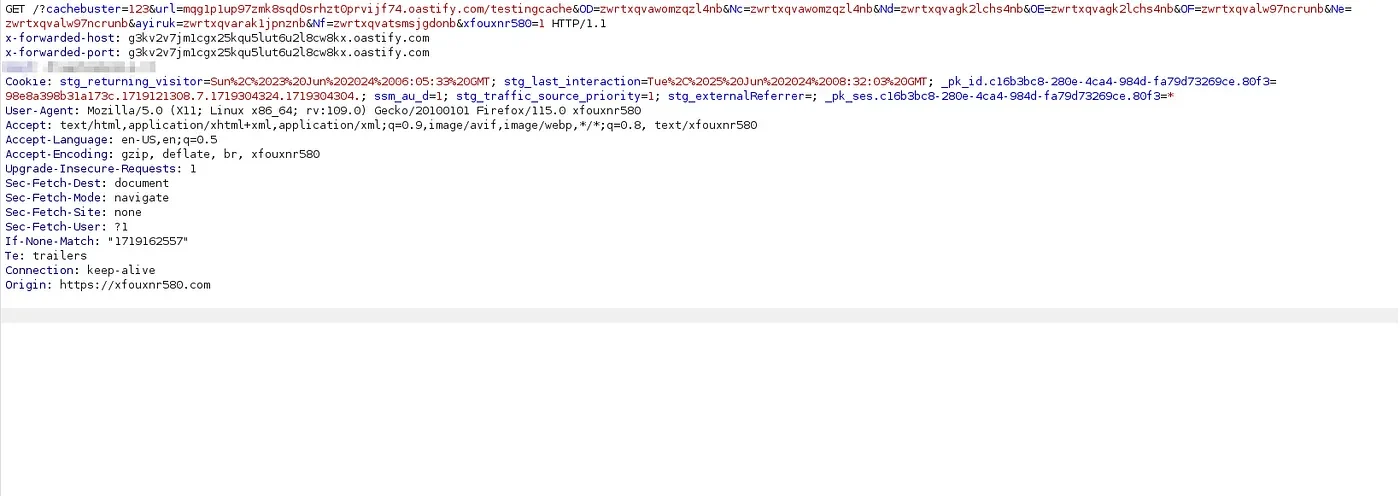
The screenshot shows the crafted request with the unkeyed parameter and the unkeyed header.
Step 3: Trigger the cache
After sending the request, I observed that the response now included X-Drupal-Cache: HIT and the payload that was getting reflected in the social media links of the website.
HTTP/1.1 200 OKDate: Wed, 26 Jun 2024 05:36:17 GMTServer: <something>Cache-Control: max-age=3600, publicX-Content-Type-Options: nosniffX-Frame-Options: SAMEORIGINExpires: Sun, 19 Nov 1978 05:00:00 GMTVary: CookieContent-Security-Policy-Report-Only: default-src <something>X-XSS-Protection: 1Strict-Transport-Security: max-age=31536000; includeSubDomainsFrom-Origin: sameReferrer-Policy: no-referrer-when-downgradeX-Drupal-Cache: HITLast-Modified: Wed, 26 Jun 2024 05:36:16 GMTETag: "1719380176"Keep-Alive: timeout=5, max=100Connection: Keep-AliveContent-Type: text/html; charset=UTF-8Content-Length: 53853
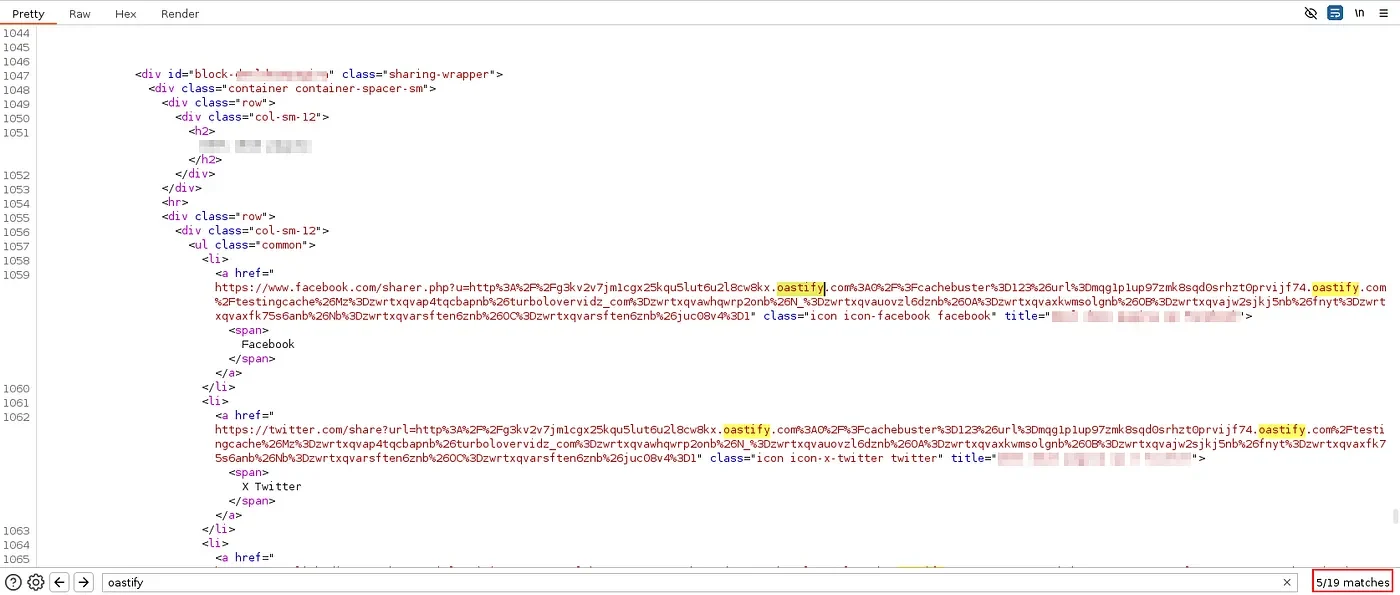
The screenshot shows several occurrences of the payload being cached. This indicated that my payload was successfully cached by the application.
Impact
Further inspection revealed that the payload was being cached inside the links for the website. This meant that if someone clicked a cached URL, the payload would be executed, resulting in DNS/HTTP interactions being sent back to Burp Suite's Collaborator.
In practical terms, this could allow an attacker to poison the cache with malicious content, potentially redirecting users to malicious sites or stealing sensitive information.
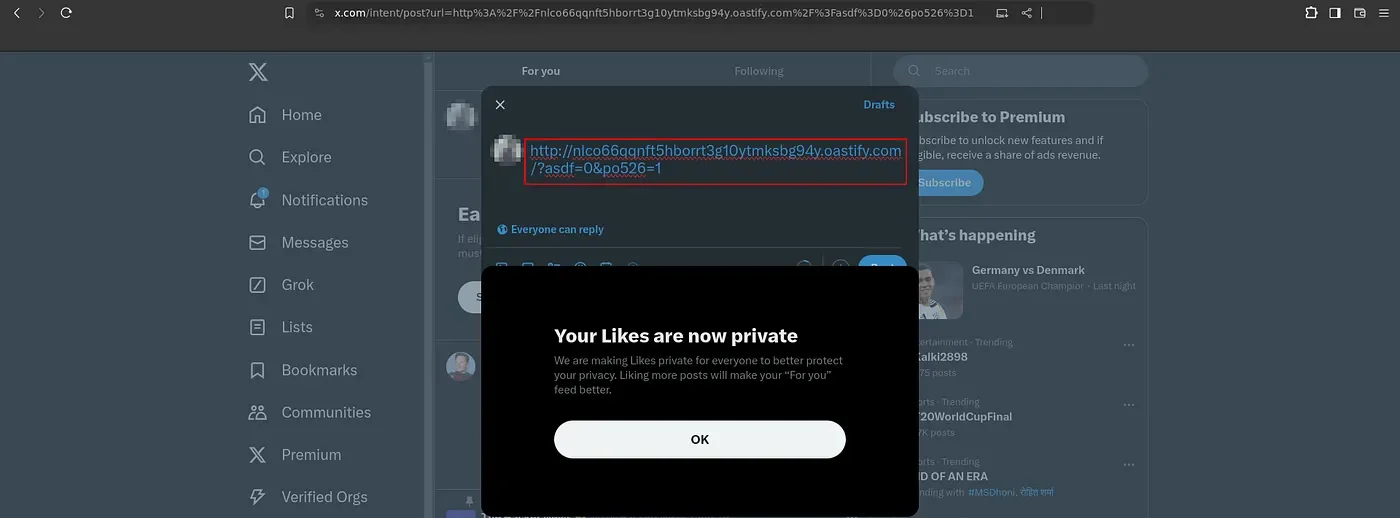
The screenshot shows the social handle loaded with the payload being shared as a post.
Root cause
The application cached the value provided via an unkeyed URL parameter and the unkeyed header x-forwarded-port, and reflected that value into the social media links of the page. Because these inputs are not part of the cache key, a response generated from an attacker-controlled value is stored and then served to other users. The responses carried Vary: Cookie, and the unkeyed parameter and header were not part of the cache key. The responses carried Cache-Control: max-age=3600, public, and the payload was served with X-Drupal-Cache: HIT.
Fix
I reported the issue to the application developers. They acknowledged the bug and promptly fixed it. Unfortunately, they deemed it not severe enough to process a reward.
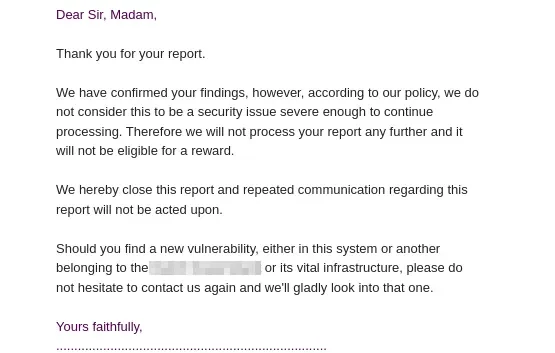
The screenshot shows the response from the security team.
The lesson is to properly key all cacheable parameters and headers. Even seemingly minor misconfigurations can lead to significant security vulnerabilities.
Variants to test
- A positive result is the value appearing in the cached response with
X-Drupal-Cache: HIT. - A positive result is the reflected value being served from cache to a second, clean request.
What happened, in plain words
A security researcher was testing a website built with Drupal, a popular tool for building and running websites (a content management system, or CMS). While looking at the responses the site sent back, he noticed signs that the site was saving copies of its pages in a cache, a kind of short-term storage so that the next visitor gets the page faster instead of the server rebuilding it every time.
He then found that the site was taking certain values supplied by the visitor, a value in the web address (a URL parameter) and a value in a request header (extra information the browser sends along with the request), and storing them inside the saved copy of the page. The problem: the cache did not treat those values as part of what makes one saved page different from another. So a value one visitor supplied could end up baked into the page that every other visitor receives. That is what security people call web cache poisoning: you slip something bad into the shared stored copy, and everyone who asks for that page afterwards gets the bad version.
In this case the value was reflected into the social media links on the page. The researcher showed that a crafted value would be saved in the cache and then executed when someone clicked a cached link, with the browser making network requests back to a server the researcher controlled. He reported it, the developers fixed it quickly, and they decided it was not severe enough to pay a reward.
Below I walk through the whole thing from zero: what a cache is, what a header is, what the researcher saw, what he sent, and why each step mattered.
Background: the pieces you need to know
Before the story makes sense, here are the basic ideas, each with a simple comparison.
A web request and a response. When you type an address into your browser, the browser sends a request to a server. The server sends back a response: a status line, a set of headers (small labelled facts about the response), and a body (usually the page itself). Think of a posted letter: the envelope has labels (headers) and inside is the letter (body).
A header. A header is a line like Cache-Control: max-age=3600, public. The part before the colon is the name, the part after is the value. Headers tell the browser and any servers in between how to treat the response: how long it may be kept, what type it is, and so on.
A cache. A cache is a store of ready-made copies. A restaurant kitchen analogy: instead of cooking every dish from scratch when ordered, the kitchen keeps some dishes ready. If the dish is ready, it is served instantly (a cache hit). If not, it is cooked fresh (a cache miss) and a portion is kept ready for the next order. Web caches sit between visitors and the server, or inside the CMS itself, and they exist to make pages load faster and put less strain on the server.
A cache key. To know which stored copy to hand out, the cache uses a key, like a label on a box. If two requests produce the same key, they get the same stored copy. Anything that is not part of the key is ignored when deciding which copy to serve. This is the heart of the whole bug: if a value can change the page but is not in the key, then a page built with one visitor's value can be handed to a different visitor.
Drupal. Drupal is a content management system: software that lets people build and run websites without writing all the code themselves. It has its own built-in page cache. It also adds a header, X-Drupal-Cache, to responses, which says whether the page came from the cache (HIT) or was built fresh (MISS).
A URL parameter. The part of a web address after a question mark, such as ?name=value. It is a way of passing information to the page. Think of it as a note attached to your order: "extra sauce".
An unkeyed parameter or header. An input whose value affects the page but is not included in the cache key. The cache cannot tell pages built with different values of that input apart, so it may serve one visitor's version to another. This is the dangerous kind of input for cache poisoning.
Reflection. When the site takes a value you supplied and writes it back into the page. Usually harmless, but if the value is written into a link or a script, it can become dangerous.
Web cache poisoning. The vulnerability class in this report. An attacker gets harmful content stored in a shared cache, so that other visitors receive it. The everyday comparison: someone swaps the ready-made dish in the kitchen's warming tray for a bad one, and every customer who orders it afterwards gets the bad dish, without the kitchen ever cooking it.
Burp Suite and Param Miner. Burp Suite is a tool used by security testers to look at and change web traffic between a browser and a server. Param Miner is an extension for Burp Suite that hunts for hidden parameters (inputs the site accepts but does not advertise). It is useful for finding cache poisoning possibilities. Param Miner requires Burp Suite v2021.9 or later.
Burp Suite Collaborator. A service that gives the tester a special address they control. If anything on the target site later makes a network request to that address, the tester can see it. It is a way of proving that a payload actually executed somewhere, rather than just sitting in the page as text.
The investigation begins
While testing the application, the researcher noticed some interesting headers in the response:
X-Drupal-Cache: MISS & Cache-Control: max-age=3600, public & Expires: Sun, 19 Nov 1978 05:00:00 GMT
HTTP/1.1 200 OKDate: Wed, 26 Jun 2024 07:43:45 GMTServer: <redacted>Cache-Control: max-age=3600, publicX-Content-Type-Options: nosniffX-Frame-Options: SAMEORIGINExpires: Sun, 19 Nov 1978 05:00:00 GMTVary: CookieX-XSS-Protection: 1Strict-Transport-Security: max-age=31536000; includeSubDomainsFrom-Origin: sameReferrer-Policy: no-referrer-when-downgradeX-Drupal-Cache: MISS
Line by line, in plain words:
HTTP/1.1 200 OK: the response uses version 1.1 of the HTTP protocol, and the status is 200 OK, meaning the request succeeded.Date: Wed, 26 Jun 2024 07:43:45 GMT: when the server produced this response.Server: <redacted>: the name of the server software. It has been hidden here.Cache-Control: max-age=3600, public: instructions for caches.max-age=3600means the response may be kept for 3600 seconds, which is one hour.publicmeans shared caches (not just the visitor's own browser) are allowed to keep it. This is the line that makes the page cacheable by everyone.X-Content-Type-Options: nosniff: tells the browser not to guess the file type; it must trust the declared type. A safety measure.X-Frame-Options: SAMEORIGIN: the page may only be shown inside a frame on the same site, which prevents other sites from framing it.Expires: Sun, 19 Nov 1978 05:00:00 GMT: the date the content expires. It is set far in the past. The researcher explains that this is a common way of saying "do not cache this" without contradicting theCache-Controldirectives. The two headers send mixed signals.Vary: Cookie: this is important. It tells caches that the response can differ depending on the visitor's cookie, so the cookie is part of the cache key. Only the cookie is listed here, which means other inputs are not accounted for.X-XSS-Protection: 1: an old browser instruction related to cross-site scripting protection.Strict-Transport-Security: max-age=31536000; includeSubDomains: tells the browser to always use HTTPS for this site for a year, including subdomains.From-Origin: same: a header about which origins may embed the resource.Referrer-Policy: no-referrer-when-downgrade: controls how much of the previous page's address is sent along when you follow a link.X-Drupal-Cache: MISS: Drupal's own note that this particular response was not served from its cache; it was built fresh.
Why this mattered: the headers together showed that the application was using Drupal's default caching mechanism, that the content was public, and that it was cacheable for an hour. A page that is shared and cacheable is exactly the kind of page where cache poisoning can hurt many people at once.
How caching works in Drupal
Drupal's caching has two phases:
- Cache Generation: when a page is requested and it is not found in the cache (MISS), Drupal generates the page content and stores it in the cache for subsequent requests.
- Cache Serving: on subsequent requests for the same page, if the content is still valid in the cache (HIT), Drupal serves the cached version, which is faster and more efficient.
The X-Drupal-Cache header reports which of the two happened:
X-Drupal-Cache: HITmeans the response was served from the cache. The page was already stored, so Drupal did not need to rebuild it. This is faster and reduces load on the server because it skips running the underlying code and database queries.X-Drupal-Cache: MISSmeans the response was not served from the cache. The page was not found, so Drupal had to build it from scratch, which usually involves running PHP code and database queries. The result may then be stored for future requests.
If his crafted value appeared in a HIT response, that would prove the value had been stored in the shared copy.
Finding the unkeyed inputs
Curious about the caching behaviour, the researcher started experimenting with various URL parameters and headers. Further analysis showed that the application was caching the value supplied through an unkeyed URL parameter and through the unkeyed header x-forwarded-port. Param Miner is very handy for figuring out the possibility of cache poisoning.
The screenshot shows the evidence of possible cache poisoning observed by Param Miner.
Why this step was taken: before you can poison a cache, you need to find an input that (a) changes the page and (b) is not part of the cache key. Param Miner automates the search for hidden inputs, so the researcher does not have to guess parameter names one by one. A positive signal is that the application stores the value supplied through these inputs in the cached response.
Crafting the payload
To exploit this, the researcher crafted a payload that included both an unkeyed parameter and the unkeyed header:
The screenshot shows the crafted request with the unkeyed parameter and the unkeyed header.
Why this step was taken: having found two inputs that the cache ignores when deciding which copy to serve, he combined them in one request. The goal is to make the server build a page containing his value, and then have that page stored in the cache under the same key as the normal page, so that later visitors receive it.
Triggering the cache
After sending the request, he observed that the response now included X-Drupal-Cache: HIT and the payload that was getting reflected in the social media links of the website.
HTTP/1.1 200 OKDate: Wed, 26 Jun 2024 05:36:17 GMTServer: <something>Cache-Control: max-age=3600, publicX-Content-Type-Options: nosniffX-Frame-Options: SAMEORIGINExpires: Sun, 19 Nov 1978 05:00:00 GMTVary: CookieContent-Security-Policy-Report-Only: default-src <something>X-XSS-Protection: 1Strict-Transport-Security: max-age=31536000; includeSubDomainsFrom-Origin: sameReferrer-Policy: no-referrer-when-downgradeX-Drupal-Cache: HITLast-Modified: Wed, 26 Jun 2024 05:36:16 GMTETag: "1719380176"Keep-Alive: timeout=5, max=100Connection: Keep-AliveContent-Type: text/html; charset=UTF-8Content-Length: 53853
Line by line, in plain words:
HTTP/1.1 200 OK: the request succeeded.Date: Wed, 26 Jun 2024 05:36:17 GMT: when this response was produced.Server: <something>: the server software name, hidden here.Cache-Control: max-age=3600, public: the same caching instruction as before: shared caches may keep this for an hour.X-Content-Type-Options: nosniff,X-Frame-Options: SAMEORIGIN,Expires: Sun, 19 Nov 1978 05:00:00 GMT,X-XSS-Protection: 1,Strict-Transport-Security: max-age=31536000; includeSubDomains,From-Origin: same,Referrer-Policy: no-referrer-when-downgrade: the same safety and policy headers as in the first response.Vary: Cookie: again, only the cookie is part of the cache key. The unkeyed parameter and thex-forwarded-portheader are not.Content-Security-Policy-Report-Only: default-src <something>: a policy header that reports violations rather than blocking them. The value is partly hidden.X-Drupal-Cache: HIT: the key line. This response came from Drupal's cache, not from a fresh build. Combined with the reflected payload, it means the crafted value is now stored in the shared copy.Last-Modified: Wed, 26 Jun 2024 05:36:16 GMT: when the stored content was last changed.ETag: "1719380176": an identifier for this particular version of the content, used by browsers and caches to tell versions apart.Keep-Alive: timeout=5, max=100: connection reuse settings.Connection: Keep-Alive: the connection may stay open for further requests.Content-Type: text/html; charset=UTF-8: the body is an HTML page encoded in UTF-8.Content-Length: 53853: the body is 53853 bytes long.
The screenshot shows several occurrences of the payload being cached. This indicated that the payload was successfully cached by the application.
Why this step was taken: seeing HIT together with the reflected payload is the proof. The server did not just echo the value back to the researcher; it stored it, and the next visitor asking for the same page would get the stored copy.
Impact
Further inspection revealed that the payload was being cached inside the links for the website. This meant that if someone clicked a cached URL, the payload would be executed, resulting in DNS/HTTP interactions being sent back to Burp Suite's Collaborator.
In practical terms, this could allow an attacker to poison the cache with malicious content, potentially redirecting users to malicious sites or stealing sensitive information.
The screenshot shows the social handle loaded with the payload being shared as a post.
Why this matters: the Collaborator interactions are the evidence that the payload actually ran, not merely appeared as text. A link on a page is something a visitor may click; if the link has been tampered with in the shared copy, every visitor who clicks it is affected, not just the researcher.
Root cause
The application cached the value provided via an unkeyed URL parameter and the unkeyed header x-forwarded-port, and reflected that value into the social media links of the page. Because these inputs are not part of the cache key, a response generated from an attacker-controlled value is stored and then served to other users. The responses carried Vary: Cookie, and the unkeyed parameter and header were not part of the cache key. The responses carried Cache-Control: max-age=3600, public, and the payload was served with X-Drupal-Cache: HIT.
In everyday terms: the kitchen keeps a ready-made dish labelled only by the customer's loyalty card (the cookie), not by the special instructions (the parameter and header). So a dish made with one customer's special instructions gets handed to the next customer with the same loyalty card.
Fix and response
The researcher reported the issue to the application developers. They acknowledged the bug and promptly fixed it. Unfortunately, they deemed it not severe enough to process a reward.
The screenshot shows the response from the security team.
The lesson is to properly key all cacheable parameters and headers. Even seemingly minor misconfigurations can lead to significant security vulnerabilities.
Variants to test
Glossary
- API: an interface that lets one piece of software talk to another, like a waiter taking your order to the kitchen.
- Burp Suite: a tool security testers use to inspect and modify web traffic between a browser and a server.
- Burp Suite Collaborator: a service that gives the tester a controlled address and records any network requests made to it, proving that a payload executed.
- Cache: a store of ready-made copies of pages or data, kept so future requests can be served faster.
- Cache-Control: a response header giving caching instructions, such as how long a copy may be kept and whether shared caches may keep it.
- Cache hit: a request served from a stored copy.
- Cache key: the label a cache uses to decide which stored copy to serve; inputs not in the key are ignored when matching.
- Cache miss: a request that could not be served from the cache, so the content was built fresh.
- Cache poisoning: getting harmful content stored in a shared cache so other visitors receive it.
- CMS (content management system): software for building and running websites, such as Drupal.
- Cookie: a small piece of data a site stores in your browser and receives back on later requests, often used to recognise you.
- DNS: the system that turns a name like example.com into a network address; a DNS interaction is a lookup made to a name the tester controls.
- Drupal: a content management system with its own built-in page cache.
- ETag: an identifier for a particular version of a response, used to tell versions apart.
- Header: a labelled fact sent with a request or response, such as
Cache-ControlorVary. - HIT / MISS: the two values of
X-Drupal-Cache, meaning served from cache and built fresh, respectively. - HTTP: the protocol browsers and servers use to exchange requests and responses.
- HTTPS: HTTP with encryption.
- Param Miner: a Burp Suite extension that finds hidden, unlinked parameters and is useful for finding cache poisoning possibilities; it requires Burp Suite v2021.9 or later.
- Payload: the crafted value an attacker sends in order to achieve an effect.
- PHP: a programming language commonly used to build websites, including Drupal.
- Reflection: when a site writes a value you supplied back into the page.
- Response: what a server sends back to a request: status, headers and body.
- Status code: a number in the response saying how the request went, such as 200 for success.
- Unkeyed input: a parameter or header whose value affects the page but is not part of the cache key.
- URL parameter: a value in the web address after a question mark, passed to the page.
- Vary: a response header listing which request inputs the cached response depends on; inputs not listed are not part of the cache key.
- Web cache poisoning: the vulnerability class in this report; see cache poisoning.
- X-Drupal-Cache: Drupal's response header reporting whether the response came from its cache.
- x-forwarded-port: a request header carrying a port value; here it was unkeyed and its value was cached.
- XSS (cross-site scripting): a class of vulnerability where attacker-supplied script runs in another user's browser.


