Exploiting Non-Cloud SSRF for More Fun & Profit
A PDF report endpoint accepted a user-supplied URL and fetched it server-side, giving full-read SSRF. The attacker used it to read local files, scan internal ports, enumerate internal hosts and reach over a thousand internal web services.
 Published on basu-banakar.medium.com
Hi Everyone, This is Basavaraj, Back again with another SSRFWriteup :) You can check my older writeups here https://basu-banakar.medium.com/
The full write-up lives on its author's site
It belongs to its author, so we link to it rather than copy it. The other two tabs are our own rewrites, checked against it.
Context
While hunting on a random target in his spare time, Basavaraj Banakar came across a subdomain that hosts reports related to the company and marketing. One functionality on that subdomain lets a user view a report in PDF format. Clicking the PDF button causes the application to make a request on the user's behalf, and the response is rendered back to the user.
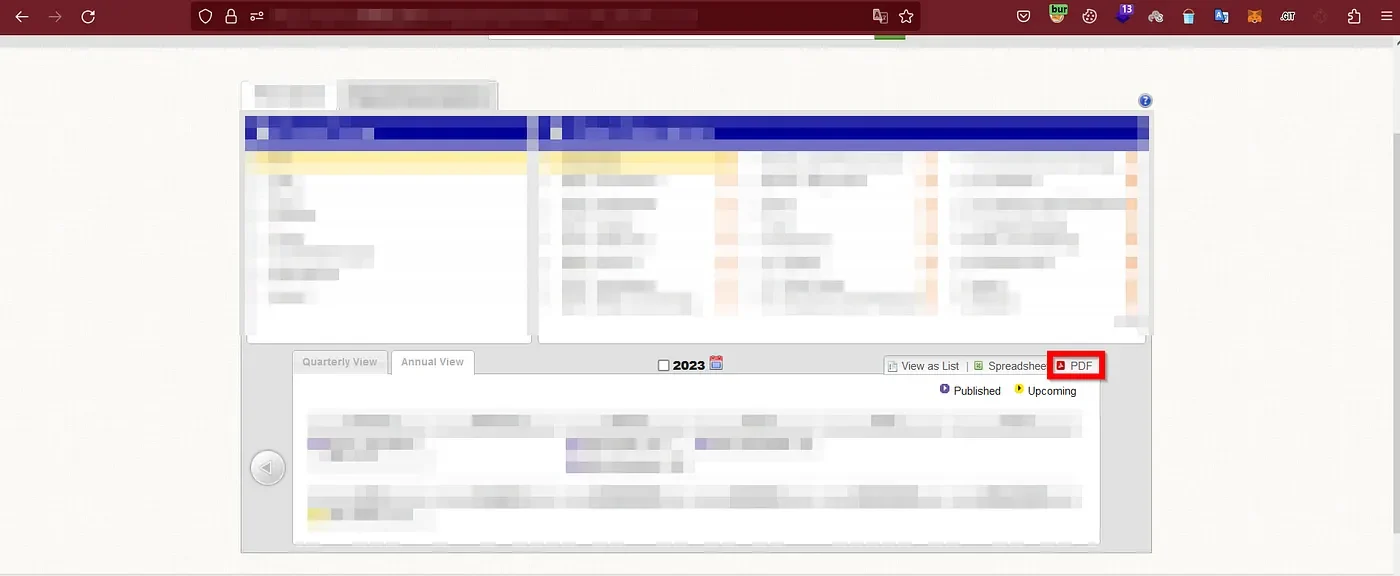
To see the report in PDF format
That server-side fetch is the feature under test: the application takes a URL from the request and retrieves it, which is exactly the shape of a server-side request forgery (SSRF) sink.
Setup
The report does not describe any account, role or authentication requirement, and it does not name the target. The tooling used was Burp Suite: the request was captured and replayed, and Burp Intruder was used for the port scan and for the later brute-forcing of IP addresses and hostnames. No product versions are given.
Finding it
After clicking the PDF button, the application made one request and returned a response. The captured request and response looked like this:
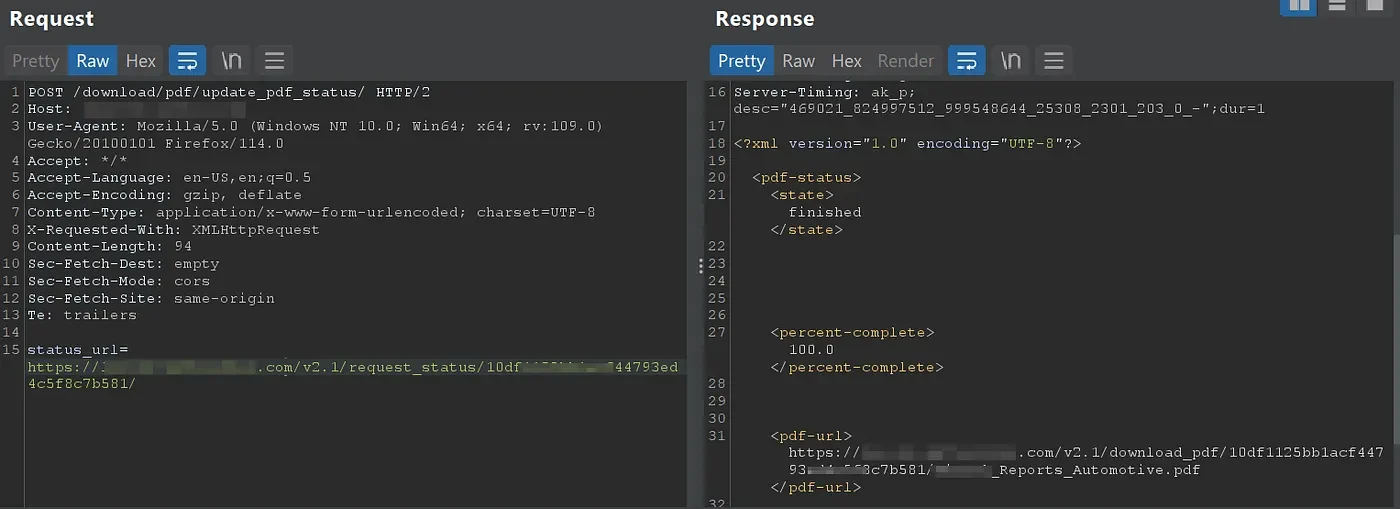
request and response
The request carries a status_url parameter, which the server uses to fetch a URL. Because the value is supplied by the client and fetched server-side, the parameter is a candidate for SSRF.
Exploitation
Step 1: Confirm full read SSRF
The researcher inserted a random URL, evil.com, into the status_url parameter and got back the response of that evil.com. That confirmed a full read SSRF: the server fetches an arbitrary URL and returns the body to the attacker.
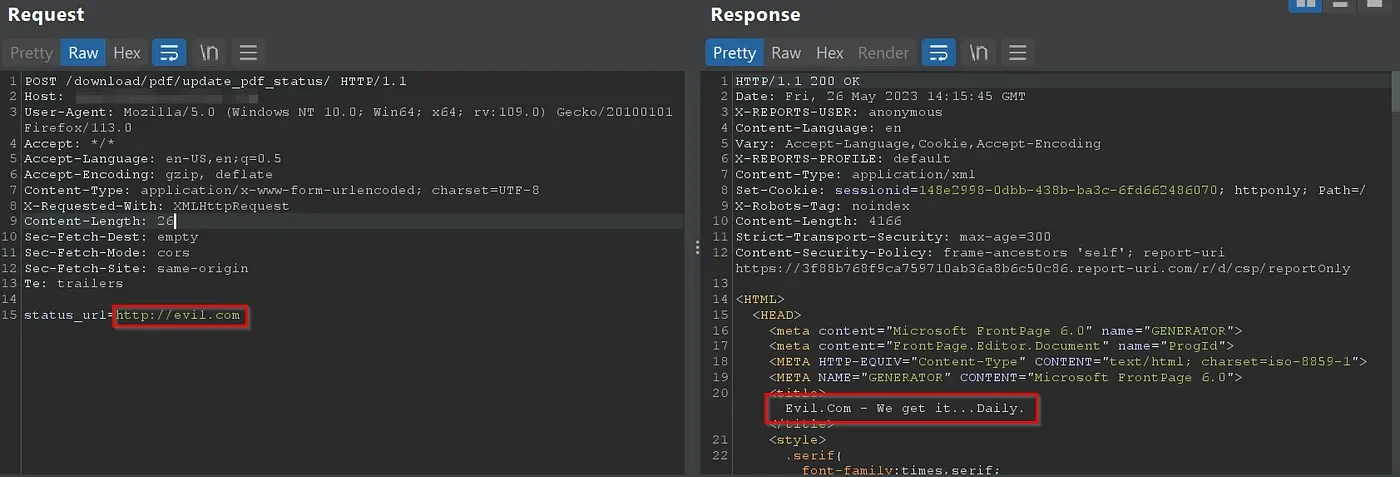
Confirmed the full read SSRF
Step 2: Try local file read
The next check was local file read through the file:/// protocol. The value file:///etc/passwd was added and the request was sent. The response was 403 by Akamai, so the WAF blocked the attempt.
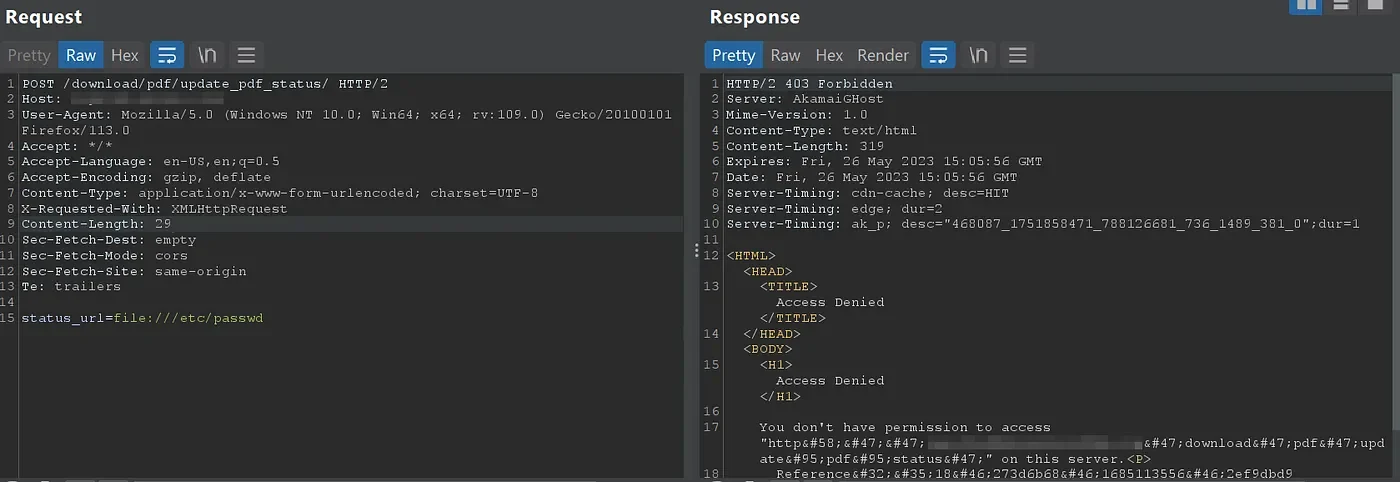
WAF Blocked due to file protocol
Step 3: Scan localhost ports
The file read was dropped at this point, and the researcher moved to internal port scanning against localhost. Ports 1 to 10000 were scanned with Intruder, and two open ports were found: 25 and 9080.
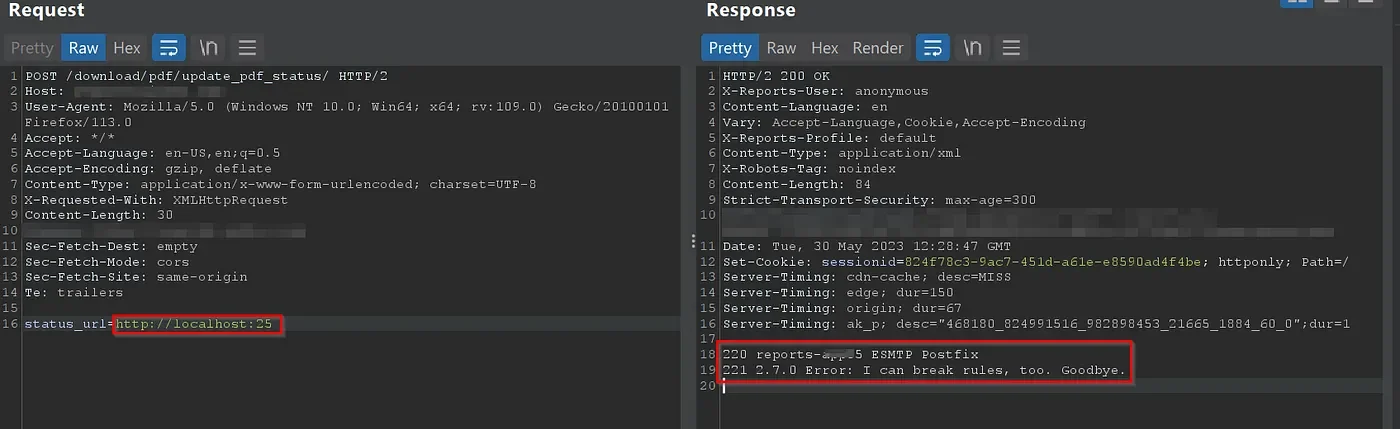
25 Port open with esmtp postfixservice
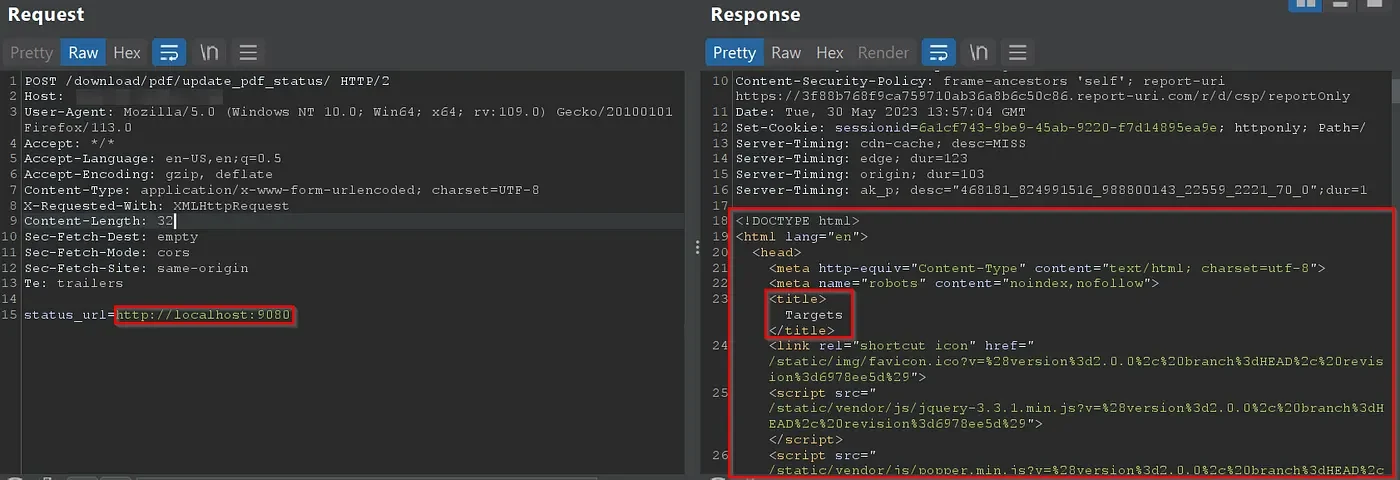
9080 Open with some random internal webserver
At this point the researcher considered the exploit sufficient to report, and reported it to the company. The company's response was positive:
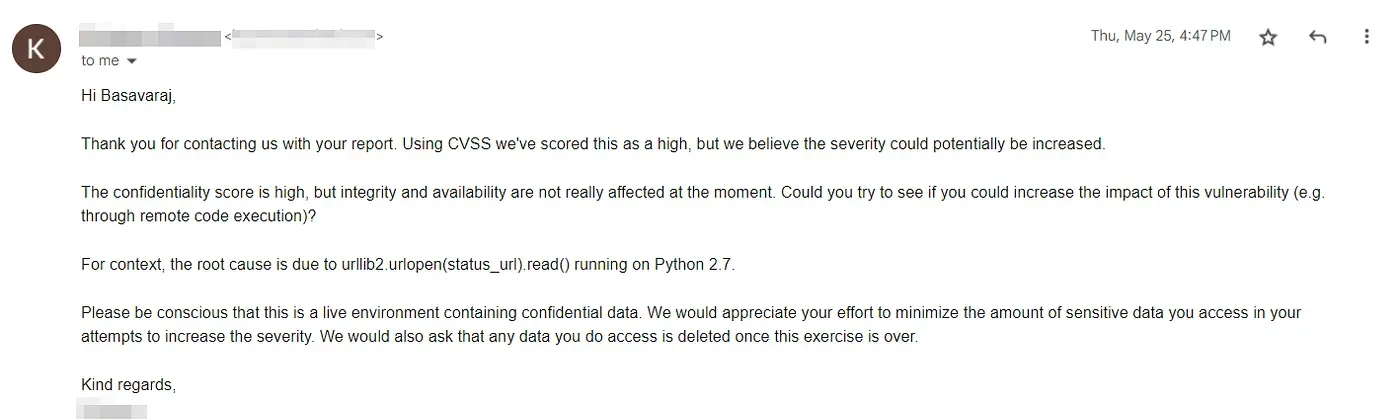
Love these kinds of responses :)
Step 4: Work around the WAF for file read
On the same day the researcher explored the issue further: other protocols such as Gopher, and attempts to find internal IPs and internal hosts, but without success. The target was also not running in the cloud.
After a two-hour break, the researcher looked into the Akamai WAF rule that was blocking the file:/// protocol and learned that a set of WAF rules blocks common files such as etc/passwd, etc/hosts and etc/shadow. Exploring different file paths on CentOS, some files could be read successfully. One interesting file was proc/net/arp:
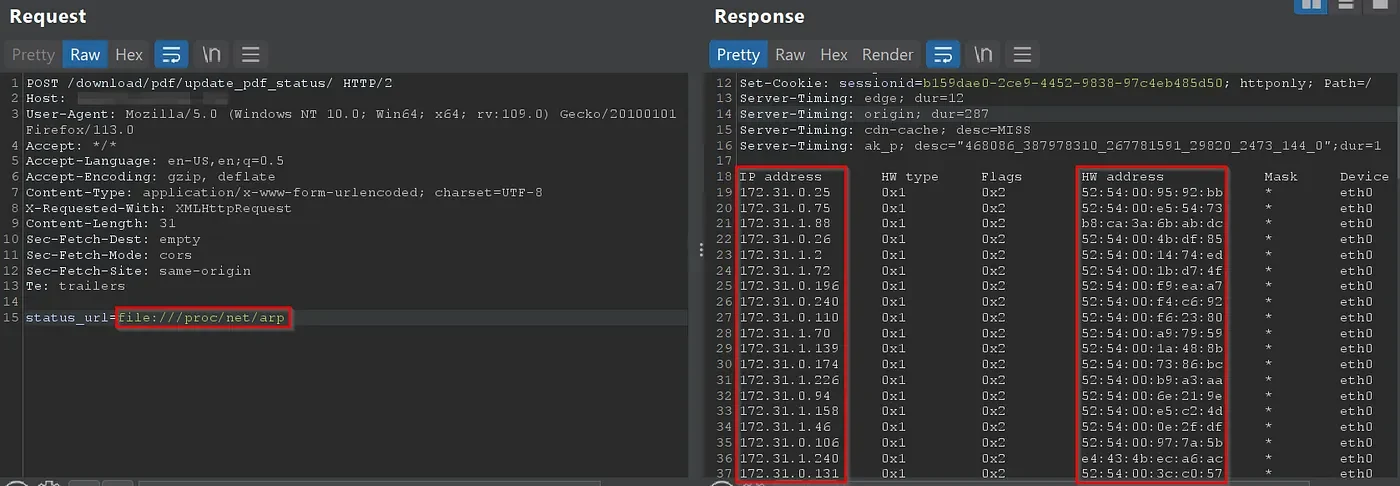
file:///proc/net/arp
Step 5: Build CIDR ranges from the ARP table
All internal IPs from the ARP table were noted down and turned into two CIDR ranges:
[redacted]/23
[redacted]-255
[redacted]-255

[redacted]/23
[redacted]-255
[redacted]-255
Converting these CIDR ranges to IP addresses gave 1024 addresses.
Step 6: Brute force the internal IPs
Intruder was used to brute force those IP addresses. The results included access to a random internal web server, and an internal web server with directory listing enabled showing some files:
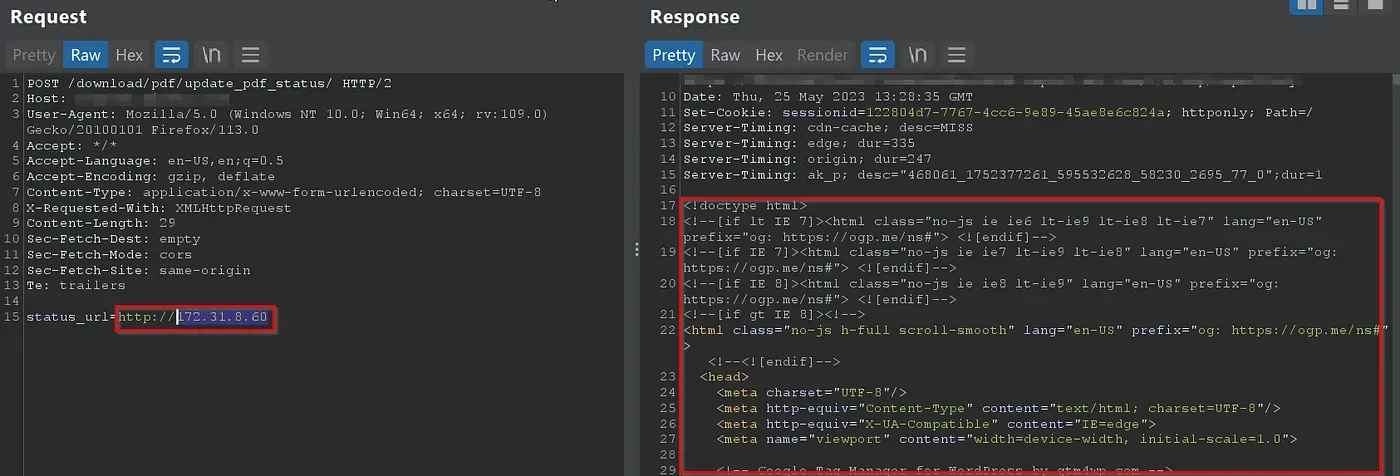
got access to a random internal web server
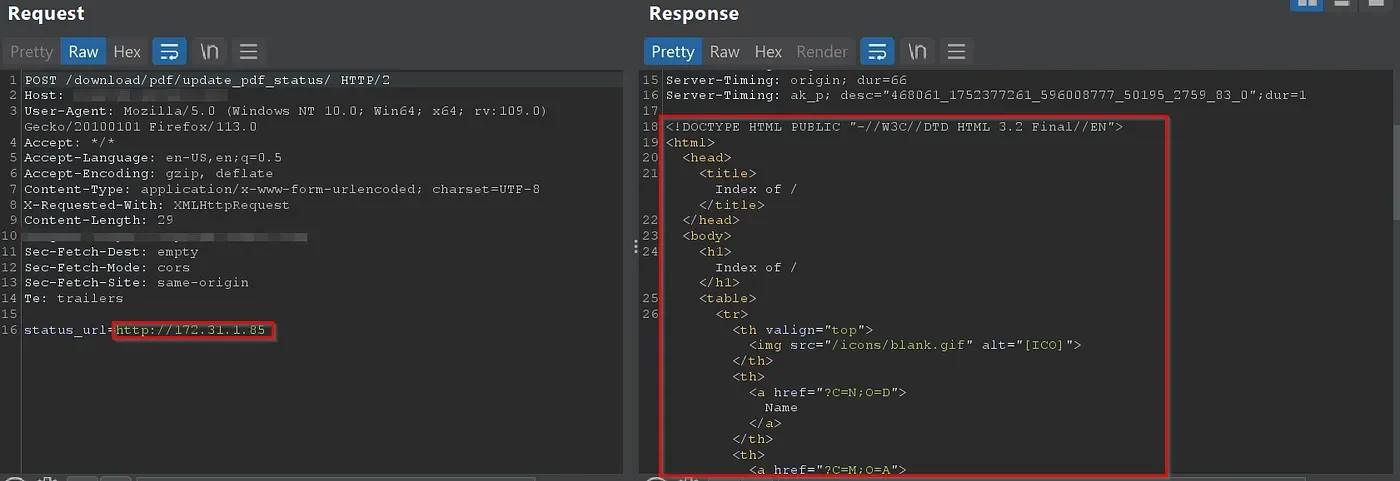
Internal web server with directory listing enabled with some files
Step 7: Extract internal hostnames
In the response to the request below, the researcher searched for hostnames belonging to the target, for example .target., and found some 6000+ results, for example some-internal-app.target.ad. The researcher guesses that .ad represents an active directory.
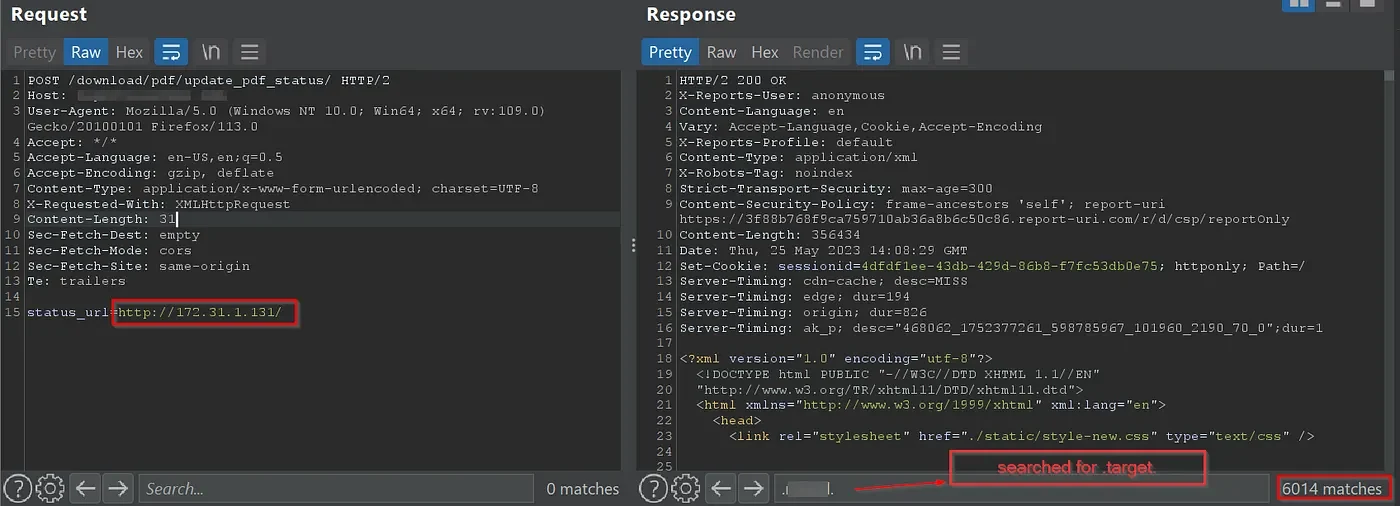
6000+ internal hostnames
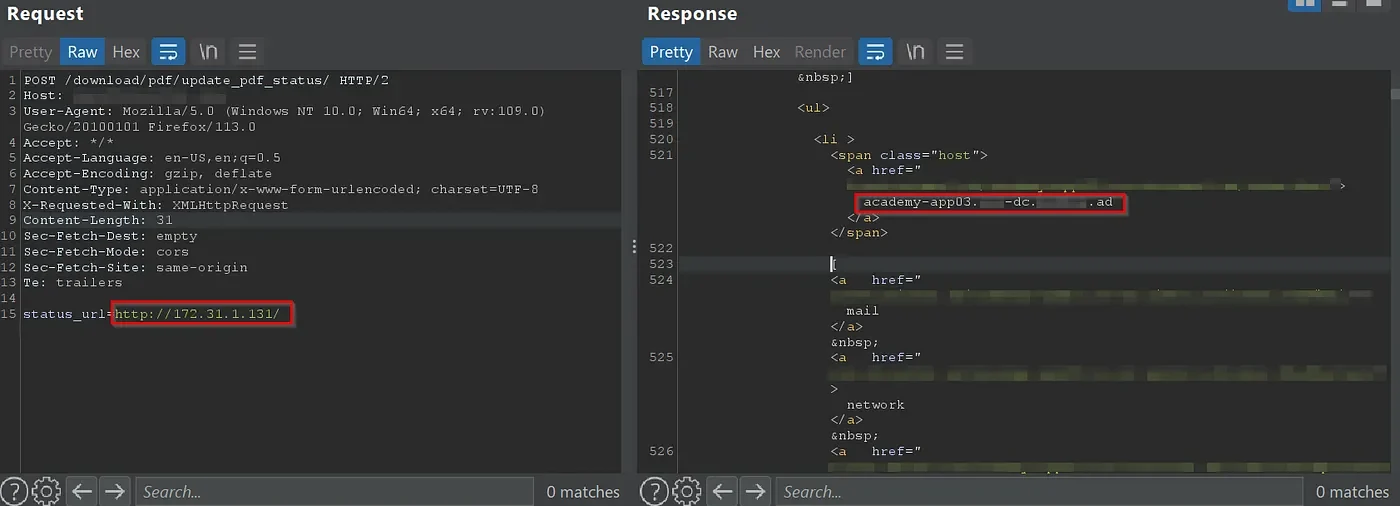
example hostname
Step 8: Brute force the hostnames
All internal hostnames were extracted and brute-forced again with Intruder. The results included an internal web server, a monitoring service, an internal mapping manager, an internal login page and HAProxy Stats:
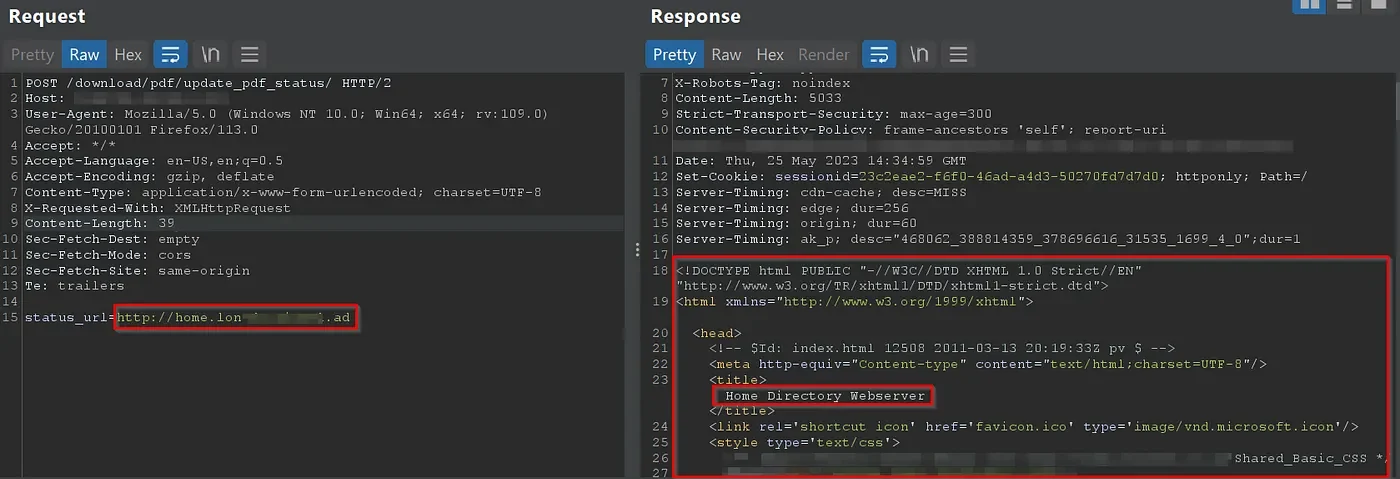
Internal web server :)
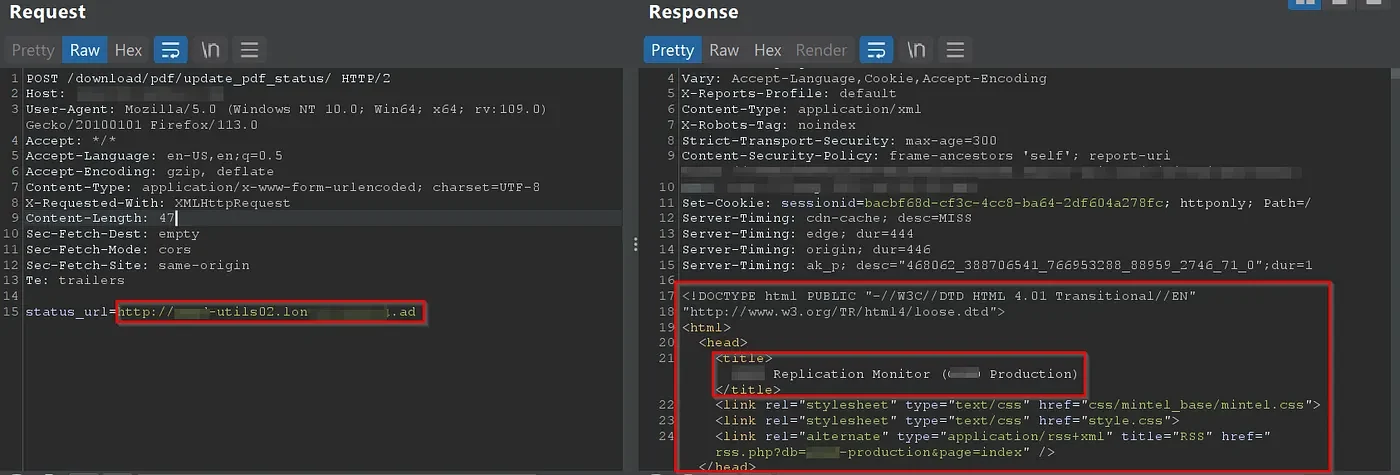
Some monitoring service
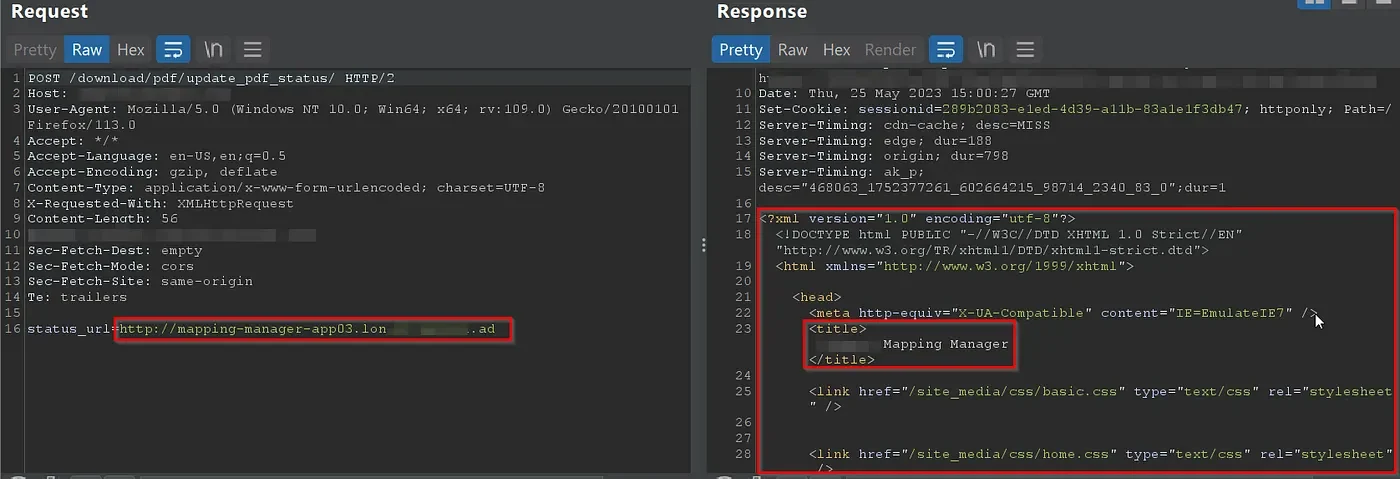
Internal mapping manager
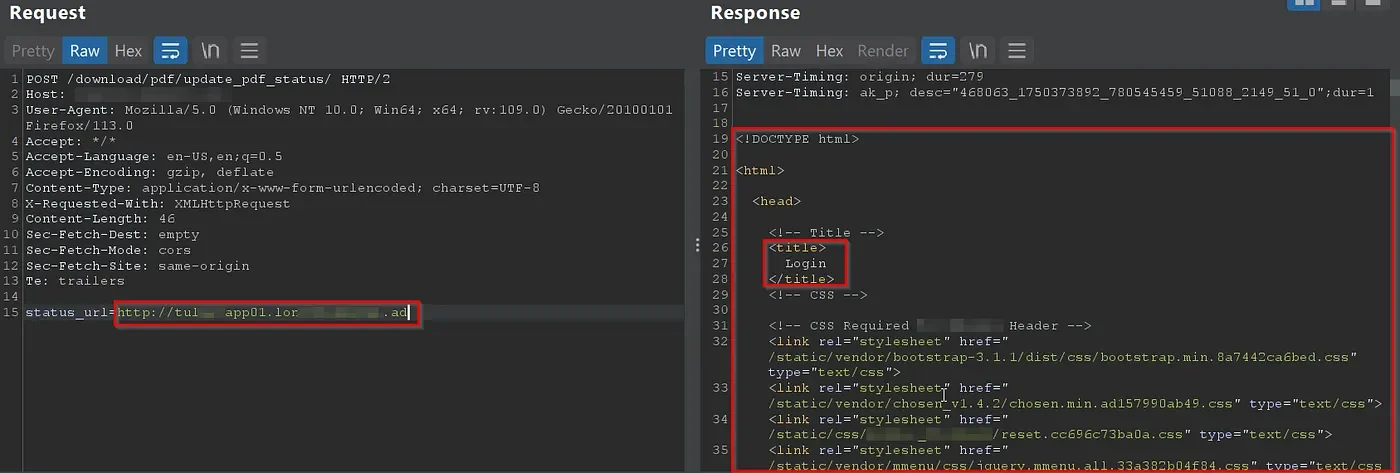
Some internal login page
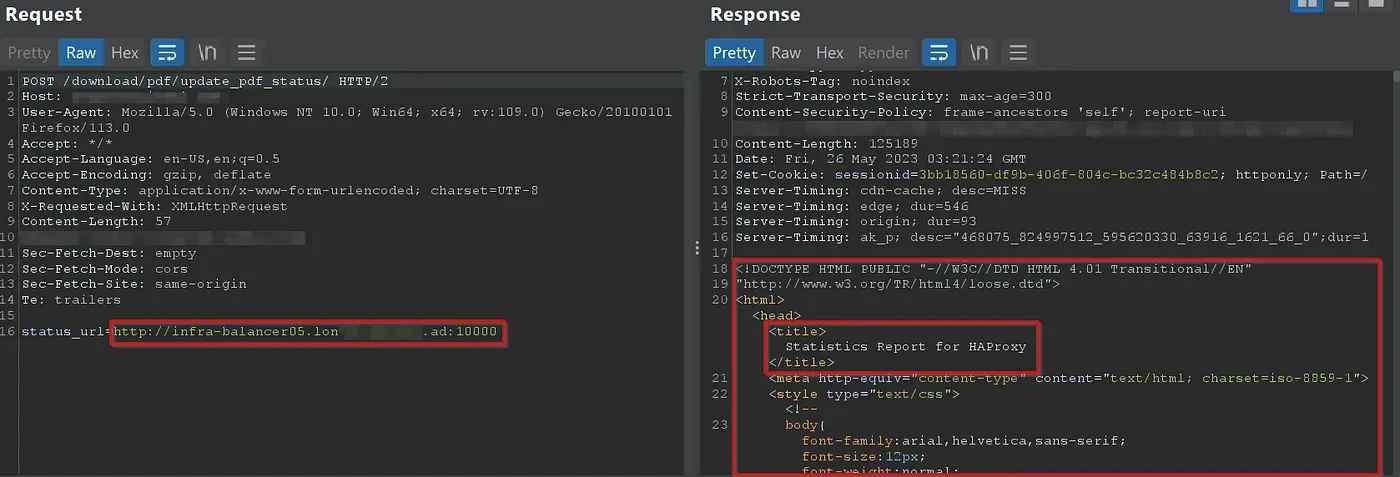
HAProxy Stats
In total, the researcher was able to access 1000+ web services running in the company's internal network.
Root cause
The status_url parameter is taken from the client request and fetched by the server without restricting the destination, so the server will retrieve any URL the client supplies and return the body. The server fetched evil.com, and file:///etc/passwd was stopped by the WAF with a 403. The WAF blocked the common file paths it knows about, but other paths on the same filesystem, such as proc/net/arp, were still readable, so the block was a blacklist rather than a control on the scheme or destination.
Impact
An attacker can use the endpoint as a proxy into the internal network. In this case that meant reading local files that the WAF did not block, enumerating internal hosts through the ARP table, scanning localhost ports, reaching internal web servers, and extracting internal hostnames from responses. The researcher states that 1000+ internal web services were accessible, including monitoring, mapping, login and HAProxy statistics pages. The report does not describe what data those services exposed or whether any of them could be used for further compromise; the researcher's remark that the company could have been taken over is his own assessment, not a demonstrated result.
Fix
The control that should be in place is an allowlist of permitted destinations for status_url, restricted to the hosts and schemes the PDF feature actually needs, with redirects disabled or re-validated, and blocking of non-HTTP schemes such as file:// at the application layer rather than relying on WAF signatures for known file paths.
Variants to test
- Supply an external URL in the fetch parameter and check whether its body comes back. A positive result is the content of a host you control appearing in the response.
- Try
file:///etc/passwdand, if blocked, other paths on the same filesystem such asfile:///proc/net/arp. A positive result is file content in the response. - Scan localhost ports with Intruder over a range such as 1 to 10000. A positive result is a distinct response for an open port, as with 25 and 9080 here.
- Read
proc/net/arpand convert the internal addresses into CIDR ranges, then brute force the resulting IPs. A positive result is an internal web server responding through the proxy. - Search responses for target hostnames such as
.target.and brute force the extracted hostnames. A positive result is an internal service, monitoring page or login page rendered through the SSRF.
What happened, in plain words
A security researcher was looking at a company's website in his spare time. He found a page that lets you view a report as a PDF file. When you click the PDF button, the website's server goes and fetches a file from a web address that is included in the request. The researcher realised he could change that web address to anything he wanted, and the server would fetch it and show him the result. That is a vulnerability called server-side request forgery, or SSRF. He used it to read some files on the server, find other computers inside the company's network, and eventually reach 1000+ internal web services. This article explains every step in simple terms, assuming you only know how to use a browser and a computer.
Background: what is SSRF?
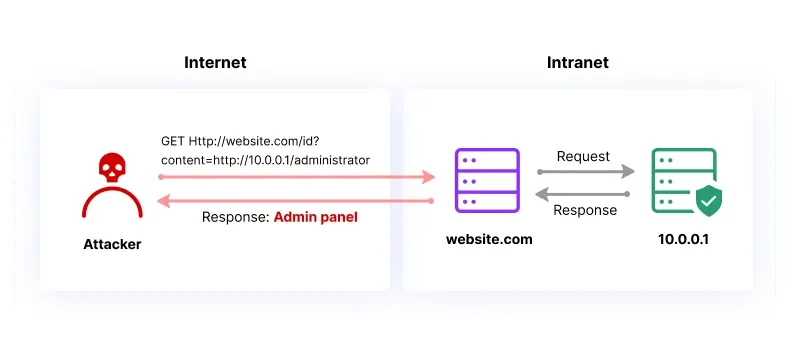
SSRF stands for server-side request forgery. Imagine you are at a hotel reception and you ask the receptionist to call a phone number for you. The receptionist has access to the hotel's internal phone system, so they can call other rooms, the kitchen, or the manager's office, places you cannot call directly from outside. If the receptionist blindly calls any number you give them, you can use them to reach internal extensions. In SSRF, the "receptionist" is a web server, and the "phone numbers" are URLs. The server makes requests on your behalf, and if it does not check where it is going, you can make it fetch internal resources that are not otherwise reachable from the internet.
A URL (uniform resource locator) is just a web address, like https://example.com/page. The part before :// is the scheme or protocol. http and https are for web pages. file is for files on the local disk. gopher is an older protocol. When a server fetches a URL for you, it can potentially use any of these schemes, not just web ones.
The feature that was tested
The researcher found a subdomain (a subdomain is a prefix to a domain, like blog.example.com is a subdomain of example.com) that hosts reports about the company and marketing. On that subdomain, there is a function to view a report in PDF format. Clicking the PDF button causes the application to make a request to a URL and return the response to the user. The request includes a parameter called status_url, which tells the server where to fetch from. Because the user can control that URL, it is a candidate for SSRF.
To see the report in PDF format
Setting up
The report does not mention any account, login, or special role needed. The researcher used a tool called Burp Suite. Burp Suite is a program that sits between your browser and the website, letting you see and change the requests your browser sends. It has a feature called Intruder that can send many requests automatically, each with a different value in a chosen place. That is useful for guessing URLs, ports, or hostnames. No specific versions of any software are given.
Finding the vulnerability
After clicking the PDF button, the application made a request and returned a response. The captured request and response looked like this:
request and response
The request contains a parameter named status_url. The server uses the value of this parameter to fetch the PDF. Because the value comes from the client (the browser) and the server fetches it, this parameter is a good place to try SSRF. The researcher did not need to guess; the feature itself was designed to fetch a URL.
Exploitation step by step
Step 1: Confirm full read SSRF
The researcher replaced the value of status_url with a random URL, evil.com, and sent the request. The server fetched evil.com and returned its content. That confirmed a full read SSRF: the server will fetch any URL and return the body to the attacker. "Full read" means the attacker can read the response, not just trigger a request.
Confirmed the full read SSRF
Step 2: Try to read local files
Next, the researcher tried to read a file on the server itself using the file:/// protocol. The file:/// scheme tells the server to open a file from its local disk. He used the path /etc/passwd, which is a standard file on Linux systems that lists user accounts. He added file:///etc/passwd as the value and sent the request. The response was 403 by Akamai. Akamai is a web application firewall (WAF), a service that filters out malicious requests. A 403 status code means "Forbidden". So the WAF blocked the attempt.
WAF Blocked due to file protocol
Step 3: Scan for open ports on the local machine
Since file reading was blocked, the researcher moved on to scanning ports on the local machine (localhost). A port is like a door on a computer; services listen on specific ports. For example, web servers usually listen on port 80 or 443, email on port 25. By making the server request http://localhost:PORT, the researcher could see which ports are open. He used Burp Intruder to try ports 1 to 10000. Two ports were open: 25 and 9080. Port 25 is typically used for email (SMTP), and the report notes it was running an esmtp postfix service. Port 9080 had some internal web server.
25 Port open with esmtp postfixservice
9080 Open with some random internal webserver
At this point, the researcher thought the finding was serious enough to report. He reported it to the company, and their response was positive:
Love these kinds of responses :)
Step 4: Bypass the WAF to read files
On the same day, the researcher continued exploring. He tried other protocols like Gopher, and tried to find internal IP addresses and hostnames, but without success. Also, the target was not hosted in the cloud.
After a two-hour break, he investigated the Akamai WAF rule that was blocking file:///. He learned that a set of WAF rules blocks common files like etc/passwd, etc/hosts, and etc/shadow. These are standard Linux files. By trying different file paths on CentOS (a Linux distribution), he found that some files could be read. One interesting file was proc/net/arp. The ARP table (Address Resolution Protocol) is a list of IP addresses and their corresponding hardware (MAC) addresses that the server has recently communicated with on the local network. It effectively reveals other machines on the same network.
file:///proc/net/arp
Step 5: Build CIDR ranges from the ARP table
From the ARP table, the researcher noted all internal IP addresses. He then grouped them into two CIDR ranges. CIDR (Classless Inter-Domain Routing) is a way to write a range of IP addresses. For example, [redacted]/23 means all addresses from [redacted] to [redacted]. The ranges he built were:
[redacted]/23
[redacted]-255
[redacted]-255

[redacted]/23
[redacted]-255
[redacted]-255
He converted these ranges to individual IP addresses, which gave 1024 addresses. That is 2 ranges of 512 addresses each (since /23 means 512 addresses).
Step 6: Brute force the internal IPs
Using Burp Intruder, he sent requests to each of those 1024 IP addresses through the SSRF. The results were surprising: he got access to a random internal web server, and another internal web server that had directory listing enabled, showing some files.
got access to a random internal web server
Internal web server with directory listing enabled with some files
Step 7: Extract internal hostnames
In the responses from those internal servers, the researcher searched for hostnames that belong to the target company. A hostname is a human-readable name for a computer, like mail.example.com. He looked for strings like .target. (where "target" is a placeholder for the company's domain). He found over 6000 results, for example some-internal-app.target.ad. The .ad suffix likely indicates an Active Directory domain (Active Directory is Microsoft's directory service for Windows networks).
6000+ internal hostnames
example hostname
Step 8: Brute force the hostnames
He extracted all those internal hostnames and used Intruder again to try each one through the SSRF. The results included an internal web server, a monitoring service, an internal mapping manager, an internal login page, and HAProxy Stats (HAProxy is a load balancer, and its stats page shows traffic information).
Internal web server :)
Some monitoring service
Internal mapping manager
Some internal login page
HAProxy Stats
In total, the researcher was able to access over 1000 web services running in the company's internal network.
Why this happened
The status_url parameter is taken from the user's request and fetched by the server without any restriction on where it can go. The server fetched evil.com, and file:///etc/passwd was only stopped by the WAF. That is why evil.com worked, and why file:/// was only stopped by the WAF, not by the application itself. The WAF blocked the common file paths it knows about, but other paths on the same filesystem, like proc/net/arp, were still readable. So the block was a blacklist (a list of bad things) rather than a control on what the server is allowed to fetch.
Impact
An attacker can use this endpoint as a proxy into the internal network. In this case, that meant reading local files that the WAF did not block, discovering internal hosts through the ARP table, scanning localhost ports, reaching internal web servers, and extracting internal hostnames from responses. The researcher states that over 1000 internal web services were accessible, including monitoring, mapping, login, and HAProxy statistics pages. The report does not describe what data those services exposed or whether any of them could be used for further compromise. The researcher's remark that the company could have been taken over is his own assessment, not a demonstrated result.
How to fix it
The control that should be in place is an allowlist (a list of allowed destinations) for status_url, restricted to the hosts and schemes the PDF feature actually needs. Redirects should be disabled or re-validated, and non-HTTP schemes like file:// should be blocked at the application layer, not relying on WAF signatures for known file paths.
Variants to test
If you want to test for similar issues, here are steps you can try:
- Supply an external URL in the fetch parameter and check whether its body comes back. A positive result is the content of a host you control appearing in the response.
- Try
file:///etc/passwdand, if blocked, other paths on the same filesystem such asfile:///proc/net/arp. A positive result is file content in the response. - Scan localhost ports with Intruder over a range such as 1 to 10000. A positive result is a distinct response for an open port, as with 25 and 9080 here.
- Read
proc/net/arpand convert the internal addresses into CIDR ranges, then brute force the resulting IPs. A positive result is an internal web server responding through the proxy. - Search responses for target hostnames such as
.target.and brute force the extracted hostnames. A positive result is an internal service, monitoring page, or login page rendered through the SSRF.
Glossary
- SSRF (Server-Side Request Forgery): A vulnerability where an attacker can make a server send requests to arbitrary destinations, often to access internal systems.
- URL (Uniform Resource Locator): A web address, like
https://example.com/page. - Scheme/Protocol: The part of a URL before
://, likehttp,https,file,gopher. - Parameter: A key-value pair in a request, like
status_url=.... - Burp Suite: A tool for intercepting and modifying web traffic.
- Burp Intruder: A Burp Suite component for automating requests with varying values.
- WAF (Web Application Firewall): A security system that filters and monitors HTTP traffic, blocking malicious requests.
- 403 Forbidden: An HTTP status code meaning the server refuses to fulfil the request.
- Port: A numbered endpoint on a computer for network communication; services listen on specific ports.
- localhost: The local computer itself; the loopback address
[redacted]. - CIDR (Classless Inter-Domain Routing): A notation for specifying a range of IP addresses, like
[redacted]/24. - ARP (Address Resolution Protocol): A protocol used to map IP addresses to hardware (MAC) addresses on a local network; the ARP table lists these mappings.
- Hostname: A human-readable name for a computer on a network, like
www.example.com. - Active Directory: Microsoft's directory service for Windows domains, used for managing users and computers.
- HAProxy: A load balancer and proxy server; its stats page shows traffic and health information.
- CentOS: A Linux distribution.
- Gopher: An older internet protocol for distributing documents, sometimes used in SSRF to craft arbitrary TCP requests.
- Cloud metadata endpoint: A special URL (like
http://[redacted]/) available in cloud environments that returns sensitive instance data; often a target for SSRF. - Allowlist: A list of permitted items; only those are allowed.
- Blacklist: A list of prohibited items; everything else is allowed.