Exploiting outdated Apache Airflow instances in bug bounties
Apache Airflow used a default signing key for its session cookies, allowing an attacker to forge an admin session and access sensitive data. The author also found two additional CVEs: one allowing any authenticated user to retrieve the signing key, and another where an authentication decorator was accidentally removed.
 Published on ian.sh
Apache Airflow is a popular system for executing workflows, such as copying and transforming data between data sources. I first ran into an Airflow instance exposed to the internet on a bug bounty program during recon, and started investigating its security.
The full write-up lives on its author's site
It belongs to its author, so we link to it rather than copy it. The other two tabs are our own rewrites, checked against it.
Context
Apache Airflow is a workflow orchestration system used to run and schedule jobs, typically copying and transforming data between data sources. It is designed to be connected to many internal systems, and it ships with a web interface for introspecting the system. That combination, a web-facing UI wired into databases and other critical infrastructure, makes it an attractive target during recon.
The author first encountered an Airflow instance exposed to the internet on a bug bounty program during reconnaissance and started investigating its security. The write-up covers the public CVE he started with, how he automated detection of it across bug bounty programs, and two lower-severity CVEs he subsequently found through source code auditing.
All of the issues described are fixed in the latest Airflow versions, but many deployment methods still install an outdated version. If you run Airflow internally, you should be on or above v1.10.15 or v2.0.2.
Setup
No special account or role is needed to start: the first step is simply reaching an Airflow login page. The tools involved are:
flask-unsign, a utility for signing and unsigning Flask session cookies.- A bug bounty automation framework (not open source at the time of writing) that discovers subdomains, finds open ports and sends HTTP requests.
- Optionally, Project Discovery's Nuclei, which has community rules for detecting Airflow and several of its issues, though not this specific one.
- A local Airflow environment, which the author built later to hunt for additional bugs. He started from a popular Docker image for Airflow but found it does not even support running an Airflow version unaffected by the public CVEs.
The precondition for the main attack is an Airflow web interface reachable from the internet that still uses the default signing key.
Finding it
Airflow's web interface uses Flask's stateless, signed cookies to store authentication data. Because the cookie is stateless, Airflow relies on the user_id attribute inside the session cookie to decide who you are. Normally the signature prevents tampering: changing the contents breaks the seal, unless you know the key.
Junghan Lee of Deliveryhero Korea discovered that Airflow included a default signing key of temporary_key, and it did not appear to be changed by anything. That turns the signed cookie into a forgeable one.
Exploitation
Step 1: capture the unauthenticated cookie
Browse to an Airflow instance's login page and capture the unauthenticated session cookie it sets. That cookie is signed, but it gives you a valid sample to test against.
Step 2: test the signing key
Use flask-unsign to check whether the cookie was signed with the default key. A successful unsign confirms the instance is vulnerable.
Step 3: forge an admin cookie
Take the same cookie and re-sign it with a modified user_id, which designates the user you want to log in as. Because the cookies are stateless, the Airflow instance has no idea the attribute was modified. In the example the author tries an ID of 1, which is typically an admin:
% flask-unsign -s --secret "temporary_key" -c "{'_fresh': True, '_id': '<id>', 'csrf_token': '<csrf>', 'user_id': '1'}"
<an admin cookie!>

# ...go set that value as your session cookie and you'll be logged in! Note that the cookie expires.
The -s flag signs the supplied cookie dictionary with the given secret, and -c supplies the cookie contents: the freshness flag, an ID, a CSRF token and the user_id set to 1. The output is a validly signed session cookie. Set it as your session cookie and you are logged in as that user. The cookie expires, so the forged value is not permanent.
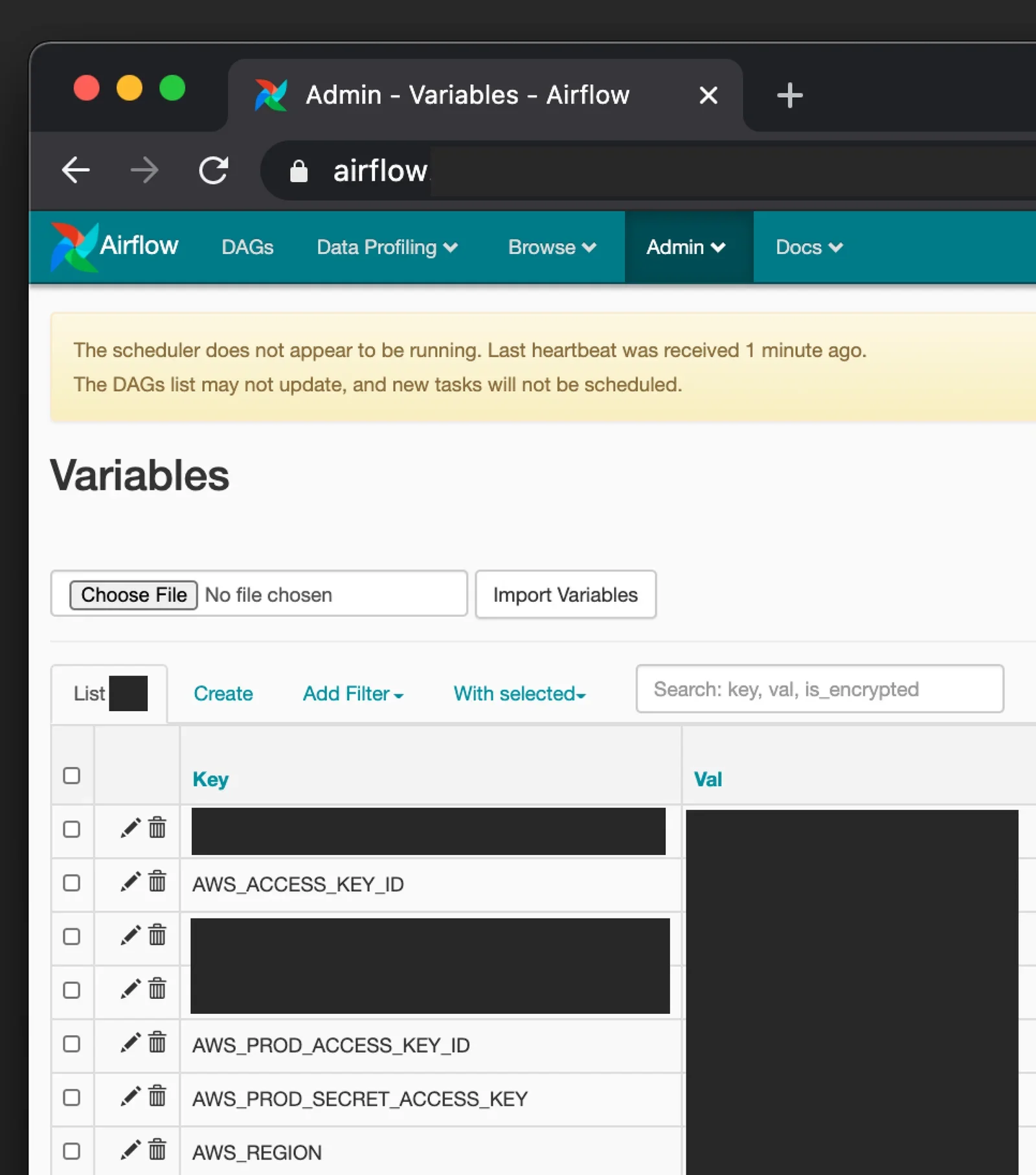
Once logged in, the Airflow web UI exposes a lot of sensitive material, which is often an extremely critical issue:
- Environment variables and their contents can be viewed. These commonly hold highly permissioned keys for AWS, payment processors, databases and similar systems.
- You may be able to execute ad-hoc queries against connected data sources even if you cannot read their credentials directly. The author describes this as SQL injection as a service.
- The logs and source code of workflows (DAGs) can be viewed, and these may also contain credentials.
Automating discovery
The author first exploited this CVE on a transportation company's bug bounty and was quickly awarded $4,500 for it as a critical issue. That is a good return for a public CVE, so he wired the bug into his bug bounty automation framework. The workflow is straightforward on paper: discover the subdomains of companies with bug bounties, find open ports on those hosts, then send HTTP requests and see what happens. Each step has depth, and a framework such as Amass is a reasonable starting point. At the time of writing his tooling tracked over 400,000 exposed ports across 1.1 million discovered domains.
To detect this issue he defined a simple request for GET /api/v1/version. The behaviour differs by version:
- On Airflow v1, the request throws a distinctive 404 page, which he flags as worthy of investigation, since most of these instances are not updated.
- On Airflow v2, the request returns the system's version if the new API is misconfigured to not require authentication.
When either rule matches a host, he gets a push notification on his phone and can quickly identify the host and IP address and investigate whether it merits a report.
He used to run flask-unsign on all cookies that looked like they could be vulnerable, but moved this into an asynchronous task because, at his request rate, it consumed more CPU than the crawler could handle. Response cookies are now stored in MariaDB and processed later at random, but the Airflow 404 page catches more of these instances than the slower cookie process does.
In total, across HackerOne and Bugcrowd, he made over $13,000 from exploiting these Airflow instances. Most companies handled the issue extremely quickly, although several still expose these instances to the internet.
Smarter companies quickly placed Airflow behind proxies such as oauth2-proxy or Duo Network Gateway, which is a strong defence against authentication issues at the application level. Exposing Airflow directly to the internet is strongly discouraged.
Further research
After this, the author set up his own local environment to hunt for additional issues. Through source code auditing and testing against his now very vulnerable Linode instance, he found two more lower-impact CVEs:
- CVE-2021-26559 (medium severity): in Airflow v2.0.0, a new API was exposed that allows retrieving Airflow's configuration file. No RBAC is enforced on this endpoint, so any authenticated user can retrieve the signing key abused above, even when it has been changed, allowing privilege escalation to an administrator.
- CVE-2021-26697 (low severity): in Airflow v1, an API endpoint for the experimental API inadvertently had its authentication decorator removed in a refactor. The author notes this as an argument for requiring a decorator to remove authentication rather than to add it. The endpoint has several complex parameters and is not very useful, so it is unlikely it was exploited.
The Apache security team was responsive and helped fix these issues quickly.
Root cause
The core mistake is a hard-coded default signing key, temporary_key, shipped with Airflow and apparently not changed by anything in the deployment. Flask session cookies are signed, not encrypted, so anyone holding the key can mint a cookie with any user_id they like. Because the session is stateless, the server trusts the user_id attribute in the cookie without any server-side check that the session belongs to that user. The signature is the only defence, and a public default key removes it.
The two follow-on CVEs share a theme: missing authorisation checks. The v2.0.0 configuration endpoint has no RBAC enforced, so any authenticated user can read the signing key. The v1 experimental API endpoint lost its authentication decorator in a refactor, so the check was silently dropped.
Impact
An attacker who can reach an Airflow instance using the default key can log in as any user, including an administrator, by forging the user_id. From the UI they can read environment variables and their contents, which commonly include highly permissioned keys for AWS, payment processors and databases; run ad-hoc queries against connected data sources even without reading their credentials; and read workflow logs and source code, which may contain credentials. The forged cookie expires, so access is not permanent without repeating the forgery.
The impact depends on the instance being internet-reachable and still using the default key. Instances placed behind an authenticating proxy such as oauth2-proxy or Duo Network Gateway are strongly defended against application-level authentication issues. The author earned over $13,000 across HackerOne and Bugcrowd from these instances, with a single transportation company paying $4,500 as a critical issue.
Fix
Upgrade Airflow to v1.10.15 or v2.0.2 or above, where all of the issues described are fixed. Beyond upgrading, do not expose Airflow directly to the internet: put it behind an authenticating proxy such as oauth2-proxy or Duo Network Gateway. The Apache security team was responsive and helped fix these issues quickly. the author's broader point is that authentication should be required by default, with an explicit decorator to remove it, rather than added by a decorator that a refactor can drop.
Variants to test
- Default Flask signing key on other Airflow instances. Send
GET /api/v1/versionand look for the distinctive Airflow v1 404 page, or a version response on v2 when the API is misconfigured to allow unauthenticated access. A positive result is either signature, which flags the host for cookie testing. - Cookie forgery with
flask-unsign. Capture the unauthenticated cookie from the login page and try to unsign it withtemporary_key. A successful unsign means you can re-sign it withuser_idset to an administrative ID and log in. - Configuration endpoint exposure (CVE-2021-26559). On Airflow v2.0.0, as any authenticated user, try to retrieve the configuration file through the new API. A positive result is the configuration contents, including the signing key, returned without an RBAC check, which allows escalation to administrator even after the default key has been changed.
- Missing authentication decorator (CVE-2021-26697). On Airflow v1, probe the experimental API endpoint that lost its authentication decorator in a refactor. A positive result is a response from an endpoint that should require authentication, though the author notes the endpoint's complex parameters make it of limited use.
- Proxy placement. Check whether the Airflow UI sits behind an authenticating proxy such as oauth2-proxy or Duo Network Gateway. If it does, application-level authentication bugs are strongly mitigated and the target is a much lower priority.
What happened, in plain words
A security researcher found that many companies put a piece of software called Apache Airflow on the public internet, and that a lot of those installations could be taken over by anyone who knew one small secret. The secret was a default password-like value that shipped with the software and was often never changed. With it, the researcher could create a fake login cookie that told Airflow "I am the administrator", and Airflow believed it. He automated the search for these installations, found many of them across bug bounty programs, and earned over $13,000 in total. He then went looking for more bugs in Airflow and found two smaller ones. This article walks through all of it slowly, assuming you have never done security work before.
Background: what Airflow is and why anyone cares
Apache Airflow is a tool for running and scheduling jobs. A "job" here means an automated task, for example copying data from one database to another, or transforming a file every night. Airflow is the thing that says "run this task at 2am, then run that task when the first one finishes".
Because it runs those jobs, Airflow has to be connected to many internal systems: databases, cloud accounts, payment processors, storage. It also ships with a web interface, a set of pages you open in a browser to look at what is running, read logs, and change settings.
That combination is what makes it interesting to an attacker. The web interface is reachable from the internet, and behind it sit connections to critical systems. If you can get into the web interface, you may be able to reach everything Airflow touches.
The researcher first came across an Airflow instance exposed to the internet while doing reconnaissance on a bug bounty program. "Reconnaissance" (recon) means the early phase of looking around: finding which servers and websites a company owns, without attacking anything yet. He started investigating how Airflow's security worked.
The article covers three things, in this order: the public vulnerability he started with, how he automated finding it across many bug bounty programs, and two lower-severity vulnerabilities he found afterwards by reading Airflow's source code.
All of the issues described are fixed in the latest Airflow versions. But many ways of deploying Airflow still install an outdated version, so the problem persists in the wild. If your company runs Airflow internally, you should be on version 1.10.15 or above, or 2.0.2 or above.
The main bug: CVE-2020-17526
Cookies, sessions and signatures, from zero
When you log in to a website, the server needs a way to remember you on your next request. The web protocol itself (HTTP) has no memory: every request arrives as if for the first time. So websites give your browser a small piece of data called a cookie, which the browser stores and sends back with every subsequent request. The server looks at the cookie and says "ah, this is the person who logged in five minutes ago".
A session is the server-side idea of "this person is logged in". A stateless session means the server does not keep a list of logged-in people on its side. Instead, everything it needs to know is stored inside the cookie itself. That is convenient, because the server does not have to remember anything, but it means the cookie must be protected from tampering.
The protection used here is a signature. The server takes the contents of the cookie, combines them with a secret key, and computes a value that only someone with the key could produce. It attaches that value to the cookie. When the cookie comes back, the server recomputes the value and checks it matches. If someone changed the contents without knowing the key, the check fails and the cookie is rejected. Think of it like a wax seal on an envelope: anyone can read the letter, but if the seal is broken you know it was tampered with.
A JWT (JSON Web Token) is a similar idea in a different format: a signed blob of data that the server trusts because of the signature. The researcher notes that stateless authentication with JWTs and similar tokens has been a gift to security researchers, because it is hard to implement correctly and the mistakes tend to be severe. Common mistakes include weak signing keys and "algorithm confusion", where an attacker tricks the server into checking the signature in a way that is easy to forge.
What went wrong in Airflow
Airflow's web interface uses Flask, a popular Python web framework, and Flask's stateless, signed cookies to store login information. Inside the cookie is an attribute called user_id, which is simply a number identifying which user you are. Airflow trusts that number: whatever user_id the cookie says, that is who you are.
Normally you cannot change it, because changing the contents breaks the signature. Unless, that is, you know the key used to sign it.
Junghan Lee of Deliveryhero Korea discovered that Airflow shipped with a default signing key of temporary_key, and it did not appear to be changed by anything in the deployment. In other words, the wax seal was made with a stamp that everyone in the world owns a copy of.
The tool: flask-unsign
flask-unsign is a small utility for signing and unsigning Flask session cookies. "Unsign" means checking whether a cookie was signed with a particular key, and reading its contents if so. "Sign" means producing a new cookie with a valid signature. It is a normal command-line tool you install and run in a terminal.
Step 1: capture the unauthenticated cookie
Browse to an Airflow instance's login page. Even before you log in, the page sets a session cookie in your browser. That cookie is signed, but it gives you a valid sample to test against. You are not trying to break into anything yet; you are collecting a specimen to examine.
Step 2: test the signing key
Use flask-unsign to check whether that cookie was signed with the default key. If the tool can successfully unsign it with temporary_key, the instance is vulnerable: the key is the default one, and you now know it.
Step 3: forge an admin cookie
Now take the same cookie, change the user_id inside it, and re-sign it with the same key. Because the cookies are stateless, the Airflow instance has no idea the attribute was modified: it just checks the signature, sees it is valid, and believes whatever user_id it finds. In the example the researcher tries an ID of 1, which is typically an admin.
% flask-unsign -s --secret "temporary_key" -c "{'_fresh': True, '_id': '<id>', 'csrf_token': '<csrf>', 'user_id': '1'}"
<an admin cookie!>

# ...go set that value as your session cookie and you'll be logged in! Note that the cookie expires.
Line by line:
flask-unsign -sruns the tool in signing mode. You are asking it to produce a validly signed cookie.--secret "temporary_key"tells it which key to sign with. This is the default key that Airflow shipped with, the one that should have been changed.-c "..."supplies the contents of the cookie you want signed. Inside the braces:'_fresh': Trueis a flag Flask uses to mark a session as freshly created, for example right after login.'_id': '<id>'is an internal identifier for the session. The angle brackets are a placeholder: the real value comes from the cookie you captured.'csrf_token': '<csrf>'is a token used to protect forms against cross-site request forgery, another placeholder taken from the captured cookie.'user_id': '1'is the important one: you are claiming to be user number 1, typically the administrator.
- The output line
<an admin cookie!>stands for the signed cookie the tool prints. It is a valid cookie, signed with the right key, saying you are the admin. - The comment explains the next move: take that value and set it as your session cookie in the browser. The server will accept it and treat you as that user. It also notes the cookie expires, so the forged value does not last forever; you would have to repeat the forgery later.
The screenshot shows the Airflow admin interface with sensitive keys visible in plaintext. That is the payoff: the fake cookie got the researcher into the admin UI, and the admin UI shows secrets.
What you can do once you are in
Once logged in, the Airflow web UI exposes a lot of sensitive material, which is often an extremely critical issue:
- Environment variables and their contents can be viewed. An environment variable is a named value that a program reads when it starts, and it is a very common place to keep configuration and secrets. In Airflow deployments these commonly hold highly permissioned keys for AWS, payment processors, databases and similar systems. "Highly permissioned" means the key can do a lot, for example read or delete data, not just one narrow thing.
- You may be able to run ad-hoc queries against connected data sources even if you cannot read their credentials directly. An "ad-hoc query" is a database command typed in by hand rather than run by a scheduled job. The researcher describes this as SQL injection as a service: SQL injection normally means tricking an application into running database commands you were not supposed to run, and here the application offers that as a feature to anyone who is logged in.
- The logs and source code of workflows can be viewed. Workflows in Airflow are called DAGs (Directed Acyclic Graphs), which is just Airflow's name for a set of tasks with an order and dependencies between them. Logs and source code often contain credentials too, because people print them while debugging or hard-code them by mistake.
Automating the search
Why automate at all
The researcher first exploited this vulnerability on a transportation company's bug bounty program and was quickly awarded $4,500 for it as a critical issue. A bug bounty program is a scheme where a company invites outside researchers to find security problems and pays them for valid reports. The payment is called a bounty.
$4,500 is a good return for a vulnerability that is already publicly known, and he was sure other instances existed. So he connected the check to his bug bounty automation framework. The reasoning is practical: bug bounties take time, and there is a real risk of spending hours on something that pays nothing. Automating detection across all the assets of every program lets a researcher cover far more ground than doing it by hand.
The workflow
The workflow is straightforward on paper:
- Discover (sub)domains of companies with bug bounties. A domain is a name like
example.com; a subdomain is a name in front of it, likejobs.example.com. Companies own many of them, and some are forgotten. - Find open ports on those hosts. A port is a numbered door on a server; different services listen on different doors. An open port tells you something is running there.
- Send HTTP requests to them and see what happens. HTTP is the protocol your browser uses to talk to websites; sending a request is what happens when you type a URL and press enter.
Each of those steps has a lot of depth, and a framework such as Amass is a reasonable starting point for the first one. At the time of writing, his tooling tracked over 400,000 exposed ports across 1.1 million discovered domains.
The detection request
To detect this issue he defined a simple request for GET /api/v1/version. An API is a way for programs to talk to each other over the web, as opposed to pages meant for humans; /api/v1/version is a URL path that asks the system for its version number. GET is the HTTP method used when you simply ask for something, the same method your browser uses when you open a page.
The response differs by Airflow version:
- On Airflow v1, the request throws a distinctive 404 page. A 404 is the standard HTTP status code for "not found". The point is that the page is distinctive: it looks like Airflow, so seeing it tells you an Airflow instance is there. He flags that as worthy of investigation, since most of these instances are not updated.
- On Airflow v2, the request returns the system's version if the new API is misconfigured to not require authentication. In other words, a version number coming back without logging in is itself a sign of a problem.
When either rule matches a host, he gets a push notification on his phone and can quickly identify the host and IP address and investigate whether it merits a report. An IP address is the numeric address of a machine on the internet, the equivalent of a street address for a server.
The cookie-checking bottleneck
He used to run flask-unsign on all cookies that looked like they could be vulnerable. But at his rate of requests, that quickly consumed more CPU than the crawler could handle. CPU is the processor inside a computer; every check costs processing time, and there is only so much to go around. So he moved the cookie checking into an asynchronous task, meaning it runs in the background rather than holding up the main crawl.
Response cookies are now stored in MariaDB, a database system, and processed later at random. The trade-off is that the Airflow 404 page catches more of these instances than the slower cookie process does, so the simple version check is the more productive signal.
Other tools
If you use Project Discovery's vulnerability scanner Nuclei, it has community rules for detecting Airflow and several of its issues, though not this specific one. A vulnerability scanner is a program that sends a list of known test requests to a target and reports which ones produced a suspicious response. The rules are the individual tests in that list.
The results
In total, across HackerOne and Bugcrowd, two well-known bug bounty platforms, he made over $13,000 from exploiting these Airflow instances. Most companies handled the issue extremely quickly, although several still expose these instances to the internet.
Smarter companies quickly placed Airflow behind proxies such as oauth2-proxy or Duo Network Gateway. A proxy here means a gatekeeper that sits in front of the application: users must authenticate to the gatekeeper first, and only then are they let through to Airflow. That is a strong defence against authentication issues at the application level, because even if Airflow's own login can be fooled, the gatekeeper still stands in the way. Exposing Airflow directly to the internet is strongly discouraged.
Further research: two more bugs
After this, the researcher was interested enough in Airflow to set up his own local environment and hunt for additional issues. He started from a popular Docker image for Airflow. Docker is a tool for packaging software into a ready-to-run box called an image, so you can start it without installing everything by hand. He was dismayed to find that this image does not even support running an Airflow version unaffected by the public vulnerabilities, which says something about how slowly deployments get updated.
Through source code auditing and testing against his now very vulnerable Linode instance, he found two more lower-impact vulnerabilities. Source code auditing means reading the program's code looking for mistakes. Linode is a cloud hosting provider; his instance was a server he rented there, deliberately set up to be vulnerable so he could experiment safely.
- CVE-2021-26559 (medium severity): in Airflow v2.0.0, a new API was exposed that allows retrieving Airflow's configuration file. No RBAC is enforced on this endpoint. RBAC stands for role-based access control: the idea that different users have different roles and are only allowed to do what their role permits. Without it, any authenticated user can retrieve the signing key abused above, even when it has been changed, which allows privilege escalation to an administrator. Privilege escalation means going from a low level of access to a higher one.
- CVE-2021-26697 (low severity): in Airflow v1, an API endpoint for the experimental API inadvertently had its authentication decorator removed in a refactor. A decorator is a small wrapper in code that adds behaviour to a function, and in this case it was the wrapper that checked whether the caller was logged in. A refactor is a rewrite of code that is meant to change its structure without changing what it does, and here it silently dropped the check. The researcher's point is a good one: authentication should be required by default, with an explicit decorator to remove it, rather than added by a decorator that a refactor can drop. The endpoint has several complex parameters and is not very useful, so it is unlikely it was exploited.
The Apache security team, which maintains Airflow, was responsive and helped fix these issues quickly.
Why it worked, and what the impact is
The core mistake is a hard-coded default signing key, temporary_key, shipped with Airflow and apparently not changed by anything in the deployment. Flask session cookies are signed, not encrypted, so anyone holding the key can mint a cookie with any user_id they like. "Signed, not encrypted" matters: signing proves the contents were not changed, but it does not hide them. Because the session is stateless, the server trusts the user_id attribute in the cookie without any server-side check that the session belongs to that user. The signature is the only defence, and a public default key removes it.
The two follow-on vulnerabilities share a theme: missing authorisation checks. The v2.0.0 configuration endpoint has no RBAC enforced, so any authenticated user can read the signing key. The v1 experimental API endpoint lost its authentication decorator in a refactor, so the check was silently dropped.
An attacker who can reach an Airflow instance using the default key can log in as any user, including an administrator, by forging the user_id. From the UI they can read environment variables and their contents, which commonly include highly permissioned keys for AWS, payment processors and databases; run ad-hoc queries against connected data sources even without reading their credentials; and read workflow logs and source code, which may contain credentials. The forged cookie expires, so access is not permanent without repeating the forgery.
The impact depends on the instance being internet-reachable and still using the default key. Instances placed behind an authenticating proxy such as oauth2-proxy or Duo Network Gateway are strongly defended against application-level authentication issues. The researcher earned over $13,000 across HackerOne and Bugcrowd from these instances, with a single transportation company paying $4,500 as a critical issue.
How to fix it
Upgrade Airflow to v1.10.15 or v2.0.2 or above, where all of the issues described are fixed. Beyond upgrading, do not expose Airflow directly to the internet: put it behind an authenticating proxy such as oauth2-proxy or Duo Network Gateway. The Apache security team was responsive and helped fix these issues quickly. The broader lesson is that authentication should be required by default, with an explicit decorator to remove it, rather than added by a decorator that a refactor can drop.
Things to try, if you are testing your own systems
- Default Flask signing key on other Airflow instances. Send
GET /api/v1/versionand look for the distinctive Airflow v1 404 page, or a version response on v2 when the API is misconfigured to allow unauthenticated access. Either result flags the host for cookie testing. - Cookie forgery with
flask-unsign. Capture the unauthenticated cookie from the login page and try to unsign it withtemporary_key. A successful unsign means you can re-sign it withuser_idset to an administrative ID and log in. - Configuration endpoint exposure (CVE-2021-26559). On Airflow v2.0.0, as any authenticated user, try to retrieve the configuration file through the new API. A positive result is the configuration contents, including the signing key, returned without an RBAC check, which allows escalation to administrator even after the default key has been changed.
- Missing authentication decorator (CVE-2021-26697). On Airflow v1, probe the experimental API endpoint that lost its authentication decorator in a refactor. A positive result is a response from an endpoint that should require authentication, though the endpoint's complex parameters make it of limited use.
- Proxy placement. Check whether the Airflow UI sits behind an authenticating proxy such as oauth2-proxy or Duo Network Gateway. If it does, application-level authentication bugs are strongly mitigated and the target is a much lower priority.
Glossary
- 404: the standard HTTP status code meaning "not found".
- Ad-hoc query: a database command typed in by hand rather than run by a scheduled job.
- API: a way for programs to talk to each other over the web, as opposed to pages meant for humans.
- Apache Airflow: a tool for running and scheduling automated jobs, often copying and transforming data between systems.
- Asynchronous task: work that runs in the background instead of holding up the main process.
- Authentication: proving who you are, for example by logging in.
- Authorisation: deciding what a logged-in user is allowed to do.
- Bug bounty program: a scheme where a company invites outside researchers to find security problems and pays them for valid reports.
- Bounty: the payment made for a valid security report.
- Cookie: a small piece of data a website stores in your browser and gets back on every request, used to remember you.
- CPU: the processor inside a computer; every check costs processing time.
- CSRF token: a value embedded in forms to stop another site from submitting requests on your behalf.
- CVE: a public identifier for a known security vulnerability.
- DAG: Airflow's name for a workflow, a set of tasks with an order and dependencies.
- Decorator: a small wrapper in code that adds behaviour to a function, such as checking whether the caller is logged in.
- Docker: a tool for packaging software into a ready-to-run box called an image.
- Domain / subdomain: a name like
example.com, and a name in front of it likejobs.example.com. - Environment variable: a named value a program reads when it starts, often used to hold configuration and secrets.
- Flask: a popular Python web framework, which Airflow's web interface is built on.
- flask-unsign: a command-line utility for signing and unsigning Flask session cookies.
- GET: the HTTP method used when you simply ask for something, as a browser does when you open a page.
- HTTP: the protocol browsers and servers use to talk to each other.
- IP address: the numeric address of a machine on the internet.
- JWT: JSON Web Token, a signed blob of data a server trusts because of the signature.
- Linode: a cloud hosting provider.
- MariaDB: a database system.
- Nuclei: a vulnerability scanner that sends a list of known test requests and reports suspicious responses.
- Port: a numbered door on a server; different services listen on different doors.
- Privilege escalation: going from a low level of access to a higher one.
- Proxy: a gatekeeper sitting in front of an application that users must authenticate to first.
- RBAC: role-based access control, where different users have different roles and are only allowed to do what their role permits.
- Reconnaissance: the early phase of looking around to find which servers and websites a company owns.
- Refactor: a rewrite of code meant to change its structure without changing what it does.
- Session: the server-side idea of "this person is logged in".
- Signature: a value computed with a secret key that proves data was not tampered with.
- Source code auditing: reading a program's code looking for mistakes.
- SQL injection: tricking an application into running database commands you were not supposed to run.
- Stateless: the server keeps no record on its side; everything it needs is in the cookie.
- Vulnerability scanner: a program that sends known test requests to a target and reports which ones produced a suspicious response.


