Exposed docker-compose.yml
A publicly accessible docker-compose.yml file exposed plaintext MySQL root and user credentials along with internal service and port configuration. An attacker could use the leaked credentials to connect directly to the database if it were reachable, and map the internal architecture.

medium.com
Published on medium.com
Bug Hunter
The full write-up lives on its author's site
It belongs to its author, so we link to it rather than copy it. The other two tabs are our own rewrites, checked against it.
Context
The target was a public service portal belonging to the municipal government of a city whose name is redacted in the write-up. The portal is a web application served from a host reachable at https://redacted.redactedkota.go.id/. The application is deployed with Docker Compose: the researcher's analysis of the exposed file shows three services, frontend, backend and mysql, with internal ports mapped to host ports.
A docker-compose.yml file normally defines and runs a multi-container application: it declares services, the ports each one maps, volumes, and the environment variables passed into each container. It is a deployment artefact, not a public resource, and it has no reason to sit inside a web root where the web server will serve it to anyone who asks.
Setup
No accounts, roles or special tooling are described. The work was reconnaissance and vulnerability testing against the public portal, carried out by the author, Primandito Adi Setiya, on 13 November 2025. The only precondition for the finding is network access to the site and the ability to request a path from it. Directory fuzzing was the technique that surfaced the file.
Finding it
While fuzzing directories on the portal, the researcher found that a Docker configuration file, docker-compose.yml, was publicly accessible. The application did not block access to the file located in the web root. Requesting the path returned the file in full, so the web server handed over the deployment definition, including the environment variables that hold database credentials in plaintext.
What makes this look wrong is the combination of location and content: a file that belongs to the deployment layer was reachable at the application's own hostname, and its contents are exactly the material an attacker wants, namely credentials and the shape of the internal network.
Exploitation
Step 1: Request the file
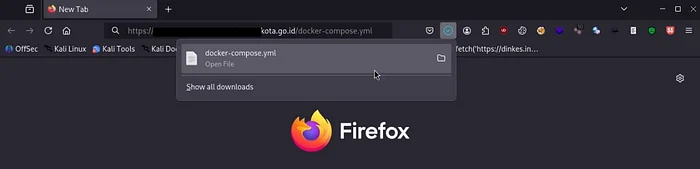
The researcher opened a browser and requested the path on the target:
Because the response is of YAML type, the browser downloads the file automatically rather than rendering it.
Step 2: Read the configuration
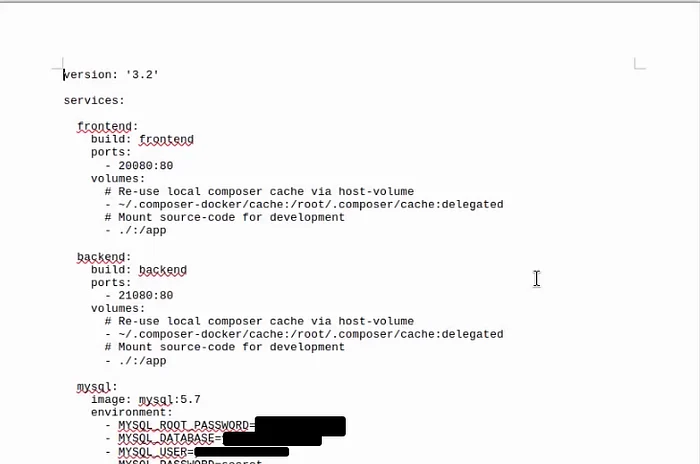
The downloaded file was opened in a text editor. It contained a range of sensitive configuration, including the services frontend, backend and mysql.
Step 3: Extract the database credentials
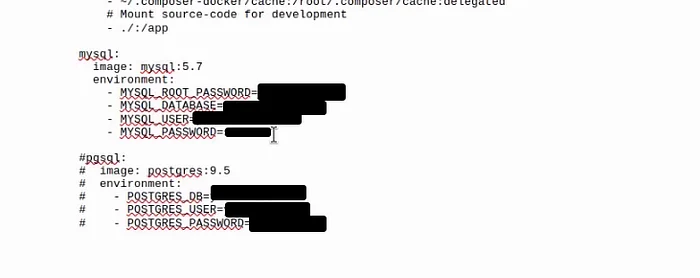
In the mysql service, environment variables leak credentials. The author masked the values in the screenshot, but the structure of the exposed fields is visible:
These four variables are the ones that matter. MYSQL_ROOT_PASSWORD is the password for the database superuser, MYSQL_USER and MYSQL_PASSWORD are an application account and its password, and MYSQL_DATABASE names the database. In the file as served they were plaintext; only the published screenshot is masked.
Step 4: Verify the fix
After the report, the affected party appears to have fixed the issue quietly. Access to docker-compose.yml is now blocked. The verification was carried out on 6 October 2026.
Root cause
The file was placed in the web root and the web server was not configured to deny access to it, so a request for the path returned the file like any other static resource. The report does not describe any further defence that was present and failed; the exposure follows directly from the file's location and the absence of a deny rule.
Impact
The leaked file gives an attacker sensitive information that can be used in three ways, as the author sets out.
- Direct database access. The exposed
MYSQL_ROOT_PASSWORD,MYSQL_USERandMYSQL_PASSWORDcan be used to connect to the database. If the database is exposed to the internet or reachable through tunnelling, an attacker can read, modify or delete data. - Mapping the internal infrastructure. The visible internal port mappings (
20080:80,21080:80) and the service names (frontend,backend,mysql) help an attacker map the application architecture and look for other weaknesses inside the internal network. - Credential reuse. Leaked credentials may be reused against other related services.
The first two points are conditional: database access depends on the database being reachable, and the architecture mapping is reconnaissance value rather than direct compromise. The severity was rated High.
Fix
The issue was fixed silently, with no confirmation or reply from the affected party, and access to docker-compose.yml is now blocked. The report does not say which mechanism was used to block it.
The author's recommendations for preventing a recurrence are three:
- Block access to configuration files. Add rules on the web server (Apache or Nginx) that deny access to
docker-compose.ymland other sensitive files such as.envand.git. - Rotate credentials. Because the database credentials were exposed, every password in the file should be changed.
- Move the configuration file. Configuration files should never be stored in the web root; keep them outside any publicly reachable directory.
Variants to test
- Other deployment artefacts in the web root. Request paths such as
docker-compose.yml,docker-compose.yaml,.env,.git/configand backup copies of configuration files. A positive result is a 200 response whose body contains service definitions, environment blocks or credentials rather than an error page or a redirect to the application. - Directory fuzzing for configuration names. Run a wordlist of common configuration and deployment filenames against the host and watch for responses with a YAML, JSON or plain-text content type and a body that parses as configuration. A positive result is a downloadable file rather than an HTML page.
- Port mappings as a lead. Where a compose file is found, note the host-to-container port mappings and check whether those host ports are reachable from outside. A positive result is a service answering on a port that the public application does not otherwise advertise.
- Credential reuse. Take any database account and password found in a configuration file and try them against other services belonging to the same organisation, within the scope you are authorised to test. A positive result is a successful login on a service unrelated to the one the file described.
What happened, in plain words
A city government runs a public website where residents can use online services. The site is built from several separate programs that work together, and those programs are described in a small text file called docker-compose.yml. That file is meant to stay on the server, out of sight, like the wiring diagram of a building kept in a locked maintenance room. Instead, it was sitting in the folder the website serves to visitors, so anyone who typed its address into a browser could download it.
The file contained the passwords for the site's database, written out in plain text. A database is the place where a website keeps its information: user records, form submissions, and so on. Whoever holds those passwords may be able to open the database directly and read, change or delete what is inside, provided they can reach it over the network.
The researcher who found this, Primandito Adi Setiya, reported it on 13 November 2025. The site's operators fixed it quietly, without replying, and by the time of a re-check on 6 October 2026 the file could no longer be downloaded. This article walks through how the file was found, what was inside it, why it matters, and what should be done to stop it happening again, all in terms that assume no security background.
The target and the setup
The target was a public service portal belonging to the municipal government of a city whose name is redacted in the write-up. The portal is a web application, meaning a program you use through a browser rather than installing on your computer. It was reachable at https://redacted.redactedkota.go.id/.
The site is deployed with Docker Compose. To understand that, start with two ideas:
- A container is a packaged bundle of a program and everything it needs to run, kept separate from the rest of the machine. Think of it as a sealed lunchbox: the food inside does not mix with anything else in the fridge.
- Docker Compose is a tool that starts several containers together and describes how they connect. It reads a file,
docker-compose.yml, that lists each container (called a service), which network ports it uses, which storage it mounts, and which settings it receives.
A docker-compose.yml file is a deployment artefact: a document used to build and run the site, not something a visitor should ever see. It has no reason to sit inside the web root, which is the folder on the server whose contents the web server hands out to anyone who asks. Putting it there is like leaving the building's wiring diagram taped to the front door.
The researcher's analysis of the exposed file shows three services: frontend, backend and mysql. In plain terms:
frontendis the part visitors see and click on.backendis the part that does the work behind the scenes, such as checking a form and saving it.mysqlis the database program, where the actual data lives.
No accounts, roles or special tools are described. The only precondition for the finding is network access to the site and the ability to request a path from it. The work was reconnaissance and vulnerability testing against the public portal, carried out on 13 November 2025. Reconnaissance means looking around a system to learn how it is built before testing anything; vulnerability testing means checking whether a known kind of weakness is present.
The technique that surfaced the file was directory fuzzing. Fuzzing means trying many inputs quickly and watching what comes back. Directory fuzzing means asking the server for a long list of common file and folder names, one after another, and seeing which ones exist. It is like walking down a corridor trying every door handle instead of guessing which door is unlocked.
Finding it
While fuzzing directories on the portal, the researcher found that docker-compose.yml was publicly accessible. The application did not block access to the file located in the web root. Requesting the path returned the file in full, so the web server handed over the deployment definition, including the environment variables that hold database credentials in plaintext.
Two terms to unpack there:
- Environment variables are named settings passed into a program when it starts, such as a database address or a password. They are a normal way to configure software, but they are not a safe place to keep secrets if the file that lists them can be downloaded.
- Plaintext means not scrambled in any way. A password stored in plaintext can be read by anyone who sees the file, with no key or tool required.
What makes this look wrong is the combination of location and content. A file that belongs to the deployment layer was reachable at the application's own hostname, and its contents are exactly the material an attacker wants: credentials and the shape of the internal network.
Exploitation
Step 1: Request the file
The researcher opened a browser and requested the path on the target:
Line by line, this is one web address:
https://is the secure version of the protocol browsers use to fetch pages. It encrypts the traffic between your browser and the server.redacted.redactedkota.go.idis the hostname, the name of the server, in the same way a street address names a building./docker-compose.ymlis the path, the location of a particular file on that server.
Typing that address into the address bar is the whole of the step. There is no special tool and no login. The reason for doing it is simple: if the file is in the web root and nothing blocks it, the server will treat the request like any other and send the file back.
Because the response is of YAML type, the browser downloads the file automatically rather than rendering it. YAML is a plain-text format for writing configuration, laid out with indentation and dashes. Browsers display HTML pages but download most other file types, which is why the file arrived as a download rather than appearing on screen.
Step 2: Read the configuration
The downloaded file was opened in a text editor, a basic program for viewing and editing plain text. It contained a range of sensitive configuration, including the services frontend, backend and mysql.
Why open it at all? Because the point of the exercise is to see what the file reveals. A configuration file like this lists which programs run, how they are wired together, and what settings each one receives. Reading it tells you what an outsider now knows about the inside of the system.
Step 3: Extract the database credentials
In the mysql service, environment variables leak credentials. The author masked the values in the screenshot, but the structure of the exposed fields is visible:
Line by line:
environment:is the heading that introduces the list of settings passed into this container.- MYSQL_ROOT_PASSWORD=[REDACTED]is the password for the database superuser, the account with the widest powers. In the file as served it was plaintext; only the published screenshot is masked.- MYSQL_DATABASE=[REDACTED]names the database the application uses, so an outsider learns which one to open.- MYSQL_USER=[REDACTED]is an ordinary application account, the one the site itself logs in with.- MYSQL_PASSWORD=[REDACTED]is that account's password.
These four variables are the ones that matter. Together they are a complete set of keys: an account name, its password, the name of the database, and the master password on top. Anyone who downloads the file has all of them without needing to guess anything.
Step 4: Verify the fix
After the report, the affected party appears to have fixed the issue quietly. Access to docker-compose.yml is now blocked. The verification was carried out on 6 October 2026.
Verifying means going back to the same address and checking the result. If the file no longer downloads, the exposure is closed. Doing this matters because a fix that is never checked is only a hope.
Root cause
The file was placed in the web root and the web server was not configured to deny access to it, so a request for the path returned the file like any other static resource. A static resource is a file the server simply hands out as-is, such as an image or a stylesheet, without running any program to produce it. The report does not describe any further defence that was present and failed; the exposure follows directly from the file's location and the absence of a deny rule.
Impact
The leaked file gives an attacker sensitive information that can be used in three ways, as the author sets out.
- Direct database access. The exposed
MYSQL_ROOT_PASSWORD,MYSQL_USERandMYSQL_PASSWORDcan be used to connect to the database. If the database is exposed to the internet or reachable through tunnelling, an attacker can read, modify or delete data. Tunnelling means sending a connection through another machine or service so that it appears to come from somewhere allowed, a way around a network boundary. - Mapping the internal infrastructure. The visible internal port mappings (
20080:80,21080:80) and the service names (frontend,backend,mysql) help an attacker map the application architecture and look for other weaknesses inside the internal network. A port mapping written as20080:80means the outside world reaches port 20080 on the server, and the server forwards that traffic to port 80 inside the container. Ports are numbered doorways into a machine; knowing which ones are open tells an attacker where to knock next. - Credential reuse. Leaked credentials may be reused against other related services. People often use the same password in more than one place, so a password found here may open a door somewhere else.
The first two points are conditional: database access depends on the database being reachable, and the architecture mapping is reconnaissance value rather than direct compromise. The severity was rated High.
Fix
The issue was fixed silently, with no confirmation or reply from the affected party, and access to docker-compose.yml is now blocked. The report does not say which mechanism was used to block it.
The author's recommendations for preventing a recurrence are three.
- Block access to configuration files. Add rules on the web server (Apache or Nginx) that deny access to
docker-compose.ymland other sensitive files such as.envand.git. Apache and Nginx are the two most common web server programs; a deny rule tells them to refuse a request for a given path instead of serving it..envis a file that commonly holds settings and secrets, and.gitis the folder version-control software uses to track changes, which can contain the full history of a project. - Rotate credentials. Because the database credentials were exposed, every password in the file should be changed. Rotating means replacing a secret with a new one and retiring the old, so that anyone who copied the old one can no longer use it.
- Move the configuration file. Configuration files should never be stored in the web root; keep them outside any publicly reachable directory.
Variants to test
These are the same ideas applied more widely, for anyone testing their own systems or systems they are authorised to test.
- Other deployment artefacts in the web root. Request paths such as
docker-compose.yml,docker-compose.yaml,.env,.git/configand backup copies of configuration files. A positive result is a 200 response whose body contains service definitions, environment blocks or credentials rather than an error page or a redirect to the application. A 200 response is the standard code a server sends when it has found and returned what was asked for. - Directory fuzzing for configuration names. Run a wordlist of common configuration and deployment filenames against the host and watch for responses with a YAML, JSON or plain-text content type and a body that parses as configuration. A positive result is a downloadable file rather than an HTML page. A wordlist is simply a long list of candidate names to try in turn.
- Port mappings as a lead. Where a compose file is found, note the host-to-container port mappings and check whether those host ports are reachable from outside. A positive result is a service answering on a port that the public application does not otherwise advertise.
- Credential reuse. Take any database account and password found in a configuration file and try them against other services belonging to the same organisation, within the scope you are authorised to test. A positive result is a successful login on a service unrelated to the one the file described.
Glossary
- Apache: a widely used web server program that answers browser requests.
- Backend: the part of a web application that does the work behind the scenes, such as processing forms and talking to the database.
- Container: a packaged bundle of a program and everything it needs to run, kept separate from the rest of the machine.
- Credential: a piece of information used to prove identity, such as a username and password.
- Credential reuse: using a password found in one place to try to log in somewhere else.
- Database: the place where a website stores its information, such as records and form submissions.
- Deny rule: a web server setting that refuses a request for a given path instead of serving it.
- Deployment artefact: a file used to build and run a system, not meant for visitors to see.
- Directory fuzzing: asking a server for a long list of common file and folder names to see which ones exist.
- Docker Compose: a tool that starts several containers together according to a configuration file.
- Environment variable: a named setting passed into a program when it starts, such as an address or a password.
- Frontend: the part of a web application that visitors see and interact with.
- Hostname: the name of a server, such as
redacted.redactedkota.go.id. - HTTP status 200: the code a server sends when it has found and returned the requested resource.
- JSON: a plain-text format for structured data, often used between programs.
- MySQL: a common database program.
- Nginx: a widely used web server program that answers browser requests.
- Path: the part of a web address that points to a particular file or page on a server.
- Plaintext: not scrambled in any way, readable by anyone who sees it.
- Port: a numbered doorway into a machine that a particular service listens on.
- Port mapping: a rule that forwards traffic from a port on the server to a port inside a container, written like
20080:80. - Reconnaissance: looking around a system to learn how it is built before testing it.
- Rotate: replace a secret with a new one and retire the old, so copied versions stop working.
- Service: in Docker Compose, one container and its settings, such as
frontend,backendormysql. - Static resource: a file the server hands out as-is, without running a program to produce it.
- Tunnelling: sending a connection through another machine or service so it appears to come from somewhere allowed.
- Vulnerability testing: checking whether a known kind of weakness is present in a system.
- Web application: a program you use through a browser rather than installing on your computer.
- Web root: the folder on a server whose contents the web server hands out to anyone who asks.
- Wordlist: a long list of candidate names tried in turn during fuzzing.
- YAML: a plain-text format for writing configuration, laid out with indentation and dashes.



