Exposed MCP Server: From Recon to OAuth Security Flaws
An exposed MCP server allowed unauthenticated dynamic client registration with an arbitrary redirect URI, and the server also fetched that URI from its own infrastructure. An attacker could register a client with a controlled callback, receive server-side requests (SSRF), and potentially steal OAuth authorization codes via the unvalidated redirect.

medium.com
Published on medium.com
Cybersecurity
The full write-up lives on its author's site
It belongs to its author, so we link to it rather than copy it. The other two tabs are our own rewrites, checked against it.
Context
Parth Narula opens this write-up as the first in a series about bugs found in AI-related services and functionality. The target is an MCP service belonging to an organisation the report calls REDACTED. MCP, the Model Context Protocol, is the interface layer that AI clients use to reach tools and resources, and this particular deployment also exposed an OAuth-based authentication flow for API clients.
The feature at the centre of the report is dynamic client registration: an application submits its details to the authorisation server and receives a client identifier and other registration information. The report also covers the authorisation endpoint that consumes the registered client_id and redirect_uri, and the documentation that described both.
Setup
The researcher was performing reconnaissance against REDACTED and used dirsearch for directory enumeration and Burp Suite, including a Burp Collaborator domain, to send requests and observe out-of-band interactions. The documentation was reachable without logging in, and the registration request was sent without authentication. The report gives no software versions.
Finding it
The starting point was the MCP service itself, opened in a browser, which returned a plain JSON status response:
{ "status": "ok"}
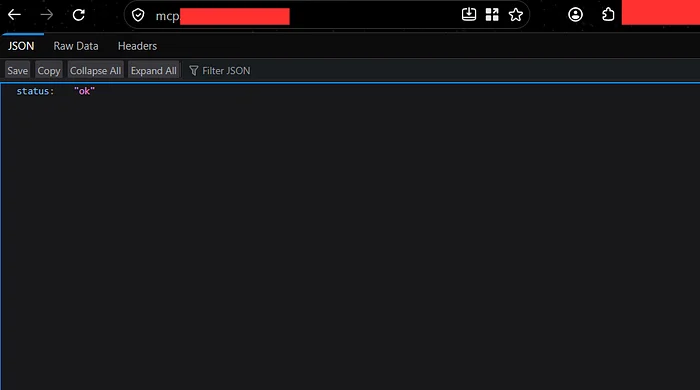
As the researcher notes, this is just a normal status response with no sensitive information and nothing that immediately suggested a vulnerability. It was enough to justify looking further.
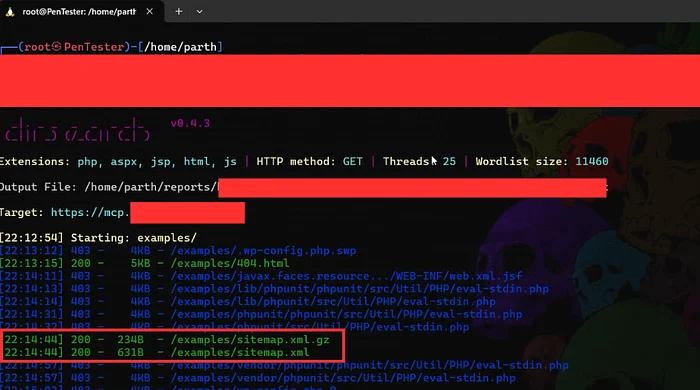
Directory enumeration with dirsearch surfaced accessible resources inside an /examples/ directory:
/examples/sitemap.xml/examples/sitemap.xml.gz
Both sitemap files returned HTTP 200. A sitemap is not a vulnerability in itself, but it can reveal pages that are not linked from the main application, so the researcher opened /examples/sitemap.xml.
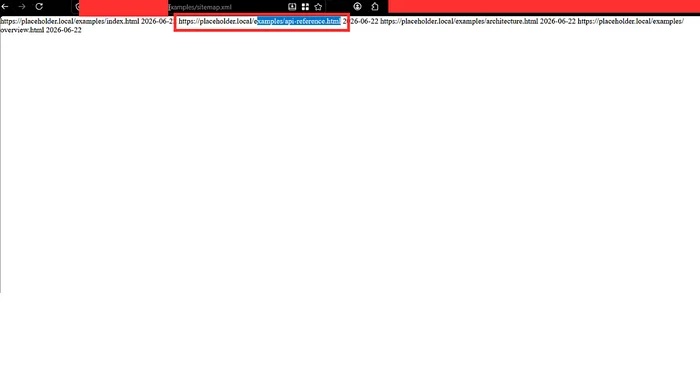
The sitemap exposed several documentation paths. One stood out:
/examples/api-reference.html
It also referenced an architecture page and an overview page. Opening the API reference revealed a complete documentation interface for the MCP service, accessible without logging in, with sections for:
API ReferenceHTTP EndpointsMCP ToolsSkill ResourcesError HandlingAuthenticationRate LimitsResponse Metadata
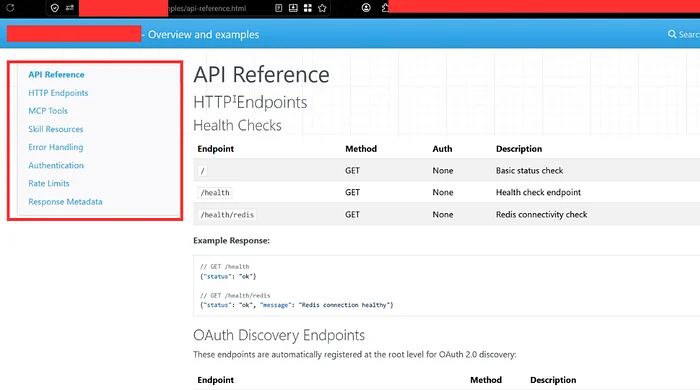
The Authentication section described the OAuth process in detail: client registration, authorisation requests and token exchange. The documented flow was:
POST /mcp/register
GET /mcp/authorize
POST /mcp/token
The authorisation parameters were listed as:
response_typeclient_idredirect_uriscopestatecode_challengecode_challenge_method
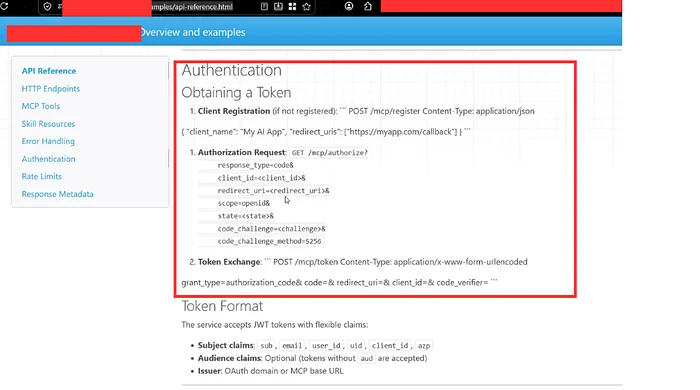
Further down, the documentation described the JWT token format and the accepted subject claims:
subemailuser_iduidclient_idazp
Documenting JWT claims is not a vulnerability by itself, but knowing what an application accepts tells a tester where to look more closely. The API reference also listed operational endpoints:
POST /mcp/registerPOST /mcp/tokenGET /mcp/authorizeGET /mcp/auth/callbackGET /mcp/consent
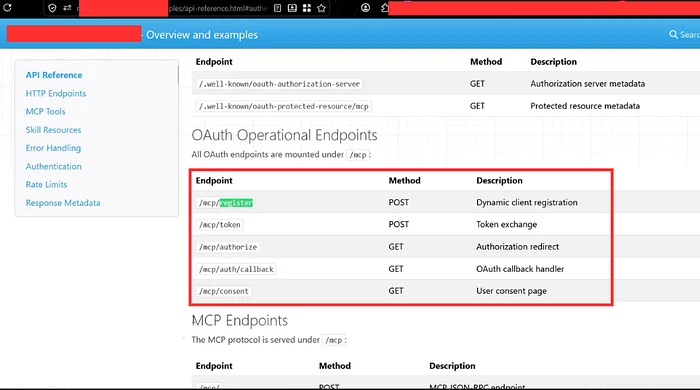
At that point the whole authentication flow was understood without logging into the service. The next step was to see how the backend actually behaved, starting with the registration endpoint described as dynamic client registration. One parameter in particular drew attention:
"redirect_uris": []
This is the value that tells the authorisation server where the browser may return during the OAuth flow. The question the researcher asked was simple: what happens if I register my own client and supply a domain I control as the redirect URI?
Exploitation
Step 1: register a client with an attacker-controlled redirect URI
A registration request was prepared in Burp Suite, using a Burp Collaborator domain so that any connection attempt to it could be observed:
POST /mcp/register HTTP/2Host: REDACTED
{ "client_name": "My AI App", "redirect_uris": [ "https://COLLABORATOR.example/" ]}
The server answered:
HTTP/2 201 Created
and returned a newly generated client ID, client secret and the registered redirect URI:
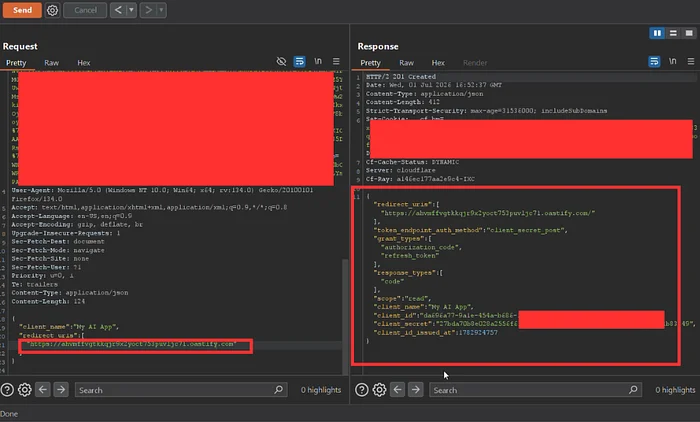
The server accepted the registration and stored the redirect URI exactly as supplied. No authentication was required to register. The researcher's conclusion is that redirect_uri is not being validated.
Step 2: check Collaborator for interactions
After the registration request, Burp Collaborator showed both DNS and HTTP requests associated with the submitted domain. The HTTP interaction was a request to the root path:
GET / HTTP/1.1Host: COLLABORATOR.example
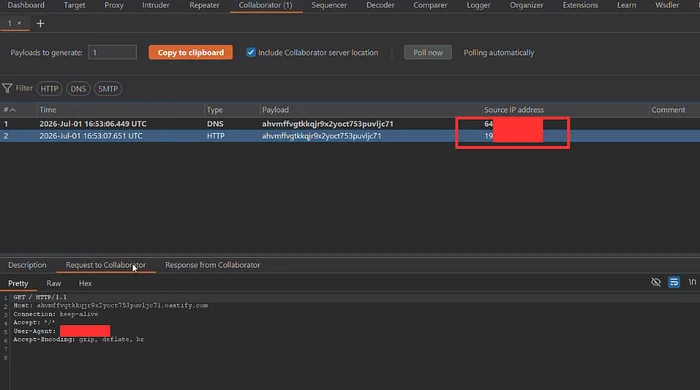
A URL submitted as part of OAuth client registration had caused the application to make network requests to that domain shortly afterwards. In the researcher's reading, the application fetches arbitrary URLs from its own infrastructure without proper restrictions, which is an SSRF vulnerability.
Step 3: drive the authorisation endpoint
With a registered client ID and a callback URL pointing at the Collaborator domain, an authorisation request was constructed against the endpoint found earlier:
/mcp/authorize?response_type=code&client_id=REDACTED&redirect_uri=https://COLLABORATOR.example/&scope=openid&state=TEST&code_challenge=REDACTED&code_challenge_method=S256
The request carries the standard OAuth parameters: response_type=code, the registered client_id, the attacker-supplied redirect_uri, scope=openid, a state value and a PKCE code_challenge with code_challenge_method=S256. Opening it in a browser, the browser eventually reached the callback domain that had been registered.
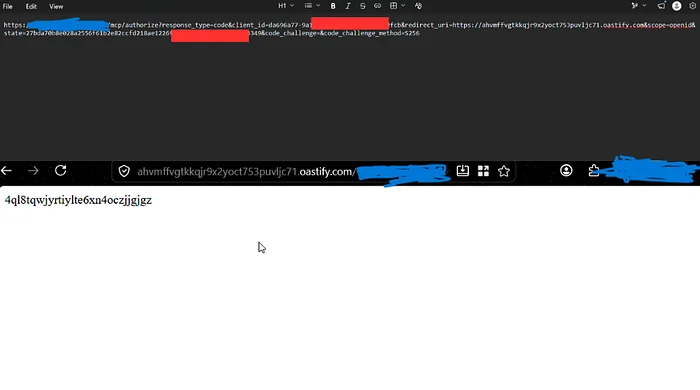
Because the registered callback URL was used during the authorisation flow and redirect_uri was not validated, the researcher states this could be used to steal an authorisation code.
Root cause
The registration endpoint accepted and stored an arbitrary redirect_uris value, and the authorisation endpoint then redirected the browser to the supplied redirect_uri. The report states plainly that redirect_uri is not getting validated. Two consequences follow from the same missing check: the server fetches the supplied URL from its own infrastructure (SSRF), and the authorisation flow will deliver its response to a domain the client controls (redirect-based code theft).
Why the existing defences did not stop it is not described in the report. The registration endpoint required no authentication. Whether any allowlist, ownership check or fetch restriction existed on the backend is not stated.
Impact
An unauthenticated attacker can register an OAuth client whose redirect URI points at infrastructure they control. The report demonstrates two effects. First, the application makes DNS and HTTP requests to that domain from its own infrastructure, which the researcher classifies as SSRF. Second, the authorisation endpoint redirects the browser to the registered callback, which the researcher says could be used to steal an authorisation code. The report does not demonstrate a full token exchange or show a victim's code being captured; it describes the redirect behaviour as confirmed and the code theft as what the flaw could be used for.
Fix
The report does not say what was changed. Based on the described behaviour, the registration endpoint should validate redirect_uris against an allowlist or an ownership check before storing it, and the authorisation endpoint should refuse any redirect_uri that does not exactly match a registered, validated value. The server-side fetching of submitted URLs should be restricted so that registration cannot be used to make the application issue requests to arbitrary hosts.
Variants to test
- Register a client with a redirect URI on a domain you control and watch for out-of-band DNS or HTTP. A positive result is any interaction arriving from the target's infrastructure after registration.
- Register with several redirect URIs in the array, mixing a legitimate-looking host and your own. A positive result is the server storing and later using the attacker entry.
- Try redirect URI variations that bypass naive matching: different subdomains, paths, ports, schemes, and values with userinfo or trailing characters. A positive result is the authorisation endpoint redirecting to a host you control.
- Send an authorisation request with a
redirect_urithat differs from the one registered for thatclient_id. A positive result is the server honouring the new value instead of rejecting the request. - Repeat the registration against other MCP or OAuth deployments that advertise dynamic client registration, and check whether the registration endpoint requires authentication at all. A positive result is an unauthenticated
201 Createdwith your callback stored. - Look for sitemaps and documentation directories under paths such as
/examples/on other targets. A positive result is an API reference reachable without login that documents the authentication flow and its parameters.
What happened, in plain words
A security researcher named Parth Narula was looking around a company's website (the report hides the company's name and calls it REDACTED). He found a service that speaks MCP, the Model Context Protocol. MCP is a way for AI assistants to reach tools and data on a server, a bit like a standard plug socket that lets many different appliances connect to the same wall. This particular service also had a login system for other programs, built on a standard called OAuth.
OAuth is the system behind the "Log in with Google" buttons you have seen. Instead of giving a website your password, you are sent to Google, you approve, and Google sends you back with a short-lived pass. The part that sends you back is called a redirect, and the address you are sent back to is called the redirect URI. If a service lets anyone choose that address without checking it, an attacker can have the pass delivered to a server they own.
That is roughly what happened here. The researcher found the service's public documentation, which described how programs could register themselves and get an identity. He then registered a client and told the service to send its replies to a server he controlled. The service accepted the registration without authentication, and it even made network requests to his server on its own. Finally, he started a login flow and watched the browser end up at his server. He describes this as two problems: the service fetches any address it is given (server-side request forgery, or SSRF), and the login flow can be pointed at an attacker's address, which could let someone steal an authorisation code.
No account or password was needed at any point. The whole story is about a service that trusted input it should have checked.

The starting point: a boring status page
The researcher was doing reconnaissance. Reconnaissance (recon) is the first phase of any security test: looking around, without breaking anything, to see what a target exposes. Think of it as walking around a building before trying any doors, noting which windows are open and which signs are on the wall.
He opened the MCP service in his browser and got this back:
{ "status": "ok"}
Line by line:
- The curly braces
{and}mark a JSON object. JSON is a plain-text way of writing data as labelled values, and it is the format most web services use to talk to each other. "status"is the label (the key). The quotes are part of the format."ok"is the value. It is a piece of text (a string), again in quotes.- The colon separates the label from the value.
So the service is saying, in machine-readable form, "I am running". That is all. The researcher says plainly that there was no sensitive information in this response and nothing that immediately suggested a vulnerability.
Why keep going, then? Because a live service is a place to look. A status page tells you the address is real and the software is up, which is enough reason to map what else lives on the same server.
Finding hidden folders with dirsearch
He ran a tool called dirsearch. Directory enumeration tools work by trying a long list of common folder and file names against a website and reporting which ones answer. It is like trying every key on a big keyring in a lock, one after another, and noting which ones turn.
One result stood out: a folder called /examples/ was reachable, and inside it were two sitemap files:
/examples/sitemap.xml/examples/sitemap.xml.gz
Line by line:
/examples/sitemap.xmlis a path on the website. The leading slash means "from the root of the site".sitemap.xmlis a file that lists other pages, normally so search engines can find them./examples/sitemap.xml.gzis the same file compressed with gzip (the.gzending), which makes it smaller to download.
Both returned HTTP 200. HTTP is the language browsers and servers use to talk, and every reply carries a three-digit status code. 200 means "here you go, success". 404 means "not found". 403 means "forbidden". Seeing 200 on both files meant they really existed and anyone could download them.
A sitemap is not a vulnerability. It is a normal, helpful file. But as the researcher points out, it can reveal pages that are not linked from the main application, which makes it a useful map during recon.
The sitemap leads to the documentation
He opened /examples/sitemap.xml and found several documentation paths. One caught his eye:
/examples/api-reference.html
Line by line:
/examples/is the same folder as before.api-reference.htmlis a web page (.html) that documents an API.
An API (Application Programming Interface) is the set of addresses and rules one program uses to talk to another. If a website is a restaurant's dining room, the API is the kitchen door where orders are handed in. An API reference is the menu: it lists what you can order and what information you must provide.
The sitemap also mentioned an architecture page and an overview page. Those are documentation pages too, describing how the system is built and what it does.
A full manual, open to everyone
He opened the API reference and found a complete documentation interface for the MCP service, reachable without logging in. It had sections for:
API ReferenceHTTP EndpointsMCP ToolsSkill ResourcesError HandlingAuthenticationRate LimitsResponse Metadata
Line by line, these are the headings of the manual:
API Reference: the main list of API calls.HTTP Endpoints: the individual web addresses (endpoints) the service answers on. An endpoint is one specific door in the building, with its own address and its own rules.MCP Tools: the tools the AI side can use through the service.Skill Resources: resources related to skills.Error Handling: what error replies look like.Authentication: how callers prove who they are.Rate Limits: how many requests you may make in a period.Response Metadata: extra information attached to replies.
For a beginner, the important point is this: the manual was public. Documentation is not a bug by itself, but it tells a tester exactly which doors exist and what each one expects, which saves a lot of guessing.
The Authentication section explains the whole login flow
The researcher then opened the Authentication section, because that is where identity is decided. It described the OAuth process in detail: client registration, authorisation requests and token exchange. In plain terms:
- A client is a program that wants to act on a user's behalf, for example an app that wants to read your files.
- Registration is the client introducing itself and receiving an identity.
- An authorisation request is the client asking the user to approve access.
- Token exchange is swapping the approval for a token, which is a short string that acts like a temporary pass.
The documented flow was three steps:
POST /mcp/register
GET /mcp/authorize
POST /mcp/token
Line by line:
POST /mcp/register: POST is an HTTP method used to send data to the server, like handing in a form./mcp/registeris the address. This is where a client signs up.GET /mcp/authorize: GET is the method a browser uses when you type an address or click a link; it asks for something. This is where the user is asked to approve access.POST /mcp/token: this is where the approval is exchanged for a token.
The documentation also listed the parameters the authorisation request accepts:
response_typeclient_idredirect_uriscopestatecode_challengecode_challenge_method
Line by line:
response_type: what kind of answer the client wants. The valuecodemeans "give me an authorisation code", a one-time string that can later be swapped for a token.client_id: the identity the client received when it registered.redirect_uri: the address the browser should be sent back to afterwards. This is the parameter that matters most in this story.scope: what access is being requested, for example just a login identity.state: a value the client makes up and expects to see again, used to tie the reply to the request that started it.code_challengeandcode_challenge_method: part of PKCE (Proof Key for Code Exchange), a protection where the client sends a scrambled value up front and must later prove it knows the original. It stops a stolen code from being useful to someone else.
Further down, the documentation described the JWT token format and the claims it accepts as the subject:
subemailuser_iduidclient_idazp
Line by line:
- A JWT (JSON Web Token) is a token that carries information inside it, in a signed, readable format. Think of a stamped, tamper-evident envelope rather than an opaque key.
- A claim is one labelled fact inside that token.
subis short for subject: who the token is about.email,user_id,uidare different labels a system might use to identify a person.client_ididentifies the program.azpis short for authorised party, the client the token was issued to.
As the researcher says, documenting JWT claims is not automatically a vulnerability. But knowing what a system accepts tells you where to look more closely.
The API reference also listed operational endpoints:
POST /mcp/registerPOST /mcp/tokenGET /mcp/authorizeGET /mcp/auth/callbackGET /mcp/consent
Line by line:
POST /mcp/register: sign up a client.POST /mcp/token: exchange an approval for a token.GET /mcp/authorize: ask the user to approve.GET /mcp/auth/callback: the address the browser comes back to after approval.GET /mcp/consent: the page where the user agrees to the access.
At this point the researcher understood the entire authentication flow without ever logging in. That is the value of reading documentation carefully: it is a map of the system's behaviour, drawn by the system's own authors.
From reading to testing
Reading was only the beginning. He wanted to see how the backend actually behaved, because documentation describes intent and the running code decides reality. The two can differ, and the gap between them is where bugs live.
He went back to this endpoint:
POST /mcp/register
The documentation called it dynamic client registration. "Dynamic" means a program can register itself automatically, without a human setting it up in advance. That is convenient, and it also means the server must decide, on its own, whether to trust what it is told.
One parameter drew his attention:
"redirect_uris": []
Line by line:
"redirect_uris"is the label. Theurisending means it holds a list of URIs. A URI is an address, and a URL is the common kind of URI you type in a browser.[]is an empty list in JSON. Square brackets mean list, and nothing between them means no entries yet.
This is the value that tells the authorisation server where the browser may return during the OAuth flow. The researcher's question was simple: what if I register my own client and supply a domain I control as the redirect URI?
Step 1: registering a client with an address he controls
He used Burp Suite, a tool that sits between the browser and the server so you can read and edit every request. He also used a Burp Collaborator domain. Collaborator gives you a unique domain name that you own for testing, and it records any DNS lookup or web request that arrives at it. DNS is the internet's phone book: it turns a name like example.com into the numeric address of a server. If something looks up your Collaborator name, Collaborator tells you, even if the connection never completes. It is a tripwire.
He prepared this request:
POST /mcp/register HTTP/2Host: REDACTED
Line by line:
POST /mcp/registeris the method and address: send data to the registration endpoint.HTTP/2is the version of the HTTP protocol being used. Version 2 is a newer, more efficient version of the same conversation.Host: REDACTEDis a header. Headers are extra labelled lines that travel with a request, like the notes on a parcel.Hosttells the server which site name the request is for, because one server can host many sites. The report hides the real name.
And this body:
{ "client_name": "My AI App", "redirect_uris": [ "https://COLLABORATOR.example/" ]}
Line by line:
- The outer braces make this one JSON object, the data being submitted.
"client_name": "My AI App"gives the client a display name. It is just a label."redirect_uris"is the list of return addresses.- The square brackets hold the list, and inside is one entry.
"https://COLLABORATOR.example/"is the address he controls.httpsis the encrypted version of the web protocol, and the trailing slash is the root of that site.
He used a Collaborator domain so that he could observe whether anything tried to connect to it. Then he sent the request. The server answered:
HTTP/2 201 Created
Line by line:
HTTP/2is the protocol version of the reply.201is the status code meaning "created": the server made a new thing, here a new client registration.Createdis the human-readable name for that code.
And the reply body contained a newly generated client ID, client secret and the registered redirect URI:
Line by line:
client_idis the public name of the new client, like a username for a program.client_secretis the matching private password. The report hides both values.redirect_urisrepeats the list he submitted, which shows the server stored exactly what he sent.
The server accepted the registration and stored the redirect URI he supplied. No authentication was required to register. His conclusion is that redirect_uri is not being validated. Validation here means checking the value against a rule, for example "only addresses on our own domain are allowed". Without that check, the server believes whatever it is told.
Step 2: the tripwire goes off
After the registration request, he checked Burp Collaborator. There were interactions: both DNS and HTTP requests associated with the domain he had submitted. The HTTP interaction was a request to the root path:
GET / HTTP/1.1Host: COLLABORATOR.example
Line by line:
GET /asks for the root page of the site, the front door.HTTP/1.1is the protocol version used for this particular request.Host: COLLABORATOR.examplesays which site name the request is for, which is how Collaborator knows it was aimed at his domain.
What does this mean? A URL he submitted as part of OAuth client registration had caused the application to make network requests to that domain shortly afterwards. In other words, the server read his address and went to fetch it itself. The researcher's reading is that the application fetches arbitrary URLs from its own infrastructure without proper restrictions, which is an SSRF vulnerability.
SSRF stands for server-side request forgery. The everyday comparison: imagine a company's receptionist who will, on request, phone any number you give them and read out what the other side says. You cannot reach the internal phone lines yourself, but the receptionist can. SSRF is that: the server is tricked into making requests on the attacker's behalf, from a position of trust inside the network.
Step 3: following the login flow to his own server
He was not finished. With a registered client ID and a callback URL pointing at the Collaborator domain, he built an authorisation request against the endpoint he had found earlier:
/mcp/authorize?response_type=code&client_id=REDACTED&redirect_uri=https://COLLABORATOR.example/&scope=openid&state=TEST&code_challenge=REDACTED&code_challenge_method=S256
Line by line:
/mcp/authorizeis the address of the authorisation endpoint.- The
?marks the start of the query string, the part of a URL that carries parameters. response_type=codeasks for an authorisation code as the answer.client_id=REDACTEDidentifies the client he registered.redirect_uri=https://COLLABORATOR.example/is the address he wants the browser sent to afterwards.scope=openidasks for the basic identity scope, the one used for "log in with" style access.state=TESTis a value he made up, which the server should echo back so the client can match the reply to its request.code_challenge=REDACTEDis the scrambled PKCE value.code_challenge_method=S256says the scrambling used SHA-256, a standard hashing function.- The
&characters separate the parameters.
He opened it in his browser. The browser eventually reached the callback domain that he had registered.
Because the registered callback URL was used during the authorisation flow and redirect_uri was not validated, the researcher states this could be used to steal an authorisation code. An authorisation code is a one-time string that can be swapped for a token. If it is delivered to an attacker's server, the attacker can try to exchange it for access. The report describes the redirect behaviour as confirmed and the code theft as what the flaw could be used for; it does not show a full token exchange or a real victim's code being captured.
Why it worked
The registration endpoint accepted and stored an arbitrary redirect_uris value, and the authorisation endpoint then redirected the browser to the supplied redirect_uri. The report states plainly that redirect_uri is not getting validated. Two consequences follow from the same missing check: the server fetches the supplied URL from its own infrastructure (SSRF), and the authorisation flow will deliver its response to a domain the client controls (redirect-based code theft).
Why the existing defences did not stop it is not described in the report. The registration endpoint required no authentication. Whether any allowlist, ownership check or fetch restriction existed on the backend is not stated.
What an attacker could do with it
An unauthenticated attacker can register an OAuth client whose redirect URI points at infrastructure they control. The report demonstrates two effects. First, the application makes DNS and HTTP requests to that domain from its own infrastructure, which the researcher classifies as SSRF. Second, the authorisation endpoint redirects the browser to the registered callback, which the researcher says could be used to steal an authorisation code. The report does not demonstrate a full token exchange or show a victim's code being captured; it describes the redirect behaviour as confirmed and the code theft as what the flaw could be used for.
How it should be fixed
The report does not say what was changed. Based on the described behaviour, the registration endpoint should validate redirect_uris against an allowlist or an ownership check before storing it, and the authorisation endpoint should refuse any redirect_uri that does not exactly match a registered, validated value. The server-side fetching of submitted URLs should be restricted so that registration cannot be used to make the application issue requests to arbitrary hosts.
An allowlist is the opposite of a blocklist: instead of listing what is forbidden, you list exactly what is permitted and reject everything else. For redirect addresses, that means only addresses the service already knows and trusts.
Variants to test
If you want to look for the same pattern on other targets, these are variations worth trying:
- Register a client with a redirect URI on a domain you control and watch for out-of-band DNS or HTTP. A positive result is any interaction arriving from the target's infrastructure after registration.
- Register with several redirect URIs in the array, mixing a legitimate-looking host and your own. A positive result is the server storing and later using the attacker entry.
- Try redirect URI variations that bypass naive matching: different subdomains, paths, ports, schemes, and values with userinfo or trailing characters. A positive result is the authorisation endpoint redirecting to a host you control.
- Send an authorisation request with a
redirect_urithat differs from the one registered for thatclient_id. A positive result is the server honouring the new value instead of rejecting the request. - Repeat the registration against other MCP or OAuth deployments that advertise dynamic client registration, and check whether the registration endpoint requires authentication at all. A positive result is an unauthenticated
201 Createdwith your callback stored. - Look for sitemaps and documentation directories under paths such as
/examples/on other targets. A positive result is an API reference reachable without login that documents the authentication flow and its parameters.
"Out-of-band" means the signal arrives by a different route than the main request, here through Collaborator rather than in the reply you are reading. "Userinfo" is the optional user:password@ part some URLs allow before the host, which naive matching often mishandles.
Lessons learned
Recon can reveal much more than you expect: a normal status endpoint might not be interesting by itself, but exploring related directories and documentation can uncover functionality that deserves further testing.
Read the API documentation carefully: API references can reveal endpoints, authentication flows, parameters and features that are not immediately visible through the main application.
Do not stop at the frontend: when you discover an API endpoint, understand how it works and check how the backend handles the parameters you control.
Glossary
- API (Application Programming Interface): the set of addresses and rules one program uses to talk to another; the menu of what you can ask for.
- API reference: documentation listing an API's endpoints, parameters and behaviour.
- Authorisation code: a one-time string issued after a user approves access, later swapped for a token.
- Authorisation endpoint: the address where a user is asked to approve a client's request for access.
- Allowlist: a list of things that are permitted, with everything else rejected.
- Burp Collaborator: a service that gives you a domain you control and records DNS and HTTP requests arriving at it, used to detect out-of-band interactions.
- Burp Suite: a tool that sits between browser and server so requests can be read and edited.
- Callback: the address a browser is sent to after an action, here after approval.
- Claim: one labelled fact inside a JWT, such as who the token is about.
- Client (OAuth): a program that wants to act on a user's behalf.
- Client ID: the public identifier a registered client receives.
- Client secret: the private password that matches a client ID.
- Code challenge / PKCE: a protection where the client sends a scrambled value up front and must later prove it knows the original, so a stolen code is less useful.
- DNS: the internet's phone book, turning names into server addresses.
- Dynamic client registration: a feature letting a program register itself automatically instead of being set up by a human.
- Endpoint: one specific address a service answers on, with its own rules.
- GET: the HTTP method used to ask for something, as when you open a link.
- Header: an extra labelled line travelling with an HTTP request or reply.
- Host header: the header naming which site a request is for.
- HTTP: the language browsers and servers use to exchange requests and replies.
- HTTP status code: the three-digit number in a reply, such as 200 (success), 201 (created), 403 (forbidden) or 404 (not found).
- JSON: a plain-text format for writing data as labelled values.
- JWT (JSON Web Token): a token carrying signed, readable information inside it.
- MCP (Model Context Protocol): an interface layer AI clients use to reach tools and resources on a server.
- OAuth: a standard for granting a program limited access without sharing a password.
- Out-of-band: a signal that arrives by a different route than the main request, such as a DNS lookup seen by Collaborator.
- Parameter: a named value in a request, usually in the query string of a URL or in the body.
- POST: the HTTP method used to send data to a server.
- Query string: the part of a URL after
?, carrying parameters separated by&. - Reconnaissance (recon): the first phase of a security test, looking around to see what a target exposes.
- Redirect: sending a browser from one address to another.
- Redirect URI: the address a browser is sent back to during an OAuth flow.
- Scope: what access a client is asking for.
- Sitemap: a file listing a site's pages, normally for search engines.
- SSRF (server-side request forgery): tricking a server into making requests on the attacker's behalf from inside its own network.
- State: a value a client makes up and expects echoed back, tying a reply to its request.
- Token: a short string acting as a temporary pass.
- URI / URL: an address; a URL is the common kind you type in a browser.
- Validation: checking a value against a rule before trusting it.
- dirsearch: a tool that tries many common folder and file names against a website and reports which answer.

