Exposed Source Code Archive (ekinerja.zip)
A publicly accessible backup archive at the web root contained the application's full source code, a .env file with the APP_KEY and database credentials, and a database dump with bcrypt password hashes. An attacker could use these to connect to the database, crack passwords, and decrypt session cookies, potentially leading to account takeover.

medium.com
Published on medium.com
Bug Hunter
The full write-up lives on its author's site
It belongs to its author, so we link to it rather than copy it. The other two tabs are our own rewrites, checked against it.
Context
The target is a public service portal belonging to the Government of Kabupaten [REDACTED], reachable at ekinerja.redactedkab.go.id. The exposed artefact is a source code archive named ekinerja.zip sitting in the web root. Nothing in the report describes the application's features beyond that; the relevant fact is that the archive was served as a static file by the web server, with no access control in front of it.
The vulnerability class is sensitive information disclosure through an exposed source code archive. The archive contained the full application source, a .env configuration file and a database dump.
Setup
The researcher was performing reconnaissance and vulnerability testing against the portal on 14 November 2025. The report does not list any accounts, roles, tool versions or special preconditions: the only requirement was network access to the host and a browser. Directory fuzzing was the technique that surfaced the file.
Finding it
While fuzzing directories on the target, the researcher found that an archive named ekinerja.zip was publicly accessible. A backup archive in the web root is wrong for two reasons: it is not part of the application's intended public surface, and its contents (source, configuration, database exports) are exactly the material an attacker wants. The application did not block access to the file, so anyone who knew or guessed the path could download it.
Exploitation
Step 1: Access the backup file
The researcher opened the path in a browser:
https://ekinerja.redactedkab.go.id/ekinerja.zip
The browser downloaded ekinerja.zip automatically. No authentication, token or special header was involved; the web server simply returned the archive.
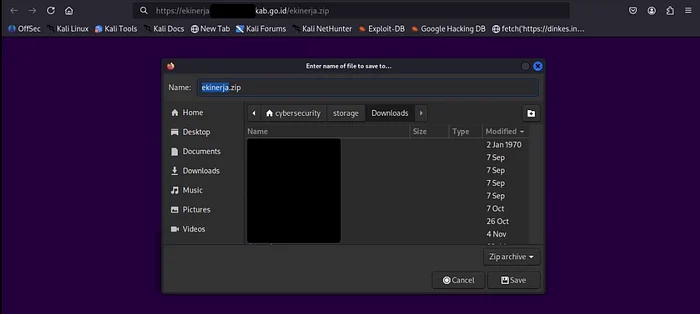
The screenshot shows the archive path being accessed and the .zip file downloading.
Step 2: Extract and analyse .env
After extracting the archive, the researcher opened the .env file in a text editor. It contained the APP_KEY and the database credentials, unsanitised in the original file (the researcher masked them before publishing).
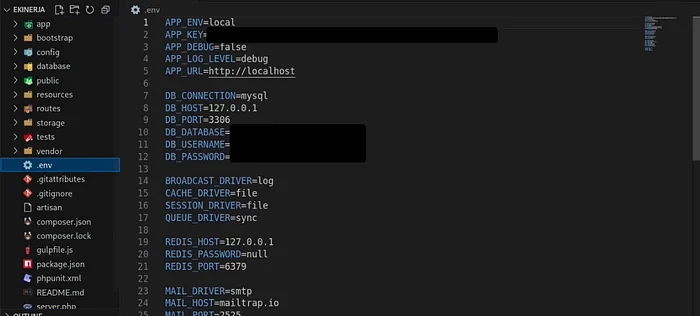
The screenshot shows the contents of .env with APP_KEY and the database credentials, redacted by the author.
Step 3: Analyse the database dump
The archive also contained database/kinerja.sql. Inside it, INSERT INTO users statements carry bcrypt password hashes for many users, including the administrator account.
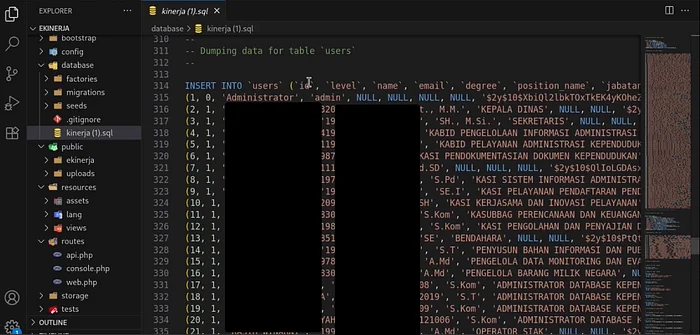
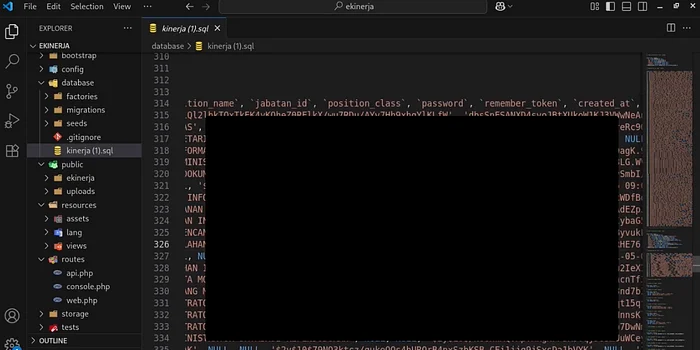
The screenshots show the INSERT INTO users statements in the dump with the bcrypt hashes.
Step 4: Verify the fix
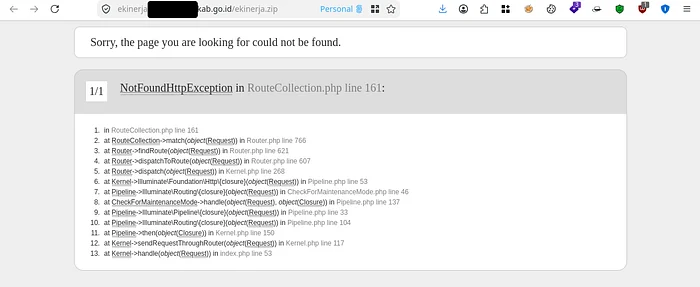
After the report, the affected party appears to have fixed the issue silently. At the time of re-checking, the archive was no longer reachable and returned 404 Not Found. The verification was carried out on 16 October 2026.
Root cause
The mistake is operational and configuration-level: a backup archive was left in a directory served by the web server, and the server was not configured to refuse requests for it. The report does not describe any application code that should have prevented this, and it does not say which web server or framework version was in use. The report does not say why the server served the archive.
Impact
The report rates the issue High and lists four consequences:
- Database compromise. The credentials in
.envcould be used to connect directly to the database and read, modify or delete all data. - Password cracking. The leaked bcrypt hashes could be cracked with tools such as Hashcat; a successful crack gives access to user accounts, including the administrator's.
- Session and cookie decryption via
APP_KEY. With theAPP_KEY, an attacker could decrypt other users' session cookies, leading to account takeover. - Further information disclosure. The source code could be analysed to find other weaknesses such as SQL injection or RCE.
These outcomes depend on the leaked material remaining valid: the database credentials being reachable from the attacker's position, the hashes resisting or yielding to cracking, and the APP_KEY still being in use.
Fix
The fix was applied silently: the archive now returns 404. Its recommendations are:
- Remove backup files from the web root. Never keep archives (
.zip,.tar.gz,.sql) in a publicly reachable directory. - Block access to sensitive files. Add web server rules that deny requests for
.env,.sql,.zipand other backup files. - Rotate credentials. Because the database credentials and
APP_KEYwere exposed, replace them, and reset the passwords of users whose hashes leaked.
Variants to test
- Common backup names in the web root. Request names such as
backup.zip,www.zip,site.tar.gzanddb.sqlat the root and in application subdirectories. A positive result is a 200 response with an archive or SQL content type rather than an HTML error page. - Framework-specific artefacts. Request
.env,.env.bakand similar configuration files directly. A positive result is a body containing key-value configuration such asAPP_KEYorDB_entries. - Directory listing on upload and backup folders. Request directories that commonly hold exports. A positive result is an auto-generated index listing archive or dump files.
- Source archives referenced in build or deployment leftovers. Look for names matching the application or project, as
ekinerja.zipdid here. A positive result is a downloadable archive whose extraction reveals application source. - Post-fix regression check. Re-request the previously exposed path after a fix. A positive result is anything other than 404, which would indicate the file or the access rule was restored or bypassed.
What happened, in plain words
A government website for a district (kabupaten) in Indonesia hosted an application whose source code archive was left publicly reachable. Somewhere on the server that hosts that website, someone had left a compressed archive of the whole application, named ekinerja.zip, in a folder that the web server hands out to anyone who asks. The archive was not protected by a login or a password. Anyone who typed the right address into a browser could download it.
Inside that archive were three things that should never have been public: the complete source code of the application, a configuration file called .env holding secret keys and the username and password for the database, and a database export (kinerja.sql) containing user records, including scrambled (hashed) passwords for many accounts, among them the administrator's.
The researcher who found it reported it on 14 November 2025. Nobody replied. Almost a year later, on 16 October 2026, the researcher checked again and the file was gone: the address now returned "404 Not Found", which is the web's way of saying "there is nothing here". The problem had been fixed quietly, without any confirmation to the person who reported it.
This article walks through the same story for someone who has never done security work: what each piece of jargon means, why each step was taken, and what the risk was.
Background you need first
Before the steps make sense, a handful of everyday ideas need to be clear. Each one is explained the first time it matters, and all of them are collected again in the glossary at the end.
A web server and a web root. When you visit a website, your browser asks a computer (the web server) for a page. The server keeps the site's files in a folder on its disk, and the top folder of that collection is called the web root. Anything placed in the web root, or in folders below it, can normally be fetched by anyone on the internet who knows its address. That is the whole point of a web root: it is the public shelf of the website.
A URL and a path. The address you type, like https://example.com/some/file.zip, has two parts that matter here. The first part (https://example.com) says which server to talk to. The part after the slash (/some/file.zip) is the path, and it tells the server which file on its shelf you want. If a file sits at that path, the server usually just sends it.
Static files. Some things a website serves are produced on the fly by a program, for example your account page, which is built fresh for you after you log in. Other things are simply files sitting on disk: images, PDFs, and archives. These are called static files, and the server hands them out without asking who you are, unless someone has deliberately set up a rule to stop it. A backup archive is a static file.
An archive (.zip). A zip file is a container that holds many files squeezed into one, like a box packed for moving. You download one file and, once you open (extract) it, you get the whole folder structure back. That is exactly why a zip in a public folder is dangerous: one download can hand over hundreds of files at once.
Source code. The instructions that make up a program, written by its developers. It is the recipe of the application. Normally the public only ever sees the finished dish (the web pages); the recipe stays on the developers' own computers and on the server in a form visitors cannot read. If the recipe leaks, outsiders can study exactly how the site was built and look for weak spots.
A configuration file and .env. Programs need settings: which database to talk to, what password to use, which secret key to sign things with. These settings are often kept in a small text file named .env (short for "environment"). Think of it as the keyring of the application: small, boring to look at, and catastrophic to lose. The leading dot in the name is a convention that marks the file as hidden on many systems, but hiding is not protecting: if the file is in a public folder, the server will still hand it over.
APP_KEY. A long random string an application uses as its master secret, for example to encrypt and decrypt things it stores about its users. If someone else learns it, they can unlock whatever the application locked with it.
A database and database credentials. A database is the organised store where a website keeps its records: user accounts, orders, staff data. To use it, the application must log in to it, with a username and password (together called credentials). Those credentials are usually written in the .env file so the application can find them at startup. If an outsider gets them, the outsider can log in to the database directly, without going through the website at all.
A database dump. A dump is a single file containing a copy of a database's contents, written out as a long list of commands that would recreate it. It is the standard way to back up or move a database. A dump named kinerja.sql is a text file full of such commands.
A password hash. Websites should not store passwords as plain text, because anyone who steals the store would instantly have everyone's password. Instead they store a hash: the result of running the password through a one-way mathematical scramble. You can turn a password into its hash easily, but you cannot turn the hash back into the password. When you log in, the site scrambles what you typed and compares the result with the stored hash. bcrypt is one well-known scrambling method, designed to be slow so that guessing is expensive. Hashes are much safer than plain passwords, but not perfectly safe: an attacker can still guess passwords one by one, scramble each guess and see if it matches. That process is called cracking.
Reconnaissance and directory fuzzing. Reconnaissance is the information-gathering phase: looking around a target before trying anything. Fuzzing means trying many candidate inputs quickly and automatically. Directory fuzzing means asking the server for a long list of plausible file and folder names (common backup names, common configuration names) and watching which ones come back with something other than "not found". It is like walking along a row of lockers trying every handle to see which ones are unlocked. The researcher was doing this when the archive turned up.
Sensitive information disclosure. This is the name of the weakness class in this story. It simply means that information which should have stayed private was handed out to anyone who asked. Nothing was broken into and no clever trick was used; the door was simply open.
Severity and "High". Security reports rate findings by how much damage they could cause. The report rates this one High, because the leaked material could lead to account takeover and database compromise.
404 Not Found. The standard answer a web server gives when there is no file at the requested path. Seeing it after a fix is a good sign: the file is no longer being served.
Silent fix. When a problem is repaired without the organisation telling the reporter. The hole is closed, but nobody confirms it, and the reporter only finds out by checking again.
The target and the setup
The target was a public service portal of the Government of Kabupaten [REDACTED], reachable at ekinerja.redactedkab.go.id. The application is an e-kinerja system, that is, software for managing staff performance. The report does not describe the application's features beyond that. What matters is one fact: the archive was served as a static file by the web server, with no access control in front of it.
The researcher was doing reconnaissance and vulnerability testing against the portal on 14 November 2025. No accounts, roles, tool versions or special conditions were needed: the only requirements were network access to the host and a browser. Directory fuzzing is what surfaced the file.
Finding it
While fuzzing directories on the target, the researcher found that an archive named ekinerja.zip was publicly accessible. A backup archive in the web root is wrong for two reasons: it is not part of what the application means to show the public, and its contents (source code, configuration, database exports) are exactly the material an attacker wants. The application did not block access to the file, so anyone who knew or guessed the path could download it.
Step by step
Step 1: Access the backup file
The researcher opened the path in a browser:
https://ekinerja.redactedkab.go.id/ekinerja.zip
Line by line, in plain words:
https://is the secure version of the web's addressing scheme. It says: talk to this server over an encrypted connection.ekinerja.redactedkab.go.idis the name of the server. The ending.go.idis the country-level domain for Indonesia, andredactedkabstands in for the district's name, which the report withholds./ekinerja.zipis the path: the name of the file being asked for, sitting at the top of the public shelf.
The browser downloaded ekinerja.zip automatically. No login, token or special header was involved; the web server simply returned the archive. This is the heart of the finding: the request was an ordinary one that any visitor could make, and the server answered it like any other file download.
The screenshot shows the archive path being accessed and the .zip file downloading.
Why this step was taken: to confirm that the file really was reachable from the open internet, with nothing in front of it. A path that appears in a fuzzing result is only a lead; downloading the file turns the lead into proof.
Step 2: Extract and analyse .env
After extracting the archive, the researcher opened the .env file in a text editor. It contained the APP_KEY and the database credentials, unsanitised in the original file (the researcher masked them before publishing).
The screenshot shows the contents of .env with APP_KEY and the database credentials, redacted by the author.
Why this step was taken: the archive alone proves that source code leaked, but the .env file is where the keys to everything else live. Opening it answers the question "how bad is this?": with the APP_KEY and the database credentials in hand, an attacker would not need to find a flaw in the website at all. They could go around it. The researcher blanked out the values in the published screenshot so that readers of the article could not use them.
Step 3: Analyse the database dump
The archive also contained database/kinerja.sql. Inside it, INSERT INTO users statements carry bcrypt password hashes for many users, including the administrator account.
The screenshots show the INSERT INTO users statements in the dump with the bcrypt hashes.
Why this step was taken: the .env shows how to reach the database, and the dump shows what is inside it without needing to connect at all. INSERT INTO users is the database instruction that adds a row to the table called users, the table of accounts. In a dump, these instructions appear once per account, each carrying that account's stored password hash. Seeing them confirms that the leaked material includes account secrets, not just settings, and that the administrator's account is among them.
Step 4: Verify the fix
After the report, the affected party appears to have fixed the issue silently. At the time of re-checking, the archive was no longer reachable and returned 404 Not Found. The verification was carried out on 16 October 2026.
Why this step was taken: a report is only useful if you can say whether the problem still exists. Requesting the same path again is the simplest possible test. A 404 means the server no longer has anything to hand out at that address, so the download is no longer possible.
Why it happened
The mistake is operational and configuration-level: a backup archive was left in a directory served by the web server, and the server was not configured to refuse requests for it. The report does not describe any application code that should have prevented this, and it does not say which web server or framework version was in use.
In everyday terms: the public shelf had a box on it that should have stayed in the back room, and nobody had put up a sign saying "do not hand this box to visitors".
What could have gone wrong
The report rates the issue High and lists four consequences:
- Database compromise. The credentials in
.envcould be used to connect directly to the database and read, modify or delete all data. In plain words: instead of using the website, an attacker could walk straight into the records room and do as they liked. - Password cracking. The leaked bcrypt hashes could be cracked with tools such as Hashcat; a successful crack gives access to user accounts, including the administrator's. In plain words: guessing passwords offline, at high speed, until one guess matches a stored hash.
- Session and cookie decryption via
APP_KEY. With theAPP_KEY, an attacker could decrypt other users' session cookies, leading to account takeover. A session cookie is the small piece of data your browser keeps after you log in, so the site recognises you on the next page; it works like a wristband at an event. If someone can read or forge yours, they can act as you. Account takeover means exactly that: someone else getting into your account. - Further information disclosure. The source code could be analysed to find other weaknesses such as SQL injection or RCE. SQL injection is a way of sneaking database commands into a website's input fields; RCE (remote code execution) means getting the server to run commands of the attacker's choosing. Both are serious, and both are easier to find when you can read the code.
These outcomes depend on the leaked material remaining valid: the database credentials being reachable from the attacker's position, the hashes resisting or yielding to cracking, and the APP_KEY still being in use.
The fix and what to do about it
The fix was applied silently: the archive now returns 404. Its recommendations are:
- Remove backup files from the web root. Never keep archives (
.zip,.tar.gz,.sql) in a publicly reachable directory. In everyday terms: do not store the moving boxes on the shop floor. - Block access to sensitive files. Add web server rules that deny requests for
.env,.sql,.zipand other backup files. This is the sign on the shelf: even if a file ends up in the wrong place, the server refuses to hand it over. - Rotate credentials. Because the database credentials and
APP_KEYwere exposed, replace them, and reset the passwords of users whose hashes leaked. Rotating means issuing new secrets and retiring the old ones, so that anything copied by an outsider stops working.
Other things worth trying
These are variations on the same idea, useful when testing a site you are allowed to test:
- Common backup names in the web root. Request names such as
backup.zip,www.zip,site.tar.gzanddb.sqlat the root and in application subdirectories. A positive result is a 200 response with an archive or SQL content type rather than an HTML error page. (A 200 response is the web's "here you go".) - Framework-specific artefacts. Request
.env,.env.bakand similar configuration files directly. A positive result is a body containing key-value configuration such asAPP_KEYorDB_entries. - Directory listing on upload and backup folders. Request directories that commonly hold exports. A positive result is an auto-generated index listing archive or dump files. (A directory listing is a page the server builds itself, showing every file in a folder, like a table of contents nobody meant to publish.)
- Source archives referenced in build or deployment leftovers. Look for names matching the application or project, as
ekinerja.zipdid here. A positive result is a downloadable archive whose extraction reveals application source. - Post-fix regression check. Re-request the previously exposed path after a fix. A positive result is anything other than 404, which would indicate the file or the access rule was restored or bypassed.
Glossary
- 404 Not Found: the standard web server answer meaning there is no file at the requested path.
- 200 response: the standard web server answer meaning the request succeeded and the content follows.
- Account takeover: a situation where someone else gains control of a user's account.
- APP_KEY: a long random secret string an application uses to encrypt and decrypt data, such as session cookies.
- Archive: a single file that packs many files together, such as a
.zip. - bcrypt: a password hashing method designed to be slow, so that guessing passwords is expensive.
- Configuration file: a small text file holding an application's settings, such as database details and secret keys.
- Credentials: a username and password pair used to log in to something, here the database.
- Cracking: guessing passwords repeatedly, hashing each guess and comparing it with a stolen hash until one matches.
- Database: the organised store where a website keeps its records, such as user accounts.
- Database dump: a single file containing a copy of a database's contents, written as commands that would recreate it.
- Directory fuzzing: automatically requesting a long list of plausible file and folder names to see which ones exist.
- Directory listing: a page generated by a server that shows every file in a folder.
.env: the conventional name of an application's configuration file, holding secrets such asAPP_KEYand database credentials.- Fuzzing: trying many candidate inputs quickly and automatically.
- Hash: the result of a one-way scramble of a value such as a password; easy to compute, impractical to reverse.
INSERT INTO users: the database instruction that adds a row to the table of user accounts.- Path: the part of a URL after the server name that says which file or page is wanted.
- RCE (remote code execution): getting a server to run commands chosen by an attacker.
- Reconnaissance: the information-gathering phase before attempting anything against a target.
- Rotate: replace a secret with a new one and retire the old, so copied secrets stop working.
- Session cookie: a small piece of data your browser keeps after logging in so the site recognises you on later pages.
- Severity: a rating of how much damage a weakness could cause; this report rates the issue High.
- Silent fix: a repair made without telling the person who reported the problem.
- Sensitive information disclosure: a weakness where information that should be private is handed out to anyone who asks.
- Source code: the instructions written by developers that make up a program.
- SQL injection: sneaking database commands into a website's input fields.
- Static file: a file sitting on the server's disk that is handed out as-is, without being built for the visitor.
- URL: the address you type to reach something on the web.
- Web root: the top folder of a website's files, whose contents are normally reachable by anyone.
- Web server: the computer (and its software) that answers browser requests and sends back pages and files.



