File Upload to RCE
The upload filter could be bypassed to upload a PHP file, and although many commands were blocked, using popen and fgets allowed command execution. An attacker could run arbitrary commands on the server, leading to full compromise.
 Published on ahmed8magdy.medium.com
code HTML and JS and some PHP work but all parameter not work it is rce but all Commands block but is OK…
The full write-up lives on its author's site
It belongs to its author, so we link to it rather than copy it. The other two tabs are our own rewrites, checked against it.
Context
This is a write-up of a file upload vulnerability that led to remote code execution on a private bug bounty program. The researcher refers to the target as example.com or subdomain.domain because the program was private. The affected feature is the profile photo upload: a user can upload an image to their profile, and the application stores it and serves it back from an uploads path.
The report does not name the product, the framework, the server software or any version. What it does show is that uploaded files are served from a predictable path of the form example.com/uploads/<user id>/<filename>, and that a file whose name ends in .php is executed by the server rather than returned as static content.
Setup
No special tooling is described. The researcher had an account on the private program with access to the profile photo upload feature, and used that feature as the entry point. Two friends, Abdalla Tarek and Flex, are credited with help during the investigation. No versions, roles or additional accounts are mentioned.
Finding it
The starting point was ordinary behaviour: uploading a normal photo through the profile page worked, and the profile was updated successfully.
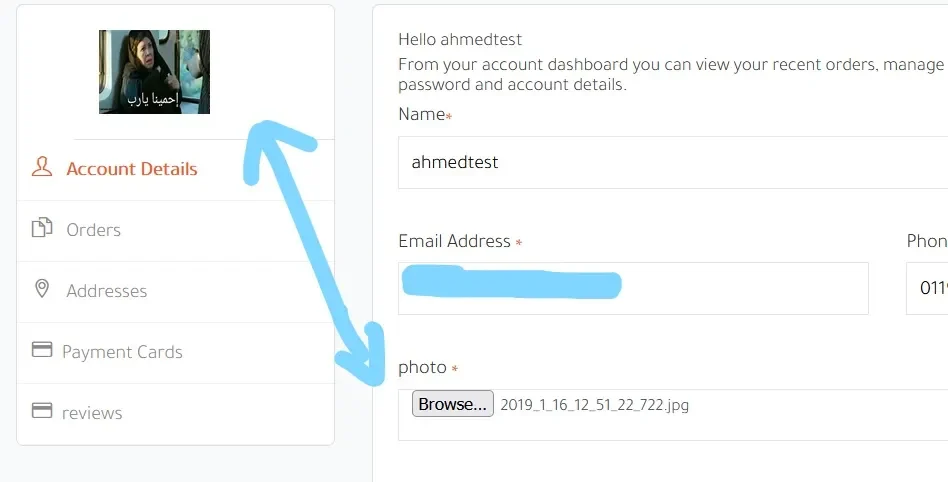
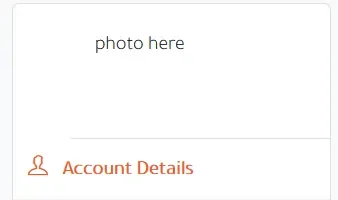
The researcher then tried a file that was not a plain image, and it did not work: the browser could not display the result because it contained errors.

That failure is what made the upload handling worth probing. After bypassing the filter, the upload worked again and the profile was updated successfully.
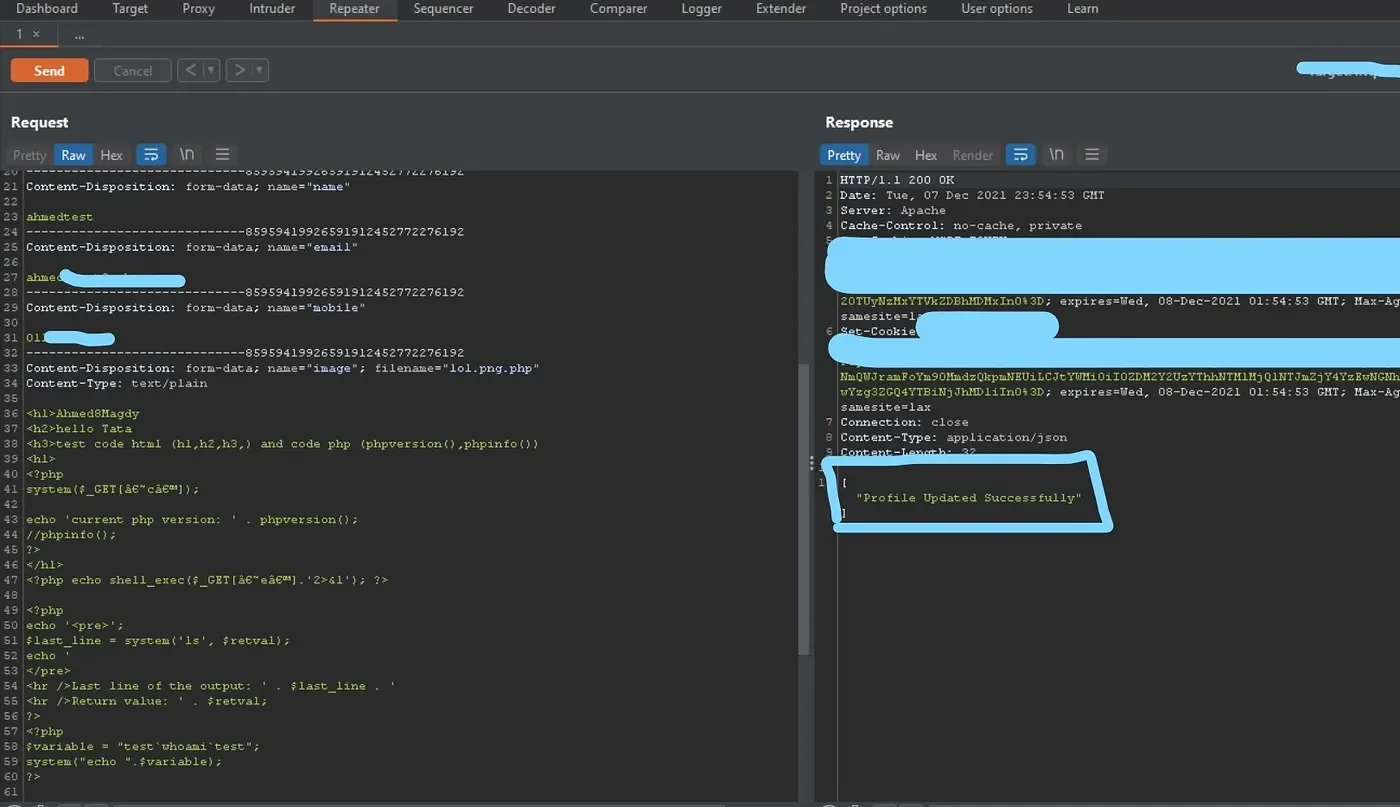
The report does not describe the filter itself or the exact bypass technique used to get past it, so the specific trick is not available here. What matters for the rest of the write-up is that a file with a .php extension could be placed in the uploads directory and reached over HTTP.
Exploitation
Step 1: confirm that uploaded PHP executes
Once the filter was bypassed, the uploaded file was reachable at a URL of this shape, with the user id in the path and a c parameter carrying the command:
example.com/uploads/(ids user)/lol.png.php?c=ls;id;whoami;
The double extension lol.png.php is the interesting part: the name still looks like an image, but the final .php is what the server acts on. The c parameter carries the command in the URL.
Step 2: map what the payload can and cannot do
Not everything worked. Some code inside the uploaded file executed and some did not.
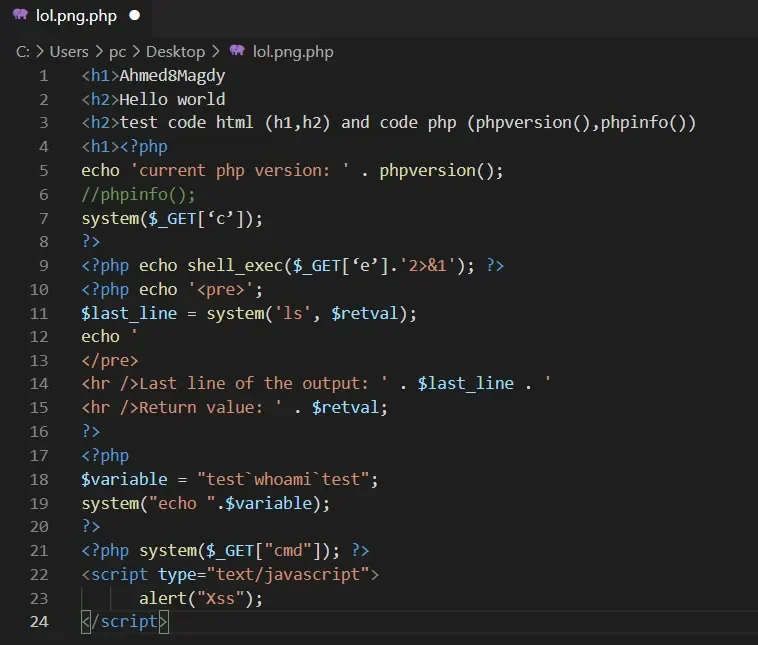
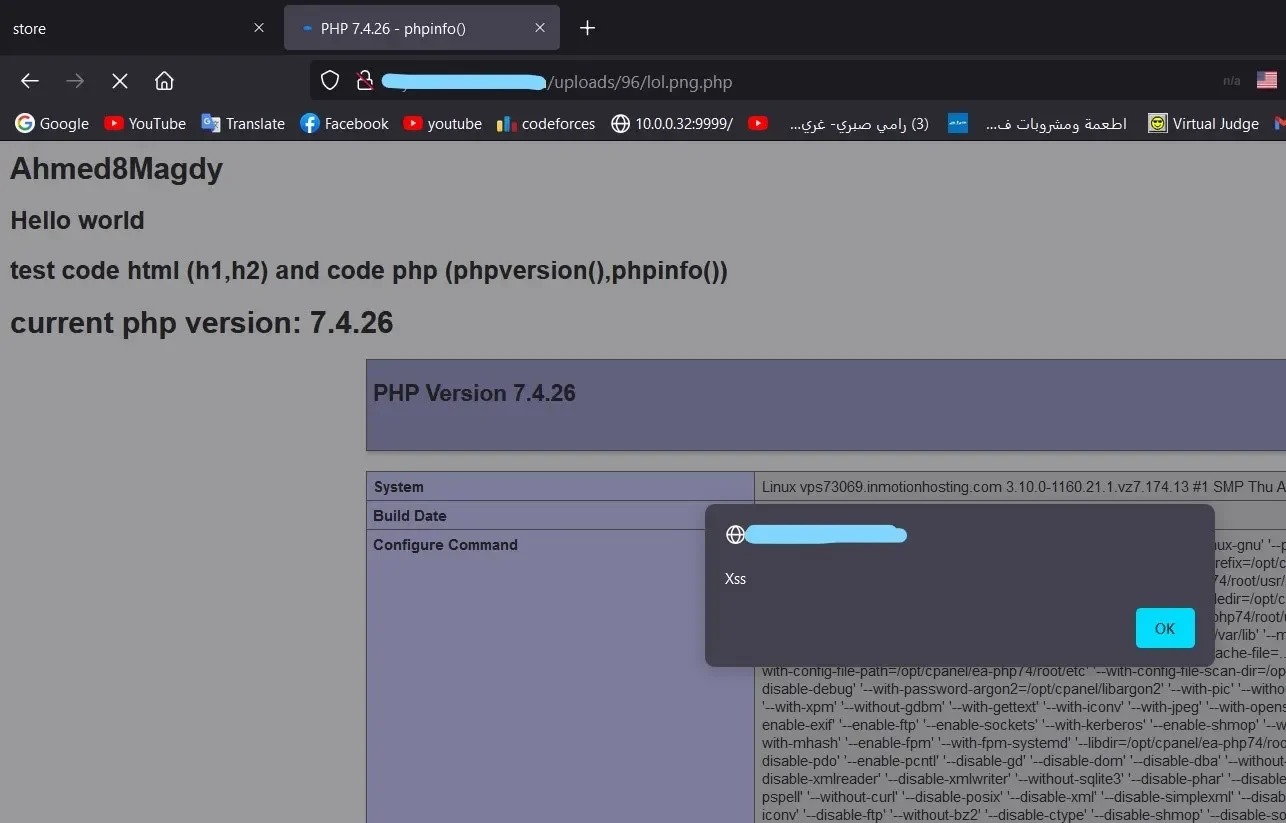
HTML and JavaScript, and some PHP, worked, but parameters did not.
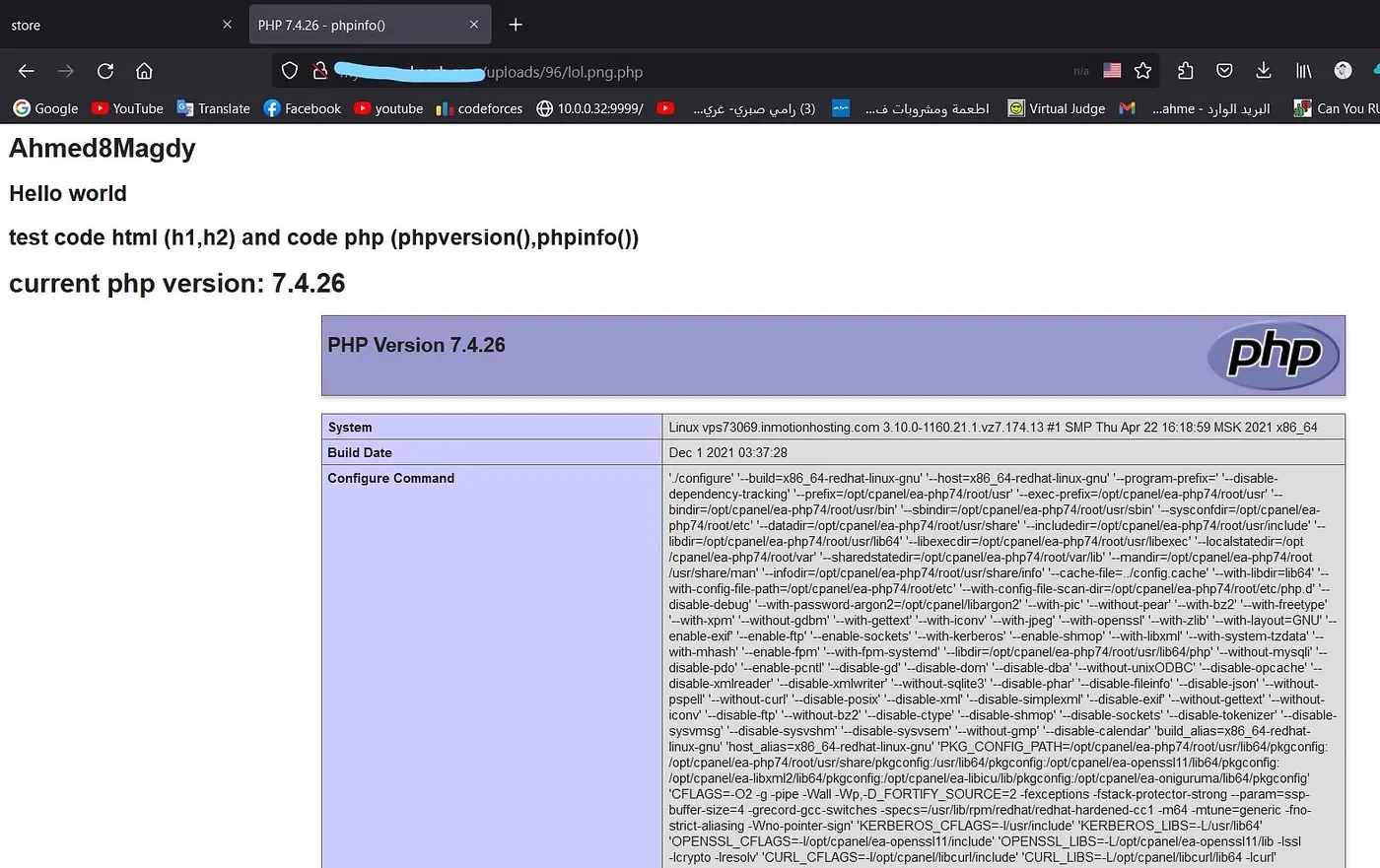
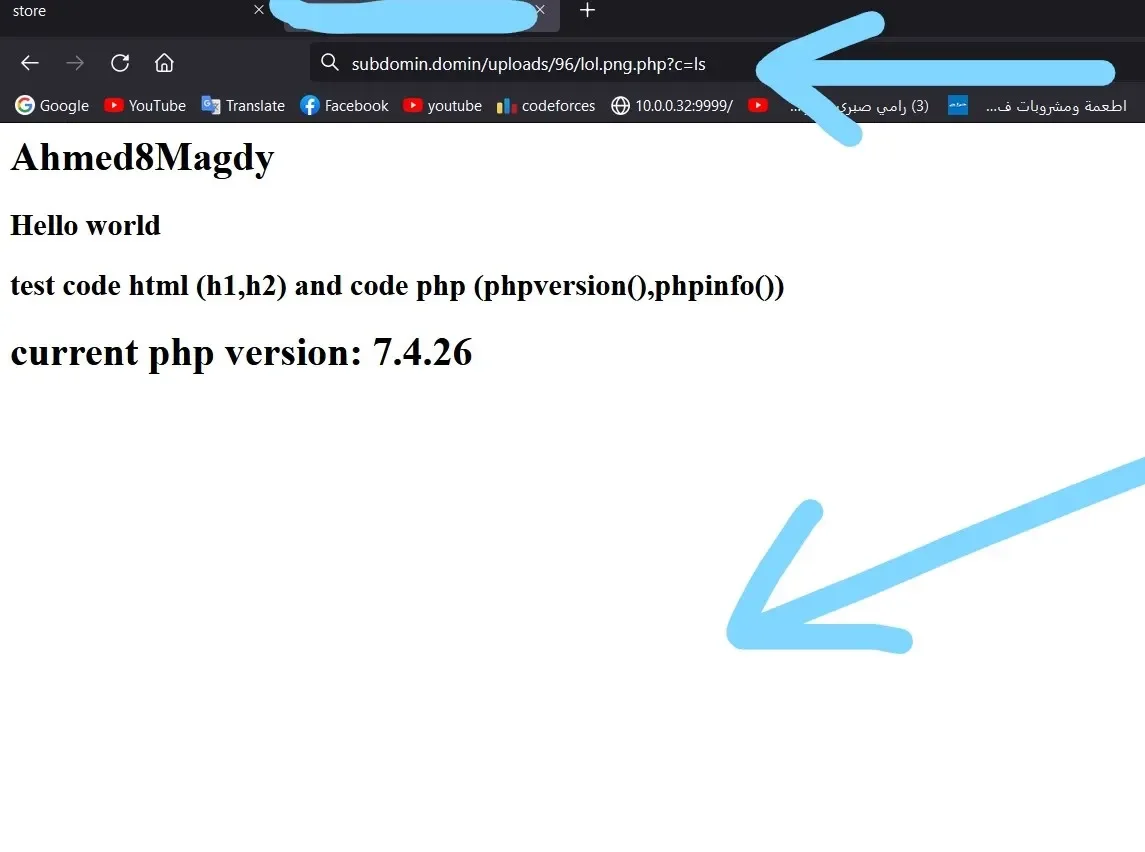
Commands passed through the parameter were blocked. The researcher's summary of this stage is that it was RCE, but all commands were blocked. Even so, the ability to run phpinfo() was enough to report the issue, initially at severity P2.

Step 3: find a way around the command blocking
After two more days of searching, the researcher asked Abdalla Tarek and Flex for help with the issue.

Flex provided the solution.
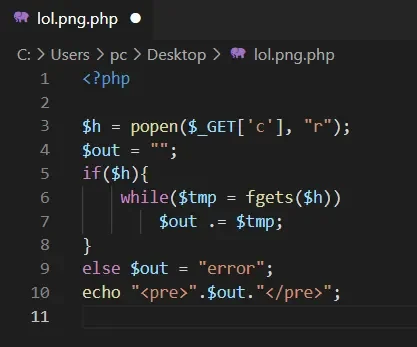
The approach relies on two PHP functions:
popen(command, $mode)opens a pipe to a process executed by forking the command given bycommand. The report's example is<?php $h = popen("ls","r");?>.fgets(file, length)returns a line from an open file. The report's example is:
$handle = fopen("inputfile.txt", "r");if ($handle) { while (($line = fgets($handle)) !== false) { // process the line read.} fclose($handle);}else {error opening the file.}
Using these two lines, the site responded and worked. Writing more than 20 lines, by contrast, did not work: the site did not react to the longer payload.

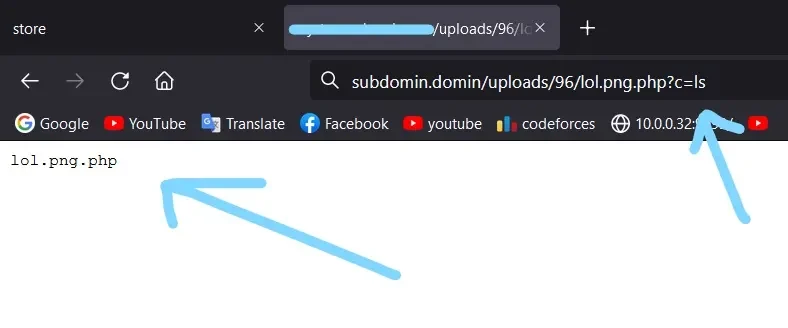
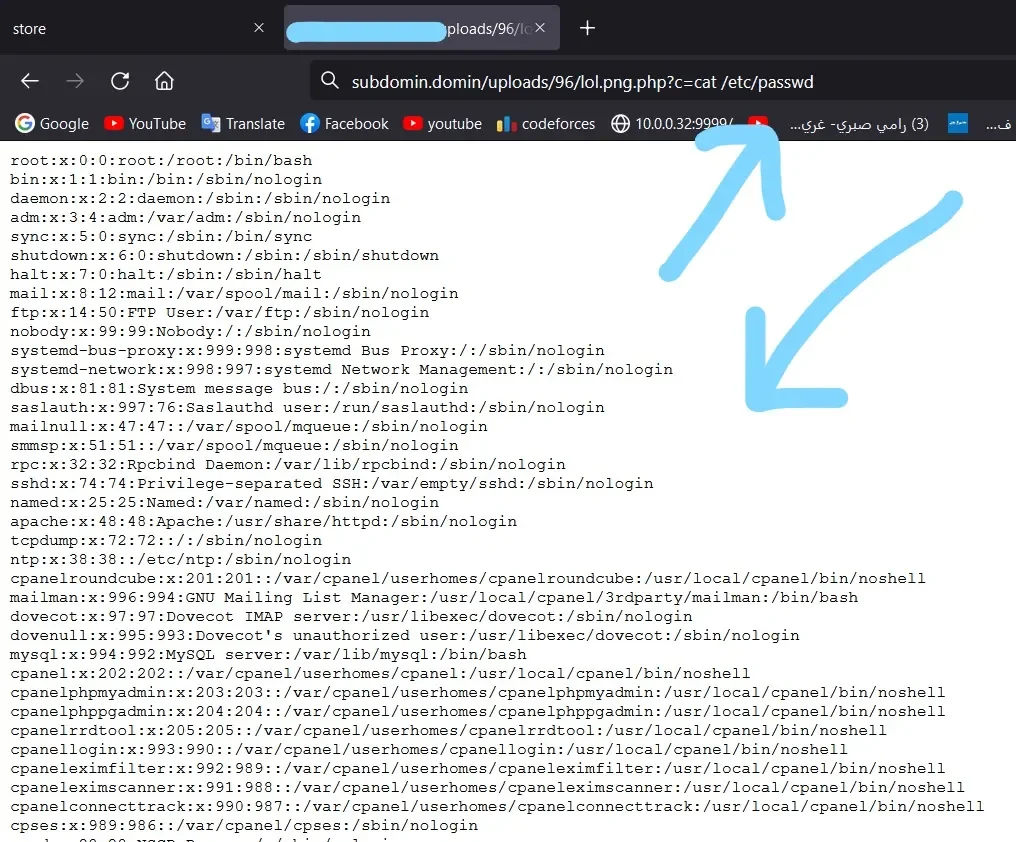
The report shows a request of the form:
example.com/uploads/96/lol.png.php?c=cat /etc/passwd
The report shows this request as the final proof of command execution.

The researcher reported the issue as RCE, and the severity became P1.
Root cause
The upload endpoint accepted a file whose name ended in .php and stored it inside a web-served directory, so the server executed it instead of serving it as an image. The command parameter was blocked, which is why plain commands failed at first; the popen/fgets pair was Flex's suggested approach.
Impact
An authenticated user with access to the profile photo upload could place a PHP file on the server and execute commands through it. In the researcher's testing, direct command parameters were blocked, but phpinfo() and, after the workaround, cat /etc/passwd both executed. The severity was ultimately rated P1.
Fix
Based on the behaviour shown, the upload handling should reject executable extensions, store uploads outside the web root or serve them through a handler that never executes them, and validate file content rather than relying on a bypassable name filter. The report does not confirm which of these, if any, was implemented.
Variants to test
- Double extensions such as
lol.png.phpon any image upload feature. A positive result is the file being served and executed at its uploads URL. - Uploads reachable at a predictable path containing a user id. A positive result is that you can fetch your uploaded file directly and it runs.
- A command parameter on the uploaded script. A positive result is command output in the response; a blocked parameter suggests a filter worth probing with alternative PHP functions such as
popenandfgets. - Payload length. The report notes that short payloads worked and a payload of more than 20 lines did not, so testing payload size against the filter is worthwhile.
phpinfo()as a low-impact proof. A positive result is the PHP configuration page rendering from the uploads path, which confirms execution without needing command output.
What happened, in plain words
A security researcher found a way to upload a file to a website's profile photo feature and then make the server run that file as a program. This is called a file upload vulnerability, and when it lets you run commands on the server it is called remote code execution, or RCE for short.
The site was part of a private bug bounty program. A bug bounty program is an arrangement where a company invites researchers to look for security problems and pays them for reporting them responsibly. Because the program was private, the researcher could not name the company, so the write-up calls the target example.com or subdomain.domain.
The feature involved is the profile photo upload. On many websites you can pick an image from your computer and upload it so it appears on your profile. The website saves the file somewhere on its server and then shows it back to you when someone views your profile. Normally that is all it does: store a picture, show a picture.
The problem here was that the server would also run certain uploaded files as code instead of just showing them. The researcher worked out how to get past the check that was supposed to stop this, uploaded a file that the server would execute, and eventually got the server to run commands and return their output. The report does not name the product, the framework, the server software or any version numbers.
Background ideas you need first
Before following the steps, here are a few ideas that come up again and again.
A server is the computer that holds a website and answers requests from your browser. When you type an address, your browser sends a request to the server, and the server sends back a page, an image or an error.
A URL is the address of something on the web, like example.com/uploads/96/lol.png.php. The part after the domain, here /uploads/96/lol.png.php, is the path. It tells the server which file or page you want.
A parameter is a small piece of information added to the end of a URL after a question mark. In example.com/page?c=hello, the parameter is named c and its value is hello. Websites use parameters to pass choices around, such as which page number to show or which search term you typed. The URL in this story carries a parameter called c whose value is a command.
A file extension is the ending of a filename, like .jpg for a photo or .php for a PHP script. The extension is a hint to the server about what kind of file it is and how to handle it.
PHP is a programming language commonly used to build websites. A file ending in .php is not shown to the visitor as text; the server runs it as a program and sends back whatever the program produces. That is the whole danger in this story: if you can upload a .php file into a place the server treats as runnable, the server will run your program.
A filter is a check that inspects what you send and rejects anything that looks disallowed. A photo upload might have a filter that only accepts files ending in .jpg or .png. Filters are useful, but they can be imperfect, and finding a way past one is called a bypass.
Remote code execution (RCE) means an attacker can make the server run commands or code of their choosing. It is one of the most serious kinds of web vulnerability because the attacker is no longer limited to what the website's pages offer; they are talking to the machine itself.
A command here means an instruction to the operating system, such as ls (list files in a folder), id (show which user you are) or whoami (show your username). If a website lets you run commands, you can ask the server to do things the website never intended.
Severity is a label for how serious a bug is. Bug bounty programs often use labels like P1 for the most serious and P2, P3 and so on for lesser issues. The exact scale is up to the program.
The starting point: a normal upload
The researcher had an account on the private program and used the profile photo upload like any ordinary user. Uploading a normal photo worked, and the profile page confirmed the update.
The first image accompanies the normal photo upload, and the second the successful profile update. Nothing unusual yet: this is the baseline. You establish what normal looks like before you try anything strange, so that when something behaves differently you know it is your change that caused it.
Trying something that is not a plain image
Next the researcher tried a file that was not a normal image. It did not work: the browser could not display the result because it contained errors.
That failure is the interesting part. A photo upload that quietly accepts anything is one kind of problem; a photo upload that rejects something is telling you a check exists. Once you know a check exists, the natural question is what exactly it checks and whether it can be fooled. The report does not describe the filter itself or the exact technique used to get past it, so the specific trick is not available here.
After bypassing the filter, the upload worked again and the profile was updated successfully.
What matters for the rest of the story is that a file whose name ends in .php could be placed in the uploads folder and reached over the web. In other words, the server would not merely hand the file back as a picture; it would run it.
Step 1: confirm that an uploaded PHP file runs
Once the filter was bypassed, the uploaded file could be reached at a URL of this shape, with the user id in the path and a c parameter carrying the command:
example.com/uploads/(ids user)/lol.png.php?c=ls;id;whoami;
Line by line:
example.comis the site, standing in for the real private target./uploads/(ids user)/is the folder where uploaded files are stored. The(ids user)part is a placeholder for the user's numeric id, so each user's uploads sit in their own folder. The report later shows a real example with96in that position.lol.png.phpis the uploaded filename. It has two extensions. The name still looks like an image because of.png, but the final.phpis what the server acts on. This is called a double extension, and it is a common way to slip an executable file past a check that only looks at part of the name.?c=starts the parameter namedc. The uploaded script reads this value and treats it as a command.ls;id;whoami;is the value.lslists files,idshows the current user and groups, andwhoamishows the current username. The semicolons separate the three commands so they run one after another.
The reason for trying this is simple: if the server runs the file, the file can run commands, and the output comes back in the page. That would turn a photo upload into remote code execution.
Step 2: work out what the payload can and cannot do
Not everything worked. Some code inside the uploaded file executed and some did not.
HTML and JavaScript, and some PHP, worked, but parameters did not.
Commands passed through the parameter were blocked. The researcher's summary of this stage is that it was RCE, but all commands were blocked. Even so, the ability to run phpinfo() was enough to report the issue, initially at severity P2.
A word on phpinfo(): it is a standard PHP function that prints a long page describing the PHP installation, including settings and configuration. It does not read private files or run operating system commands, so it is a low-impact way to prove that your uploaded file is really being executed by the server. If that page appears when you request your uploaded file, you have proof of code execution without needing to do anything more intrusive. That is why the researcher could report the issue even while the command parameter was blocked.
Step 3: getting around the command blocking
After two more days of searching, the researcher asked two friends, Abdalla Tarek and Flex, for help with the issue.
Flex provided the solution.
The approach relies on two PHP functions.
popen(command, $mode)opens a pipe to a process executed by forking the command given bycommand. A pipe is a channel that carries the output of one program so another program can read it. In plain terms,popenstarts a command and gives you a handle you can read from. The report's example is<?php $h = popen("ls","r");?>.fgets(file, length)returns a line from an open file. The report's example is:
$handle = fopen("inputfile.txt", "r");if ($handle) { while (($line = fgets($handle)) !== false) { // process the line read.} fclose($handle);}else {error opening the file.}
Line by line for the fgets example:
$handle = fopen("inputfile.txt", "r");opens a file namedinputfile.txtfor reading ("r") and keeps a handle to it in a variable called$handle. A handle is like a bookmark that lets you refer to the open file later.if ($handle) {checks that the file really opened. If opening failed, the handle would be false and the code would skip to theelse.while (($line = fgets($handle)) !== false) {reads one line at a time from the open file. Each call tofgetsreturns the next line, or false when there are no more lines. The loop keeps going until it hits false.// process the line read.is a comment: a note for humans that the program ignores. It marks where you would do something with each line.fclose($handle);closes the file when the loop is done.else {error opening the file.}is the branch taken when the file could not be opened.
Put together, popen starts a command and fgets reads its output line by line. The researcher's point is that using these two lines, the site responded and worked. Writing more than 20 lines, by contrast, did not work: the site did not react to the longer payload.
The report shows a request of the form:
example.com/uploads/96/lol.png.php?c=cat /etc/passwd
Line by line:
example.com/uploads/96/lol.png.phpis the uploaded file, this time with96as the user id folder, showing the predictable path shape in practice.?c=is the parameter the script reads.cat /etc/passwdis the command.catprints the contents of a file, and/etc/passwdis a standard file on Unix-like systems that lists user accounts. Reading it is a classic, harmless way to prove you can read files on the server.
The report shows this request as the final proof of command execution.
The researcher reported the issue as RCE, and the severity became P1.
Why it worked
The upload feature accepted a file whose name ended in .php and stored it inside a folder that the web server serves to visitors. Because the server treats .php files as programs, it ran the file instead of handing it back as an image. The command parameter was blocked, which is why plain commands failed at first; the popen/fgets pair was Flex's suggested approach.
What it means in practice
An authenticated user with access to the profile photo upload could place a PHP file on the server and execute commands through it. In the researcher's testing, direct command parameters were blocked, but phpinfo() and, after the workaround, cat /etc/passwd both executed. The severity was ultimately rated P1.
How it should be fixed
Based on the behaviour shown, the upload handling should reject executable extensions, store uploads outside the web root or serve them through a handler that never executes them, and validate file content rather than relying on a bypassable name filter. The report does not confirm which of these, if any, was implemented.
Things worth trying on other sites
- Double extensions such as
lol.png.phpon any image upload feature. A positive result is the file being served and executed at its uploads URL. - Uploads reachable at a predictable path containing a user id. A positive result is that you can fetch your uploaded file directly and it runs.
- A command parameter on the uploaded script. A positive result is command output in the response; a blocked parameter suggests a filter worth probing with alternative PHP functions such as
popenandfgets. - Payload length. The report notes that short payloads worked and a payload of more than 20 lines did not, so testing payload size against the filter is worthwhile.
phpinfo()as a low-impact proof. A positive result is the PHP configuration page rendering from the uploads path, which confirms execution without needing command output.
Glossary
- Server: the computer that stores a website and answers requests from browsers.
- URL: the address of a page, file or resource on the web.
- Path: the part of a URL after the domain that points to a specific file or page.
- Parameter: a named value added to a URL after a question mark, used to pass information to the server.
- File extension: the ending of a filename, such as
.jpgor.php, that hints at the file type. - PHP: a programming language widely used to build websites;
.phpfiles are run by the server rather than shown as text. - Filter: a check that inspects input and rejects anything that looks disallowed.
- Bypass: a way of getting past a check or filter.
- Remote code execution (RCE): a vulnerability that lets an attacker make the server run code or commands of their choosing.
- Command: an instruction to the operating system, such as listing files or showing the current user.
- Severity: a label for how serious a bug is, often P1 for the most serious and P2, P3 and so on for lesser issues.
- Bug bounty program: an arrangement where a company invites researchers to find and report security problems, often with a reward.
- Private program: a bug bounty program that only invited researchers can take part in, so the target cannot be named publicly.
- Double extension: a filename with two extensions, such as
lol.png.php, where the last one is what the server acts on. phpinfo(): a PHP function that prints a page describing the PHP installation; useful as low-impact proof that code is executing.popen: a PHP function that starts a command and gives you a handle to read its output.fgets: a PHP function that reads one line at a time from an open file or handle.- Pipe: a channel that carries the output of one program so another program can read it.
cat: a command that prints the contents of a file./etc/passwd: a standard file on Unix-like systems listing user accounts, often used to prove file read access.ls,id,whoami: commands that list files, show the current user and groups, and show the current username.- Web root: the folder on a server whose contents are served to visitors over the web.


