Finding Single Page Apps and endpoints backed by APIs inside a Main Web App
Two API vulnerabilities were found: an IDOR that leaked user profile data via a userName parameter, and an information disclosure plus privilege escalation that exposed admin user lists and allowed creating a new admin account. An attacker could access sensitive personal information and gain full administrative control of the application.
 Published on bendtheory.medium.com
While hunting for bugs on Main Web Apps, I encounter tons of interesting APIs. Some are well secured, obscurely documented, and keep you in your lane despite attempts to poke and prod.
The full write-up lives on its author's site
It belongs to its author, so we link to it rather than copy it. The other two tabs are our own rewrites, checked against it.
Context
This is an account of two API vulnerabilities found on a private bug bounty program, both inside Single Page Apps that sit within a large main web app. The target is a big site made up of many separate apps, each with its own functionality and its own API, and each secured to a different standard. The researcher had been working the same program for almost a year and was still finding new APIs by repeating the same enumeration techniques.
The two findings are an IDOR that leaked user profile data and an information disclosure that chained into privilege escalation to admin. The first paid $1000 and the second paid $3000. The techniques in between are presented as generic enough to apply to other targets when hunting for IDORs, privilege escalation and information disclosure in APIs.
Setup
The work is done from an authenticated and an unauthenticated browser session, with all traffic captured in Burp. The main tools and extensions are:
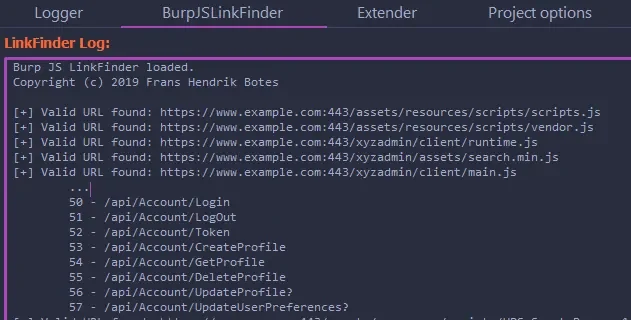
- BurpJSLinkFinder, a Burp extension that parses links out of JavaScript files. The researcher keeps it on and checks it constantly while navigating a target.
- burplist.py, a small Python 2 script the researcher wrote to turn a Burp project into a custom wordlist.
- ffuf and dirsearch for directory brute forcing, the latter with its default wordlist.
- gau, qsreplace, httpx, kiterunner and the standalone LinkFinder Python script for command line recon.
- Intruder in Burp for the actual attacks.
- urlscan.io as an additional source of URLs.
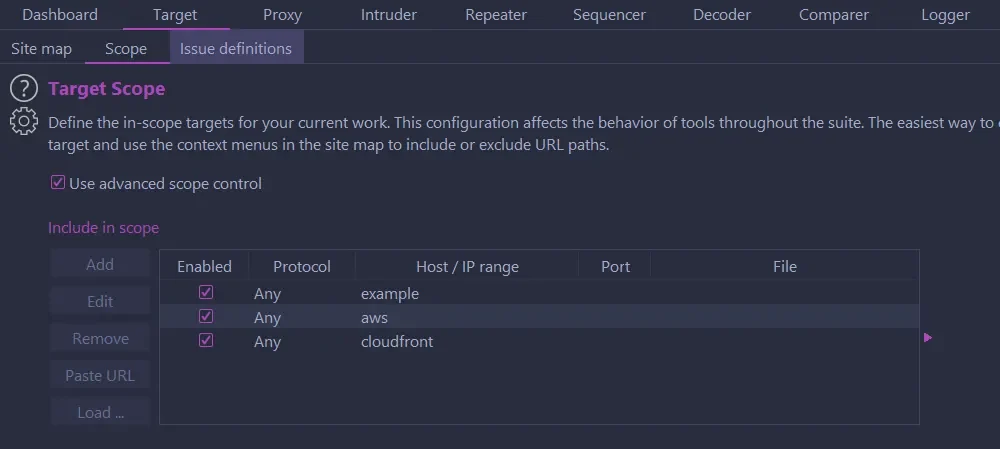
Scope is typically set to a keyword so that interesting content across all domains relevant to the target is captured, with a few cloud keywords thrown in to gather passive information. The researcher notes that casting a wide net matters because the data gathered feeds later enumeration.
Finding it
Google dorking
The starting point is finding interesting pages indexed by Google. The dorks used to get started, or to look for new content after months of hunting, are:
site:example.com filetype:jsp
File types help fingerprint the underlying web technologies. This rarely helps with APIs, since modern app routing hides file types, but it is useful for other bugs and for mapping attack surface.
site:example.com intext:"Example, Inc. All rights reserved."
Copyright strings pick up indexed content, and adding a year to the string finds older content.
site:example.com inurl:xyz
Here xyz is replaced with a 2 to 4 letter acronym for a product or service the target offers.
site:example.com inurl:management
After getting to know the target, dork for common words and terms related to its products and services.
site:example.com inurl:register
This finds apps that allow registration or sign-up. The word list the researcher likes for this includes register, signup, login, auth, authenticate, logout, signin, profile, account, dashboard, panel, admin, forgot, reset, forgotpw, password, email.
site:example.com -ext:pdf -ext:html
Removing static content and common file types focuses results on more dynamic parts of the target.
Manual and passive enumeration
While authenticated and unauthenticated, click every link, submit every form, change email and password, fill out the profile, buy something, register for a premium account, and keep Burp capturing all of it. This runs alongside every other enumeration technique.
JavaScript file and endpoint analysis
BurpJSLinkFinder parses links out of JS files, but its output cannot be trusted on its own. It will sometimes produce a link like:
/api/v1/account//profile?id=
That looks like a viable endpoint, but reading the actual code shows how the endpoint is really used and formatted:
var profileURL = '/api/v1/account/' + type + '/profile?id=' + id
Finding the line where a URL is built, or where an ajax request is assembled, is a good jumping off point for analysing how requests are constructed and where they can be exploited. A large JS file is the best outcome here, especially if the development team releases new versions regularly. The eponymous standalone LinkFinder Python script is recommended for non-Burp workflows.
Custom wordlist creation
After about a week of manual hacking on a main web app, the Burp file holds thousands of in-scope requests and hundreds of unique pages and JavaScript files full of interesting words. The burplist.py script extracts those words into a wordlist. The researcher describes it as working but bad, written in Python 2, and in need of love.
The process is:
- Change the filter settings in Proxy History to remove all binary and image files.
- Select a request, hit ctrl-A, right click, and select Save Items in the context menu. Save as an XML file with the "Base64-encode requests and responses" options checked.
- Run the script:
python burplist.py burprequests.xml
- Use the
clean_wordlist.shscript by @BonJarber to remove junk words and nonsense. - Clean further by removing all words with numbers, converting to lowercase and removing duplicates (after checking whether the target treats upper and lower case paths the same), and by tweaking proxy history and scope to contain more specifically targeted endpoints and domains, for example only JavaScript files.
The result is a wordlist tailored to the target.
CLI recon tools
gau by @hacker_ is used together with @tomnomnom's qsreplace and custom grepping built by @dreyand_. Results, if manageable, go to httpx to find valid endpoints, and the LinkFinder Python script works well here too. For directory brute forcing, dirsearch runs with its default wordlist and ffuf with the custom wordlist, against both the root directory and any interesting API directories found during enumeration. @assetnote's kiterunner is described as a great advance in API endpoint discovery and the future of brute force API discovery. urlscan.io is used like gau to gather URL data, adding up to 10k unique URLs for a single domain, and user submitted content can contain interesting and unique URLs for the target.
Exploitation
Example 1: IDOR leaking user profile data
Step 1: Build the wordlist
From a large Burp project, the researcher exported a custom wordlist containing over 100k unique words using burplist.py.
Step 2: Brute force and hit a block
ffuf was fired up with the new wordlist and was quickly blocked by Akamai.
Step 3: Find an unprotected mirror
To continue scanning, the researcher found a production mirror of the site in Spanish that was not protected by Akamai and carried on there. Looking for domains using the word "origin" is suggested as another way to find such mirrors.
Step 4: A word triggers a redirect
An interesting word triggered a 302 response and prompted for authentication. The URL was along the lines of:
https://example.com/MyExampleApp
Step 5: Log in
Navigating to the URL and logging in redirected to something like:
https://example.com/MyExampleApp/dashboard
Step 6: BurpJSLinkFinder finds the API surface
BurpJSLinkFinder found a JS file at https://example.com/MyExampleApp/resources/scripts/main.js containing dozens of links, many starting with /api:
50 — /api/Account/Login 51 — /api/Account/LogOut 52 — /api/Account/Token 53 — /api/Account/CreateProfile 54 — /api/Account/GetProfile 55 — /api/Account/DeleteProfile 56 — /api/Account/UpdateProfile? 57 — /api/Account/UpdateUserPreferences?
Step 7: Read the code behind the links
Reviewing main.js showed that each URL had been extracted from code snippets like this:
this.baseUrl = "/MyExampleApp"login = function(content) { var url = this.baseUrl + "/api/Account/Login"; var body = { body: JSON.stringify(content), }; return this.http.request("post", url, body)}
Step 8: Check proxy history for live requests
Proxy history showed a few API requests had already fired to initialise the app:
237 https://www.example.com POST /MyExampleApp/api/Account/Login238 https://www.example.com GET /MyExampleApp/api/Account/Token
Step 9: Fuzz the endpoint list with Intruder
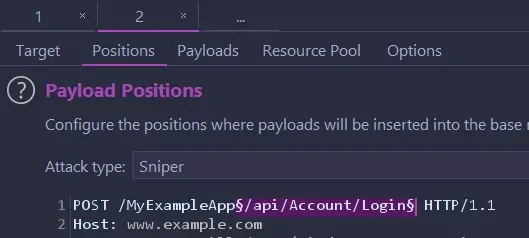
One of the POST requests, with a JSON body, was sent to Intruder with the payload position set to the base API URL. All the API endpoints found by BurpJSLinkFinder were loaded as payloads and the attack was started.
Step 10: Filter the responses
404 responses were ignored. The interesting ones were 405 Method Not Allowed, 400 Bad Request and 200 OK.
Step 11: Read the error message
The GetProfile endpoint returned a 400 response along the lines of:
{"error":{"code":123,"message":"Invalid userName value"}}
Step 12: Deduce the parameter
The error revealed that a JSON parameter called userName was likely needed to retrieve information from the API.
Step 13: Confirm with your own account
Putting the researcher's own username in userName returned their own profile information. The next step was to find another username using the app in order to leak information.
Step 14: Brute force usernames
Usernames were brute forced with Intruder by mixing and matching a first initial and a common last name, using two payload lists: a-z and common-surnames.txt from SecLists.
Step 15: Spot the outlier
After a few hundred requests, Intruder found a response longer than the others, confirming PII was being leaked for valid usernames.
Step 16: Reuse the valid usernames elsewhere
The same Intruder attack was re-run with the valid usernames against other API endpoints to find additional leaks and escalate impact.
This vulnerability paid $1000.
Example 2: API information disclosure and privilege escalation to admin
Step 1: An admin endpoint in the Site Map
While reviewing Burp's passively captured Site Map for the main web app, the researcher came across an endpoint like:
https://www.example.com/xyzadmin/home
Step 2: Recognise the acronym
xyz was an acronym for another product the researcher had seen before, but this admin endpoint was new.
Step 3: Load the page and watch the extension
The page itself was empty and had no interesting content, but BurpJSLinkFinder lit up: it found over 450 URLs in a single JavaScript file called main.js.
Step 4: Pick the endpoints that stand out
Among the many endpoints, two jumped out:
328 — /xyzadmin/api/Users/showUsers329 — /xyzadmin/api/Users/showAdmins
Step 5: Request them directly
Navigating directly to these endpoints returned JSON objects for all the users and all the company admins for the entire app. That was already a high severity vulnerability, but the researcher was confident it could become critical with more digging.
Step 6: Find the write endpoint
Reviewing the BurpJSLinkFinder dump again revealed another endpoint: /xyzadmin/api/Users/AddOrUpdateAdmin.
Step 7: Model the expected body from the leaked data
Because the /showAdmins endpoint had already leaked JSON objects that appeared to represent admin users, the researcher had an idea of what to send in a POST request to /AddOrUpdateAdmin to escalate privileges:
Step 8: Read the client code for the request structure
The leaked data gave a general idea of the fields, but not the final request body. Going back to the JavaScript file, the researcher found a function definition that answered this. The following is highly abridged and non-obfuscated:
function createAdmin(){ var adm = new Admin() adm.userName = this.newUserNameValue adm.userRole = "Admin" var body = new postBody({ user: adm, modifiedBy: this.loggedInUser }) this.client.AddOrUpdateAdmin(n)}
Step 9: Build the body
From this code, the JSON post body to create a new admin would look like:
{ "user": { "email": "", "firstName": null, "lastName": null, "userName": "bendtheory", "phoneNumber": "", "userRole": "admin", "password": null, "id": "deadbeef-aced-bead-baff-87654321", "active": true, "type": "Admin" }, "modifiedBy": "bendtheory" }
Step 10: Send it
In a Repeater tab, a POST request to /xyzadmin/api/Users/AddOrUpdateAdmin was sent and returned a message along the lines of:
{"success":true,"message":"OK"}
Step 11: Reload the admin page
Reloading /xyzadmin/home gave access to everything: the researcher could add, delete and modify anything from any user across the entire app.
This vulnerability paid $3000.
Root cause
The first example is an IDOR: the GetProfile endpoint takes a userName parameter and returned profile data for usernames other than the caller's. The endpoint's own error handling made the parameter easy to discover, and the response length made valid usernames easy to spot. The second example centres on administrative API endpoints: showUsers and showAdmins returned the full user and admin lists, and AddOrUpdateAdmin accepted a POST that created an admin. In both cases the endpoints were reachable directly. The report does not describe the server-side code, so the exact check that was missing is not stated.
Impact
In the first example, an attacker who can reach the app and knows or guesses a username can retrieve that user's profile information, including PII, and can repeat the attack against other API endpoints with valid usernames to widen the leak. In the second example, an attacker can list every user and every company admin in the app, then create an admin account and use the admin page to add, delete and modify anything belonging to any user across the entire app. Both findings were on a private program, and the second depended on the attacker first finding the /xyzadmin/home endpoint and reading the JavaScript behind it.
Fix
The report does not say what the program changed. Based on the findings, the fixes would be: enforce on the server that GetProfile only returns data for the authenticated user (or for users the caller is authorised to view), and enforce authorisation on the admin API endpoints so that showUsers, showAdmins and AddOrUpdateAdmin reject callers who are not admins. The client-side JavaScript should not be the only thing gating these calls.
Variants to test
- Fuzz the API endpoint list with a valid request. Send a known-good POST with a JSON body to Intruder, set the payload position to the base API URL, and load every endpoint BurpJSLinkFinder found. A positive result is a
405,400or200where a404was expected, and error messages that name parameters. - Read error messages for parameter names. A response like
{"error":{"code":123,"message":"Invalid userName value"}}tells you the parameter to supply. A positive result is a 200 with data once the parameter is filled in. - Brute force identifiers with two payload lists. Mix a first initial with a common surname list and watch response lengths. A positive result is a response noticeably longer than the others, indicating valid records.
- Reuse valid identifiers on other endpoints. Take the usernames that worked and replay them against every other endpoint in the JS dump. A positive result is additional data leaks from endpoints that share the same identifier.
- Request admin endpoints directly. Take endpoints like
/xyzadmin/api/Users/showUsersand/xyzadmin/api/Users/showAdminsfrom a JS file and request them as a low-privileged user. A positive result is a JSON list of users or admins. - Model write requests from leaked objects and client code. Use the fields in the leaked JSON and the function that builds the request in the JS file to construct a POST to a write endpoint such as
AddOrUpdateAdmin. A positive result is a success message and a privilege change visible after reloading the app. - Look for unprotected mirrors. When a WAF such as Akamai blocks brute forcing, look for production mirrors in other languages or on domains containing "origin". A positive result is the same app responding without the block.
What happened, in plain words
A security researcher spent almost a year hunting for bugs on a large website run by one company. That website is not one program: it is a big collection of separate apps, each with its own features and its own way of talking to the server. The researcher found two serious problems in those apps and was paid for them: $1000 for the first and $3000 for the second.
The first problem let someone who could reach one app look up other people's profile information by guessing their usernames. The second problem let the researcher list every user and every company administrator in an app, and then create a new admin account, which gave access to everything in that app.
Neither bug needed a clever exploit. Both were found by reading the JavaScript files that a browser downloads when it loads a page, spotting the addresses of the app's internal services in those files, and then simply asking those services for data directly. This article walks through the same steps the researcher took, in the same order, and explains every idea from scratch along the way.
The ideas you need first
Before the steps make sense, here are the handful of concepts the whole story rests on.
A web app and a Single Page App. A normal website sends you a fresh page from the server every time you click something. A Single Page App (SPA) sends you one page and a pile of JavaScript once, and then the JavaScript redraws the screen as you click around, fetching data in the background. Think of the difference between a restaurant where a waiter walks to the kitchen for every dish, and a buffet where everything is laid out and you serve yourself. The buffet is faster, but everything on the table is visible to every guest.
An API. API stands for Application Programming Interface. In this context it means the set of web addresses (endpoints) that the JavaScript uses to fetch and send data, separate from the addresses that serve the visible pages. If the website is the dining room, the API is the serving hatch to the kitchen. You are not supposed to walk into the kitchen, but nothing physically stops you from trying the hatch.
An endpoint. One specific address on the API, such as /api/Account/GetProfile. Each endpoint does one job: log in, fetch a profile, delete a profile, and so on.
A request and a response. Your browser sends a request (a method such as GET to fetch or POST to send data, an address, sometimes a body of data) and the server sends back a response with a status code and usually some data. Status codes you will meet here: 200 OK means success, 302 means redirect to somewhere else, 400 Bad Request means the server did not like what you sent, 404 Not Found means no such address, and 405 Method Not Allowed means the address exists but does not accept that kind of request.
JSON. A simple text format for structured data, made of curly braces, names in quotes, and values. It is how most APIs send data back and forth. A JSON object like {"userName": "alice"} is just a labelled box holding a value.
A parameter. A named value you supply in a request, for example userName in the example above. Parameters are how you tell an endpoint which record you want.
A cookie or token. When you log in, the server gives your browser a small piece of data (a cookie, or a token kept by the JavaScript) that proves who you are on every later request. Think of it as the wristband you get at an event: the door staff check the wristband, not your face. If a request carries a valid wristband, the server believes it.
Burp Suite. A tool that sits between your browser and the website and records every request and response, and lets you replay and modify them. It is the notebook and the laboratory of web security testing. Burp has several parts used here: Proxy (records traffic), Site Map (a tree of everything seen), Repeater (send one request by hand, again and again), and Intruder (send the same request many times with different values filled in automatically).
Brute forcing. Trying many guesses automatically, one after another, until something works. Like trying every key on a big ring in a lock, quickly.
A wordlist. A plain text file of words used as the guesses in a brute force attack.
A WAF. A Web Application Firewall, a filter in front of a site that blocks traffic that looks like an attack. Akamai is one such product.
IDOR. Insecure Direct Object Reference. It means the server hands out a record based on an identifier you supply, without checking that the record belongs to you. If a cloakroom gave out any coat whose ticket number you named, without checking you owned the ticket, that would be an IDOR.
Information disclosure. The server reveals data it should not, for example a list of all users.
Privilege escalation. Gaining more power than you were given, for example turning a normal account into an administrator account.
PII. Personally Identifiable Information: data that identifies a real person, such as a name, email or phone number.
The setup
The researcher works with two browser sessions at once: one logged in, one logged out. Everything both sessions do passes through Burp, so every request is recorded. The tools in play are:
- BurpJSLinkFinder, a Burp extension that reads JavaScript files and pulls out every link and address it finds inside them. The researcher leaves it switched on and checks its output constantly while browsing.
- burplist.py, a small script the researcher wrote (in Python 2, an old version of the Python language) that turns a Burp project into a custom wordlist.
- ffuf and dirsearch, two programs that try many addresses quickly to discover hidden ones. dirsearch runs with its default wordlist; ffuf runs with the custom one.
- gau, qsreplace, httpx, kiterunner and the standalone LinkFinder Python script, all command line tools for gathering and checking addresses.
- Intruder, the part of Burp that automates repeated requests.
- urlscan.io, a public site that records URLs people have submitted, used as an extra source of addresses.
Scope in Burp is usually set to a keyword rather than a single domain, so that anything on any domain mentioning that keyword is captured. A few cloud-related keywords are added to gather passive information. The reasoning: casting a wide net early means more raw material to work through later.
Finding it
Google dorking
Dorking means using Google's advanced search operators to find pages that normal searching would not surface. It is the cheapest reconnaissance there is: no tools, just a search box. The researcher uses it to get started, and again months later to look for content that has appeared since.
site:example.com filetype:jsp
site:example.com restricts results to that domain. filetype:jsp asks only for files ending in .jsp. Why: the file type hints at what technology the site is built with, which helps map the attack surface. It rarely helps with APIs, because modern apps hide file types behind clean addresses, but it is useful for other kinds of bugs.
site:example.com intext:"Example, Inc. All rights reserved."
intext: searches for a phrase inside the page text. Copyright footers appear on almost every page a company publishes, so this finds indexed pages reliably. Adding a year to the phrase finds older pages that are still online.
site:example.com inurl:xyz
inurl: searches inside the address itself. Replace xyz with a two to four letter acronym for one of the target's products or services. Why: internal apps are often named after product acronyms, and those names end up in addresses.
site:example.com inurl:management
Once you know the target's products, search for ordinary words related to them. management is an example; the point is to guess the vocabulary the company uses internally.
site:example.com inurl:register
This finds apps that let you create an account. The researcher's preferred words for this kind of search are register, signup, login, auth, authenticate, logout, signin, profile, account, dashboard, panel, admin, forgot, reset, forgotpw, password, email. Why: any app you can register on gives you a legitimate account to explore from the inside.
site:example.com -ext:pdf -ext:html
-ext: excludes results with that file extension. Removing PDFs and plain HTML pages pushes static documents out of the way so the dynamic, interactive parts of the site rise to the top.
Manual and passive enumeration
Enumeration means systematically listing what exists. The manual half is simple: while logged in and while logged out, click every link, submit every form, change your email and password, fill out your profile, buy something, register for a premium account. All of it with Burp recording. Why: every one of those actions fires a request, and every request is a clue about how the app works and what it can do. This runs alongside every other technique, not instead of them.
JavaScript file and endpoint analysis
This is the heart of the method. BurpJSLinkFinder reads JavaScript files and lists the addresses inside them, but its output cannot be trusted on its own. It will sometimes produce something like:
/api/v1/account//profile?id=
That looks like a usable endpoint, but the double slash and the empty id= show it was assembled from pieces. Reading the actual code shows how the address is really built:
var profileURL = '/api/v1/account/' + type + '/profile?id=' + id
Line by line: var profileURL = creates a variable named profileURL. The rest is a string built by gluing pieces together with +. The fixed text '/api/v1/account/' comes first, then the value of a variable called type, then '/profile?id=', then the value of a variable called id. So the real address depends on two values the app supplies at runtime, and the tool's guess was missing both. Why this matters: the line where a URL is assembled, or where an ajax request (a background request made by JavaScript) is built, tells you exactly which parameters the endpoint expects. That is the jumping off point for working out how to exploit it.
A large JavaScript file is the best possible find, especially if the development team ships new versions regularly, because each new version can reveal new endpoints. For people who do not use Burp, the researcher recommends the standalone LinkFinder Python script, which does the same job.
Custom wordlist creation
After about a week of manual work on a main web app, the Burp project holds thousands of requests, hundreds of unique pages and many JavaScript files, all full of words that belong to this specific target. A generic wordlist will never contain those words. So the researcher wrote burplist.py to pull them out into a wordlist. The script works, but the researcher calls it bad, written in Python 2, and in need of love.
The process:
- In Burp's Proxy History, change the filter settings to hide binary and image files. Why: images are noise; you want text and addresses.
- Select a request, press ctrl-A to select everything, right click, and choose Save Items. Save as an XML file with the "Base64-encode requests and responses" option checked. Why: XML is a format the script can read, and Base64 encoding keeps the saved data intact.
- Run the script:
python burplist.py burprequests.xml
python runs the Python interpreter, burplist.py is the script, and burprequests.xml is the saved Burp export it reads. The output is a list of words.
- Run the
clean_wordlist.shscript by @BonJarber to strip junk words and nonsense. Why: raw extraction includes fragments that will never be real addresses. - Clean further: remove all words containing numbers, convert everything to lowercase and remove duplicates (after checking whether the target treats upper case and lower case addresses the same way), and narrow the Burp history and scope to more specific targets, for example only JavaScript files.
The result is a wordlist built specifically for this target, which is far more likely to hit a real hidden address than any off-the-shelf list.
Command line recon tools
gau by @hacker_ collects known URLs for a domain from public sources. It is used together with qsreplace by @tomnomnom, which rewrites the parameter values in those URLs, and some custom filtering built by @dreyand_. If the results are a manageable number, they go to httpx, which checks which addresses actually respond. The LinkFinder Python script fits well here too.
For directory brute forcing, dirsearch runs with its default wordlist and ffuf with the custom wordlist, aimed both at the root of a target and at any interesting API directories found along the way. @assetnote's kiterunner is described as a big step forward in API endpoint discovery and the future of brute force API discovery. urlscan.io is used like gau to gather addresses, and can add up to 10,000 unique URLs for a single domain; because people submit what they browse, it sometimes contains unusual addresses for your target that no other source has.
Exploitation
Example 1: IDOR leaking user profile data
Step 1: Build the wordlist
From a large Burp project, the researcher exported a custom wordlist containing over 100,000 unique words using burplist.py. Why: this list is made of words that actually appear in this target's own pages and scripts, so it is far more likely to match a real hidden address.
Step 2: Brute force and hit a block
ffuf was started with the new wordlist and was quickly blocked by Akamai. Why this matters: the WAF recognised the flood of requests as an attack and stopped answering. Brute forcing is loud, and loud gets noticed.
Step 3: Find an unprotected mirror
To keep scanning, the researcher found a production mirror of the site in Spanish that was not behind Akamai, and continued there. A production mirror is the same application deployed for another market or language, often with the same code but a different front door. Looking for domains containing the word "origin" is suggested as another way to find such mirrors. Why: the protection is on the front door, not on the building.
Step 4: A word triggers a redirect
One interesting word in the wordlist produced a 302 response and a prompt to log in. The address was along the lines of:
https://example.com/MyExampleApp
https:// is the secure web protocol, example.com is the site, and /MyExampleApp is the path to one particular app inside it. A 302 means the server is sending you somewhere else, here to a login page. Why this is interesting: a redirect to a login means there is something behind it worth protecting.
Step 5: Log in
Navigating to that address and logging in redirected to something like:
https://example.com/MyExampleApp/dashboard
/dashboard is the landing page you see once you are authenticated. Why: now the researcher has a legitimate account inside this app, which means a valid wristband for every request the app makes.
Step 6: BurpJSLinkFinder finds the API surface
BurpJSLinkFinder found a JavaScript file at https://example.com/MyExampleApp/resources/scripts/main.js containing dozens of links, many starting with /api:
50 — /api/Account/Login 51 — /api/Account/LogOut 52 — /api/Account/Token 53 — /api/Account/CreateProfile 54 — /api/Account/GetProfile 55 — /api/Account/DeleteProfile 56 — /api/Account/UpdateProfile? 57 — /api/Account/UpdateUserPreferences?
Each line is a number (the position in the tool's output) followed by an address. Reading them in plain words: Login signs you in, LogOut signs you out, Token issues your credential, CreateProfile makes a profile, GetProfile fetches one, DeleteProfile removes one, UpdateProfile changes one, and UpdateUserPreferences changes settings. The question marks mean the tool saw a parameter starting there. Why this is the key moment: the app's entire private menu has just been printed out.
Step 7: Read the code behind the links
Reviewing main.js showed that each address had been extracted from code snippets like this:
this.baseUrl = "/MyExampleApp"login = function(content) { var url = this.baseUrl + "/api/Account/Login"; var body = { body: JSON.stringify(content), }; return this.http.request("post", url, body)}
Line by line: this.baseUrl = "/MyExampleApp" stores the app's base path in a property called baseUrl. login = function(content) { defines a function named login that takes one input, content. var url = this.baseUrl + "/api/Account/Login"; builds the full address by gluing the base path to the endpoint path. var body = { body: JSON.stringify(content), }; creates the data to send, converting the input into JSON text with JSON.stringify. return this.http.request("post", url, body) sends a POST request to that address carrying that body. Why this matters: the code shows the exact method (POST), the exact address, and the shape of the data. The tool's list alone did not tell you any of that.
Step 8: Check proxy history for live requests
Burp's proxy history showed that a few API requests had already fired when the app started up:
237 https://www.example.com POST /MyExampleApp/api/Account/Login238 https://www.example.com GET /MyExampleApp/api/Account/Token
Each line is a request number, the host, the method, and the path. The first is a POST to Login, the second a GET to Token. Why this matters: these are real requests the app itself made, so they are known to work, and they can be copied and reused as templates.
Step 9: Fuzz the endpoint list with Intruder
One of these POST requests, with its JSON body, was sent to Intruder with the payload position set to the base API URL. All the API endpoints found by BurpJSLinkFinder were loaded as payloads, and the attack was started. In plain words: take a request that is known to work, mark the part of the address that names the endpoint, and tell Burp to try every endpoint from the list in that spot, one after another. Why: this asks the server, politely and automatically, which of the addresses from the JavaScript file actually exist and respond.
Step 10: Filter the responses
404 responses were ignored. The interesting ones were 405 Method Not Allowed, 400 Bad Request and 200 OK. Why: a 404 means the address does not exist, so there is nothing there. A 405 means the address exists but wants a different kind of request, a 400 means it exists but disliked the data, and a 200 means it worked. All three of the latter prove the endpoint is real.
Step 11: Read the error message
The GetProfile endpoint returned a 400 response along the lines of:
{"error":{"code":123,"message":"Invalid userName value"}}
Line by line: the outer braces hold one object. "error" is a label whose value is another object. Inside that, "code":123 is a numeric error code and "message":"Invalid userName value" is a human-readable explanation. Why this is gold: the server has just told the researcher the name of the parameter it wants, userName. Error messages are one of the most reliable sources of information about an API.
Step 12: Deduce the parameter
The error revealed that a JSON parameter called userName was likely needed to retrieve information from the API. Why: the server complained specifically about that value, which means it looked for it and found it missing or wrong.
Step 13: Confirm with your own account
Putting the researcher's own username in userName returned their own profile information. Why this step: it proves the endpoint works and shows what a successful response looks like, so that later responses can be compared against it. The next question is whether it will return someone else's profile.
Step 14: Brute force usernames
Usernames were brute forced with Intruder by mixing and matching a first initial and a common last name, using two payload lists: a-z and common-surnames.txt from SecLists. In plain words: try asmith, bjones, cwilliams and so on, every letter against every common surname. Why this approach: many companies build usernames from a first initial plus a surname, so this pattern guesses real accounts efficiently.
Step 15: Spot the outlier
After a few hundred requests, Intruder found a response longer than the others, confirming that PII was being leaked for valid usernames. Why length: a response for a real user contains a full profile, so it is bigger; a response for a non-existent user is a short error. The odd one out is the hit.
Step 16: Reuse the valid usernames elsewhere
The same Intruder attack was re-run with the valid usernames against other API endpoints to find additional leaks and escalate the impact. Why: once you know a set of real usernames, every other endpoint that takes a username becomes a candidate for the same flaw.
This vulnerability paid $1000.
Example 2: API information disclosure and privilege escalation to admin
Step 1: An admin endpoint in the Site Map
While reviewing Burp's passively captured Site Map for the main web app, the researcher came across an endpoint like:
https://www.example.com/xyzadmin/home
The Site Map is Burp's automatically built tree of every address it has seen, even ones the researcher never clicked. xyzadmin is a path segment, and /home is a page inside it. Why this matters: the researcher did not find this by guessing; Burp had recorded it in the background.
Step 2: Recognise the acronym
xyz was an acronym for another product the researcher had seen before, but this admin endpoint was new. Why this matters: knowing the product tells you roughly what the app does and what data it holds, which guides what to look for.
Step 3: Load the page and watch the extension
The page itself was empty and had no interesting content, but BurpJSLinkFinder lit up: it found over 450 URLs in a single JavaScript file called main.js. Why this matters: an empty page can still load a large script, and that script is where the app's real capabilities are written down.
Step 4: Pick the endpoints that stand out
Among the many endpoints, two jumped out:
328 — /xyzadmin/api/Users/showUsers329 — /xyzadmin/api/Users/showAdmins
showUsers suggests a list of all users; showAdmins suggests a list of all administrators. The names alone say what they probably do. Why these two: a list of every user and every admin is exactly the kind of data that should never be public.
Step 5: Request them directly
Navigating directly to these endpoints returned JSON objects for all the users and all the company admins for the entire app. In plain words: the researcher pasted the address into the browser and the server answered with the full lists. That was already a high severity vulnerability, but the researcher was confident it could become critical with more digging. Why: reading data is bad, but changing data is worse.
Step 6: Find the write endpoint
Reviewing the BurpJSLinkFinder output again revealed another endpoint: /xyzadmin/api/Users/AddOrUpdateAdmin. The name says it adds or updates an administrator. Why this is the dangerous one: it is a write endpoint, one that changes data rather than just reading it.
Step 7: Model the expected body from the leaked data
Because /showAdmins had already leaked JSON objects that appeared to represent admin users, the researcher had an idea of what to send in a POST request to /AddOrUpdateAdmin to escalate privileges:
Line by line: the outermost braces hold one object with a single label, "admins", whose value is a list (the square brackets). The list holds two entries, labelled "0" and "1". Each entry is an object describing one admin: email and phoneNumber are empty strings, firstName, lastName and password are null (meaning no value), userName is admin or admin2, userRole is admin, id is a long identifier string, active is true, and type is Admin. Why this matters: this is the shape of the data the app itself uses for admins, copied from what the server leaked. It is a template, not yet a working request.
Step 8: Read the client code for the request structure
The leaked data gave a general idea of the fields, but not the final request body. Going back to the JavaScript file, the researcher found a function definition that answered this. The following is highly abridged and non-obfuscated:
function createAdmin(){ var adm = new Admin() adm.userName = this.newUserNameValue adm.userRole = "Admin" var body = new postBody({ user: adm, modifiedBy: this.loggedInUser }) this.client.AddOrUpdateAdmin(n)}
Line by line: function createAdmin(){ defines a function named createAdmin. var adm = new Admin() creates a new admin object. adm.userName = this.newUserNameValue sets its username from a value the page holds. adm.userRole = "Admin" sets its role to Admin. var body = new postBody({ user: adm, modifiedBy: this.loggedInUser }) builds the request body with two fields: user, which is the admin object, and modifiedBy, which is whoever is logged in. this.client.AddOrUpdateAdmin(n) sends it to the AddOrUpdateAdmin endpoint. Why this matters: the leaked data showed the fields of an admin, but this code shows the wrapper around them, namely that the request must contain a user field and a modifiedBy field.
Step 9: Build the body
From this code, the JSON post body to create a new admin would look like:
{ "user": { "email": "", "firstName": null, "lastName": null, "userName": "bendtheory", "phoneNumber": "", "userRole": "admin", "password": null, "id": "deadbeef-aced-bead-baff-87654321", "active": true, "type": "Admin" }, "modifiedBy": "bendtheory" }
Line by line: the outer object has two labels. "user" holds one admin object with the same fields as the leaked template, but with userName set to the researcher's own name and userRole set to admin. "modifiedBy" holds the researcher's name, matching what the code said the server expects. Why this shape: it follows the client code exactly, so the server should accept it as if the app itself had sent it.
Step 10: Send it
In a Repeater tab, a POST request to /xyzadmin/api/Users/AddOrUpdateAdmin was sent and returned a message along the lines of:
{"success":true,"message":"OK"}
Line by line: "success":true says the operation worked, and "message":"OK" confirms it in words. Why Repeater: it lets you send one hand-crafted request and read the exact reply, which is how you confirm a guess before relying on it.
Step 11: Reload the admin page
Reloading /xyzadmin/home gave access to everything: the researcher could add, delete and modify anything from any user across the entire app. Why reload: the page checks your role when it loads, so reloading is how you find out whether the new admin account really took effect.
This vulnerability paid $3000.
Root cause
The first example is an IDOR: the GetProfile endpoint takes a userName parameter and returned profile data for usernames other than the caller's. The endpoint's own error handling made the parameter easy to discover, and the response length made valid usernames easy to spot. The second example centres on administrative API endpoints: showUsers and showAdmins returned the full user and admin lists, and AddOrUpdateAdmin accepted a POST that created an admin. In both cases the endpoints were reachable directly. The report does not describe the server-side code, so the exact check that was missing is not stated.
Impact
In the first example, an attacker who can reach the app and knows or guesses a username can retrieve that user's profile information, including PII, and can repeat the attack against other API endpoints with valid usernames to widen the leak. In the second example, an attacker can list every user and every company admin in the app, then create an admin account and use the admin page to add, delete and modify anything belonging to any user across the entire app. Both findings were on a private program, and the second depended on the attacker first finding the /xyzadmin/home endpoint and reading the JavaScript behind it.
Fix
The report does not say what the program changed. Based on the findings, the fixes would be: enforce on the server that GetProfile only returns data for the authenticated user (or for users the caller is authorised to view), and enforce authorisation on the admin API endpoints so that showUsers, showAdmins and AddOrUpdateAdmin reject callers who are not admins. The client-side JavaScript should not be the only thing gating these calls.
Variants to test
- Fuzz the API endpoint list with a valid request. Send a known-good POST with a JSON body to Intruder, set the payload position to the base API URL, and load every endpoint BurpJSLinkFinder found. A positive result is a
405,400or200where a404was expected, and error messages that name parameters. - Read error messages for parameter names. A response like
{"error":{"code":123,"message":"Invalid userName value"}}tells you the parameter to supply. A positive result is a 200 with data once the parameter is filled in. - Brute force identifiers with two payload lists. Mix a first initial with a common surname list and watch response lengths. A positive result is a response noticeably longer than the others, indicating valid records.
- Reuse valid identifiers on other endpoints. Take the usernames that worked and replay them against every other endpoint in the JavaScript dump. A positive result is additional data leaks from endpoints that share the same identifier.
- Request admin endpoints directly. Take endpoints like
/xyzadmin/api/Users/showUsersand/xyzadmin/api/Users/showAdminsfrom a JavaScript file and request them as a low-privileged user. A positive result is a JSON list of users or admins. - Model write requests from leaked objects and client code. Use the fields in the leaked JSON and the function that builds the request in the JavaScript file to construct a POST to a write endpoint such as
AddOrUpdateAdmin. A positive result is a success message and a privilege change visible after reloading the app. - Look for unprotected mirrors. When a WAF such as Akamai blocks brute forcing, look for production mirrors in other languages or on domains containing "origin". A positive result is the same app responding without the block.
Glossary
- API: the set of web addresses an app uses to fetch and send data, separate from the pages you see.
- Endpoint: one specific address on an API that performs one job.
- Request: what your browser sends to a server: a method, an address, and sometimes data.
- Response: what the server sends back: a status code and usually data.
- Status code: a number saying how a request went, such as 200 OK, 302 redirect, 400 bad request, 404 not found, 405 method not allowed.
- GET / POST: two kinds of request; GET asks for data, POST sends data.
- JSON: a text format for structured data using braces, quoted names and values.
- Parameter: a named value supplied in a request, such as
userName. - Cookie / token: a small piece of data proving who you are on each request after you log in.
- Single Page App (SPA): a site that loads once and redraws itself with JavaScript instead of fetching new pages.
- JavaScript: the programming language browsers run; it contains the app's logic and its API addresses.
- Ajax request: a background request made by JavaScript without reloading the page.
- Burp Suite: a tool that records, replays and modifies web traffic.
- Proxy History: Burp's log of every request and response.
- Site Map: Burp's automatically built tree of every address it has seen.
- Repeater: the Burp part that sends one hand-crafted request and shows the reply.
- Intruder: the Burp part that repeats a request many times with different values filled in.
- BurpJSLinkFinder: a Burp extension that extracts links and addresses from JavaScript files.
- LinkFinder: a standalone Python script that does the same job outside Burp.
- burplist.py: a small Python 2 script that turns a Burp export into a custom wordlist.
- Wordlist: a text file of words used as guesses in a brute force attack.
- Brute forcing: trying many guesses automatically until one works.
- Fuzzing: sending many variations of a request to see how the server reacts.
- WAF: a Web Application Firewall, a filter that blocks traffic that looks like an attack.
- Akamai: a WAF product that blocked the brute forcing in the first example.
- Production mirror: the same application deployed for another market or language, often with different protection.
- Scope: the set of domains and addresses a tester is allowed to work on, and what Burp records.
- Google dorking: using Google's advanced search operators to find pages normal searching misses.
- Enumeration: systematically listing what exists on a target.
- IDOR: Insecure Direct Object Reference; the server returns a record based on an identifier you supply without checking it belongs to you.
- Information disclosure: the server reveals data it should not.
- Privilege escalation: gaining more power than you were given, such as becoming an administrator.
- PII: Personally Identifiable Information, data that identifies a real person.
- Authorisation: checking whether a user is allowed to do what they are asking to do.
- Authentication: checking who a user is.
- ffuf / dirsearch: programs that try many addresses quickly to discover hidden ones.
- gau: a tool that collects known URLs for a domain from public sources.
- qsreplace: a tool that rewrites parameter values in URLs.
- httpx: a tool that checks which addresses actually respond.
- kiterunner: a tool for discovering API endpoints by brute force.
- urlscan.io: a public site that records URLs people have submitted.
- SecLists: a public collection of wordlists, including
common-surnames.txt. - Base64: an encoding that turns data into plain text characters so it survives being saved and moved.
- XML: a text format for structured data, used here for the Burp export.
- Python 2: an old version of the Python programming language.



