Remediation Archeology — Finding and Decoding an Ancient XSS
 Published on bendtheory.medium.com
One of my favorite pastimes in Bug Bounty is reviewing my ancient (read: 2 or 3 years old) vulnerability reports. I feel like I’ve come a long way since then and can review old problems with a fresh perspective.
The full write-up lives on its author's site
It belongs to its author, so we link to it rather than copy it. The other two tabs are our own rewrites, checked against it.
Context
This is a story about revisiting an old report. The researcher had submitted an open redirect on a web app back in June 2020, and two or three years later went back through the old inbox to look at it again with fresh eyes. The same app had previously yielded other odd behaviour, including brute forcing an Epoch integer in a token to bypass the registration confirmation process for an employee account, so there was reason to expect more.
The open redirect itself had been fixed: clicking the crafted link now just returned a 404. But the login redirection functionality was still worth a look, because that is where the original bug lived. The feature in question is the post-login redirect: when an unauthenticated user requests a page, the app sends them to the login page and, after a successful login, sends them back to where they were trying to go.
Setup
The researcher registered a new account. The confirmation token was now a proper hash rather than the half-baked timestamp seen in the earlier report, so that particular bypass was gone. After confirming and logging in, the workflow was simple:
- Copy a URL from the authenticated session.
- Paste it into a second, non-authenticated browser.
- Observe the redirect to the login page and inspect the parameters it carries.
No special tooling is described beyond a browser and CyberChef for decoding. The target is referred to throughout as example.com.
Finding it
Pasting an authenticated URL into the unauthenticated browser produced the expected redirect to the login page, but with an interesting parameter attached: returnTo, carrying a long hex value.
The post-auth URL was:
https://example.com/en-us/messages/my-messages.html?test=123
The login page URL it turned into was:
https://example.com/en-us/login.html?returnTo=[redacted]
After a successful login, the value of returnTo is sent to an endpoint called /authcheck, which returns the post-auth URL the user was originally trying to reach. That decoded value is then passed directly to window.location.href. A decoded, attacker-influenced string reaching window.location.href is a DOM XSS sink, so the parameter immediately looked worth attacking.
The first obstacle was the encoding. Decoding the hex value gave:
gacsumo#u}.eo$nabro$~ed~oco#21=4sud.<mdxn#ugacsumm)}o#u
That is not random enough to be encryption, but it is not plain text either. The researcher spent about fifteen minutes trying shifted Base64, ROT69 and mental character frequency analysis (noticing fragments like gacsum and nabro) before taking a different approach: submit a dummy URL padded with A characters and see what comes back.
The dummy post-auth URL was:
https://example.com/en-us/messages/my-messages.html/AAAAAAAAAAAAAA?test=123
and the resulting login page URL was:
https://example.com/en-us/login.html?returnTo=[redacted]
The 41 bytes in there are the hex for A, which confirmed the value is a hex string rather than ciphertext. Decoding it, however, produced garbage:
VÖÒ.Öò7Vv.77VÖò7WÒæVòFæ.’&òGæVGæö6ò3#.ÓG7VGó…………..òÆÖG.â7Vv.77
The realisation was that CyberChef was trying to print the hex character 14 rather than 41: the string is reversed. Adding a reverse operation before the hex decode produced readable output.
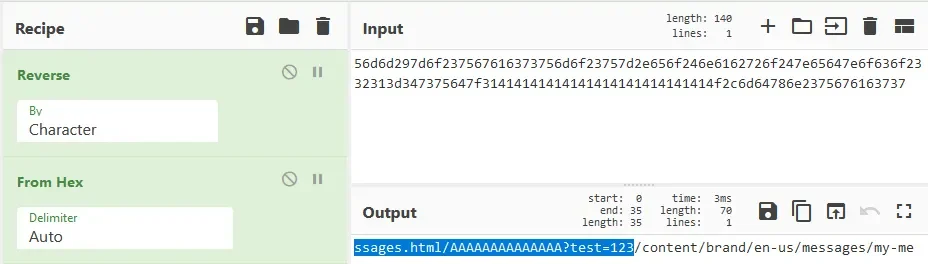
The decoded value is shown in the screenshot. The post-auth URI has been cut like a deck of cards in the middle of the string, with the latter half of the original string prepended to the front.
The researcher notes relief that the app did not actually shuffle the string, since that would have made the whole process much harder.
Exploitation
With the encoding understood, the three steps can be reversed to craft any value that will be passed to the XSS sink: undo the card cut, hex encode, then reverse.
Step 1: choose the payload
The payload is a javascript: URI:
javascript:prompt(document.domain)
Step 2: apply the card cut
The string is split in the middle and the halves swapped:
(document.domain)javascript:prompt
Step 3: hex encode
[redacted]
Step 4: reverse
[redacted]
Step 5: deliver it
After a successful login, the crafted returnTo value is sent to /authcheck, decoded back to javascript:prompt(document.domain) and passed directly to the window.location.href sink. The researcher's reconstruction of the client-side code, which they note they did not test, looked roughly like this:
$.ajax({ type: "GET", url: "/authcheck", data: getParam("returnTo"), success: function(data) { // I didn't test this jQuery code, but it looked kinda like this ¯\_(ツ)_/¯ window.location.href = data.returnToPath }})
The final PoC URL submitted in the report was:
https://example.com/en-us/login.html?returnTo=[redacted]
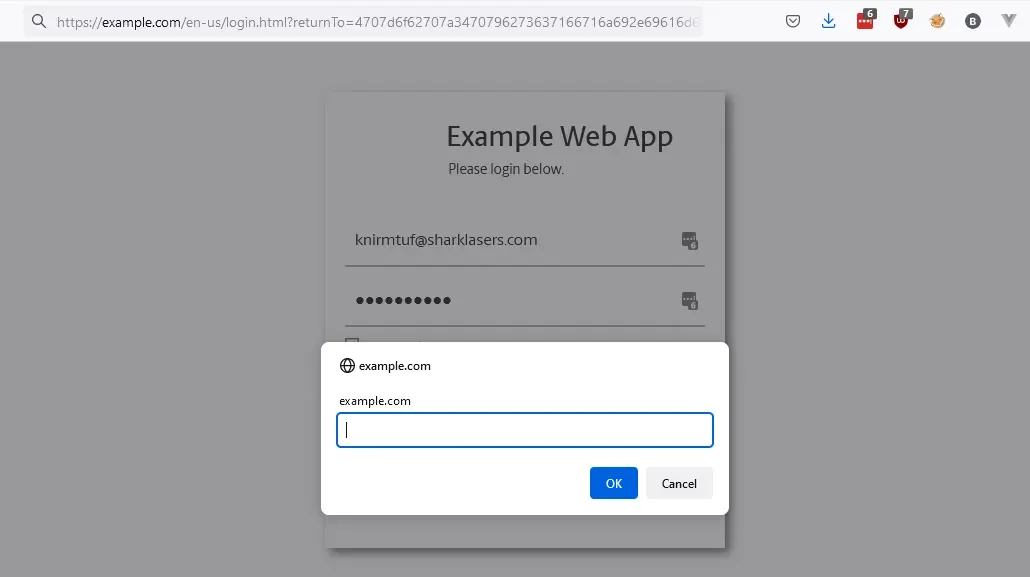
After a successful login, the decoded javascript: URI is assigned to window.location.href and the script runs.
Root cause
The /authcheck endpoint returns a returnToPath, and the client assigns that value to window.location.href. The custom encoding (card cut, hex encode, reverse) is obfuscation, not a security control: it is fully reversible by anyone who works out the scheme, and the app itself reverses it before use.
There was an Akamai WAF in place, but the encoding made it trivial to bypass: the encoding made it trivial to bypass the Akamai WAF. The researcher notes that finding another Akamai bypass would have been much harder, so in reality this was not that bad.
Impact
After a successful login with the crafted returnTo value, the JavaScript runs on the app's origin. The report does not go further into what an attacker could do with that execution. The researcher submitted the finding before being awarded a bounty; it was triaged as a P3 with a potential $500 bounty, and the post was to be updated if that number changed.
Fix
The report does not describe a fix. The obvious remediation, consistent with the root cause, is to validate the decoded returnToPath on the server or client before assigning it to window.location.href, allowing only relative, same-origin paths and rejecting javascript: and other schemes.
Variants to test
- Look for
returnTo,redirect,nextand similar parameters on login pages, and check whether the value is decoded client-side and assigned towindow.location.href. A positive result is a decoded value you control reaching the sink. - When a parameter looks like hex but decodes to garbage, try reversing the string before decoding, and try swapping the two halves. A positive result is readable text containing your input.
- Submit a dummy value padded with a repeated character such as
Aand look for its hex (41) in the encoded output. A positive result confirms the encoding is hex-based and shows how your input is transformed. - Test whether a
javascript:URI survives the encoding and is executed after login. A positive result is script execution in the app's origin. - Where a WAF blocks obvious payloads, check whether the app's own encoding lets the payload through in an unrecognised form. A positive result is the WAF allowing the request and the app decoding it back to the payload.
What happened, in plain words
A security researcher keeps a folder of old bug reports. A few years ago, in June 2020, they had found a bug on a website and reported it. Now, two or three years later, they opened that old report again to look at it with fresh eyes. This is a common habit: you learn a lot in a couple of years, and old notes often hide something you missed.
The old bug was an open redirect. That means the website could be tricked into sending a visitor to a different address than the one they expected, just by changing a link. The site had fixed that bug: the old crafted link now just showed a "page not found" (404) error. But the researcher remembered that the same site had other strange behaviour in the past, so they decided to look at the login and redirect feature again, because that is where the original bug had lived.
The feature is simple and very common. When you open a page on a site while you are not logged in, the site sends you to the login page. After you log in, it sends you back to the page you originally wanted. To remember where you wanted to go, the site puts that address into the login page's web address as a parameter called returnTo. That parameter held a long string of hex characters, and the researcher suspected it could be turned into a cross-site scripting (XSS) bug. XSS means getting a website to run JavaScript code that an attacker wrote, inside a victim's browser, as if the site itself had written it.
The rest of the story is about working out how that returnTo value is scrambled, unscrambling it, and then scrambling a malicious value of their own so the site will run it after login. The scrambling turned out to be three simple steps, not real encryption, and once the researcher understood them, the site's own firewall did not notice the attack at all.
Background: the old report and the feature
The researcher had submitted an open redirect on this web app back in June 2020. An open redirect is a bug where a site takes an address from the URL and sends the visitor there without checking that the address belongs to the site. Attackers use it for phishing: the link looks like it points at the trusted site, but it actually bounces the victim somewhere else.
The same app had produced other odd findings before, including brute forcing an Epoch integer in a token to bypass the registration confirmation process for an employee account. In plain words: the confirmation token was a number based on the current time (an "Epoch" timestamp is the number of seconds since 1 January 1970), and because it was predictable, someone could guess it and confirm an account they should not have been able to confirm. That history suggested the app had more surprises in it.
The open redirect was fixed. Clicking the crafted link now returned a 404, the standard "not found" response. But the login redirection feature was still worth a look, because that is where the original bug lived. The feature is the post-login redirect: when a user who is not logged in asks for a page, the app sends them to the login page and, after a successful login, sends them back to where they were trying to go.
Setting up
The researcher registered a new account. The confirmation token was now a proper hash rather than the half-baked timestamp seen in the earlier report, so that particular bypass was gone. A hash, in this context, is a value produced by a one-way mathematical function: easy to compute from the input, practically impossible to predict or reverse. That is the right way to build a confirmation token.
After confirming and logging in, the workflow was simple:
- Copy a URL from the authenticated session.
- Paste it into a second, non-authenticated browser.
- Observe the redirect to the login page and inspect the parameters it carries.
"Authenticated" means logged in: the browser holds a session, which is how the site recognises you from one page request to the next. "Non-authenticated" means a second browser with no session, standing in for a stranger. No special tooling is described beyond a browser and CyberChef for decoding. CyberChef is a free web page that lets you paste data and apply transformations to it, such as decoding hex, reversing a string, or both in a row. The target is referred to throughout as example.com.
Finding it
Pasting an authenticated URL into the unauthenticated browser produced the expected redirect to the login page, but with an interesting parameter attached: returnTo, carrying a long hex value. A parameter is a named value added to the end of a web address after a ?, like a label on a form field. Hex (short for hexadecimal) is a way of writing data using the characters 0 to 9 and a to f, where each pair of characters stands for one byte, that is, one unit of data.
The post-auth URL was:
https://example.com/en-us/messages/my-messages.html?test=123
This is the page the user was trying to reach: a messages page, with a harmless test parameter test=123 added. The login page URL it turned into was:
https://example.com/en-us/login.html?returnTo=[redacted]
Line by line: the site is example.com; the path /en-us/login.html is the login page for English (US); and returnTo= is followed by a long hex string. That hex string is supposed to be the post-auth URL, encoded so it can travel safely inside another URL. The researcher's question was: encoded how?
After a successful login, the value of returnTo is sent to an endpoint called /authcheck, which returns the post-auth URL the user was originally trying to reach. An endpoint is a specific address on a server that does one job, like a counter in a shop: you send it something, it sends something back. That decoded value is then passed directly to window.location.href. In a browser, window.location.href is the property that holds the current page address; assigning to it tells the browser to navigate to the new address. If the value assigned is a javascript: address, the browser runs the code in it instead of loading a page. A decoded, attacker-influenced string reaching window.location.href is a DOM XSS sink. "DOM" refers to the browser's in-memory model of the page, and a "sink" is a place where data ends up being used in a dangerous way. So the parameter immediately looked worth attacking.
The first obstacle was the encoding. Decoding the hex value gave:
gacsumo#u}.eo$nabro$~ed~oco#21=4sud.<mdxn#ugacsumm)}o#u
That is not random enough to be encryption, but it is not plain text either. Encryption produces output that looks completely random; this looked like text that had been stirred around. The researcher spent about fifteen minutes trying shifted Base64, ROT69 and mental character frequency analysis (noticing fragments like gacsum and nabro) before taking a different approach. Base64 is a way of packing binary data into letters and digits; ROT69 is a playful name for a letter-shifting cipher in the style of ROT13, which moves each letter a fixed number of places along the alphabet. Character frequency analysis means looking for patterns in which letters appear often, the way codebreakers attack simple ciphers.
The different approach: submit a dummy URL padded with A characters and see what comes back. The idea is to put a recognisable marker into the input and watch how it appears in the output. If you send a run of As and see a run of 41s, you have learned something concrete about the encoding.
The dummy post-auth URL was:
https://example.com/en-us/messages/my-messages.html/AAAAAAAAAAAAAA?test=123
Here the researcher added /AAAAAAAAAAAAAA (fourteen A characters) into the path, before the ?test=123. The resulting login page URL was:
https://example.com/en-us/login.html?returnTo=[redacted]
The 41 bytes in there are the hex for A, which confirmed the value is a hex string rather than ciphertext. In hex, the capital letter A is written 41, so seeing 41 repeated means the As travelled through the encoding as themselves. Decoding it, however, produced garbage:
VÖÒ.Öò7Vv.77VÖò7WÒæVòFæ.’&òGæVGæö6ò3#.ÓG7VGó…………..òÆÖG.â7Vv.77
Those odd accented characters appear because the decoder is reading pairs of hex characters in the wrong order and turning them into whatever character that number happens to represent.
The realisation was that CyberChef was trying to print the hex character 14 rather than 41: the string is reversed. In other words, the hex pairs are stored back to front, so a decoder reading left to right sees 14 where the real byte is 41. Adding a reverse operation before the hex decode produced readable output.
The screenshot shows the result after adding the reverse step before the hex decode. The decoded value is shown in the screenshot. Look at that carefully: the end of the original address (.../messages/my-me) has been moved to the front, and the beginning (ssages.html/...) is now at the back. The post-auth URI has been cut like a deck of cards in the middle of the string, with the latter half of the original string prepended to the front.
The researcher notes relief that the app did not actually shuffle the string, since that would have made the whole process much harder. A shuffle would mix the characters unpredictably; a cut is a simple, reversible move.
Exploitation
With the encoding understood, the three steps can be reversed to craft any value that will be passed to the XSS sink: undo the card cut, hex encode, then reverse. The order matters. The app takes your address, cuts it, hex-encodes it, then reverses it. To build a value the app will accept, you do the same three steps to your payload, in the same order, and hand the result over as returnTo.
Step 1: choose the payload
The payload is a javascript: URI:
javascript:prompt(document.domain)
A javascript: URI is an address that starts with the word javascript: instead of http:. When a browser navigates to one, it runs the code after the colon as JavaScript. prompt(...) opens a small pop-up box showing the text you give it, and document.domain is the current site's domain name. So this payload, if it runs, pops up a box showing the site's own domain, which proves the code ran on that site.
Step 2: apply the card cut
The string is split in the middle and the halves swapped:
(document.domain)javascript:prompt
Here the payload has been cut into two pieces and the back piece ((document.domain)) placed in front of the front piece (javascript:prompt). This is the same move the app makes to your address.
Step 3: hex encode
[redacted]
Each character of the cut string has been replaced by its hex byte. For example, ( becomes 28, j becomes 6a, and so on. The result is a long string of hex characters that looks like meaningless data.
Step 4: reverse
[redacted]
The hex string is now written back to front, character by character. This is the final value that goes into returnTo. When the app reverses it, hex-decodes it and undoes the cut, it gets back exactly javascript:prompt(document.domain).
Step 5: deliver it
After a successful login, the crafted returnTo value is sent to /authcheck, decoded back to javascript:prompt(document.domain) and passed directly to the window.location.href sink. The researcher's reconstruction of the client-side code, which they note they did not test, looked roughly like this:
$.ajax({ type: "GET", url: "/authcheck", data: getParam("returnTo"), success: function(data) { // I didn't test this jQuery code, but it looked kinda like this ¯\_(ツ)_/¯ window.location.href = data.returnToPath }})
Line by line: $.ajax({...}) is a jQuery function that sends a request to a server without reloading the page. type: "GET" means it is a read-style request. url: "/authcheck" is the endpoint being called. data: getParam("returnTo") takes the returnTo value from the page's address and sends it along. success: function(data) {...} is the code that runs when the server replies, with the reply stored in data. Inside it, window.location.href = data.returnToPath takes the decoded address from the reply and assigns it to the browser's location, which navigates the page. That last line is the sink: whatever the server puts in returnToPath gets used as a navigation target, with no check that it is a safe address.
The screenshot shows the result after a successful login.
The final PoC URL submitted in the report was:
https://example.com/en-us/login.html?returnTo=[redacted]
This is the whole attack in one link: the login page, with the crafted returnTo value attached. After a successful login, the decoded javascript: URI is assigned to window.location.href and the script runs. "Origin" means the combination of scheme, host and port that the browser treats as one security boundary; code running in the app's origin can read and act on the app's data as if it were the app.
Root cause
The /authcheck endpoint returns a returnToPath, and the client assigns that value to window.location.href. In plain words: the app trusts whatever address comes back and navigates to it, even when the address is a javascript: instruction rather than a normal page.
The custom encoding (card cut, hex encode, reverse) is obfuscation, not a security control: it is fully reversible by anyone who works out the scheme, and the app itself reverses it before use. Obfuscation means making something hard to read; it is not the same as protecting it. A lock you can pick with three simple moves is not a lock.
There was an Akamai WAF in place, but the encoding made it trivial to bypass: the encoding made it trivial to bypass the Akamai WAF. A WAF, or web application firewall, is a filter that sits in front of a site and blocks requests that look like attacks, usually by matching known patterns such as <script> or javascript:. Because the payload arrived scrambled, the filter saw only a long hex string and let it through. The researcher notes that finding another Akamai bypass would have been much harder, so in reality this was not that bad.
Impact
After a successful login with the crafted returnTo value, the JavaScript runs on the app's origin. In everyday terms: the victim clicks a link that looks like the site's normal login page, logs in as usual, and from that moment the attacker's code is running inside the victim's logged-in session. The report does not go further into what an attacker could do with that execution. The researcher submitted the finding before being awarded a bounty; it was triaged as a P3 with a potential $500 bounty, and the post was to be updated if that number changed. "Triaged" means the programme reviewed the report and assigned it a severity; P3 is a middle severity level in many bug bounty programmes.
Fix
The report does not describe a fix. The obvious remediation, consistent with the root cause, is to validate the decoded returnToPath on the server or client before assigning it to window.location.href, allowing only relative, same-origin paths and rejecting javascript: and other schemes. A relative path is one that stays on the same site, like /en-us/messages/my-messages.html; a same-origin check confirms the address points at the app itself and not somewhere else.
Variants to test
- Look for
returnTo,redirect,nextand similar parameters on login pages, and check whether the value is decoded client-side and assigned towindow.location.href. A positive result is a decoded value you control reaching the sink. - When a parameter looks like hex but decodes to garbage, try reversing the string before decoding, and try swapping the two halves. A positive result is readable text containing your input.
- Submit a dummy value padded with a repeated character such as
Aand look for its hex (41) in the encoded output. A positive result confirms the encoding is hex-based and shows how your input is transformed. - Test whether a
javascript:URI survives the encoding and is executed after login. A positive result is script execution in the app's origin. - Where a WAF blocks obvious payloads, check whether the app's own encoding lets the payload through in an unrecognised form. A positive result is the WAF allowing the request and the app decoding it back to the payload.
Glossary
- Open redirect: a bug where a site sends a visitor to an address taken from the URL without checking that the address belongs to the site.
- 404: the standard web response meaning the requested page was not found.
- Epoch integer: a number representing a moment in time as the count of seconds since 1 January 1970; predictable, so a poor basis for a secret token.
- Token: a value a site gives you to prove something later, such as that you confirmed your account or that you are logged in.
- Hash: a value produced by a one-way function; easy to compute from the input, practically impossible to predict or reverse.
- Authenticated: logged in, with a session the site recognises.
- Session: the site's record of who you are across page requests, usually kept via a cookie or similar value in your browser.
- Parameter: a named value added to a web address after a
?, like a label on a form field. - Hex (hexadecimal): a way of writing data with the characters
0to9andatof, where each pair stands for one byte. - Byte: one unit of data, a number from 0 to 255.
- Endpoint: a specific address on a server that does one job, taking input and returning a result.
window.location.href: the browser property holding the current page address; assigning to it navigates the browser.javascript:URI: an address starting withjavascript:that makes the browser run the code after the colon.- XSS (cross-site scripting): getting a site to run JavaScript written by an attacker, inside a victim's browser, as if the site had written it.
- DOM: the browser's in-memory model of the page.
- Sink: a place in code where data ends up being used in a dangerous way, such as navigation or HTML insertion.
- Encryption: scrambling data with a secret key so that only someone with the key can read it.
- Base64: a way of packing binary data into letters and digits so it can travel as text.
- ROT13 / ROT69: letter-shifting ciphers that move each letter a fixed number of places along the alphabet; ROT69 is a playful name in the same style.
- Character frequency analysis: looking for patterns in which letters appear often, the way codebreakers attack simple ciphers.
- CyberChef: a free web page for applying transformations to data, such as hex decoding and reversing.
- Card cut: splitting a string in the middle and swapping the two halves, like cutting a deck of cards.
- Obfuscation: making something hard to read; not the same as protecting it.
- WAF (web application firewall): a filter in front of a site that blocks requests matching known attack patterns.
- Akamai: a company that provides web security services, including a WAF.
- Origin: the combination of scheme, host and port that the browser treats as one security boundary.
- Relative path: an address that stays on the same site, such as
/en-us/messages/my-messages.html. - Same-origin: pointing at the same scheme, host and port as the app itself.
- jQuery: a JavaScript library that makes common tasks such as sending requests simpler.
- AJAX: sending a request to a server from JavaScript without reloading the page.
- GET: a read-style HTTP request, normally used to fetch a page or data.
- PoC (proof of concept): a working demonstration that a bug is real.
- Triaged: reviewed by the bug bounty programme and assigned a severity.
- P3: a middle severity level in many bug bounty programmes.
- Bounty: a payment a programme gives a researcher for a valid report.



