Finding my First Critical Web Cache Poisoning
The author found a web cache poisoning vulnerability by using Param Miner to discover an unkeyed input, then confirmed that a malicious response could be cached and served to other users. The impact could include theft of session cookies and PII, and potentially escalation to XSS or open redirect.
 Published on n3t-hunt3r.medium.com
Hey Fam! Hope you and your family are doing well amid this pandemic.
The full write-up lives on its author's site
It belongs to its author, so we link to it rather than copy it. The other two tabs are our own rewrites, checked against it.
Context
This write-up describes the approach that led to the author's first critical web cache poisoning finding, in an external bug bounty program. The target is referred to only as redacted.com; the report does not name the organisation, the product or the specific feature beyond saying that the poisoning took place in the Profile section.
Web cache poisoning, as the author frames it, is a technique in which an attacker takes advantage of a web server's and a cache's behaviour to serve a malicious HTTP response to other users. The author describes it as a two-step process: first the attacker works out how to get a potentially dangerous payload response out of the backend server, then they get that response cached and served to the intended victims. A poisoned web cache can be used to spread a range of attacks, including XSS, denial of service, JavaScript injection and open redirection.
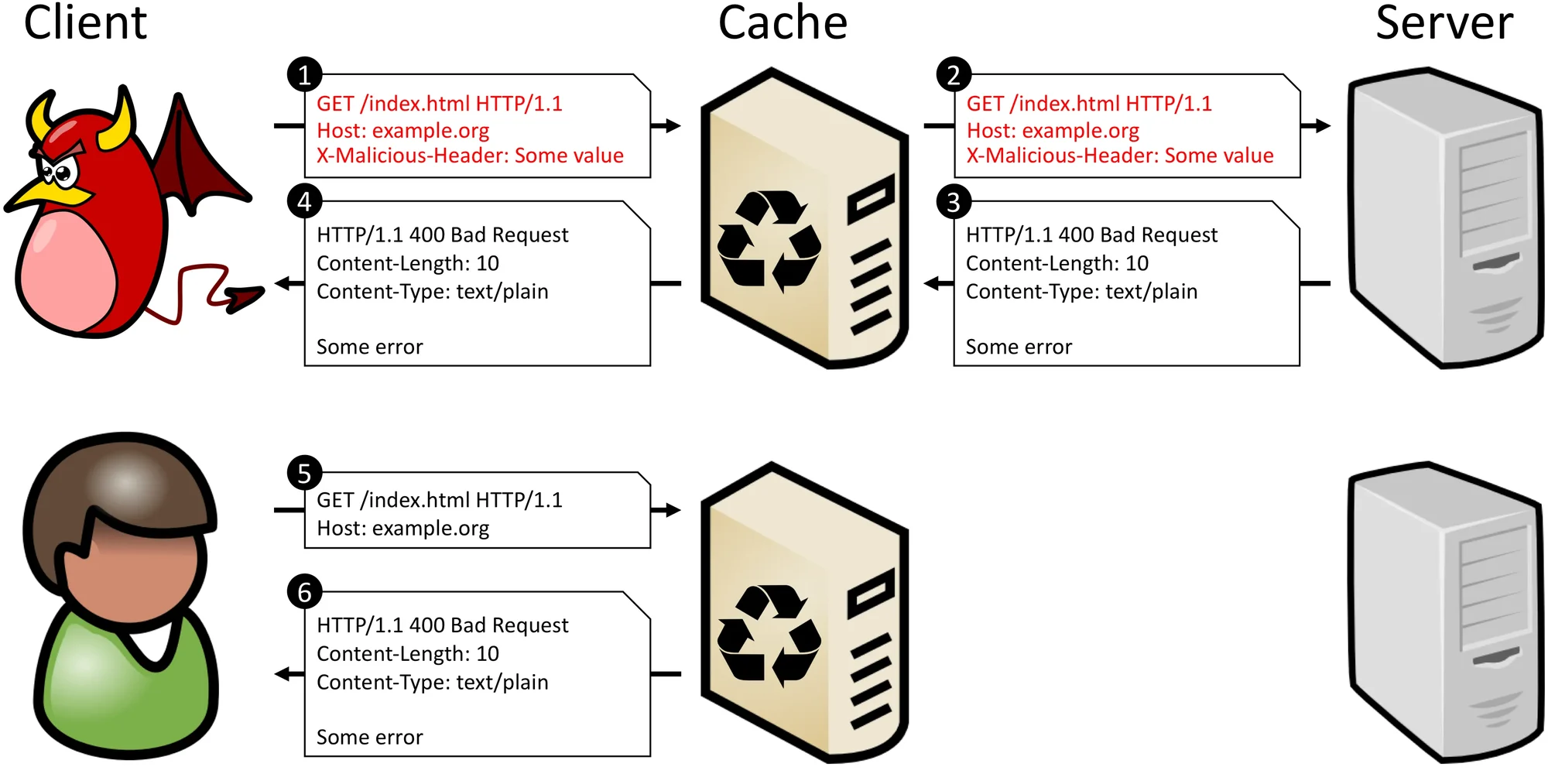
The image above is captioned "Web-Cache Demo".
Setup
The tooling described in the report is small:
- Burp Suite, used to intercept and modify requests. The author notes that if you are using Burp Suite Pro, parameters identified by Param Miner are reported as scanner issues; otherwise they are listed under Extender -> Extensions -> Param Miner -> Output.
- Param Miner, the Burp extension from PortSwigger used to identify hidden, unlinked parameters. The author describes it as particularly useful for finding web cache poisoning vulnerabilities.
- Burp Collaborator, or alternatively the open-source interactsh tool from the Project Discovery team, to obtain out-of-band interaction support.
The report does not describe any account creation, user roles or specific versions. The only precondition it makes explicit is that the target was an external program and that the vulnerable behaviour was reachable in the Profile section.
Finding it
The author's validation model for web cache poisoning is stated up front as four steps:
- Find the weak service code that allows a lot of headers to be stuffed into the HTTP header area.
- Force the cache server to flush its actual cache information, which is what we want the servers to cache.
- Send a specially constructed request to the server, which will be cached.
- Send the next request; the response to it will be the previously injected content stored in the cache.
The headers the author lists as usable for this purpose are:
X-Forwarded-Host:your-hackers-site.com
X-Host:your-hackers-site.com
Forwarded-Server:your-hackers-site.com
On the target, the method was simple: the author used Param Miner to identify hidden, unlinked parameters. The usage is described as right-clicking a request in Burp and choosing "Guess (cookies|headers|params)".
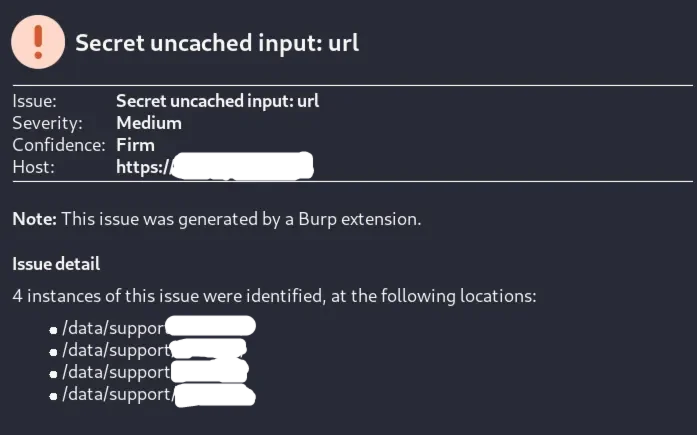
The screenshot is captioned "Issue Generated By Param Miner".
Through this, the author identified a secret uncached input and then used it to check whether the vulnerability existed. The author states that the vulnerability was confirmed to be present.
Exploitation
Step 1: identify a hidden, unlinked input
Run Param Miner against the request of interest in Burp, using "Guess (cookies|headers|params)". On Burp Suite Pro the discovered parameters appear as scanner issues; otherwise they are listed under Extender -> Extensions -> Param Miner -> Output. On this target this surfaced a secret uncached input.
Step 2: confirm the poisoning
Use the discovered input to test whether the response can be influenced and then cached. The author confirms that the vulnerability was present. The report does not include the request or the response used for this confirmation.
Step 3: locate the cacheable surface and build impact
After confirmation, the author wanted to build an impact, for example escalating to XSS or a URL redirect. The author then found that the poisoning was taking place in the Profile section, where the request could easily be cached by using the author's own server to get the response. Burp Collaborator was used for this, with interactsh named as a free open-source alternative that provides the same interaction support.
Step 4: observe what the cache serves to other users
If a user browses through the cached section and the attempt succeeds, the author was able to obtain critical information such as the user's session, cookies and PII.

Root cause
The report does not analyse the server-side code, so the precise mistake is not stated. What it does establish is the pattern: an input that was not part of the cache key (the author calls it a secret uncached input, found with Param Miner) could still influence the response, and that response was then stored and served from the cache. In other words, the cache key did not cover everything that affected the response, which is the classic precondition for cache poisoning. The author's first validation step mentions weak service code that lets a lot of headers be stuffed into the HTTP header area.
Impact
As the author puts it, if a specially crafted response is cached by a web cache used by several users, or even by a single user's browser cache, the impact of the response may well be increased. Unless the answer is stored in a shared site cache such as those on proxy servers, all users of that cache receive the malicious content just before the cache entry is purged. The author believes it is possible to escalate beyond stored XSS. The author says that if a user browsed the cached section and the attempt succeeded, critical information such as session, cookies and PII could be obtained.
Fix
Variants to test
- Unkeyed headers. Send the request with
X-Forwarded-Host,X-HostandForwarded-Serverpointing at a host you control, then request the same resource again without the header. A positive result is your host appearing in the cached response served to the second request. - Param Miner guessing. Run "Guess (cookies|headers|params)" on requests for cacheable pages. A positive result is a scanner issue or an Output entry for a parameter that changes the response.
- Profile and account pages. Test cacheable authenticated-looking sections, as the author found the issue in the Profile section. A positive result is another user's session, cookies or PII appearing in a response served from cache.
- Out-of-band confirmation. Use Burp Collaborator or interactsh to detect whether the poisoned response causes a callback. A positive result is an interaction arriving from a victim browsing the cached section.
- Escalation checks. Once a response is confirmed poisonable, try to turn it into XSS, an open redirect or JavaScript injection, which the author lists as the attack classes a poisoned cache can spread.
What happened, in plain words
A security researcher was taking part in a bug bounty programme. A bug bounty programme is a scheme where a company invites outside people to look for security problems in its systems and pays them for reporting what they find. The company in this story is never named; the researcher calls it redacted.com. The researcher found a serious flaw called web cache poisoning and wrote up the approach that led to it. It was their first critical finding of this kind.
To understand the story you need one idea: a cache. A cache is a shortcut. When many people ask a website for the same page, the website can keep a copy of the finished page in a storage layer and hand that copy to the next visitors instead of building the page again from scratch. It is like a coffee shop that keeps a pot of filter coffee ready: the next customer gets a cup instantly instead of waiting for a fresh brew. That is fast and cheap, and almost every large website does it.
The danger is that the copy is shared. If an attacker can make the cache store a tampered copy, every visitor who receives that copy gets the tampered version. That is web cache poisoning: you poison the shared pot, and everyone who drinks from it gets the poison.
The researcher's path was short. They used a tool called Param Miner to discover a hidden input that the website accepted but did not account for when deciding which copy to store. They confirmed that this input could change the page, and that the changed page was then stored in the cache. The poisoning happened in the Profile section of the site. When other users browsed that cached section, the researcher was able to obtain critical information such as their session, cookies and PII. A session is the state of being logged in; a cookie is a small piece of data the browser stores and sends back to the site, often the thing that proves you are logged in; PII means personally identifiable information, data that points at a specific person, such as a name, address or email.
That is the whole story in one paragraph. The rest of this article walks through it slowly, explaining each concept from zero, because the original write-up assumes you already know what a header, a cache key and an intercepting proxy are.
Background: what a cache is and why poisoning works
The researcher starts by defining the vulnerability. Web cache poisoning is a technique in which an attacker takes advantage of a web server's and a cache's actions to serve a malicious HTTP response to other users.
Unpack that sentence. A web server is the computer (or program) that answers requests from browsers. An HTTP response is the answer it sends back: the page, the images, the status code, all of it. Malicious means crafted to harm or deceive the person who receives it. So the attacker is not breaking into the server; they are arranging for the server and its cache to hand out a bad answer to innocent visitors.
The image above is captioned "Web-Cache Demo". In plain terms: users ask the cache, the cache either has a stored copy and returns it, or asks the backend server and stores what comes back.
The researcher describes poisoning as a two-step process:
- The attacker must figure out how to get a potentially dangerous payload response from the backend server. A payload here means the content the attacker wants other people to receive, for example a piece of JavaScript that steals data. The backend is the server that actually builds the page, behind the cache.
- They must cache their response and serve it only to the intended victims after they have succeeded. In other words, once the backend can be made to produce the bad answer, the attacker needs that answer to be stored so that other people receive it.
Why does this matter so much? Because an infected web cache can be a destructive means of disseminating a series of attacks. Disseminating means spreading widely. The researcher lists the attack types a poisoned cache can carry:
- XSS (cross-site scripting): injecting JavaScript into a page so that it runs in other people's browsers.
- DOS (denial of service): making a service unusable for its normal users.
- JavaScript injection: getting attacker-controlled script into a page.
- Open redirection: making the site send visitors to an address the attacker chooses.
The point is that the cache multiplies the attacker's reach. One poisoned copy can be served to many people before anyone notices.
How the researcher validated the idea
The researcher gives a four-step model for checking whether a site is vulnerable. Each step is worth explaining, because the words hide a lot.
- Find the weak service code that allows them to stuff a lot of headers into the HTTP header area. A header is a small labelled line that travels with every web request and response, carrying metadata rather than content: what browser you use, what language you prefer, which site you came from. Think of the envelope around a letter: the letter is the page, the headers are the address and postmark. Some headers are meant to be read by the backend, and some are meant to be read by the cache. If the backend reads a header that the cache ignores when deciding which copy to store, that header is a candidate for abuse. "Stuffing" means adding headers the site did not expect.
- The cache server is forced to flush its actual cache information, which we want the servers to cache. Flushing means clearing out the stored copies. The researcher wants a clean slate so that the next stored copy is definitely the one they created, not an older, harmless one.
- Sends a specially constructed request to the server, which will be cached. A request is what your browser sends when you open a page: a method (usually GET), a path, headers and sometimes a body. A specially constructed request is one the attacker has edited by hand, adding the extra header or parameter.
- The next request is sent. The response to this request will be the previously injected content stored in the cache. This is the proof. If a second, ordinary request comes back carrying the attacker's content, the poison worked.
The researcher then lists three headers that can be used for this purpose:
X-Forwarded-Host:your-hackers-site.com
This line is a single HTTP header. X-Forwarded-Host is the header name; everything after the colon is its value. The X- prefix is a convention for non-standard headers, ones invented by a product rather than defined in the core web standards. The header is meant to tell the backend which hostname the original visitor asked for, for example when a proxy sits in front. Here the value is set to your-hackers-site.com, a domain the attacker controls. If the backend uses that value to build links in the page, the page will now contain links to the attacker's domain.
X-Host:your-hackers-site.com
Same shape, different name. X-Host is another informal header some servers and proxies read as a hint about the requested host. The value is again the attacker's domain. The reason to try several names is that different products honour different ones, and the researcher is listing the common candidates.
Forwarded-Server:your-hackers-site.com
Again a single header line. Forwarded-Server is a header some proxy software adds to record which server handled a request. If the application trusts it and reflects it into the page, the attacker's domain ends up in the response. The pattern across all three is the same: a header the cache does not consider when choosing a stored copy, but which the backend does consider when building the page.
The tools used
The researcher's toolkit is small, and each piece has a clear job.
- Burp Suite is an intercepting proxy. A proxy sits between your browser and the website and lets you see and edit every request and response. Imagine a postal worker who lets you open, read and rewrite every letter before it is delivered. Security testers use it to change requests by hand, which a normal browser does not allow. The researcher notes that if you are using Burp Suite Pro, the paid edition, parameters identified by Param Miner are reported as scanner issues; otherwise they are listed under Extender -> Extensions -> Param Miner -> Output. A scanner issue is an entry Burp creates when it notices something interesting.
- Param Miner is a Burp extension from PortSwigger used to identify hidden, unlinked parameters. A parameter is a named input a request can carry, for example
?name=valuein a URL or a header line. "Hidden, unlinked" means the parameter is not shown anywhere in the site's pages, so you would never find it by clicking around; the server still accepts it. The researcher describes Param Miner as particularly useful for finding web cache poisoning vulnerabilities, because poisoning often depends on exactly such an input. - Burp Collaborator, or alternatively the open-source interactsh tool from the Project Discovery team, provides out-of-band interaction support. That phrase needs unpacking. "Out-of-band" means the signal comes back through a different channel than the one you sent the request on. You give the target a unique address that belongs to you; if the target ever contacts that address, your tool records the contact. It is like leaving a marked envelope with a return address you control: if it comes back, you know someone opened it. This is how you prove that a server actually processed your input, even when the visible page gives nothing away.
The report does not describe any account creation, user roles or specific versions. The only precondition it makes explicit is that the target was an external programme and that the vulnerable behaviour was reachable in the Profile section.
Finding it
On the target, the method was simple. The researcher used Param Miner to identify hidden, unlinked parameters. The usage is described as right-clicking a request in Burp and choosing "Guess (cookies|headers|params)".
That menu label is worth reading carefully. Guess means the tool tries a long list of candidate names and watches for a change in the response. The three categories in brackets are the places a parameter can hide:
- cookies: small pieces of data the browser stores for a site and sends back with each request. A cookie often holds your session identifier, the value that proves you are logged in. Think of it as the wristband you get at an event: you show it at the door instead of your ticket every time.
- headers: the metadata lines described earlier.
- params: ordinary parameters in the URL or the request body.
The screenshot is captioned "Issue Generated By Param Miner". In Burp Suite Pro these appear as scanner issues; otherwise you find them under Extender -> Extensions -> Param Miner -> Output.
Through this, the researcher identified a secret uncached input and then used it to check whether the vulnerability existed. "Uncached" is the key word: the input was not part of what the cache uses to tell one stored copy from another. The report does not name the parameter, the endpoint or the exact request that was sent. An endpoint is a specific address on a server that does a specific job, such as /profile. The researcher states that the vulnerability was confirmed to be present.
Exploitation, step by step
Step 1: identify a hidden, unlinked input
Run Param Miner against the request of interest in Burp, using "Guess (cookies|headers|params)". On Burp Suite Pro the discovered parameters appear as scanner issues; otherwise they are listed under Extender -> Extensions -> Param Miner -> Output. On this target this surfaced a secret uncached input.
Why this step first? Because cache poisoning needs an input that the cache ignores but the backend obeys. You cannot guess such an input reliably by hand; there are too many possible names. Param Miner automates the guessing and tells you which names changed the response.
Step 2: confirm the poisoning
Use the discovered input to test whether the response can be influenced and then cached. The researcher confirms that the vulnerability was present. The report does not include the request or the response used for this confirmation.
Why this step? Because a changed response is not enough. The change must also be stored, so that a later, ordinary visitor receives it. That is the difference between a harmless quirk and a real vulnerability.
Step 3: locate the cacheable surface and build impact
After confirmation, the researcher wanted to build an impact, for example escalating to XSS or a URL redirect. Impact means the real-world harm a flaw can cause; a tester has to show it, not just claim it. Escalating means turning a small effect into a bigger one. A URL redirect is a response that tells the browser to go to a different address; if the attacker chooses that address, it is an open redirection.
The researcher then found that the poisoning was taking place in the Profile section, where the request could easily be cached by using the researcher's own server to get the response. Burp Collaborator was used for this, with interactsh named as a free open-source alternative that provides the same interaction support.
Why use your own server? Because it gives you a place to receive and observe the interaction. If the poisoned page causes a browser or a server to reach out to an address you control, you see it arrive, and you have proof that your input was processed.
Step 4: observe what the cache serves to other users
If a user browses through the cached section and the attempt succeeds, the researcher was able to obtain critical information such as the user's session, cookies and PII.
Why is this the serious part? Because the Profile section is where a logged-in user's own data lives. If a poisoned copy of that section is served to other users, their session identifiers and personal data can end up with the attacker. With a session identifier, an attacker can often act as that user without knowing their password.
Why it worked
The report does not analyse the server-side code, so the precise mistake is not stated. What it does establish is the pattern: an input that was not part of the cache key could still influence the response, and that response was then stored and served from the cache.
The cache key is the set of things the cache uses to decide whether two requests deserve the same stored copy. Usually it is the path plus maybe the host and a few selected headers. If two requests have the same cache key, the second one gets the first one's stored response. Everything that affects the response but is not in the cache key is called unkeyed. That is the classic precondition for cache poisoning: the cache thinks two requests are the same, but the backend treats them differently.
The researcher's first validation step mentions weak service code that lets a lot of headers be stuffed into the HTTP header area.
Impact
As the researcher puts it, if a specially crafted response is cached by a web cache used by several users, or even by a single user's browser cache, the impact of the response may well be increased. Unless the answer is stored in a shared site cache such as those on proxy servers, all users of that cache receive the malicious content just before the cache entry is purged. A proxy server here is a server that sits in front of the real site and handles requests on its behalf, which is exactly where shared caches usually live. Purged means removed from the cache.
The researcher believes it is possible to escalate beyond stored XSS. Stored XSS is cross-site scripting where the malicious script is saved on the server and served to everyone who views the affected page. The researcher says that if a user browsed the cached section and the attempt succeeded, critical information such as session, cookies and PII could be obtained.
Fix
In everyday terms: either the cache must treat requests that differ in that input as different requests, or the backend must stop letting that input change the page. Both close the gap between what the cache thinks and what the backend does.
Variants to test
These are the checks the researcher's approach suggests, written so that someone new can follow the idea. Each one names what a positive result looks like.
- Unkeyed headers. Send the request with
X-Forwarded-Host,X-HostandForwarded-Serverpointing at a host you control, then request the same resource again without the header. A positive result is your host appearing in the cached response served to the second request. The reason to send the second request is to prove the response was stored, not just reflected once. - Param Miner guessing. Run "Guess (cookies|headers|params)" on requests for cacheable pages. A positive result is a scanner issue or an Output entry for a parameter that changes the response. Start with pages that are likely to be cached, such as public pages served to many visitors.
- Profile and account pages. Test cacheable authenticated-looking sections, as the researcher found the issue in the Profile section. A positive result is another user's session, cookies or PII appearing in a response served from cache. This is the highest-impact case, so it is worth checking carefully.
- Out-of-band confirmation. Use Burp Collaborator or interactsh to detect whether the poisoned response causes a callback. A positive result is an interaction arriving from a victim browsing the cached section. A callback is the target contacting your address; it proves your input was processed even if the page looks unchanged.
- Escalation checks. Once a response is confirmed poisonable, try to turn it into XSS, an open redirect or JavaScript injection, which the researcher lists as the attack classes a poisoned cache can spread. The point of escalation is to show real harm rather than a strange-looking page.
Glossary
- Backend: the server that actually builds a page, sitting behind the cache or proxy.
- Bug bounty programme: a scheme where a company invites outside researchers to report security flaws, usually for a reward.
- Burp Collaborator: a service that gives you a unique address and records any contact made to it, used to prove a server processed your input.
- Burp Suite: a tool that sits between your browser and a website so you can read and edit requests and responses.
- Cache: a storage layer that keeps copies of responses so later visitors get them faster.
- Cache key: the set of request details a cache uses to decide whether two requests can share one stored copy.
- Callback: a contact made by the target to an address you control, used as proof of processing.
- Cookie: a small piece of data a browser stores for a site and sends back with each request, often holding a session identifier.
- Denial of service (DOS): making a service unusable for its normal users.
- Endpoint: a specific address on a server that performs a specific job.
- Escalation: turning a small observed effect into a bigger, more harmful one.
- Flush: to clear stored copies out of a cache.
- Header: a labelled metadata line sent with a request or response, separate from the content.
- HTTP response: the answer a server sends back to a request.
- Impact: the real-world harm a flaw can cause.
- Interactsh: an open-source tool from Project Discovery that provides the same out-of-band interaction support as Burp Collaborator.
- Intercepting proxy: a tool that sits between browser and server and lets you read and change traffic.
- Malicious: crafted to harm or deceive the person who receives it.
- Open redirection: a response that sends visitors to an address the attacker chooses.
- Out-of-band: a signal that comes back through a different channel than the one the request was sent on.
- Parameter: a named input carried in a request, in the URL, the body, a header or a cookie.
- Payload: the content an attacker wants other people to receive.
- PII: personally identifiable information, data that points at a specific person.
- Profile section: the part of a site where a logged-in user sees and edits their own account details.
- Proxy server: a server that handles requests on behalf of the real site, often where shared caches live.
- Purge: to remove an entry from a cache.
- Request: what a browser sends when it opens a page: method, path, headers and sometimes a body.
- Scanner issue: an entry a security tool creates when it notices something interesting.
- Session: the state of being logged in, usually represented by an identifier stored in a cookie.
- Stored XSS: cross-site scripting where the malicious script is saved on the server and served to everyone who views the page.
- Unkeyed: an input that affects the response but is not part of the cache key.
- URL redirect: a response telling the browser to go to a different address.
- Web cache poisoning: making a shared cache store a tampered response and serve it to other users.
- Web server: the program or computer that answers requests from browsers.
- XSS (cross-site scripting): injecting script into a page so that it runs in other people's browsers.


