**From a Forgotten Config Endpoint to Full OAuth2 Takeover (Critical)**
An unauthenticated configuration endpoint exposed the application's OAuth2 client secret and other secrets. The researchers used the leaked secret to obtain a valid access token and access a protected identity API, reading user and tenant data and potentially modifying users and roles.
 Published on medium.com
Bug Bounty
The full write-up lives on its author's site
It belongs to its author, so we link to it rather than copy it. The other two tabs are our own rewrites, checked against it.
Context
The target was a private bug bounty program, referred to in the write-up as free-palestine.com. The product is an ERP / B2B procurement and e-invoicing platform. Its identity model is centralised: the platform authenticates through a central SSO/identity provider called Connect, and talks to a public identity API that manages users, tenants and roles.
ERP platforms are assembled from many services: a frontend, a backend, message brokers, caches, search clusters, and an identity provider tying accounts together. Each moving part is another place a secret can leak. That is what happened here: an internal configuration endpoint on the ERP application returned the application's entire property set in cleartext, including the Connect OAuth2 client_id and client_secret, an RSA private key, credentials for internal infrastructure (RabbitMQ, Redis, Solr, Elasticsearch), and internal IP addresses and service endpoints. The leaked OAuth2 credentials were then used to mint a valid access_token from Connect via the client_credentials grant, and that token opened the protected public identity API.
The chain, as the author frames it: config leak, secret, token, unauthorised API access, PII plus privilege manipulation.
Setup
The work was done on a private program, and the write-up uses placeholder names for the hosts. The only precondition that matters is that the configuration route was reachable without a session: the request below was sent with no valid session and no CSRF token. The researcher found the route by reading the frontend's JavaScript while mapping it, not by guessing paths.
Finding it
While mapping the frontend's JavaScript, the team noticed the application referenced an internal-looking properties/config route. That reference in client-side code was the lead: a route the frontend knows about is a route an unauthenticated client can try to call directly.
Exploitation
Step 1: request the config endpoint without a session
The route was requested directly, with no valid session:
GET /web/api/properties/ HTTP/1.1Host: free-palestine.com
It returned 200 OK with Content-Type: application/json: a full configuration dump, with no login required, not even a valid session or CSRF token.
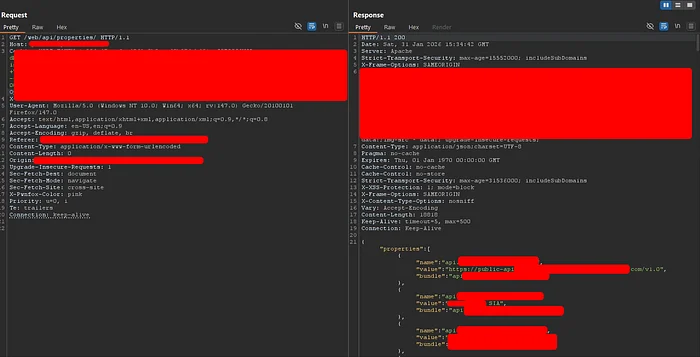
Screenshot 1 shows the unauthenticated GET /web/api/properties/ request returning 200 with a large JSON config body.
Step 2: read the secrets in the response
The body was not feature flags. It was the application's secrets. The write-up lists these exposed keys:
| Exposed key | What it is |
|---|---|
example.connect.client.id |
OAuth2 client_id for Connect |
example.connect.client.secret |
OAuth2 client_secret |
*.privateKey |
RSA private key |
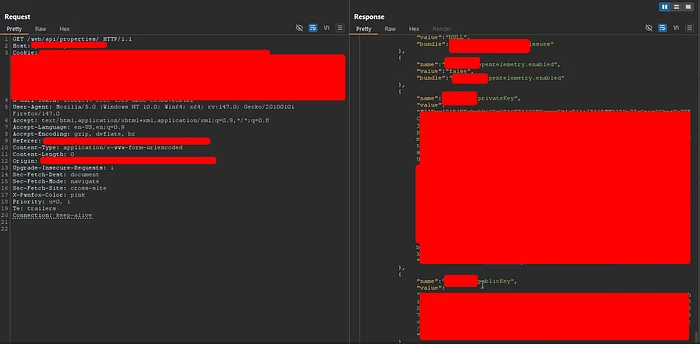
Screenshot 2 shows the JSON config with the OAuth2 client_id/client_secret and privateKey keys visible, values redacted. Beyond these, the dump also contained credentials for RabbitMQ, Redis, Solr and Elasticsearch, plus internal IP addresses and service endpoints.
A leaked private key and OAuth2 client secret is already Critical on its own, but the author kept going to prove impact.
Step 3: exchange the leaked secret for a token
OAuth2 has a grant designed for machine credentials: client_credentials. Connect was asked for a token using the leaked secret:
POST /connect/token HTTP/1.1Host: connect.identity.exampleContent-Type: application/x-www-form-urlencodedgrant_type=client_credentials&client_id=<LEAKED_ID>&client_secret=<LEAKED_SECRET>
The body is form-encoded and carries the grant type plus the two leaked values. Connect replied:
{"access_token": "[redacted]…","token_type": "Bearer","expires_in": 3600,"scope": "publicapi:user:read publicapi:user:update publicapi:tenant:* …"}
A valid access token came back. Nothing restricted where the secret could be used: no IP or environment restriction stopped a leaked secret from being used anywhere. The granted scopes included user read/update and tenant management.
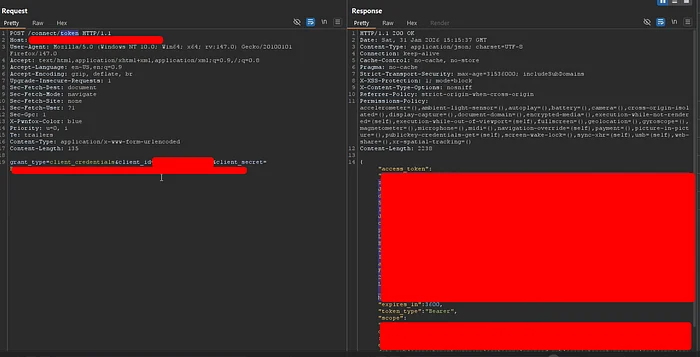
Screenshot 3 shows the /connect/token request with the leaked credentials returning a 200 with an access_token.
Step 4: call the protected identity API
With the token, the protected public identity API was reachable:
GET /v1.0/users HTTP/1.1Host: public-api.connect.identity.exampleAuthorization: Bearer <ACCESS_TOKEN>
The response listed real users:
{"total_users": 34,"users": [{ "id": "00000000-0000–0000-0000-000000000000", "email": "[redacted]", "country_code": "NO" }]}
Real users, emails, countries and IDs came back. Per the token scopes, the same credential also allowed creating and updating users, managing tenants and assigning roles.
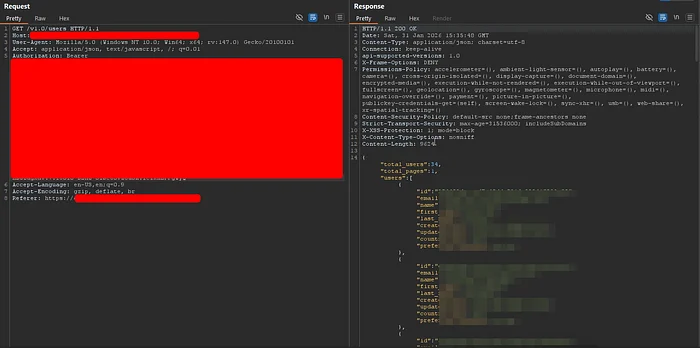
Screenshot 4 shows the authorised /v1.0/users response listing real users, with PII redacted.
Root cause
The application served its full property set from a client-reachable route, /web/api/properties/, with no authentication check. The route was referenced from the frontend JavaScript, so it was discoverable by anyone reading the bundles. The property set itself contained raw secrets rather than references to a secret store: the Connect OAuth2 client credentials, an RSA private key, and infrastructure credentials for RabbitMQ, Redis, Solr and Elasticsearch, alongside internal addresses and endpoints.
The identity provider then compounded the leak. The client_credentials grant accepted the leaked secret from anywhere, with no IP or environment binding, and the client was granted broad scopes covering user read/update and tenant management. A secret that should have been usable only from a known environment was usable from anywhere, and it carried more authority than the integration needed. The report does not describe the server-side code, so the exact reason the auth check was missing is not stated.
Impact
- Full OAuth2 trust-boundary break: the leaked client credentials let an attacker authenticate to Connect as the application and mint valid tokens at will.
- Unauthorised access to the identity API: enumerate and modify users and tenants, exposing PII (emails, names, country, IDs), which the author flags as a GDPR concern.
- Privilege and role manipulation: the token scopes allow user creation/update and role assignment, which means escalation and persistence.
- The RSA private key and infrastructure credentials (RabbitMQ, Redis, Solr, Elasticsearch) plus internal topology were disclosed, giving a broad secondary attack surface.
- The scope crosses systems: a bug in the ERP application compromised a separate security authority, the identity platform. That cross-system reach is what makes it Critical.
The config route answered without a session, and the identity provider placed no restriction on where the client secret could be used.
Fix
According to the report's timeline, the team rotated the exposed secrets and fixed the endpoint. The report's timeline records the sequence:
- Reported: unauthenticated config disclosure with the full OAuth2 to identity-API chain.
- Triaged and accepted as Critical; the team rotated the exposed secrets and fixed the endpoint quickly.
- Resolved: the endpoint is no longer accessible and the disclosed secrets were rotated.

Screenshot 5 shows the report's status history: Reported, Accepted as Critical, Resolved.
The author's recommendations for the class of bug: never serve config to clients, keep property/config endpoints server-side behind auth, and never put raw secrets in them in the first place. OAuth2 client secrets should be bound to an IP or environment and granted least privilege, and any secret that touches a client should be assumed burned and rotatable.
Variants to test
- Grep frontend JavaScript bundles for config and properties paths (
/api/properties,/config,/settings,/env) and request them without a session. A positive result is a200withapplication/jsonand a body containing keys rather than UI data. - Look for OAuth2 client credentials in any client-reachable response, then try the
client_credentialsgrant against the identity provider from your own host. A positive result is a token response with anaccess_tokenand a scope list. - Take any leaked token and call the identity API's user and tenant endpoints. A positive result is a listing of real users or tenants, or a successful create/update call.
- Check whether the identity provider binds client secrets to an IP or environment by replaying the token request from a different network. A positive result is a token issued from an unexpected origin.
- Inspect the scopes on issued tokens for write and admin permissions (
*:update,*:tenant:*, role assignment). A positive result is a token whose scopes exceed what the integration needs. - Look for private keys and broker or cache credentials in any exposed configuration, and treat their presence as a separate finding even if the token chain cannot be completed.
What happened, in plain words
A company ran a web platform for business purchasing and electronic invoicing. Like most modern platforms, it was not one program but a collection of services talking to each other, and one of those services was a central login system called Connect that kept track of who everyone was.
One of the platform's own web addresses, meant for internal use, handed out the platform's entire settings file to anyone who asked, without asking for a password. That settings file contained the username and password the platform itself uses to log in to Connect, plus a private cryptographic key and passwords for other internal systems.
With those leaked credentials the researchers asked Connect for an access pass, and Connect gave them one. That pass let them read the list of real users on the platform, and its permissions also allowed changing users and managing customer accounts.
The whole chain is: a settings page anyone could read, a secret inside it, a pass made from that secret, and private data behind the pass.
The target, and why it matters
This was a private bug bounty program. A bug bounty program is an arrangement where a company invites independent researchers to look for security mistakes in its systems and pays them for reporting the serious ones. The program was private, and the write-up refers to it as free-palestine.com.
The product is described as an ERP / B2B procurement and e-invoicing platform. Two terms there:
- ERP (enterprise resource planning) is large business software that ties together purchasing, invoicing, stock, accounting and similar day-to-day operations in one place. Think of it as the company's back office in software form.
- B2B means business to business: the platform is used by companies to buy from and sell to other companies, not by ordinary shoppers.
Its login model is centralised. Instead of every service checking passwords itself, the platform sends users to one central identity provider, here called Connect, which confirms who they are. This is called SSO, single sign-on: log in once, and every connected service trusts that one login. Connect also exposes a public identity API, a service that other software can call to list and manage users, customer organisations (called tenants) and roles.
An API (application programming interface) is the way one piece of software asks another to do something, usually over the web. If a website's pages are the shop counter a person walks up to, an API is the service hatch round the back where other programs place orders. It speaks in structured data rather than pretty pages.
The author explains why platforms like this leak: they are stitched together from many services, a frontend (what the browser shows), a backend (the logic behind it), message brokers (services that pass messages between programs), caches (fast temporary storage), search clusters, and the identity provider. Every extra moving part is another place a secret can end up somewhere it should not. That is exactly what happened here.
Finding it
Before any request was sent, the team read the platform's JavaScript. JavaScript is the programming language that runs inside your browser to make pages interactive. When you load a modern website, the browser downloads files full of JavaScript, and those files often mention web addresses the site uses behind the scenes.
While mapping that JavaScript, the team noticed the application referred to an internal-looking properties/config route. A route is simply a web address path on a server, like /web/api/properties/, that the server knows how to answer. The reasoning was: if the frontend knows this address exists, an outsider can try calling it directly, without going through the website's normal screens.
This is the first lesson of the report: the frontend's own code told them where to look. They did not guess the address.
Step 1: asking for the settings page without logging in
The team sent this request directly, with no valid session:
GET /web/api/properties/ HTTP/1.1Host: free-palestine.com
Line by line:
GET /web/api/properties/ HTTP/1.1is the request line.GETis the HTTP method used to ask a server to send something back, like asking a librarian for a book./web/api/properties/is the path being requested, the settings route.HTTP/1.1is the version of the web protocol being spoken.Host: free-palestine.comtells the server which site the request is for. One server can host many sites, so the request has to name the one it wants.
A session is how a website remembers that you logged in. When you sign in, the server gives your browser a small piece of data, often stored in a cookie, and the browser sends it back with every later request so the server recognises you. Sending a request with no session is like walking into an office with no visitor badge: you are simply an anonymous stranger.
A CSRF token (cross-site request forgery token) is an extra random value that well-built sites require alongside state-changing requests, to prove the request really came from their own pages and not from a malicious site tricking your browser. The report notes that not even this was required.
The server answered 200 OK with Content-Type: application/json. 200 OK is the standard HTTP status code for success. Content-Type: application/json says the body is JSON, a plain-text format for structured data built from names and values, which programs read easily. What came back was a full configuration dump: the application's settings, in the clear, to an anonymous stranger.
Screenshot 1 shows the request going out with no session and coming back with a 200 and a large JSON body full of configuration.
Step 2: reading the secrets inside
The response was not harmless feature flags. A feature flag is a simple on/off switch that tells software which features to show; it is boring configuration. This was the application's secrets. The write-up lists these exposed keys:
| Exposed key | What it is |
|---|---|
example.connect.client.id |
OAuth2 client_id for Connect |
example.connect.client.secret |
OAuth2 client_secret |
*.privateKey |
RSA private key |
Screenshot 2 shows the JSON settings with the OAuth2 client ID, client secret and private key names visible, with the actual values blanked out.
What those three things are:
- OAuth2 is a widely used standard for letting one piece of software get permission to use another on someone's behalf, without sharing a password. It works with a pair of values: a client_id, which is a public name for the application, like a username, and a client_secret, which is its password. Anyone holding both can act as that application.
- An RSA private key is one half of a cryptographic key pair used to prove identity and protect data. The private half must never leave its owner; if it leaks, whoever holds it can impersonate the owner or decrypt things meant only for them. Think of it as the master key to a building, not a copy of one office key.
Beyond those, the dump also contained credentials for RabbitMQ, Redis, Solr and Elasticsearch, which are internal infrastructure services (a message broker, a cache, and two search systems), plus internal IP addresses and service endpoints. An IP address is the numeric address of a machine on a network, and an endpoint is a specific address where a service answers requests. Together they describe the inside layout of the company's network, which is useful to an attacker planning a second move.
The author is blunt: a leaked private key and OAuth2 client secret is already Critical on its own. Critical is the top severity rating in bug bounty work. But the team kept going, because a finding is far more convincing when you can show what damage it actually allows.
Step 3: turning the leaked secret into an access pass
OAuth2 has a grant type made for exactly this situation: client_credentials. A grant type is the particular procedure used to obtain a token. The client_credentials grant is for machine-to-machine logins, where one program proves its identity to another using its client ID and secret, with no human involved.
An access token is a temporary pass, usually a long string of characters, that a server issues after you prove who you are. You then show it with each request instead of repeating your password. It is like a wristband at an event: show it at the door and you get in, and it stops working after a while.
The team asked Connect for a token using the leaked secret:
POST /connect/token HTTP/1.1Host: connect.identity.exampleContent-Type: application/x-www-form-urlencodedgrant_type=client_credentials&client_id=<LEAKED_ID>&client_secret=<LEAKED_SECRET>
Line by line:
POST /connect/token HTTP/1.1asks the server to do something rather than just fetch a page.POSTis the method used to submit data./connect/tokenis the address of Connect's token-issuing service.Host: connect.identity.examplenames the identity provider's server. The.exampleending marks it as a placeholder name, not a real address.Content-Type: application/x-www-form-urlencodedsays the submitted data is formatted the way ordinary web forms send it: pairs of names and values joined with&.grant_type=client_credentialssays which procedure is being used: the machine-to-machine one.client_id=<LEAKED_ID>andclient_secret=<LEAKED_SECRET>are the two leaked values, with the placeholders standing in for the real ones.
Connect replied:
{"access_token": "[redacted]…","token_type": "Bearer","expires_in": 3600,"scope": "publicapi:user:read publicapi:user:update publicapi:tenant:* …"}
Line by line:
"access_token"is the pass itself. The value beginning[redacted]is the start of a JWT (JSON Web Token), a token format that carries its own information inside it. The…shows the rest was cut off for the write-up."token_type": "Bearer"means the pass is presented by simply carrying it, like a wristband: whoever holds it is treated as the holder. That is why a leaked bearer token is dangerous."expires_in": 3600says the pass is valid for 3600 seconds, one hour."scope"lists what the pass is allowed to do. Scopes are the permissions attached to a token, like the list of rooms a keycard opens. Here they includepublicapi:user:read(read users),publicapi:user:update(change users) andpublicapi:tenant:*(everything to do with tenants).
Two problems made this worse than it needed to be. First, nothing restricted where the secret could be used: there was no IP or environment restriction, so a leaked secret worked from anywhere, not only from the company's own network. Second, the permissions were broad: user read and update, and tenant management, far more than a simple integration should need.
Screenshot 3 shows the token request with the leaked credentials coming back with a 200 and an access token.
Step 4: walking into the protected identity API
With the token in hand, the protected public identity API answered:
GET /v1.0/users HTTP/1.1Host: public-api.connect.identity.exampleAuthorization: Bearer <ACCESS_TOKEN>
Line by line:
GET /v1.0/users HTTP/1.1asks for the list of users at that address.v1.0is just a version number in the path.Host: public-api.connect.identity.examplenames the identity API's server, again a placeholder.Authorization: Bearer <ACCESS_TOKEN>is the line that carries the pass.Authorizationis the standard header for credentials, andBearersays the token is presented as-is. A header is a labelled line of extra information sent with a web request, like the address block on an envelope.
The response listed real users:
{"total_users": 34,"users": [{ "id": "00000000-0000–0000-0000-000000000000", "email": "[redacted]", "country_code": "NO" }]}
Line by line:
"total_users": 34says the platform had 34 users in total."users"is the list itself. Each entry has anid(a unique identifier, shown here as a placeholder pattern of zeros), anemail(shown as a placeholder address) and acountry_code(hereNO).
So real users, emails, countries and IDs came back. PII, personally identifiable information, is any data that can identify a real person, such as a name, an email address or an ID number. And per the token's scopes, the same pass also allowed creating and updating users, managing tenants and assigning roles. A role is a set of permissions given to an account, such as administrator or ordinary user, so assigning roles is how you grant power to an account.
Screenshot 4 shows the authorised user-list response with the personal details blanked out.
Why it was possible
The root cause has two halves.
First, the application served its full settings from a route anyone could reach, /web/api/properties/, with no login check at all. The route was mentioned in the frontend JavaScript, so anyone reading those files could find it. And the settings themselves contained raw secrets rather than references to a secure secret store: the Connect OAuth2 client ID and secret, an RSA private key, and credentials for RabbitMQ, Redis, Solr and Elasticsearch, along with internal addresses and endpoints. A secret store is a dedicated, locked-down service for keeping passwords and keys, so that application settings only point to them instead of containing them.
Second, the identity provider made the leak worse. Its client_credentials grant accepted the leaked secret from anywhere, with no IP or environment binding, and the client had been given broad scopes covering user read and update plus tenant management. A secret that should only have worked from one known place worked from everywhere, and it carried more authority than the integration needed.
The report does not describe the server-side code, so the exact reason the login check was missing is not stated.
Impact
- The OAuth2 trust boundary broke completely. The leaked client credentials let an attacker log in to Connect as the application itself and mint valid tokens whenever they liked. A trust boundary is the line between parties that trust each other and parties that do not; crossing it means an outsider is treated as an insider.
- The identity API was open without authorisation. Users and tenants could be listed and changed, exposing PII such as emails, names, country and IDs. The author flags this as a GDPR concern. GDPR is the European data protection law, which sets rules for handling personal data.
- Privileges and roles could be manipulated. The token scopes allowed creating and updating users and assigning roles, which means an attacker could give themselves more power and keep it. Privilege escalation is gaining more permissions than you are entitled to, and persistence is arranging to keep access after the first break-in.
- The private key and infrastructure credentials were disclosed. RabbitMQ, Redis, Solr and Elasticsearch credentials plus the internal network layout gave a broad second front to attack.
- The damage crossed systems. A bug in the purchasing platform compromised a separate security authority, the identity platform. That reach beyond one system is what makes it Critical.
The settings route answered without a session, and the identity provider placed no restriction on where the client secret could be used.
The fix and the timeline
According to the report's timeline, the team rotated the exposed secrets and fixed the endpoint. Rotating a secret means replacing it with a new one and retiring the old, so that anyone holding the leaked copy can no longer use it. The report's timeline records the sequence:
- Reported: the unauthenticated settings disclosure, with the full chain from OAuth2 credentials to the identity API.
- Triaged and accepted as Critical: the team rotated the exposed secrets and fixed the endpoint quickly. Triaged means the programme reviewed the report and confirmed it was a real issue.
- Resolved: the endpoint is no longer accessible and the disclosed secrets were rotated.
Screenshot 5 shows the report's status history: Reported, then Accepted as Critical, then Resolved.
The author's advice for this class of bug: never serve settings to clients, keep configuration endpoints on the server behind a login check, and never put raw secrets in them in the first place. OAuth2 client secrets should be bound to an IP address or environment and given the least privilege they need. Least privilege means granting only the permissions a job actually requires, nothing more. And any secret that has touched a client should be assumed burned and made easy to rotate.
What to try on your own targets
These are the checks the author suggests for the same kind of mistake:
- Search frontend JavaScript files for settings-related paths such as
/api/properties,/config,/settingsor/env, then request them without a session. A positive result is a200withapplication/jsonwhose body contains keys rather than ordinary page data. - Look for OAuth2 client credentials in any response a client can reach, then try the
client_credentialsgrant against the identity provider from your own machine. A positive result is a token response containing anaccess_tokenand a list of scopes. - Take any leaked token and call the identity API's user and tenant endpoints. A positive result is a list of real users or tenants, or a successful create or update.
- Check whether the identity provider binds client secrets to an IP or environment by repeating the token request from a different network. A positive result is a token issued from an unexpected origin.
- Inspect the scopes on issued tokens for write and admin permissions such as
*:update,*:tenant:*or role assignment. A positive result is a token whose scopes exceed what the integration needs. - Look for private keys and broker or cache credentials in any exposed configuration, and treat finding them as a separate issue even if the token chain cannot be completed.
Glossary
- Access token: a temporary pass issued after proving identity, shown with later requests instead of a password.
- API (application programming interface): the way one piece of software asks another to do something, usually over the web, exchanging structured data.
- B2B: business to business; trade between companies rather than with ordinary consumers.
- Bearer token: a token that grants access to whoever presents it, like a wristband.
- Bug bounty program: an arrangement where a company invites independent researchers to find security mistakes and pays for serious reports.
- Cache: fast temporary storage that keeps frequently used data close at hand.
- Client ID: the public name an application uses when logging in to another service under OAuth2, like a username.
- Client secret: the password that goes with a client ID; anyone holding both can act as that application.
client_credentialsgrant: the OAuth2 procedure for machine-to-machine logins, where a program proves itself with its client ID and secret and no human is involved.- Cookie: a small piece of data a website stores in your browser and gets back with later requests, often used to remember that you logged in.
- Critical: the top severity rating in bug bounty work.
- CSRF token: an extra random value required with state-changing requests to prove they came from the site's own pages.
- Endpoint: a specific address where a service answers requests.
- ERP (enterprise resource planning): large business software tying together purchasing, invoicing, stock and accounting.
- Feature flag: a simple on/off switch telling software which features to show.
- GDPR: the European data protection law governing the handling of personal data.
- Grant type: the particular procedure used to obtain an OAuth2 token.
- Header: a labelled line of extra information sent with a web request, such as credentials or the content type.
- HTTP: the protocol browsers and servers use to exchange requests and responses on the web.
- Identity provider: a central service that confirms who users are and issues proof of login to other services.
- IP address: the numeric address of a machine on a network.
- JavaScript: the programming language that runs in the browser to make pages interactive; its files often mention the site's internal addresses.
- JSON: a plain-text format for structured data made of names and values, easy for programs to read.
- JWT (JSON Web Token): a token format that carries information about itself inside the token string.
- Least privilege: granting only the permissions a job actually needs, nothing more.
- Message broker: a service that passes messages between programs.
- OAuth2: a standard for letting one piece of software get permission to use another without sharing a password.
- Persistence: arranging to keep access after the first break-in.
- PII (personally identifiable information): any data that can identify a real person, such as a name, email or ID.
- Privilege escalation: gaining more permissions than you are entitled to.
- Private key: the secret half of a cryptographic key pair, used to prove identity and protect data; it must never leave its owner.
- Role: a set of permissions given to an account, such as administrator or ordinary user.
- Rotating a secret: replacing a secret with a new one and retiring the old, so leaked copies stop working.
- Route: a web address path on a server that the server knows how to answer.
- RSA: a family of cryptographic algorithms that use a public and a private key.
- Scope: a permission attached to a token, like one room a keycard opens.
- Secret store: a dedicated, locked-down service for keeping passwords and keys, so settings only point to them.
- Session: how a website remembers that you logged in, usually via a cookie.
- SSO (single sign-on): logging in once and having every connected service trust that one login.
- Tenant: a customer organisation whose accounts and data are kept separate inside a shared platform.
- Triaged: reviewed by the programme and confirmed as a real issue.
- Trust boundary: the line between parties that trust each other and parties that do not.



