From a Profile Picture Upload to RCE: Hunting an ASP.NET/IIS Vulnerability
The profile-picture upload accepted arbitrary content and served it from a publicly accessible directory, allowing stored XSS. Because the upload directory was also configured to execute ASP.NET handlers, an uploaded .ashx file was processed by the server, leading to remote code execution.
 Published on medium.com
Cybersecurity
The full write-up lives on its author's site
It belongs to its author, so we link to it rather than copy it. The other two tabs are our own rewrites, checked against it.
Context
This assessment targeted a self-hosted web platform hosted in another country. The functionality in scope was ordinary account management and, in particular, the profile-picture upload: users could upload JPEG or PNG images, with a client-side file-size limit and MIME-type validation. The application ran on Microsoft IIS 10.0 with ASP.NET on the .NET Framework 4.x stack.
The investigation produced two findings: Stored Cross-Site Scripting through the upload, and Remote Code Execution through an uploaded ASP.NET HTTP Handler. The point of the write-up is less the two bugs than the reasoning that connected them: how the application processed uploaded files, how the technology stack shaped what was executable, and why an assumption that works on one stack does not carry over to another.
Setup
The first obstacle was simply reaching the application. It was hosted abroad and free VPN services gave an inconsistent connection, so a residential proxy was configured to get a stable one. The researcher created an account and completed the profile-registration workflow.
Tools and techniques used:
- Burp Suite to capture and modify the upload request.
- Reconnaissance covering subdomain enumeration, DNS reconnaissance, network and infrastructure analysis, technology fingerprinting, JavaScript file analysis, public asset discovery, GitHub and public repository reconnaissance, and application endpoint discovery.
Three areas came out of the mapping: the profile-picture upload, the IIS/ASP.NET stack underneath it, and the password recovery and account information update functionality.
Finding it
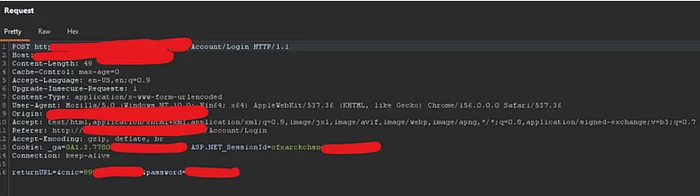
The account-management functionality came first. The application used ASP.NET session-related identifiers, and behaviour around session changes and account information was observed. It was not conclusive: session identifiers can legitimately rotate during authentication and account-management operations, and an unusual response is not a vulnerability unless unauthorised access or another demonstrable impact can be shown. With no such evidence, the researcher moved on to file uploads, which turned out to be the turning point.
The stack mattered before any payload was sent. A PHP payload does not automatically execute on an ASP.NET application, and a file does not become executable because its content looks like source code: the server needs an execution mechanism that recognises and processes it. Time went into IIS and ASP.NET behaviour, security advisories, historical vulnerabilities and technical articles. Early approaches did not produce code execution, a reminder that configuration matters more than the version banner.
The upload flow, as mapped from the front end, was:
- The user selects a JPEG or PNG image.
- JavaScript validates file size and MIME type in the browser.
- JavaScript uses the FileReader API to generate a Data URL for the image preview.
- The user confirms the profile information.
- The application sends a
multipart/form-dataPOST to the profile-registration endpoint, with the file in thePictureparameter. - The ASP.NET application receives the file.
The open questions were all server-side: was the file decoded and re-encoded as an image, was the original content preserved, was the extension validated, where was the file stored, and could it be retrieved directly? Those matter more than whether the form accepts an unexpected MIME type, because client-side validation is not a security boundary. A browser can reject a file while a manually constructed request is still accepted, so validation has to be enforced on the server against the actual file and its intended use.
Exploitation
Step 1: Capture the original upload
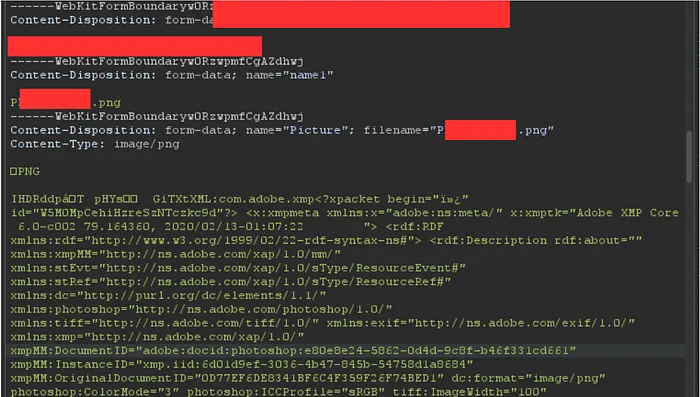
After registering and completing the profile workflow, the upload request was captured in Burp Suite and studied before anything was modified: the upload endpoint, the multipart structure, the filename parameter, the Content-Type header, the server response and the resulting file location. The body was multipart/form-data with a file parameter named Picture, a filename, a content type and binary image data. Revisiting the front end showed how the form built the request, and confirmed the distinction that drives the rest of the assessment: the browser preview and the server's file processing are separate things, and a file rendering correctly in a preview says little about how safely the server stores and serves it.
Step 2: Replace the image with HTML
The upload request was modified to submit a harmless HTML document instead of the original image content.
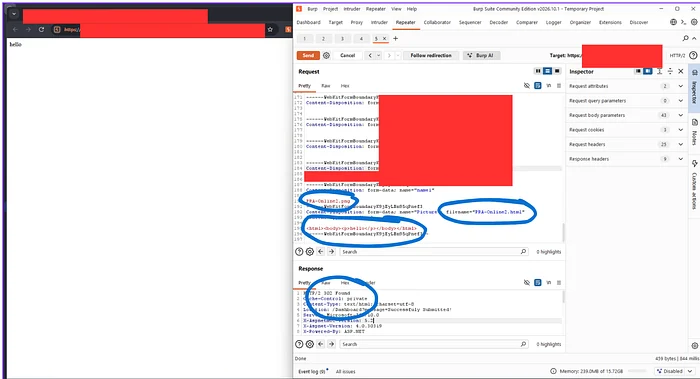
The application accepted the modified content. Opening the resulting resource afterwards caused the supplied HTML to be interpreted by the browser. Testing continued with a controlled JavaScript proof of concept, which confirmed Stored XSS: the uploaded content was not merely treated as an image, it was served in a way that let active browser content execute. That is a weakness in the file-upload and file-serving design, not just in the upload form.
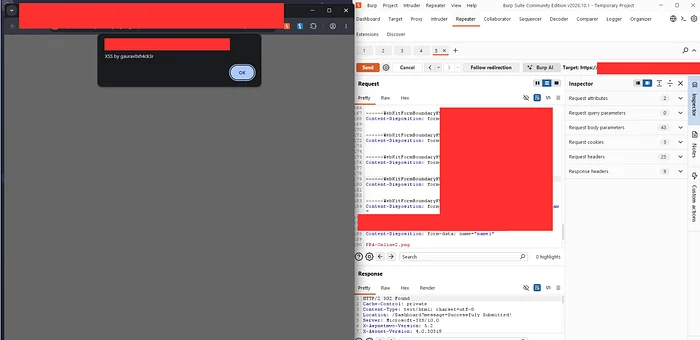
Stored XSS differs from reflected XSS in that the payload is persisted and stays available until the content is removed or access to it is blocked, rather than needing a victim to follow a crafted request. The consequences depend on the application's origin, browser context, authentication design and security controls.
Step 3: Try PHP and fail
The next question was whether the server would execute an uploaded file rather than only render it. Early attempts used PHP-based files. They did not work: the uploaded resources returned HTTP 404 when accessed through the expected URLs. A PHP file is not automatically executable on IIS/ASP.NET; execution depends on configured handlers, runtime, mappings and the application environment, and changing an extension does not install an interpreter. The failed attempts were useful evidence that the server's actual execution environment had to be understood rather than guessed at.
Step 4: Study ASP.NET HTTP Handlers
Research into ASP.NET turned up HTTP Handlers, which process incoming requests for particular resource types. The .ashx extension is a familiar example. A handler can implement the IHttpHandler interface and process a request through its ProcessRequest method, which is fundamentally different from serving an uploaded HTML or image file: an image is returned as content, while a handler is processed by the server-side runtime. The question became whether the upload directory, already known to be publicly accessible, was also configured as an executable application location.
Step 5: Upload an ASP.NET handler
A controlled test used an ASP.NET HTTP Handler proof of concept. The uploaded resource was accessible through its resulting URL, and instead of returning the file as an ordinary image, the server processed it as an ASP.NET handler and returned the handler's expected response. The uploaded file had crossed from untrusted stored content into the server-side execution environment.
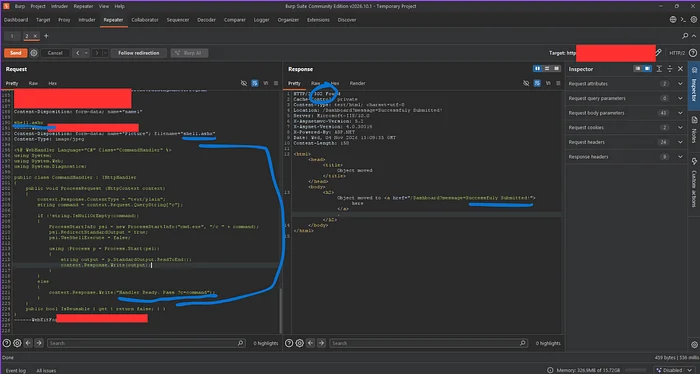
Step 6: Confirm command execution
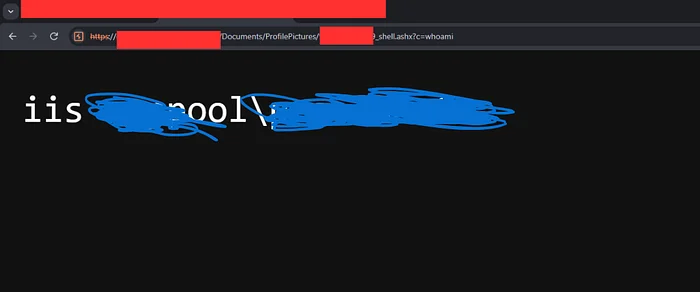
A minimal, non-destructive command-execution proof of concept checked whether the handler could invoke an operating-system process. The server returned the identity of the process executing the handler, which is strong evidence of server-side operating-system command execution. The profile-picture upload had become an RCE attack surface.
No exotic IIS zero-day was involved. The evidence pointed to an application-level upload weakness combined with an execution-capable server configuration, and a vulnerable application can expose serious problems even when its underlying software is not affected by a published CVE.
Root cause
The two findings are related but technically distinct.
Stored XSS. The application accepted untrusted content through the profile-picture upload and served it in a browser-interpretable context, giving persistent HTML and JavaScript execution in the affected browser context.
RCE. The application allowed an uploaded ASP.NET handler to become accessible in a location where the server-side runtime processed it, and the handler could execute an operating-system process under the application's server-side security context.
The underlying concerns, as listed in the write-up:
- Insufficient restrictions on uploaded file types.
- Inadequate validation of actual file content.
- Unsafe treatment of uploaded files.
- Exposure of uploaded content through a publicly accessible application directory.
- Execution-capable server configuration for untrusted upload locations.
Accepting an unexpected extension is not enough to establish RCE; server-side execution has to be demonstrated independently. That is the line between an upload anomaly and a confirmed high-impact vulnerability. Client-side size and MIME checks are not a security boundary, because a request can be constructed by hand.
Impact
Stored XSS means persisted HTML and JavaScript that remains available until the content is removed or access is prevented. The real consequences depend on the application's origin, browser context, authentication design and security controls.
On the RCE side, an uploaded handler is processed by the server-side runtime and can invoke operating-system processes under the application's server-side security context. In this assessment the demonstration was deliberately limited to returning the identity of the executing process; no system control was taken and no sensitive information was accessed. Once execution is sufficiently established, further exploitation should stop, evidence should be preserved with sensitive information redacted, and the issue should go through the authorised disclosure channel.
Fix
Blocking one extension is not the fix. The upload architecture needs a clear separation between user-controlled files and executable application resources, with the following controls implemented together:
Strict server-side validation
- Maintain an allowlist of necessary image formats.
- Validate actual file signatures and decode the image with a trusted image-processing library.
- Re-encode accepted images into a safe output format.
- Enforce file-size and dimension limits.
Safe storage
- Store uploads outside the application web root wherever possible.
- Use generated filenames instead of user-supplied ones.
- Prevent directory traversal and unsafe path construction.
- Serve uploads through a controlled static-content mechanism.
Disable execution
- Ensure upload directories cannot execute ASP.NET handlers or other server-side scripts.
- Review IIS handler mappings and execution permissions.
- Separate uploaded content from application code and executable directories.
Least privilege
- Run application pools under appropriately restricted identities.
- Limit filesystem permissions.
- Avoid unnecessary access to sensitive system resources.
Browser-side protection
- Serve uploads from a separate origin where practical.
- Use suitable
Content-TypeandContent-Dispositionheaders. - Apply appropriate Content Security Policy controls.
- Never insert untrusted content into an HTML context without proper encoding.
Blocking .ashx alone would leave the architectural problem in place.
Variants to test
-
HTML upload into a served directory. Submit an HTML document in place of an image and open the resulting URL. A positive result is the browser rendering the markup and executing a controlled script, which confirms Stored XSS.
-
Handler upload on ASP.NET. Upload a minimal
IHttpHandlerproof of concept and request its URL. A positive result is the handler's expected response instead of the file being returned as static content. -
Command execution through the handler. Use a minimal, non-destructive proof of concept that invokes an operating-system process. A positive result is the server returning the identity of the process running the handler.
-
Direct retrieval of uploads. Request the stored file at its resulting URL. A positive result is the file being served from a publicly accessible location, which is the precondition for both findings.
-
Session identifier changes. Observe identifiers during authentication and account updates, but treat rotation as expected behaviour. Only a demonstrated unauthorised access counts as a finding.
What happened, in plain words
A security researcher tested a website that was hosted in another country. The website let people create an account and upload a profile picture. That is the whole feature: you pick a JPEG or PNG image, the site shows you a preview, and you save your profile.
The researcher found two problems in that ordinary feature. First, the site accepted an HTML document in place of an image and served it back so the browser interpreted it. That is called Stored Cross-Site Scripting, or Stored XSS. Second, the site accepted a special kind of file that the server itself would run as a program. That is called Remote Code Execution, or RCE, and it is one of the most serious problems a website can have.
The interesting part is not the two bugs on their own. It is how the researcher got from one to the other: by understanding how the site handled uploaded files, what software the site was built on, and why a trick that works on one kind of server does nothing on another.
The words you need first
Before the story, a few everyday ideas. You do not need to memorise them; each one comes back when it is used.
- Server: the computer somewhere else that runs the website. Your browser asks it for pages and files, and it answers. Think of a restaurant kitchen: you order, the kitchen prepares, the waiter brings it out. You never see the kitchen.
- Browser: the program on your computer, such as Chrome or Firefox, that shows web pages and sends requests to servers.
- HTTP request: the message your browser sends to a server, for example "please give me this page" or "please save this file for me". An HTTP response is the server's reply.
- Endpoint: a specific address on the server that does a specific job, like a particular counter in the restaurant. The profile-registration endpoint is the counter that handles saving your profile.
- API: a way for one program to talk to another using agreed requests and replies. When the upload form sends your picture to the server, it is using the site's API, even though you never see it.
- Cookie / session identifier: a small label the server gives your browser after you log in, so it can recognise you on the next request. Like a coat-check ticket: show the ticket, get your coat. If someone else gets your ticket, they can pretend to be you.
- MIME type: a label that says what kind of file something is, for example
image/jpegfor a JPEG photo ortext/htmlfor a web page. It is a claim, not a guarantee. - Multipart form data: the format a browser uses to send a form that includes a file. The request is split into parts, and each part has a name, a filename, a type and the actual bytes.
- Vulnerability: a weakness in a website that someone can use to make it do something it was not supposed to do.
- Exploit: the actual request or file that takes advantage of a vulnerability.
- Payload: the content you send in an exploit, for example the HTML or script you upload.
- Proof of concept (PoC): a small, safe demonstration that proves a problem is real without causing damage.
- Reconnaissance: looking around first to understand what a site is made of and which parts are worth testing, before trying anything.
- Technology stack: the collection of software a site is built on, for example Microsoft IIS as the web server plus ASP.NET as the programming framework.
- IIS: Microsoft's web server software. It is the program that receives requests and decides what to do with them.
- ASP.NET: Microsoft's framework for building web applications. Programs written with it run on the server.
- CVE: a public catalogue number for a known security flaw in a piece of software. If your software has no matching CVE, it can still be badly configured and unsafe.
- RCE (Remote Code Execution): when an attacker can make the server run commands of their choosing. It is roughly the difference between someone leaving a note in your letterbox and someone getting into your kitchen and using your oven.
- XSS (Cross-Site Scripting): when a site lets attacker-supplied content run as code in someone's browser. Stored XSS means the content is saved on the server and runs whenever someone opens it. Reflected XSS means it only runs if a victim follows a specially crafted link.
- Burp Suite: a tool that sits between your browser and the server so you can see and edit requests before they are sent.
- Proxy: a middleman computer that your traffic passes through. A residential proxy routes traffic through an ordinary home internet connection.
- VPN: a service that routes your traffic through another location. Free ones can be slow or unreliable.
- HTTP 404: the server's way of saying "there is nothing at this address".
- Handler (ASP.NET HTTP Handler): a piece of server-side code that processes requests for a particular kind of file. The
.ashxextension is a common example. Unlike a photo, which is just handed back as content, a handler is run by the server. - Web root: the folder on the server whose contents are publicly reachable through the website.
- Least privilege: giving a program only the permissions it actually needs, no more.
1. Getting access was the first challenge
The first problem was not a security bug at all. It was simply reaching the website reliably. The platform was hosted in another country, and free VPN services gave an inconsistent connection. So the researcher set up a residential proxy to get a stable connection.
Why does this matter? Because testing needs a reliable connection. If requests time out or arrive half-finished, you cannot tell whether a strange response is a security problem or just a bad network. Removing that noise is the first step of any careful test.
Once access was stable, the researcher did not start firing random payloads at the site. That is the equivalent of trying every key in a bunch on a door without looking at the lock. Instead, the first goal was to understand the attack surface: the full set of places where a site accepts input or exposes something.
Reconnaissance covered:
- Subdomain enumeration: finding other names under the same domain, such as shop.example.com when the main site is example.com.
- DNS reconnaissance: looking up the records that map names to servers.
- Network and infrastructure analysis: understanding what is hosted where.
- Technology fingerprinting: working out which software the site runs on.
- JavaScript file analysis: reading the code the browser downloads, because it often reveals endpoints and checks.
- Public asset discovery: finding files the site exposes publicly.
- GitHub and public repository reconnaissance: checking whether code or configuration was accidentally published.
- Application endpoint discovery: listing the addresses that do real work.
The point of reconnaissance is not to collect the longest list of URLs. It is to understand what exists, how the parts talk to each other, which technologies are involved, and where testing is most likely to find something meaningful.
Three areas stood out:
- The profile-picture upload.
- The Microsoft IIS and ASP.NET stack underneath it.
- Password recovery and account information update.
These became the starting paths.
2. Understanding the application before exploiting it
The account-management features came first. The application used ASP.NET session-related identifiers, and the researcher noticed behaviour around session changes and account information.
Here is the trap. An unusual response is not automatically a vulnerability. Session identifiers can legitimately change during login and account updates; that is a normal security measure, not a bug. To call something a vulnerability you need unauthorised access or some other demonstrable impact. Without that evidence, this path was not conclusive, so the researcher moved on to file uploads. That decision became the turning point of the whole assessment.
3. The technology stack changed the entire approach
During reconnaissance, the environment was identified as:
- Microsoft IIS 10.0.
- ASP.NET on the .NET Framework 4.x stack.
Why does this matter before sending a single payload? Because file-upload problems depend heavily on what the server is and how it is configured.
A PHP payload, for example, will not automatically run on an ASP.NET application. PHP and ASP.NET are different languages with different runtimes, like a diesel engine and a petrol engine: the fuel from one does not make the other go. And a file does not become a program just because its contents look like source code. The server needs a mechanism that recognises that kind of file and processes it.
The researcher spent time studying how IIS and ASP.NET behave, reading security advisories, looking at historical vulnerabilities and technical articles. Several approaches were tried, and the early ones did not produce code execution.
That is a useful lesson in itself: technology fingerprinting should guide your testing, not become an excuse to blindly try every public exploit that mentions a product version. The actual configuration and implementation matter more than the version banner.
4. Investigating the profile-picture upload
The profile-picture feature looked ordinary. Users could upload JPEG or PNG images, with a client-side file-size limit and MIME-type validation.
Reading the front-end code showed the workflow:
- File selection. The user picks a JPEG or PNG image.
- JavaScript validation. The browser checks file size and MIME type.
- FileReader. JavaScript uses the FileReader API to build a Data URL for the image preview. A Data URL is a way of embedding a file's contents directly in a text string so the browser can display it without asking the server.
- Profile confirmation. The user confirms the profile information.
- HTTP request. The application sends a
multipart/form-dataPOST to the profile-registration endpoint, with the uploaded file in thePictureparameter. - Server-side processing. The ASP.NET application receives the file.
At that point the important questions were all about the server, and none of them were answered yet:
- Was the file decoded and re-encoded as an image?
- Was the original content preserved?
- Was the extension validated?
- Where was the file stored?
- Could the uploaded object be retrieved directly?
These questions matter far more than whether the form accepts an unexpected MIME type. Here is why: client-side validation is not a security boundary. JavaScript checks make the form friendlier, but an attacker can build an HTTP request by hand and skip the browser entirely. So the server must enforce the rules itself, against the actual file and its intended use, rather than trusting browser-side checks or request headers.
5. Intercepting and understanding the upload request
The researcher created an account and completed the profile-registration workflow, then captured the upload request with Burp Suite. Instead of changing everything at once, the original request and response were studied first.
The request contained a multipart/form-data body with a file parameter named Picture, along with a filename, a content type and binary image data.
What was examined:
- The upload endpoint.
- The multipart structure.
- The filename parameter.
- The
Content-Typeheader. - The server response.
- The resulting uploaded-file location.
The front-end code was revisited to see how the form built its request. This established a distinction that drives the rest of the assessment: the browser's image preview and the server's actual file processing are two separate things. A file displaying correctly in a preview tells you almost nothing about how safely the server stores and serves it.
6. The first breakthrough: Stored XSS
The next question was whether the application trusted the supplied file metadata and content too much. During controlled testing, the upload request was modified to submit a harmless HTML document instead of the original image content.
The application accepted the modified content. More importantly, after the upload, opening the resulting resource caused the supplied HTML to be interpreted by the browser. That was the first significant breakthrough.
Testing continued with a controlled JavaScript proof of concept, and Stored Cross-Site Scripting was confirmed. The uploaded content was not merely being treated as an image. It was being served in a way that allowed active browser content to execute. That is a weakness in the file-upload and file-serving design, not just in the upload form.
Why this matters
Stored XSS happens when untrusted content is saved and later shown in a browser in a context where it can run as code. Reflected XSS is different: there, an attacker generally needs a victim to visit a specially crafted request. Stored XSS stays available until the content is removed or access to it is blocked, so anyone who opens it runs it.
The real consequences depend on the application's origin, browser context, authentication design and security controls. In plain terms, the impact depends on the application's origin, browser context, authentication design and security controls. The researcher did not stop at the XSS finding, though. The bigger question was still open: was the server only rendering uploaded content in the browser, or could the server itself execute an uploaded file?
7. Understanding why PHP payloads were not working
The next attempts asked whether an uploaded file could be interpreted as server-side executable content. Some early approaches used PHP-based files. They did not work: the uploaded resources returned HTTP 404 responses when accessed through the expected URLs.
This was a useful technical lesson. A PHP file is not automatically executable on an IIS/ASP.NET application. Server-side execution depends on the configured handlers, runtime, mappings and application environment. Changing a filename extension does not install an interpreter or make an incompatible runtime execute the content. It is like renaming a photo to .php: the name changed, but nothing on the server now knows how to run it.
At this point the researcher went back to the technology stack. Rather than continuing with payloads designed for unrelated environments, the focus moved to understanding how ASP.NET processes requests.
8. The missing piece: ASP.NET HTTP Handlers
While researching ASP.NET, the researcher came across HTTP Handlers. ASP.NET supports handlers that process incoming HTTP requests for particular resource types. One familiar example is the .ashx extension.
An ASP.NET HTTP Handler can implement the IHttpHandler interface and process an incoming request through its ProcessRequest method. That is fundamentally different from serving an uploaded HTML or image file. An image is normally returned as content, like handing someone a printed photo. An ASP.NET handler is processed by the server-side runtime, like handing the kitchen a recipe and having it cooked.
That distinction was central to the next question: what would happen if an application allowed untrusted handler files to be uploaded into a location where IIS and ASP.NET could execute them?
The key question became: was the uploaded file merely accessible, or was the upload directory also configured as an executable application location? It was already known that the application stored uploaded profile pictures in a publicly accessible directory. What remained unknown was whether the server would interpret files there as programs.
9. The second breakthrough: server-side code execution
After the previous investigation, a controlled test used an ASP.NET HTTP Handler proof of concept. The result was unexpected. The uploaded resource was accessible through its resulting URL, and instead of returning the file as an ordinary image, the server processed it as an ASP.NET handler. The handler returned its expected response.
This was the point where the investigation changed significantly. The uploaded file had crossed an important security boundary: it was no longer just untrusted content being stored by an application. It was being processed by the server-side execution environment.
A minimal, non-destructive command-execution proof of concept then checked whether the handler could invoke an operating-system process. The server returned the identity of the process executing the handler. That is strong evidence of server-side operating-system command execution. The upload functionality had become an RCE attack surface.
The striking part is that the application had presented all of this as a simple profile-picture upload. The vulnerability did not depend on an exotic IIS zero-day. The evidence pointed to an application-level upload security weakness combined with an execution-capable server configuration. The distinction matters: a vulnerable application can expose serious security problems even when its underlying software is not affected by a published CVE.
10. Breaking down the vulnerability chain
The investigation revealed two related but technically distinct security issues.
Finding 1: Stored Cross-Site Scripting
The application accepted untrusted content through its profile-picture upload feature and served that content in a browser-interpretable context. The result was persistent HTML and JavaScript execution in the affected browser context.
Finding 2: Remote Code Execution
The application allowed an uploaded ASP.NET handler to become accessible in a location where the server-side runtime processed it. The handler's ability to execute an operating-system process demonstrated command execution under the application's server-side security context.
The underlying security concerns were:
- Insufficient restrictions on uploaded file types.
- Inadequate validation of actual file content.
- Unsafe treatment of uploaded files.
- Exposure of uploaded content through a publicly accessible application directory.
- Execution-capable server configuration for untrusted upload locations.
Importantly, accepting an unexpected file extension alone is not enough to establish RCE. Server-side execution must be independently demonstrated. That distinction separates an interesting upload anomaly from a confirmed high-impact vulnerability.
11. What beginners should learn from this assessment
- Reconnaissance is more than enumeration. Collecting subdomains and endpoints is only the beginning. Understanding functionality and how components relate can uncover attack surfaces that automated scanning misses.
- Understand the technology stack before choosing an approach. PHP, ASP.NET, Java and Node.js have different execution models. A payload designed for one environment will not automatically work in another.
- Learn HTTP requests, not just tools. Burp Suite is powerful, but its real value comes from understanding what is sent and how the server responds. Pay attention to multipart boundaries, filenames, content types, HTTP methods, response headers and resource locations.
- Client-side validation is not server-side security. A browser can reject a file while the server still accepts a manually constructed request. The server must enforce validation independently.
- MIME type and file extension are not proof of file safety. A filename, an HTTP
Content-Typeheader and the actual file contents are different things. Security-sensitive applications must not trust these values independently. - File storage and file execution are different security boundaries. An application may need to store user uploads, but those uploads should not be interpreted as executable application resources.
- A failed attempt is still useful evidence. The unsuccessful PHP tests showed that the server's actual execution environment had to be understood instead of blindly reusing payloads.
- Do not confuse an observation with a vulnerability. A changing session identifier, an unusual HTTP response or an accepted file extension is not automatically a security finding. Demonstrable impact and a defensible explanation of the underlying behaviour matter.
12. How should this be fixed?
The right fix is not simply to block one file extension. The upload architecture needs a clear separation between user-controlled files and executable application resources.
Strict server-side validation
- Maintain an allowlist of necessary image formats.
- Validate actual file signatures and decode the image using a trusted image-processing library.
- Re-encode accepted images into a safe output format.
- Enforce file-size and dimension limits.
Safe storage
- Store user uploads outside the application web root wherever possible.
- Use generated filenames rather than trusting user-supplied filenames.
- Prevent directory traversal and unsafe path construction.
- Serve uploads through a controlled static-content mechanism.
Disable execution
- Ensure upload directories cannot execute ASP.NET handlers or other server-side scripts.
- Review IIS handler mappings and execution permissions.
- Separate uploaded content from application code and executable directories.
Least privilege
- Run application pools under appropriately restricted identities.
- Limit filesystem permissions.
- Avoid unnecessary access to sensitive system resources.
Browser-side protection
- Serve user uploads from a separate origin where practical.
- Use suitable
Content-TypeandContent-Dispositionheaders. - Apply appropriate Content Security Policy controls.
- Ensure untrusted content is never inserted into an HTML context without proper encoding.
These controls should be implemented together. Blocking .ashx alone would not address the underlying architectural problem.
13. Responsible disclosure and final thoughts
Finding code execution is an important security finding, but demonstrating impact does not require taking control of a system or accessing sensitive information. Once execution has been sufficiently established, further exploitation should stop. The evidence should be preserved, sensitive information redacted, and the vulnerability reported through the authorised disclosure channel.
A strong report should explain the affected functionality, the reproducible conditions, the security boundary that was crossed, the demonstrated impact, and the recommended remediation.
This investigation reinforced something fundamental to security research: the best findings often come from understanding how an application works, not from knowing the largest collection of payloads. What began as a profile-picture upload feature turned into an investigation of browser content interpretation, HTTP request processing, IIS configuration, ASP.NET handlers and server-side execution. There were multiple dead ends, several incorrect assumptions and plenty of reading along the way.
But the biggest lesson was simple: do not look at a feature only in terms of what it was designed to do. Understand what the server actually allows it to do. Sometimes, the most ordinary functionality hides the most interesting security boundary.
Glossary
- ASP.NET: Microsoft's framework for building web applications that run on a server.
- Attack surface: all the places where a site accepts input or exposes something that could be tested.
- Browser: the program on your computer that displays web pages and sends requests to servers.
- Burp Suite: a tool that sits between your browser and a server so you can see and edit requests.
- Client-side validation: checks performed by the browser, which an attacker can bypass by building requests by hand.
- Content-Type header: the part of an HTTP message that states what kind of content is being sent.
- Cookie / session identifier: a small label the server gives your browser so it can recognise you on later requests.
- Data URL: a way of embedding a file's contents directly in a text string so a browser can display it.
- DNS: the system that maps domain names to servers.
- Endpoint: a specific address on a server that performs a specific job.
- FileReader API: a browser feature that lets JavaScript read a file the user selected.
- Handler (ASP.NET HTTP Handler): server-side code that processes requests for a particular kind of file, such as
.ashx. - HTTP request / response: the message your browser sends to a server, and the server's reply.
- HTTP 404: the server's reply meaning there is nothing at that address.
- IIS: Microsoft's web server software.
- IHttpHandler / ProcessRequest: the ASP.NET interface and method through which a handler processes an incoming request.
- Least privilege: giving a program only the permissions it actually needs.
- MIME type: a label saying what kind of file something is, such as
image/jpeg; it is a claim, not a guarantee. - Multipart/form-data: the format used to send a form that includes a file, split into named parts.
- Payload: the content sent in an exploit, such as the HTML or script uploaded.
- Proof of concept (PoC): a small, safe demonstration that proves a problem is real.
- Proxy: a middleman computer that traffic passes through; a residential proxy uses an ordinary home connection.
- Reconnaissance: looking around first to understand what a site is made of before testing.
- Reflected XSS: XSS that only runs when a victim follows a specially crafted request.
- Server: the remote computer that runs the website and answers requests.
- Stored XSS: XSS where the malicious content is saved on the server and runs whenever someone opens it.
- Technology stack: the collection of software a site is built on, such as IIS plus ASP.NET.
- Vulnerability: a weakness that lets someone make a site do something it was not supposed to do.
- Web root: the folder on a server whose contents are publicly reachable through the website.
- Zero-day: a previously unknown flaw with no official fix available at the time.


