From DNS Record to Subdomain Takeover: A Dangling Tilda Configuration
A subdomain's DNS record still pointed to the website-hosting platform Tilda, but the Tilda project behind it was no longer controlled by the organisation. An attacker with a paid Tilda account could attach the abandoned hostname to their own project and serve content from the legitimate subdomain.
 Published on medium.com
Cybersecurity
The full write-up lives on its author's site
It belongs to its author, so we link to it rather than copy it. The other two tabs are our own rewrites, checked against it.
Context
During an authorised bug-bounty engagement I found a subdomain that pointed to a third-party website-hosting platform. The DNS looked ordinary at first. What made it interesting was the relationship between the subdomain and the service behind it: the hostname had once been configured as a custom domain on Tilda, a website-building and hosting platform, and the resource behind it was no longer owned by anyone.
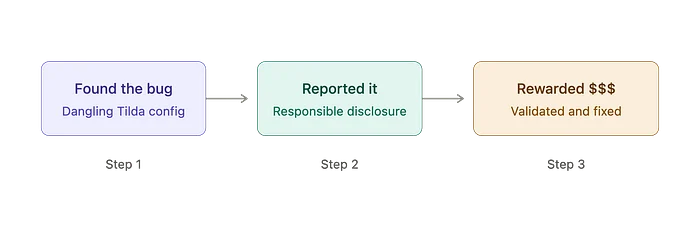
That is a subdomain takeover. I reported it responsibly and it was validated, fixed and rewarded. The organisation's identity and the exploitation specifics have been sanitised here.
A subdomain takeover happens when a company's subdomain still points to a third-party service, but the resource behind it has been deleted or abandoned and is up for grabs.
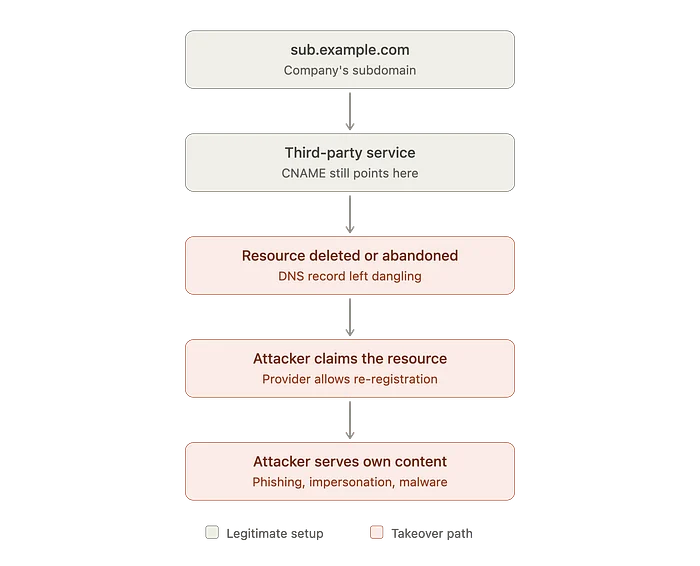
If the provider lets someone else claim that resource, an attacker can serve their own content from https://sub.example.com without ever touching the company's main domain. That opens the door to phishing, brand impersonation, malicious content hosting and abuse of the domain's reputation.
Setup
The work was done under an authorised bug-bounty engagement. The only tooling the report shows is a DNS lookup with dig. Validating the finding required a Tilda account on a paid plan: custom domains on Tilda require a paid plan, so finishing the validation meant using a Premium account. No other accounts, roles or versions are described.
Finding it
While enumerating subdomains, one hostname stood out. I started with a simple DNS lookup:
dig sub.example.com

ANSWER SECTION:
sub.example.com. 28 IN A [redacted]
The answer is an A record with a TTL of 28 seconds, pointing at [redacted]. That IP belonged to infrastructure used by Tilda.
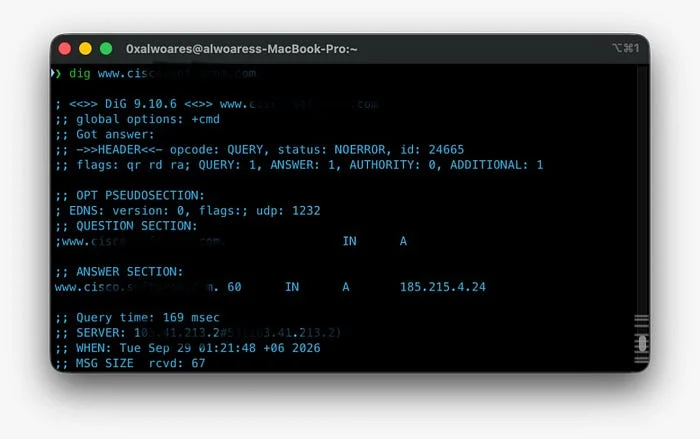
Even so, I did not treat this as a takeover. A DNS record that points to a third-party provider proves nothing by itself. The real question was whether the organisation still controlled the resource on the other end.
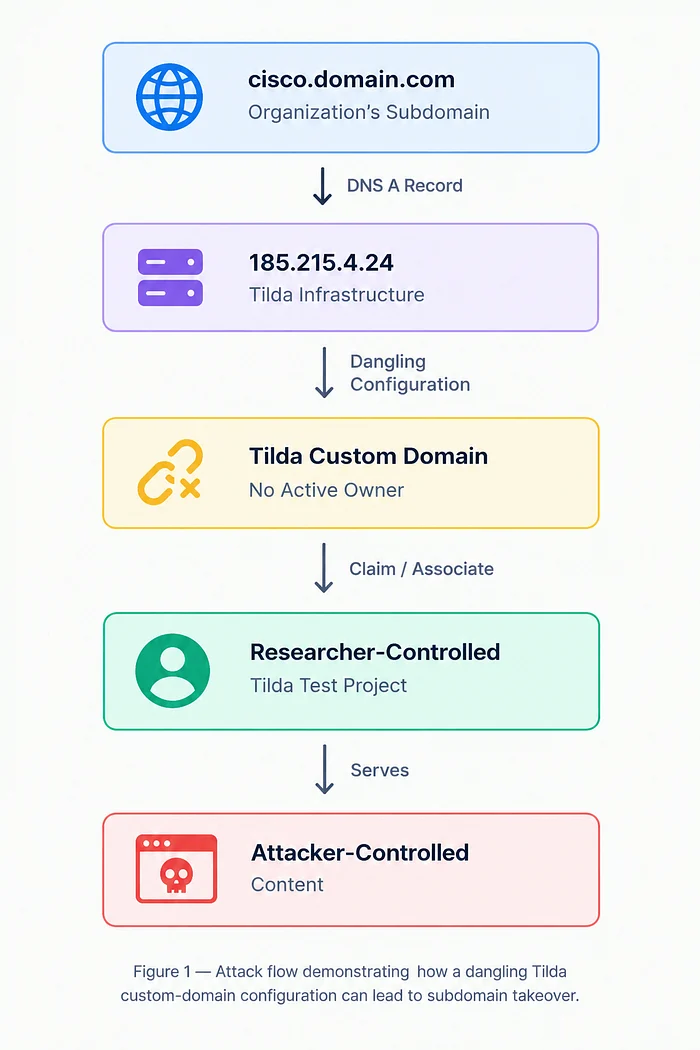
The hostname looked like it had once been set up as a Tilda custom domain. In a healthy setup the chain looks like this:
sub.example.com → Tilda → Tilda project
The DNS still points at the service, but nobody owns the resource behind it.
Exploitation
Step 1: identify the target
The hostname under test was https://sub.example.com/.
Step 2: inspect DNS
dig sub.example.com returned the A record shown above, pointing to Tilda infrastructure.
Step 3: identify the provider
The IP confirmed the hostname was tied to Tilda.
Step 4: check the association
The hostname could be examined as a Tilda custom-domain configuration. The question at this point is whether the hostname can still be attached to a project, and by whom.
Step 5: demonstrate control
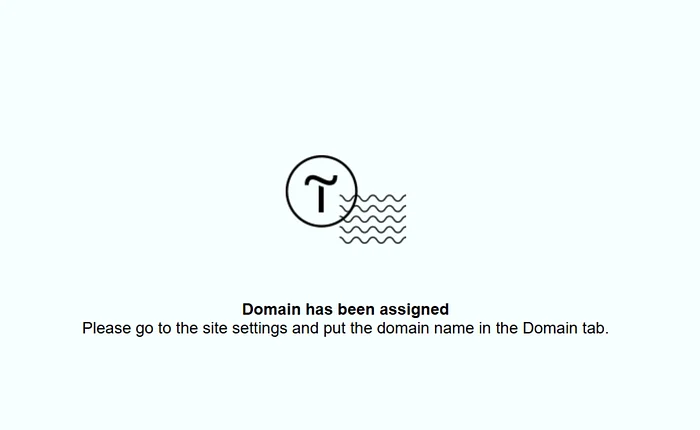
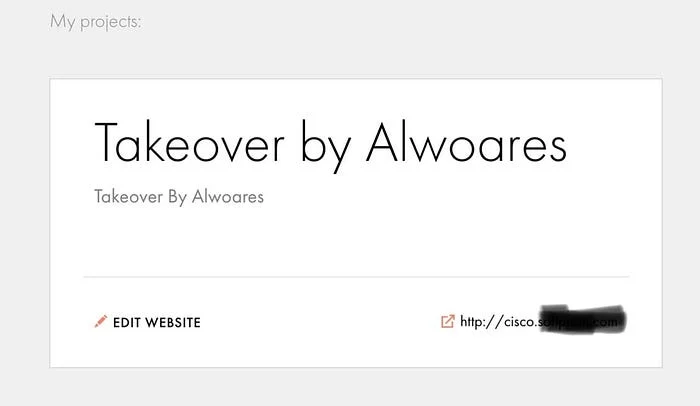
I checked whether the hostname could be attached to a Tilda project controlled by a different account. Because custom domains on Tilda require a paid plan, this meant using a Premium account. Once the hostname was attached to a test project I controlled, the organisation's hostname served my content instead of theirs.
This is the key distinction:
Identifying a third-party DNS setup is not the same as proving a takeover.
The impact comes from showing that an unauthorised party can bind the abandoned hostname to their own resource and serve content from the legitimate subdomain. I kept my testing careful and did not access or modify any of the organisation's legitimate resources.
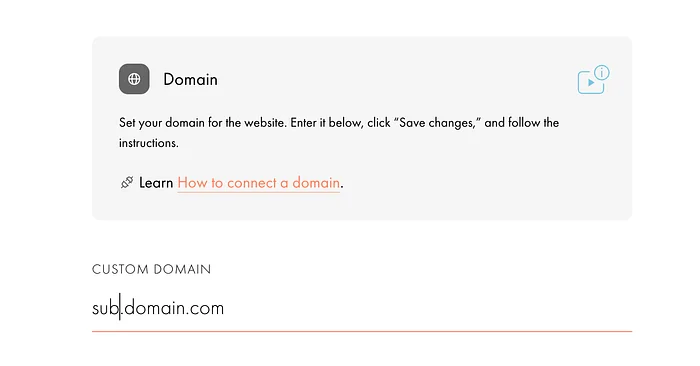
The live page has been left out and the details are sanitised throughout. Any screenshot included should be redacted too.
Root cause
The hostname still pointed at Tilda, but no project owned the custom-domain binding any more. The hostname still resolved to Tilda infrastructure, but no project owned that custom-domain binding any more, so the provider allowed it to be claimed by another account. The dangling record is the mistake; the provider's willingness to let a new account attach an unclaimed hostname is what turns it into a takeover.
A record that points at a third-party provider looks healthy from DNS alone, and the provider has no reason to refuse a claim on a hostname that no project currently holds.
Impact
A successful takeover lets an attacker host arbitrary content under a domain people trust. That could mean:
- Phishing campaigns
- Brand impersonation
- Social engineering
- Malicious content hosting
- Damage to the organisation's domain reputation
A victim receiving a link to https://sub.example.com/login sees a legitimate domain and trusts it, even though an attacker controls what is behind it. The impact depends on the abandoned resource being claimable by an unauthorised party, which is exactly what the validation step has to prove.
Fix
The issue was validated, fixed and rewarded. The remediation guidance in the write-up is:
- If the subdomain is no longer needed: delete the DNS record.
- If it is still needed: make sure it is tied to a Tilda project the organisation actually controls.
- In general: keep an inventory that maps each subdomain to its DNS record, provider, provider resource and current owner. Whenever a SaaS project is retired, review its DNS records at the same time.
Lessons learned
- Ordinary DNS records can point to forgotten infrastructure. A plain-looking record may lead straight to an abandoned SaaS setup.
- Third-party integrations deserve attention. Many hunters focus on the main application, but forgotten SaaS integrations can expose an entirely different attack surface.
- Provider identification is not a takeover. Seeing
subdomain → Tildadoes not mean subdomain takeover. You still have to prove that someone else can actually claim the resource. - Validate safely. Never modify legitimate resources or touch data that is not yours.
The interesting part of this finding was not spotting a Tilda IP address. It was tracing the whole chain:
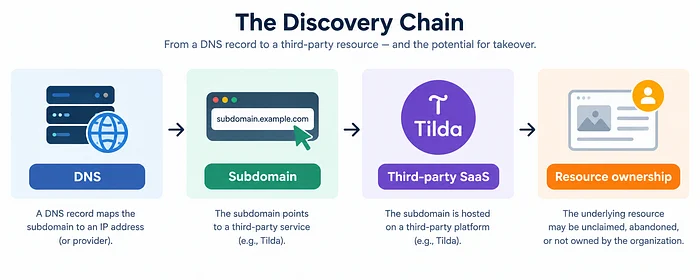
Following it revealed an issue serious enough to be fixed and rewarded. So if you hunt for bugs, do not stop at listing subdomains. Find out where they point, and whether anyone still legitimately owns what is behind them.
Variants to test
- Dangling custom domains on other site builders. Enumerate subdomains, resolve each one, and attribute the IP or CNAME to a hosting or site-builder provider. A positive result is a hostname that resolves to the provider but is not bound to any project in the organisation's account.
- Claim test with a separate account. Try to attach the hostname as a custom domain from an account the organisation does not control. A positive result is the provider accepting the binding and serving your content from the organisation's hostname.
- Retired SaaS projects. For each third-party integration you can identify, check whether the project still exists and whether its DNS records were cleaned up when it was retired. A positive result is a live DNS record pointing at a resource that no longer exists.
- Paid-plan gating. Where a provider requires a paid plan to attach a custom domain, check whether the gate is the only obstacle. A positive result is that a paid account is sufficient to complete the claim, as it was here with a Premium account.
What happened, in plain words
A company owned a web address, something like sub.example.com, that was a smaller part of its main website. That address was set up to point at Tilda, a service that lets people build and host websites without writing code. The address still pointed at Tilda, but no Tilda project owned it any more. That address book is called DNS, and I will explain it properly below.
Because the pointer was still there and no project owned it, someone with a paid Tilda account could claim that leftover address for their own project, and have the company's own web address show their content. That is called a subdomain takeover. I found it during an authorised bug-bounty engagement, which is a programme where a company invites outside researchers to look for security problems and pays for good reports. The report was validated, fixed and rewarded. The company's identity and the exact exploitation details have been sanitised here.
A subdomain takeover happens when a company's subdomain still points to a third-party service, but the resource behind it has been deleted or abandoned and is up for grabs.
If the provider lets someone else claim that resource, an attacker can serve their own content from https://sub.example.com without ever touching the company's main domain. That opens the door to phishing, brand impersonation, malicious content hosting and abuse of the domain's reputation.
The words you need first
Before the steps, a few everyday ideas. You do not need to install anything to follow this; a browser and a little patience are enough.
A domain and a subdomain. A domain is the main name of a website, like example.com. A subdomain is a name placed in front of it, like sub.example.com, and it is often used for a separate service: a shop, a help centre, a login page. To a visitor both look like part of the same company, and that trust is exactly what makes a takeover interesting.
DNS. DNS is the internet's address book. When you type a name into your browser, your computer asks DNS "which numeric address belongs to this name?" and gets an answer back. The numeric address is called an IP address, and it is how computers actually find each other. Think of DNS as a contacts app: you pick a name, and the phone dials the number stored next to it.
A record. Each entry in that address book is a record. The most common type for websites is an A record, which maps a name to an IP address. There are other types, but this report only deals with A records.
TTL. Every DNS answer carries a TTL, short for time to live. It tells your computer how many seconds it may keep the answer before asking again. A short TTL means changes spread quickly; a long TTL means the old answer lingers.
A third-party provider. Instead of running everything themselves, companies often rent pieces of their online presence from other companies. Tilda is one such provider: it builds and hosts websites. The company keeps its own domain name but points part of it at the provider.
A custom domain. Providers usually give you a free address of their own, but they also let you attach your own domain name to your project. That is called a custom domain, and it is the feature at the centre of this story.
A dangling record. If a company deletes its project at the provider but leaves the DNS record pointing there, the record is called dangling: it still points somewhere, but nothing legitimate is on the other end.
A bug bounty. A programme where a company authorises researchers to test its systems within rules, and rewards reports of real problems. Working inside those rules is what separates research from unauthorised access.
Setting up
The work was done under an authorised bug-bounty engagement. The only tool the report shows is a DNS lookup with dig, a small command-line program that asks DNS questions and prints the answers. Validating the finding required a Tilda account on a paid plan: custom domains on Tilda require a paid plan, so finishing the validation meant using a Premium account. No other accounts, roles or versions are described.
Why a paid account matters: the provider only lets paying customers attach their own domain names. That is a normal business rule, not a security control, and the report treats it as an obstacle to clear rather than a defence.
Finding it
While enumerating subdomains, one hostname stood out. Enumerating means making a list of the subdomains a company uses, usually by combining the main name with common words and checking which ones exist. I started with a simple DNS lookup:
dig sub.example.com

ANSWER SECTION:
sub.example.com. 28 IN A [redacted]
Line by line:
dig sub.example.comis the question: "DNS, what do you know about the namesub.example.com?"ANSWER SECTION:marks the part of the output that holds the reply.sub.example.com.is the name being answered. The trailing dot means the full name from the top of the DNS tree, so there is no ambiguity about which name is meant.28is the TTL in seconds: whoever asked may cache this answer for 28 seconds before asking again.INis the class of the record, short for Internet. It is almost alwaysINand you can read it as "this is an ordinary internet record".Ais the record type: a name-to-IP mapping.[redacted]is the IP address the name points to.
The answer is an A record with a TTL of 28 seconds, pointing at [redacted]. That IP belonged to infrastructure used by Tilda.
Why this step first: DNS is the cheapest question you can ask, and it tells you where a name actually goes. Before touching anything, you want to know which company is on the other end.
Even so, I did not treat this as a takeover. A DNS record that points to a third-party provider proves nothing by itself. Plenty of healthy websites point at hosting providers. The real question was whether the organisation still controlled the resource on the other end.
The hostname looked like it had once been set up as a Tilda custom domain. In a healthy setup the chain looks like this:
sub.example.com → Tilda → Tilda project
Read the arrows as "leads to". A visitor types the company's name, DNS sends them to Tilda, and Tilda looks up which project is attached to that name and shows it. The DNS still points at the service, but nobody owns the resource behind it. The first arrow works; the second one leads nowhere.
Exploitation
Step 1: identify the target
The hostname under test was https://sub.example.com/.
Why: you need one clear subject for the whole investigation. Everything below is about this single name.
Step 2: inspect DNS
dig sub.example.com returned the A record shown above, pointing to Tilda infrastructure.
Why: this confirms the name is not hosted by the company itself. It is rented, which means someone else's rules apply to it.
Step 3: identify the provider
The IP confirmed the hostname was tied to Tilda.
Why: knowing the provider tells you which product's features to examine. Each provider has its own way of attaching custom domains, and that mechanism is where the mistake lives.
Step 4: check the association
The hostname could be examined as a Tilda custom-domain configuration. The question at this point is whether the hostname can still be attached to a project, and by whom.
Why: this is the difference between a suspicious record and a real problem. If the name is still bound to a project the company controls, nothing is wrong. If it is bound to nothing, the door may be open.
Step 5: demonstrate control
I checked whether the hostname could be attached to a Tilda project controlled by a different account. Because custom domains on Tilda require a paid plan, this meant using a Premium account. Once the hostname was attached to a test project I controlled, the organisation's hostname served my content instead of theirs.
Why this step is the proof: anyone can guess. Only a demonstration shows that an outsider can actually take the name and put content on it. The test project was mine, and the content was mine, so no legitimate resource was touched.
This is the key distinction:
Identifying a third-party DNS setup is not the same as proving a takeover.
The impact comes from showing that an unauthorised party can bind the abandoned hostname to their own resource and serve content from the legitimate subdomain. I kept my testing careful and did not access or modify any of the organisation's legitimate resources.
The live page has been left out and the details are sanitised throughout. Any screenshot included should be redacted too.
Root cause
The hostname still pointed at Tilda, but no project owned the custom-domain binding any more. The hostname still resolved to Tilda infrastructure, but no project owned that custom-domain binding any more, so the provider allowed it to be claimed by another account. The dangling record is the mistake; the provider's willingness to let a new account attach an unclaimed hostname is what turns it into a takeover.
SaaS means software as a service: software you rent over the internet instead of running yourself, and Tilda is one. A record that points at a third-party provider looks healthy from DNS alone, and the provider has no reason to refuse a claim on a hostname that no project currently holds.
A comparison: imagine you cancel a gym membership but leave your name on the door's entry list. The door still opens for your name, and the gym has no reason to question whoever now uses it.
Impact
A successful takeover lets an attacker host arbitrary content under a domain people trust. That could mean:
- Phishing campaigns
- Brand impersonation
- Social engineering
- Malicious content hosting
- Damage to the organisation's domain reputation
Phishing is a fake page that looks real and asks for a password or a payment. Brand impersonation is using a company's name and look to borrow its credibility. Social engineering is manipulating people rather than machines, for example by sending a convincing message. A victim receiving a link to https://sub.example.com/login sees a legitimate domain and trusts it, even though an attacker controls what is behind it. The impact depends on the abandoned resource being claimable by an unauthorised party, which is exactly what the validation step has to prove.
Fix
The issue was validated, fixed and rewarded. The remediation guidance in the write-up is:
- If the subdomain is no longer needed: delete the DNS record.
- If it is still needed: make sure it is tied to a Tilda project the organisation actually controls.
- In general: keep an inventory that maps each subdomain to its DNS record, provider, provider resource and current owner. Whenever a SaaS project is retired, review its DNS records at the same time.
An inventory here is simply a list that answers, for every name: where does it point, who owns the thing it points at, and is that thing still alive? Most takeovers are not clever attacks; they are bookkeeping failures.
Lessons learned
- Ordinary DNS records can point to forgotten infrastructure. A plain-looking record may lead straight to an abandoned SaaS setup.
- Third-party integrations deserve attention. Many hunters focus on the main application, but forgotten SaaS integrations can expose an entirely different attack surface. Attack surface means all the places an outsider can interact with a system.
- Provider identification is not a takeover. Seeing
subdomain → Tildadoes not mean subdomain takeover. You still have to prove that someone else can actually claim the resource. - Validate safely. Never modify legitimate resources or touch data that is not yours.
The interesting part of this finding was not spotting a Tilda IP address. It was tracing the whole chain:
Following it revealed an issue serious enough to be fixed and rewarded. So if you hunt for bugs, do not stop at listing subdomains. Find out where they point, and whether anyone still legitimately owns what is behind them.
Variants to test
- Dangling custom domains on other site builders. Enumerate subdomains, resolve each one, and attribute the IP or CNAME to a hosting or site-builder provider. A CNAME is another DNS record type that points one name at another name instead of at an IP address. A positive result is a hostname that resolves to the provider but is not bound to any project in the organisation's account.
- Claim test with a separate account. Try to attach the hostname as a custom domain from an account the organisation does not control. A positive result is the provider accepting the binding and serving your content from the organisation's hostname.
- Retired SaaS projects. For each third-party integration you can identify, check whether the project still exists and whether its DNS records were cleaned up when it was retired. A positive result is a live DNS record pointing at a resource that no longer exists.
- Paid-plan gating. Where a provider requires a paid plan to attach a custom domain, check whether the gate is the only obstacle. A positive result is that a paid account is sufficient to complete the claim, as it was here with a Premium account.
Glossary
- A record: a DNS entry that maps a name to an IP address.
- Attack surface: all the places an outsider can interact with a system.
- Brand impersonation: using a company's name and look to borrow its credibility.
- Bug bounty: an authorised programme that rewards researchers for reporting real security problems.
- CNAME: a DNS record that points one name at another name rather than at an IP address.
- Custom domain: a company's own domain name attached to a project at a third-party provider.
- Dangling record: a DNS record that still points at a provider where the resource behind it no longer exists.
- dig: a command-line program that asks DNS questions and prints the answers.
- DNS: the internet's address book, turning names into IP addresses.
- Domain: the main name of a website, such as
example.com. - Enumerating subdomains: building a list of the subdomains a company uses.
- IP address: the numeric address computers use to find each other.
- Phishing: a fake page or message that looks real and asks for a password or payment.
- Provider: a company that rents out part of another company's online presence, such as hosting or site building.
- Record: a single entry in DNS.
- SaaS: software you rent over the internet instead of running yourself.
- Social engineering: manipulating people rather than machines, for example with a convincing message.
- Subdomain: a name placed in front of a domain, such as
sub.example.com. - Subdomain takeover: claiming an abandoned resource behind a company's subdomain so that the company's own name serves your content.
- TTL: time to live, the number of seconds a DNS answer may be cached before asking again.



