From empty page to POST based JSON XSS
A subdomain returned JSON error messages that reflected user input without encoding, and the response was served as HTML. An attacker could craft a form that submits a JSON payload containing an HTML tag with an event handler, causing script execution in the victim's browser.
 Published on blog.flawminers.com
Hello bug bounty hunters . This is Daoud Youssef a part time bug bounty hunter and Co-founder of flawminers.com .
The full write-up lives on its author's site
It belongs to its author, so we link to it rather than copy it. The other two tabs are our own rewrites, checked against it.
Context
This write-up describes a cross-site scripting issue found on a subdomain of a private bug bounty program. The program cannot be named, so the researcher refers to it as redacted.com, and every subdomain of it was in scope. The affected host is webhook.redacted.com, a subdomain whose main page returns essentially nothing: the whole page contains a single number, 0. The name suggests something that deals with URLs, which is why the researcher first thought of server-side request forgery. The name suggests something that deals with URLs, which is why the researcher first thought of server-side request forgery, but the vulnerability that turned up is a reflected XSS delivered through a POST body that the application parses as JSON.
Setup
The work was done on a private program, so no account, role or credential details are given. The tooling described is:
- A private framework that enumerates subdomains with several tools, both actively and passively.
httprobe, used to check which of the collected subdomains are live.aquatone, whose generated HTML report was opened in a browser to look at the collected hosts.- For the injection attempts: ZAP, Burp Suite Pro,
sqlmapandghauri. - A browser, used both to view raw responses and to load the final HTML proof of concept.
The researcher's stated methodology is to prioritise subdomains that answer with 403 or 404, or whose main page is empty, because other hunters tend to ignore them, which makes a finding easier and less likely to be a duplicate. The second habit is to fuzz endpoints with unexpected methods, headers and payloads to see how the application behaves outside its normal use.
Finding it
After collecting subdomains and passing them through httprobe, the live hosts were fed to aquatone and the generated HTML report was opened in the browser. One host stood out by name: webhook.redacted.com. Its page contained only the number 0.
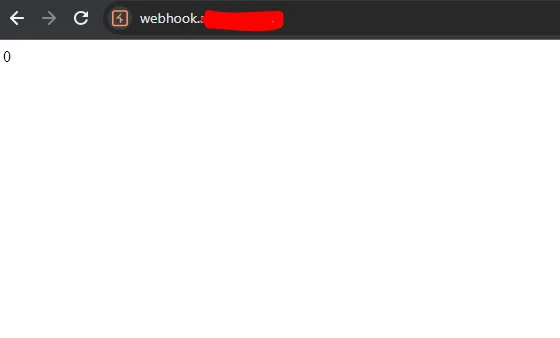
The ordinary response of the subdomain.
A name like webhook invites thoughts of SSRF, since webhooks deal with URLs, but the empty page is what made the host worth probing. The first request was a plain GET:
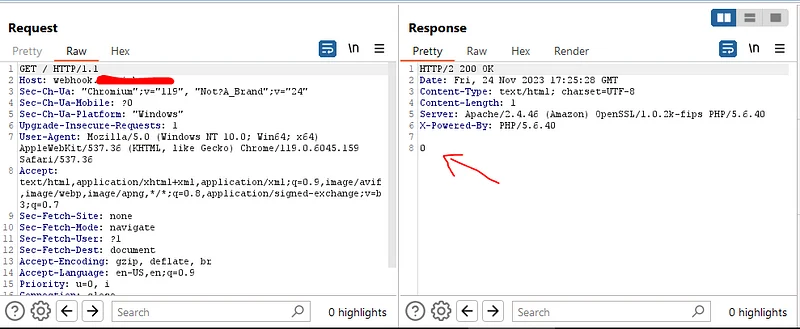
The response of the GET request.
Exploitation
Step 1: change the method
The request method was switched from GET to POST, with no body. The response did not change.
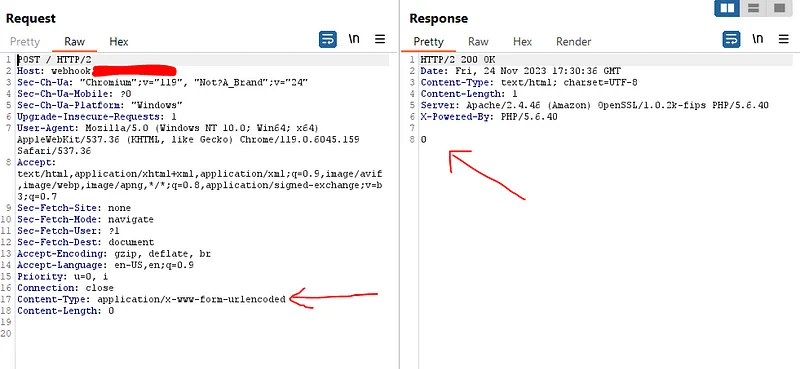
The response to a POST with empty data.
Step 2: add form-encoded data
Dummy POST data was added:
The response still did not change.
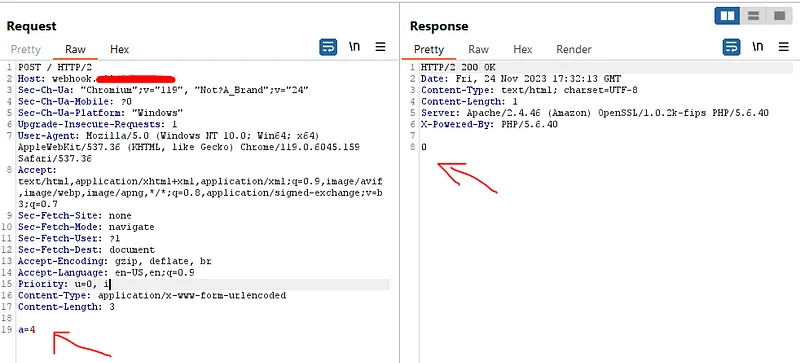
The response to the POST with dummy data.
Step 3: send the body as JSON
The body was then sent as JSON instead of form-encoded data, and the application returned an error message.
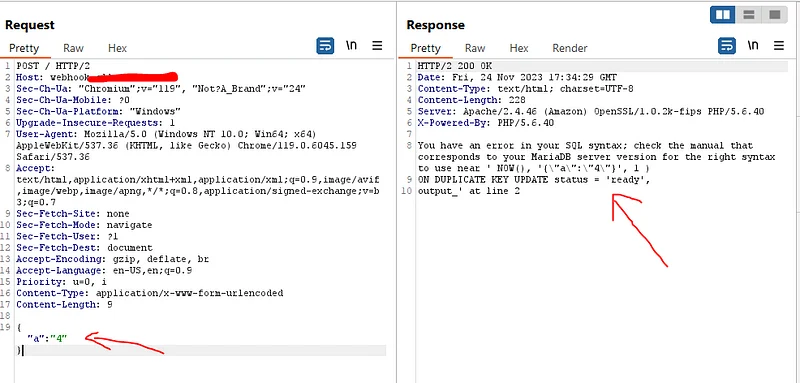
Error message returned when the request body is JSON.
The researcher thought the error meant a SQL injection might be reachable, so time was spent on it with payload lists, cheat sheets, write-ups and the tools listed above. No SQL injection could be exploited. During those attempts, one behaviour stood out: whatever was injected into the JSON data was reflected in the source code without encoding. That shifted the goal from SQL injection to POST-based JSON XSS.
Step 4: first payload, and the escaped slash
The first payload tried was:
<script>alert(1)</script>
The application escaped the slash on the closing tag, so the payload did not execute.
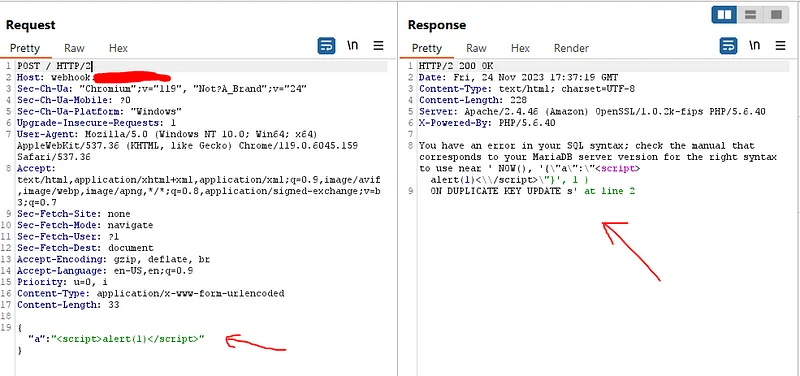
The application escaped the slash of the closing tag.
Step 5: a tag that needs no closing tag
To avoid the closing-tag problem, the payload was changed to an HTML tag that works without a closing tag:
<img src=x onerror=alert(1)>
This time the payload was reflected without encoding and the alert fired when the response was rendered in the browser. One condition matters here: this only works because the response header sets the content type to text/html. Without that, the browser would not render the reflected markup as HTML.
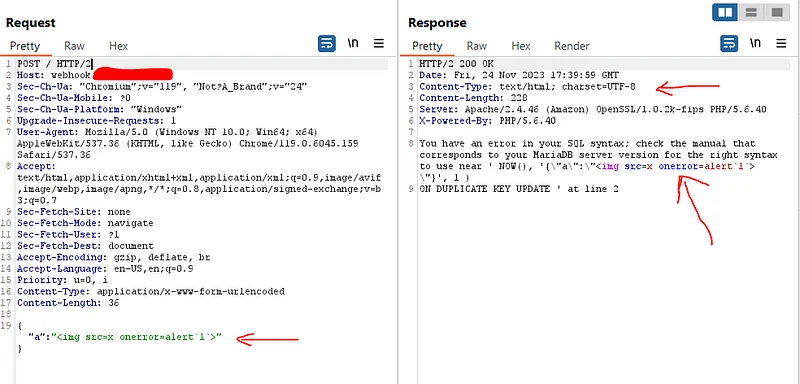
The JSON payload reflected without encoding and rendered as HTML.
Step 6: turning it into an HTML proof of concept
A finding that only works inside Burp will not be accepted, so an HTML page was built to deliver the payload. The request that reaches the application carries the header:
content-type: Application/x-www-form-urlencoded
So the form has to carry the JSON syntax itself: the curly braces {}, the double quotes "" and the colon :. The first attempt put the whole payload in the name of the parameter, with an empty value.
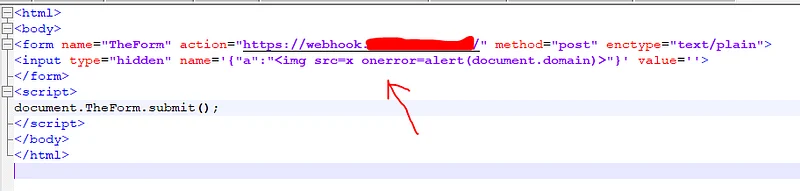
The first attempt at the payload.
Three details of that proof of concept are called out:
- The whole payload went into the parameter name, with an empty value.
enctype=text/plainis required so the browser does not URL-encode the special characters.- An auto-submit call,
document.TheForm.submit(), submits the form as soon as the victim opens the page, so the victim only has to visit the malicious site and does not have to click anything. Fewer actions required from the victim means a higher severity.
Step 7: the browser's extra equals sign
The browser appends an extra = between the parameter name and the value. With an empty value, that = lands at the end of the payload, which breaks the JSON: the body is no longer valid JSON, and the response falls back to the behaviour of a regular POST.
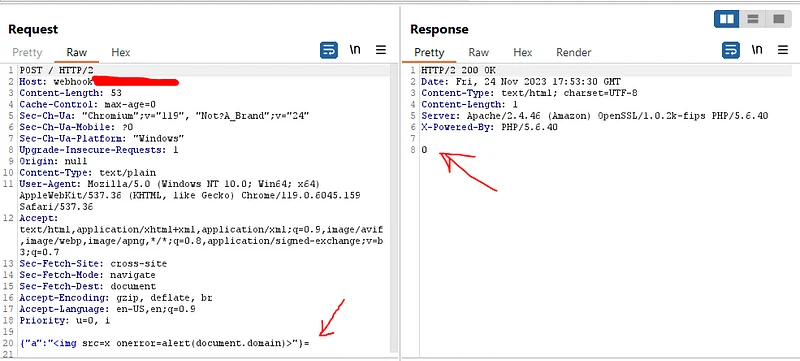
The equals sign breaking the JSON payload.
The reverse was tried as well, putting the whole payload in the value with an empty parameter name, but then the browser puts the = at the start of the payload, which also makes it invalid JSON. At that point the whole exploit seemed blocked by a single character.
Step 8: let the browser supply the equals sign
The payload itself already contains an equals sign in the middle:
<img src=x onerror=alert(document.domain)>
The idea was to remove that = from the payload, split the payload in two at that point, put the part before the = in the parameter name and the part after it in the parameter value, and let the browser insert the = between them. The browser's own separator then completes the JSON for the attacker.
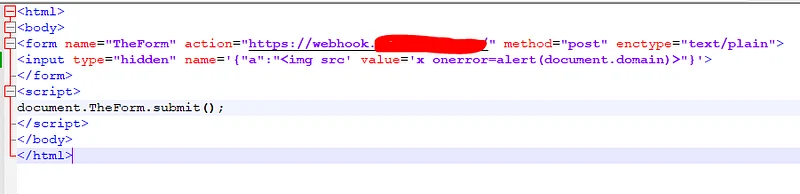
The final payload.
Step 9: result
The split payload worked, and the alert fired.
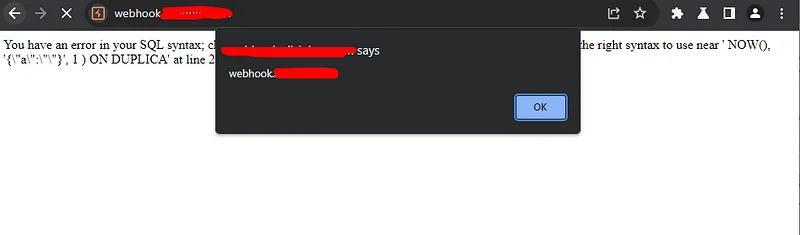
The payload working.
Root cause
The application parses the POST body as JSON and reflects values from it into the response without HTML encoding. The escaping of the slash in a closing tag stopped the </script> payload, but a tag such as <img> that needs no closing tag was not affected. The response is served with content-type: text/html, so the browser renders the reflected markup as HTML rather than treating it as data. The report does not describe the server-side code, so why the JSON body is reflected at all is not stated.
Impact
An attacker who can get a victim to load a crafted HTML page can run JavaScript in the context of webhook.redacted.com. The proof of concept submits itself automatically, so the victim only has to open the page. The report does not state which users, sessions or data are reachable from that origin, and it does not claim any specific account takeover or data theft.
Fix
Variants to test
- Send a JSON body to endpoints that normally take form data, and watch for parser error messages. A positive result is a distinct error that reveals the body is being parsed as JSON.
- Inject a marker string into every JSON value and search the raw response for it unencoded. A positive result is the marker appearing verbatim in an HTML context.
- Try
<script>alert(1)</script>first, then a tag with no closing tag such as<img src=x onerror=alert(1)>if the slash is escaped. A positive result is the alert firing when the response is rendered. - Check the response
content-type. A positive result for rendering istext/html; other types will not execute the markup. - Build a form with
enctype=text/plainand an auto-submit, and place the payload in the parameter name. A positive result is the payload arriving intact in the request body. - If the browser's inserted
=breaks the JSON, split the payload at an existing=and place the two halves in the parameter name and value. A positive result is valid JSON arriving at the server and the payload executing.
What happened, in plain words
A security researcher found a bug on a website that belongs to a private bug bounty program. A bug bounty program is an arrangement where a company invites independent researchers to look for security problems in its systems and pays them for reporting what they find. This particular program cannot be named publicly, so throughout the write-up the researcher calls it redacted.com. Every subdomain of that domain was allowed to be tested.
A subdomain is a smaller address that sits under a main domain name. If the main domain is example.com, then shop.example.com and mail.example.com are subdomains of it. Each subdomain can be a completely separate application, sometimes forgotten by the people who run the main site.
The subdomain where the bug was found is webhook.redacted.com. A webhook is a mechanism where one system notifies another system by sending it a request to a URL, usually when something happens. The name suggests the application deals with URLs, which is why the researcher first suspected a different class of bug called SSRF (server-side request forgery, where an attacker makes the server fetch a URL of the attacker's choosing). That is not what was found. What was found is a cross-site scripting bug, usually shortened to XSS.
XSS means that an attacker can get their own JavaScript code to run inside another person's browser, in the context of the vulnerable website. JavaScript is the programming language that browsers run to make pages interactive. If an attacker's JavaScript runs as if it came from webhook.redacted.com, the browser treats it as trusted code from that site. The specific flavour here is reflected XSS: the attacker's input is sent to the server in a request, and the server sends it straight back in the response, unencoded, so the browser executes it.
The request that carries the payload is a POST request whose body the application parses as JSON. A POST request is one of the standard ways a browser talks to a server: it is used to send data, for example when you submit a form. JSON is a text format for structured data, built from curly braces, double quotes, colons and commas. The application reads the POST body as JSON and reflects values from it back into the page.
Setup
The work was done on a private program, so no account, role or credential details are given. The tools the researcher describes are:
- A private framework that enumerates subdomains with several tools, both actively and passively. Enumerating subdomains means finding as many of them as possible, either by asking public sources (passive) or by probing the target directly (active).
httprobe, a small command-line tool that takes a list of hostnames and checks which ones actually respond, so you know which are live.aquatone, a tool that takes a list of live hosts, visits them, takes screenshots and produces an HTML report you can open in a browser to look at all of them at once.- For the injection attempts: ZAP, Burp Suite Pro,
sqlmapandghauri. ZAP and Burp Suite Pro are intercepting proxies: they sit between your browser and the server so you can see and modify every request and response.sqlmapandghauriare automated tools that try to detect and exploit SQL injection, a bug where attacker input changes the meaning of a database query. - A browser, used both to view raw responses and to load the final HTML proof of concept. A proof of concept (PoC) is a minimal demonstration that the bug is real, something a reviewer can run themselves.
The researcher's stated methodology is to prioritise subdomains that answer with 403 or 404, or whose main page is empty. HTTP status codes are three-digit numbers a server sends back with every response: 200 means OK, 403 means forbidden, 404 means not found. Subdomains that return 403, 404 or an empty page are often ignored by other hunters, which makes a finding easier and less likely to be a duplicate. A duplicate is a report of a bug someone else already reported, and programs usually do not pay for duplicates.
The second habit is to fuzz endpoints with unexpected methods, headers and payloads. Fuzzing means sending lots of slightly different inputs and watching how the application reacts. An endpoint is a specific URL path that the application handles. A method is the verb of an HTTP request: GET is used to fetch something, POST is used to send data. A header is extra information attached to a request or response, such as the content type. A payload is the actual malicious input you send.
Finding it
After collecting subdomains and passing them through httprobe, the live hosts were fed to aquatone and the generated HTML report was opened in the browser. One host stood out by name: webhook.redacted.com. Its page contained only the number 0.
The ordinary response of the subdomain.
A name like webhook invites thoughts of SSRF, since webhooks deal with URLs, but the empty page is what made the host worth probing. The first request was a plain GET:
The response of the GET request.
Exploitation
Step 1: change the method
The request method was switched from GET to POST, with no body. The response did not change.
The response to a POST with empty data.
Step 2: add form-encoded data
Dummy POST data was added:
This is a single line of text. a is the name of a parameter, = is the separator, and 4 is the value. Form-encoded means the body is written in the same format a normal HTML form produces: name=value pairs joined by &. The response still did not change.
The response to the POST with dummy data.
Step 3: send the body as JSON
The body was then sent as JSON instead of form-encoded data, and the application returned an error message.
Error message returned when the request body is JSON.
The researcher thought the error meant a SQL injection might be reachable, so time was spent on it with payload lists, cheat sheets, write-ups and the tools listed above. No SQL injection could be exploited. During those attempts, one behaviour stood out: whatever was injected into the JSON data was reflected in the source code without encoding. Reflected means the input comes back in the response. Without encoding means the characters are not converted into safe HTML entities, so the browser sees them as markup rather than as text. That shifted the goal from SQL injection to POST-based JSON XSS.
Step 4: first payload, and the escaped slash
The first payload tried was:
<script>alert(1)</script>
This is an HTML script tag. <script> opens it, </script> closes it, and everything between is JavaScript. alert(1) is a built-in browser function that pops up a small dialog showing the number 1. If that dialog appears, the attacker's JavaScript ran. The application escaped the slash on the closing tag, so the payload did not execute. Escaping here means the slash character was turned into something the browser no longer treats as the end of a tag.
The application escaped the slash of the closing tag.
Step 5: a tag that needs no closing tag
To avoid the closing-tag problem, the payload was changed to an HTML tag that works without a closing tag:
<img src=x onerror=alert(1)>
This is an image tag. src=x tells the browser to load an image from the address x, which does not exist. onerror=alert(1) is an event handler: it tells the browser to run alert(1) if loading the image fails. Since x is not a real image, loading always fails, so the handler always runs. There is no closing tag, so there is no slash to escape. This time the payload was reflected without encoding and the alert fired when the response was rendered in the browser. One condition matters here: this only works because the response header sets the content type to text/html. The content type tells the browser what kind of document it is receiving. If it were text/plain or application/json, the browser would show the markup as text and never execute it.
The JSON payload reflected without encoding and rendered as HTML.
Step 6: turning it into an HTML proof of concept
A finding that only works inside Burp will not be accepted, so an HTML page was built to deliver the payload. The request that reaches the application carries the header:
content-type: Application/x-www-form-urlencoded
This header says the body is form-encoded data. So the form has to carry the JSON syntax itself: the curly braces {}, the double quotes "" and the colon :. The first attempt put the whole payload in the name of the parameter, with an empty value.
The first attempt at the payload.
Three details of that proof of concept are called out:
- The whole payload went into the parameter name, with an empty value.
enctype=text/plainis required so the browser does not URL-encode the special characters. URL-encoding turns characters like{and"into percent codes such as%7B, which would break the JSON.enctypeis the attribute on a form that controls how the browser encodes the body.- An auto-submit call,
document.TheForm.submit(), submits the form as soon as the victim opens the page, so the victim only has to visit the malicious site and does not have to click anything. Fewer actions required from the victim means a higher severity. Severity is how serious the program considers the bug.
Step 7: the browser's extra equals sign
The browser appends an extra = between the parameter name and the value. With an empty value, that = lands at the end of the payload, which breaks the JSON: the body is no longer valid JSON, and the response falls back to the behaviour of a regular POST.
The equals sign breaking the JSON payload.
The reverse was tried as well, putting the whole payload in the value with an empty parameter name, but then the browser puts the = at the start of the payload, which also makes it invalid JSON. At that point the whole exploit seemed blocked by a single character.
Step 8: let the browser supply the equals sign
The payload itself already contains an equals sign in the middle:
<img src=x onerror=alert(document.domain)>
This is the same image tag as before, but the handler now calls alert(document.domain) instead of alert(1). document.domain is a property the browser exposes to JavaScript that holds the current hostname. The handler now calls alert(document.domain) instead of alert(1). The idea was to remove that = from the payload, split the payload in two at that point, put the part before the = in the parameter name and the part after it in the parameter value, and let the browser insert the = between them. The browser's own separator then completes the JSON for the attacker.
The final payload.
Step 9: result
The split payload worked, and the alert fired.
The payload working.
Root cause
The application parses the POST body as JSON and reflects values from it into the response without HTML encoding. The escaping of the slash in a closing tag stopped the </script> payload, but a tag such as <img> that needs no closing tag was not affected. The response is served with content-type: text/html, so the browser renders the reflected markup as HTML rather than treating it as data. The report does not describe the server-side code, so why the JSON body is reflected at all is not stated.
Impact
An attacker who can get a victim to load a crafted HTML page can run JavaScript in the context of webhook.redacted.com. The proof of concept submits itself automatically, so the victim only has to open the page. The report does not state which users, sessions or data are reachable from that origin, and it does not claim any specific account takeover or data theft.
Fix
Variants to test
- Send a JSON body to endpoints that normally take form data, and watch for parser error messages. A positive result is a distinct error that reveals the body is being parsed as JSON.
- Inject a marker string into every JSON value and search the raw response for it unencoded. A positive result is the marker appearing verbatim in an HTML context.
- Try
<script>alert(1)</script>first, then a tag with no closing tag such as<img src=x onerror=alert(1)>if the slash is escaped. A positive result is the alert firing when the response is rendered. - Check the response
content-type. A positive result for rendering istext/html; other types will not execute the markup. - Build a form with
enctype=text/plainand an auto-submit, and place the payload in the parameter name. A positive result is the payload arriving intact in the request body. - If the browser's inserted
=breaks the JSON, split the payload at an existing=and place the two halves in the parameter name and value. A positive result is valid JSON arriving at the server and the payload executing.
Glossary
- Bug bounty program: an arrangement where a company invites independent researchers to look for security problems in its systems and pays them for reporting what they find.
- Subdomain: a smaller address under a main domain name, such as
shop.example.comunderexample.com. - Webhook: a mechanism where one system notifies another by sending a request to a URL, usually when something happens.
- SSRF (server-side request forgery): a bug where an attacker makes the server fetch a URL of the attacker's choosing.
- XSS (cross-site scripting): a bug where an attacker gets their own JavaScript to run inside another person's browser, in the context of the vulnerable website.
- Reflected XSS: a flavour of XSS where the attacker's input is sent to the server and comes straight back in the response, unencoded, so the browser executes it.
- JavaScript: the programming language browsers run to make pages interactive.
- POST request: an HTTP request used to send data to a server, for example when submitting a form.
- GET request: an HTTP request used to fetch something from a server.
- JSON: a text format for structured data, built from curly braces, double quotes, colons and commas.
- HTTP status code: a three-digit number a server sends with every response, such as 200 (OK), 403 (forbidden) or 404 (not found).
- Endpoint: a specific URL path that an application handles.
- Method: the verb of an HTTP request, such as GET or POST.
- Header: extra information attached to a request or response, such as the content type.
- Payload: the actual malicious input an attacker sends.
- Fuzzing: sending lots of slightly different inputs and watching how the application reacts.
- Enumerating subdomains: finding as many subdomains as possible, either from public sources (passive) or by probing the target directly (active).
httprobe: a command-line tool that checks which hostnames in a list actually respond.aquatone: a tool that visits a list of live hosts, takes screenshots and produces an HTML report.- Intercepting proxy: a tool that sits between your browser and the server so you can see and modify every request and response, such as ZAP or Burp Suite Pro.
- SQL injection: a bug where attacker input changes the meaning of a database query.
sqlmap/ghauri: automated tools that try to detect and exploit SQL injection.- Proof of concept (PoC): a minimal demonstration that a bug is real, something a reviewer can run themselves.
- Duplicate: a report of a bug someone else already reported; programs usually do not pay for duplicates.
- Form-encoded: a body format of
name=valuepairs joined by&, the same format a normal HTML form produces. - Reflected: input that comes back in the response.
- Encoding: converting characters into a safe representation, such as HTML entities or percent codes, so they are treated as data rather than markup.
- Escaping: turning a character into something the browser no longer treats as syntax, such as the slash of a closing tag.
- HTML tag: a piece of markup such as
<img>or<script>that tells the browser what to render. - Event handler: an attribute on an HTML tag that tells the browser to run code when something happens, such as
onerror. alert(): a built-in browser function that pops up a small dialog.document.domain: a property the browser exposes to JavaScript that holds the current hostname.- Content type: a header that tells the browser what kind of document it is receiving, such as
text/htmlortext/plain. enctype: the attribute on a form that controls how the browser encodes the body, such astext/plain.- URL-encoding: turning characters like
{and"into percent codes such as%7B. - Auto-submit: JavaScript that submits a form automatically as soon as the page loads.
- Severity: how serious the program considers the bug.
- Origin: the combination of scheme, host and port that a browser uses to decide which code is trusted to talk to which site.





