From N/A to 💰$$$: How a 4-Month Dead Report Became My First Bug Bounty Win
The researcher found an internal npm scope referenced in a frontend JavaScript bundle that did not exist on the public registry, creating a dependency confusion risk. They registered the scope with a benign package, but triage closed the report as N/A because no execution was proven; months later the company asked for the namespace back and the report was reopened and rewarded.
 Published on medium.com
Bug Bounty Writeup
The full write-up lives on its author's site
It belongs to its author, so we link to it rather than copy it. The other two tabs are our own rewrites, checked against it.
Context
This is a supply chain story rather than a request-and-response story. The target was a large private bug bounty program, referred to in the write-up only as [REDACTED_COMPANY]. The feature involved is the company's frontend build: compiled JavaScript bundles served to users, which reference internal npm packages by scope name. The write-up does not name the application, the endpoint that served the bundles, or the program.
The relevant concept is dependency confusion. When a build or install process is configured to resolve a scoped package from a public registry as a fallback, and that scope is not owned by the company on the public registry, anyone can register the scope and publish a package under the same name. A misconfigured internal proxy may then pull the public package instead of the internal one.
Setup
The researcher was working a private program and had no special access described beyond participation in the program. The only tooling mentioned is reading compiled frontend JavaScript bundles and checking the public npm registry. No versions, accounts, roles or configuration details of the target's build system are given.
Finding it
While going through the compiled frontend JavaScript bundles, the researcher found a recurring module path inside a heavily obfuscated clientlib file:
@redacted-scope/core
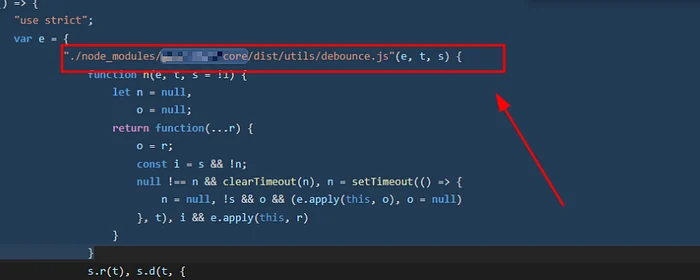
The path is a scoped npm package reference: the scope is @redacted-scope and the package is core. The researcher then checked the public npm registry and found that the @redacted-scope organisation did not exist there. That is the condition that makes dependency confusion possible: the internal name is unclaimed in the public namespace.
Exploitation
Step 1: Claim the scope defensively
To prove the concept without harming the company, the researcher registered the scope on the public npm registry and published a completely empty, benign proof-of-concept package. The intent was to secure the namespace before a real threat actor could, and to demonstrate that the name was available. The write-up does not include the package contents, the exact package name, or the commands used to publish it.
Step 2: Submit the report
A detailed report was submitted describing the leaked internal scope and the dependency confusion risk. Days later, triage closed it as Not Applicable.
The stated reason was that the researcher had not provided a pingback or run whoami on the internal build servers. Without proof of execution, triage assumed the company's internal proxies successfully blocked public fallbacks. The researcher had deliberately refused to drop a reverse shell in the package, so the report was closed without a demonstration that the public package would actually be installed.
Step 3: Wait, then respond to the inbound request
Four months later, a Product Owner at [REDACTED_COMPANY] emailed the researcher. They had noticed the PoC on npm, explained that they needed the namespace for their internal developers, and asked whether ownership could be transferred to them.
The researcher replied immediately, did not hold the scope hostage and did not demand money, and offered to transfer it to the company's maintainers the same day. In the same message the researcher pointed back to the original disclosure, noting that it had been closed as N/A because the researcher had refused to execute unauthorised code on the company's servers to prove impact, and asked whether the security team could take a second look.
Step 4: The client reopens the ticket
A few days later the client logged directly into the platform. They confirmed that the package was technically blocked by their defences, but that leaving the namespace vulnerable to hijacking was a major administrative oversight. They cited the report as highlighting a critical best practice, overruled the triage team and reopened the ticket.
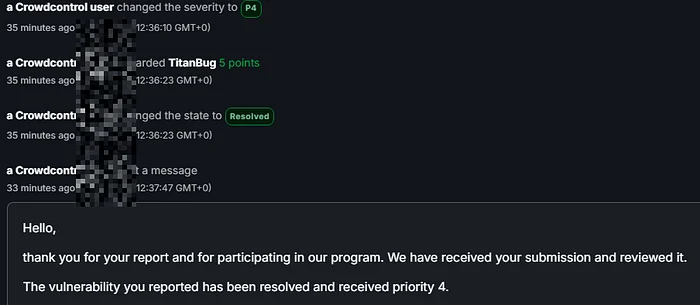
Shortly afterwards the researcher was awarded a first bounty. The write-up shows the amount only as $$$ and does not state a figure.
Root cause
The internal build referenced a scoped package, @redacted-scope/core, whose scope was unclaimed on the public npm registry. The company's defences blocked the public package from being pulled in this instance, but the namespace itself was left open to registration by anyone. The client framed this as an administrative oversight rather than a code defect: the blocking control worked, while ownership of the public namespace did not exist.
Why triage rejected it the first time is also part of the delay: triage wanted proof of execution on internal build servers, and the researcher would not run unauthorised code to produce that proof. The report therefore described a real exposure that the triage process could not accept on its own terms.
Impact
Under the conditions described, an attacker who registered the scope first could have published a package under the internal name. Whether that package would be installed depends on the internal proxy falling back to the public registry, which the company says was blocked in this case. The write-up does not establish that installation or code execution occurred, and the researcher explicitly avoided attempting it. The demonstrated impact is therefore the hijacking of the namespace and the potential for dependency confusion, not a confirmed compromise.
Fix
The write-up does not describe any remediation. What it does say is that the company needed the namespace for its internal developers and asked the researcher to transfer ownership, and that the researcher agreed to transfer the scope to the company's maintainers.
Variants to test
- Grep compiled frontend bundles for scoped package references such as
@scope/nameand check each scope against the public npm registry. A positive result is a scope used internally that has no owner on the public registry. - Do the same for unscoped internal package names that appear in bundles or source maps. A positive result is a name that resolves to an unrelated public package or is unclaimed.
- Check whether the organisation exists but the specific package name is unclaimed. A positive result is an internal package name that can be published under an existing public scope you can join.
- Look for internal registry hostnames or proxy configuration in bundles and build artefacts. A positive result is evidence that the client is configured to fall back to the public registry.
- When claiming a namespace, publish only an empty, benign package and never include execution payloads. A positive result is confirmation that the name was available, without touching the target's build servers.
Takeaway
The researcher's own conclusions: staying ethical avoided violating the rules of engagement and made a professional conversation possible months later; handing over the npm scope gracefully built the goodwill needed for the client to advocate internally; and persistence through a run of N/A results is what eventually produced the first payout.
What happened, in plain words
A security researcher spent months hunting for bugs in companies' websites through bug bounty programmes. A bug bounty programme is a deal offered by a company: if you find a security problem in our systems and report it privately, we may pay you a reward (the bounty). Most of the researcher's reports had been rejected, marked N/A, which stands for "Not Applicable": the company's reviewers decided the report did not describe a real, payable problem.
One of those rejected reports turned out to be right after all. The researcher had found that a company's website code referred to a piece of software hosted in a public library called npm, under a name the company did not actually own there. Anyone could have claimed that name and published their own software under it. The researcher claimed the name first, with an empty harmless package, to keep it out of criminal hands, and reported it. The reviewers said no, because the researcher had not proved that the company's systems would actually download the package. Four months later, the company itself emailed to ask for the name back. The researcher handed it over politely and mentioned the old report. The company's own staff looked again, agreed the report was valid, overruled the reviewers, and paid the first bounty.
This article walks through that story from the beginning, explaining every technical idea as it appears.
The setting: a private programme and a website's code
The researcher was working on a private bug bounty programme, whose details are not public. The company is referred to only as [REDACTED_COMPANY], and the write-up does not name the application, the web address that served the code, or the programme.
The part of the company involved is its frontend build. "Frontend" means the part of a website that runs in your browser: the pages, buttons and scripts. Modern websites are not written as one giant file. Developers write many small pieces of code and then a build process combines and compresses them into files the browser downloads, called bundles. Those bundles are what the researcher read.
A useful comparison: a bundle is like a printed recipe book handed out to every visitor. The recipe book mostly contains cooking instructions, but it also mentions which branded ingredients the kitchen uses. If you read it carefully, you learn the names of suppliers the company relies on.
The idea: dependency confusion
The vulnerability class here is called dependency confusion. To understand it, you need to know what a package and a registry are.
- A package is a reusable chunk of software that developers download and plug into their own project instead of writing everything from scratch. Think of it as a ready-made ingredient rather than growing the vegetables yourself.
- A registry is an online shop where packages are published and downloaded. npm is the best-known public registry for JavaScript packages, and anyone in the world can publish to it.
- A scope is a naming prefix that groups packages together, written with an
@sign and a slash, like@company/name. It works like a family surname:@company/coreand@company/uibelong to the same owner.
Companies often keep their own private packages in an internal registry, a private shop only their build systems can reach. But build tools are often configured with a fallback: if the internal shop does not have the package, try the public shop. That fallback is the danger. If a company's internal package is called @company/core but nobody has registered the @company scope on the public npm registry, an outsider can register that scope and publish their own @company/core. The build system, looking for the internal package, may find the outsider's public one instead and install it. The outsider's code then runs inside the company's systems. That is dependency confusion: the build is confused about which shop to trust.
An everyday comparison: imagine a company that orders "Smith's flour" from its own warehouse. If the warehouse is out of stock, the purchasing system tries the public supermarket. If anyone can open a shop called "Smith's" and stock it with poisoned flour, the fallback delivers poison instead of flour.
Finding it
The researcher was reading the company's compiled frontend JavaScript bundles. JavaScript is the programming language browsers run; a bundle is the combined, compressed output of the developers' source code. Compiled bundles are often obfuscated, meaning the code is deliberately made hard for humans to read, with meaningless variable names and tangled structure, to slow down anyone trying to copy or attack it.
Inside a heavily obfuscated file called clientlib, the researcher noticed a module path that kept appearing:
@redacted-scope/core
Line by line, in plain words:
@redacted-scopeis the scope, the family name. The real name has been replaced withredacted-scopefor the write-up./coreis the package name inside that family.- Together they identify one specific package: the "core" package belonging to the "redacted-scope" family.
Why does this matter? Because the bundle is public. Anyone who downloads the website's JavaScript can read the names of the internal packages the company uses. The recipe book has leaked its supplier list.
The researcher then checked the public npm registry and found that the @redacted-scope organisation did not exist there. That is the key condition: the company uses the name internally, but nobody owns it on the public shop. The front door is unlocked and the nameplate is missing.
Step 1: Claim the scope defensively
To prove the problem without harming the company, the researcher registered the scope on the public npm registry and published a completely empty, benign proof-of-concept package. A proof of concept (PoC) is a minimal demonstration that a problem is real, without doing any damage.
Why do this? Two reasons. First, it proves the name was available: if the researcher could register it, so could a criminal. Second, it secures the namespace before a real attacker does. Registering the name and putting nothing dangerous inside is like putting your own padlock on an abandoned gate: you now control who gets through, and you have not broken anything.
The write-up does not include the package contents, the exact package name, or the commands used to publish it.
Step 2: Submit the report, and hit the wall
The researcher wrote a detailed report describing the leaked internal scope and the dependency confusion risk, and submitted it to the bug bounty programme. A few days later, the reviewers (triage) closed it as Not Applicable.
Triage is the first line of review in a bug bounty programme: a team that reads incoming reports and decides whether they are valid, duplicates, out of scope, or not applicable. Their stated reason was that the researcher had not provided a pingback or run whoami on the internal build servers.
Two terms to unpack:
- A pingback is when the target system, while processing your test, makes a network request back to a server you control. It is proof that your code actually ran on their machine, like a boomerang returning to your hand.
whoamiis a simple command that prints the name of the user account it runs under. Running it on a server proves you have code execution there and shows which account you reached.
Without proof of execution, triage assumed the company's internal proxies successfully blocked public fallbacks. A proxy here is a middleman server that sits between the company's build systems and the outside internet, filtering or forwarding requests. If the proxy refuses to fetch packages from the public registry, the attack fails.
The researcher had deliberately refused to drop a reverse shell in the package. A reverse shell is code that makes the victim's machine connect back to the attacker and hand over control of a command line. It is a serious intrusion, and planting one in a package would have meant running unauthorised code on the company's build servers, which the rules of engagement (the programme's written rules about what testers may and may not do) likely forbid. So the report was closed without a demonstration that the public package would actually be installed. The researcher took the reputation hit and moved on.
This is the central tension of the story: the reviewer wanted proof that required breaking the rules, and the researcher chose the rules.
Step 3: Four months later, an email arrives
Four months passed. Then a Product Owner at [REDACTED_COMPANY] emailed the researcher. A Product Owner is the person inside a company who owns a product and decides what it should do; they are not usually security staff.
They had noticed the PoC on npm. They explained politely that they needed the namespace for their internal developers and asked whether ownership could be transferred to them. In other words: the company had discovered that its own name was registered by a stranger, and wanted it back.
This was the opening the researcher needed. The company now had a business reason to care about the exact issue that triage had dismissed.
Step 4: The reply that turned it around
The researcher replied immediately. They did not hold the scope hostage and did not demand money. Holding a name hostage would mean refusing to hand it back unless paid, which is extortion, not security research. Instead the researcher offered to transfer it to the company's maintainers the same day, and in the same message pointed back to the original disclosure. The message said, in the researcher's own words:
"I am happy to transfer this to your maintainers today. However, I actually responsibly disclosed this exact issue to your bug bounty program months ago, but it was closed as N/A because I refused to execute unauthorized code on your servers to prove impact. Could your security team take a second look?"
Why did this work? Because it combined generosity with evidence. The researcher gave the company what it wanted (the name) without conditions, and at the same time reminded it that the problem had been reported properly and rejected for the wrong reason. Responsible disclosure means telling the owner privately and giving them time to fix it, rather than publishing or exploiting it.
Step 5: The client reopens the ticket
A few days later, the client logged directly into the platform. "The client" here means the company itself, as opposed to the triage team that had rejected the report. They confirmed that the package was technically blocked by their defences, but that leaving the namespace vulnerable to hijacking was a major administrative oversight. They cited the report as highlighting a critical best practice, overruled the triage team and reopened the ticket.
What does that mean in plain words? The company agreed with both halves of the story. Their proxy did block the public package, so no malicious code had run. But the name was still unclaimed, and anyone could have taken it. That is an administrative oversight: a paperwork and ownership mistake, not a flaw in the code itself. The blocking control worked; the ownership did not exist. The company's own staff, who understood the business risk, overruled the reviewers who had applied a narrow rule.
Shortly afterwards the researcher was awarded a first bounty. The write-up shows the amount only as $$$ and does not state a figure.
Why it happened: the root cause
The internal build referenced a scoped package, @redacted-scope/core, whose scope was unclaimed on the public npm registry. The company's defences blocked the public package from being pulled in this instance, but the namespace itself was left open to registration by anyone. The client framed this as an administrative oversight rather than a code defect: the blocking control worked, while ownership of the public namespace did not exist.
Why triage rejected it the first time is also part of the delay. Triage wanted proof of execution on internal build servers, and the researcher would not run unauthorised code to produce that proof. The report therefore described a real exposure that the triage process could not accept on its own terms.
What the impact actually was
Under the conditions described, an attacker who registered the scope first could have published a package under the internal name. Whether that package would be installed depends on the internal proxy falling back to the public registry, which the company says was blocked in this case. The write-up does not establish that installation or code execution occurred, and the researcher explicitly avoided attempting it. The demonstrated impact is therefore the hijacking of the namespace and the potential for dependency confusion, not a confirmed compromise.
In everyday terms: the burglar never got in, because the door was locked. But the key was hanging on a hook outside, and anyone could have taken it. The company paid for the missing key, not for a break-in.
The fix
What it does say is that the company needed the namespace for its internal developers and asked the researcher to transfer ownership, and that the researcher agreed to transfer the scope to the company's maintainers.
Other places to look for the same problem
Variants worth testing for anyone learning this class of bug:
- Grep compiled frontend bundles for scoped package references such as
@scope/nameand check each scope against the public npm registry. A positive result is a scope used internally that has no owner on the public registry. "Grep" means searching text for a pattern; in a browser you can do the same with the page's search function or by saving the JavaScript and searching it. - Do the same for unscoped internal package names that appear in bundles or source maps. A source map is a companion file that maps compressed code back to the original readable source, often shipped by accident. A positive result is a name that resolves to an unrelated public package or is unclaimed.
- Check whether the organisation exists but the specific package name is unclaimed. A positive result is an internal package name that can be published under an existing public scope you can join.
- Look for internal registry hostnames or proxy configuration in bundles and build artefacts. A positive result is evidence that the client is configured to fall back to the public registry.
- When claiming a namespace, publish only an empty, benign package and never include execution payloads. A positive result is confirmation that the name was available, without touching the target's build servers.
The takeaway
The researcher's own conclusions:
- Stay ethical. If the researcher had tried to force an RCE (remote code execution, running commands on someone else's machine) to please triage, it might have violated the rules of engagement. Playing it safe allowed a professional conversation with the client months later.
- Never hold assets hostage. Gracefully handing over the npm scope built the goodwill needed for the client to advocate for the researcher internally.
- Keep grinding. If you are drowning in N/As, keep going. The breakthrough is coming.
The first win is the hardest. Now, it is back to the hunt.
Glossary
- Bug bounty programme: A company's offer to pay researchers who privately report security problems in its systems.
- Bounty: The reward paid for a valid report.
- Triage: The first-line review team that decides whether an incoming report is valid, duplicate, out of scope or not applicable.
- Private programme: A bug bounty programme open only to invited researchers, with details not made public.
- Frontend: The part of a website that runs in the browser.
- Bundle: A combined, compressed file of JavaScript that a website sends to the browser.
- Obfuscated: Deliberately made hard for humans to read, while still working for the computer.
- Package: A reusable chunk of software that developers download and plug into their projects.
- Registry: An online shop where packages are published and downloaded.
- npm: The best-known public registry for JavaScript packages; anyone can publish to it.
- Scope: A naming prefix with an
@sign and a slash, like@company/name, that groups packages under one owner. - Namespace: The space of names an owner controls; here, the scope name on the public registry.
- Dependency confusion: An attack where a build system, configured to fall back to a public registry, downloads an attacker's package that shares a name with an internal one.
- Internal registry: A private package shop reachable only by a company's own build systems.
- Proxy: A middleman server that filters or forwards requests between internal systems and the internet.
- Proof of concept (PoC): A minimal, harmless demonstration that a problem is real.
- Pingback: A network request made by the target system back to a server you control, proving your code ran there.
whoami: A command that prints the name of the user account it runs under.- Reverse shell: Code that makes a victim's machine connect back to an attacker and hand over a command line.
- RCE (remote code execution): Running your own commands on someone else's machine.
- Rules of engagement: The written rules of a programme stating what testers may and may not do.
- Responsible disclosure: Telling the owner privately and giving them time to fix the problem before it is made public.
- Product Owner: The person inside a company who owns a product and decides what it should do.
- Maintainers: The people responsible for a package or namespace.
- Source map: A companion file that maps compressed code back to the original readable source.
- Grep: Searching text for a pattern.
- Administrative oversight: A paperwork or ownership mistake, as opposed to a flaw in the code itself.
- Root cause: The underlying reason a problem exists.
- Impact: The harm a problem could cause.
- Remediation: The fix applied to remove the problem.