From parameter pollution to XSS
A redirect interstitial page accepted a destination parameter that allowed a javascript: scheme as long as a whitelisted hostname followed it, and the value was later placed into a script context. By supplying the same parameter twice, the attacker got a comma inserted between the two values, letting a second value run as JavaScript and execute in the victim's browser.
 Published on medium.com
I noticed that on clicking on any link on the main page it will redirect the user to a page to make sure that the user is aware that this will redirect him/her to another website. the URL looks like this: <redacted>/intersticial.aspx?dest=http://whitelistedWebsite.com
The full write-up lives on its author's site
It belongs to its author, so we link to it rather than copy it. The other two tabs are our own rewrites, checked against it.
Context
The target is a website whose main page contains links that lead to other sites. Before sending a visitor away, the site shows an interstitial page that warns the user that they are about to be redirected to another website. The destination is carried in a query parameter called dest, and the page is reached at a path like this:
<redacted>/intersticial.aspx?dest=http://whitelistedWebsite.com
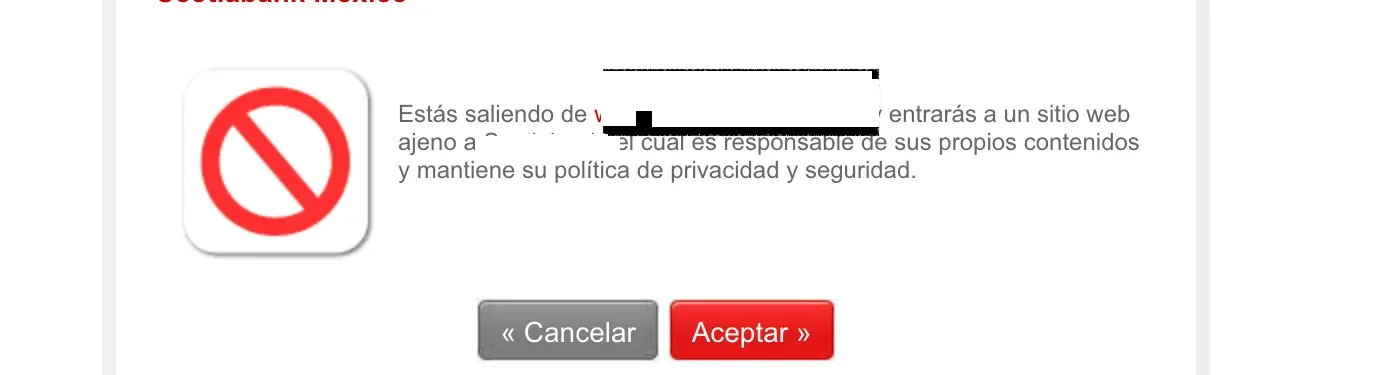
The screenshot shows the interstitial itself: a warning page with an accept button, captioned in the report as "once click aceptar you will be redirected". The feature is a redirect gate, and its whole purpose is to make sure the user is aware that they will leave the site.
Setup
The report does not describe any account, role or special precondition. The researcher worked from the public main page, clicked links, and edited the dest value in the address bar. The only tool mentioned is the Chrome DevTools, opened while testing the javascript: scheme.
Finding it
The researcher noticed that clicking any link on the main page does not redirect immediately. Instead it goes through the interstitial page, with the destination in dest. That makes dest the obvious place to look: it is user-controlled, it ends up driving a redirect, and the page is designed to accept arbitrary external destinations as long as they are on a whitelist.
The first attempt was to replace the whitelisted host with a JavaScript payload:
javascript:alert(1)
This did not work, because the URL must match the whitelisted sites. The value is checked against a list, and a bare javascript: payload is not on it.
Exploitation
Step 1: a scheme with a whitelisted host
The next attempt kept the whitelisted host but changed the scheme:
/intersticial.aspx?dest=javascript://whitelistedWebsite.com
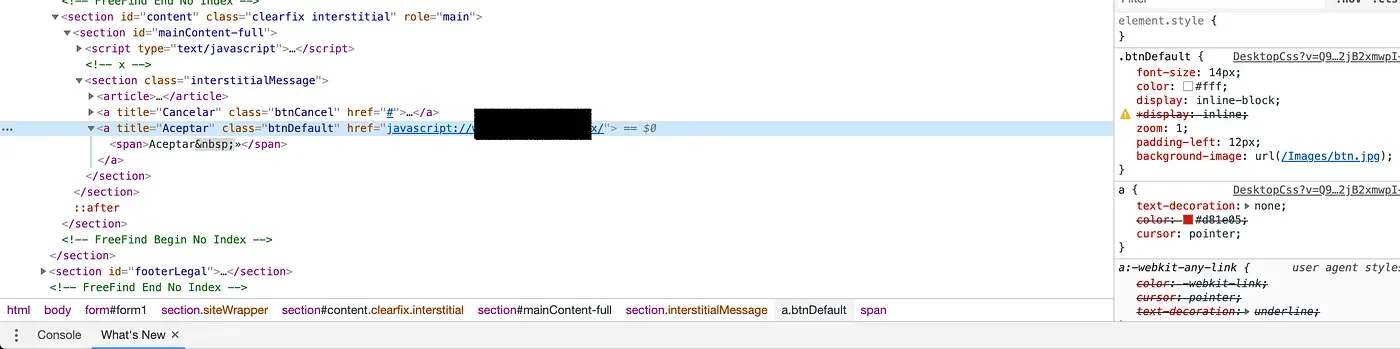
The screenshot is captioned "javascript parameter accepted as a scheme". With DevTools open, the researcher concluded that the parameter accepts any scheme, as long as a whitelisted website is appended to it. Two examples from the report show the boundary:
/intersticial.aspx?dest=data://whitelistedWebsite.com
This one is accepted.
/intersticial.aspx?dest=http://google.com
This one is not accepted, because google.com is not on the whitelist.
So the check is not on the scheme. It is on the presence of a whitelisted host somewhere in the value, and the scheme in front of it is left to the browser.
Step 2: trying to join JavaScript and the URL
The problem now is syntax. A value like javascript://whitelistedWebsite.com is treated as JavaScript by the browser, but //whitelistedWebsite.com is a comment, so nothing executes. The researcher needed a way to write JavaScript and the whitelisted URL together so that the JavaScript actually runs.
Several attempts failed:
- Adding
%0a%0d, which inserts a newline, redirected to a forbidden page. - Adding the whitelisted website as a variable and then a semicolon to terminate the JavaScript line did not work either. The site does not accept a semicolon in this parameter and redirects to the homepage instead, because the URL must come directly after the scheme, not after something like
var url=whitelistedWebsite.com.
Step 3: a single slash and a regex-shaped value
The researcher then tried:
javascript:/whitelistedWebsite.com/i
as the value of dest, and found that the parameter accepts not only schemes like http:// and ftp:// but also http:/ and javascript:/. That is, a single slash after the scheme is enough.
At this point the shape of the value, javascript:/.../i, suggested a regular expression, and the researcher reasoned about regex as a sequence of characters defining a search pattern, usable in almost any programming language. The next payload tried to append a second statement:
/intersticial.aspx?dest=javascript:/whitelistedWebsite.com/i;alert(document.domain)
The website refused the request because it includes a semicolon. Something else was needed to separate the two valid JavaScript statements so that the JavaScript would execute.
Step 4: HTTP parameter pollution
The researcher added a second parameter with the same name, dest, so the URL became:
<redacted>intersticial.aspx?dest=javascript:/whitelistedWebsite.com/i&dest=
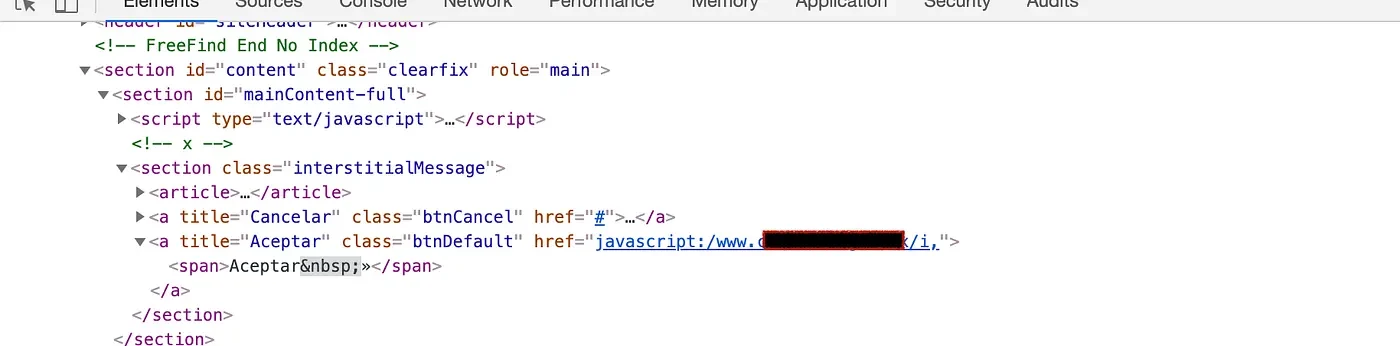
The screenshot shows this duplicated-parameter URL. The researcher then noticed that a comma is added to the URL, and put an alert function in the value of the second parameter. The final URL is:
<redacted>intersticial.aspx?dest=javascript:/whitelistedWebsite.com/i&dest=alert(1)
Once the accept button was clicked, the payload executed.
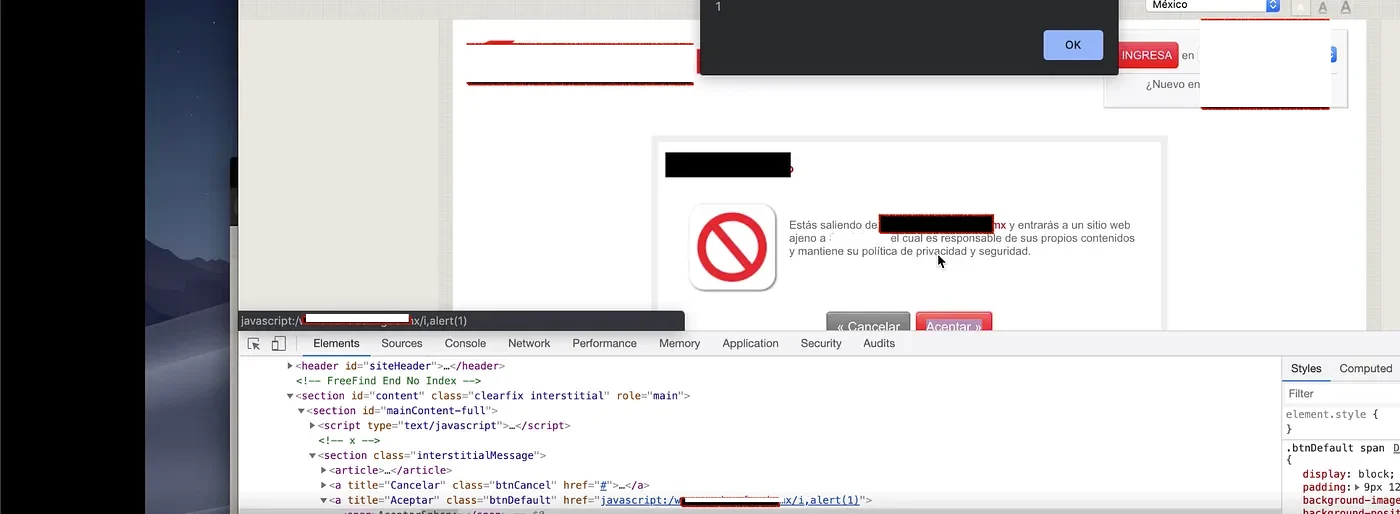
The screenshot is captioned "Voilà! XSS confirmed." The researcher noticed that a comma is added to the URL, and the two dest values end up joined with it, which is what makes the two halves run as one expression.
Root cause
The validation on dest does not restrict the scheme: any scheme is accepted as long as a whitelisted website is appended. Any scheme is accepted as long as a whitelisted host appears in the value, so javascript: passes the check and is then handed to the browser as a navigation target. The parameter also accepts a single slash after the scheme, such as http:/ and javascript:/.
The second mistake is how repeated parameters are handled. When dest appears twice, the request is not rejected, and a comma appears between the two values. That comma is valid JavaScript, so the first value supplies the javascript: scheme and the whitelisted host, and the second value supplies the code to run. The semicolon filter that blocked the earlier attempt is bypassed entirely, because no semicolon is needed.
Impact
The result is cross-site scripting on the interstitial page. An attacker who can get a victim to open a crafted intersticial.aspx URL can run JavaScript in the context of the site once the victim clicks the accept button. The report does not describe what an attacker could reach with that JavaScript beyond the alert used as proof, and it does not state which cookies, sessions or users were affected. The execution requires the user interaction of clicking accept, and the payload only works because the site accepts a whitelisted host after a javascript: scheme.
Fix
Based on the behaviour described, the validation should reject any scheme other than the intended redirect schemes, so that javascript:, data: and similar values never reach the browser as navigation targets. It should also reject repeated dest parameters instead of concatenating them, and it should not rely on a host appearing anywhere in the value as proof that the destination is safe.
Variants to test
- Try other schemes with a whitelisted host appended, such as
data://whitelistedWebsite.com, and see whether the value is accepted and what the browser does with it. - Try a single slash after the scheme, as in
javascript:/whitelistedWebsite.com/i, on other redirect parameters to see whether the parser accepts it. - Duplicate the redirect parameter with the same name and check whether the server concatenates the values, uses the first, uses the last, or rejects the request. A comma or other separator inserted between the values is the sign to look for.
- Where a semicolon is filtered, look for a separator the server itself inserts, as the comma did here, and place the payload in the second value.
- Test whether the whitelist check is a substring match by placing the whitelisted host in a position that is not the host, for example after a
javascript:scheme, and observe whether the value is accepted.
What happened, in plain words
A website had a safety page. When you clicked a link that took you to another site, the website did not send you straight there. It first showed you a warning page that said, in effect, "you are about to leave this site, click accept to continue". The address of the page you were going to was carried in the address bar as part of the warning page's own URL, in a small piece of information called a parameter named dest.
The researcher who wrote this report found that this warning page could be tricked into running JavaScript code of the attacker's choosing. JavaScript is the programming language that web pages use to make things happen in your browser: buttons react, pages change, and so on. If an attacker can make a site run their own JavaScript, that is called cross-site scripting, usually shortened to XSS. The trick here needed two ingredients: a check that only looked at part of the address, and a quirk in how the server handled a parameter that appeared twice in the same URL.
This article walks through the same steps the researcher took, in the same order, and explains each idea from scratch. You only need a browser and a computer to follow along.
The feature being tested
The main page of the site had links that lead to other websites. Before sending a visitor away, the site showed an interstitial page. "Interstitial" just means a page that sits in between: you are not on the site you started from, and not yet on the site you are going to. Its whole job is to make sure the user knows they are leaving.
The destination address was carried in the URL of that warning page, in a query parameter called dest. A query parameter is the part of a web address after the question mark. In example.com/page?colour=blue, the parameter is colour and its value is blue. Parameters are how a browser passes small pieces of information to a page. The page is reached at a path like this:
<redacted>/intersticial.aspx?dest=http://whitelistedWebsite.com
Line by line:
<redacted>stands for the site's own address, which has been removed here./intersticial.aspxis the path of the warning page on the server. The.aspxending tells you the page is built with a Microsoft technology, but you do not need to know that to follow the story.?marks the start of the parameters.dest=http://whitelistedWebsite.comis one parameter nameddestwhose value is the address of the site the user is being sent to.whitelistedWebsite.comis a stand-in name for a site the warning page trusts.
The screenshot shows the warning page itself, with an accept button. The caption in the report reads "once click aceptar you will be redirected". "Aceptar" is Spanish for accept. So the flow is: click a link, land on the warning page, click accept, and only then go to the destination.
Before you start
The report does not describe any account, login or special setup. The researcher started from the public main page, clicked links, and edited the dest value directly in the browser's address bar. Editing the address bar is the simplest way to test a parameter: you change the value, press Enter, and see what the page does.
The only tool mentioned is Chrome DevTools. DevTools is a panel built into the Chrome browser that you open with a keyboard shortcut or from the browser menu. Among other things it shows you the page's code and any messages the browser prints, which helps you see what the browser is doing with a value you typed.
Finding the weak spot
The researcher noticed that clicking any link on the main page did not redirect immediately. It went through the warning page, with the destination in dest. That makes dest the obvious place to look, for three reasons:
- It is user-controlled: anyone can type anything into the address bar.
- It ends up driving a redirect: the value decides where the browser goes next.
- The page only accepts destinations that match the whitelisted sites. A whitelist is a list of things that are allowed; anything not on the list is refused. Here the list is a set of trusted websites.
The first attempt was to replace the trusted website with a JavaScript payload:
javascript:alert(1)
Line by line:
javascript:is a scheme. A scheme is the first part of a web address, before the://, that tells the browser what kind of address it is. You already knowhttp://andhttps://for web pages, andmailto:for email addresses.javascript:tells the browser "treat what follows as JavaScript code and run it".alert(1)is a very small piece of JavaScript that makes the browser pop up a box containing the number 1. It is the standard harmless proof that code ran.
So the idea was: if the warning page will send the browser to whatever is in dest, what if dest is a javascript: address? The browser would run the code instead of navigating. This did not work, because the URL must match the whitelisted sites. The value is checked against the list, and a bare javascript: payload is not on it.
Exploitation
Step 1: a scheme with a trusted host
The next attempt kept the trusted host but changed the scheme:
/intersticial.aspx?dest=javascript://whitelistedWebsite.com
Line by line:
/intersticial.aspxis the warning page.?dest=starts the parameter.javascript://whitelistedWebsite.comis the value. It begins with thejavascript:scheme, so the browser would treat the rest as code, but the rest is//whitelistedWebsite.com, which in JavaScript means "this line is a comment, ignore it". Nothing would run, but the value does contain a trusted host, which is what the check is looking for.
The screenshot is captioned "javascript parameter accepted as a scheme". With DevTools open, the researcher concluded that the parameter accepts any scheme, as long as a trusted website is appended to it. Two examples from the report show the boundary. First:
/intersticial.aspx?dest=data://whitelistedWebsite.com
Line by line:
data:is another scheme. Adata:address carries its content inside the address itself rather than pointing at a server.//whitelistedWebsite.comis the trusted host appended after it.
This one is accepted. Second:
/intersticial.aspx?dest=http://google.com
Line by line:
http://is the ordinary web scheme.google.comis a real site, but it is not on the whitelist.
This one is not accepted, because google.com is not on the list. Put together, the two examples show that the check is not on the scheme. It is on whether a trusted host appears somewhere in the value, and the scheme in front of it is left to the browser to interpret.
Step 2: trying to join JavaScript and the URL
The problem now is syntax, meaning the rules for how code must be written. A value like javascript://whitelistedWebsite.com is treated as JavaScript by the browser, but //whitelistedWebsite.com is a comment, so nothing executes. The researcher needed a way to write JavaScript and the trusted URL together so that the JavaScript actually runs.
Several attempts failed:
- Adding
%0a%0d, which inserts a newline, redirected to a forbidden page.%0aand%0dare how a newline character is written inside a URL; a newline would end one line of code and start another, which is one way to separate two statements. - Adding the trusted website as a variable and then a semicolon to terminate the JavaScript line did not work either. A variable is a named box that holds a value in code, and a semicolon is the usual way to end a JavaScript statement. The site does not accept a semicolon in this parameter and redirects to the homepage instead, because the URL must come directly after the scheme, not after something like
var url=whitelistedWebsite.com.
Step 3: a single slash and a regex-shaped value
The researcher then tried:
javascript:/whitelistedWebsite.com/i
as the value of dest, and found that the parameter accepts not only schemes like http:// and ftp:// but also http:/ and javascript:/. That is, a single slash after the scheme is enough. ftp:// is the scheme for file transfer, and the point is that the check does not care whether there are one or two slashes.
At this point the shape of the value, javascript:/.../i, suggested a regular expression. A regular expression, often shortened to regex, is a sequence of characters that defines a search pattern, used to find or match text. It is available in almost any programming language. In JavaScript, a regex is written between two slashes, with optional letters after the closing slash, so javascript:/whitelistedWebsite.com/i looks like a javascript: scheme followed by a regex. The researcher reasoned about this shape and then tried to append a second statement:
/intersticial.aspx?dest=javascript:/whitelistedWebsite.com/i;alert(document.domain)
Line by line:
/intersticial.aspx?dest=is the warning page and its parameter.javascript:/whitelistedWebsite.com/iis the value that was already accepted.;is a semicolon, the usual separator between two JavaScript statements.alert(document.domain)is JavaScript that pops up a box showing the domain of the current page.document.domainis a property the browser exposes that holds the site's domain name, so this proves which site the code is running on.
The website refused the request because it includes a semicolon. Something else was needed to separate the two valid JavaScript statements so that the JavaScript would execute.
Step 4: HTTP parameter pollution
The researcher added a second parameter with the same name, dest, so the URL became:
<redacted>intersticial.aspx?dest=javascript:/whitelistedWebsite.com/i&dest=
Line by line:
<redacted>is the site's address.intersticial.aspx?dest=javascript:/whitelistedWebsite.com/iis the firstdestparameter, with the value that was already accepted.&separates one parameter from the next in a URL.dest=is a second parameter with the same name, and an empty value for now.
The screenshot shows this duplicated-parameter URL. Sending the same parameter name more than once is called HTTP parameter pollution. The name sounds alarming, but the idea is simple: a URL can contain the same parameter twice, and different servers handle that in different ways. Some use the first value, some use the last, some combine them, and some reject the request. The researcher then noticed that a comma is added to the URL, and put an alert function in the value of the second parameter. The final URL is:
<redacted>intersticial.aspx?dest=javascript:/whitelistedWebsite.com/i&dest=alert(1)
Line by line:
- The first
deststill suppliesjavascript:/whitelistedWebsite.com/i, which passes the whitelist check and starts the value with thejavascript:scheme. - The second
destsuppliesalert(1), the code to run. - A comma appears between the two values in the URL.
Once the accept button was clicked, the payload executed.
The screenshot is captioned "Voilà! XSS confirmed." The researcher noticed that a comma is added to the URL, and the two dest values end up joined with it, which is what makes the two halves run as one expression. In JavaScript, a comma can separate expressions, so the combined value reads as the first part followed by the second part, and the second part runs.
Why it worked
The validation on dest does not restrict the scheme: any scheme is accepted as long as a trusted website is appended. Any scheme is accepted as long as a trusted host appears in the value, so javascript: passes the check and is then handed to the browser as a navigation target. The parameter also accepts a single slash after the scheme, such as http:/ and javascript:/.
The second mistake is how repeated parameters are handled. When dest appears twice, the request is not rejected, and a comma appears between the two values. That comma is valid JavaScript, so the first value supplies the javascript: scheme and the trusted host, and the second value supplies the code to run. The semicolon filter that blocked the earlier attempt is bypassed entirely, because no semicolon is needed.
What an attacker could do
The result is cross-site scripting on the warning page. "Reflected" means the malicious value is not stored on the server; it is sent in the URL and bounced straight back into the page. An attacker who can get a victim to open a crafted intersticial.aspx URL can run JavaScript in the context of the site once the victim clicks the accept button. "In the context of the site" means the code runs as if it came from that site, so the browser treats it as trusted.
The report does not describe what an attacker could reach with that JavaScript beyond the alert used as proof, and it does not state which cookies, sessions or users were affected. A cookie is a small piece of data a site stores in your browser, often used to keep you logged in, which is why running code in a site's context can be serious. The execution requires the user interaction of clicking accept, and the payload only works because the site accepts a trusted host after a javascript: scheme.
How to fix it
Based on the behaviour described, the validation should reject any scheme other than the intended redirect schemes, so that javascript:, data: and similar values never reach the browser as navigation targets. It should also reject repeated dest parameters instead of concatenating them, and it should not rely on a host appearing anywhere in the value as proof that the destination is safe.
Things worth trying elsewhere
- Try other schemes with a trusted host appended, such as
data://whitelistedWebsite.com, and see whether the value is accepted and what the browser does with it. - Try a single slash after the scheme, as in
javascript:/whitelistedWebsite.com/i, on other redirect parameters to see whether the parser accepts it. - Duplicate the redirect parameter with the same name and check whether the server concatenates the values, uses the first, uses the last, or rejects the request. A comma or other separator inserted between the values is the sign to look for.
- Where a semicolon is filtered, look for a separator the server itself inserts, as the comma did here, and place the payload in the second value.
- Test whether the whitelist check is a substring match by placing the trusted host in a position that is not the host, for example after a
javascript:scheme, and observe whether the value is accepted.
Glossary
- Parameter: a named value passed to a page in the URL after a question mark, such as
destin?dest=.... - Query string: the part of a URL after the
?that carries parameters. - Interstitial page: a page shown in between two others, here a warning before leaving the site.
- Redirect: sending the browser from one address to another.
- Whitelist: a list of things that are allowed; anything not on the list is refused.
- Scheme: the first part of an address before
://, such ashttp,https,ftp,dataorjavascript, telling the browser what kind of address it is. - JavaScript: the programming language web pages use to make things happen in the browser.
- XSS (cross-site scripting): a flaw that lets an attacker run their own JavaScript in the context of a website.
- Reflected XSS: XSS where the malicious value is sent in the request and bounced straight back into the page, rather than stored on the server.
alert(1): a tiny JavaScript statement that pops up a box containing 1, used as harmless proof that code ran.document.domain: a browser property that holds the current page's domain name.- Comment: text in code that the browser ignores; in JavaScript,
//starts a comment to the end of the line. - Statement: a single instruction in code.
- Semicolon: the usual character that ends a JavaScript statement.
- Variable: a named box in code that holds a value.
- Newline: the character that ends one line and starts the next; in a URL it is written
%0aor%0d. - Regular expression (regex): a sequence of characters that defines a search pattern, used to find or match text.
- HTTP parameter pollution: sending the same parameter name more than once in a request, which different servers handle in different ways.
- Concatenate: join two strings together end to end.
- Chrome DevTools: a panel built into the Chrome browser that shows the page's code and messages from the browser.
- Cookie: a small piece of data a site stores in your browser, often used to keep you logged in.
- Session: the period during which a site remembers who you are, usually tied to a cookie.
- Substring match: a check that looks for a piece of text anywhere inside a larger string, rather than requiring an exact match.



