From Recon to Responsible Disclosure: Finding an Exposed Test End
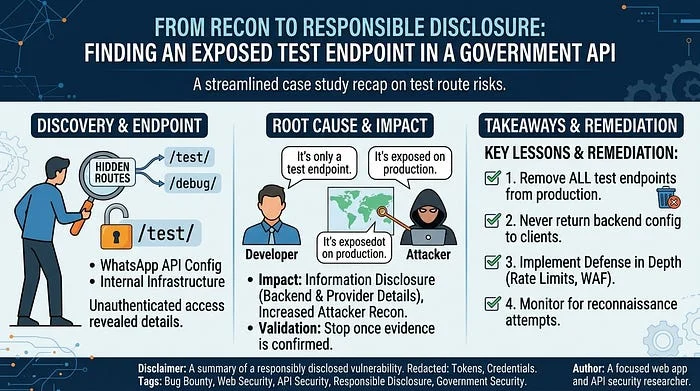
An unauthenticated test endpoint left on a production government website returned backend configuration details for the application's WhatsApp Business API and OTP integration. An attacker could use this information to map the attack surface and plan more targeted follow-up attacks, though no account takeover or message sending was demonstrated.
 Published on medium.com
Bug Bounty Writeup
The full write-up lives on its author's site
It belongs to its author, so we link to it rather than copy it. The other two tabs are our own rewrites, checked against it.
Context
The target was a government-owned web application, tested during a routine bug bounty reconnaissance. The application includes OTP functionality and a WhatsApp Business API integration, and the finding concerns an unauthenticated test endpoint that returned backend configuration for that integration.
A test-related route existing on a production system is not automatically a vulnerability. The question that matters is what the endpoint actually does and who can access it.
Setup
The work was done as reconnaissance against the application's API surface. No accounts, roles or tool versions are described. The testing was deliberately limited to validation: no mass requests, no OTP abuse, no account takeover attempts and no destructive testing. Sensitive values from the response were not retained or published.
Finding it
Reconnaissance was not limited to pages directly visible to users. Modern applications often expose additional API routes for authentication, OTP verification, development, testing, debugging, internal integrations and legacy functionality, and these routes are sometimes developed with different security assumptions from the main application.
While mapping API-related routes and examining how they behaved, one pattern stood out:
/test/
A test route on a production system is only a lead. The next step was to determine what the endpoint did and whether it could be reached without authentication.
Exploitation
Step 1: Send a single unauthenticated request
A single request was sent to the endpoint to check whether it was accessible without authentication. The server responded successfully, with no authentication challenge. The response contained backend configuration information related to the application's WhatsApp messaging integration, including provider-related configuration and other implementation details.
The report does not reproduce the request or the response body; sensitive values were redacted. The finding was therefore not simply "there is a test endpoint" but "an unauthenticated production endpoint is returning backend integration information that should not be exposed to an external user".
Step 2: Stop at validation
One request was enough to establish the issue. The researcher did not attempt to abuse the OTP functionality, send messages to arbitrary users, perform account takeover, brute-force authentication, enumerate large numbers of records, modify backend configuration or perform destructive actions. The principle applied: once there is enough evidence to establish impact, stop. There is no need to prove every possible escalation path if doing so could create unnecessary risk.
Root cause
The root cause appeared to be a test/debug endpoint deployed to the production environment without sufficient access control. The problematic architecture looked like this:
Production Application
        │
        ├── Public API
        │
        ├── Authentication API
        │
        ├── OTP API
        │
        └── Test Endpoint
                │
                └── Backend configuration
The problem was not that the test endpoint existed, but that it was accessible from the public internet, accessible without authentication, and returning information useful for reconnaissance. This is security through assumptions: developers may think "it's only a test endpoint", while an attacker sees an endpoint exposed on the production attack surface.
Test endpoints frequently receive less security scrutiny than primary functionality. During development a developer might create routes such as:
/test/config/test/otp/debug/provider/dev/status
These can be useful internally, but if they are accidentally deployed to production they become publicly accessible functionality. The problem is worse when the endpoint does not require authentication, exposes configuration, returns verbose responses, interacts with backend services, exposes internal identifiers, provides debugging information or allows state-changing operations.
Impact
The primary impact was information disclosure. The exposed information gave visibility into the backend WhatsApp Business integration and OTP-related infrastructure. From an attacker's perspective this can provide intelligence for:
- Reconnaissance: learning more about the technologies and external services the application uses.
- Attack surface mapping: knowing how OTP and messaging infrastructure is structured helps identify additional endpoints worth testing.
- Provider-specific attacks: knowledge of the messaging provider and integration architecture makes subsequent attacks more targeted.
- Reduced attacker effort: instead of discovering the architecture independently, the attacker receives some of it directly from the application.
The finding did not demonstrate that the exposed information alone was sufficient to take over accounts or send arbitrary WhatsApp messages, and such actions were intentionally not attempted. The conclusion is that the endpoint exposes backend implementation and integration information that should not be available to unauthenticated users, increasing the target's reconnaissance and attack surface.
Fix
The report was submitted to the organisation's security response team through its bug bounty / vulnerability disclosure process, with the affected endpoint, vulnerability description, technical evidence, security impact, reproduction steps, recommended remediation and supporting screenshots. The CSIRT team reviewed it and accepted it as a valid security finding. The report does not say which changes were made.
The recommended remediation was:
- Remove test endpoints from production. If an endpoint is only needed for development or testing, do not deploy it. Use environment-based routing, feature flags, build-time configuration or separate development/staging environments.
Development
    └── /test/*
Staging
    └── /test/*
Production
    └── No test endpoints
- Never return backend configuration to clients. Keep it server-side. Instead of returning provider configuration such as:
{
  "provider": "...",
  "configuration": "...",
  "internalInformation": "..."
}
the client should receive only the minimum information required for its functionality. If the frontend does not need it, do not send it.
-
Protect OTP-related endpoints with authentication where appropriate, authorisation, rate limiting, abuse prevention, input validation, monitoring and appropriate logging. OTP infrastructure is particularly sensitive because it sits close to authentication.
-
Apply defence in depth so that a test endpoint that accidentally reaches production is still constrained:
Request
   │
   ▼
WAF / Edge Protection
   │
   ▼
Authentication
   │
   ▼
Authorization
   │
   ▼
Rate Limiting
   │
   ▼
Input Validation
   │
   ▼
Application
- Add detection for reconnaissance patterns. Monitor requests involving routes such as:
/test/
/debug/
/dev/
/staging/
/internal/
/admin/
WAF rules and monitoring can detect repeated reconnaissance attempts, but WAF protection is an additional layer, not a replacement for removing unnecessary endpoints.
What happened, in plain words
A security researcher was looking around a website run by a government organisation, as part of a bug bounty programme. A bug bounty programme is an arrangement where an organisation says: if you find a security problem in our systems, tell us privately and responsibly, and we will not treat you as an attacker. The researcher found a page on the live website that was meant only for testing. Nobody had to log in to see it, and it handed back details about how the site talks to WhatsApp, the messaging service, including the setup for the one-time codes (OTP) the site sends to users.
That is the whole story. There was no clever break-in, no stolen password, no trick that let someone take over an account. There was simply a door that should have been locked, or better, removed, and it was standing open on the public internet. The researcher sent one request, saw what came back, stopped, and reported it. The organisation's computer security incident response team (CSIRT) reviewed the report and accepted it as a real security issue.
This article walks through the same steps the researcher took, in the same order, but explains every idea from scratch. If you can use a browser and a computer, you can follow it.
Some words you will meet straight away
Before the story, a few everyday ideas. You do not need to memorise them; each is explained again where it first matters.
- A web page is what your browser shows you. Behind it, your browser and the website's computer (the server) exchange messages.
- An API (application programming interface) is a way for one piece of software to ask another for something, in a fixed format. A useful comparison: a restaurant. The menu is the API. You do not walk into the kitchen and cook; you ask for a named dish and the kitchen sends it back. The API is the list of things you are allowed to ask for and the shape of the answer.
- A request is one such ask: your browser (or a tool) says "give me this", and the server replies with a response.
- Authentication means proving who you are, like showing a passport at a border. Authorisation means what you are allowed to do once you are in, like a passport not granting you the right to enter every room in the building.
- An endpoint is one specific address on a server that answers a particular kind of request. Think of it as one counter in a large office: each counter deals with one kind of paperwork.
- Production means the real, live system that actual users use. Development and staging are copies used while building and testing, before anything goes live.
- Reconnaissance (often shortened to recon) means looking around first to see what exists, before trying anything. A burglar casing a street, or a hiker studying a map, is doing reconnaissance. In security it is the harmless, information-gathering phase.
- Information disclosure is the name for the kind of problem here: the system gives out information it should have kept to itself.
The starting point
The target was a government-owned web application. It has two features that matter for this story: it sends OTP codes (one-time passwords, the short numbers you sometimes receive to confirm it is really you), and it is connected to the WhatsApp Business API, which is the official way for a business to send WhatsApp messages through WhatsApp's own systems rather than by hand.
The researcher was doing routine bug bounty reconnaissance. The testing was deliberately kept small: no floods of requests, no attempts to abuse the OTP feature, no attempts to take over accounts, nothing destructive. Anything sensitive that came back in a response was not kept or published.
One important point the researcher makes early: a test-related address existing on a live system is not automatically a vulnerability. Lots of sites have odd corners. The question that matters is what the endpoint actually does, and who can reach it.
Finding it
Reconnaissance was not limited to the pages a normal visitor sees. Modern applications often have extra API routes, meaning extra counters in the office, for things like:
- logging in (authentication)
- checking OTP codes
- development
- testing
- debugging (finding out why something went wrong)
- connections to internal services
- older features kept for compatibility
These routes are interesting because they are sometimes built with different assumptions from the main site. A comparison: the front of a shop is designed to be seen by customers, but the stockroom door may have been fitted by someone who assumed only staff would ever walk through it.
While mapping these API-related routes and watching how they behaved, one pattern stood out:
/test/
Line by line, this is not code at all. It is a fragment of a web address, the part that comes after the site name. The slashes are separators, like the slashes in a file path on your computer. test is simply a word someone chose for this section of the site. Seeing it tells you only that somewhere there is a route whose address contains /test/. It does not tell you what the route does, whether it is protected, or whether it is a problem. That is why the next step was to find out what the endpoint did and whether it could be reached without logging in.
Trying it
Step 1: one request, no login
A single request was sent to the endpoint to check whether it was reachable without authentication. The server answered successfully. There was no login prompt, no "please sign in" challenge. The response contained backend configuration information about the application's WhatsApp messaging integration, including details about the provider and other implementation details.
A comparison for "backend configuration": the settings panel inside a machine, the wiring diagram and the list of which supplier supplies which part. A customer should see the product on the shelf, not the wiring diagram.
The report does not reproduce the request or the response body. Sensitive values were redacted, meaning removed or blanked out before publication, the way you might black out an account number on a photocopy. So the finding was not simply "there is a test endpoint". It was: an endpoint on the live system, reachable without logging in, is returning backend integration information that should not be exposed to an outside user.
Step 2: stop at validation
One request was enough to establish the issue. The researcher did not try to abuse the OTP feature, send messages to arbitrary users, take over accounts, guess passwords repeatedly, list large numbers of records, change backend configuration, or do anything destructive.
The principle applied: once you have enough evidence to establish impact, stop. There is no need to prove every possible escalation path if doing so could create unnecessary risk. A comparison: if you find a tap dripping into a wall, you do not need to flood the house to prove the tap is loose. You photograph the drip, turn it off if you can, and call the plumber.
Why it happened
The root cause appeared to be a test or debug endpoint that had been deployed to the production environment without sufficient access control. In plain words: a testing door was built into the live building, and nobody put a lock on it.
The problematic architecture looked like this:
Production Application
        │
        ├── Public API
        │
        ├── Authentication API
        │
        ├── OTP API
        │
        └── Test Endpoint
                │
                └── Backend configuration
Line by line: Production Application is the live system. The vertical bars and branches are a simple tree drawing, the same idea as folders inside folders. Public API is the part meant for ordinary visitors. Authentication API handles logging in. OTP API handles the one-time codes. Test Endpoint is the testing door. The last line shows that this testing door leads to Backend configuration, the internal settings.
The problem was not that the test endpoint existed. The problem was that it was:
- reachable from the public internet,
- reachable without authentication, and
- returning information useful for reconnaissance.
This is what the researcher calls security through assumptions. Developers may think "it's only a test endpoint". An attacker sees "it's an endpoint exposed on the production attack surface". Those are very different perspectives, like a homeowner thinking "it's only the back door" while a burglar counts it as an entrance.
Test endpoints often get less security scrutiny than the main features. During development, a developer might create routes such as:
/test/config/test/otp/debug/provider/dev/status
Line by line: this is a list of address fragments, one per line, each a word a developer might use in a route name. test for testing, config for configuration, otp for one-time passwords, debug for debugging, provider for the outside company that supplies a service, dev for development, status for a health or status check. The report presents them as examples of the kind of words that turn up in such routes, not as addresses that were all found on this site.
These routes can be useful internally. But if they are accidentally deployed to production, they become publicly accessible functionality. The problem gets worse when the endpoint does not require authentication, exposes configuration, returns verbose responses (long, chatty answers full of detail), interacts with backend services, exposes internal identifiers (names or numbers used inside the system), provides debugging information, or allows state-changing operations (actions that change something rather than just read it).
What it means for security
The primary impact was information disclosure. The exposed information gave visibility into the backend WhatsApp Business integration and the OTP-related infrastructure.
From an attacker's point of view, that can provide intelligence for four things:
- Reconnaissance: learning more about the technologies and outside services the application uses.
- Attack surface mapping: knowing how the OTP and messaging infrastructure is structured helps identify other endpoints worth testing. Attack surface means all the places an attacker could possibly knock on.
- Provider-specific attacks: knowing which messaging provider is used and how the integration is built makes later attacks more targeted.
- Reduced attacker effort: instead of working out the architecture independently, the attacker gets some of it handed over directly by the application.
A comparison: a burglar who has to guess the layout of a building will be slow and may give up. A burglar handed a floor plan skips the guessing. The floor plan alone does not open any door, but it makes everything else easier.
The finding did not show that the exposed information alone was enough to take over accounts or send arbitrary WhatsApp messages, and such actions were deliberately not attempted. The honest conclusion is that the endpoint exposes backend implementation and integration information that should not be available to users who have not logged in, which increases the target's reconnaissance and attack surface.
Reporting it
The report was submitted to the organisation's security response team through its bug bounty or vulnerability disclosure process. It contained:
- the affected endpoint,
- a description of the vulnerability,
- technical evidence,
- the security impact,
- steps to reproduce it,
- recommended fixes, and
- supporting screenshots.
The CSIRT team reviewed it and accepted it as a valid security finding. The report does not say which changes were made afterwards.
How to fix it
The recommended remediation was as follows.
- Remove test endpoints from production. If an endpoint is only needed for development or testing, do not deploy it. Use environment-based routing (the system behaves differently depending on whether it is development, staging or production), feature flags (switches that turn a feature on or off), build-time configuration (settings fixed when the software is packaged), or separate development and staging environments.
Development
    └── /test/*
Line by line: Development is the name of the environment. The └── is a tree-drawing character, like an indented bullet. /test/* means the /test/ section and everything under it, the * standing for "anything". So: in development, test routes are allowed.
Staging
    └── /test/*
Production
    └── No test endpoints
Line by line: the same for Staging, the rehearsal environment that mimics production. Then Production, the live system, where the line says plainly: no test endpoints. The point is that the same software can be configured to keep the testing door in the rehearsal building and leave it out of the real one.
- Never return backend configuration to clients. Keep it server-side. A client here means the browser or app on the user's side. Instead of returning provider configuration such as:
{
  "provider": "...",
  "configuration": "...",
  "internalInformation": "..."
}
Line by line: this is JSON, a common text format for structured data. The curly braces { and } wrap one object, a bundle of labelled values. Each line inside is a label in quotes, then a colon, then a value in quotes. provider would name the outside company. configuration would hold settings. internalInformation would hold internal details. The ... in each value is a placeholder meaning "some real value would go here", and in the published report those real values were redacted. The recommendation is that the client should receive only the minimum information it needs to work. If the frontend (the part users see) does not need it, do not send it.
-
Protect OTP-related endpoints with authentication where appropriate, authorisation, rate limiting (a cap on how many requests are allowed in a period, like a ticket machine that only issues one ticket per minute), abuse prevention, input validation (checking that what arrives is the right shape before using it), monitoring and appropriate logging. OTP infrastructure is particularly sensitive because it sits close to authentication: it is one of the checks that decides whether someone is who they claim to be.
-
Apply defence in depth. This means layering several independent protections, so that if one fails another still stands. A comparison: a castle with a moat, a wall and a locked keep. If a test endpoint accidentally reaches production, the other layers should still constrain it.
Request
   │
   ▼
WAF / Edge Protection
   │
   ▼
Authentication
   │
   ▼
Authorization
   │
   ▼
Rate Limiting
   │
   ▼
Input Validation
   │
   ▼
Application
Line by line: Request is the incoming ask from a browser or tool. The arrows ▼ show the order in which it passes through the layers. WAF / Edge Protection is a web application firewall, a filter at the edge of the network that inspects traffic before it reaches the site. Authentication checks who you are. Authorization checks what you may do. Rate Limiting caps how often you may ask. Input Validation checks the shape of what you sent. Application is the site itself, the last line of defence. The point is that no single layer is expected to solve every problem.
- Add detection for reconnaissance patterns. Monitor requests involving routes such as:
/test/
/debug/
/dev/
/staging/
/internal/
/admin/
Line by line: six address fragments, one per line, each a word commonly used in route names. test, debug, dev, staging, internal, admin. The recommendation is to watch for repeated requests to addresses containing these words. WAF rules and monitoring can detect repeated reconnaissance attempts, but a WAF is an additional layer, not a replacement for removing unnecessary endpoints. A comparison: a camera over the back door is useful, but it is not a substitute for locking the door.
The bigger lesson
This finding was not complicated. There was no sophisticated exploit chain, no zero-day (a previously unknown flaw), no advanced memory corruption. It was simply an endpoint that should not have been publicly accessible.
Real-world security problems are often caused by small inconsistencies adding up:
"temporary" endpoint
        +
production deployment
        +
no authentication
        +
verbose response
        ↓
information disclosure
Line by line: each line is one small decision. A "temporary" endpoint is something built quickly and meant to be removed. production deployment means it went live anyway. no authentication means nobody had to log in. verbose response means it answered with more detail than it should. The arrow ↓ means these together lead to information disclosure, the leak of information. None of those decisions looks catastrophic alone. Together they create an unnecessary attack surface.
For developers, the lessons are: test endpoints are real attack surface, because if an endpoint is deployed to production, attackers will eventually find it; verbose responses leak intelligence, so keep answers minimal in every environment; and defence in depth matters, so apply authentication, authorisation, rate limiting, input validation and monitoring consistently, and do not assume an endpoint is safe just because it is not part of the main user flow.
For security researchers, the lessons are: check test endpoints, because routes containing words like /test/, /debug/, /dev/ and /staging/ often get less attention than the main features; map the full API surface, looking beyond what the main interface calls at auxiliary APIs, legacy routes, debugging and test functionality, undocumented endpoints and alternative API versions, since the real attack surface is usually larger than what the frontend shows; and know when to stop, because once you have enough evidence to establish a vulnerability, further exploitation may be unnecessary. A good report does not need to demonstrate maximum possible damage. It needs to establish clearly what is exposed, why it is exposed, who can access it, what an attacker can learn or do, and what should be fixed.
For organisations, the lessons are: include test routes in security reviews, with a simple checklist to stop an endpoint accidentally reaching production; scan for debug and test endpoints, using automated scanning as a complement to, not a replacement for, manual testing; and establish a vulnerability disclosure programme, so researchers have a safe channel to report what internal testing may miss.
Conclusion
Every production endpoint should be treated as part of the security boundary. A test endpoint may look harmless to a developer because it was created for internal testing, but once it is deployed publicly it becomes accessible to anyone who can discover it. In this case, an unauthenticated test endpoint exposed information related to the application's WhatsApp Business integration and OTP infrastructure. The vulnerability did not require sophisticated exploitation. The important part was recognising that the information should never have been exposed in the first place.
The remediation is relatively simple: remove unnecessary test endpoints from production, protect sensitive API functionality, minimise response data, keep backend configuration server-side, apply authentication and authorisation consistently, and monitor the attack surface continuously.
For security researchers, the lesson is equally simple: do not only test what the application wants you to see. Test what the application accidentally exposes.
All testing described was performed with minimal impact. Only the requests necessary to validate the vulnerability were made. No mass scanning against the affected functionality, OTP abuse, account takeover attempts, destructive testing or unauthorised access to user data was performed. Sensitive information was redacted before publication, and the vulnerability was responsibly disclosed to the affected organisation before publication.
Glossary
- API: a defined way for one piece of software to ask another for something, like a menu of allowed requests and the shape of the answers.
- Attack surface: all the places an attacker could possibly try to interact with a system.
- Authentication: proving who you are, for example by logging in.
- Authorisation: what you are allowed to do once you are identified.
- Backend: the part of a system that runs on the server and is not directly seen by users.
- Bug bounty programme: an arrangement where an organisation invites researchers to report security problems, usually with rules and sometimes a reward.
- Client: the software on the user's side, such as a browser or app.
- Configuration: the settings that control how a system behaves.
- CSIRT: computer security incident response team, the group inside an organisation that handles security reports and incidents.
- Debug endpoint: a route built to help developers find and fix problems, which should not be reachable by the public.
- Defence in depth: layering several independent protections so that if one fails, another still stands.
- Development environment: a copy of the system used while building it.
- Endpoint: one specific address on a server that answers a particular kind of request.
- Feature flag: a switch that turns a feature on or off without changing the code.
- Frontend: the part of a system users see and interact with.
- Information disclosure: a security problem where a system gives out information it should have kept private.
- Input validation: checking that incoming data is the right shape and type before using it.
- JSON: a common text format for structured data, using braces, labels and values.
- OTP: one-time password, a short code valid for a single use, often sent to confirm identity.
- Production: the real, live system that actual users use.
- Rate limiting: a cap on how many requests are allowed in a period of time.
- Reconnaissance: the information-gathering phase of security testing, looking around to see what exists.
- Redacted: removed or blanked out, usually to protect sensitive values before publishing.
- Request: one ask sent to a server, such as "give me this page".
- Response: what the server sends back.
- Route: a path or address pattern that a server recognises and handles.
- Server: the computer that hosts a website and answers requests.
- Staging environment: a rehearsal copy of the system that mimics production before changes go live.
- Stack trace: the technical list of what a program was doing when it failed.
- State-changing operation: an action that changes something, rather than only reading it.
- Test endpoint: a route built for testing, which should not be reachable on the live system.
- Verbose response: an answer that includes more detail than necessary.
- Vulnerability: a weakness in a system that could be used to cause harm or gain unauthorised access.
- Vulnerability disclosure process: the formal way an organisation receives and handles security reports.
- WAF: web application firewall, a filter that inspects traffic before it reaches a website.
- WhatsApp Business API: the official way for a business to send WhatsApp messages through WhatsApp's own systems.
- Zero-day: a security flaw that was not previously known, so no fix exists yet.



