From Shodan to RCE: That one time I hacked a Fortune 500 company.
An unauthenticated Jenkins dashboard exposed to the internet allowed reading any file on the server and executing commands as root. The attacker used the Groovy script console to achieve remote code execution.

Bug Bounty
The full write-up lives on its author's site
It belongs to its author, so we link to it rather than copy it. The other two tabs are our own rewrites, checked against it.
Context
The target was a multinational company with tens of thousands of employees and, in the researcher's words, a large number of endpoints. The bug bounty program had a wide scope: ***.company.*** domains plus any asset owned by the organisation. The researcher had been working on this program since early 2020. The organisation and all identifying details are redacted in the write-up in line with the program scope.

The asset that mattered was a Jenkins instance. Jenkins is an open source CI/CD automation server written in Java, used to implement CI/CD workflows called pipelines. The instance was reachable from the internet and its dashboard was unauthenticated.
Setup
The work was done from the researcher's local machine, with no special access to the target. The tools involved were:
- Shodan, used for reconnaissance and for the automated search at the end.
- A browser, used to browse the Jenkins dashboard and its pages.
nmap, used to see which ports were open on the server.- A netcat listener, used to catch the reverse shell.
The Jenkins dashboard was exposed to the open internet and unauthenticated.
Finding it
The subdomain was found during the recon phase using Shodan. The researcher browsed Shodan results manually, opening interesting pages in new tabs, and estimates having gone through at least 100 pages of results before landing on the dashboard. The search term was:
ssl: "company"
This searches for hosts whose SSL certificate contains the string company, which is a way to find assets belonging to an organisation without knowing its hostnames in advance. The result looked something like this:
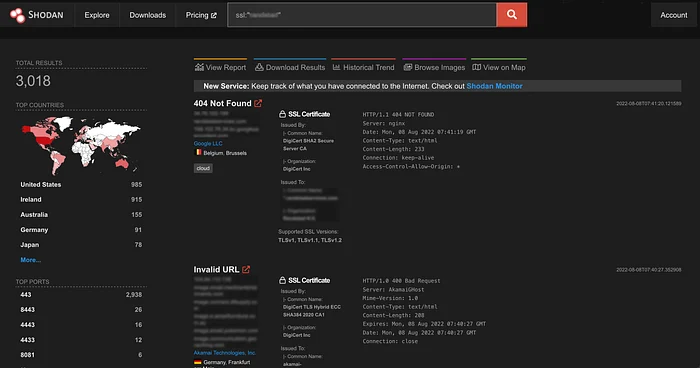
Once on the dashboard, some initial poking around revealed three things:
- Add-on apps could be installed, specifically the Terminal app. The shell would start but no command would successfully run, so this was a dead end.
- All user profiles could be seen. This confirmed that the server belonged to the organisation: a quick LinkedIn search on the users showed they were all members of the organisation's DevOps team.
- The Groovy terminal was already installed. This was the interesting one.
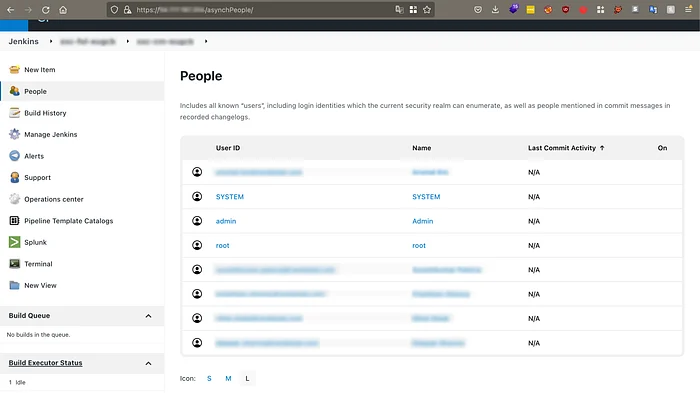
Using two public guides on abusing the Jenkins Groovy script console, the researcher found two bugs: arbitrary file read and remote code execution.
Exploitation
Step 1: Arbitrary file read via /script
The bug was located at /script and behaved as a primitive webshell. The researcher describes arbitrary file read as existing because the web application does not properly validate user-supplied input, so a crafted HTTP request can display the contents of any file on the webserver without authentication. After reviewing previous research and the Jenkins documentation, the researcher experimented with various commands and was able to print the contents of any file on the webserver:
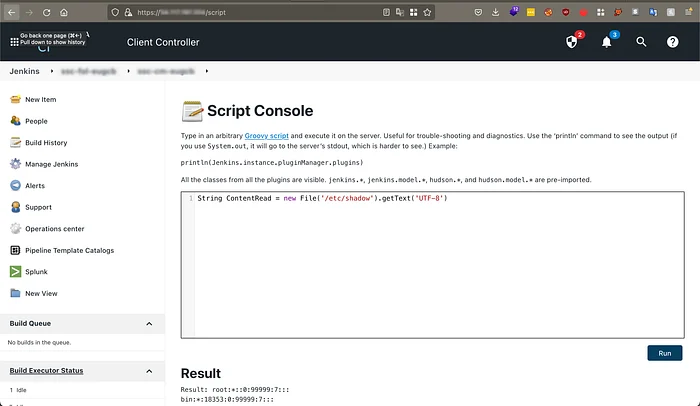
The successful payload that revealed too much.
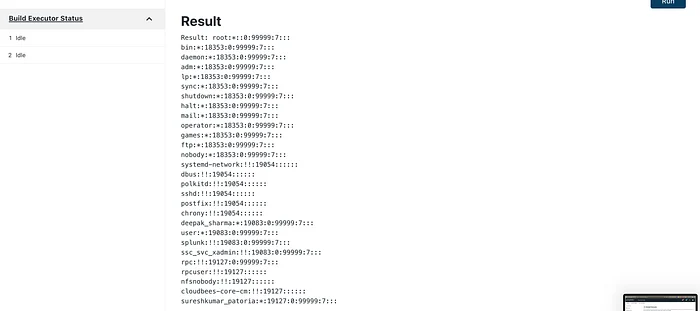
Boom-shakalaka!
Step 2: Reverse TCP shell from the webshell
Digging further into the documentation and previous write-ups, the researcher fired a reverse TCP shell from within the webshell. It took a significant number of iterations before it worked:
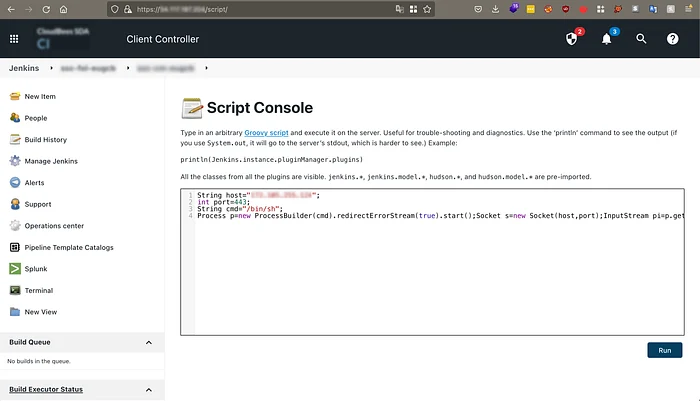
The syntax used for the reverse shell.
Knowing which ports were open on the webserver helped. An nmap scan showed port 80 (http) and port 443 (https) open. The researcher tried the usual reverse shell ports in the netcat listener (4444, 4445, 9001, 1337) and none worked, so the shell was eventually fired over a port that was already open on the target.
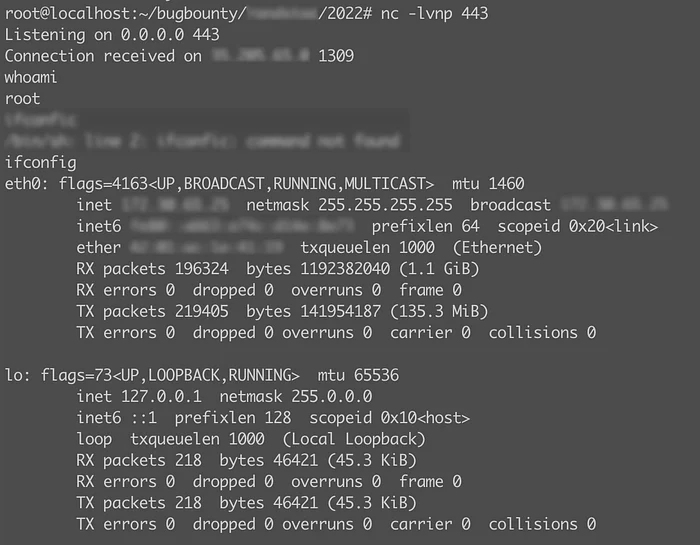
Final boss: root-user reverse TCP shell.
The shell came back as the root user. The researcher stopped at the point of confirming the user as root and reading the networking information under ifconfig, which was treated as sufficient evidence of compromise.
Root cause
The Jenkins dashboard was exposed to the open internet and its script console at /script could be reached without authentication. The Groovy script console is designed to run arbitrary Groovy on the server, so once it is reachable unauthenticated it is effectively a webshell: the same access gives both file read and command execution. The report does not describe the configuration behind the missing authentication beyond the exposure itself.
Impact
An attacker could perform any action they wanted on the target webserver, including accessing, modifying and removing all files. In this case the shell ran as root, so the compromise was complete. The researcher did not go beyond confirming root and the ifconfig output.
Timeline
| Date | Event |
|---|---|
| 16 May 2022 | Bugs submitted via the bug bounty platform; the vendor responded immediately. |
| 17 May 2022 | Submission resolved by the vendor; the Jenkins instance was taken offline. |
The CVSSv3 severity rating of the bug was upgraded to Exceptional (9.5 to 10 out of 10). The outcome is redacted.
Fix
The vendor took the Jenkins instance offline. The report's remediation advice is:
- Do not expose your Jenkins dashboard to the open internet.
- If you absolutely must, enforce login for read access to the dashboard, and/or:
- Enforce 2FA.
Variants to test
The report closes with a way to automate finding other vulnerable Jenkins instances:
- Register for a Shodan account and configure the Shodan CLI.
- Compile a list of all organisation names that have bug bounty programs from the public bounty-targets-data repository.
- Save the list in a text file and run the following bash one-liner:
while read line; do shodan search ssl:$line x-jenkins 200; done < list.txt
This loops over each organisation name, searches Shodan for hosts whose SSL certificate matches that name and that also match x-jenkins with a 200 result, and prints the hits. A positive result is a Jenkins instance belonging to an in-scope organisation.

What happened, in plain words
A security researcher spent around five hours grinding through Shodan results, which is a search engine for internet-connected devices and servers. While doing this, they found a Jenkins dashboard that belonged to a large multinational company (a Fortune 500 company). The dashboard was open to anyone on the internet, with no login required.
Jenkins is a tool that software teams use to build and deploy their software automatically. It is powerful because it can run commands on the server it lives on. Because the dashboard was unprotected, the researcher could:
- Read the contents of any file on the server, straight from the browser.
- Take complete control of the server. They did this by making the server connect back to their own computer and give them a command prompt, running as the root user (the most powerful user on a Linux system). This is called remote code execution, or RCE.
The next day the submission was resolved and the Jenkins instance was taken offline. The researcher was careful not to go any further than needed to prove the problem was real.
This article walks through the whole story from the beginning, explaining every term as it comes up, so you can follow along even if you have never done security work before.
The target
Organisation: redacted.
The company's name and any details that could identify it have been removed from the write-up, because the bug bounty program's rules require it. A bug bounty program is a scheme where a company invites outside people to test its systems and report problems, usually paying a reward for good findings.
What we do know is that the target is a multinational company with tens of thousands of employees and a very large number of endpoints. An endpoint here simply means any system or address the company owns that can be reached over a network. The researcher had been testing this company's program since early 2020.
The program had a wide scope. Scope means the set of things you are allowed to test. Here it covered ***.company.*** domains (any web address ending in the company's name) plus any asset owned by the organisation. Because the scope was so wide, the researcher had to work "top down": start from what the company is, then find everything it owns by looking at things like ASNs and SSL certificates. An ASN (Autonomous System Number) is a number that identifies a block of internet addresses belonging to one organisation. An SSL certificate is the digital certificate a website presents to prove its identity and enable encrypted HTTPS connections; certificates often contain the company's name, which makes them a good way to find a company's servers.
What is Jenkins, anyway?
Jenkins is a free, open source tool for CI/CD. CI/CD stands for continuous integration and continuous delivery/deployment: the practice of automatically building, testing and releasing software whenever a developer makes a change. Jenkins is written in Java (a programming language) and is used to implement these automated workflows, which are called pipelines. Think of it as a robot factory worker that, every time someone hands over new code, runs a series of steps: compile it, test it, and ship it.
Because Jenkins is built to run commands and scripts on its server, anyone who can reach its controls without logging in can effectively run commands on that server. That is the heart of this whole story.
Initial recon
Gently boys, the scope says max 20 requests/sec.
Recon, short for reconnaissance, is the information-gathering phase: finding out what exists before you try anything. The note about 20 requests per second is a rule in the program's scope limiting how fast you may send requests, so you do not overload the company's systems.
The researcher found this particular subdomain (a subdomain is a prefix on a domain, like build.example.com) during recon using Shodan. Shodan is a search engine that indexes servers, devices and services connected to the internet, rather than web pages. The researcher browsed Shodan results by hand, opening interesting pages in new browser tabs, and estimates they went through at least 100 pages of results before finding this dashboard.
The search term used was:
ssl: "company"
Line by line:
ssl:tells Shodan to look at the SSL certificate presented by each host."company"is the text to look for inside that certificate.
So this asks Shodan: show me every host whose certificate contains the word "company". The idea is that a company's servers often use certificates that include its name, so this finds the company's assets even if you do not know their addresses in advance. It is like searching a phone book for everyone with the same surname when you do not know their first names.
The result looked something like this:
Shodan search results for SSL certificates owned by the target organisation
Once on the dashboard, some initial poking around revealed three things:
- Add-on apps could be installed, specifically the Terminal app. The shell would start but no command would successfully run. This was a dead end. (A shell is a text interface where you type commands; an add-on app is an extra plugin you can install into Jenkins.)
- All user profiles could be seen. This helped confirm the server really belonged to the organisation. A quick LinkedIn search on the users showed they were all members of the organisation's DevOps team. DevOps is the way of working where the same team builds and operates software. Seeing real employee accounts on the dashboard was the confirmation the researcher needed.
- The Groovy terminal was already installed. This was the interesting one. Groovy is a programming language that runs on Java, and Jenkins lets you run Groovy scripts on the server through a console. A console here means a page where you type code and it runs immediately.
Using two public guides on abusing the Jenkins Groovy script console, the researcher found two bugs: arbitrary file read and remote code execution. A bug, in this context, is a weakness in the software or its configuration that can be misused.
Exploitation
Exploitation means actually using a weakness to prove it can be abused, rather than just suspecting it.
Step 1: Arbitrary file read via /script
The bug was located at /script. A path like /script is the part of a web address after the domain, telling the server which page or feature you want. Here it was the Groovy script console page, and it behaved as a primitive webshell. A webshell is a web page that lets you run commands on a server through your browser, as if you had a terminal on that machine.
The researcher explains arbitrary file read like this: the vulnerability exists because the web application does not properly validate user-supplied input. Validation means checking that what a user sends is safe and expected. When that check is missing, a crafted HTTP request can display the contents of any file on the webserver without authentication. An HTTP request is the message your browser sends to a server to ask for something; authentication means proving who you are, usually by logging in.
After reviewing previous research and the Jenkins documentation, the researcher experimented with various commands and was able to print the contents of any file on the webserver:
The successful payload that revealed too much.
Boom-shakalaka!
A payload is the actual input you send to trigger a weakness. The images show the successful payload that revealed too much.
Step 2: Reverse TCP shell from the webshell
Digging further into the documentation and previous write-ups, the researcher fired a reverse TCP shell from within the webshell. It took a significant number of iterations before it worked:
The syntax used for the reverse shell.
A reverse shell works like this: instead of you connecting to the server and asking for a command prompt, you tell the server to connect back to your computer. Your computer waits and catches that connection. TCP is the basic protocol that carries such connections across the internet. The advantage of a reverse shell is that it often gets past firewalls, because the connection is going outward from the server rather than inward. Think of it as asking someone to call you back rather than trying to get through their front door.
Knowing which ports were open on the webserver helped. A port is a numbered channel on a computer that a particular service listens on; for example, web traffic normally uses port 80 for plain HTTP and port 443 for HTTPS. An nmap scan (nmap is a tool that probes a server to see which ports are open) showed port 80 (http) and port 443 (https) open. The researcher tried the usual reverse shell ports in the netcat listener (4444, 4445, 9001, 1337) and none worked, so the shell was eventually fired over a port that was already open on the target. A netcat listener is a program that sits on your machine waiting for an incoming connection so you can interact with it.
Final boss: root-user reverse TCP shell.
The shell came back as the root user. Root is the administrator account on a Linux system, with permission to do anything. The researcher stopped at the point of confirming the user as root and reading the networking information under ifconfig, which was treated as sufficient evidence of compromise. ifconfig is a command that shows a machine's network settings. There was no need to go further: proving you are root is proof enough.
Root cause
The root cause is the underlying reason the problem existed. The Jenkins dashboard was exposed to the open internet and its script console at /script could be reached without authentication. The Groovy script console is designed to run arbitrary Groovy on the server, so once it is reachable unauthenticated it is effectively a webshell: the same access gives both file read and command execution. The report does not describe the configuration behind the missing authentication beyond the exposure itself.
Impact
Impact means what an attacker could actually do with the weakness. An attacker could perform any action they wanted on the target webserver, including accessing, modifying and removing all files. In this case the shell ran as root, so the compromise was complete. The researcher did not go beyond confirming root and the ifconfig output.
Timeline
| Date | Event |
|---|---|
| 16 May 2022 | Bugs submitted via the bug bounty platform; the vendor responded immediately. |
| 17 May 2022 | Submission resolved by the vendor; the Jenkins instance was taken offline. |
The CVSSv3 severity rating of the bug was upgraded to Exceptional (9.5 to 10 out of 10). CVSS is a standard scoring system for how serious a vulnerability is, where 10 is the worst. The outcome is redacted.
Fix
The vendor took the Jenkins instance offline. The report's remediation advice is:
- Do not expose your Jenkins dashboard to the open internet.
- If you absolutely must, enforce login for read access to the dashboard, and/or:
- Enforce 2FA.
2FA means two-factor authentication: logging in with something you know (a password) plus something you have (such as a code from your phone), so a stolen password alone is not enough.
Variants to test
The report closes with a way to automate finding other vulnerable Jenkins instances:
- Register for a Shodan account and configure the Shodan CLI. CLI means command-line interface, a way of using a program by typing commands instead of clicking.
- Compile a list of all organisation names that have bug bounty programs from the public bounty-targets-data repository. A repository is a shared collection of files, often hosted on a site like GitHub.
- Save the list in a text file and run the following bash one-liner:
while read line; do shodan search ssl:$line x-jenkins 200; done < list.txt
Line by line:
while read line; do ... done < list.txtreads the filelist.txtone line at a time, and for each line runs the commands betweendoanddone. Each line is one organisation name.shodan searchasks Shodan to search.ssl:$linelooks for hosts whose SSL certificate contains that organisation's name.x-jenkinsis a marker that Jenkins servers often send in their responses, so this narrows the results to Jenkins instances.200means only show hosts that answered successfully (HTTP status 200 means OK).
So the loop searches Shodan for each organisation in turn, looking for Jenkins servers whose certificates match the name and that answer normally. A positive result is a Jenkins instance belonging to an in-scope organisation.
Glossary
- ASN (Autonomous System Number): a number identifying a block of internet addresses owned by one organisation.
- Authentication: proving who you are, usually by logging in.
- Bug bounty program: a scheme where a company invites outsiders to test its systems and report problems, often for a reward.
- CI/CD: continuous integration and continuous delivery/deployment, the practice of automatically building, testing and releasing software.
- CLI (command-line interface): using a program by typing commands rather than clicking.
- Console: a page or window where you type code or commands and they run immediately.
- CVSS: a standard scoring system for the severity of a vulnerability, from 0 to 10.
- DevOps: a way of working where the same team builds and operates software.
- Endpoint: any system or address owned by an organisation that can be reached over a network.
- Exploitation: actually using a weakness to prove it can be abused.
- Groovy: a programming language that runs on Java, used by Jenkins for scripting.
- HTTP request: the message a browser sends to a server to ask for something.
- HTTPS: the encrypted version of HTTP, normally on port 443.
- ifconfig: a command that shows a machine's network settings.
- Impact: what an attacker could actually do with a weakness.
- Java: a widely used programming language.
- Jenkins: an open source CI/CD automation server written in Java.
- Netcat listener: a program that waits for an incoming connection so you can interact with it.
- nmap: a tool that probes a server to see which ports are open.
- Payload: the input you send to trigger a weakness.
- Pipeline: an automated workflow in Jenkins that builds, tests and deploys software.
- Port: a numbered channel on a computer that a service listens on.
- Recon (reconnaissance): the information-gathering phase before testing.
- Remote code execution (RCE): running your own commands on someone else's computer over a network.
- Repository: a shared collection of files, often hosted online.
- Reverse shell: a shell where the target server connects back to your computer, giving you a command prompt.
- Root: the administrator account on a Linux system, with permission to do anything.
- Root cause: the underlying reason a problem exists.
- Scope: the set of things you are allowed to test in a bug bounty program.
- Shell: a text interface where you type commands.
- Shodan: a search engine that indexes servers and devices connected to the internet.
- SSL certificate: a digital certificate a website presents to prove its identity and enable encrypted HTTPS.
- Subdomain: a prefix on a domain, such as
buildinbuild.example.com. - TCP: the basic protocol that carries connections across the internet.
- 2FA (two-factor authentication): logging in with something you know plus something you have.
- Validation: checking that what a user sends is safe and expected.
- Webshell: a web page that lets you run commands on a server through your browser.


