GitLab’s Third Critical Patch in Six Weeks: What CVE-2026–110264 Means for Your Source Code, Your Secrets and Your Cloud
An integer overflow in GitLab's regular-expression compiler (Onigmo) could let an unauthenticated attacker execute arbitrary code on self-managed GitLab servers by supplying a crafted Org-mode file. Successful exploitation would expose instance secrets, CI/CD variables, runner tokens, and read/write access to all repositories.

Vulnerability
The full write-up lives on its author's site
It belongs to its author, so we link to it rather than copy it. The other two tabs are our own rewrites, checked against it.
Context
GitLab is a source code management and CI/CD platform. Self-managed installations hold source code, run the pipelines that build and deploy it, and store the credentials those pipelines use. Code execution on a GitLab server therefore reaches the software delivery chain and, through the credentials stored there, often the cloud accounts behind it.
This write-up covers CVE-2026-110264, an out-of-band critical patch GitLab released on October 21, 2026. The flaw is rated CVSS 10.0 and is an integer overflow in a regular-expression compiler. Under certain conditions it lets an unauthenticated attacker run arbitrary code on a self-managed GitLab server. According to The Hacker News, it affects every release back to GitLab 7.0, which shipped in 2014.

Photo by Diana Polekhina on Unsplash
Setup
The affected products are self-managed GitLab Community Edition and Enterprise Edition, on all deployment types. GitLab.com and GitLab Dedicated are already patched and need no action.
The vulnerable versions are:
- 7.0 through 18.11.12
- 19.0.0 through 19.0.9
- 19.1.0 through 19.1.8
- 19.2.0 through 19.2.8
- 19.3.0 through 19.3.5
- 19.4.0 through 19.4.2
- 19.5.0
No account is needed on the target: the reported attack path requires no authentication, only one public project that can hold the payload.
Finding it
The bug lives in Onigmo, Ruby's built-in regular-expression engine, which GitLab ships inside its own packages. A weakness in that engine is present in every release that shipped it, which is why the flaw reaches back to 2014.
At first GitLab did not say what conditions an attacker needs. Censys later reported that GitLab's own detection write-ups place the flaw in the renderer for Org-mode (.org) files, where a keyword from a #+TODO: line is passed into a regular expression. That is the reported trigger: a crafted regular expression reaches the vulnerable compiler through the Org-mode renderer.
Exploitation
Step 1: Get a public project that can hold the payload
Per the detection write-ups summarised by Censys, the attack needs no authentication, only one public project that can hold the .org payload. The report does not include a request or payload for this step.
Step 2: Deliver the crafted regular expression through an Org-mode file
Per the detection write-ups summarised by Censys, the flaw is reached through the renderer for Org-mode (.org) files, where a keyword from a #+TODO: line is passed into a regular expression. A specially crafted regular expression triggers an integer overflow in the compiler and, under the right conditions, code execution on the GitLab server. The report does not publish the exact payload.
Step 3: Code runs as the git user
Code execution on GitLab runs as the git user. Per GitLab's detection guidance, as summarised by Censys, that exposes:
- the instance secrets in
gitlab-secrets.json - every CI/CD variable
- runner and access tokens
- read and write access to every repository on the instance
Exploitation status
As of October 22, neither GitLab, Censys nor The Hacker News reported exploitation in the wild, and the flaw was not in CISA's Known Exploited Vulnerabilities catalogue. Censys also reported no public proof of concept at that point. Check CISA's catalogue and GitLab's advisory for current status before assuming that still holds.
Scale
On the day of disclosure, Censys observed roughly 82,000 hosts and about 209,000 web properties running GitLab. Since every release up to the fix is affected, effectively that whole population was in range. Censys estimates more than half of internet-exposed GitLab servers run a release line more than seven months old that gets no fix of its own, and more than a quarter are three or more major versions behind. Those servers can only be fixed by upgrading to a newer release line.
Three GitLab CVEs You Should Not Confuse
GitLab has had a rough autumn, and reporting often blends the CVEs together. They are separate problems with different conditions.
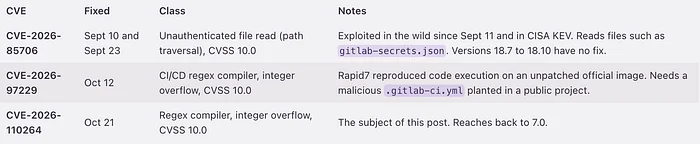
The Hacker News reports that CVE-2026-110264 is the fourth code-execution flaw in GitLab's regular-expression engine reported by the same researcher in a month. Two earlier ones on September 23 (CVE-2026-93577 and CVE-2026-89078, both 9.9) required a logged-in account.
The file-read flaw, CVE-2026-85706, deserves attention even though it is a separate bug. According to CrowdSec, it has been actively exploited since September 11, with 1,022 unique source IPs observed through October 5. Public tooling reduces the attack to a single HTTP request, and public proofs of concept list gitlab-secrets.json and gitlab.rb as targets. If your instance was reachable and unpatched after September 10 and had a public project, assume those files may have been read.
The Patching Trap: "We Already Patched on October 12"
If you upgraded on October 12 to fix CVE-2026-97229, you installed 19.4.2, 19.3.5 or 19.2.8. Each of those sits one patch below the fix for CVE-2026-110264. An instance patched nine days ago is in the vulnerable range again. Do not assume you are covered.
Here are the fixed versions for each release line:
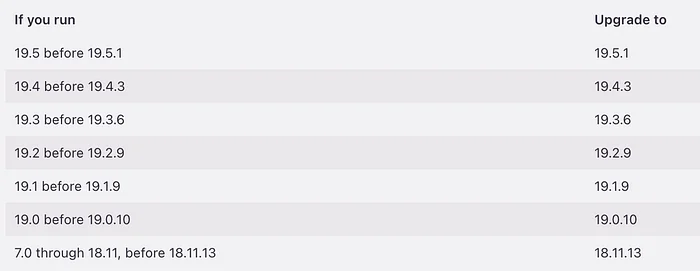
GitLab backported the fix to 18.11.13, 19.0.10, 19.1.9 and 19.2.9 on top of its standard releases, which it reserves for severe issues. If you are on an older line than 18.11, there is no fix for your branch. You need to upgrade to a supported line, stepping through GitLab's required upgrade stops.
Two practical points for planning:
- Downtime. The 19.4.3 and 19.3.6 releases include database changes that run during the upgrade. On a single-node server, that means downtime while they finish. Multi-node setups can use GitLab's zero-downtime procedure.
- No workaround. The Hacker News reports GitLab's advisory offers no interim workaround, and since the preconditions weren't published at first, you can't rule yourself out by configuration. The fix is the only certain protection.
You can confirm your version with sudo gitlab-rake gitlab:env:info on Linux package installations, or from the Admin area dashboard.
If You Cannot Patch Today
Sometimes the upgrade path is long and needs a maintenance window. In the meantime, reduce the odds, but treat these as stopgaps and not as fixes.
- Narrow who can reach the instance. If GitLab is internet-facing only for convenience, put it behind a VPN, an allowlist or an identity-aware proxy. An unreachable server can't be exploited remotely.
- Reduce the public-project precondition. Censys, citing GitLab's write-ups, says the reported path requires a public project to hold the payload. Converting public projects to internal or private, and restricting anonymous access and public project creation, narrows that path. Rapid7 makes a similar point about CVE-2026-97229, noting that such controls address only the demonstrated delivery path and do not fix the vulnerable compiler.
- Turn on detection now. GitLab published two Sigma detections in its open-source TLDR framework, "Onigmo native worker crash" and "Org mode render error burst", that run against GitLab's own application logs.
- Schedule the upgrade with a date. Mitigations without a deadline tend to become permanent.
How to Tell Whether Someone Got In
If your instance was reachable and unpatched, look for signs of code execution. GitLab's guidance, via Censys, lists these:
- unexpected child processes of Puma
- new files owned by
gitin/tmp - changed crontabs or SSH keys for the
gituser
Here are some read-only starting points on a Linux package install:
ps -eo pid,ppid,user,lstart,cmd --forest | grep -A4 -i pumasudo find /tmp -user git -newermt "2026-10-12" -lssudo crontab -l -u gitsudo ls -la /var/opt/gitlab/.ssh/ 2>/dev/null
Also review production_json.log and the other application logs for crash bursts and .org rendering errors, and check public projects for unexpected .org files. Forward logs off-host where you can, since an attacker with code execution as git could tamper with local logs.
GitLab's guidance is clear on the next step: where these signs appear, treat the instance as compromised and rotate its secrets. The same logic applies if you can't prove a clean history. With a bug this severe and an exposed, unpatched server, "I saw nothing" doesn't prove nothing happened. A file read in particular leaves little behind, as CrowdSec notes about CVE-2026-85706.
The Rotation Checklist
Patching ends the exposure. Rotation ends the consequences. Work through these, starting with what reaches outside GitLab:
- CI/CD variables. This is the highest-value set: cloud credentials (AWS, Azure, GCP), deploy tokens, registry credentials, signing keys and third-party API keys. Rotate them at the provider, not just in GitLab.
- Runner tokens. Reset runner registration and authentication tokens, and re-register runners.
- Access tokens. Revoke and reissue personal, project and group access tokens, and deploy keys.
- Integration and service credentials. Rotate anything GitLab uses to talk to other systems: webhooks secrets, OAuth application secrets, Kubernetes integrations, and credentials in
gitlab.rbfor the database, LDAP, SMTP and object storage. - The keys in
gitlab-secrets.json. These encrypt CI/CD variables and sign sessions. CrowdSec points out that they decrypt data already in the database, so changing them is a planned project, not a one-line command. Plan it. Don't skip it. - Review what changed. Audit recent commits, pipeline definitions, merge requests, new users and new SSH keys for anything you can't explain. Since an attacker with write access can alter code that your builds trust, check build artifacts from the exposure window too.
- Look outward. Search your cloud audit logs for use of the credentials you just rotated, in particular from unfamiliar IP addresses or at odd hours. A stolen key usually shows up in the cloud account before it shows up anywhere else.
Root cause
An integer overflow in Onigmo, Ruby's built-in regular-expression compiler, which GitLab ships inside its own packages. The reported delivery path, per Censys's account of GitLab's write-ups, is the Org-mode renderer, where a keyword from a #+TODO: line is passed into a regular expression.
Why existing defences did not stop it: the report does not describe any defence that was bypassed. It notes that GitLab did not initially publish the preconditions, so operators could not rule themselves out by configuration, and that the advisory offered no interim workaround. The fix is the only certain protection.
Impact
Per GitLab's detection guidance, as summarised by Censys, that exposes the instance secrets in gitlab-secrets.json, every CI/CD variable, runner and access tokens, and read and write access to every repository on the instance.
CI/CD variables routinely hold cloud credentials, deploy keys, registry tokens and signing keys. Write access to every repository means an attacker can alter code or pipeline definitions that your build systems will then trust and run. For an engineering organisation, a GitLab server is the control plane for how software reaches production.
A patch alone is not an adequate response to flaws like this one. The patch closes the door. It does nothing about what an attacker took while the door was open.
Fix
GitLab fixed CVE-2026-110264 on October 21, and NVD published the record on October 22. The fixed versions for each release line are shown in the image above. If you are on an older line than 18.11, there is no fix for your branch; you need to upgrade to a supported line, stepping through GitLab's required upgrade stops.
Confirm your version with sudo gitlab-rake gitlab:env:info on Linux package installations, or from the Admin area dashboard.
Variants to test
The report does not describe variants to test on other targets. The related CVEs it separates out are CVE-2026-93577 and CVE-2026-89078 (both 9.9, requiring a logged-in account) and CVE-2026-85706 (a file-read flaw, actively exploited since September 11, with public tooling reducing it to a single HTTP request and public proofs of concept listing gitlab-secrets.json and gitlab.rb as targets).
What happened, in plain words
GitLab is a website you install on a server of your own, or use as a hosted service, where a company keeps the text files that make up its software. Those files are called source code. GitLab also runs the automated jobs that turn that code into a working product and put it live, and it stores the passwords and keys those jobs need. Because of that, a GitLab server is not just a filing cabinet. It is the room where the company's software is assembled and shipped.
On October 21, 2026, GitLab released an emergency fix for a serious mistake in its own code. The mistake has an official identifier, CVE-2026-110264. A CVE is simply a catalogue number for a known security flaw, so that everyone in the world can talk about the same bug without confusion. The flaw is rated CVSS 10.0. CVSS is a scoring system from 0 to 10 that tries to say how bad a flaw is, and 10.0 is the maximum. The flaw is an integer overflow in a regular-expression compiler. We will unpack both of those phrases below, but the short version is: a piece of software that reads patterns in text can be tricked into misbehaving, and the misbehaviour lets a stranger run their own instructions on the server. The stranger needs no account and no password. According to The Hacker News, the flaw affects every release back to GitLab 7.0, which shipped in 2014.
Photo by Diana Polekhina on Unsplash
Why does this matter so much? Because the server holds the keys to the company's cloud accounts, the automated build jobs, and every project the company has. If a stranger can run instructions on that server, they can read those keys and use them elsewhere. The patch closes the hole. It does not undo anything a stranger did while the hole was open. That distinction runs through this whole article.
The basics you need before the details
A few everyday ideas come up again and again, so here they are first, in plain words.
- A server is a computer that stays switched on and answers requests from other computers. When you open a website, your browser asks a server for a page and the server sends it back.
- Self-managed means the company runs the GitLab software on its own server, rather than renting the ready-made GitLab.com service. Self-managed is the situation this flaw concerns.
- A regular expression, often shortened to regex, is a way of describing a pattern in text. Think of it as a very precise search instruction: not "find the word cat" but "find any word that starts with c, has three letters and ends in t". Software uses these patterns constantly to check and rearrange text.
- A compiler is a program that translates one kind of instruction into another kind that the machine can actually run. In this story the compiler belongs to the regular-expression engine, the part of the software that understands those patterns.
- An integer overflow happens when a number grows past the largest value a fixed-size slot can hold. Picture a car odometer with six digits: after 999999 it rolls over to 000000. Software that does not expect the rollover can be confused into doing something it never intended, and that confusion is what an attacker exploits.
- Arbitrary code execution means the attacker gets to run instructions of their own choosing on the machine, as if they were sitting at its keyboard. It is the most serious outcome a software flaw can have.
- Unauthenticated means the attacker does not need to log in. No username, no password, no account on the target at all.
- A CI/CD pipeline is the chain of automated steps a company uses to test, build and publish software. CI stands for continuous integration, CD for continuous delivery. Think of a factory conveyor belt: code goes in at one end, a tested product comes out at the other.
- A CI/CD variable is a named value stored in GitLab for those automated jobs to use, and it very often holds a password or a key.
- A token is a long random string that works like a password for software rather than a person. If you have a token, the system treats you as authorised, so a stolen token is as good as a stolen password.
- A runner is a small program, on its own machine, that actually carries out the pipeline jobs GitLab hands it.
- A repository is the folder of source code plus its full history of changes, kept by GitLab.
- A public project is a repository that anyone on the internet can see without logging in.
- A proof of concept, or PoC, is a small demonstration that a flaw really can be exploited, usually published by a researcher.
- Exploited in the wild means real attackers have been seen using the flaw against real victims, not just in a laboratory.
- Rotation means replacing a secret with a fresh one and retiring the old one, the way you change a lock after losing your keys.
With those in hand, the rest of the article will make sense.
Who is affected, and which versions
The affected products are self-managed GitLab Community Edition and Enterprise Edition, on all deployment types. Community Edition is the free version, Enterprise Edition the paid one; both are built from the same core and both carry the flaw. GitLab.com, the hosted service, and GitLab Dedicated, a single-tenant hosted offering, are already patched and need no action from customers.
The vulnerable versions are:
- 7.0 through 18.11.12
- 19.0.0 through 19.0.9
- 19.1.0 through 19.1.8
- 19.2.0 through 19.2.8
- 19.3.0 through 19.3.5
- 19.4.0 through 19.4.2
- 19.5.0
Version numbers look intimidating but they are just labels in a sequence, like floors of a building. 18.11.12 is older than 19.0.0, and 19.0.9 is older than 19.1.0. The list above says: if your GitLab sits anywhere in these ranges, you have the flaw. The ranges are split by release line, which is a maintained branch of the software that receives its own small fixes. GitLab keeps several lines alive at once so that customers who cannot jump to the newest version still get security updates.
No account is needed on the target: the reported attack path requires no authentication, only one public project that can hold the payload. A payload here means the file the attacker prepares and feeds to the server to trigger the bug.
Finding it: where the bug actually lives
The bug lives in Onigmo, Ruby's built-in regular-expression engine, which GitLab ships inside its own packages. Ruby is the programming language GitLab is written in, and Onigmo is the component that handles regular expressions for every Ruby program. GitLab does not rely on whatever version of Ruby happens to be installed on the machine; it bundles its own, so the same flawed engine travelled inside every GitLab package for years. A weakness in that engine is present in every release that shipped it, which is why the flaw reaches back to 2014.
At first GitLab did not say what conditions an attacker needs. That is common: vendors publish the fix quickly and the technical details later, so that attackers do not get a head start. Censys, a company that scans the internet and publishes advisories, later reported that GitLab's own detection write-ups place the flaw in the renderer for Org-mode (.org) files, where a keyword from a #+TODO: line is passed into a regular expression.
Two terms there need unpacking. A renderer is the part of a website that turns a stored file into something readable on screen, the way a word processor turns a document file into pages. Org-mode is a plain-text format, popular for notes and to-do lists, in which lines beginning with #+ carry special instructions. One such instruction is #+TODO:, which lists the keywords used to mark a task's state, words like TODO or DONE. Per Censys's account of GitLab's write-ups, GitLab's renderer takes a keyword from that line and builds a regular expression out of it, and that is what reaches the vulnerable compiler. That is the reported trigger: a crafted regular expression reaches the vulnerable compiler through the Org-mode renderer.
How an attack would work
Step 1: Get a public project that can hold the payload
Per the detection write-ups summarised by Censys, the attack needs no authentication, only one public project that can hold the .org payload. In plain terms, the attacker needs somewhere on the target server to leave a file that the server will later read and render. A public project is exactly that: anyone can create content in it, and the server will process it. The report does not include a request or payload for this step.
Step 2: Deliver the crafted regular expression through an Org-mode file
Per the detection write-ups summarised by Censys, the flaw is reached through the renderer for Org-mode (.org) files, where a keyword from a #+TODO: line is passed into a regular expression. A specially crafted regular expression triggers an integer overflow in the compiler and, under the right conditions, code execution on the GitLab server. The report does not publish the exact payload.
Why does the file format matter so much? Because the server does not merely store the file, it processes it to display it. That processing is where the attacker's text becomes an instruction the server follows. It is the difference between a library that only shelves books and a library that reads every book aloud on arrival: if a book contains a magic phrase, the reading itself is the danger.
Step 3: Code runs as the git user
On a Linux server, every program runs under the identity of a user account, and each account has its own permissions. GitLab's own software runs as a user called git. Code execution on GitLab therefore runs as the git user. Per GitLab's detection guidance, as summarised by Censys, that exposes:
- the instance secrets in
gitlab-secrets.json - every CI/CD variable
- runner and access tokens
- read and write access to every repository on the instance
gitlab-secrets.json is a file on the server holding the master keys GitLab uses to protect other secrets. If it is a safe, this file is the key to the safe. CI/CD variables are the stored values the pipelines use, and as noted they routinely hold cloud credentials, deploy keys, registry tokens and signing keys. Runner and access tokens are the strings that let machines and people act on GitLab without typing a password. Read and write access to every repository means the attacker can see all the code and also change it.
Put together, the attacker can read the company's cloud passwords, change the code that gets built, and alter the pipeline definitions that decide what runs. For an engineering organisation, a GitLab server is the control plane for how software reaches production. A control plane is the set of controls that decides what the machinery does, as opposed to the machinery itself.
Was anyone actually attacked?
As of October 22, neither GitLab, Censys nor The Hacker News reported exploitation in the wild, and the flaw was not in CISA's Known Exploited Vulnerabilities catalogue. CISA is the US government's cybersecurity agency, and its catalogue lists flaws that have definitely been used against real targets. Censys also reported no public proof of concept at that point. Check CISA's catalogue and GitLab's advisory for current status before assuming that still holds. A quiet start does not mean a quiet future: once a proof of concept appears, the barrier to using a flaw drops sharply.
How many servers are in range
On the day of disclosure, Censys observed roughly 82,000 hosts and about 209,000 web properties running GitLab. A host is one machine; a web property is one address or site served from it, and one machine can serve several. Since every release up to the fix is affected, effectively that whole population was in range. Censys estimates more than half of internet-exposed GitLab servers run a release line more than seven months old that gets no fix of its own, and more than a quarter are three or more major versions behind. Those servers can only be fixed by upgrading to a newer release line.
Why can an old line not simply receive a small patch? Because vendors stop maintaining lines after a while. Think of a car model that the maker no longer produces parts for: you cannot buy a new brake pad for it, you have to move to a newer model. That is why the age of a server matters as much as whether it was patched.
Three GitLab CVEs you should not confuse
GitLab has had a rough autumn, and reporting often blends the CVEs together. They are separate problems with different conditions. Mixing them up leads to the wrong conclusion, such as thinking a patch for one covers another.
The Hacker News reports that CVE-2026-110264 is the fourth code-execution flaw in GitLab's regular-expression engine reported by the same researcher in a month. Two earlier ones on September 23 (CVE-2026-93577 and CVE-2026-89078, both 9.9) required a logged-in account. That difference is enormous in practice: a flaw needing a login can only be used by someone who already has a foothold, while this one can be used by a complete stranger.
The file-read flaw, CVE-2026-85706, deserves attention even though it is a separate bug. A file-read flaw lets an attacker read files they should not see, without necessarily running anything. According to CrowdSec, it has been actively exploited since September 11, with 1,022 unique source IPs observed through October 5. An IP address is the numeric label of a computer on the internet, so 1,022 unique source IPs means at least that many distinct machines were seen trying it. Public tooling reduces the attack to a single HTTP request, and public proofs of concept list gitlab-secrets.json and gitlab.rb as targets. HTTP is the language browsers and servers use to exchange pages and requests; a single request means the whole attack is one short message, easy to automate. gitlab.rb is GitLab's main configuration file, which can contain credentials for the database, mail and storage. If your instance was reachable and unpatched after September 10 and had a public project, assume those files may have been read. We return to that in the rotation section.
The patching trap: "We already patched on October 12"
This is the detail most likely to bite you.
If you upgraded on October 12 to fix CVE-2026-97229, you installed 19.4.2, 19.3.5 or 19.2.8. Each of those sits one patch below the fix for CVE-2026-110264. An instance patched nine days ago is in the vulnerable range again. Do not assume you are covered.
Why does this happen? Because a version number is a sequence, and each fix moves the sequence forward by one small step. Fixing one flaw produces, say, 19.4.2. Fixing the next flaw produces 19.4.3. If you stopped at 19.4.2, you are one step short. It is like taking medicine for Monday's illness and assuming it also covers Tuesday's.
Here are the fixed versions for each release line:
GitLab backported the fix to 18.11.13, 19.0.10, 19.1.9 and 19.2.9 on top of its standard releases, which it reserves for severe issues. To backport means to take a fix written for the newest version and adapt it to older versions still in use, so that customers on those lines do not have to jump to the newest release. If you are on an older line than 18.11, there is no fix for your branch. You need to upgrade to a supported line, stepping through GitLab's required upgrade stops. An upgrade stop is a version you must pass through on the way, because GitLab cannot jump several major versions in one move; the software needs to migrate its data step by step.
Two practical points for planning:
- Downtime. The 19.4.3 and 19.3.6 releases include database changes that run during the upgrade. A database is the organised store where GitLab keeps users, projects and settings. On a single-node server, that means downtime while they finish, because the site cannot serve pages while its store is being rebuilt. Multi-node setups can use GitLab's zero-downtime procedure, where several machines take turns so the site stays up.
- No workaround. The Hacker News reports GitLab's advisory offers no interim workaround, and since the preconditions weren't published at first, you can't rule yourself out by configuration. A workaround is a setting or trick that blocks the attack without installing the fix. Here there is none, so the fix is the only certain protection.
You can confirm your version with sudo gitlab-rake gitlab:env:info on Linux package installations, or from the Admin area dashboard. sudo means run the following command with administrator rights. gitlab-rake is a helper program that ships with GitLab and performs maintenance tasks. gitlab:env:info is the name of one such task, which prints details about the installation, including its version. The Admin area dashboard is the web page where an administrator sees the same information without touching a terminal.
If you cannot patch today
Sometimes the upgrade path is long and needs a maintenance window, a scheduled period when the site may be offline. In the meantime, reduce the odds, but treat these as stopgaps and not as fixes.
- Narrow who can reach the instance. If GitLab is internet-facing only for convenience, put it behind a VPN, an allowlist or an identity-aware proxy. A VPN is a private tunnel into a network, so only people with the tunnel can reach what is inside. An allowlist is a list of permitted addresses, and everything else is refused. An identity-aware proxy is a gatekeeper that checks who you are before passing your request on. An unreachable server can't be exploited remotely: if the attacker's message never arrives, the bug is never triggered.
- Reduce the public-project precondition. Censys, citing GitLab's write-ups, says the reported path requires a public project to hold the payload. Converting public projects to internal or private, and restricting anonymous access and public project creation, narrows that path. Internal means visible to logged-in users of the organisation; private means visible only to chosen people. Rapid7 makes a similar point about CVE-2026-97229, noting that such controls address only the demonstrated delivery path and do not fix the vulnerable compiler. In other words, you are locking the front door while the window stays broken.
- Turn on detection now. GitLab published two Sigma detections in its open-source TLDR framework, "Onigmo native worker crash" and "Org mode render error burst", that run against GitLab's own application logs. Sigma is a shared way of writing detection rules so they work across different log tools. A detection here is a rule that watches the logs, the running diary the server keeps, and raises an alarm when it sees the pattern. A crash is a program stopping unexpectedly; a burst is many such events close together. Both are clues that someone is probing the bug.
- Schedule the upgrade with a date. Mitigations without a deadline tend to become permanent. A mitigation is a measure that reduces harm without removing the cause.
How to tell whether someone got in
If your instance was reachable and unpatched, look for signs of code execution. GitLab's guidance, via Censys, lists these:
- unexpected child processes of Puma
- new files owned by
gitin/tmp - changed crontabs or SSH keys for the
gituser
A process is a running program. Puma is the web server component of GitLab, the part that answers browser requests. A child process is a program started by another program, so an unexpected child of Puma means Puma started something nobody asked it to start. /tmp is the scratch folder on a Linux machine where temporary files go. A crontab is the list of tasks a machine runs automatically on a schedule, and SSH keys are the cryptographic keys that allow passwordless login to a server. An attacker who wants to stay in would add a scheduled task or a key of their own.
Here are some read-only starting points on a Linux package install:
ps -eo pid,ppid,user,lstart,cmd --forest | grep -A4 -i pumasudo find /tmp -user git -newermt "2026-10-12" -lssudo crontab -l -u gitsudo ls -la /var/opt/gitlab/.ssh/ 2>/dev/null
Line by line, in plain words:
ps -eo pid,ppid,user,lstart,cmd --forestlists the running processes.-eochooses which columns to show: process ID, parent process ID, the user it runs as, when it started, and the command itself.--forestdraws them as a tree so you can see which program started which.| grep -A4 -i pumapasses that list togrep, a text filter.-iignores upper and lower case,pumais the word to look for, and-A4also shows four lines after each match, so you see the children of Puma as well as Puma itself.sudo find /tmp -user git -newermt "2026-10-12" -lssearches the scratch folder for files owned by thegituser and newer than October 12, then lists them with details. The date is a starting point: files created after it are worth a look.sudo crontab -l -u gitlists the scheduled tasks belonging to thegituser.-lmeans list,-u gitmeans for that user.sudo ls -la /var/opt/gitlab/.ssh/ 2>/dev/nulllists the contents of the folder where GitLab keeps SSH keys, with details.2>/dev/nullthrows away any error message if the folder does not exist, so the output stays clean.
All four commands only read; none of them changes anything, which is why they are safe to run on a live server.
Also review production_json.log and the other application logs for crash bursts and .org rendering errors, and check public projects for unexpected .org files. production_json.log is GitLab's main log file, written in JSON, a simple structured text format that tools can read easily. Forward logs off-host where you can, since an attacker with code execution as git could tamper with local logs. Sending copies to another machine means the attacker cannot quietly delete the evidence.
GitLab's guidance is clear on the next step: where these signs appear, treat the instance as compromised and rotate its secrets. The same logic applies if you can't prove a clean history. With a bug this severe and an exposed, unpatched server, "I saw nothing" doesn't prove nothing happened. A file read in particular leaves little behind, as CrowdSec notes about CVE-2026-85706. Reading a file is like reading a page: you can put it back exactly as it was, and nobody can tell it was touched.
The rotation checklist
Patching ends the exposure. Rotation ends the consequences. Work through these, starting with what reaches outside GitLab:
- CI/CD variables. This is the highest-value set: cloud credentials (AWS, Azure, GCP), deploy tokens, registry credentials, signing keys and third-party API keys. AWS, Azure and GCP are the big cloud providers; a credential is the username-and-key pair that lets software use them. A deploy token lets a pipeline push code or packages. A registry stores built software images. A signing key proves that a piece of software really came from you. Rotate them at the provider, not just in GitLab: changing the value in GitLab does nothing if the old key still works at AWS.
- Runner tokens. Reset runner registration and authentication tokens, and re-register runners. If the old token still lets a machine join your build fleet, an attacker can add a machine of their own.
- Access tokens. Revoke and reissue personal, project and group access tokens, and deploy keys. To revoke is to cancel; to reissue is to create a fresh replacement.
- Integration and service credentials. Rotate anything GitLab uses to talk to other systems: webhooks secrets, OAuth application secrets, Kubernetes integrations, and credentials in
gitlab.rbfor the database, LDAP, SMTP and object storage. A webhook is an automatic message GitLab sends to another service when something happens, and its secret proves the message is genuine. OAuth is the mechanism behind "log in with Google" style buttons. Kubernetes is the system that runs containers, the packaged units modern software ships in. LDAP is the directory service many companies use for logins. SMTP is the protocol for sending email. Object storage is a service for holding files, such as backups and uploaded attachments. - The keys in
gitlab-secrets.json. These encrypt CI/CD variables and sign sessions. To encrypt is to scramble data so only someone with the right key can read it; a session is the state of being logged in. CrowdSec points out that they decrypt data already in the database, so changing them is a planned project, not a one-line command. Plan it. Don't skip it. In other words, the old key is needed to unscramble what is already stored, so you must re-encrypt carefully rather than simply swapping the key. - Review what changed. Audit recent commits, pipeline definitions, merge requests, new users and new SSH keys for anything you can't explain. A commit is one recorded change to the code. A merge request is a proposed change waiting for approval. Since an attacker with write access can alter code that your builds trust, check build artifacts from the exposure window too. An artifact is a file produced by a build, such as the finished program.
- Look outward. Search your cloud audit logs for use of the credentials you just rotated, in particular from unfamiliar IP addresses or at odd hours. An audit log records who did what and when. A stolen key usually shows up in the cloud account before it shows up anywhere else.
Why this keeps happening, and what it teaches
GitLab is not unusually careless. A widely deployed Ruby regex engine had a flaw, and the same researcher kept finding variants of it. Fixes landed quickly, across seven branches at once. That is a vendor responding well. The lessons for defenders are less about GitLab and more about what we keep inside it.
- Your SCM server is a crown-jewel system. SCM stands for source code management, the category GitLab belongs to. Many organisations treat GitLab like an internal tool. It is closer to a domain controller for your delivery pipeline. A domain controller is the server that decides who may log in and what they may do across a Windows network; compromise it and you control everything. GitLab holds credentials, it can change what production runs, and it is often reachable from the internet so contractors and remote staff can use it.
- Secrets stored as CI/CD variables turn a server compromise into a cloud compromise. This is the real multiplier. If your pipeline needs to deploy to AWS, how it authenticates decides the blast radius when GitLab is breached. Blast radius is how much damage one failure can cause. A long-lived access key stored as a CI variable is valid for as long as it exists, and the attacker gets all of it. A short-lived credential issued per job through OIDC federation, or access granted just in time, is worth far less once stolen. OIDC federation is a way for one system to vouch for another so it can receive a temporary credential instead of holding a permanent one. Just in time means access is granted only for the moment it is needed and then withdrawn.
- Severity scores don't tell you your risk. CVSS 10.0 applies to every GitLab instance equally. What matters to you is whether yours is internet-facing, how old it is, which public projects exist, and what credentials sit behind it. A forgotten, internet-facing, three-major-versions-behind GitLab server that holds production cloud keys is a very different risk from a patched internal one, even though they share a CVE number. The score describes the flaw; your exposure describes your risk.
- Patching speed depends on inventory. An inventory is simply a list of what you have and where. The first question in the first hour was "where do we run GitLab, and which versions?" Teams that could answer in minutes moved fast. Teams that couldn't spent days. Censys's numbers suggest a large share of exposed servers are well behind on versions, which is also an inventory and ownership problem.
The structural fixes
These steps make the next GitLab flaw, or a flaw in any other CI/CD platform, much less painful.
- Reduce exposure. Keep SCM and CI systems off the public internet where you can. Use a VPN or identity-aware proxy. Review which projects genuinely need to be public.
- Remove long-lived cloud keys from CI/CD variables. Use short-lived, identity-based credentials per job. Where a human or a pipeline needs elevated cloud access, grant it for a limited time and revoke it automatically.
- Scope CI secrets tightly. Use protected variables, environment-scoped secrets, and protected branches, so a secret is only available to the jobs that need it. A protected branch is a branch of the code that only certain people may change, and a protected variable is one that only jobs on such branches can read. Scoping means limiting who or what can use something.
- Keep an inventory with owners and versions. Know every GitLab instance, who runs it, and what version it's on. Track end-of-life release lines. End of life means the vendor no longer produces fixes for that line.
- Watch repository activity. New SSH keys, new access tokens, unexpected pipeline changes and odd permission grants are early signs of tampering.
- Know your blast radius ahead of time. Be able to answer "if this GitLab server were compromised right now, which cloud accounts, clusters and data could the stored credentials reach?" A cluster is a group of machines managed together, usually to run containers.
- Practise the rotation. Rotating every CI/CD secret is a muscle. If it takes your team a week the first time you try it, do the first run before you need to.
Where Cloudanix fits
Let us be direct about what a platform can and can't do here. Cloudanix doesn't patch your GitLab server, and nothing but the upgrade closes CVE-2026-110264. Where it helps is the part that decides how bad a compromise gets.
- Credentials and access. With Just-in-Time access, access to cloud accounts, databases and Kubernetes is granted on request, scoped, and automatically revoked, including for service accounts and pipelines. A service account is a login meant for software rather than a person. That means the credentials sitting behind a CI system are short-lived by design, so a stolen one is worth much less.
- Attack paths and blast radius. The unified asset graph correlates cloud resources, identities and code context, so "what could this compromised system reach?" becomes one query instead of a multi-tool investigation. An asset graph is a map of everything you own and how it connects; an attack path is a route an attacker could take across that map.
- Code and pipeline security across SCMs. Cloudanix code security works across GitHub, GitLab, Bitbucket and Azure DevOps, scanning for secrets and vulnerabilities, so credentials hardcoded in repositories and pipeline files get found and fixed. Hardcoded means written directly into a file instead of being stored safely elsewhere.
- Exposure over patch lists. The real question in incidents like this is exposure management, not just patching: knowing what is reachable from the internet and what sits behind it.
If you'd like to see where long-lived credentials and standing access sit in your own environment, you can start with a free security assessment at cloudanix.com. Standing access means permission that stays granted all the time rather than being handed out for a moment.
The takeaway
For GitLab self-managed customers, the immediate to-do list is short. Upgrade to the fixed version for your line, including if you patched on October 12. Check for signs of compromise. If there's any doubt about an exposed, unpatched instance, rotate the secrets it holds, starting with CI/CD variables and cloud credentials.
The longer-term lesson is about what we put inside our delivery systems. GitLab will have another critical bug someday, and so will every other CI/CD platform. When that happens, the question that decides the outcome isn't how fast you patched. It's whether the credentials on that server were short-lived and narrowly scoped, or long-lived and powerful. Make them the former, and the next 10.0 becomes a maintenance window instead of an incident.
Glossary
- Allowlist: a list of addresses or identities that are permitted, with everything else refused.
- Arbitrary code execution: a flaw outcome where an attacker can run instructions of their own choosing on a machine.
- Artifact: a file produced by a build, such as the finished program.
- Asset graph: a map of an organisation's systems and how they connect.
- Attack path: a route an attacker could take from one compromised system to another.
- Audit log: a record of who did what and when.
- Authentication: proving who you are, usually with a password or token.
- Backport: adapting a fix written for a new version so it also works on an older version still in use.
- Blast radius: how much damage a single failure can cause.
- Child process: a program started by another program.
- CI/CD: continuous integration and continuous delivery, the automated chain that tests, builds and publishes software.
- CI/CD variable: a named value stored in GitLab for automated jobs, often a password or key.
- CISA: the US Cybersecurity and Infrastructure Security Agency.
- Cloud credential: the key that lets software use a cloud provider such as AWS, Azure or GCP.
- Cluster: a group of machines managed together, usually to run containers.
- Commit: one recorded change to source code.
- Compiler: a program that translates instructions from one form into another the machine can run.
- Control plane: the set of controls that decides what a system does, as opposed to the system itself.
- Crontab: the list of tasks a Linux machine runs automatically on a schedule.
- CVSS: a 0 to 10 score for how severe a security flaw is.
- CVE: a catalogue number that uniquely identifies a known security flaw.
- Database: an organised store of data, here GitLab's users, projects and settings.
- Deploy key: a key that lets a pipeline or machine read or write a repository.
- Deploy token: a token that lets a pipeline push code or packages.
- Detection: a rule that watches logs and raises an alarm when it sees a suspicious pattern.
- Domain controller: the server that decides who may log in and what they may do across a Windows network.
- Downtime: a period when a service is unavailable.
- Encryption: scrambling data so only someone with the right key can read it.
- End of life: the point at which a vendor stops producing fixes for a version.
- Exploited in the wild: used by real attackers against real victims.
- File-read flaw: a flaw that lets an attacker read files they should not see.
gituser: the Linux account under which GitLab's software runs.gitlab.rb: GitLab's main configuration file, which can contain credentials.gitlab-secrets.json: the file holding GitLab's master keys for protecting other secrets.- Hardcoded: written directly into a file instead of stored safely elsewhere.
- Host: one machine on a network.
- HTTP: the language browsers and servers use to exchange pages and requests.
- Identity-aware proxy: a gatekeeper that checks who you are before passing a request on.
- Integer overflow: a number growing past the largest value its fixed-size slot can hold, causing unexpected behaviour.
- Inventory: a list of what an organisation has and where it is.
- IP address: the numeric label of a computer on the internet.
- JSON: a simple structured text format that tools can read easily.
- Just in time access: access granted only for the moment it is needed and then withdrawn.
- Kubernetes: the system that runs containers, the packaged units modern software ships in.
- LDAP: a directory service many companies use for logins.
- Log: the running diary a server keeps of what happened.
- Maintenance window: a scheduled period when a service may be offline for work.
- Merge request: a proposed change to code waiting for approval.
- Mitigation: a measure that reduces harm without removing the cause.
- Object storage: a service for holding files such as backups and attachments.
- OIDC federation: a way for one system to vouch for another so it receives a temporary credential instead of holding a permanent one.
- Onigmo: Ruby's built-in regular-expression engine, which GitLab ships inside its own packages.
- OAuth: the mechanism behind "log in with Google" style buttons.
- Org-mode: a plain-text format for notes and to-do lists, in which
#+lines carry special instructions. - Payload: the file or data an attacker prepares and feeds to a server to trigger a bug.
- Pipeline: the automated chain of steps that tests, builds and publishes software.
- Process: a running program.
- Proof of concept (PoC): a small demonstration that a flaw really can be exploited.
- Protected branch: a branch of code that only certain people may change.
- Protected variable: a CI/CD variable that only jobs on protected branches can read.
- Public project: a repository anyone on the internet can see without logging in.
- Puma: the web server component of GitLab that answers browser requests.
- Regular expression: a precise way of describing a pattern in text.
- Renderer: the part of a website that turns a stored file into something readable on screen.
- Repository: a folder of source code plus its full history of changes.
- Revoke: to cancel a token or key so it no longer works.
- Rotation: replacing a secret with a fresh one and retiring the old one.
- Runner: a program that carries out the pipeline jobs GitLab hands it.
- Scoping: limiting who or what may use something.
- Self-managed: running the software on your own server rather than using a hosted service.
- Server: a computer that stays switched on and answers requests from other computers.
- Service account: a login meant for software rather than a person.
- Session: the state of being logged in.
- Sigma: a shared way of writing detection rules so they work across different log tools.
- SMTP: the protocol for sending email.
- Source code: the text files that make up a piece of software.
- SSH key: a cryptographic key that allows passwordless login to a server.
- Standing access: permission that stays granted all the time rather than being handed out for a moment.
- Token: a long random string that works like a password for software rather than a person.
- Unauthenticated: without logging in or proving an identity.
- Upgrade stop: a version an installation must pass through on the way to a newer one.
- VPN: a private tunnel into a network, so only people with the tunnel can reach what is inside.
- Webhook: an automatic message one system sends to another when something happens.
- Web property: one address or site served from a host; one machine can serve several.
- Workaround: a setting or trick that blocks an attack without installing the fix.
- Zero-downtime procedure: an upgrade method where several machines take turns so the site stays up.


