Give me a browser, I’ll give you a Shell
A restricted VDI browser allowed the file:// protocol to read local files and directory listings, and a crafted file input opened the OS file picker, letting the tester create and run a batch file to obtain a shell. The text also describes using Word's VBA editor to run code when file creation is restricted.

Bug Bounty
The full write-up lives on its author's site
It belongs to its author, so we link to it rather than copy it. The other two tabs are our own rewrites, checked against it.
Context
During a penetration test the target was a Windows server running a VDI, VMware Horizon. Users log into the VDI with their Active Directory account and are given a limited browser that only allows a single application, with no internet connection. The write-up describes how that restricted browser was turned into a shell on the underlying operating system.
The scenario is a kiosk-style lockdown: the browser is the only thing the user can reach, and the assumption behind the design is that a browser with no internet access and a single permitted application is a safe way for employees to check their calendars or view the progress of their tasks. The author's position is the opposite one: if the only thing you have access to is a browser, you can still compromise the server if you use it the wrong way.
Setup
The preconditions are all in the environment rather than in tooling:
- A Windows server hosting a VMware Horizon VDI.
- An Active Directory account used to log into the VDI.
- A restricted browser that permits a single application and has no internet connection.
- Write and execute permission in the directory the user is working in, for the file-creation steps to succeed.
No specific browser version, Windows build or Horizon version is given.
Finding it
The starting point is reading the server's files. Reading files you are not permitted to read is treated as a local file inclusion (LFI). The mechanism is the first part of a URL, the schema or protocol, which decides how the rest of the URI is treated. The mailto protocol, for example, says the rest of the URI is an email address: clicking mailto:[redacted] opens a mail composing page in the default email application with [redacted] as the receiver.
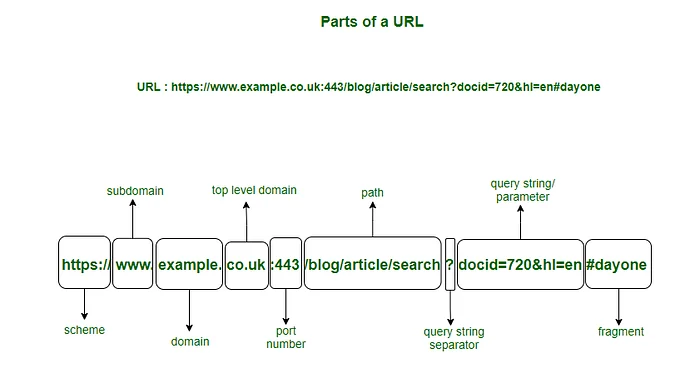
The file protocol is the interesting one here, because it lets a browser read files.
Exploitation
Step 1: read a known file with the file protocol
The first file tried was the hosts file:
file:\\\C:WINDOWS\System32\drivers\etc\hosts
As expected, it returned the content of the hosts file.
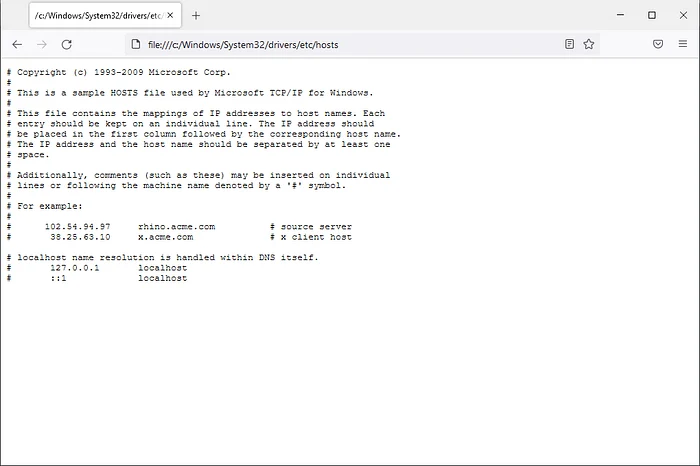
This is limited: you need to know the exact path of a file to read its content.
Step 2: list directories
The file protocol also shows the content of directories if you give it the location of that directory. Entering this into the URL bar lists the content of the C drive:
file:///c:/
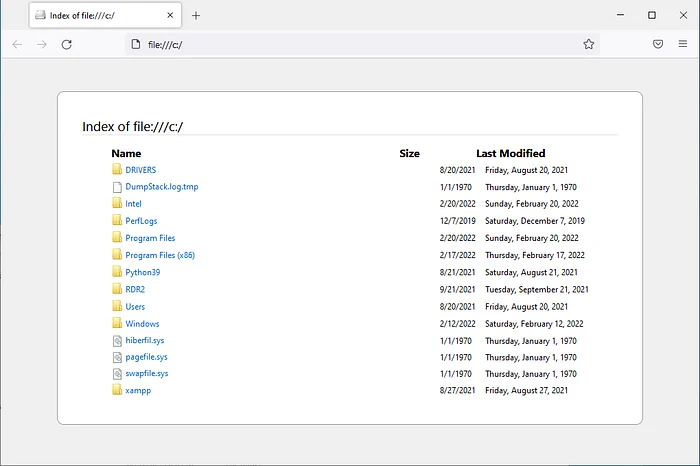
With directory listing available, the exact-path limitation largely goes away: the author could read almost all files on the server. The author was still inside the browser, though, and wanted access to the underlying OS.
Step 3: reach an OS application through the file picker
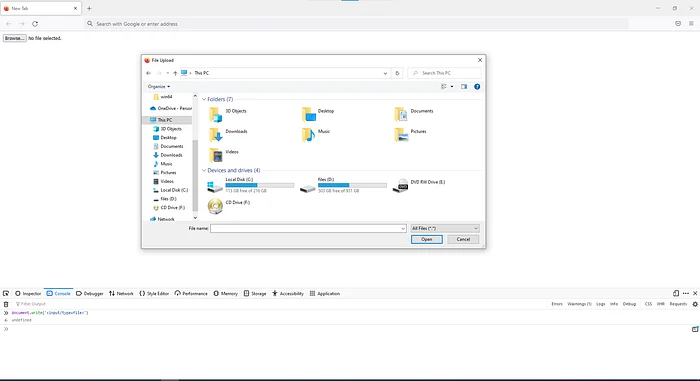
The hint is the procedure for uploading a file to a website. When uploading a file you first select that file, and the window that lets you select the file is an OS application. Access to that OS application means access to OS functionality such as creating and executing files.
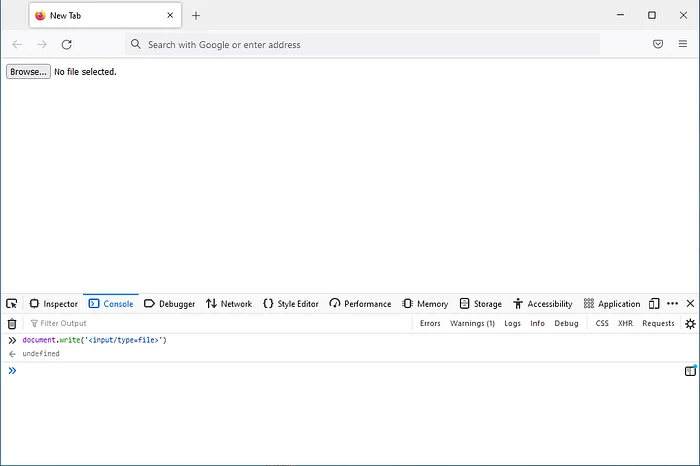
Rather than searching the web application for an upload functionality, the author created the input directly:
document.write('<input/type=file>')
Step 4: bypass disabled devtools with the javascript protocol
If devtools is disabled, a chromium-based browser still accepts the same payload through the javascript protocol, entered into the URL bar:
javascript:document.write('<input/type=file>')
Step 5: create and execute a batch file
The method chosen was to create a .bat file with the content cmd.exe and execute it to get a shell. Creating and executing files from the file picker window requires write and execute permission in the directory you are in.
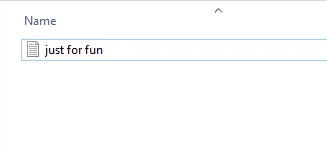
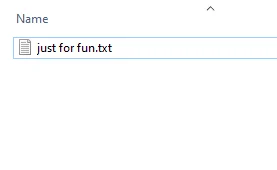
There is a catch: if the file name extensions option is disabled, you cannot change the file extension to .bat and execute it.
Step 6: enable file name extensions through the file explorer
Using Open in new window from the file picker gives access to the OS's file explorer.
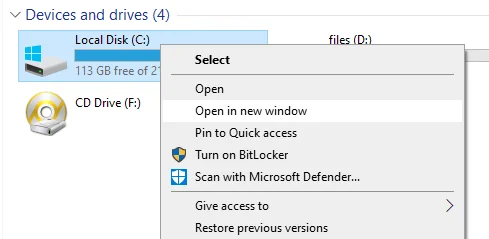
From there the file name extensions option can be enabled, and then the file can be created and modified.
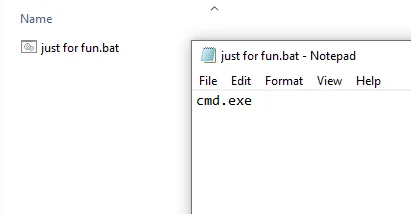
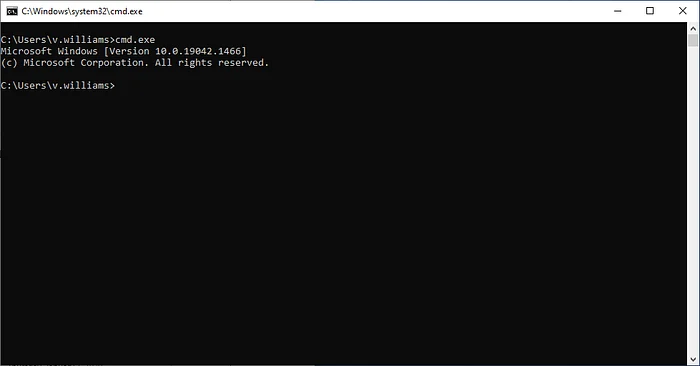
At this point the shell is obtained.
Step 7: when the file explorer route is blocked, use Word's scripting engine
If you cannot open file explorer and enable the file name extensions option, or another kind of restriction applies, there is another route. Among the file types offered by the picker there is a reverse shell hidden in the options:
- Create a
Microsoft Word Document. - Open it.
- Press ALT+F11.
- Write your reverse shell code.
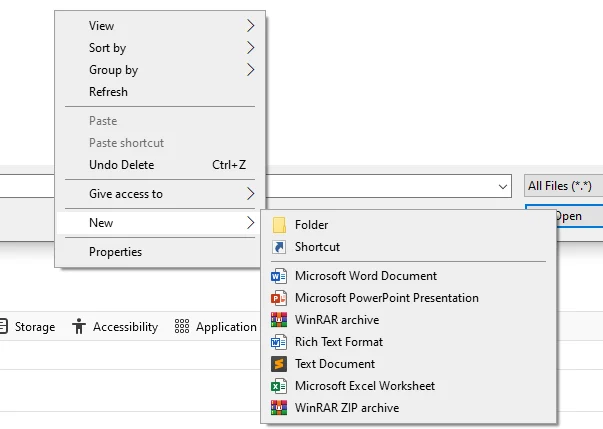
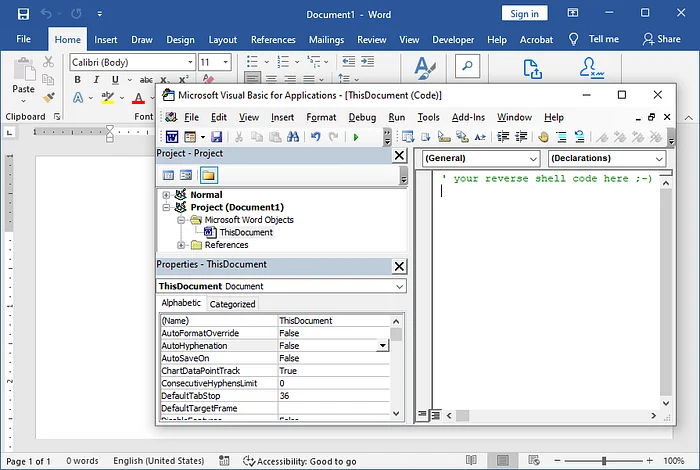
This is Microsoft Word's scripting engine, which can write and execute Visual Basic code. It is the same functionality social engineers use to penetrate an organisation's internal networks with a phishing email and a malicious Word doc attachment.
If the environment is even more restricted and you cannot create files at all, find a Word doc on the server and edit it.
Root cause
The lockdown is built around the browser, but the browser is allowed to hand off to operating system components. The file protocol lets the browser read arbitrary files and list directories on the local file system. The file picker is an OS application, so reaching it from the page gives access to OS functionality, including creating and executing files. The javascript protocol provides a second way to inject the file input when devtools is disabled. The file name extensions setting and the file explorer are OS-level controls that can be reached from the same picker, and Word's VBA scripting engine provides a file-creation route that does not depend on the extension setting at all. The restrictions in place did not stop the browser from being used as a bridge to the operating system.
Impact
An attacker who has only the restricted browser, logged in with an Active Directory account, can read files on the server and, where write and execute permission exist in the working directory, create and execute files to obtain a shell. From that shell the attacker can change OS settings such as the file name extensions option. Where the file explorer route is blocked, the Word scripting engine provides an alternative, and where file creation is blocked entirely, editing an existing Word doc on the server is suggested. The impact is code execution on the Windows server hosting the VDI, starting from a kiosk-style browser session.
Fix
The write-up does not describe a fix or a change made by the client. The report does not state which of these were changed.
Variants to test
- Try
file:///c:/in the URL bar of a locked-down browser. A positive result is a directory listing of theCdrive. - Try
file:\\\C:WINDOWS\System32\drivers\etc\hoststo confirm file reads. A positive result is the content of thehostsfile. - Try
document.write('<input/type=file>')in the console andjavascript:document.write('<input/type=file>')in the URL bar of a chromium-based browser. A positive result is a file input appearing on the page. - From the file picker, use
Open in new windowto reach the file explorer. A positive result is the OS file explorer opening. - Create a
.batfile containingcmd.exein a directory where you have write and execute permission. A positive result is a shell. - Create a
Microsoft Word Document, open it, press ALT+F11 and add VBA code. A positive result is code execution through Word's scripting engine. - If file creation is blocked, find an existing
Word docon the server and edit it. A positive result is the same scripting engine being reachable through an existing document.
Closing note
If you use a tool, learn all of its functionalities.
What happened, in plain words
Imagine you are hired to test how safe a company's computers are. You are allowed to sit at one of their machines, but the company has locked it down hard: the only thing you can open is a web browser, and that browser is only allowed to show one single application. There is no internet connection. The idea behind this setup is that employees can check their calendars or look at the progress of their tasks, and nothing more.
The author of this write-up was in exactly that position during a penetration test. A penetration test (often shortened to pentest) is an authorised exercise where a security professional tries to break into a system, with the owner's permission, to find out how it could be attacked for real. The target was a Windows server running a VDI. A VDI, or Virtual Desktop Infrastructure, is a setup where the actual desktop you see on your screen is not running on your own computer but on a central server; your screen is just a window into that remote machine. Here the VDI product was VMware Horizon. Users log into it with their Active Directory account. Active Directory is Microsoft's system for managing user accounts and permissions across a company's network, so logging in with an Active Directory account means logging in with a normal company username and password.
The author's point is simple and a bit provocative: even if the only thing you can touch is a browser, you can still take over the server underneath, if you use the browser in a way its designers did not intend. The rest of the article walks through how.
The starting position
Before any trick, it helps to list what the author actually had. All of it comes from the environment, not from special tools:
- A Windows server hosting a VMware Horizon VDI.
- An Active Directory account used to log into the VDI.
- A restricted browser that permits a single application and has no internet connection.
- Write and execute permission in the directory the user is working in, for the file-creation steps to succeed.
"Write permission" means you are allowed to create or change files in a folder. "Execute permission" means you are allowed to run a file as a program. Without those two, several of the steps below would not work. The write-up does not give a specific browser version, Windows build or Horizon version.
Part one: reading files with a browser
The first idea is to read files that live on the server. Reading files you are not supposed to read is called local file inclusion, or LFI. "Local" because the files are on the same machine, and "inclusion" because the trick is usually to make an application pull a file into its output. Here the browser itself is the thing being made to pull in a file.
How can a browser read a file? The answer starts with something everyone has seen but few people think about: the URL. A URL is the address you type in the address bar, and it has several parts. The very first part is the schema, also called the protocol. The protocol is the set of rules that decides how the rest of the address should be treated. A simple comparison: the first word of an address tells the postal service whether it is a street address, a PO box or a parcel locker, and the rest is read according to that rule.
A familiar example is mailto. When you click a link like mailto:[redacted], the browser knows the rest of the address is an email address, so it opens a mail composing page in your default email application and puts [redacted] in the receiver field. The protocol is doing the work of telling the browser what kind of thing follows.
There is another protocol called file. It tells the browser that the rest of the address is a path on the local computer, and the browser will read that file and show it to you. That is the whole trick for the first step.
Step 1: read a known file
The first file the author tried was the hosts file:
file:\\\C:WINDOWS\System32\drivers\etc\hosts
Line by line, in plain words:
file:is the protocol. It says: treat what follows as a location on this computer's disk, not as a web address.\\\is the part that points at the local machine. In Windows paths, a leading\\normally means a network location, and the extra backslashes here are how the address was written in the browser.C:WINDOWS\System32\drivers\etc\hostsis the full path of the file being read.C:is the drive, and the rest is the folder chain down to the file namedhosts.
The hosts file is a small text file that maps names to addresses on a computer, a bit like a personal phone book the operating system checks before asking anyone else. It is a safe, well-known file to test with, which is why it was chosen first. As expected, the browser returned its content.
That works, but it is limited: to read a file you must already know its exact path. If you do not know where a file lives, you cannot ask for it.
Step 2: list folders instead of guessing
A directory listing would solve that problem. A directory is just a folder, and a listing is the list of files and subfolders inside it. The file protocol can show that too, if you give it the location of a directory rather than a file. Entering this into the URL bar lists the content of the C drive:
file:///c:/
Line by line:
file:again selects the local-file protocol.///is the separator between the protocol and the path. Three slashes is the usual way to write a local path in a URL: two belong to the address syntax and the third starts the path.c:/is the root of theCdrive. The trailing slash means "this folder", so the browser shows what is inside it rather than trying to open a file.
With folder listings available, the exact-path problem mostly disappears. You can walk through the file system folder by folder and read almost every file on the server. But the author was still sitting inside a browser, and wanted to reach the operating system underneath.
Part two: from files to a shell
A shell is a way to type commands directly to a computer and see the results, like a text conversation with the operating system. Getting a shell means getting the ability to run programs, not just look at files. The author wanted that, not just a calendar.
The hint is something everyone who has uploaded a file to a website has done. When you upload a file, the first thing you do is select it. The window that lets you browse your computer and pick the file is not part of the website: it is an application provided by the operating system. And if you can reach an operating system application, you can reach operating system features, including creating and executing files.
So instead of hunting through the web application hoping to find an upload button, the author created the file-selection box directly, using a line of JavaScript. JavaScript is the programming language that runs inside web pages and lets them react to clicks and change what is on screen. document is the page itself, and write tells the page to add something to it.
document.write('<input/type=file>')
Line by line:
documentrefers to the current web page..write(...)inserts the text inside the brackets into the page.'<input/type=file>'is a piece of HTML, the language web pages are written in.inputmeans a form field, andtype=filemeans a field that lets the user choose a file from their computer. The slash betweeninputandtypeis unusual, but it is exactly how the author wrote it.
The result is that a file-selection control appears on the page, even though the page was never designed to have one.
Step 3: what if the developer tools are disabled?
Developer tools, or devtools, are the built-in panel in a browser that lets you inspect a page and run JavaScript in it. Locked-down browsers often disable them. If that is the case, there is a second route: the javascript protocol. If the browser is chromium-based (Chromium is the open-source engine behind several browsers), you can type this into the URL bar and get the same result:
javascript:document.write('<input/type=file>')
Line by line:
javascript:is the protocol. It tells the browser that what follows is code to run, not a page to load.- The rest is the same instruction as before: add a file-selection field to the page.
So even with devtools switched off, the browser will still run a short piece of code typed into the address bar.
Step 4: create and run a batch file
The plan now is to make a file that, when run, gives a shell. The author chose a .bat file containing the single line cmd.exe. A .bat file is a Windows batch file: a plain text file of commands that Windows runs one after another when you open it. cmd.exe is the Windows command interpreter, the program that gives you the classic command prompt. So a batch file containing cmd.exe simply opens a command prompt when executed.
Creating and executing files from the file picker window requires write and execute permission in the folder you are in. There is a catch, though. Windows can hide file extensions, the part of a file name after the dot that says what kind of file it is. If the file name extensions option is disabled, you cannot see or change the extension to .bat, and so you cannot make the file runnable.
Step 5: turn extensions back on through the file explorer
There is a small trick. The file picker has an Open in new window option. Using it gives access to the operating system's file explorer, the normal window for browsing folders and files.
From there the file name extensions option can be switched on, and then the file can be created and modified.
At that point the shell is obtained: a command prompt on the server, reached from nothing but a browser.
Part three: when even that is blocked
What if you cannot open file explorer and enable the file name extensions option, or some other restriction applies? The author offers another route. Look at the list of file types the picker offers when you create a new file.
On the surface it is just the ability to create a few different kinds of file. But among those options there is a reverse shell. A reverse shell is a connection where the compromised machine reaches out to the attacker's machine and hands it a command prompt, rather than the attacker connecting in. The steps are:
- Create a
Microsoft Word Document. - Open it.
- Press ALT+F11.
- Write your reverse shell code.
ALT+F11 opens Microsoft Word's scripting engine, the built-in feature that can write and run Visual Basic code. Visual Basic is a programming language that Microsoft Office applications use for macros, small programs that automate tasks inside a document. This is the same feature that social engineers use to get into an organisation's internal network with a phishing email and a malicious Word doc attachment. A social engineer is someone who manipulates people rather than machines, for example by sending an email that tricks someone into opening an attachment.
If the environment is even more restricted and you cannot create files at all, the suggestion is to find a Word doc already on the server and edit it.
Why the lockdown failed
The whole design is built around the browser, but the browser is allowed to hand off to parts of the operating system. The file protocol lets it read files and list folders on the local disk. The file picker is an operating system application, so reaching it from the page gives access to operating system features, including creating and running files. The javascript protocol gives a second way to inject the file field when devtools are disabled. The file name extensions setting and the file explorer are operating system controls reachable from the same picker, and Word's scripting engine gives a file-creation route that does not depend on the extension setting at all. None of the restrictions stopped the browser from being used as a bridge to the operating system.
What it means in practice
Someone with only the restricted browser, logged in with an Active Directory account, can read files on the server and, where write and execute permission exist in the working folder, create and run files to get a shell. From that shell they can change operating system settings such as the file name extensions option. Where the file explorer route is blocked, the Word scripting engine is an alternative, and where file creation is blocked entirely, editing an existing Word doc on the server is suggested. The result is code execution on the Windows server hosting the VDI, starting from a limited kiosk-style browser session. "Privilege escalation" means moving from a lower level of access to a higher one.
Was it fixed?
The write-up does not describe a fix or a change made by the client. Which of these were changed is not stated.
Things to try in a test
- Try
file:///c:/in the address bar of a locked-down browser. A positive result is a listing of theCdrive. - Try
file:\\\C:WINDOWS\System32\drivers\etc\hoststo confirm file reads. A positive result is the content of thehostsfile. - Try
document.write('<input/type=file>')in the console andjavascript:document.write('<input/type=file>')in the address bar of a chromium-based browser. A positive result is a file field appearing on the page. - From the file picker, use
Open in new windowto reach the file explorer. A positive result is the operating system file explorer opening. - Create a
.batfile containingcmd.exein a folder where you have write and execute permission. A positive result is a shell. - Create a
Microsoft Word Document, open it, press ALT+F11 and add Visual Basic code. A positive result is code execution through Word's scripting engine. - If file creation is blocked, find an existing
Word docon the server and edit it. A positive result is the same scripting engine being reachable through an existing document.
Closing note
If you use a tool, learn all of its functionalities.
Glossary
- Active Directory: Microsoft's system for managing user accounts and permissions across a company network.
- Batch file (.bat): a plain text file of Windows commands that run one after another when the file is opened.
- Chromium: the open-source browser engine that several browsers are built on.
- cmd.exe: the Windows command interpreter, which gives you the classic command prompt.
- Developer tools (devtools): the built-in browser panel for inspecting a page and running code in it.
- Directory: a folder; a directory listing is the list of files and folders inside it.
- Execute permission: the right to run a file as a program.
- File extension: the part of a file name after the dot that says what kind of file it is, such as
.bat. - File explorer: the normal Windows window for browsing folders and files.
- File picker: the window that opens when you choose a file to upload; it is provided by the operating system, not the website.
fileprotocol: a URL scheme that tells the browser to read a location on the local disk.hostsfile: a small local text file that maps names to addresses, checked before other name lookups.- HTML: the language web pages are written in.
- JavaScript: the programming language that runs inside web pages.
javascriptprotocol: a URL scheme that tells the browser to run the code that follows.- Kiosk: a locked-down setup where a device only allows one application or purpose.
- Local file inclusion (LFI): making an application read a file from the local machine that it should not expose.
- Local privilege escalation: moving from a lower level of access on a machine to a higher one.
- Macro: a small program inside an Office document that automates tasks.
mailtoprotocol: a URL scheme that says the rest of the address is an email address.- Penetration test: an authorised exercise in which a security professional tries to break into a system to find weaknesses.
- Protocol (schema): the first part of a URL, which says how the rest of the address should be treated.
- Reverse shell: a connection in which the compromised machine reaches out to the attacker and hands over a command prompt.
- Shell: a way to type commands to a computer and see the results.
- Social engineering: manipulating people, rather than machines, to get access.
- URL: the address of a resource, such as the text you type in a browser's address bar.
- VDI (Virtual Desktop Infrastructure): a setup where the desktop runs on a central server and your screen is a window into it.
- Visual Basic (VBA): the programming language Office applications use for macros.
- VMware Horizon: the VDI product named in this write-up.
- Write permission: the right to create or change files in a folder.



