Good Recon Leads To Senssitive Accounts
A URL parameter exposed employee translation accounts without authentication, revealing usernames and other details. The author then found a WordPress login panel and confirmed a username exists by triggering a 'password incorrect' error, suggesting a brute-force attack could be possible.

https://www.instagram.com/milanjain/
The full write-up lives on its author's site
It belongs to its author, so we link to it rather than copy it. The other two tabs are our own rewrites, checked against it.
Context
The target is a VDP (vulnerability disclosure programme) host that the researcher refers to as xyz.com. The report does not name the organisation or describe the product beyond what the researcher found: a set of pages that list employee accounts belonging to people who translate company documents. Those pages expose translation records and the details of the employees behind them, including their names and when they joined the company. Editing a translation requires a login, and that login link leads to a WordPress login panel.
The weakness reported is information disclosure combined with username enumeration: the translation pages are reachable without authentication, and the WordPress login form confirms whether a given username exists.
Setup
The researcher worked from a single machine with a small command-line toolchain. No accounts, credentials or special roles were needed to reach the exposed pages; the only credential involved is the one guessed at the end. The tools used are:
subfinderfor subdomain enumerationwaybackurlsfor pulling historical URLs from the Wayback Machinehttpxfor probing which URLs are alivegrepfor filtering the URL list
No versions are given in the report.
Finding it
Recon started with subdomain enumeration against the target domain, with the results saved to a file:
subfinder -d xyz.com -o xyz_sub.txt
Some tools were then run against the results looking for bugs, but nothing turned up. The next step was to collect historical URLs for every discovered subdomain:
cat xyz_sub.txt | waybackurls | tee -a xyz_url.txt
This produced more than 10,000 URLs, which is too many to open by hand. The researcher narrowed the list to login panels, with SQL injection as the initial hypothesis:
cat xyz_url.txt | grep "login" | httpx -mc 200
The pipeline works as follows: cat reads the URL file, grep "login" keeps only URLs containing the string login, and httpx -mc 200 keeps only hosts that are alive and answer with HTTP 200. SQL injection attempts on the surviving URLs did not work.
Among the results were two URLs that looked almost identical:
https//subdomain/:fileter/status%5D=either&filters%5Buser_login%5D=name
https//subdomain/:fileter/status%5D=either&filters%5Buser_login%5D=name2
Both carry a filters[user_login] parameter, URL-encoded as filters%5Buser_login%5D, whose value differs only by a trailing 2. The parameter name suggests the page filters a list of users by login name, and the two URLs therefore looked like two different filtered views of the same listing.
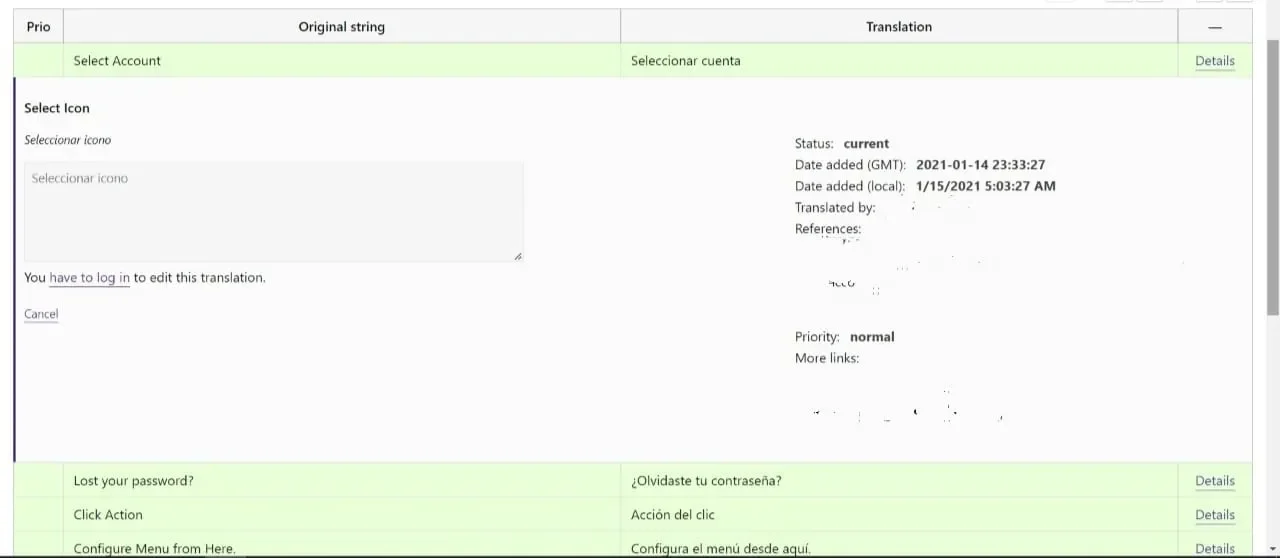
On first opening, the page was not obviously meaningful. After looking again, the researcher realised the pages were employee accounts for people who translate company documents. From these pages it was possible to see every detail about the translations and also the employees themselves: who they are, their names, and when they joined the company.
Exploitation
Step 1: Reach the translation listing without authentication
The two URLs above were opened directly in the browser. No login was required to view them, and they returned the translation records and the associated employee details. The parameter name suggests the page filters a list of users by login name, and the two URLs looked like two different filtered views of the same listing.
Step 2: Try to edit a translation
Wanting to go further, the researcher looked for a way to edit the translations. A link was present for editing, but following it required a login.
Step 3: Follow the login link to WordPress
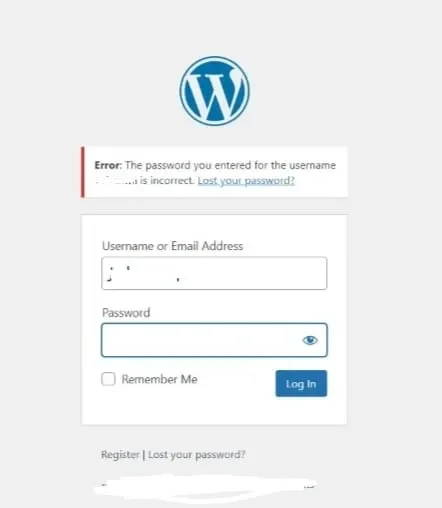
Clicking the edit link led to a WordPress login panel, which presents a username and password form.
Step 4: Test a username harvested from the URL
The username seen in the URL was submitted to the WordPress login form. The response was an error stating that the password was incorrect for that username, which the researcher took to mean the user exists in the database. The researcher notes that this makes a brute-force attack against the account feasible, and reported the issue at that point.
Root cause
The translation listing was reachable without authentication and exposed translation records and employee details, including names and join dates. The WordPress login form returned an error saying the password was incorrect for that username, which the researcher read as confirmation that the account exists. Together, the two issues let an unauthenticated attacker build a list of valid usernames and confirm each one against the login panel.
Impact
An unauthenticated attacker can read the translation records and the personal details of the employees who produce them, including names and join dates, and can confirm which of those usernames are valid WordPress accounts. With a confirmed username list, password brute force against the login panel becomes practical. The report does not state how many accounts or records were exposed, nor whether the brute force was actually carried out.
Fix
The changes that would address what was found are: require authentication and authorisation before serving the translation listing, and stop returning distinct error messages for unknown usernames versus wrong passwords on the WordPress login form.
Variants to test
- Other filter parameters on the same listing. Swap
filters[user_login]for other filter names visible in the application and check whether the response still returns records without a session. A positive result is any listing that renders data for an unauthenticated request. - Sequential or guessable identifiers. Where a listing is keyed by a username or ID, iterate values and compare responses. A positive result is a different employee's data returned for each value.
- Login forms reached from edit links. Follow edit or admin links from public pages and submit a known username with a wrong password. A positive result is an error that confirms the username exists.
- Historical URLs from wayback data. Run the same
waybackurlsandhttpx -mc 200pipeline against other subdomains of a target and inspect any URL carrying a user or filter parameter. A positive result is a live page that exposes account data without a login.
What happened, in plain words
A security researcher was testing a website that had agreed to receive reports about its security problems. Such an arrangement is called a vulnerability disclosure programme, or VDP: the owner says "if you find something wrong, tell us, and we will not be angry". The researcher does not name the company, so throughout this article the site is called xyz.com.
The researcher found two things. First, some web pages that list the accounts of employees who translate company documents could be opened by anyone, with no login at all. Those pages showed the translations and also personal details about the employees, such as their names and when they joined the company. Second, the login page for editing those translations was a WordPress login form, and when a real username was typed with a wrong password it returned an error saying the password was incorrect for that username. That difference lets anyone check whether a username is real.
Put together, a stranger could read employee details from the open pages and then test a username on the login form. With a confirmed list of real usernames, guessing passwords becomes much easier, because the attacker no longer wastes time on names that do not exist.
This article walks through the same steps the researcher took, in the same order, and explains every tool and idea from scratch. You only need to be comfortable using a browser and a computer to follow along.
The starting point
The target is a website that runs a VDP. The report does not say which organisation it belongs to or what the product is called. What the researcher describes is a set of pages that list employee accounts belonging to people who translate company documents. Those pages show translation records and the details of the employees behind them, including their names and when they joined the company. Editing a translation requires a login, and the login link leads to a WordPress login panel.
WordPress is a very common piece of software for building websites and blogs. It has a standard login page where you type a username and a password. Many companies use it, and its login page looks the same across installations, which is why it is easy to recognise.
The weakness reported is a combination of two things:
- Information disclosure: information that should be private is visible to anyone who asks for it. Think of a filing cabinet left open in a reception area: nothing was broken, the drawer was simply not locked.
- Username enumeration: the system lets an outsider work out which usernames exist. Think of a hotel reception that says "no guest by that name" for one person and "that guest has the wrong key" for another. The second answer tells you the guest is staying there.
The setup
The researcher worked from a single computer using a handful of command-line tools. A command line is a text window where you type instructions instead of clicking buttons. No accounts, passwords or special roles were needed to reach the exposed pages. The only credential involved is the one guessed at the very end.
The tools used are:
subfinder, which finds subdomains of a domain.waybackurls, which pulls historical URLs from the Wayback Machine.httpx, which checks which URLs are alive.grep, which filters a list of lines by a piece of text.
The report gives no version numbers for any of these tools.
A few of those ideas deserve a plain explanation before we start.
A domain is the name you type to reach a site, such as xyz.com. A subdomain is a name that sits in front of it, such as shop.xyz.com or login.xyz.com. Large organisations have many subdomains, and each one can be a separate application with its own quirks. Finding them is often the first step of testing, because a forgotten subdomain is a common place for mistakes.
The Wayback Machine is an internet archive that has been saving copies of web pages for years. If a page existed in 2015 and was removed later, the archive may still have a record of its address. waybackurls asks the archive for every address it knows under a domain. This is useful because old addresses sometimes still work, and old pages sometimes still respond even when nobody links to them any more.
HTTP status codes are short numbers a web server sends back with every page. 200 means "here is the page, all fine". 404 means "not found". 403 means "forbidden". When a tool says -mc 200, it means "match code 200", so only keep addresses that actually returned a working page.
Finding it
The first step was to find subdomains of the target and save the results to a file:
subfinder -d xyz.com -o xyz_sub.txt
Line by line:
subfinderis the name of the program being run.-d xyz.comtells it which domain to look under. The-dpart is an option, short for domain.-o xyz_sub.txttells it to write the output into a file calledxyz_sub.txtinstead of printing it on screen. The-opart is short for output.
Why do this first? Because you cannot test what you cannot find. The researcher wanted a complete picture of the target's addresses before looking for problems.
Some other tools were then run against the results looking for bugs, but nothing turned up. This is normal: most testing steps produce nothing, and you move on.
The next step was to collect historical addresses for every subdomain that had been found:
cat xyz_sub.txt | waybackurls | tee -a xyz_url.txt
Line by line:
cat xyz_sub.txtprints the contents of the subdomain file.catis short for concatenate, and it simply reads a file and sends its contents onward.- The vertical bar
|is called a pipe. It takes whatever the left side produced and hands it to the right side as input. Think of it as a conveyor belt between two machines. waybackurlsreads a list of domains and asks the Wayback Machine for every address it has recorded under them.tee -a xyz_url.txtboth shows the results on screen and appends them to a file.teeis named after the plumbing fitting that splits a pipe in two directions. The-ameans append, so it adds to the file rather than overwriting it.
Why do this? Because the archive can reveal pages that are not linked from the main site any more but may still be live. It is a way of finding forgotten doors.
This produced more than 10,000 addresses. That is far too many to open by hand, so the researcher narrowed the list to login pages, with SQL injection as the first idea.
SQL injection is a classic attack where you type database instructions into a form field or a URL parameter, hoping the application passes them straight to its database. Think of a waiter who writes your order on the kitchen ticket without checking it: if you write "one soup and also give me the safe combination", the kitchen might just do it. The researcher wanted to see whether any login page was vulnerable to this.
The command used to narrow the list was:
cat xyz_url.txt | grep "login" | httpx -mc 200
Line by line:
cat xyz_url.txtreads the big list of addresses.grep "login"keeps only the lines that contain the wordlogin.grepis a search tool for text; it prints matching lines and drops the rest.httpx -mc 200takes those addresses and checks each one, keeping only those that are alive and answer with HTTP status 200.
Why do this? Because a list of 10,000 addresses is useless if most of them are dead. Filtering to live login pages gives a short, focused list worth looking at.
SQL injection attempts on the surviving addresses did not work. Among the results, however, were two addresses that looked almost identical:
https//subdomain/:fileter/status%5D=either&filters%5Buser_login%5D=name
https//subdomain/:fileter/status%5D=either&filters%5Buser_login%5D=name2
These are written exactly as they appear in the report. Notice that they are missing the colon after https, and the word filter appears as fileter. That is how the researcher recorded them.
What matters is the part after the question mark, called the query string. A URL can carry extra information after a ?, in the form name=value, with several pairs joined by &. Here the pair is filters%5Buser_login%5D=name. The %5B and %5D are URL encoding: some characters cannot appear literally in a URL, so they are written in a coded form. %5B is [ and %5D is ]. Decoded, the parameter is filters[user_login], and its value is name in the first URL and name2 in the second.
The parameter name suggests the page filters a list of users by login name. The two addresses therefore looked like two different filtered views of the same listing, one for a user called name and one for a user called name2.
The image shows the page that opened from one of these addresses. On first opening it, the researcher could not tell what it was. After looking again, it became clear: these were employee accounts for people who translate company documents. From these pages it was possible to see every detail about the translations, and also the employees themselves: who they are, their names, and when they joined the company.
Exploitation
Step 1: Reach the translation listing without authentication
The two addresses above were opened directly in the browser. No login was required. They returned the translation records and the associated employee details. The parameter name suggests the page filters a list of users by login name, and the two addresses looked like two different filtered views of the same listing.
Why does this matter? Because a page that shows employee data should normally ask who you are first. Here it did not. Anyone with the address could read it, which is the information disclosure part of the finding.
Step 2: Try to edit a translation
Wanting to go further, the researcher looked for a way to edit the translations. A link was present for editing, but following it required a login. This is a sensible design in principle: reading might be open, but changing things should not be. The question was how well that login was built.
Step 3: Follow the login link to WordPress
Clicking the edit link led to a WordPress login panel, which presents a username and password form.
The image shows that login panel: a standard WordPress form asking for a username and a password.
Step 4: Test a username harvested from the URL
The username seen in the URL was submitted to the WordPress login form together with an arbitrary password, meaning any made-up password. The response was an error stating that the password was incorrect for that username.
Why is that interesting? Because the message distinguishes two situations that should look the same to an outsider:
- A real username with a wrong password gets "password is incorrect for this username".
- A username that does not exist should get a generic message, or the same message as the first case.
When the two cases produce different answers, the form is telling you which usernames are real. That is username enumeration. The researcher notes that this makes a brute-force attack against the account feasible, and reported the issue at that point.
Brute force means trying many passwords in turn, often from a list of common ones, until one works. It is like trying every key on a keyring in a door. It is slow and noisy, but if you already know the lock exists and you know the account name, it becomes practical.
Root cause
The translation listing was reachable without authentication and exposed translation records and employee details, including names and join dates. The WordPress login form returned an error saying the password was incorrect for that username, which the researcher read as confirmation that the account exists. Together, the two issues let an unauthenticated attacker build a list of valid usernames and confirm each one against the login panel.
In everyday terms: the front door of the archive is open, and the reception desk will happily tell you which staff members have keys.
Impact
An unauthenticated attacker can read the translation records and the personal details of the employees who produce them, including names and join dates, and can confirm which of those usernames are valid WordPress accounts. With a confirmed username list, password brute force against the login panel becomes practical.
Fix
The changes that would address what was found are: require authentication and authorisation before serving the translation listing, and stop returning distinct error messages for unknown usernames versus wrong passwords on the WordPress login form.
Authentication means proving who you are, for example by logging in. Authorisation means deciding what a proven user is allowed to do. Both are needed: a page should check that you are logged in, and also that you are the right kind of user to see it.
Variants to test
If you want to practise the same ideas on a target you are allowed to test, these are the variations worth trying. Each one follows the same pattern: change one thing, look at the response, and ask whether the answer should have been given to a stranger.
- Other filter parameters on the same listing. Swap
filters[user_login]for other filter names visible in the application and check whether the response still returns records without a session. A positive result is any listing that renders data for an unauthenticated request. - Sequential or guessable identifiers. Where a listing is keyed by a username or ID, iterate values and compare responses. A positive result is a different employee's data returned for each value.
- Login forms reached from edit links. Follow edit or admin links from public pages and submit a known username with a wrong password. A positive result is an error that confirms the username exists.
- Historical URLs from wayback data. Run the same
waybackurlsandhttpx -mc 200pipeline against other subdomains of a target and inspect any URL carrying a user or filter parameter. A positive result is a live page that exposes account data without a login.
Glossary
- Authentication: proving who you are, usually by logging in with a username and password.
- Authorisation: deciding what a logged-in user is allowed to see or do.
- Brute force: trying many passwords in turn until one works.
- Command line: a text window where you type instructions instead of clicking buttons.
- Domain: the name you type to reach a website, such as
xyz.com. - grep: a command-line tool that keeps only the lines of text matching a pattern.
- HTTP status code: a number a web server returns with each response, such as 200 for success or 404 for not found.
- httpx: a command-line tool that checks whether web addresses are alive and what they return.
- Information disclosure: a flaw where information that should be private is visible to someone who should not see it.
- Parameter: a named value carried in a URL after the question mark, in the form
name=value. - Pipe: the
|symbol on the command line, which passes the output of one program into another. - Query string: the part of a URL after the
?, carrying parameters. - SQL injection: an attack where database instructions are typed into an input in the hope the application passes them to its database.
- Subdomain: a name in front of a domain, such as
login.xyz.com. - subfinder: a command-line tool that finds subdomains of a domain.
- URL encoding: a way of writing characters that cannot appear literally in a URL, such as
%5Bfor[. - Username enumeration: a flaw where a system lets an outsider work out which usernames exist.
- VDP (vulnerability disclosure programme): an arrangement where an organisation invites people to report security problems to it.
- Wayback Machine: an internet archive that keeps copies of web pages over time.
- waybackurls: a command-line tool that pulls historical addresses for a domain from the Wayback Machine.
- WordPress: a widely used software for building websites and blogs, with a standard login page.



