GraphQL Introspection leads to Sensitive Data Disclosure.
The GraphQL endpoint allowed introspection queries, which revealed the full schema including a userHash field. An attacker could use this to enumerate sensitive data such as user hashes.
 Published on medium.com
GraphQL
The full write-up lives on its author's site
It belongs to its author, so we link to it rather than copy it. The other two tabs are our own rewrites, checked against it.
Context
Pranay Bafna, a final year Information Technology student at the time of writing, published this write-up on 2 October 2019 about a GraphQL finding on a bug bounty target. The target was a web application where users can invest money in restaurants, fitness studios, craft breweries and a variety of growing concepts, and where business owners can raise capital to expand or open a new concept. The researcher found the GraphQL endpoint at target.qa/infosec/graphql and confirmed that the application was using GraphQL rather than a REST API.
The feature involved is the profile update flow. When a user updates their profile, the front end sends a GraphQL mutation to the endpoint. The write-up does not name the mutation or show the full request body, so the exact fields of the profile update are not documented here.
Setup
The only tool required was Burp Suite, with two extensions installed:
- GraphQL Raider: a Burp Suite extension for testing endpoints implementing GraphQL.
- JSON Beautifier: an extension that adds a new tab to Burp's HTTP message viewer to beautify JSON content.
The researcher logged in to a normal user account. No special role or privilege is described. The precondition for the whole chain is simply an authenticated session and access to the profile update page.
Finding it
The researcher spent two to three hours learning GraphQL basics and reading other bug reports, including nahamsec's GraphQL CTF challenge, before testing the target. After logging in and moving to the Profile Update page, the profile update request was captured in Burp Proxy and sent to Repeater. Replaying the request from Repeater updated the profile every time.
In the GraphQL extension, the researcher noticed that the request contained a GraphQL query named as a mutation. Looking at the response, the body contained "__typename":"User". That field is the introspection meta-field that tells the client which GraphQL type an object is, and its presence in a normal application response is what prompted the next step.
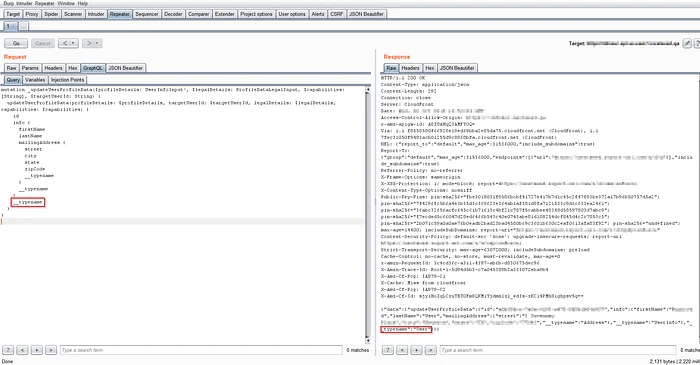
The screenshot shows the mutation request and its response, with the __typename field set to User visible in the returned JSON.
Exploitation
Step 1: Probe the type with an unexpected field
After some time spent enumerating information from error messages, the researcher obtained the field name userHash. Replacing __typename with userHash in the selection set returned the hash value for the user.
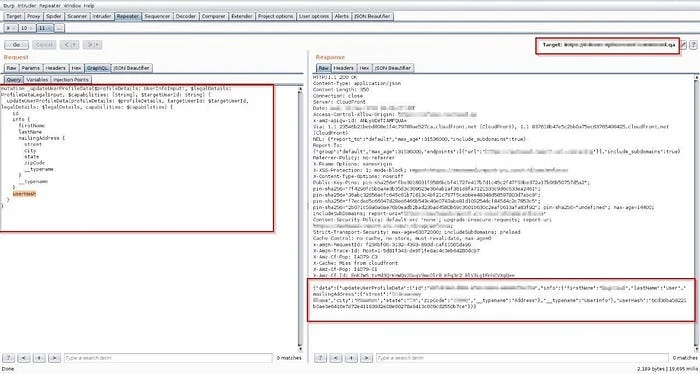
The screenshot shows the modified request and the response containing the hash value. The important point is that the server accepted a field that the client never normally requests, and the error feedback during enumeration was enough to discover its name. The write-up does not show the exact request body used for this step.
Step 2: Try the introspection query
To dig further, the researcher searched online and found the introspection query described on the GraphQL homepage. Because the introspection query differs between websites, the researcher iterated on requests until the following query was accepted:
query IntrospectionQuery {
  __schema {
    queryType { name }
    mutationType { name }
    subscriptionType { name }
    types {
      ...FullType
    }
    directives {
      name
      description
      args {
        ...InputValue
      }
      onOperation
      onFragment
      onField
    }
  }
}

fragment FullType on __Type {
  kind
  name
  description
  fields(includeDeprecated: true) {
    name
    description
    args {
      ...InputValue
    }
    type {
      ...TypeRef
    }
    isDeprecated
    deprecationReason
  }
  inputFields {
    ...InputValue
  }
  interfaces {
    ...TypeRef
  }
  enumValues(includeDeprecated: true) {
    name
    description
    isDeprecated
    deprecationReason
  }
  possibleTypes {
    ...TypeRef
  }
}

fragment InputValue on __InputValue {
  name
  description
  type { ...TypeRef }
  defaultValue
}

fragment TypeRef on __Type {
  kind
  name
  ofType {
    kind
    name
    ofType {
      kind
      name
      ofType {
        kind
        name
      }
    }
  }
}
Executing this query in the GraphQL extension produced an error because the operation name in the request was still UpdateProfile, the name of the original mutation.
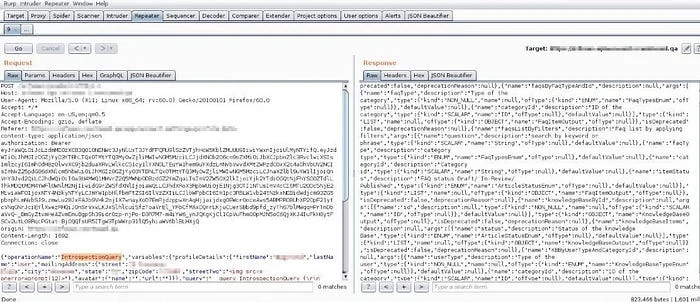
The screenshot shows the introspection query being sent with the wrong operation name and the resulting error.
Step 3: Correct the operation name
Changing the operationName to IntrospectionQuery made the query succeed, and the whole GraphQL schema was returned.
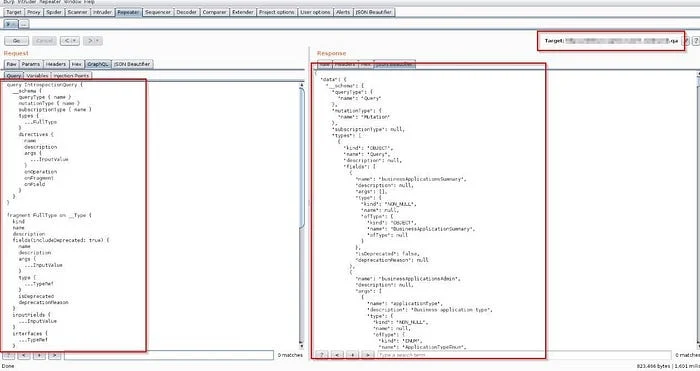
The screenshot shows the successful response with the schema. With the full schema in hand, the researcher had the endpoint's complete schema.
Root cause
Introspection is enabled on the endpoint. GraphQL servers expose the __schema and __type meta-fields by default, and this server did not disable them, so any authenticated client could ask for the complete schema. The profile update mutation returned the User type, and the server accepted userHash when it was selected in place of __typename. Changing the operation name to IntrospectionQuery made the query succeed.
Impact
The researcher could retrieve the full GraphQL schema and, from it, the userHash value for the user. The report frames the outcome as sensitive data disclosure.
Fix
Based on the finding, the fixes would be to disable introspection on the production endpoint, to remove userHash from the fields returned by the profile mutation unless the client genuinely needs it, and to enforce field-level authorisation on the server so that selecting a field the client does not normally request does not return it.
Variants to test
- Introspection on other endpoints. Send the introspection query above with
operationNameset toIntrospectionQueryagainst any GraphQL endpoint you find. A positive result is a full schema in the response rather than an error about the operation name or a disabled introspection message. - Field enumeration through errors. Replace a known field such as
__typenamewith a guessed field name and read the error. A positive result is a suggestion or a type error that names valid fields, which is howuserHashwas found here. - Sensitive fields on the user type. Once the schema is known, request fields such as hashes, tokens or internal identifiers on the
Usertype in a normal mutation. A positive result is any value the client never displays. - Operation name handling. Send a valid query with a mismatched
operationNameand observe the error. A positive result is an error that reveals the expected operation name or confirms the server parses the operation name separately from the query body.
What happened, in plain words
A student called Pranay Bafna found a way to make a website hand over a map of its own inner workings, and also got it to return a value called userHash that the normal page never shows. He wrote it up on 2 October 2019.
The website was a place where people invest money in restaurants, fitness studios, craft breweries and other growing businesses, and where business owners raise money to open or expand. It used a technology called GraphQL to talk to its own front end. GraphQL, in the simplest terms, is a way for a web page to ask a server for exactly the data it wants, a bit like filling in a form where you tick only the boxes you need. The server then answers with just those boxes.
GraphQL has a built-in feature called introspection. Introspection means the server will describe itself: what kinds of data it holds, what questions you are allowed to ask, and what each answer looks like. It is meant for developers, like the instruction manual that comes with a machine. If that manual is left available on a live website, a client that can reach the endpoint can read it.
That is what happened here. The researcher first noticed a small clue in a normal response, then guessed a hidden field name by reading error messages, then asked the server for its full manual, and finally got the server to return a value called userHash that the normal web page never shows. The company paid him a three-figure dollar amount, between $600 and $800.
Below is the same story, step by step, with every concept explained from scratch.
The background you need first
What an API is
When you use a website, your browser does not contain all the data. It asks a server for it. The server is a computer somewhere else that holds the database and the rules. The conversation between your browser and that server happens through an API, which stands for Application Programming Interface. Think of a restaurant: you are the customer, the kitchen is the server and the database, and the waiter is the API. You do not walk into the kitchen yourself; you tell the waiter what you want, and the waiter brings it back. The menu is the list of things you are allowed to ask for.
Most websites use an API style called REST, where each thing you might want has its own address, like /users/42 for user number 42. GraphQL is a different style. Instead of many addresses, there is usually one address, and you send it a written request describing exactly which pieces of data you want. That written request is called a query.
What a query and a mutation are
In GraphQL there are two main kinds of request:
- A query asks for data, like "show me my profile".
- A mutation changes data, like "save my new profile picture".
The name is literal: a mutation mutates something.
What a field and a type are
GraphQL data is organised into types. A type is a category of thing, for example a User. Each type has fields, which are the individual pieces of information it holds, for example a user's name or email. When you write a query, you list the fields you want back. That list is called the selection set.
What introspection is
GraphQL servers can be asked about themselves using special fields that start with two underscores, such as __schema and __type. These are called meta-fields. Asking the server to describe its own types, fields and allowed operations is called introspection. It is enormously useful while building an app, because tools can auto-complete and validate your queries. It is also enormously useful to an attacker, because it turns guesswork into a complete list.
What Burp Suite is
Burp Suite is a tool that sits between your browser and a website and lets you watch and edit every request and response. Imagine a postal worker who, before delivering your letter, lets you open it, change the wording and reseal it. Burp has a component called Proxy, which captures traffic as it passes, and another called Repeater, which lets you take one captured request and send it again and again with small changes, seeing the answer each time. That repeat-and-observe loop is the core of most web security testing.
What the two extensions do
Burp can be extended with add-ons. The researcher used two:
- GraphQL Raider: a Burp Suite extension for testing endpoints implementing GraphQL. In plain terms, it understands GraphQL requests and makes them easier to read and edit.
- JSON Beautifier: an extension that adds a new tab to Burp's HTTP message viewer to beautify JSON content. JSON is the text format most APIs use to send data back; unformatted, it is one long cramped line, and beautifying it adds indentation so a human can read it.
What a hash is
A hash is the output of a one-way mathematical function. You put data in, you get a fixed-length string of characters out. The same input always gives the same output, but you cannot practically turn the output back into the input. Websites store passwords as hashes so that even the site itself does not know your password. A value called userHash is therefore potentially sensitive, though the write-up does not say what this particular hash is used for.
Setting up
The only tool required was Burp Suite, with the two extensions above installed. The researcher logged in to a normal user account. No special role or privilege is described. The precondition for the whole chain is simply an authenticated session and access to the profile update page.
Before testing, the researcher spent two to three hours learning GraphQL basics and reading other bug reports, including nahamsec's GraphQL CTF challenge. A CTF, or Capture The Flag, is a practice challenge where you try to find a hidden piece of information in a deliberately vulnerable system. Reading other people's reports is how most beginners learn what to look for.
Finding the endpoint
While checking the target, the researcher found the GraphQL endpoint at target.qa/infosec/graphql and confirmed that the application was using GraphQL rather than a REST API. An endpoint is simply the address on the server where a particular API lives. The .qa part of the name suggests a quality assurance environment, that is, a testing copy of the site, though the write-up does not discuss this.
The feature involved is the profile update flow. When a user updates their profile, the front end sends a GraphQL mutation to the endpoint. The write-up does not name the mutation or show the full request body, so the exact fields of the profile update are not documented here.
Step by step
Step 1: Capture the profile update request
The researcher logged in, moved to the Profile Update page, and captured the profile update request in Burp Proxy. Capturing means letting Burp hold the request so you can look at it before it reaches the server. The request was then sent to Repeater.
Replaying the request from Repeater updated the profile every time. This matters because it shows the request is live and repeatable: the server is not ignoring it.
Step 2: Notice the clue in the response
In the GraphQL extension, the researcher noticed that the request contained a GraphQL query named as a mutation. Looking at the response, the body contained "__typename":"User".
That field is the introspection meta-field that tells the client which GraphQL type an object is. In everyday terms, it is like a parcel arriving with a label saying "this is a User". Its presence in a normal application response is what prompted the next step: if the server volunteers the type name, perhaps it will volunteer other field names too.
The screenshot shows the mutation request and its response, with the __typename field set to User visible in the returned JSON.
Step 3: Guess a hidden field name from error messages
After some time spent enumerating information from error messages, the researcher obtained the field name userHash. Enumerating means trying things one at a time and learning from what comes back. When you ask a GraphQL server for a field that does not exist, it usually replies with an error, and that error often hints at what does exist. It is like asking a librarian for a book that is not on the shelf and being told, "we do not have that, but we do have these similar titles".
Replacing __typename with userHash in the selection set returned the hash value for the user.
The screenshot shows the modified request and the response containing the hash value. The important point is that the server accepted a field that the client never normally requests, and the error feedback during enumeration was enough to discover its name.
Why this matters: the normal web page only ever asks for the fields it needs to draw the screen. If the server will answer any field you name, then the page's own restraint is the only thing hiding the rest. That is not a security control; it is a habit.
Step 4: Find the introspection query
To dig further, the researcher searched online and found the introspection query described on the GraphQL homepage. Because the introspection query differs between websites, the researcher iterated on requests until the following query was accepted:
query IntrospectionQuery {
  __schema {
    queryType { name }
    mutationType { name }
    subscriptionType { name }
    types {
      ...FullType
    }
    directives {
      name
      description
      args {
        ...InputValue
      }
      onOperation
      onFragment
      onField
    }
  }
}

fragment FullType on __Type {
  kind
  name
  description
  fields(includeDeprecated: true) {
    name
    description
    args {
      ...InputValue
    }
    type {
      ...TypeRef
    }
    isDeprecated
    deprecationReason
  }
  inputFields {
    ...InputValue
  }
  interfaces {
    ...TypeRef
  }
  enumValues(includeDeprecated: true) {
    name
    description
    isDeprecated
    deprecationReason
  }
  possibleTypes {
    ...TypeRef
  }
}

fragment InputValue on __InputValue {
  name
  description
  type { ...TypeRef }
  defaultValue
}

fragment TypeRef on __Type {
  kind
  name
  ofType {
    kind
    name
    ofType {
      kind
      name
      ofType {
        kind
        name
      }
    }
  }
}
Line by line, in plain words:
query IntrospectionQuery {opens a query and gives it a name,IntrospectionQuery. Naming a query is optional but useful, because the name can be referenced separately when the request is sent.__schema {asks for the schema, which is the server's description of itself.queryType { name },mutationType { name },subscriptionType { name }ask for the names of the three kinds of operation the server supports: reading, changing, and live updates.types { ...FullType }asks for every type the server knows about, and says "for each one, fill in the details described in theFullTypeblock below". The three dots are called a fragment spread; a fragment is a reusable block of field requests, like a saved shopping list you can attach to any order.directives { ... }asks for the server's directives, which are modifiers that change how a query behaves, along with their names, descriptions, arguments and where they can be applied (onOperation,onFragment,onField).fragment FullType on __Type {starts the reusable block that describes a single type.kind,name,descriptionask what sort of type it is, what it is called, and what it is for.fields(includeDeprecated: true) { ... }asks for every field on that type, including old ones that are on their way out.- Inside each field,
name,description,args,type,isDeprecated,deprecationReasonask for the field's name, its description, the arguments it accepts, what type it returns, whether it is deprecated, and why. inputFields,interfaces,enumValues,possibleTypesask for the fields you can send in, the interfaces the type implements, the fixed list of allowed values, and the other types it could be.fragment InputValue on __InputValue { ... }describes a single argument: its name, description, type and default value.fragment TypeRef on __Type { ... }describes how a type is referenced, including nested wrappers such as lists of lists, which is whyofTyperepeats inside itself.
Executing this query in the GraphQL extension produced an error because the operation name in the request was still UpdateProfile, the name of the original mutation.
The screenshot shows the introspection query being sent with the wrong operation name and the resulting error.
Why this happened: a GraphQL request can carry more than one named operation in the same body, so the server needs to be told which one to run. That instruction is a separate value called operationName. The researcher had replaced the query text but left the old name in place, so the server was looking for an operation called UpdateProfile and could not find one matching the new text.
Step 5: Correct the operation name
Changing the operationName to IntrospectionQuery made the query succeed, and the whole GraphQL schema was returned.
The screenshot shows the successful response with the schema. With the full schema in hand, the researcher had the endpoint's complete schema.
Why it worked
Introspection is enabled on the endpoint. GraphQL servers expose the __schema and __type meta-fields by default, and this server did not disable them, so any authenticated client could ask for the complete schema. The profile update mutation returned the User type, and the server accepted userHash when it was selected in place of __typename. Changing the operation name to IntrospectionQuery made the query succeed.
What the impact was
The researcher could retrieve the full GraphQL schema and, from it, the userHash value for the user. The report frames the outcome as sensitive data disclosure.
How it was disclosed
The researcher reported it to the company around 15:39, which he gives as 3 pm Indian Standard Time. The company read the report, the steps to reproduce and the proof of concept screenshots, and rewarded him with a three-figure dollar amount, between $600 and $800. A proof of concept, or PoC, is the smallest demonstration that proves a bug is real, usually a screenshot or a short recording.
How it should be fixed
Based on the finding, the fixes would be to disable introspection on the production endpoint, to remove userHash from the fields returned by the profile mutation unless the client genuinely needs it, and to enforce field-level authorisation on the server so that selecting a field the client does not normally request does not return it.
Things you can try yourself
These are the same ideas generalised, so a beginner can practise them on a site they are allowed to test.
- Introspection on other endpoints. Send the introspection query above with
operationNameset toIntrospectionQueryagainst any GraphQL endpoint you find. A positive result is a full schema in the response rather than an error about the operation name or a disabled introspection message. - Field enumeration through errors. Replace a known field such as
__typenamewith a guessed field name and read the error. A positive result is a suggestion or a type error that names valid fields, which is howuserHashwas found here. - Sensitive fields on the user type. Once the schema is known, request fields such as hashes, tokens or internal identifiers on the
Usertype in a normal mutation. A positive result is any value the client never displays. - Operation name handling. Send a valid query with a mismatched
operationNameand observe the error. A positive result is an error that reveals the expected operation name or confirms the server parses the operation name separately from the query body.
Glossary
- API: the agreed way for one piece of software to ask another for data or actions, like a waiter carrying orders between you and the kitchen.
- Authenticated session: the state of being logged in, so the server knows which user is making each request.
- Authorisation: the check that a logged-in user is allowed to do or see a particular thing, as opposed to authentication, which is only about who they are.
- Burp Suite: a tool that sits between your browser and a website so you can capture, inspect and edit requests and responses.
- Burp Proxy: the part of Burp Suite that intercepts traffic as it passes through.
- Burp Repeater: the part of Burp Suite that lets you resend one captured request repeatedly with changes.
- CTF (Capture The Flag): a practice challenge where you hunt for a hidden piece of information in a deliberately vulnerable system.
- Directive: a GraphQL modifier that changes how a query or part of a query is handled.
- Endpoint: the address on a server where a particular API or feature lives.
- Enumeration: trying candidate values one at a time and learning from the responses, often from error messages.
- Field: one named piece of information inside a GraphQL type, such as a user's name.
- Fragment: a reusable block of field requests in GraphQL that can be attached to several places in a query.
- Fragment spread: the
...Namesyntax that attaches a fragment at a particular point in a query. - GraphQL: a way for a client to ask a server for exactly the data it wants, using a written query rather than many separate addresses.
- Hash: the fixed-length output of a one-way function; the same input always gives the same output, but the output cannot practically be turned back into the input.
- Introspection: a GraphQL feature that lets a client ask the server to describe its own types, fields and operations.
- JSON: a text format for sending structured data between programs.
- JSON Beautifier: a Burp Suite extension that adds a tab to format JSON so it is readable by a human.
- Meta-field: a special GraphQL field starting with two underscores, such as
__schemaor__typename, that describes the schema rather than application data. - Mutation: a GraphQL request that changes data on the server.
- Operation name: the label that tells a GraphQL server which named operation in a request body to run.
- Proof of concept (PoC): the smallest demonstration that proves a bug is real, usually a screenshot or short recording.
- Query: a GraphQL request that asks for data.
- REST: a common API style where each kind of data has its own address, such as
/users/42. - Schema: the server's complete description of its types, fields, arguments and operations.
- Selection set: the list of fields a GraphQL query asks to be returned.
- Type: a category of thing in GraphQL, such as
User, with its own set of fields. __typename: a GraphQL meta-field that returns the name of the type of the object being returned.



