Command Palette
The Elementor WordPress plugin's lightbox module accepted a user-controlled video parameter object that was passed into a jQuery element, allowing arbitrary attributes such as an error handler to be set. An attacker could run JavaScript in the context of any Elementor-based site, leading to cookie theft and, in some cases, account takeover.

Announcing CVE-2022-29455
The full write-up lives on its author's site
It belongs to its author, so we link to it rather than copy it. The other two tabs are our own rewrites, checked against it.
Context
Elementor is a popular WordPress plugin for building pages. The write-up concerns a DOM-based cross-site scripting flaw in Elementor's frontend lightbox module, tracked as CVE-2022-29455. The lightbox is the component that opens images, videos and slideshows in an overlay on an Elementor-built page. Its settings can be supplied by the page through a base64-encoded payload, and the module then renders the requested media type.
The authors say the vulnerability affected more than 6.5 million websites, and quote BuiltWith's figure of at least 6,441,433 sites using Elementor. Every Elementor-based site was affected, whether hosted by Elementor or self hosted, according to the report.
The research began during the HackerOne ambassador World Cup, while the authors were scanning selected target websites. A quick scan for known plugins on an interesting WordPress site turned up Elementor.
Setup
The work was done against a WordPress site with an up-to-date Elementor installation, found through a quick scan for known plugins. The authors note that all screenshots and research were done on the obfuscated code inside the browser; they later found the code is open source and easier to read, but kept the write-up on the obfuscated version for learning purposes.
No special accounts or roles are described for the initial reproduction. The account takeover proof of concept depends on an administrator being logged in to the WordPress account when the payload is triggered.
Two tools are offered to readers at the top of the post. The first is a nuclei template for scanning:
wget https://raw.githubusercontent.com/projectdiscovery/nuclei-templates/[redacted]/cves/2022/CVE-2022-29455.yaml
nuclei -t ./CVE-2022-29455.yaml -u https://...
The second is an online tester at https://www.rotem-bar.com/elementor.
Finding it
The starting point was an earlier Elementor bug, CVE-2021-24891, found by Joel Beleña. In that vulnerability, injecting a payload into the lightbox settings allowed arbitrary JavaScript to be injected into the site where the plugin is used. The payload forced the lightbox module to display and gave it custom settings in a base64 payload. Decoding those settings returns JSON that sets the type to "null" and supplies an html parameter containing raw HTML:
{"type":"null","html":"<script>alert('xss')</script>"}
Reproducing that payload against the up-to-date target did not work. Reading the code, however, showed the authors that the type parameter accepts other values worth investigating. The original problem occurred when the type value was not caught by the switch case, and the code then set HTML received from the user.
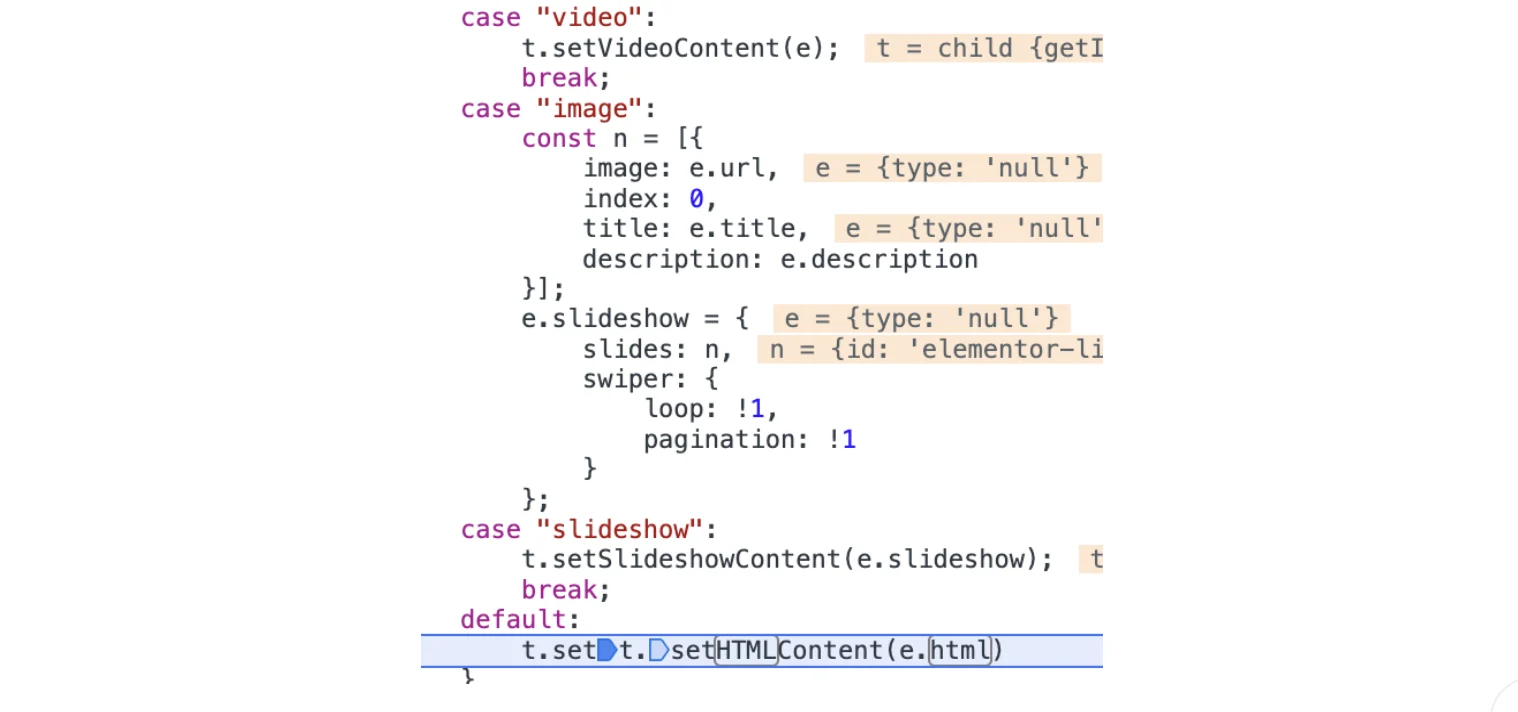
The fix for CVE-2021-24891 was in place: the JavaScript deletes the html parameter before passing the settings to the affected function.
Looking at the types the lightbox module accepts, the authors identified image, video and slideshow. Image did not do much, so they moved on to video.
Exploitation
Step 1: get past the url check
Using the video type requires a url parameter as well. There is a check that url must start with http. The authors guess that in the past this check did not exist and someone injected a javascript:// style value.
Step 2: reach the jQuery object through videoType
Dissecting the video function showed that it uses a jQuery variable (t in the code) to set video parameters taken from a parameter called videoParams.
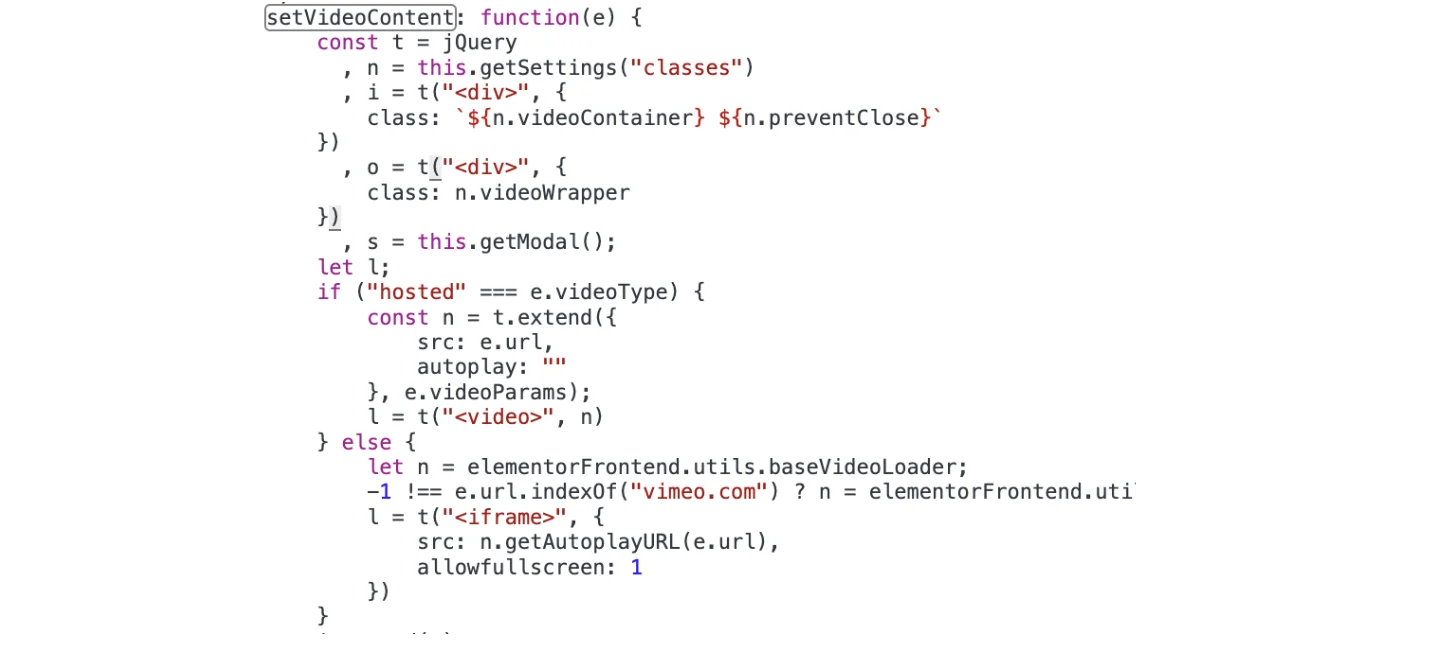
To reach the state where the jQuery variable is used, another parameter, videoType, must be added. When videoType equals hosted, the function creates a new object dynamically, receiving src and autoplay, but that object can be overridden by videoParams. Because videoParams is controlled by the user, any parameter can be added to the video object.
Step 3: prove control with a style parameter
The first verification payload adds a style attribute:
{
  "type": "video",
  "url": "http://",
  "videoType": "hosted",
  "videoParams": {
    "style": "background-color:red"
  }
}
Encoded to base64 it looks like this:
[redacted]
The payload successfully added a new style parameter, which was rendered into the video.
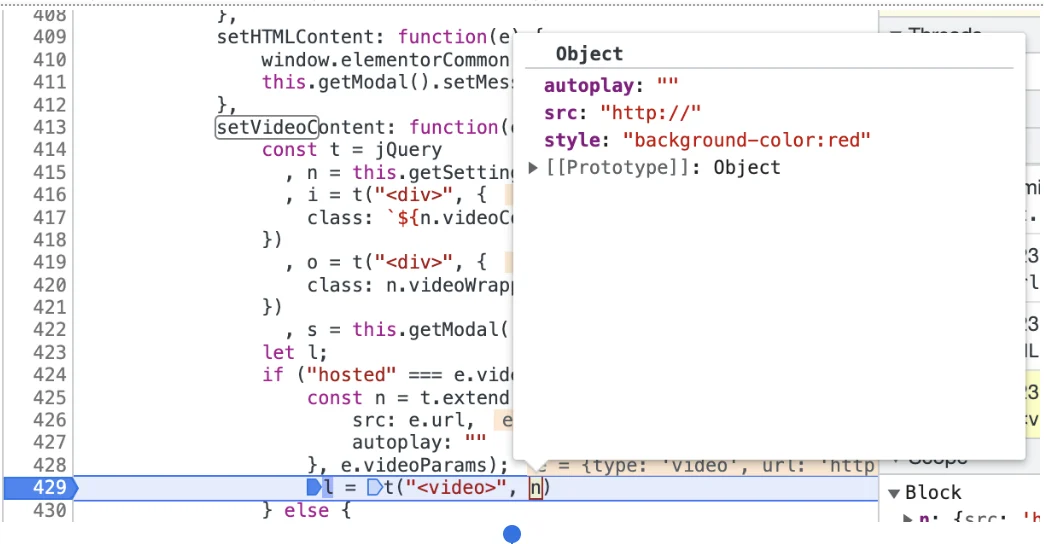
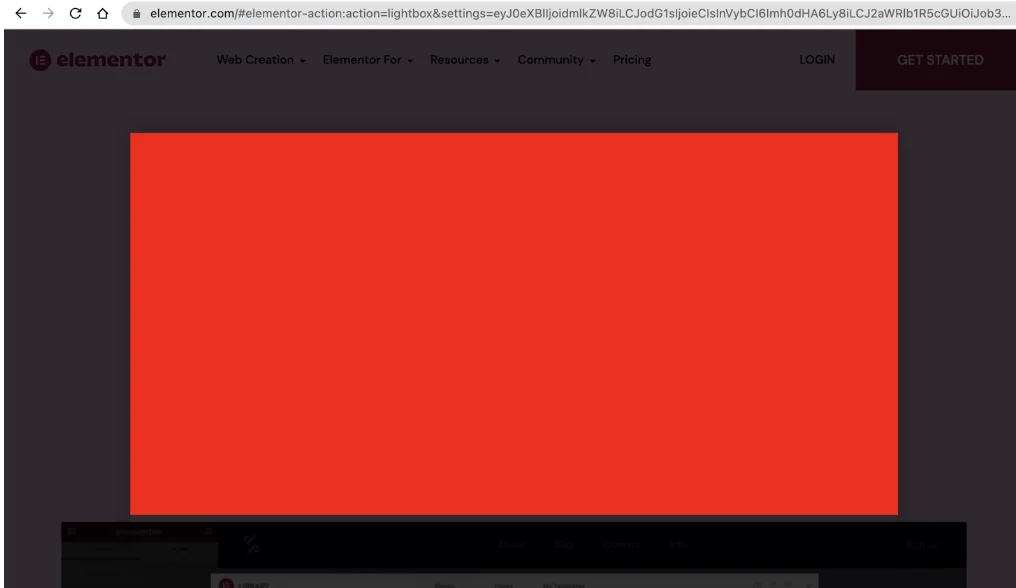
The authors could now colour any video and make users see a red screen. Further playing with the payload let them change it to a picture and build a phishing page.
Step 4: turn attribute injection into script execution
Going through the attributes that can be accepted, the authors found that onerror is also allowed and accepts JavaScript. A new payload with onerror gave the full exploit:
{
    "type": "video",
    "url": "http://",
    "videoType": "hosted",
    "videoParams": {
        "onerror":"alert(document.domain+' '+document.cookie)",
        "style": "background-color:red"
    }
}
Its base64 form:
[redacted]
ybCI6ICJodHRwOi8vIiwKICAgICJ2aWRlb1R5cG
[redacted]
[redacted]
[redacted]
[redacted]
[redacted]
The report points to the exact vulnerable area in the open-source code: https://github.com/elementor/elementor/blob/release/3.5.0/assets/dev/js/frontend/utils/lightbox/lightbox.js#L257
Step 5: find more vulnerable sites
With the target confirmed vulnerable, the authors went looking for more. Using the BuiltWith figure as motivation, they took lists of domains and subdomains and scanned for the plugin:
cat list.txt | \
cut -d"/" -f3 | awk 'NF{print $0 "/wp-content/plugins/elementor/assets/js/frontend.min.js"}' | \
httpx -nc -fr -ms "elementor" -er "elementor - v[^\s]*"
The scan started to produce vulnerable websites.
Step 6: account takeover proof of concept
The authors built an account takeover proof of concept: when clicked, it created a new user if an administrator was logged in to their WordPress account. The demonstration is a video at https://youtu.be/IXX1jm-rh_g.
Root cause
The lightbox settings are attacker-controllable through a base64 payload, and the video branch builds a media object from user-supplied videoParams. The earlier fix removed the html parameter before it reached the affected function, but the video path still let arbitrary attributes through. When videoType is hosted, the dynamically built object receives src and autoplay, and videoParams can override it, so attributes such as style and onerror are rendered into the video element. onerror then executes JavaScript in the page's origin. Because this is DOM-based XSS, a WAF cannot help, as the report states.
Impact
According to the report, an attacker could:
- exfiltrate cookies from the affected origins through the XSS, which in certain scenarios could lead to account takeovers;
- execute JavaScript on the victim's behalf;
- bypass SOAP;
- bypass CORS;
- deface the site.
The account takeover proof of concept created a new user if an administrator was logged in to their WordPress account. The authors also note that changing the video to a picture allowed a phishing page.
Fix
Elementor disclosed the issue on 11/02/2022, published a public fix on 23/02/2022, and made full disclosure on 12/06/2022, with the patchstack team helping disclose the CVE. The report does not describe the code change itself. For sites that cannot update immediately, the authors suggest hot-patching, removing the plugin, or disabling video support, and note that a WAF is not effective against DOM-based XSS.
Variants to test
- Other lightbox types. The report lists image, video and slideshow; image was skipped and slideshow was not explored. Try base64 settings with type set to slideshow and user-controlled parameters, and look for attributes reflected into the rendered element.
- Other attribute names in videoParams. The authors found style and onerror work. Try other event handler attributes and see whether they appear in the rendered video element and fire.
- The url check. The report notes url must start with http. Try values that satisfy the prefix but still resolve to attacker-controlled content, and watch for script execution or unexpected requests.
- Mass scanning. Run the nuclei template or the httpx pipeline against your own inventory and confirm the frontend.min.js marker and version; a positive result is a site where the crafted base64 payload renders attacker-controlled attributes.
A positive result in any of these is a rendered element carrying your attribute, or JavaScript executing in the target origin.
What happened, in plain words
A group of three security researchers found a way to make a popular website-building tool called Elementor run code that an attacker chooses, inside the browser of anyone who visits a page built with it. The tool is a plugin for WordPress, which is software many people use to run blogs and websites. The flaw was given an official identifier, CVE-2022-29455. A CVE is like a reference number in a public catalogue of known security problems, so people can look it up and track it.
The researchers say the flaw affected more than 6.5 million websites. They also quote a figure from BuiltWith, a service that tracks which technologies websites use, of at least 6,441,433 sites running Elementor. According to the report, every Elementor-based site was affected, whether it was hosted by Elementor or self hosted. "Self hosted" means the site owner runs the WordPress installation on their own server rather than paying a hosting company to run it for them.
The kind of bug is called DOM-based cross-site scripting, often shortened to DOM XSS. To understand that, you need two ideas. First, a web page is not just text: the browser builds a live structure in memory from the page's HTML, and that structure is called the DOM (Document Object Model). JavaScript, the programming language that runs in your browser, can read and change that structure while you look at the page. Second, cross-site scripting (XSS) means tricking a website into running JavaScript that the attacker wrote, as if the site itself had written it. "DOM-based" means the dangerous step happens entirely inside the browser, in the page's own JavaScript, rather than on the server. That matters later: a WAF (web application firewall), which is a filter that sits in front of a server and inspects incoming requests, cannot see or stop something that only happens in the browser.
The specific component involved is Elementor's lightbox. A lightbox is the overlay that pops up over a page when you click an image or a video: the rest of the page dims and the media appears in a box on top. Elementor's lightbox can be told what to show by settings that the page passes to it, and those settings are encoded in base64. Base64 is a way of writing any data using only ordinary letters, digits and a couple of symbols, so it can travel safely inside text. It is not encryption: anyone can decode it back. That is the key to the whole story, because the settings are decoded and then used to build part of the page.
The researchers found the bug while taking part in the HackerOne ambassador World Cup. HackerOne is a platform where companies invite security researchers to test their systems and report problems. During that event the researchers were scanning some target websites, and a quick scan for known plugins on an interesting WordPress site turned up Elementor.
Before you start: the tools offered in the post
The post opens with two things a reader can use to check their own site. The first is a nuclei template. Nuclei is a free scanner that runs small rule files, called templates, against a website to check for a specific known problem. The commands are:
wget https://raw.githubusercontent.com/projectdiscovery/nuclei-templates/[redacted]/cves/2022/CVE-2022-29455.yaml
nuclei -t ./CVE-2022-29455.yaml -u https://...
Line by line:
wgetis a command-line program that downloads a file from a URL. Here it downloads a file calledCVE-2022-29455.yamlfrom GitHub, the code-hosting site. A.yamlfile is a plain-text configuration file; this one contains the check for this specific bug.nuclei -t ./CVE-2022-29455.yaml -u https://...runs the scanner.-ttells it which template to use (the file just downloaded, in the current folder), and-uis where you put the address of the site you want to test. Thehttps://...is a placeholder: you replace it with your own site's address.
The second tool is an online tester at https://www.rotem-bar.com/elementor, where a site owner can check whether their own Elementor installation is vulnerable.
How the researchers got there
The earlier bug they started from
They did not begin from nothing. They began from an earlier Elementor bug, CVE-2021-24891, found by a researcher named Joel Beleña. In that bug, putting a crafted payload into the lightbox settings let an attacker inject arbitrary JavaScript into the site using the plugin. "Arbitrary JavaScript" simply means code of the attacker's choosing.
The payload in that older bug forced the lightbox to appear and gave it custom settings, all wrapped in base64. When you decode the base64, you get JSON, a common text format for structured data that looks like {"name": "value"}. The decoded settings looked like this:
{"type":"null","html":"<script>alert('xss')</script>"}
Line by line, in plain words:
"type":"null"sets a setting calledtypeto the textnull. The lightbox usestypeto decide what kind of media to show (an image, a video, and so on).nullis not one of the expected kinds."html":"<script>alert('xss')</script>"supplies a chunk of raw HTML. HTML is the language web pages are written in, and<script>is the tag that tells the browser "run the JavaScript between these tags".alert('xss')is the simplest possible JavaScript: it opens a pop-up box with the textxss. In a real attack, that would be code that steals data instead of showing a pop-up.
The reason this worked is that the code that handled the lightbox settings had a list of known type values it knew how to deal with, written as a switch case. A switch case is a programming construct that says "if the value is A do this, if it is B do that, otherwise do something else". When type was null, none of the known cases matched, and the code fell through to a default branch that took the html value supplied by the user and inserted it into the page. Inserting raw HTML that contains a <script> tag is exactly how you get script execution.
The screenshot shows that part of the code, where the type parameter was not caught by any switch case and the HTML received from the user was set into the page.
Why the old payload no longer worked
When the researchers tried the old payload against their target, which had an up-to-date Elementor, it did not work. The fix for CVE-2021-24891 was in place: the JavaScript now deletes the html parameter before passing the settings on to the affected function. In other words, the dangerous input is removed before it can reach the place that inserts it into the page.
But reading the code gave them an idea. The type parameter accepts other values besides null, and those other values were worth investigating. The original problem was that an unexpected type slipped past the switch case; maybe other paths through the code had similar gaps.
A note on how they read the code
The researchers add a small disclaimer: all their screenshots and research were done on the obfuscated code inside the browser. Obfuscated means the code has been deliberately made hard for a human to read, for example by shortening names and removing spacing, while still working the same for the browser. Later they found that Elementor's code is open source, meaning the readable source is published, and much easier to read. They kept the write-up on the obfuscated version on purpose, for learning purposes, as it better simulates future assessments.
Exploitation, step by step
Step 1: the types the lightbox accepts
Looking at the different type values the lightbox module accepts, they found three: image, video and slideshow. The image type did not do much, so they skipped it and focused on video.
Step 2: getting past the url check
Using the video type also requires a url parameter, which tells the lightbox where the video is. There is a check that url must start with http. The researchers guess that in the past this check did not exist, and someone injected a value beginning with javascript:// instead. That matters because a javascript: URL is a way of putting JavaScript where a link or a resource address is expected; if the browser follows it, the code runs. The http check is there to stop that.
Step 3: reaching the jQuery object through videoType
Dissecting the video function brought an interesting insight. The function uses jQuery to set the video's parameters. jQuery is a widely used JavaScript library, meaning a collection of ready-made code that developers include in their pages so they do not have to write common tasks from scratch. In the code, jQuery is stored in a variable called t.
The screenshot shows the video function and the jQuery variable t being used to set the video parameters.
The parameters come from a setting called videoParams. But to reach the point where the jQuery variable is used, you need to add another parameter, videoType. When videoType equals hosted, the function creates a new object dynamically. An object here is just a bundle of named settings, like a form with fields. The function fills in two fields, src (the video source address) and autoplay (whether the video starts by itself), but those fields can be overridden by whatever is in videoParams. And because videoParams is controlled by the user, any parameter at all can be added to the video object. That is the gap: the code trusts the user's videoParams to contain only harmless settings.
Step 4: proving control with a style parameter
To verify the idea, they built a new payload:
{
  "type": "video",
  "url": "http://",
  "videoType": "hosted",
  "videoParams": {
    "style": "background-color:red"
  }
}
Line by line:
"type": "video"tells the lightbox to show a video, which is the branch they want to reach."url": "http://"satisfies the check that the URL must start withhttp. It is not a real video address; it only needs to pass the check."videoType": "hosted"is the value that makes the function build the video object dynamically and use the jQuery variable."videoParams": { "style": "background-color:red" }is the user-controlled bundle.styleis an HTML attribute that applies visual formatting; here it sets the background colour to red.
Encoded to base64, the same payload looks like this:
[redacted]
That long string is just the JSON above, written in base64 so it can be passed around as text. The lightbox decodes it and uses the settings inside.
The payload successfully added a new style parameter, which was rendered into the video:
The screenshots show the video element carrying the injected style. The researchers could now colour any video they wanted and make users see a red screen. Playing further with the payload, they were also able to change it to a picture and build a convincing phishing page. Phishing means a fake page designed to look genuine so that visitors type in passwords or other sensitive details.
Step 5: from attribute injection to script execution
Adding a colour is harmless. The next question was whether the same trick could add something dangerous. Going through the attributes that can be accepted, the researchers found that onerror is also allowed, and it accepts JavaScript. onerror is an event handler: an attribute that tells the browser "when this element fails to load, run this code". If you point a video or image at an address that does not exist, the load fails, and the onerror code runs. A new payload with onerror gave the full exploit:
{
    "type": "video",
    "url": "http://",
    "videoType": "hosted",
    "videoParams": {
        "onerror":"alert(document.domain+' '+document.cookie)",
        "style": "background-color:red"
    }
}
Line by line:
- The first four lines are the same as before: a video, a URL that passes the
httpcheck, andvideoTypeset tohostedso the dynamic object is built. "onerror":"alert(document.domain+' '+document.cookie)"is the dangerous addition.document.domainis the address of the site the page is on, anddocument.cookieis the browser's store of cookies for that site. A cookie is a small piece of data a website asks your browser to keep and send back on later requests; it is often used to remember that you are logged in. Reading it from JavaScript means an attacker can steal a logged-in user's session. Thealert(...)simply displays both values in a pop-up, which is enough to prove the code ran and what it could reach."style": "background-color:red"is kept from the previous payload.
Its base64 form:
[redacted]
ybCI6ICJodHRwOi8vIiwKICAgICJ2aWRlb1R5cG
[redacted]
[redacted]
[redacted]
[redacted]
[redacted]
The report points to the exact vulnerable area in the open-source code: https://github.com/elementor/elementor/blob/release/3.5.0/assets/dev/js/frontend/utils/lightbox/lightbox.js#L257
Step 6: finding more vulnerable sites
With their target confirmed vulnerable, the researchers went looking for more. The BuiltWith figure was the motivation: if millions of sites use the plugin, many of them are probably exposed. They took lists of domains and subdomains and scanned for the plugin:
cat list.txt | \
cut -d"/" -f3 | awk 'NF{print $0 "/wp-content/plugins/elementor/assets/js/frontend.min.js"}' | \
httpx -nc -fr -ms "elementor" -er "elementor - v[^\s]*"
Line by line:
cat list.txtprints the contents of a file calledlist.txt, which holds a list of addresses, one per line. The|symbol is a pipe: it takes the output of one command and feeds it as input to the next.cut -d"/" -f3splits each line on the/character and keeps the third piece. If a line is a full URL likehttps://example.com/some/page, the pieces arehttps:, an empty piece,example.com, and so on, so the third piece is the host name,example.com.awk 'NF{print $0 "/wp-content/plugins/elementor/assets/js/frontend.min.js"}'appends a fixed path to each host.NFmeans "number of fields"; the condition skips empty lines. The path is where Elementor's frontend JavaScript file normally lives on a WordPress site, so the result is a full address for that file on each host.httpx -nc -fr -ms "elementor" -er "elementor - v[^\s]*"uses httpx, a tool that sends HTTP requests to many addresses at once. In short: fetch the plugin's file from every host, keep the ones that really run Elementor, and note their version.
The scan started to produce vulnerable websites.
Step 7: the account takeover proof of concept
The researchers built an account takeover proof of concept. Account takeover means getting into someone else's account without their permission. Their demonstration, when clicked, created a new user if an administrator was logged in to their WordPress account. In other words, the malicious page used the administrator's own logged-in session to add an attacker-controlled account. The demonstration is a video at https://youtu.be/IXX1jm-rh_g.
Why it worked
The lightbox settings can be controlled by an attacker through a base64 payload, and the video branch builds a media object from user-supplied videoParams. The earlier fix removed the html parameter before it reached the affected function, but the video path still let arbitrary attributes through. When videoType is hosted, the dynamically built object receives src and autoplay, and videoParams can override it, so attributes such as style and onerror end up rendered into the video element. onerror then executes JavaScript in the page's origin. The origin is the combination of scheme, host and port that the browser uses to decide which site a page belongs to; code running in a site's origin can read that site's cookies and data. Because this is DOM-based XSS, a WAF cannot help, as the report states.
What an attacker could do
According to the report, an attacker could:
- exfiltrate cookies from the affected origins through the XSS, which in certain scenarios could lead to account takeovers;
- execute JavaScript on the victim's behalf;
- bypass SOAP;
- bypass CORS;
- deface the site.
A few of those terms need explaining. Exfiltrate means steal data and send it somewhere the attacker can read it. SOAP is an older protocol for exchanging structured messages between systems; a bypass here means getting around a protection that was supposed to stop unauthorised messages. CORS (Cross-Origin Resource Sharing) is the browser rule that normally stops one website's JavaScript from reading data belonging to another website; a bypass means getting around that rule. Deface means change what a site shows to visitors, for example replacing its content with the attacker's message.
The account takeover proof of concept created a new user if an administrator was logged in to their WordPress account. The authors also note that changing the video to a picture allowed a phishing page.
How it was fixed and disclosed
Elementor was told about the issue on 11/02/2022, published a public fix on 23/02/2022, and made full disclosure on 12/06/2022, with the patchstack team helping disclose the CVE. The report does not describe the code change itself. For sites that cannot update immediately, the authors suggest hot-patching (applying a targeted fix to the running site without a full update), removing the plugin, or disabling video support, and note that a WAF is not effective against DOM-based XSS.
Things worth testing on your own sites
- Other lightbox types. The report lists image, video and slideshow; image was skipped and slideshow was not explored. Try base64 settings with
typeset toslideshowand user-controlled parameters, and look for attributes reflected into the rendered element. - Other attribute names in
videoParams. The authors foundstyleandonerrorwork. Try other event handler attributes and see whether they appear in the rendered video element and fire. - The
urlcheck. The report notesurlmust start withhttp. Try values that satisfy the prefix but still resolve to attacker-controlled content, and watch for script execution or unexpected requests. - Mass scanning. Run the nuclei template or the httpx pipeline against your own inventory and confirm the
frontend.min.jsmarker and version; a positive result is a site where the crafted base64 payload renders attacker-controlled attributes.
A positive result in any of these is a rendered element carrying your attribute, or JavaScript executing in the target origin.
Glossary
- Account takeover: getting into someone else's account without their permission.
- Attribute: a named setting written inside an HTML tag, such as
styleoronerror. - Base64: a way of writing any data using only ordinary letters, digits and a couple of symbols, so it can travel safely inside text; not encryption, anyone can decode it.
- Cookie: a small piece of data a website asks your browser to keep and send back on later requests, often used to remember that you are logged in.
- CORS (Cross-Origin Resource Sharing): the browser rule that normally stops one website's JavaScript from reading data belonging to another website.
- Cross-site scripting (XSS): tricking a website into running JavaScript that the attacker wrote, as if the site itself had written it.
- CVE: a reference number in a public catalogue of known security problems, so people can look it up and track it.
- Deface: change what a site shows to visitors, for example replacing its content with the attacker's message.
- DOM (Document Object Model): the live structure the browser builds in memory from a page's HTML, which JavaScript can read and change.
- DOM-based XSS: cross-site scripting where the dangerous step happens entirely inside the browser, in the page's own JavaScript, rather than on the server.
- Elementor: a popular WordPress plugin for building pages.
- Event handler: an attribute that tells the browser to run code when something happens to an element, such as
onerrorwhen it fails to load. - Exfiltrate: steal data and send it somewhere the attacker can read it.
- HackerOne: a platform where companies invite security researchers to test their systems and report problems.
- Hot-patching: applying a targeted fix to a running site without a full update.
- HTML: the language web pages are written in.
- httpx: a tool that sends HTTP requests to many addresses at once.
- JavaScript: the programming language that runs in your browser and can read and change the page.
- jQuery: a widely used JavaScript library of ready-made code for common tasks.
- JSON: a common text format for structured data, written as
{"name": "value"}pairs. - Lightbox: the overlay that pops up over a page when you click an image or a video.
- nuclei: a free scanner that runs small rule files, called templates, against a website to check for a specific known problem.
- Object: a bundle of named settings, like a form with fields.
- Obfuscated: code deliberately made hard for a human to read while still working the same for the browser.
- Open source: software whose readable source code is published.
- Origin: the combination of scheme, host and port that the browser uses to decide which site a page belongs to.
- Phishing: a fake page designed to look genuine so that visitors type in passwords or other sensitive details.
- Pipe: the
|symbol, which takes the output of one command and feeds it as input to the next. - Plugin: an add-on that gives a piece of software extra features.
- Self hosted: running a WordPress installation on your own server rather than paying a hosting company to run it for you.
- SOAP: an older protocol for exchanging structured messages between systems.
- Switch case: a programming construct that says "if the value is A do this, if it is B do that, otherwise do something else".
- WAF (web application firewall): a filter that sits in front of a server and inspects incoming requests.
- WordPress: software many people use to run blogs and websites.



