Hacking — Tamper with the URL Parameters, especially if they modify the page
A URL parameter controlling a third-party iframe (PowerReviews) could be changed to load any merchant's form, letting an attacker inject their own content into a trusted page. This could be used for phishing, similar to stored XSS, though it requires social engineering to obtain an account on the third-party service.

My report: https://hackerone.com/reports/367589
The full write-up lives on its author's site
It belongs to its author, so we link to it rather than copy it. The other two tabs are our own rewrites, checked against it.
Context
Many websites embed third-party services such as review forms, job applications and search functionality in iframes. The parent page URL often carries parameters that modify the iframe: stylistic modifiers, identifiers, and so on. When those parameters modify the iframe, an attacker may be able to load their own content inside the trusted page.
The example here is a Starbucks site, athome.starbucks.com, which used a PowerReviews iframe integration. When a user clicked to write a review for a product, the parent URL gained several parameters beginning with pr, the prefix used by PowerReviews. One of them, pr_merchant_id, identifies the merchant whose review form is loaded. Every PowerReviews form has a unique merchant ID tied to its creator.
Setup
No special accounts or tools are described. The researcher only needed a browser and the ability to edit URL parameters. Creating a PowerReviews or Greenhouse account to host a malicious form would have been required to complete the attack, but the researcher did not do that because it would have been illegal. That step is therefore a precondition for a real attacker, not something demonstrated in the report.
Finding it
The starting observation is simple: if a page has interesting URL parameters, tamper with them, especially when they modify an iframe. The pr_ prefix on the parameters made it clear which service was involved. The pr_merchant_id parameter stood out because it controls which merchant's form is loaded. Changing it to a different ID caused the page to load any PowerReviews form on athome.starbucks.com.
Exploitation
Step 1: Identify the iframe parameters
Open a product review page and click to write a review. The parent URL is appended with parameters that all begin with pr. The report does not reproduce the full URL, but the relevant parameter is pr_merchant_id.
Step 2: Change the merchant ID
Modify pr_merchant_id in the parent URL to the ID of a different PowerReviews merchant. The iframe then loads that merchant's form instead of the original one. The report does not give the exact request or the exact value used, but the effect is that any PowerReviews form can be displayed inside a page on athome.starbucks.com.
Step 3: Use the injected form
An attacker who controls a PowerReviews merchant account can design a form that looks like a login prompt. Sending the crafted URL to a victim on the trusted domain shows the attacker's form inside the legitimate page. The victim may enter credentials into the attacker's form. The report notes that acquiring a merchant account requires some social engineering, which adds difficulty compared with ordinary XSS.
Root cause
The parent page takes a URL parameter (pr_merchant_id) that selects which merchant's PowerReviews form the iframe loads. Because the iframe is served from the third-party service, the parent page trusts whatever content that service returns for the supplied ID. The report does not describe any server-side validation or allowlist.
Impact
The impact is similar to stored XSS: an attacker can load their own content inside a page on the trusted domain. In the Starbucks case, a phishing form could be shown to a victim on athome.starbucks.com. The attack requires the attacker to have a merchant account on the third-party service, which in many cases (PowerReviews, Greenhouse) needs social engineering. That requirement lowers the impact compared with a plain XSS, but the vulnerability can still be serious.
Fix
Starbucks continued to use PowerReviews on athome.starbucks.com but removed the iframes, which avoids the parameter issue entirely. Greenhouse also appears to avoid iframes now; the report points to GitHub's Greenhouse job integration as an example.
Variants to test
- Look for URL parameters that modify an iframe, especially those with a service-specific prefix such as
pr_. A positive result is that changing the value loads content from a different account or service on the same trusted page. - Try parameters that look like identifiers (merchant ID, form ID, job board ID). A positive result is that a different identifier loads a form you control.
- Check whether the iframe URL is built from the parent URL without validation. A positive result is that a different value loads content you control in the iframe.
- Test other third-party integrations that use iframes (review forms, job applications, search). A positive result is that you can inject your own content into the iframe through a URL parameter.
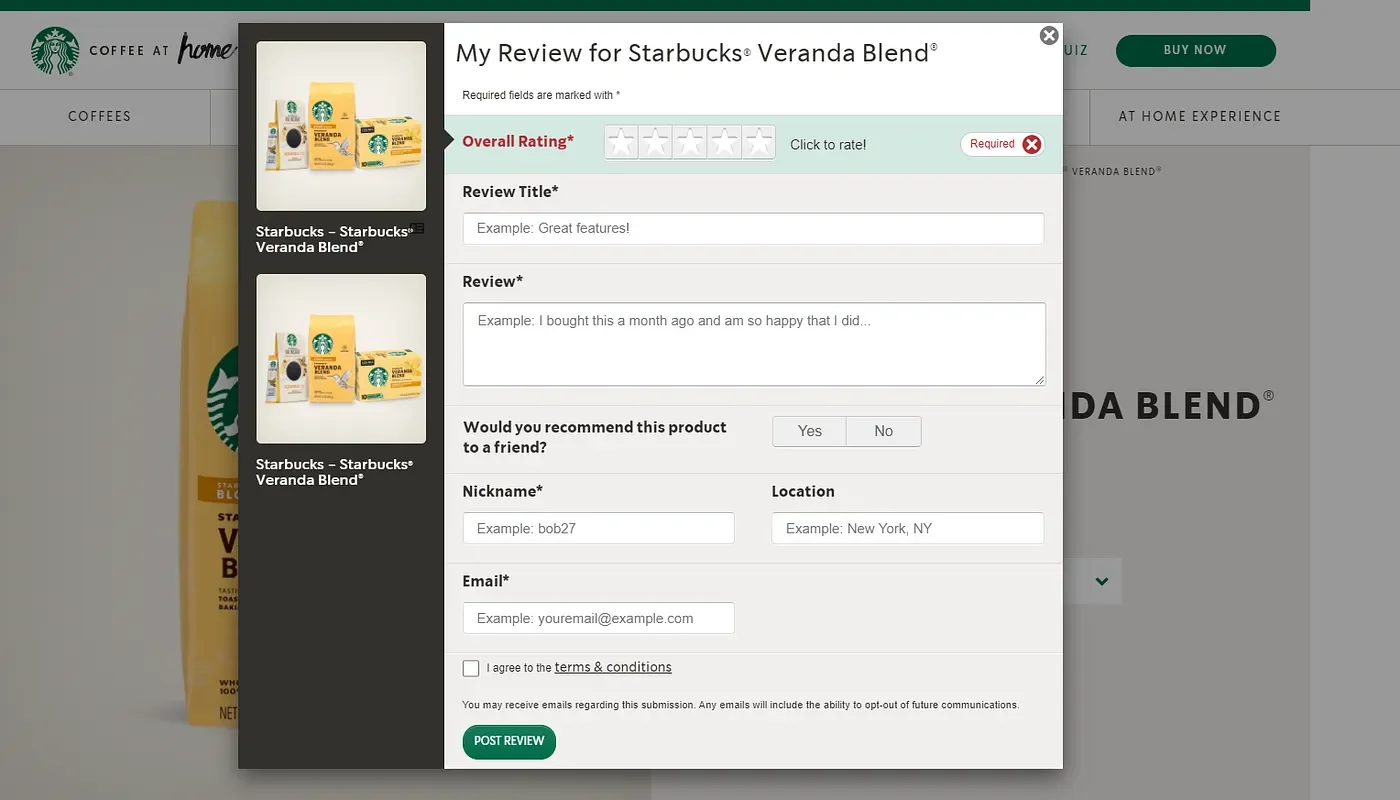
The screenshot shows Starbucks' newer PowerReviews integration without iframes, which removes the parameter surface described above.
What happened, in plain words
Many websites do not build every feature themselves. Instead they rent parts of the page from other companies: a review form from a reviews company, a job application form from a hiring company, a search box from a search company. One common way to drop such a rented feature into a page is an iframe. An iframe is a small window inside a web page that shows a different web page, like a picture-in-picture frame on a television: the outer page stays the same, but the content inside the frame comes from somewhere else.
When a site uses an iframe, the address of the outer page (the URL, the text in the browser's address bar) often carries extra pieces of information called URL parameters. A URL parameter is a small label-and-value pair stuck onto the end of an address, after a question mark, like ?colour=blue. Websites use them to remember choices: which product you are looking at, which style to show, which account's form to load.
Here is the problem. If the outer page uses one of those parameters to decide what the iframe shows, then anyone who can edit the address bar can change it. In this report, a researcher found exactly that on a Starbucks site, athome.starbucks.com. The site used a review service called PowerReviews inside an iframe, and one parameter decided which company's review form was loaded. By changing that parameter, the researcher could make the trusted Starbucks page display a review form belonging to a different PowerReviews customer. In the wrong hands, that form could be made to look like a Starbucks login prompt and used to trick people out of their passwords.
This kind of bug is often called HTTP parameter pollution: the address carries a value that changes what the page loads. The report's advice is simple: if you see a page with interesting parameters in its address, change them and see what happens, especially when they control an iframe.
The tip, and the reports behind it
The concise tip in the report is:
If you run into a page with interesting URL parameters, always tamper with them and see what you can do, especially if they modify an iframe within the page. Depending on what type of integration it is you may be able to inject content into that iframe.
In plain words: when a page's address contains values that seem to change what is displayed, try different values. If the thing being changed is an iframe, the change may let you put your own content inside the page.
The report links to two public bug reports as references:
https://hackerone.com/reports/367589https://hackerone.com/reports/298265
The author notes that they have found the same kind of vulnerability in many different programs, but that none of those other reports were public at the time of writing.
Why third-party services matter
Many websites use third-party services across their pages: review forms, job applications, search functions and more. Sometimes those services are placed into the page with an iframe. When that happens, the address of the outer page often contains parameters that adjust the iframe. Some of these parameters only change how things look; others are identifiers, meaning they name a specific account, form or product. Either way, if a parameter changes what the iframe shows, it is worth experimenting with.
That description is abstract, so the report moves to a concrete example: the Starbucks case.
The Starbucks example
On the Starbucks site, the review feature was a PowerReviews iframe. When a visitor clicked to write a review for a product, several parameters were added to the outer page's address. All of them began with pr, which is the prefix PowerReviews uses, so the prefix itself tells you which service is involved.
One parameter stood out: pr_merchant_id. A merchant ID is simply a unique number or code that identifies a particular business account. Every PowerReviews form has a unique merchant ID tied to the person or company that created it, in the same way every shop in a market has its own stall number. The parameter tells the page which merchant's review form to load.
By changing pr_merchant_id in the address to a different ID, the researcher could load any PowerReviews form on a page within athome.starbucks.com. The report does not reproduce the full URL or the exact value used, but the effect is the important part: a form belonging to someone else appeared inside the trusted Starbucks page.
What an attacker could do with it
In most of these parameter pollution cases, where you can load your own content inside the iframe, the impact is similar to Stored XSS. XSS, short for cross-site scripting, is a class of bug where an attacker gets their own code or content to run inside a trusted website, so victims believe it comes from the site they trust. "Stored" means the malicious content is saved somewhere first and then shown to visitors, rather than being a one-off trick.
Here the attacker's content is a form hosted on the third-party review service. An attacker could design a form on that service that looks like a page asking a victim to log in. They then send the victim the crafted link on the trusted website. The victim sees the phishing form inside the legitimate page and may type their login details into it. Phishing is the practice of imitating a real page to collect someone's credentials.
There is a catch. In many cases, such as PowerReviews or Greenhouse, the attacker first needs an account on the third-party service to create the form. Getting one requires a bit of social engineering, meaning manipulating or persuading people rather than breaking in technically. The researcher did not perform this step because it would have been illegal. That requirement adds a level of difficulty compared with ordinary XSS, which may lower the impact.
The general lesson
Overall, parameter pollution into iframes, especially third-party integration iframes, can lead to content injection similar to Stored XSS and can be a serious vulnerability. Every third-party service works differently, though, so the work lies in figuring out which URL parameters can be modified and how one could inject content into the page.
The screenshot shows Starbucks' newer PowerReviews integration without iframes. Removing the iframe removes the parameter surface described above.
What changed afterwards
Starbucks seems to continue using PowerReviews on athome.starbucks.com, but without iframes any more, which avoids the whole parameter situation in the first place. Greenhouse also appears to avoid iframes entirely now; the report points to GitHub's Greenhouse job integration as an example. The author thanks the Starbucks team for helping with categorisation and HackerOne for disclosing the Greenhouse vulnerability.
Glossary
- URL: the address of a web page, shown in the browser's address bar.
- URL parameter: a label-and-value pair appended to a URL, usually after a question mark, used to pass information to the page.
- iframe: a small window inside a web page that displays a different web page, often from another company.
- Third-party service: a feature provided by another company and embedded in a site, such as a review form or job application form.
- HTTP parameter pollution: a bug where a site accepts a URL parameter value it did not expect and trusts it, letting an attacker change the page's behaviour.
- Merchant ID: a unique code identifying a business account on a service; here, it decides whose review form is loaded.
- Stored XSS: cross-site scripting where an attacker's content is saved and then shown to visitors inside a trusted site.
- Phishing: imitating a real page to trick someone into entering credentials or other sensitive information.
- Social engineering: manipulating people into doing something or giving something up, rather than attacking technology directly.
- Content injection: getting your own content displayed inside someone else's page.
- HackerOne: a platform where security researchers report vulnerabilities to companies and reports can be disclosed publicly.