Hacking Veeam: Several CVEs and $30k Bounties
The post describes several vulnerabilities in Veeam products, including an authentication bypass via a SAML token that fails to validate the issuer, a deserialisation whitelist bypass leading to remote code execution, an NTLM relay attack due to missing extended protection, a local privilege escalation via path traversal, and broken access controls/IDORs. An attacker could gain administrator access, execute code, or escalate privileges.
 Published on blog.voorivex.team
This post is about a program that I've been working on for a couple of months. I will go through the challenges I faced and the vulnerabilities I found, along with some bug bounty tips at the end.
The full write-up lives on its author's site
It belongs to its author, so we link to it rather than copy it. The other two tabs are our own rewrites, checked against it.
Context
This write-up covers a few months of work against Veeam products, all of which are Windows-based: .exe files, DLLs, and several components that talk to each other, such as agents and local web-based platforms. The researcher reports the following findings against the program:
| Finding | Reward | CVE |
|---|---|---|
| Authentication Bypass | $7500 | CVE-2024-29849 |
| Remote Code Execution | $7500 | CVE-2024-42024 |
| NTLM Relay to Account Takeover | $3000 | CVE-2024-29850 |
| Local Privilege Escalation | $3000 | CVE-2024-29853 |
| Broken Access Control & IDORs | not stated | CVE-2024-29852, etc |
The products involved are Veeam Enterprise Manager (VEM), which exposes a REST API channel at https://<enterprise-manager>:9398, and Veeam One, which installs a server, a client and an agent. Veeam One Agent is the component that transmits data between Veeam products, for example Veeam Backup & Replication sending data to the Veeam One server via the agent.
Setup
Most of the bugs were found by auditing the source code rather than by black-box testing, so the first step was decompiling the .NET binaries. The researcher used ILSpy and its ilspycmd command-line tool, driven by this PowerShell script, which iterates over every DLL in the current directory and decompiles each one into its own _src folder:
# Get all DLL files in the current directory
$dllFiles = Get-ChildItem -Filter *.dll

foreach ($dllFile in $dllFiles) {
    # Create a directory with the name filename_src
    $outputDirectory = Join-Path (Get-Location) ($dllFile.BaseName + "_src")
    New-Item -ItemType Directory -Force -Path $outputDirectory | Out-Null

    # Build the ilspycmd command
    $ilspycmdCommand = "ilspycmd $($dllFile.FullName) -p -o $outputDirectory"

    # Execute the ilspycmd command
    Invoke-Expression $ilspycmdCommand
}
With the source in hand, the search strategy was to look for routes and roles, since most of the reported broken access control bugs came from that methodology.
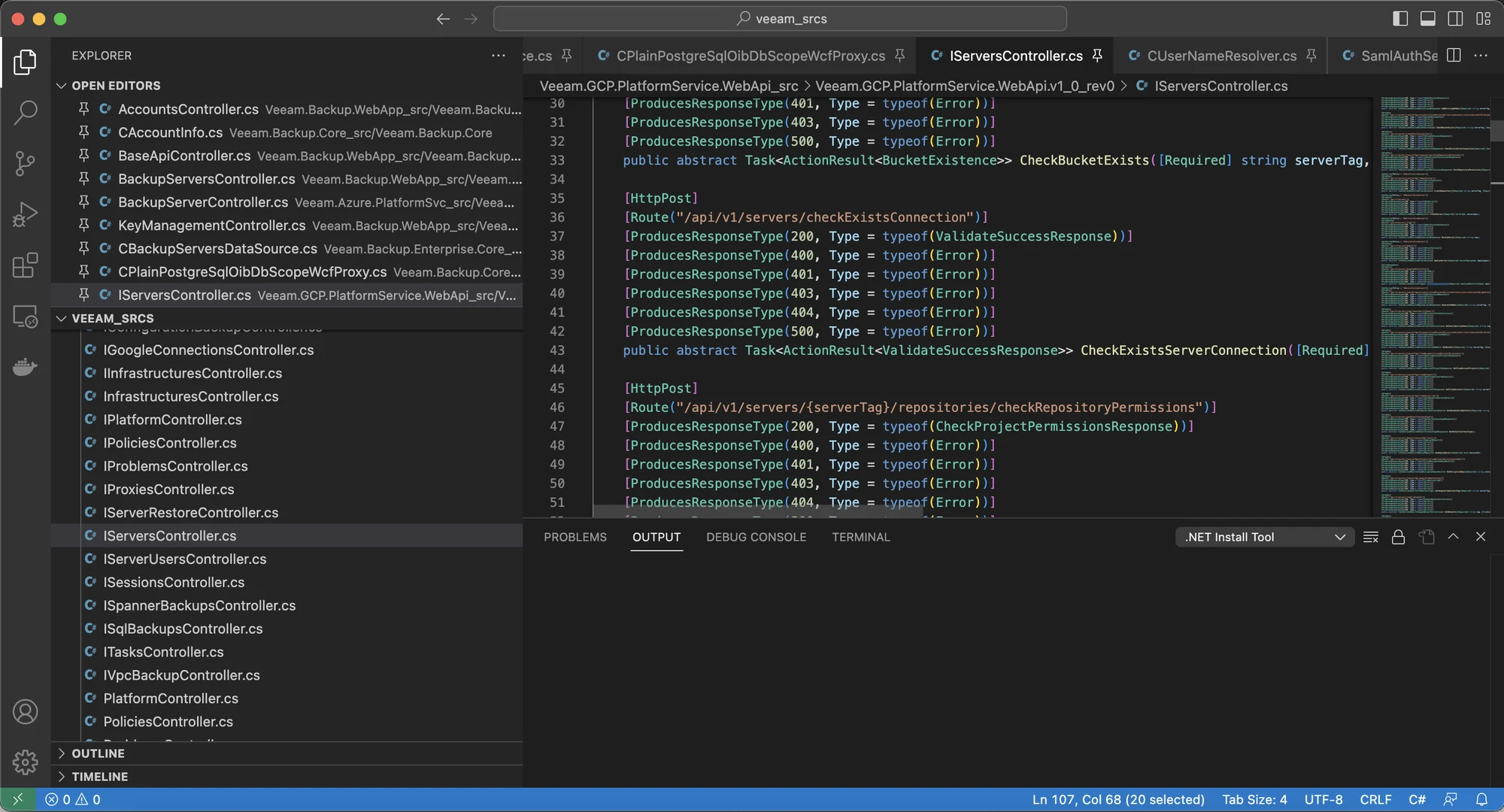
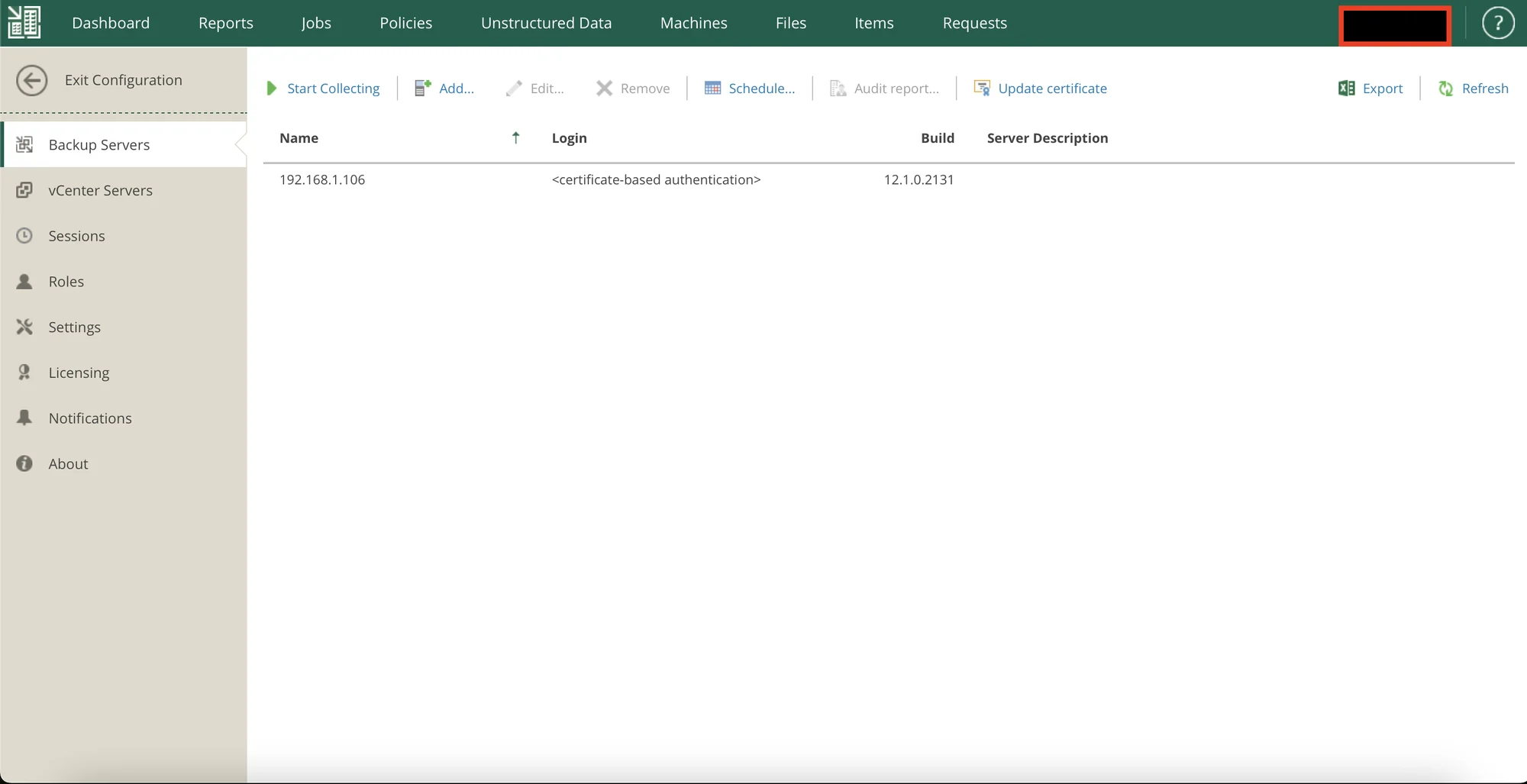
Alongside the code, the researcher used the platforms themselves and read Veeam's help documents to understand the existing roles, the authentication options, and what products like Enterprise Manager actually do.
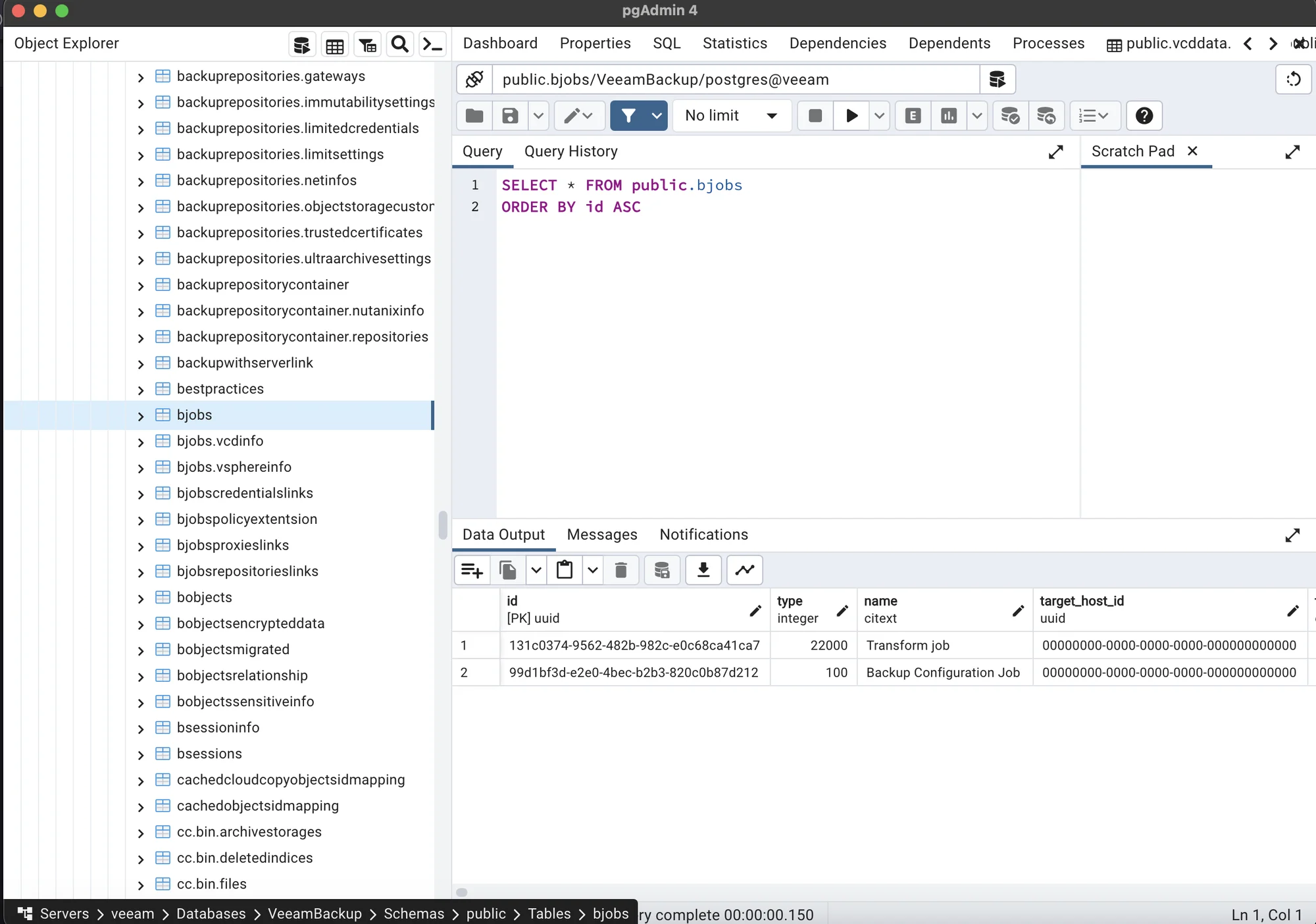
One practical obstacle was infrastructure: testing required installing VMware ESXi, which needs a large machine with plenty of RAM and storage. VEM uses a PostgreSQL database, and the workaround was to insert dummy data directly into the platform's database, which allowed progress through the available features without completing the full setup.
For the access control work on Veeam One, two accounts were created with different permissions, read-only and power user, to test features and their related API endpoints. The researcher also notes that a friend helped with some of the reverse engineering tasks.
Finding it
The login endpoint and its SAML token
While reading the VEM code, the researcher looked at the endpoint responsible for logging in and setting an auth cookie for the end user:
POST https://<enterprise-manager>:9398/api/sessionMngr/?v=latest
The endpoint accepts XML data in this shape:
<LoginSpec xmlns="http://www.veeam.com/ent/v1.0">
<VMwareSSOToken>
Base64EncodedData
</VMwareSSOToken>
</LoginSpec>
The Base64EncodedData is a SAML assertion:
<saml2:Assertion xmlns:saml2="urn:oasis:names:tc:SAML:2.0:assertion">
    <saml2:Issuer>https://[redacted]:8443/websso/SAML2/Metadata</saml2:Issuer>
<saml2:Subject>
        <saml2:NameID>[redacted]</saml2:NameID>
</saml2:Subject>
<saml2:AttributeStatement>
<saml2:Attribute FriendlyName="Group">
            <saml2:AttributeValue>Admin</saml2:AttributeValue>
            <saml2:AttributeValue>User</saml2:AttributeValue>
        </saml2:Attribute>
</saml2:AttributeStatement>
</saml2:Assertion>
It contains a saml2:Issuer, which is the SAML listener, and a saml2:NameID, the account name with the domain you wish to sign in as. Reading the code, the researcher realised the IF condition fails and never validates the protection check. An attacker who sets up a listener and sends a request to the endpoint can retrieve the auth cookie associated with the victim's account, which could be Administrator, and log in without any interaction from the victim.
The deserialisation binder in Veeam One Agent
In the agent, one of the functions responsible for handling data, and specifically for deserialising it, is called CustomSerializationBinder.
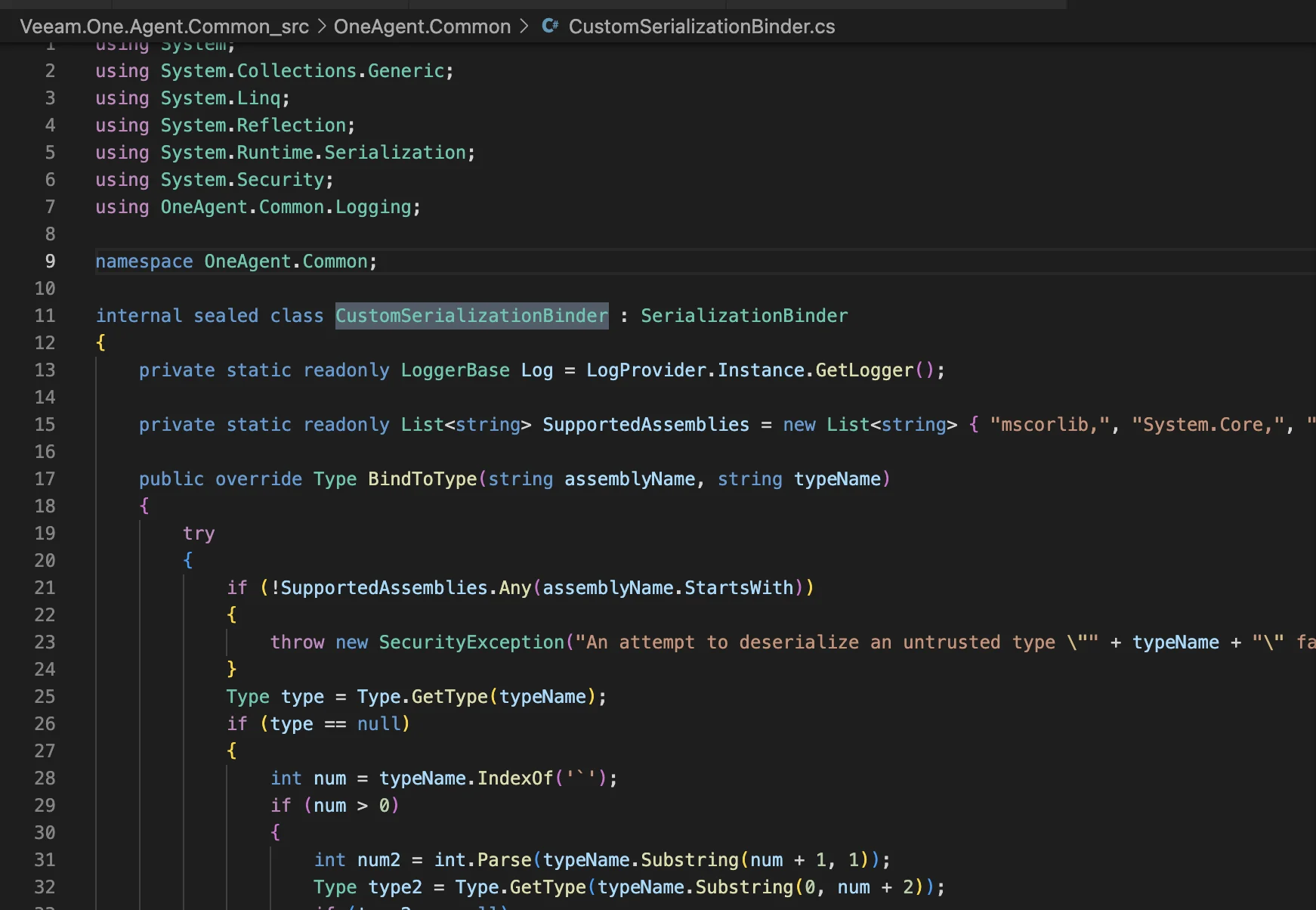
The function has a protection based on a whitelist called SupportedAssemblies; if one of the expected values is not given, the request is malformed and an error is returned.


The Windows authentication endpoint in VEM
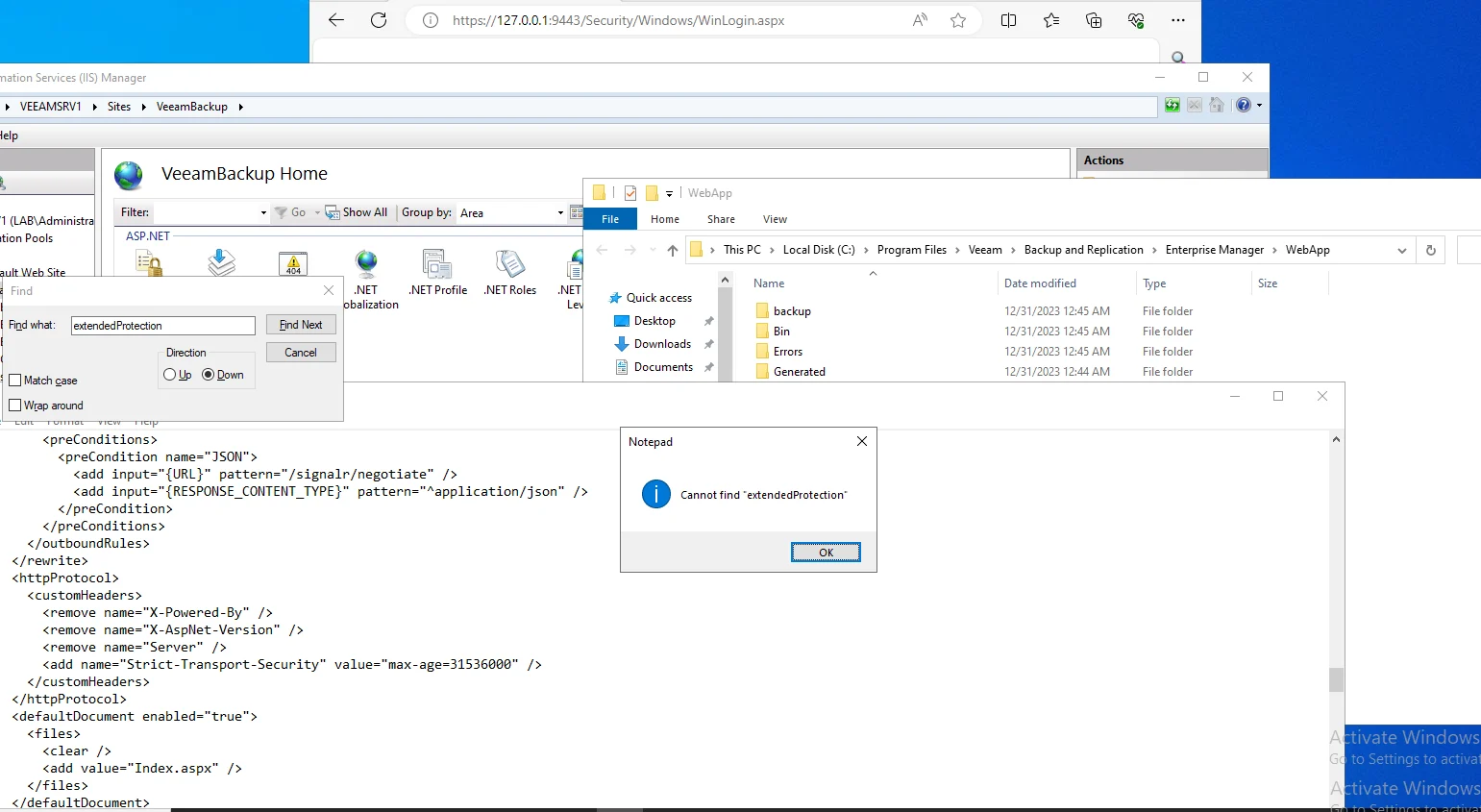
VEM has an endpoint that lets clients authenticate with Windows AD users. Searching through the files after installation, the researcher noticed there is no extendedProtection enabled in the webapp config file.
The agent's DLL resolution
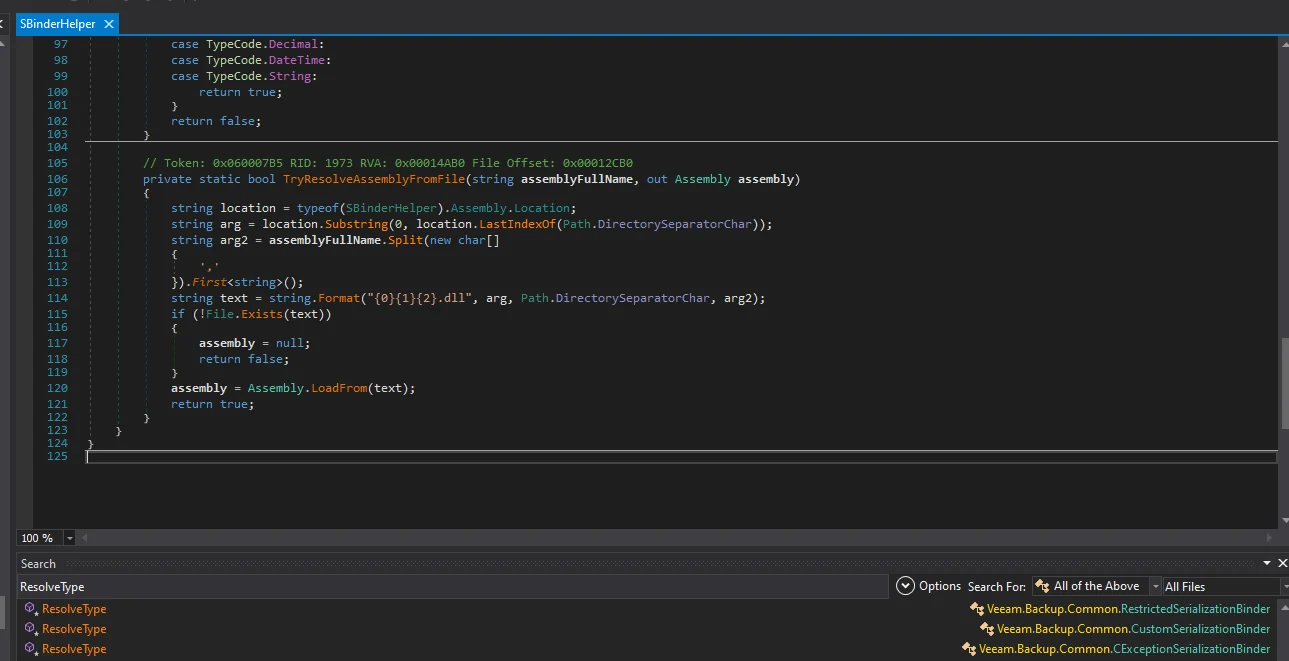
Reviewing the Veeam One source, a section of the agent component is vulnerable to local privilege escalation because of an argument that is controllable by the user. The TryResolveAssemblyFromFile function takes 3 args to format the DLL filename:
string text = string.Format("{0}{1}{2}.dll", arg, Path.DirectorySeparatorChar, arg2);
Roles and the backup repository feature
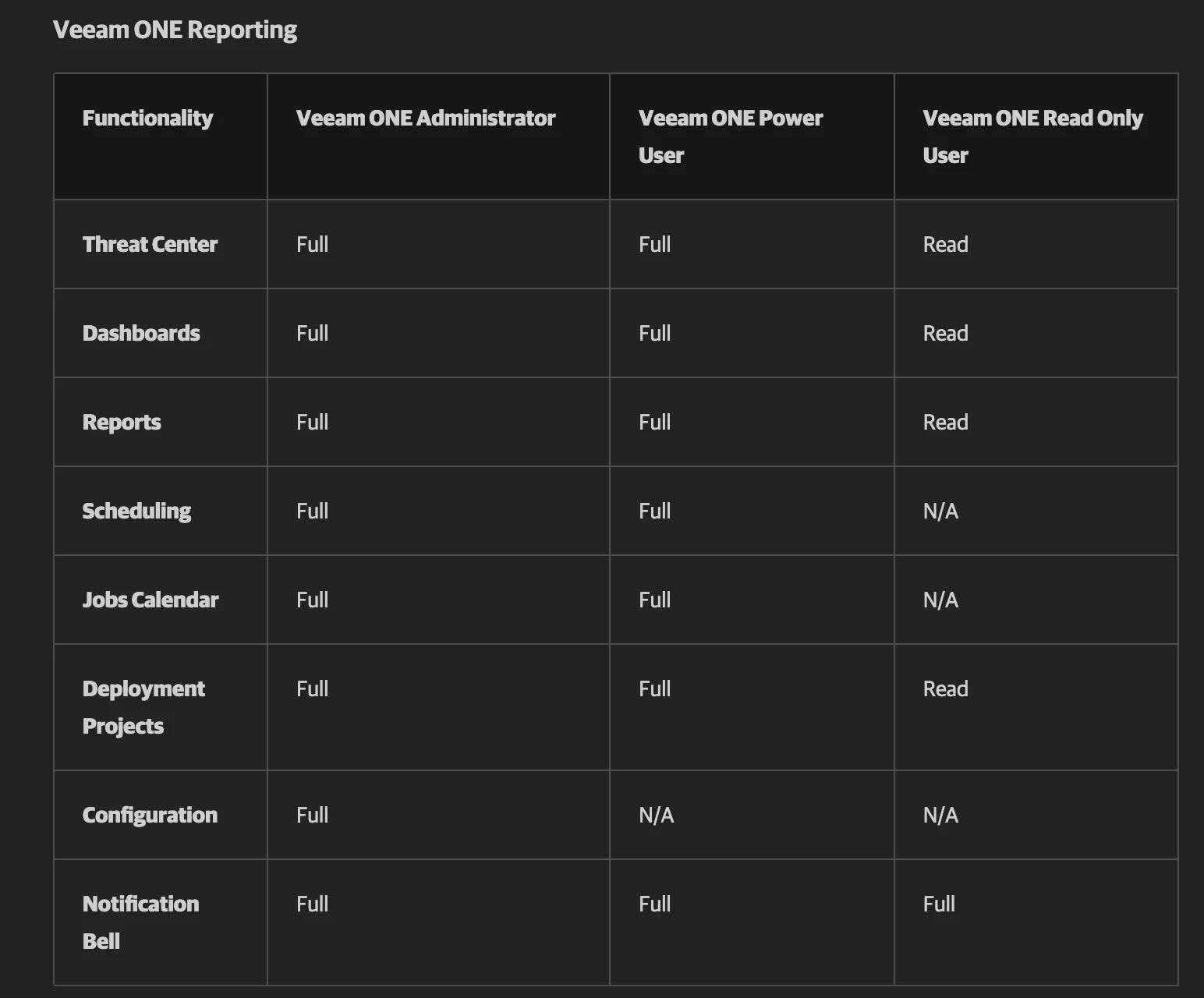
For the access control work, the researcher first needed to understand the different roles and groups in Veeam One. After reading the docs, there are three types of group, each with a set of permissions.
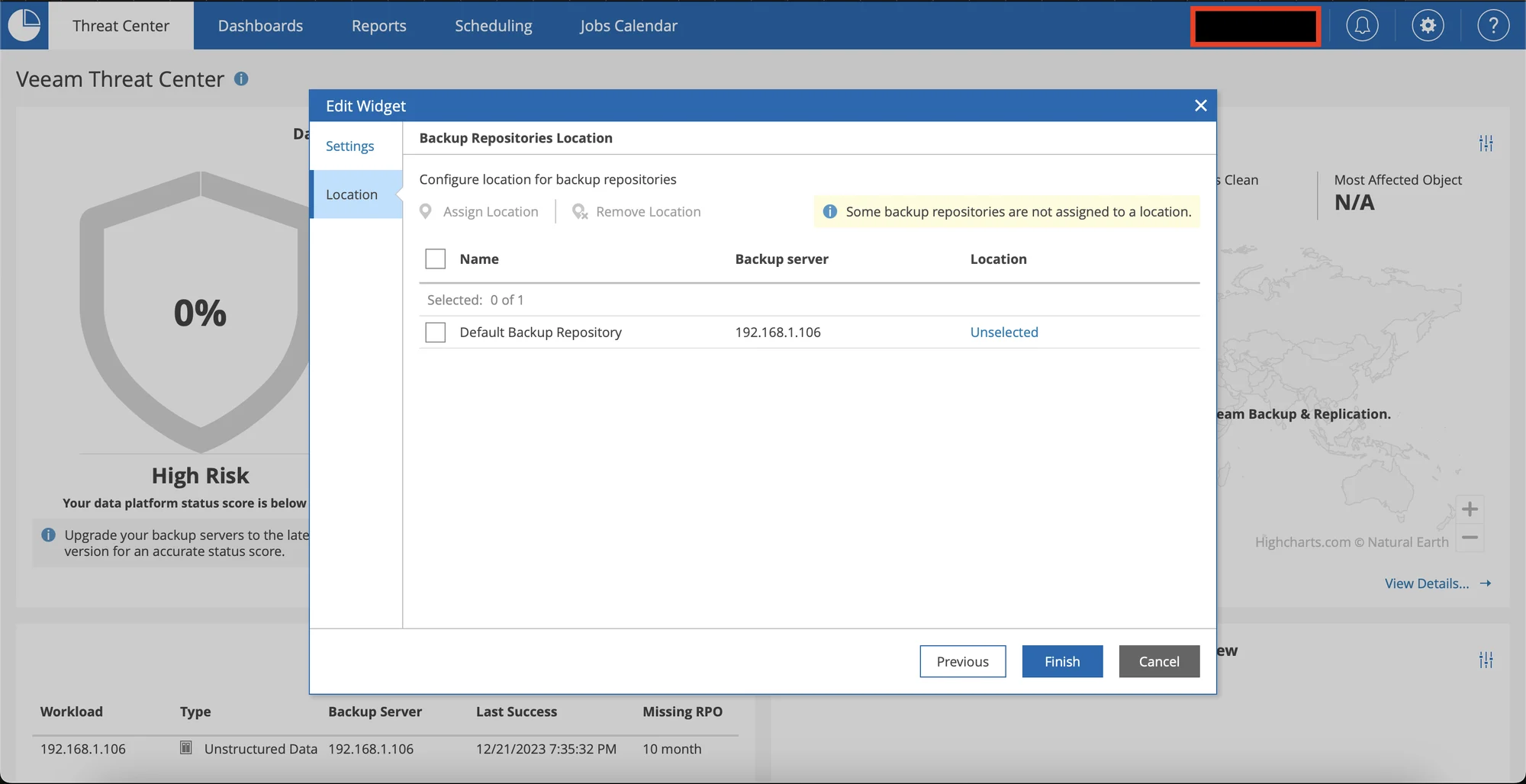
There was a specific section that allowed users to create backup repository locations.
Exploitation
Step 1: Authentication bypass with a forged SAML assertion (CVE-2024-29849)
Calling the endpoint, the first function triggered is LogInAfterAuthentication.
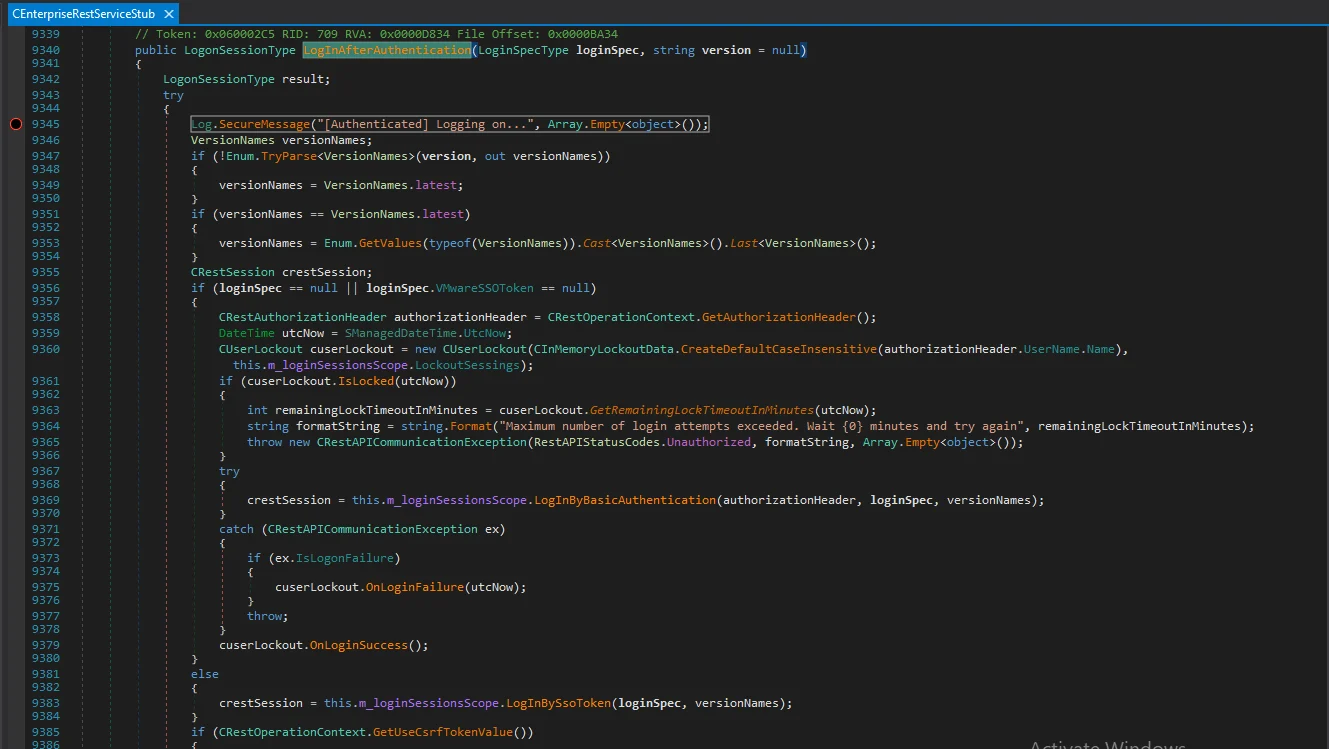
There is a condition (loginSpec == null || loginSpec.VwareSSOToken == null). By providing VMwareSSOToken, the condition is set to false, and execution moves to the next section:
else {
    crestSession = this.m_loginSessionsScope.LogInBySsoToken(loginSpec, versionNames);
}
The LogInBySsoToken code:
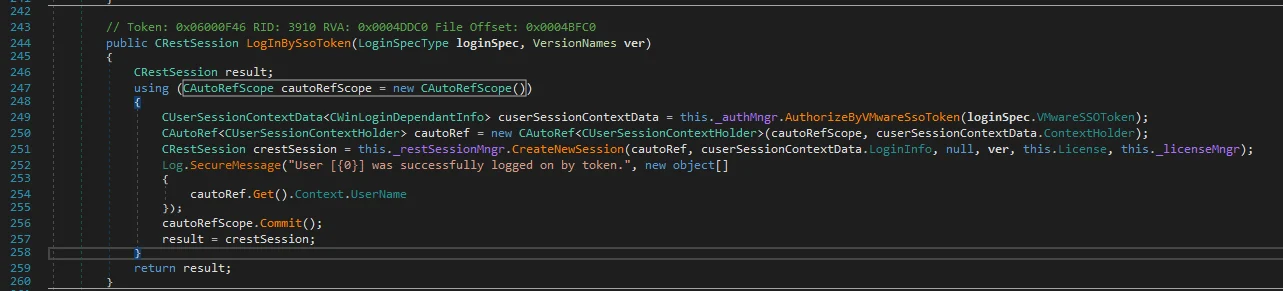
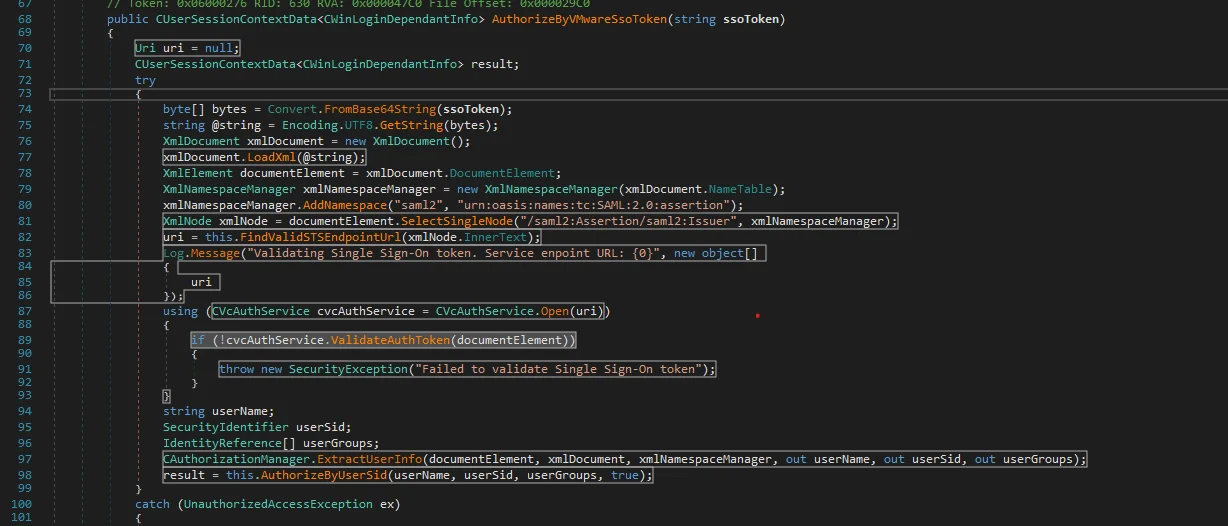
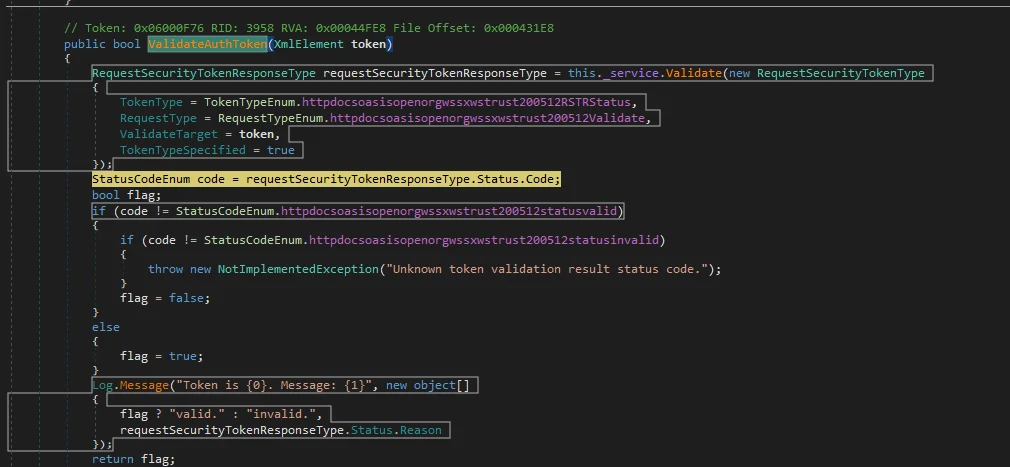
Calling AuthorizeByVMwareSsoToken goes to the next functions, named FindValidsTSEndpointUrl and ValidateAuthToken.
Eventually, due to the failed condition check:
if (CAuthorizationManager.VaidateStsUrl(pluginInfo, out result))
    return result;
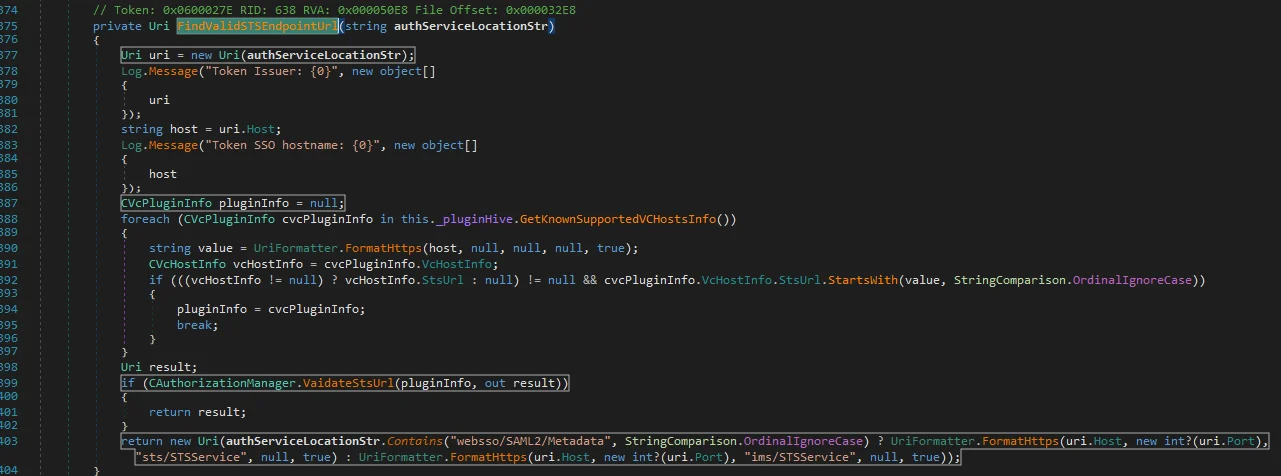
It goes to the end of the code:
return new Uri(authServiceLocationStr.Contains("websso/SAML2/Metadata", StringComparison.OrdinalIgnoreCase)
    ? UriFormatter.FormatHttps(uri.Host, new int?(uri.Port), "sts/STSService", null, true)
    : UriFormatter.FormatHttps(uri.Host, new int?(uri.Port), "ims/STSService", null,
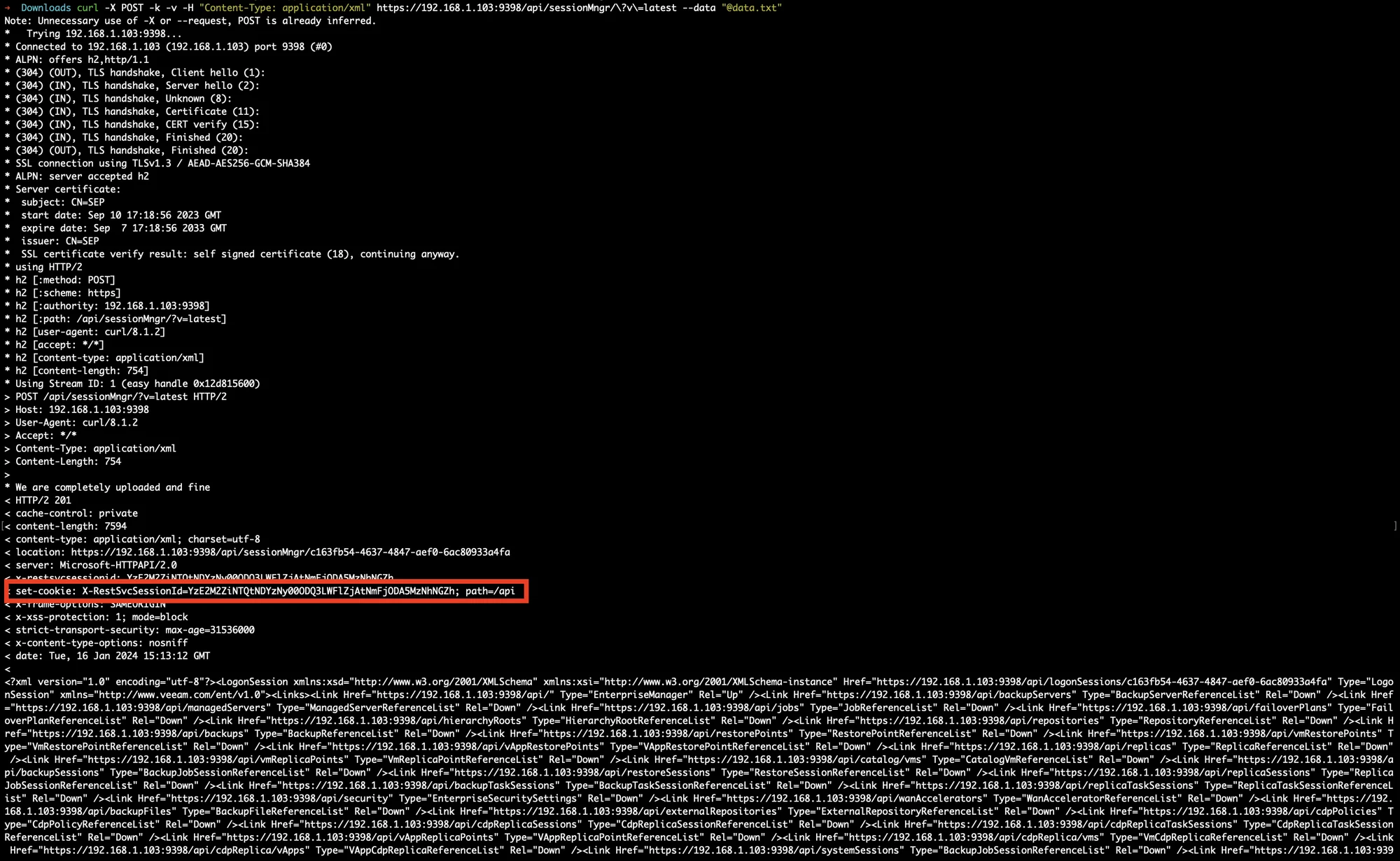
And the attacker receives the set-cookie: X-RestSvcSessionId= linked to the account simply by providing username@domain.
Step 2: RCE on Veeam One Agent (CVE-2024-42024)
The whitelist check in CustomSerializationBinder can be bypassed by passing a valid assemblyName but a different typeName:
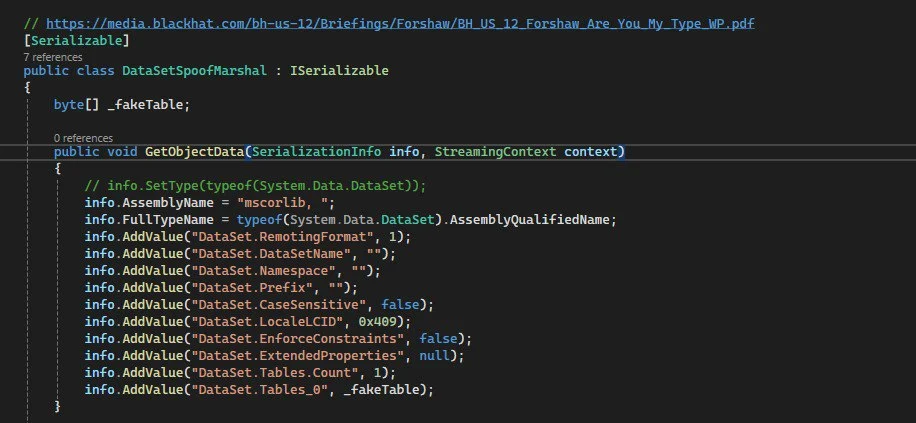
This is the exploitation file. A valid value like mscorlib is provided, but the other argument is controlled by the user and bypassed successfully:
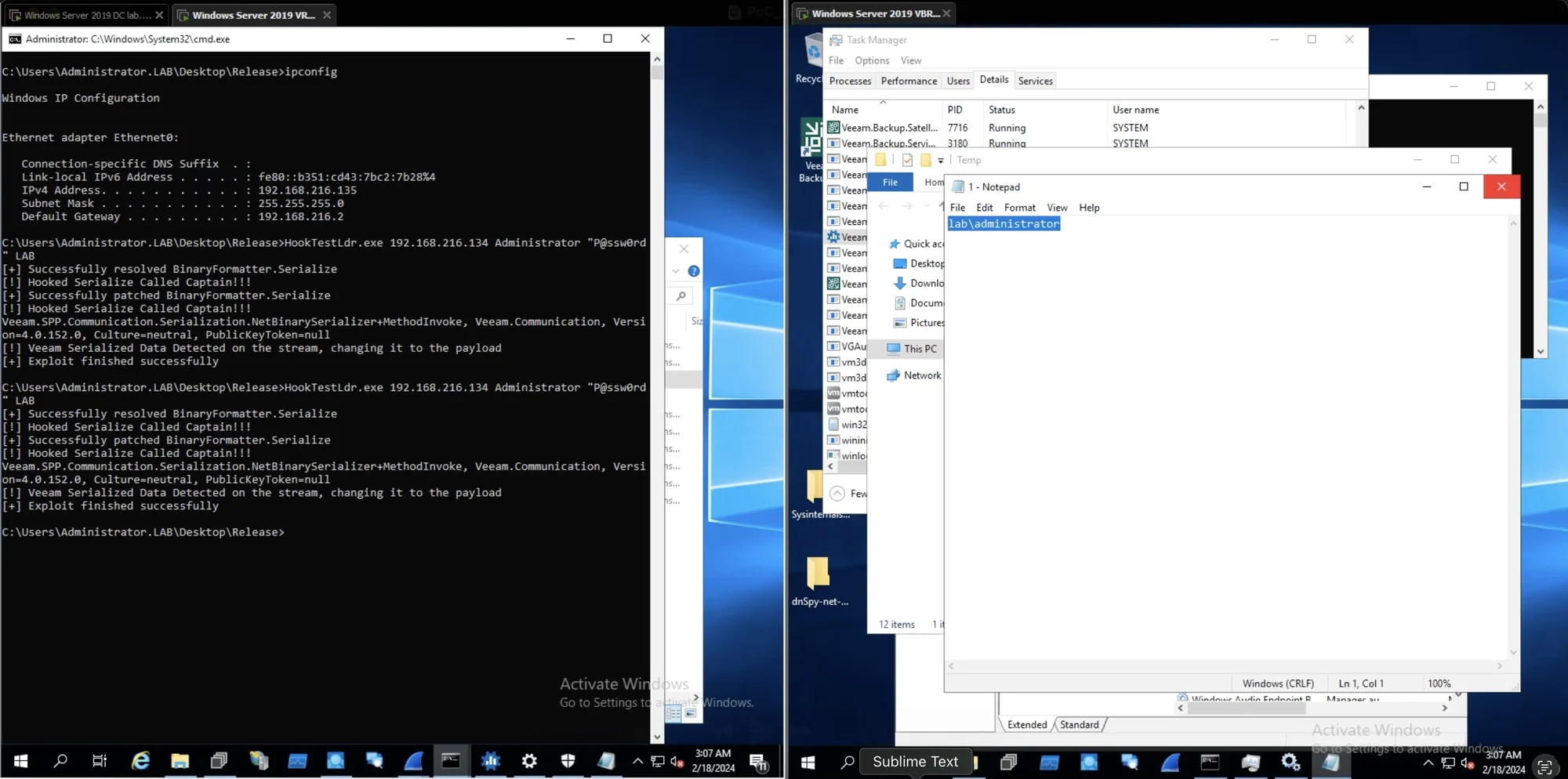
Running whoami command as PoC
Step 3: Account takeover via NTLM relay (CVE-2024-29850)
The researcher was inspired by a blog post on relaying NTLM to MSSQL and looked for a similar bug in Veeam products. The missing extendedProtection in the webapp config means an attacker can relay another user's NTLM session and capture the user's authenticated cookie. This allows the attacker to impersonate the victim and access the Veeam Enterprise Manager platform as an Administrator.
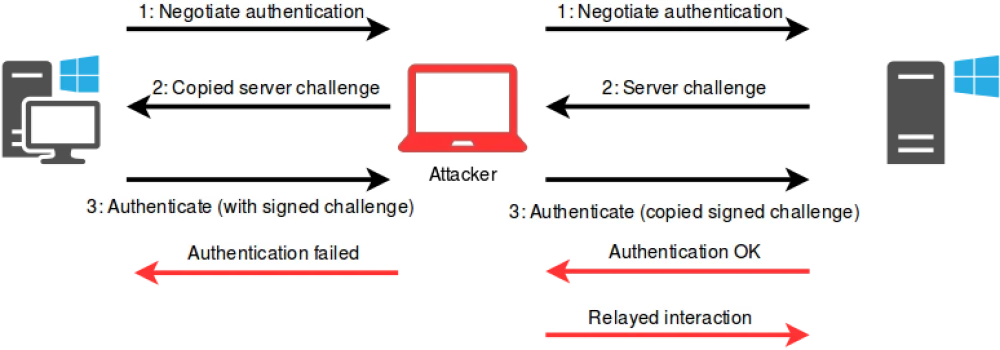
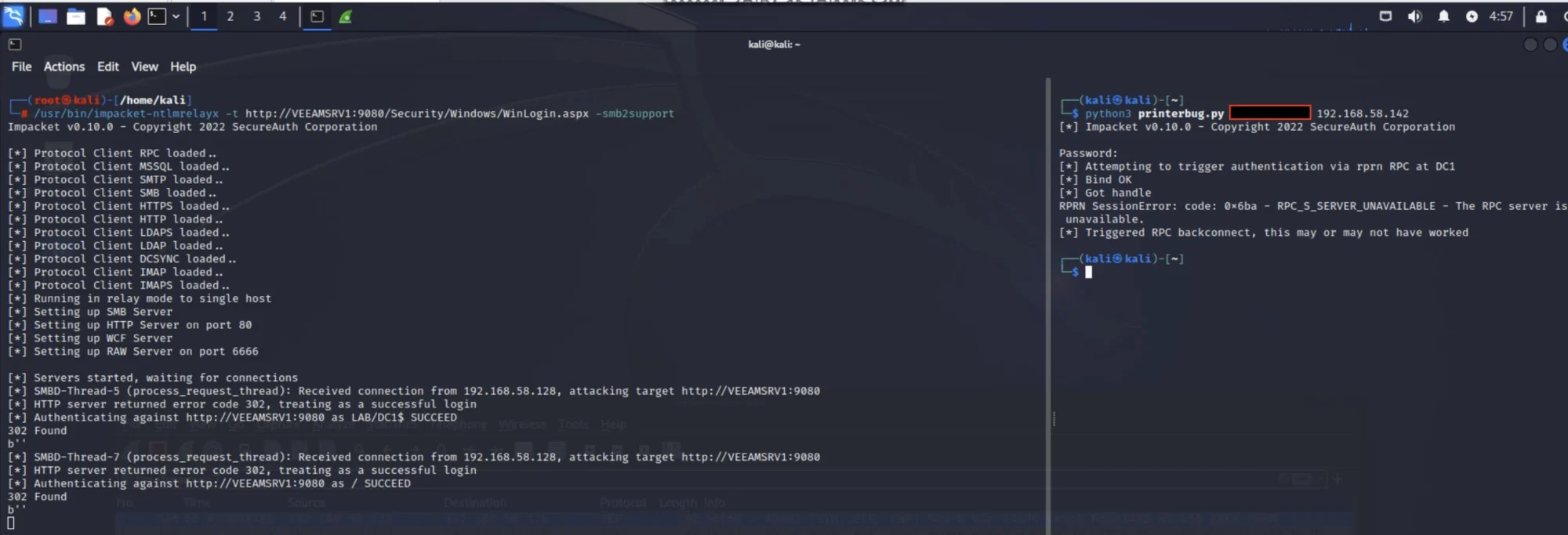
In the example attack scenario, the attacker sets up a listener on the authentication endpoint, which is Security/Windows/Winlogin.aspx, and relays the machine that has an authentication cookie. Using impacket's ntlmrelayx:
/usr/bin/impacket-ntlmrelayx -t http://VEEAMSRV1:9080/Security/Windows/Winlogin.aspx -smb2support
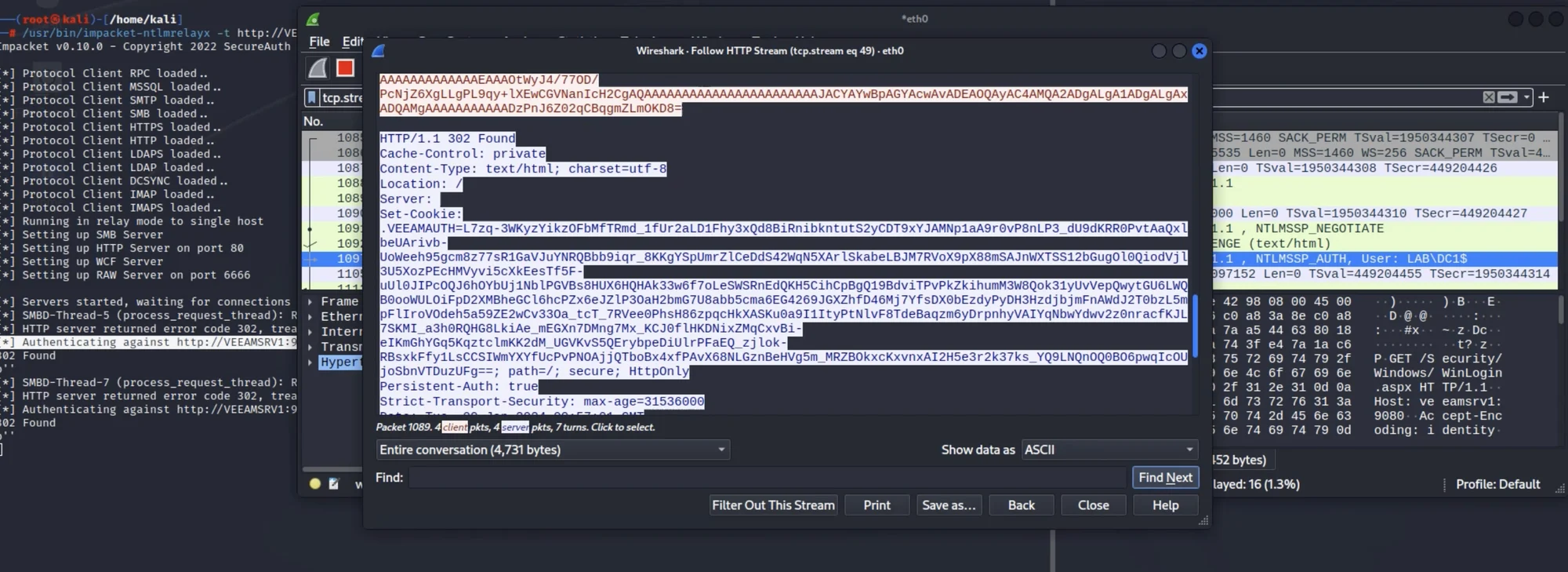
It was possible to grab the victim's machine authentication cookie via Wireshark.
Step 4: Local privilege escalation via Veeam One Agent (CVE-2024-29853)
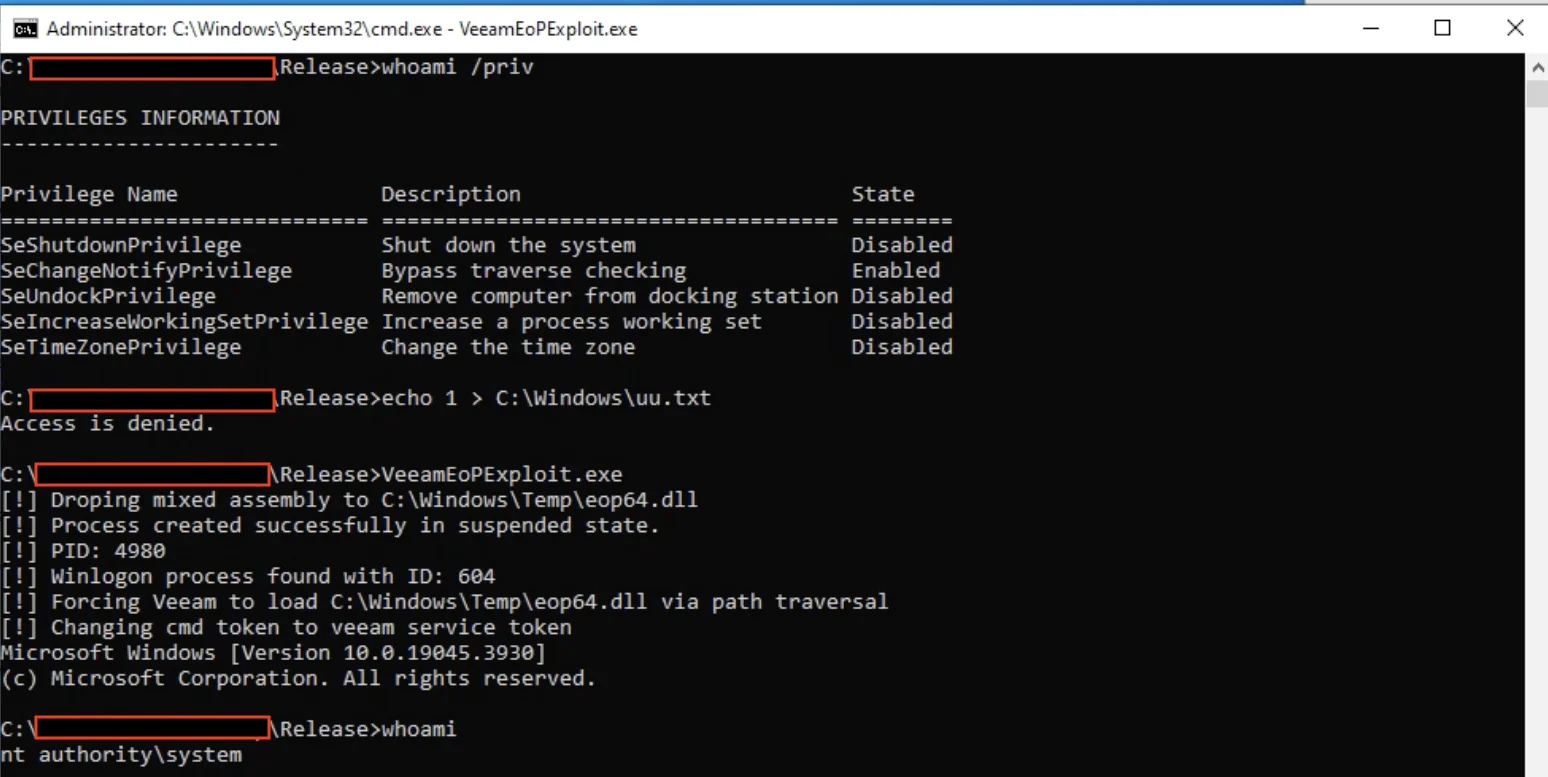
By injecting a malicious DLL, the researcher bypassed the protection with path traversal and escalated the user's role to the local system (administrator).
Step 5: IDOR on Veeam One custom locations (black-box)
With a power user account, a custom location was added. Then, with the read-only user, the researcher tried to delete the related record by providing its ID. Here is the request for removing the related data:
DELETE /api/v2.2/geolocations/cities/{VALUE} HTTP/2
Host: [redacted]:1239
Cookie: {VALUE}
User-Agent: Mozilla/5.0 (Macintosh; Intel Mac OS X 10.15; rv:125.0) Gecko/20100101 Firefox/125.0
Accept: */*
Accept-Language: en-US,en;q=0.5
Accept-Encoding: gzip, deflate, br
Veeam-Connection-Id: {VALUE}
Authorization: Bearer {VALUE}
Content-Type: application/json;charset=utf-8
Content-Length: 2
Origin: https://[redacted]:1239
Referer: https://[redacted]:1239/
Sec-Fetch-Dest: empty
Sec-Fetch-Mode: cors
Sec-Fetch-Site: same-origin
X-Pwnfox-Color: yellow
Te: trailers

[]
Using another numerical value like 1, 2, etc. resulted in the data added by the power user being removed by the read-only user, contrary to what the documents described.
Step 6: Finding the same class of bug in the source (white-box)
Two methods were used to find these bugs. The first was identifying API endpoints and their related functions.
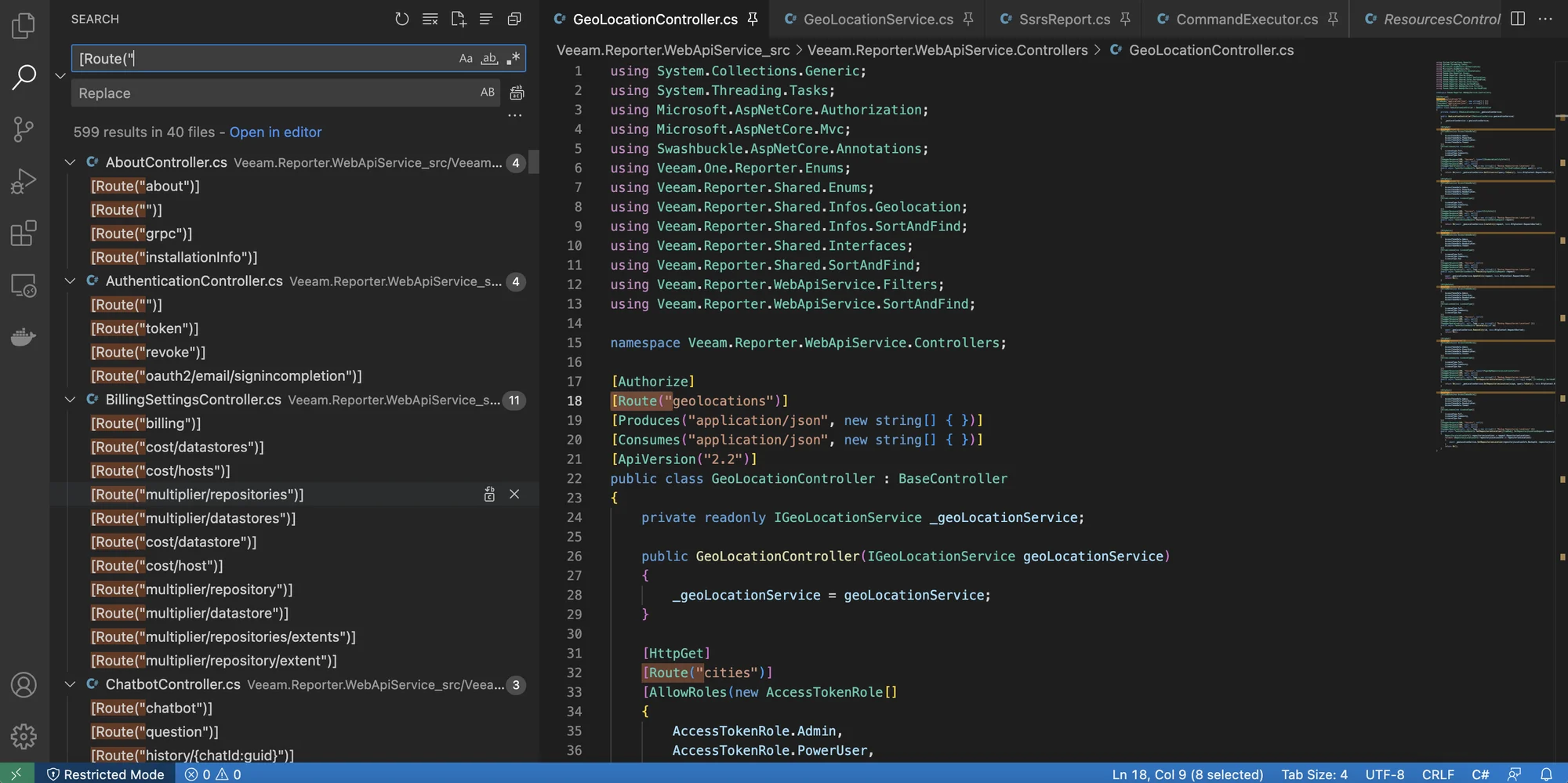
For example, most of the Veeam One APIs could be found by searching for [route(" in the source code and reading each one to see which user groups have the right to call the respective endpoint.
The second method involved finding the bug with the black-box approach and then searching for similar vulnerable endpoints in the source code. Here is the actual vulnerable code for deleting custom locations:
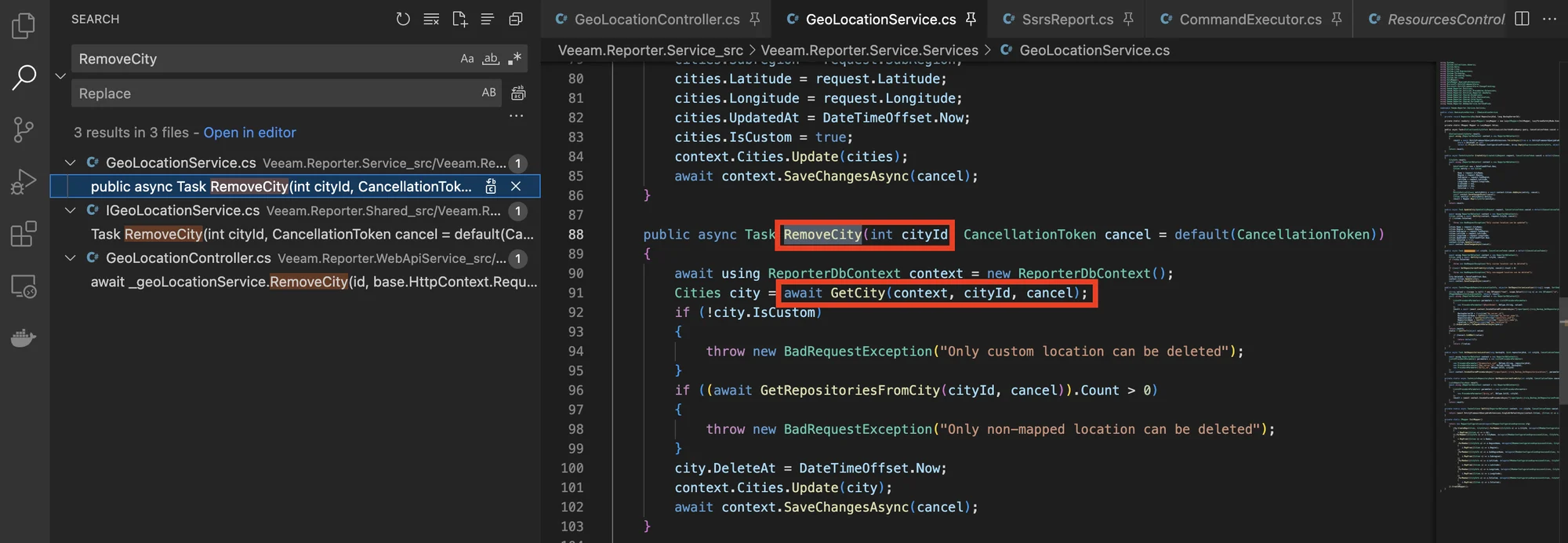
It takes an argument int CityId and passes it to the GetCity function directly without checking which user created the value, leading to the IDOR vulnerability.
Root cause
CVE-2024-29849. The IF condition in LogInAfterAuthentication fails and never validates the protection check, and the later CAuthorizationManager.VaidateStsUrl check fails in a way that lets execution fall through to the code that returns the STS service URI. The result is that a session cookie for an arbitrary username@domain is issued without any interaction from that user. The researcher notes the component is vulnerable whether SSO is enabled or not.
CVE-2024-42024. CustomSerializationBinder relies on a whitelist of SupportedAssemblies, but the check can be satisfied with a valid assemblyName while the typeName is attacker-controlled, so the whitelist does not constrain what actually gets deserialised.
CVE-2024-29850. The webapp config file has no extendedProtection enabled, so NTLM authentication on Security/Windows/Winlogin.aspx can be relayed and the resulting authenticated cookie captured.
CVE-2024-29853. TryResolveAssemblyFromFile builds a DLL filename with string.Format("{0}{1}{2}.dll", arg, Path.DirectorySeparatorChar, arg2), where an argument is controllable by the user. That allows path traversal and loading of a malicious DLL.
IDOR. The delete handler takes int CityId and passes it to GetCity directly without checking which user created the value.
Impact
- CVE-2024-29849: an attacker who sets up a listener and sends a request to the endpoint can retrieve the auth cookie associated with the victim's account, which could be Administrator, and log in to the platform successfully without any interaction needed.
- CVE-2024-42024: remote code execution on the Veeam One Agent, demonstrated by running
whoami. - CVE-2024-29850: an attacker can relay another user's NTLM session, capture the user's authenticated cookie, impersonate the victim and access the Veeam Enterprise Manager platform as an Administrator.
- CVE-2024-29853: escalation of the user's role to the local system (administrator).
- IDOR: a read-only user can delete records created by a power user, contrary to the documented permissions.
Fix
The report does not describe the vendor's patches or the code changes made.
Variants to test
- Other SAML-consuming endpoints. Send a
LoginSpecwith aVMwareSSOTokenwhosesaml2:NameIDnames a privileged account and whosesaml2:Issuerpoints at a listener you control. A positive result is aset-cookie: X-RestSvcSessionId=for that account. - Other serialisation binders. Look for whitelists keyed on assembly name only, and try a valid
assemblyNamewith a differenttypeName. A positive result is deserialisation of your type instead of an error. - Other Windows authentication endpoints. Check webapp config files for a missing
extendedProtectionand try relaying NTLM to the login endpoint withimpacket-ntlmrelayx. A positive result is a captured authenticated cookie. - Other
string.Formatpath builders. Search decompiled code for filenames assembled from user-controlled arguments and try path traversal into a DLL you control. A positive result is your DLL being loaded. - Other object-ID handlers. Take an ID created by a higher-privileged account and call the endpoint with a lower-privileged account, as with
DELETE /api/v2.2/geolocations/cities/{VALUE}. A positive result is the record being removed. - Route enumeration. Search the source for
[route("and read each handler to see which groups may call it; then repeat the black-box test against any handler that lacks an ownership check.
What happened, in plain words
A security researcher spent a couple of months testing software made by a company called Veeam. Veeam makes backup software: programs that copy and store copies of a company's computers and servers so that nothing is lost if something breaks. The researcher found several problems in that software and reported them to the company, which paid a reward for most of them. This kind of paid reporting is called a bug bounty.
The five problems were:
| Problem | Reward | Official ID |
|---|---|---|
| --- | --- | |
| Authentication Bypass | $7500 | CVE-2024-29849 |
| Remote Code Execution | $7500 | CVE-2024-42024 |
| NTLM Relay to Account Takeover | $3000 | CVE-2024-29850 |
| Local Privilege Escalation | $3000 | CVE-2024-29853 |
| Broken Access Control & IDORs | not stated | CVE-2024-29852, etc |
A few words before we start. A CVE is a public catalogue number for a known security flaw. When a company fixes a flaw, it gets a number like CVE-2024-29849 so that everyone can look it up and know exactly which problem is meant. Think of it like a case number at a police station: it does not tell you what happened, it just lets people refer to the same case.
An authentication bypass means getting into an account without knowing the password, or without the real owner doing anything. Remote code execution means making someone else's computer run commands of your choosing, from a distance. Account takeover means ending up in control of somebody else's account. Local privilege escalation means starting as an ordinary user on a machine and ending up with the highest level of power on that same machine. Broken access control means the software lets a user do things they should not be allowed to do, and an IDOR (Insecure Direct Object Reference) is a specific kind of that: the software identifies records by a simple number, and it never checks whether the person asking for number 5 is allowed to see or change number 5.
The products involved are Veeam Enterprise Manager (often shortened to VEM) and Veeam One. Enterprise Manager is a web-based control panel: you open it in a browser, log in, and manage backups from there. It also offers a REST API channel at https://<enterprise-manager>:9398. An API is a way for programs to talk to each other over the network, the same way a website talks to your browser, but with data instead of pretty pages. When you click a button in a web page, the page often sends a request to an API behind the scenes and shows you the answer. Veeam One installs a server, a client and an agent. An agent is a small helper program that runs on a machine and passes messages between bigger programs. In Veeam's case, the Veeam One Agent transmits data between Veeam products, for example Veeam Backup & Replication sending data to the Veeam One server through the agent.
Setting up to look at the code
Most of the bugs were found by reading the program's source code, not by poking at the running product blindly. Testing a running product without seeing its code is called black-box testing: you can only observe what goes in and what comes out, like judging a locked box by shaking it. Reading the code is called white-box testing: you can see the machinery inside. The researcher mostly worked white-box, because the code makes it obvious where the interesting checks are, and where they are missing.
Veeam's products are Windows programs. They are shipped as .exe files and DLL files. A DLL is a library file: a bundle of code that other programs load and use, a bit like a shared toolbox that several workers borrow from. The code inside these files is not plain text; it is compiled, meaning it has been translated into a form the computer can run. To read it, you have to translate it back, which is called decompiling or reverse engineering.
The researcher used a free tool called ILSpy, and specifically its command-line version ilspycmd, to decompile every DLL. Rather than typing the command once per file, this PowerShell script walks through all the DLLs in the current folder and decompiles each one into its own folder:
# Get all DLL files in the current directory
$dllFiles = Get-ChildItem -Filter *.dll

foreach ($dllFile in $dllFiles) {
    # Create a directory with the name filename_src
    $outputDirectory = Join-Path (Get-Location) ($dllFile.BaseName + "_src")
    New-Item -ItemType Directory -Force -Path $outputDirectory | Out-Null

    # Build the ilspycmd command
    $ilspycmdCommand = "ilspycmd $($dllFile.FullName) -p -o $outputDirectory"

    # Execute the ilspycmd command
    Invoke-Expression $ilspycmdCommand
}
Line by line:
$dllFiles = Get-ChildItem -Filter *.dllasks Windows for a list of every file in the current folder whose name ends in.dll, and stores that list in a variable called$dllFiles. A variable is just a named box that holds a value.foreach ($dllFile in $dllFiles) {starts a loop: the instructions between the braces are repeated once for each file in the list, and inside the loop$dllFilemeans "the file we are on right now".$outputDirectory = Join-Path (Get-Location) ($dllFile.BaseName + "_src")builds the name of the folder where the decompiled code will go.Get-Locationis the current folder,$dllFile.BaseNameis the file's name without the.dllpart, and"_src"is appended to it. Sobackup.dllbecomes a folder calledbackup_src.New-Item -ItemType Directory -Force -Path $outputDirectory | Out-Nullactually creates that folder.-Forcemeans "do not complain if it already exists", and| Out-Nullthrows away the confirmation message so the screen stays readable.$ilspycmdCommand = "ilspycmd $($dllFile.FullName) -p -o $outputDirectory"assembles the text of the command to run: decompile this file, with the-poption (produce a project, that is, a set of source files rather than one big dump), and write the output (-o) into the folder we just made.Invoke-Expression $ilspycmdCommandruns that assembled text as a command.
With readable source code in hand, the researcher started looking for places worth testing. The chosen strategy was to look for routes and roles. A route is a URL path the program answers on, like /api/sessionMngr/; a role is a permission level, like "administrator" or "read-only user". Most of the access control bugs reported in this work came from exactly this method: find a route, find which roles are supposed to reach it, and check whether the code actually enforces that.
The screenshot shows the researcher searching the decompiled source for routes and roles, which is the starting point described above.
Reading code alone is not enough, though. The researcher also used the products themselves and read Veeam's help documents, to understand which roles exist, what the authentication options are, and what a product like Enterprise Manager actually does.
The image shows the Veeam Enterprise Manager help documentation being consulted for that purpose.
One practical obstacle was hardware. Properly testing the product required installing VMware ESXi, a system for running virtual machines. A virtual machine is a computer simulated inside another computer, like a flat packed inside a flat. Running it needs a large machine with plenty of memory (RAM) and disk space. To avoid that setup, the researcher used a shortcut: VEM stores its data in a PostgreSQL database, and dummy data was inserted directly into that database. A database is an organised store of records, like a very strict spreadsheet. Inserting rows by hand let the researcher move forward through the product's features without completing the full installation.
The screenshot shows dummy rows inserted directly into the Postgres database behind the platform.
For the access control work on Veeam One, two accounts were created with different permission levels, read-only and power user, so that the same feature could be tried from both sides. The researcher also mentions that a friend helped with some of the reverse engineering tasks.
Finding the problems
The login endpoint and its SAML token
While reading the VEM code, the researcher looked at the endpoint responsible for logging a user in and giving them an authentication cookie. A cookie is a small piece of text that a website hands to your browser after you log in, and that your browser sends back with every later request so the site knows who you are. It works like a cloakroom ticket: show the ticket, get your coat, no need to prove your identity again. If someone else gets your ticket, they get your coat.
The endpoint is:
POST https://<enterprise-manager>:9398/api/sessionMngr/?v=latest
POST is the kind of request used to send data to a server (as opposed to GET, which just asks for a page). The address points at the Enterprise Manager machine on port 9398, and /api/sessionMngr/ is the session manager, the part that deals with logins. ?v=latest says "use the latest version of this API".
The endpoint accepts XML data. XML is a way of writing structured data using tags in angle brackets, a bit like nested labelled boxes. The expected shape is:
<LoginSpec xmlns="http://www.veeam.com/ent/v1.0">
<VMwareSSOToken>
Base64EncodedData
</VMwareSSOToken>
</LoginSpec>
This says: here is a login specification (LoginSpec), and inside it a VMwareSSOToken whose content is some encoded data. Base64 is a way of turning arbitrary data into plain letters and digits so it can travel safely inside text; it is not encryption, anyone can decode it.
The decoded data is a SAML assertion. SAML is a standard for login messages: one system says to another "this person is who they claim to be, here are their details", signed or at least structured in a standard way. SSO, single sign-on, is the idea behind it: log in once with a central identity system and be let into many applications without typing the password again. A SAML assertion is like a letter of introduction from a trusted office. The whole security of the scheme rests on the receiving application checking that the letter really came from the trusted office.
The assertion in the report looks like this:
<saml2:Assertion xmlns:saml2="urn:oasis:names:tc:SAML:2.0:assertion">
    <saml2:Issuer>https://[redacted]:8443/websso/SAML2/Metadata</saml2:Issuer>
<saml2:Subject>
        <saml2:NameID>[redacted]</saml2:NameID>
</saml2:Subject>
<saml2:AttributeStatement>
<saml2:Attribute FriendlyName="Group">
            <saml2:AttributeValue>Admin</saml2:AttributeValue>
            <saml2:AttributeValue>User</saml2:AttributeValue>
        </saml2:Attribute>
</saml2:AttributeStatement>
</saml2:Assertion>
Reading it in plain words:
saml2:Issuernames who issued the assertion. Here it points at a SAML listener, the service that is supposed to vouch for users.saml2:Subjectwithsaml2:NameIDnames the account being asserted, written asusername@domain. In the example it is[redacted], an administrator account on a lab domain.saml2:AttributeStatementcarries extra facts about the user, here a group attribute listingAdminandUser.
Reading the code, the researcher realised that the IF condition fails and never validates the protection check. In plain terms: the protection check did not work. An attacker who sets up their own listener and sends a request to this endpoint can therefore receive the authentication cookie belonging to the victim's account, which could be Administrator, and log in to the platform without the victim doing anything at all.
The deserialisation binder in Veeam One Agent
In the agent, one of the functions responsible for handling data, and specifically for turning it back into objects, is called CustomSerializationBinder. Some background first. Programs often need to send complex data over a network, so they serialise it: they flatten an object into a stream of bytes. The receiver deserialises it: it turns the bytes back into a live object. A binder is the part that decides which class of object a piece of incoming data should become. This is a sensitive spot, because if an attacker can influence which class gets created, they can sometimes make the program create a class that does something dangerous when it is built. That is the essence of a deserialisation vulnerability.
The image shows the decompiled CustomSerializationBinder function.
The function has a protection based on a whitelist called SupportedAssemblies. A whitelist is a list of things that are allowed, and everything not on the list is refused, like a guest list at a door. An assembly in .NET is a packaged unit of compiled code, roughly what a DLL is. So the binder was meant to accept only objects from a known set of assemblies. If one of the expected values is not given, the request is malformed and an error is returned.
The two images show the SupportedAssemblies whitelist and the error returned for malformed requests.
The Windows authentication endpoint in VEM
VEM has an endpoint that lets clients authenticate with Windows AD users. AD, Active Directory, is Microsoft's directory of users and machines in a company network; when you log in to a work PC, AD is usually what checks your password. NTLM is an older Microsoft authentication protocol used for that. It works by a challenge and response: the server sends a random challenge, the client proves it knows the password by computing a response from it, without sending the password itself. The weakness is that the response can be captured and replayed to a different server that accepts the same kind of proof. That replay is called an NTLM relay, and it is like someone photographing your signed permission slip and handing the photo to a different guard.
Searching through the files after installation, the researcher noticed there is no extendedProtection enabled in the webapp config file. Extended protection is a Windows setting that ties an authentication exchange to the specific service it was meant for, so a captured response cannot be reused against another service. Without it, a relay becomes possible.
The image shows the webapp config file with the extendedProtection setting missing.
The agent's DLL resolution
Reviewing the Veeam One source, a section of the agent component is vulnerable to local privilege escalation because of an argument that is controllable by the user. The TryResolveAssemblyFromFile function takes 3 args to format the DLL filename:
string text = string.Format("{0}{1}{2}.dll", arg, Path.DirectorySeparatorChar, arg2);
In plain words: string.Format builds a piece of text from a template. The template is "{0}{1}{2}.dll", where {0}, {1} and {2} are slots filled by the three values that follow. Slot 0 gets arg, slot 1 gets Path.DirectorySeparatorChar (the slash character that separates folders in a path), and slot 2 gets arg2, then .dll is appended. So the result is a filename like something\something.dll. If arg or arg2 can be influenced by a user, the user can influence the path, and paths are how you reach files outside the intended folder. That trick is called path traversal: using .. and slashes to climb out of the folder the program meant you to stay in, like writing "../../kitchen" on a delivery address to get somewhere you were not supposed to go.
The image shows the decompiled TryResolveAssemblyFromFile function.
Roles and the backup repository feature
For the access control work, the researcher first needed to understand the different roles and groups in Veeam One. After reading the docs, there are three types of group, each with a set of permissions.
The image shows the three group types in Veeam One and their permissions.
There was a specific section that allowed users to create backup repository locations. A backup repository is simply where backup copies are stored, a disk or a folder somewhere. The feature lets an administrator describe such a location in the product.
The image shows the backup repository location screen in Veeam One.
Exploiting the problems
Step 1: Authentication bypass with a forged SAML assertion (CVE-2024-29849)
Calling the endpoint, the first function triggered is LogInAfterAuthentication.
The image shows the LogInAfterAuthentication function, the entry point for the SAML token path.
There is a condition (loginSpec == null || loginSpec.VwareSSOToken == null). A condition in code is a question with a yes or no answer; == means "is equal to", null means "nothing at all", and || means "or". So the question is: is the login specification missing, or is its SSO token missing? If either is missing, the program should refuse. By providing VMwareSSOToken, the condition is set to false, meaning "nothing is missing", and execution moves to the next section:
else {
    crestSession = this.m_loginSessionsScope.LogInBySsoToken(loginSpec, versionNames);
}
else means "in every other case, do this". The code calls LogInBySsoToken, passing along the login specification and the version names, and stores the resulting session in crestSession. In other words: because a token was present, the program proceeds to log the user in by SSO token, without yet asking whether the token is genuine.
The LogInBySsoToken code:
The image shows LogInBySsoToken, which passes through to AuthorizeByVMwareSsoToken.
Calling AuthorizeByVMwareSsoToken goes to the next functions, named FindValidsTSEndpointUrl and ValidateAuthToken.
The two images show FindValidStsEndpointUrl and ValidateAuthToken decompiled. These are the functions that are supposed to find the trusted token service and check the token against it.
Eventually, due to the failed condition check:
if (CAuthorizationManager.VaidateStsUrl(pluginInfo, out result))
    return result;
This is the check that should stop the request. if runs the next line only when the question is true. CAuthorizationManager.VaidateStsUrl(pluginInfo, out result) asks whether the token service URL is valid, and puts its answer into result. If that returns true, the function returns result, which means the request is rejected. Because the check fails, the rejection never happens and the code continues.
The image shows the failed VaidateStsUrl condition that lets the request slip through.
It goes to the end of the code:
return new Uri(authServiceLocationStr.Contains("websso/SAML2/Metadata", StringComparison.OrdinalIgnoreCase)
    ? UriFormatter.FormatHttps(uri.Host, new int?(uri.Port), "sts/STSService", null, true)
    : UriFormatter.FormatHttps(uri.Host, new int?(uri.Port), "ims/STSService", null,
This builds and returns a web address. Contains("websso/SAML2/Metadata", StringComparison.OrdinalIgnoreCase) checks whether the stored service location text contains that path, ignoring upper and lower case. The ? and : form a compact if-then-else: if the text contains that path, build one address ending in sts/STSService; otherwise build one ending in ims/STSService. Either way, the function hands back an address instead of an error.
And the attacker receives the set-cookie: X-RestSvcSessionId= linked to the account simply by providing username@domain. set-cookie is the instruction a server sends to a browser to store a cookie; X-RestSvcSessionId is the name of this particular session cookie. So the server hands out a valid session for whatever account name was written in the forged assertion.
The image shows the Set-Cookie: X-RestSvcSessionId response returned for the targeted account.
The researcher notes that whether SSO is enabled or not, the component is vulnerable. In other words, you do not need the organisation to have set up single sign-on for this to work.
Step 2: RCE on Veeam One Agent (CVE-2024-42024)
The whitelist check in CustomSerializationBinder can be bypassed by passing a valid assemblyName but a different typeName. Remember the guest list: the door checks the name of the assembly, but not the name of the type inside it. A type is a specific kind of object defined inside an assembly, like a particular tool inside the toolbox. So the attacker names a trusted toolbox but asks for a tool of their own choosing.
The image shows the bypass payload: a valid assemblyName with an attacker-controlled typeName.
This is the exploitation file. A valid value like mscorlib is provided, but the other argument is controlled by the user and bypassed successfully. mscorlib is the standard .NET library, so naming it satisfies the whitelist.
The image shows the whoami command being run as proof. whoami is a standard command that simply prints which user the program is running as; if an attacker can make the server run whoami, they can make it run anything.
Running whoami command as PoC
Step 3: Account takeover via NTLM relay (CVE-2024-29850)
The researcher was inspired by a blog post on relaying NTLM to MSSQL and looked for a similar bug in Veeam products. With the configuration set up, an attacker can relay another user's NTLM session and capture the user's authenticated cookie. This allows the attacker to impersonate the victim and access the Veeam Enterprise Manager platform as an Administrator.
The image is a diagram of the relay: the attacker sits between the victim and Winlogin.aspx.
In the example attack scenario, the attacker sets up a listener on the authentication endpoint, which is Security/Windows/Winlogin.aspx, and relays the machine that has an authentication cookie. Using impacket's ntlmrelayx. Impacket is a collection of free tools for working with Windows network protocols, widely used by security testers.
/usr/bin/impacket-ntlmrelayx -t http://VEEAMSRV1:9080/Security/Windows/Winlogin.aspx -smb2support
Reading the command: /usr/bin/impacket-ntlmrelayx is the program being run. -t gives the target, the address that will receive the relayed authentication: the Veeam server on port 9080, at the Windows login page. -smb2support turns on support for SMB version 2, the file-sharing protocol that Windows machines use to talk to each other, so that the tool can handle that kind of incoming authentication.
It was possible to grab the victim's machine authentication cookie via Wireshark. Wireshark is a program that records and displays network traffic, like a tape recorder for conversations between computers.
The two images show the Wireshark capture of the relayed authentication and the authenticated cookie obtained through it.
Step 4: Local privilege escalation via Veeam One Agent (CVE-2024-29853)
By injecting a malicious DLL, the researcher bypassed the protection with path traversal and escalated the user's role to the local system (administrator). DLL injection here means getting the program to load a DLL the attacker wrote, by pointing its file path at the attacker's file. Local system is a built-in Windows account used by services, with extensive power over the machine.
The image shows the DLL injection achieved through path traversal in the format arguments.
Step 5: IDOR on Veeam One custom locations (black-box)
With a power user account, a custom location was added. Then, with the read-only user, the researcher tried to delete the related record by providing its ID. The point of the test is simple: the read-only account should not be able to delete anything, so if it can, the permission check is missing. Here is the request for removing the related data:
DELETE /api/v2.2/geolocations/cities/{VALUE} HTTP/2
Host: [redacted]:1239
Cookie: {VALUE}
User-Agent: Mozilla/5.0 (Macintosh; Intel Mac OS X 10.15; rv:125.0) Gecko/20100101 Firefox/125.0
Accept: */*
Accept-Language: en-US,en;q=0.5
Accept-Encoding: gzip, deflate, br
Veeam-Connection-Id: {VALUE}
Authorization: Bearer {VALUE}
Content-Type: application/json;charset=utf-8
Content-Length: 2
Origin: https://[redacted]:1239
Referer: https://[redacted]:1239/
Sec-Fetch-Dest: empty
Sec-Fetch-Mode: cors
Sec-Fetch-Site: same-origin
X-Pwnfox-Color: yellow
Te: trailers

[]
Line by line:
DELETE /api/v2.2/geolocations/cities/{VALUE} HTTP/2is the request itself.DELETEis the HTTP method that asks the server to remove something. The path points at version 2.2 of the API, thegeolocations/citiescollection, and{VALUE}is where the record's number goes.HTTP/2is the version of the web protocol being used.Host: [redacted]:1239says which machine and port the request is addressed to.Cookie: {VALUE}carries the browser cookie for the logged-in user, the cloakroom ticket from earlier.User-Agent: ...identifies the browser that sent the request. Here it claims to be Firefox on a Mac.Accept,Accept-Language,Accept-Encodingtell the server what kinds of response the client can handle, in which language, and whether compression is fine.Veeam-Connection-Id: {VALUE}is a header specific to this product, used to tie the request to a connection.Authorization: Bearer {VALUE}carries the access token. A bearer token is a token where possession alone is enough, like a banknote: whoever holds it can spend it.Content-Type: application/json;charset=utf-8says the body of the request is JSON. JSON is a simple text format for data, using braces and quotes.Content-Length: 2says the body is two bytes long.OriginandReferersay which page the request came from, which browsers send automatically.Sec-Fetch-Dest,Sec-Fetch-Mode,Sec-Fetch-Siteare browser-added hints about the kind of request this is.X-Pwnfox-Color: yellowis a header added by a browser extension used by testers to colour-code traffic; it is not part of Veeam.Te: trailerssays the client can handle trailing headers.- The empty line, then
[], is the body: an empty JSON array, meaning no extra data is being sent.
Using another numerical value like 1, 2, etc. resulted in the data added by the power user being removed by the read-only user, contrary to what the documents described. In other words, the server looked up the record purely by the number in the URL and never asked who created it.
Step 6: Finding the same class of bug in the source (white-box)
Two methods were used to find these bugs. The first was identifying API endpoints and their related functions.
The image shows the source being searched for [route( to list the Veeam One APIs.
For example, most of the Veeam One APIs could be found by searching for [route(" in the source code and reading each one to see which user groups have the right to call the respective endpoint. [route( is the marker a .NET program uses to declare a URL path, so searching for it is like searching a book for every chapter heading at once.
The second method involved finding the bug with the black-box approach and then searching for similar vulnerable endpoints in the source code. Here is the actual vulnerable code for deleting custom locations:
The image shows the vulnerable delete-cities controller, which has no check on who created the record.
It takes an argument int CityId and passes it to the GetCity function directly without checking which user created the value, leading to the IDOR vulnerability. int means the argument is a whole number, and CityId is the record's number. The handler fetches the city by that number and deletes it, with no question about ownership.
Why it worked
CVE-2024-29849. The IF condition in LogInAfterAuthentication fails and never validates the protection check, and the later CAuthorizationManager.VaidateStsUrl check fails in a way that lets execution fall through to the code that returns the STS service URI. The result is that a session cookie for an arbitrary username@domain is issued without any interaction from that user. The component is vulnerable whether SSO is enabled or not.
CVE-2024-42024. CustomSerializationBinder relies on a whitelist of SupportedAssemblies, but the check can be satisfied with a valid assemblyName while the typeName is attacker-controlled, so the whitelist does not constrain what actually gets deserialised.
CVE-2024-29850. The webapp config file has no extendedProtection enabled, so NTLM authentication on Security/Windows/Winlogin.aspx can be relayed and the resulting authenticated cookie captured.
CVE-2024-29853. TryResolveAssemblyFromFile builds a DLL filename with string.Format("{0}{1}{2}.dll", arg, Path.DirectorySeparatorChar, arg2), where an argument is controllable by the user. That allows path traversal and loading of a malicious DLL.
IDOR. The delete handler takes int CityId and passes it to GetCity directly without checking which user created the value.
What an attacker could do
- CVE-2024-29849: an attacker who sets up a listener and sends a request to the endpoint can retrieve the auth cookie associated with the victim's account, which could be Administrator, and log in to the platform successfully without any interaction needed.
- CVE-2024-42024: remote code execution on the Veeam One Agent, demonstrated by running
whoami. - CVE-2024-29850: an attacker can relay another user's NTLM session, capture the user's authenticated cookie, impersonate the victim and access the Veeam Enterprise Manager platform as an Administrator.
- CVE-2024-29853: escalation of the user's role to the local system (administrator).
- IDOR: a read-only user can delete records created by a power user, contrary to the documented permissions.
How it should be fixed
The report does not describe the vendor's patches or the code changes made.
Things to try on other products
- Other SAML-consuming endpoints. Send a
LoginSpecwith aVMwareSSOTokenwhosesaml2:NameIDnames a privileged account and whosesaml2:Issuerpoints at a listener you control. A positive result is aset-cookie: X-RestSvcSessionId=for that account. - Other serialisation binders. Look for whitelists keyed on assembly name only, and try a valid
assemblyNamewith a differenttypeName. A positive result is deserialisation of your type instead of an error. - Other Windows authentication endpoints. Check webapp config files for a missing
extendedProtectionand try relaying NTLM to the login endpoint withimpacket-ntlmrelayx. A positive result is a captured authenticated cookie. - Other
string.Formatpath builders. Search decompiled code for filenames assembled from user-controlled arguments and try path traversal into a DLL you control. A positive result is your DLL being loaded. - Other object-ID handlers. Take an ID created by a higher-privileged account and call the endpoint with a lower-privileged account, as with
DELETE /api/v2.2/geolocations/cities/{VALUE}. A positive result is the record being removed. - Route enumeration. Search the source for
[route("and read each handler to see which groups may call it; then repeat the black-box test against any handler that lacks an ownership check.
Glossary
- API: a way for programs to talk to each other over a network, sending data rather than web pages.
- Access control: the rules deciding which user is allowed to do what.
- Account takeover: gaining control of someone else's account.
- Active Directory (AD): Microsoft's directory of users and machines in a company network.
- Agent: a small helper program that runs on a machine and passes messages between larger programs.
- Assembly: a packaged unit of compiled .NET code, roughly a DLL.
- Authentication bypass: getting into an account without the password or without the owner's involvement.
- Base64: an encoding that turns arbitrary data into plain letters and digits; not encryption.
- Bearer token: a token where simply holding it is enough to use it.
- Black-box testing: testing a running product without seeing its source code.
- Broken access control: software letting a user do things they should not be permitted to do.
- Bug bounty: a programme that pays people for reporting security flaws.
- Condition: a question in code with a yes or no answer.
- Cookie: a small piece of text a site gives your browser after login, sent back on later requests to identify you.
- CVE: a public catalogue number for a known security flaw.
- Database: an organised store of records.
- Decompiling: translating compiled program files back into readable source code.
- Deserialisation: turning a stream of bytes back into a live object in a program.
- DLL: a library file of code that other programs load and use.
- DLL injection: getting a program to load a DLL the attacker wrote.
- Extended protection: a Windows setting that ties an authentication exchange to the service it was meant for, blocking relays.
- IDOR (Insecure Direct Object Reference): a flaw where records are identified by a simple number and ownership is never checked.
- Impacket: a collection of free tools for working with Windows network protocols.
- JSON: a simple text format for data, using braces and quotes.
- Local privilege escalation: going from an ordinary user to the highest power level on the same machine.
- Local system: the highest built-in Windows account on a machine.
- NTLM: an older Microsoft authentication protocol based on challenge and response.
- NTLM relay: capturing an NTLM authentication response and replaying it to another server.
- Path traversal: using
..and slashes to reach files outside the intended folder. - PostgreSQL: a popular open-source database system.
- PowerShell: Microsoft's scripting language for automating tasks on Windows.
- Remote code execution: making someone else's computer run commands of your choosing from a distance.
- Reverse engineering: examining a compiled program to understand how it works.
- Role: a permission level such as administrator or read-only user.
- Route: a URL path a program answers on.
- SAML: a standard format for login messages in which one system vouches for a user to another.
- Serialisation: flattening an object into a stream of bytes for sending or storage.
- SSO (single sign-on): logging in once with a central system and being let into many applications.
- Type: a specific kind of object defined inside an assembly.
- Variable: a named box in a program that holds a value.
- Virtual machine: a computer simulated inside another computer.
- Whitelist: a list of things that are allowed, with everything else refused.
- White-box testing: testing with access to the source code.
- Wireshark: a program that records and displays network traffic.
- XML: a way of writing structured data using tags in angle brackets.



