Hey UserID x, what’s your secret token? Broken API enables me to leak/modify any users personal information
The mobile app's API allowed changing the user ID parameter to access and modify any user's personal information, including resetting their password. After a fix added a secret hash requirement, sending a blank hash on the update endpoint leaked the hash, which could then be used to view or modify any user's data.

Here is a fun story about how I found IDOR to leak any users’ details, and then broke their patch. The mobile app was leaking any users unique hash, which was required to view & modify your personal data, along with their userid (just an integer).
The full write-up lives on its author's site
It belongs to its author, so we link to it rather than copy it. The other two tabs are our own rewrites, checked against it.
Context
The target was a mobile application with a backend API. The app used the API to query a user's details and to modify profile information. The researcher describes the typical shape of such a call as:
https://api.example.com/api?act=get_user&id=1
which returns the details for user id 1, usually in JSON. The same pattern applies to modifying profile information. The user identifier was a plain integer. After the first fix, the API added a per-user hash value that had to accompany requests for that user's data.
Setup
The researcher downloaded the app from the iOS store, configured Burp as an interception proxy, signed up for an account and began monitoring the traffic. No further tooling, versions or preconditions are described.
Finding it
While watching the traffic, the researcher noticed that the id parameter was a simple integer and decided to change it from 1 to 2 to see what would happen. The change was accepted: requesting any userid revealed that user's information, and the same request also allowed the researcher to update that user's password, with no verification of any kind. The researcher reported this through Bugcrowd and it was rated P1.
A fix was issued shortly afterwards, and on retrying, the issue appeared to be fixed.
Exploitation
Step 1: observe the new request shape
On revisiting the report, the API request now looked like this:
https://api.example.com/api?act=get_user&id=1&hash=E9ih29plz0a
The hash value had to match whichever id was being queried in order to view that id's information. The researcher notes this as pretty good protection, but rather than trying to decode the hash value, decided to see whether the protection could be broken.
Step 2: query with a blank hash
Querying for your own information with a blank hash returned:
"result_msg":"The \"hash\" parameter is mandatory for this api key","result_cached":"none","data":[],"sync":[]}
So the read path enforced the presence of the parameter.
Step 3: look at the update request
Updating account information used this request:
https://api.example.com/api?act=update_user&id=1&hash=E9ih29plz0a&name=sean&password=derp
Sending a valid hash updated the researcher's information. The next question was what a blank hash would do on this request. The researcher points out that the act parameter has changed, so different code is executed behind the scenes.
Step 4: send a null hash on the update function
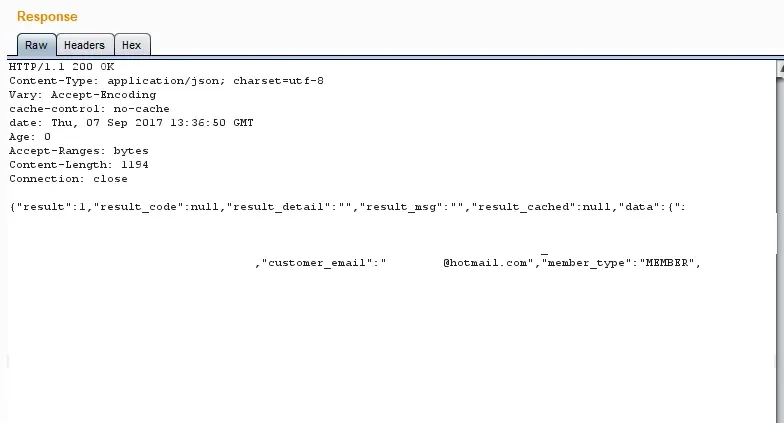
Changing hash to null on the update request returned:
The response leaked the hash belonging to user id 1. The researcher stresses that changing the act parameter is critical here: from testing, this was the only endpoint which leaked the user's hash.
Step 5: confirm the hash is tied to the id
Changing the id to 2 changed the hash value in the response, confirming that the leaked hash belonged to the requested userid.
Step 6: use the leaked hash on the read request
Taking that hash and sending it with the first request gave access to all of that user's data again. Beyond reading the data, the researcher could remotely reset any user's password.
Root cause
The original vulnerability was a straightforward IDOR: the API trusted the client-supplied id for both reading and updating a user's record, with no check that the caller owned that record. After the fix, requests carried a per-user hash that had to match the id being queried, a shared-secret style authorisation token rather than a server-side session check.
The bypass came from inconsistent enforcement across actions. The get_user action rejected a blank hash with a mandatory-parameter error, but the update_user action, which runs different code behind the scenes, accepted a null hash and returned the target user's hash in its response. The researcher notes that the hash never changes. The report does not describe the server-side code, so the exact reason the update path skipped the check is not stated;
Impact
An attacker who can call the update function with a null hash can obtain the secret hash for any userid, then use that hash with the read request to view that user's personal information and to reset their password remotely, leading to account takeover. The hash never changes, so the leaked value remains valid. The researcher's original finding, before the fix, allowed reading any user's information and updating their password directly. The report does not quantify how many users were affected.
Fix
The report states that a fix was issued after the first report and that the issue appeared fixed on retry. The bypass described here was found after that fix.
Variants to test
- Compare enforcement across every
actvalue on an API: send each action with the token parameter omitted, blank and null, and look for actions that proceed anyway. A positive result is a success response where a mandatory-parameter error was expected. - Look for secret fields in responses: call profile update or settings actions and inspect the JSON for tokens, hashes or keys belonging to the user. A positive result is a secret value appearing in a response that does not need it.
- Check whether the token is bound to the id: request two different ids and compare the returned tokens. A positive result is a different token per id, confirming the token is a per-user secret that can be harvested.
- Re-test the original IDOR after a fix: replay the pre-fix request with a changed
idon every action, not just the one that was reported. A positive result is any action still acting on another user's record. - Check token rotation: after a password reset or logout, replay an old token. A positive result is the old token still being accepted.
What happened, in plain words
A security researcher downloaded a mobile app, watched the network traffic it sent to its servers, and found that the app's backend would happily hand over or change any user's personal information if you simply changed a number in the request. He reported it, the company fixed it, and later he came back to check the fix. The fix added a secret code that had to accompany each request. He found that one particular request, the update action, accepted a null secret code and returned the secret code in its response. With that code he could read and change any user's account again.
This article walks through the whole story from zero. You only need a browser and a computer to follow the ideas. No prior security knowledge is assumed: every term is explained the first time it appears, and there is a glossary at the end.
The pieces you need to know first
What an API is
When you use a mobile app, the app itself is mostly a shell. The real work happens on a server somewhere on the internet. The app sends a message to that server asking for something, and the server sends a message back. That conversation is called an API (Application Programming Interface). A useful everyday comparison: the app is a waiter, the server is the kitchen, and the API is the menu of dishes the kitchen is willing to make. The waiter does not cook; it just carries orders back and forth in a fixed format.
Most APIs speak in a format called JSON (JavaScript Object Notation). JSON is just text organised into labelled values, a bit like a very tidy shopping list. A response might look like {"name":"sean","id":1}. Humans can read it, and programs can parse it easily.
What a URL parameter is
Look at a web address like https://shop.example.com/search?colour=red&size=large. Everything after the ? is a set of parameters: little labelled values sent along with the request. colour=red means "the parameter called colour has the value red". The & separates one parameter from the next. APIs use the same idea to say what they want: which action to perform, which user, and so on.
What an IDOR is
IDOR stands for Insecure Direct Object Reference. In plain words: the server lets you name the thing you want by its identifier (a number, a username, a file name), and it does not check whether that thing actually belongs to you. Imagine a hotel where you tell the front desk "give me the key to room 204" and they hand it over without checking that you are the guest in 204. The room number is the "direct object reference"; the missing check is the "insecure" part.
What a token or hash is here
A token is a secret string that stands in for proof of identity. When you log in somewhere, the server often gives your browser or app a token, and you show it on every later request to prove who you are. A hash in this story is used in that same role: a per-user secret value that has to accompany a request for that user's data. Think of it as a cloakroom ticket: the number on the ticket matches the coat, and without the right ticket you should not get the coat back. The report calls this value a hash; it is not being used here as a password hash in the cryptographic sense, just as a shared secret.
What Burp is
Burp (Burp Suite) is a tool that sits between an app or browser and the internet and lets you read and edit every message that passes through. It is called an interception proxy. The everyday comparison: a postal worker who opens every letter you send, lets you read it, lets you rewrite it, and then sends it on. The researcher used Burp to see the app's API calls and to change them by hand.
What Bugcrowd and P1 mean
Bugcrowd is a bug bounty platform: a website where companies invite researchers to report security problems and pay for good ones. A bug bounty is a reward paid for finding and reporting a flaw responsibly. P1 is the highest priority rating on such platforms: the most serious kind of finding.
Setting up
The researcher downloaded the app from the iOS store, set up Burp as an interception proxy, signed up for a normal account, and started watching the traffic the app produced. The point of signing up was to have a legitimate account of his own, so he could see what a normal request looks like before changing anything.
The first finding: changing a number
While watching the traffic, the researcher saw that the app asked the server for a user's details using a request shaped like this:
https://api.example.com/api?act=get_user&id=1
Line by line:
https://api.example.com/apiis the address of the API on the server.act=get_usertells the server which action to perform: get a user's details.id=1says which user: the one with identifier 1. The identifier is a plain whole number (an integer).
The server replies with the details for user id 1, usually in JSON. The same pattern is used to modify profile information: a request names an action and a user id, and the server acts on that user.
The researcher noticed the id was a simple integer and asked himself a natural question: what if I change it to 2? This is the classic IDOR test. If the server is checking ownership properly, it should refuse, because user 1 is not user 2. If it is not checking, it will answer as if nothing were wrong.
It answered as if nothing were wrong. Changing the id value to any userid he wanted revealed that user's information, and the same request also let him update that user's password, with no verification of any kind. In other words, the server trusted the number the client sent and never asked whether the caller owned that record.
He reported it through Bugcrowd and it was rated P1. A fix was issued shortly afterwards, and when he retried, the problem appeared to be gone.
Coming back to the fix
Some time later, the researcher decided to revisit a majority of his Bugcrowd reports, including this one. When he queried the site's API again, the request now looked like this:
https://api.example.com/api?act=get_user&id=1&hash=E9ih29plz0a
Line by line:
act=get_useris still the action: get a user's details.id=1is still the user being asked about.hash=E9ih29plz0ais new. It is the per-user secret token described earlier. The server now requires it to match whicheveridis being queried before it will show that id's information.
This is a sensible fix in principle. Instead of trusting the number alone, the server now asks for a secret that only the rightful owner of that account should have. The researcher called it pretty good protection. But rather than trying to decode the hash value, he decided to see whether the protection could be broken. That is the right instinct: a lock is only as good as its weakest use, and a fix that is applied in one place may be missing in another.
Step 1: what happens with a blank hash?
His first experiment was to ask for his own information but leave the hash empty. The server replied:
"result_msg":"The \"hash\" parameter is mandatory for this api key","result_cached":"none","data":[],"sync":[]}
Line by line:
result_msgis a human-readable message from the server. Here it says thehashparameter is mandatory for this API key: you must supply it.result_cachedsaysnone, meaning this answer was not served from a cache.datais an empty list[], meaning no user data was returned.syncis an empty list too.
So the read path, the action that fetches data, did enforce the presence of the parameter. A blank hash got you nothing. That is the behaviour you want.
Step 2: look at the update request
Next he looked at the request used to update account information:
https://api.example.com/api?act=update_user&id=1&hash=E9ih29plz0a&name=sean&password=derp
Line by line:
act=update_useris a different action from before: update a user's details.id=1is the user to update.hash=E9ih29plz0ais the secret token for that user.name=seansets the name field.password=derpsets the password field.
Sending a valid hash updated his own information, which is expected. The interesting question was what a blank hash would do on this request. The researcher points out something important: the act parameter has changed, so different code is executed behind the scenes. An API is not one program; it is a set of actions, and each action can be written by a different person, at a different time, with different checks. A guard at one door says nothing about the guard at the next door.
Step 3: send a null hash on the update function
He changed hash to null on the update request. The server returned:
Line by line:
resultis1, which in this API appears to mean success.result_code,result_detailandresult_msgare empty or null: no error was reported.result_cachedis null.datais where the interesting part is. It containsuser_idset to1andhashset toE9ih29plz0a.syncis an empty list.
In plain words: the update action accepted a null hash, did not complain, and then handed back the secret hash belonging to user id 1 in its own response. The very value that was supposed to protect the account was being printed in the reply.
The researcher stresses that changing the act parameter is critical here. From his testing, this was the only endpoint which leaked the user's hash. An endpoint is one address or action on a server that you can send a request to; think of it as one specific service window at a counter. The read window checked the ticket; the update window did not, and worse, it read the ticket number out loud.
Step 4: confirm the hash belongs to the id
He then changed the id to 2, and the hash value in the response changed. That confirmed the leaked hash belonged to the requested userid: each user has their own secret, and the update action would reveal whichever one you asked for. This is the difference between a one-off mistake and a repeatable harvesting technique. If the hash had stayed the same, it might have been a generic value; because it changed with the id, it was clearly a per-user secret.
Step 5: use the leaked hash on the read request
Now he took that leaked hash and sent it with the first request, the read request that had previously refused a blank hash. It worked. He had access to all of that user's data again. Beyond reading the data, he could remotely reset any user's password. Resetting someone's password means taking over their account: you change the lock and keep the new key. This is called account takeover.
So the chain is simple to state: send a blank hash to a certain function, receive that user's secret hash, then use the hash on the normal read request to view their private information and reset their password. The bonus, as the researcher puts it, is that the hash never changes. A secret that never rotates is a key that can never be repossessed: once it leaks, it works forever.
Why this happened
The original problem was a straightforward IDOR. The API trusted the client-supplied id for both reading and updating a user's record, with no check that the caller owned that record. After the fix, requests carried a per-user hash that had to match the id being queried. That is a shared-secret style authorisation token rather than a server-side session check. In other words, the server was not looking up who you were on its own side; it was asking you to bring a password for the record, and trusting you to bring the right one.
The bypass came from inconsistent enforcement across actions. The get_user action rejected a blank hash with a mandatory-parameter error, but the update_user action, which runs different code behind the scenes, accepted a null hash and returned the target user's hash in its response. The researcher notes that the hash never changes. The report does not describe the server-side code, so the exact reason the update path skipped the check is not stated. That is a guess about the code, not something the report shows.
What an attacker could do
An attacker who can call the update function with a null hash can obtain the secret hash for any userid, then use that hash with the read request to view that user's personal information and to reset their password remotely, leading to account takeover. The hash never changes, so the leaked value remains valid. The researcher's original finding, before the fix, allowed reading any user's information and updating their password directly. The report does not quantify how many users were affected.
What the fix should be
The report states that a fix was issued after the first report and that the issue appeared fixed on retry. The bypass described here was found after that fix. The general lesson is that a security check belongs in one central place that every action passes through, not copied into each action by hand, because the one copy someone forgets is the one that gets found.
Things to try yourself
These are the kinds of checks the story suggests, written so a beginner can follow the reasoning:
- Compare enforcement across every
actvalue on an API: send each action with the token parameter omitted, blank and null, and look for actions that proceed anyway. A positive result is a success response where a mandatory-parameter error was expected. - Look for secret fields in responses: call profile update or settings actions and inspect the JSON for tokens, hashes or keys belonging to the user. A positive result is a secret value appearing in a response that does not need it.
- Check whether the token is bound to the id: request two different ids and compare the returned tokens. A positive result is a different token per id, confirming the token is a per-user secret that can be harvested.
- Re-test the original IDOR after a fix: replay the pre-fix request with a changed
idon every action, not just the one that was reported. A positive result is any action still acting on another user's record. - Check token rotation: after a password reset or logout, replay an old token. A positive result is the old token still being accepted.
Glossary
- API: the agreed way for one program (such as a mobile app) to ask another (a server) for data or actions, usually over the internet.
- JSON: a text format for structured data, made of labelled values in braces and brackets, easy for both humans and programs to read.
- Parameter: a labelled value attached to a request, usually after a
?in a URL and separated by&, such asid=1. - Endpoint: one specific address or action on a server that accepts requests, like one service window at a counter.
- IDOR (Insecure Direct Object Reference): a flaw where the server lets you name a record by its identifier and does not check that the record belongs to you.
- Token: a secret string used as proof of identity or permission, shown on requests in place of logging in again.
- Hash (in this report): a per-user secret value that had to accompany requests for that user's data; used here as a shared secret, not as a cryptographic password hash.
- Burp (Burp Suite): a tool that sits between an app and the internet so you can read and edit the traffic; an interception proxy.
- Interception proxy: software that receives your network traffic, lets you inspect or change it, and forwards it on.
- Bug bounty: a programme where a company rewards people for finding and reporting security flaws.
- Bugcrowd: a bug bounty platform where researchers submit reports and companies rate and reward them.
- P1: the highest priority rating for a security report on such a platform.
- Account takeover: when an attacker gains control of someone else's account, for example by resetting their password.
- Null: an explicit empty value, meaning "nothing here", as opposed to a value that happens to be blank text.
- Cache: a store of previous answers kept to speed up later requests; a cached response is one served from that store.
- Mandatory parameter: a parameter the server insists must be present before it will process the request.
- Token rotation: changing a secret token regularly or after events such as a password reset, so an old leaked token stops working.




