The feature works as intended, but what’s in the source?
A gift-list feature that claimed to share only the buyer's address also exposed the buyer's private email address in the page source. An attacker who created a list could obtain the email addresses of users who bought gifts, without those users being informed.

Sean (zseano)
The full write-up lives on its author's site
It belongs to its author, so we link to it rather than copy it. The other two tabs are our own rewrites, checked against it.
Context
This is a write-up about a gift-list feature on a site the author refers to only as [redacted]. The feature lets a user create a list, and other users buy gifts from it. When a buyer checks a box during purchase, the site tells them:
Checking this box allows us to share your address with the list creator to help them manage their thank you list. You can change your preference at any time.
So the stated behaviour is narrow: the buyer's postal address is shared with the list creator, and nothing else. The buyer appears in the creator's "Thank you" list, and the creator can see the address. The author tested the feature and found it working as intended, but the page source told a different story.
Setup
The author tested while authenticated as the list creator. The only tool mentioned is the browser's view-source and its in-page search (CTRL + F). No versions, endpoints, parameters or headers are given in the report.
The precondition is simply a working gift-list flow: a creator account with a list, and a purchase made against that list by a buyer who ticks the sharing checkbox.
Finding it
Before testing, the author wrote notes on what the feature claimed to do, in the form of a goal statement: the address is shared and reflected on a page, visible only to the list creator and no-one else. The point of writing it down is to know what "correct" looks like, so that anything beyond it stands out. As testing continues, the notes grow to record which features are connected or share data.
The author then tested the feature itself: bought a gift from the list, appeared in the "Thank you" list, and confirmed the creator could see the address as stated. Attempts at stored XSS, IDOR and purchasing with a sandbox credit card all failed. Everything worked as intended, which is exactly why the leak was easy to miss: nobody who does not deliberately go looking for extra data would notice it.
Exploitation
Step 1: read the source of the thank you list
Still authenticated as the list creator, the author opened the thank you list page and viewed its source with view-source. The question being asked was simple: is it only my address that is shared?
Step 2: search the DOM for the buyer's email
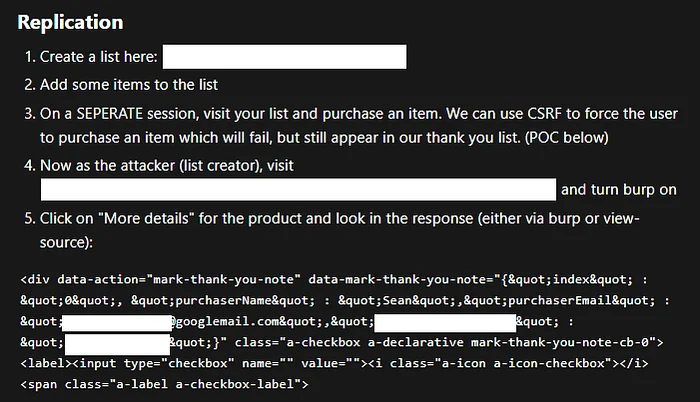
The author searched the source for the email address used to make the purchase, using CTRL + F and the string:
@googlemail.com
The email was present in the HTML DOM. The page therefore disclosed the buyer's private email address to the list creator, in addition to the postal address the checkbox described. The buyer was never told their email would be shared, and the list creator was never told they would receive it.
Steps to reproduce
The report includes a reproduction steps image:
Root cause
The report does not describe the server-side or template code, so the exact mistake is not stated. What it shows is that the rendered page for the thank you list contained more buyer data than the feature's own description promised: the email address was embedded in the HTML DOM alongside the address.
Impact
Any user who bought a gift from a list and ticked the sharing checkbox would share their private email address with the list creator, in addition to their postal address. Neither party was informed. The exposure is limited to list creators viewing their own thank you list, and the report does not describe any way to reach the data without being that creator. The author's framing is that the feature worked as intended and the leak was hidden in plain sight.
Fix
The implied fix is to render only the fields the feature promises to share, so that the buyer's email is not present in the thank you list page at all.
Variants to test
- Search the DOM for identifiers the feature does not mention. After exercising a sharing feature, view-source the receiving user's page and search for the buyer's email, username, user ID or internal identifiers. A positive result is any value in the HTML that the feature description does not cover.
- Compare the stated scope with the rendered data. Write down exactly what the UI says will be shared, then enumerate every field in the response for the receiving account. A positive result is a field outside the stated scope.
- Check other roles and views of the same data. The report only covers the list creator's thank you list; the same record may appear in exports, notifications or admin views. A positive result is the extra field appearing in any of them.
- Test the mobile web version and mobile apps. The author's own side tip is that mobile work often comes after the desktop app and is put together quickly, with a simple UI pulling data. A positive result is the same over-disclosure, or more of it, on the mobile surface.
- Look at API responses behind the page. GraphQL in particular is called out as notorious for returning more than the UI needs. A positive result is a response containing fields the feature never mentions.
What happened, in plain words
A website had a feature for gift lists. One person creates a list (say, for a birthday), and other people buy gifts from it. When someone buys a gift, they can tick a checkbox that says their postal address will be shared with the list creator, so the creator can send a thank-you note. The checkbox promises that only the address is shared.
The author of this write-up tested that feature. It worked exactly as described: the buyer appeared in the creator's "Thank you" list, and the creator could see the buyer's postal address. But when the author looked at the hidden source code of the thank-you page (the raw HTML that the browser turns into the page you see), they found something extra: the buyer's private email address was also sitting there in the page. The buyer was never told their email would be shared, and the creator was never told they would receive it. The leak was invisible unless you deliberately searched the page source.
This is a story about a feature that behaves correctly on the surface but quietly reveals more information than it promises. The lesson: always check what is actually in the page, not just what the page says.
How the feature works
When testing on a site the author refers to only as [redacted], they saw this text next to a checkbox:
Checking this box allows us to share your address with the list creator to help them manage their thank you list. You can change your preference at any time.
The text mentions only the address. Nothing about email, phone number, or anything else. That is the stated scope: the buyer's postal address is shared with the list creator, and nothing more.
Before testing, the author wrote a note to themselves describing what the feature claims to do, something like: "Feature [xyz], Address is shared, reflected on [redacted].com/example. Only visible to list creator, no-one else." Writing this down gives a clear picture of what "correct" looks like, so anything beyond it stands out. As testing continues, the notes grow to record which features are connected or share data. The more you understand how a site is put together, the easier it is to spot when something is off.
Testing the feature
The author then used the feature as a normal user would:
- Used a gift list as the list creator.
- Bought a gift from that list (as a buyer), ticking the sharing checkbox.
- Checked that the buyer appeared in the "Thank you" list and that the creator could see the buyer's postal address.
Everything worked as intended. The author also tried other common attacks: stored XSS (injecting malicious JavaScript that gets saved and shown to other users), IDOR (changing an ID in a request to access someone else's data), and purchasing with a sandbox credit card (a test card number provided by payment processors for testing). None of those worked. The feature was solid on the surface, which is exactly why the leak was easy to miss: nobody who does not deliberately go looking for extra data would notice it.
Finding the leak
Step 1: view the source of the thank-you page
Still logged in as the list creator, the author opened the thank-you list page and used the browser's "view source" feature. View source shows the raw HTML that the server sent to the browser, before the browser renders it into the visible page. It is like looking at the blueprint of a house instead of the painted walls.
The question was simple: is it only my address that is shared?
Step 2: search the source for the buyer's email
The author used the browser's in-page search (CTRL + F) and searched for the email address they had used to make the purchase. The search string was:
@googlemail.com
This is the domain part of the email address the author used to make the purchase. The author pressed CTRL + F, typed that string, and the browser highlighted matches.
And there it was: the buyer's email address was sitting in the HTML DOM. The DOM (Document Object Model) is the browser's internal representation of the page, built from the HTML. If something is in the DOM, it is in the page source, even if it is not visible on screen. The page was disclosing the buyer's private email address to the list creator, in addition to the postal address that the checkbox described. The buyer was never told their email would be shared, and the list creator was never told they would receive it.
Steps to reproduce
The report includes an image showing the reproduction steps:
Why it happened
The report does not describe the server-side code or the template that generated the page, so the exact mistake is not stated. What it shows is that the rendered page for the thank-you list contained more buyer data than the feature's own description promised: the email address was embedded in the HTML DOM alongside the postal address.
Impact
Any user who bought a gift from a list and ticked the sharing checkbox would share their private email address with the list creator, in addition to their postal address. Neither party was informed. The exposure is limited to list creators viewing their own thank-you list, and the report does not describe any way to reach the data without being that creator. The author's framing is that the feature worked as intended and the leak was hidden in plain sight.
Fix
The implied fix is to render only the fields the feature promises to share, so that the buyer's email is not present in the thank-you list page at all.
Variants to test
- Search the DOM for identifiers the feature does not mention. After using a sharing feature, view the source of the receiving user's page and search for the buyer's email, username, user ID, or internal identifiers. A positive result is any value in the HTML that the feature description does not cover.
- Compare the stated scope with the rendered data. Write down exactly what the UI says will be shared, then list every field in the response for the receiving account. A positive result is a field outside the stated scope.
- Check other roles and views of the same data. The report only covers the list creator's thank-you list; the same record may appear in exports, notifications, or admin views. A positive result is the extra field appearing in any of them.
- Test the mobile web version and mobile apps. The author's own side tip is that mobile work often comes after the desktop app and is put together quickly, with a simple UI pulling data. A positive result is the same over-disclosure, or more of it, on the mobile surface.
- Look at API responses behind the page. GraphQL in particular is called out as notorious for returning more than the UI needs. A positive result is a response containing fields the feature never mentions.
Glossary
- HTML: The language used to build web pages. It describes the structure and content of a page.
- DOM (Document Object Model): The browser's internal tree-like representation of an HTML page. It is what the browser uses to display and interact with the page.
- View source: A browser feature that shows the raw HTML code that the server sent, before any scripts run or styles are applied.
- CTRL + F: A keyboard shortcut that opens the browser's find bar to search for text on the current page.
- Stored XSS: A type of attack where malicious JavaScript is saved on the server (e.g. in a comment) and then runs in the browsers of users who view that content.
- IDOR (Insecure Direct Object Reference): A vulnerability where changing an identifier (like a user ID) in a request lets you access data that belongs to someone else.
- Sandbox credit card: A test card number provided by payment processors for testing, which does not charge real money.
- API: A way for software to talk to other software. In web terms, it is often a set of URLs that return data in a structured format (like JSON) rather than a full web page.
- GraphQL: A query language for APIs that lets the client ask for exactly the data it needs. If not properly restricted, it can return more data than intended.
- Information disclosure: A vulnerability where a system reveals information to someone who should not have access to it.
- Access control: The mechanisms that decide who is allowed to see or do what. Broken access control means those rules are not enforced correctly.