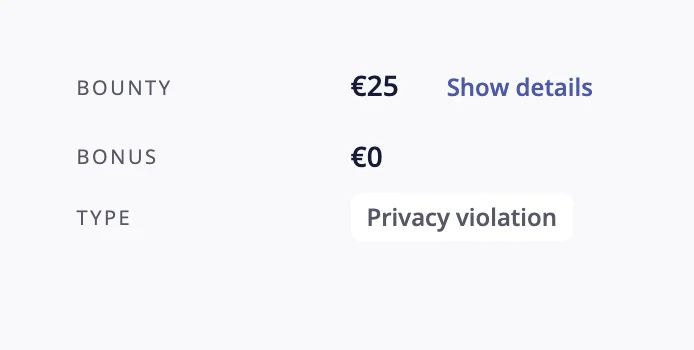
How a Simple Bug Got Me €25
An API endpoint accepted an email address and returned newsletter subscription details for that account, including a subscription identifier, a tracking identifier, timestamps and a preview link. An attacker could use it to confirm whether a given email was subscribed and to enumerate subscriptions.

Bugbounty
The full write-up lives on its author's site
It belongs to its author, so we link to it rather than copy it. The other two tabs are our own rewrites, checked against it.
Context
While taking part in the Target.com bug bounty program, I found a simple API information disclosure issue on one of the in-scope assets. The feature involved is a newsletter subscription API: it accepts an email address and returns newsletter subscription information associated with that account.
The endpoint leaks user metadata based on email input. When a valid email is provided, the API returns a detailed JSON object disclosing personally identifiable information (PII).
Setup
The report does not describe any accounts, roles, tools or versions. The only precondition shown is a valid email address to place in the request path.
Finding it
The API accepted an email address and returned newsletter subscription information associated with that account.
Exploitation
Step 1: Request the subscription data for an email
GET /api/newsletter/rest/v3/users/<email>/subscriptions?state=SUBSCRIBED&representation=WIDE
The email address is part of the path. The request carries two query parameters, state=SUBSCRIBED and representation=WIDE.
Step 2: Read the response
When a valid email is provided, the API returns a detailed JSON object disclosing PII such as:
- Subscription ID
- Email tracking ID
- Subscription timestamp
- Newsletter ID and name
- Personalised preview URL
Example response:
{ "subscriptionId": "514c7a38-8107-4aaa-664d-f513fbae5777", "email": "[redacted]", "emailTrackingId": "32df5ddfsadse995319asdfe037f8d", "state": "SUBSCRIBED", "rootEventTimestamp": "2025-04-06T07:17:08.133Z", "newsletter": { "newsletterId": "59asdf347a69253fdsfdf86c8e6", "name": "ameensec", "previewUrl": "https://ameen.sec/optiext/optiextension.dll?..." }}
The response echoes the email address, confirms the subscription state, and adds the internal subscription and tracking identifiers plus the newsletter details and a personalised preview URL.
Root cause
The endpoint performs a lookup keyed on an email address supplied by the caller and returns the full detailed representation of the matching subscription, including internal identifiers and a personalised preview URL.
Impact
The endpoint could be used to confirm whether an email address was subscribed and to expose internal subscription and tracking information. The main concern was the possibility of using the endpoint for email and subscription enumeration.
It was a relatively simple API issue, but a good reminder that even small information-disclosure bugs can be worth reporting when they expose user-related data.
Fix
The report does not describe any fix or remediation.
Variants to test
- Try the same path pattern on other newsletter or marketing APIs, substituting an email address you control. A positive result is a JSON object containing subscription identifiers, timestamps or tracking identifiers for that address.
- Compare responses with and without a detailed representation parameter such as
representation=WIDE. A positive result is that the detailed form adds internal identifiers or personalised URLs that the default form omits.
What happened, in plain words
I was taking part in the bug bounty program for Target.com. A bug bounty program is an arrangement where a company invites outside people to look for security problems in its systems and pays for good reports, instead of only relying on its own staff. The company lists which systems are fair game, called in-scope assets, and you agree to stay inside that list.
Information disclosure means the system hands out data to someone who should not be able to see it. It is not a break-in and nothing gets changed; the problem is that the data comes back at all.
The feature involved is a newsletter subscription API. A newsletter is an email bulletin that a company sends to people who signed up for it, and a subscription is one person's record of having signed up. An API is a way for one piece of software to talk to another over the web, usually by sending a request to a web address and getting structured data back. Think of it as a service counter: you hand over a question in a fixed format and you get an answer in a fixed format, with no web page drawn around it.
This particular counter accepts an email address and returns the newsletter subscription information tied to that account. That is the whole story: I gave it an email address, and it gave me back details about that person's subscription.
The Endpoint
An endpoint is one specific address on a server that answers one specific kind of request. The endpoint I looked at was this one:
GET /api/newsletter/rest/v3/users/<email>/subscriptions?state=SUBSCRIBED&representation=WIDE
Line by line, in plain words:
GETis the method, the verb of the request. It means "give me something back", as opposed to sending or changing something. When your browser loads a normal page it is doing aGETtoo./api/newsletter/rest/v3/users/<email>/subscriptionsis the path, the part of the address that says which counter you are standing at. Reading it left to right: this is the API area, the newsletter part of it, a version marker (v3), then users, then a particular user identified by an email address, then that user's subscriptions. The<email>is a placeholder: in a real request you put an actual email address there.?starts the query string, the part of the address that carries settings for the request rather than naming the resource.state=SUBSCRIBEDis one setting. It asks for subscriptions whose state is subscribed, meaning currently active rather than cancelled or pending.&separates one setting from the next.representation=WIDEis the other setting. It asks for the wide, detailed version of the answer rather than a slimmed-down one. A useful comparison is asking a librarian for a book's full catalogue entry instead of just its title.
Metadata here means data about the subscription record rather than the newsletter content itself: identifiers, timestamps and links. When a valid email is provided, the API returns a detailed JSON object. JSON is a common text format for data, built from labels and values in curly braces, so that software on both sides can read it reliably. That object discloses personally identifiable information (PII), which is any data that can be tied to a specific person, such as their email address or an identifier that points back to their account. The fields listed were:
- Subscription ID
- Email tracking ID
- Subscription timestamp
- Newsletter ID and name
- Personalised preview URL
An ID is a unique label a system gives to a record so it can refer to it later. A timestamp is the date and time something happened. A tracking ID is an identifier used to follow activity, for example to see whether an email was opened. A preview URL is a web address that shows a preview of something, here a personalised one.
Example response:
{ "subscriptionId": "514c7a38-8107-4aaa-664d-f513fbae5777", "email": "[redacted]", "emailTrackingId": "32df5ddfsadse995319asdfe037f8d", "state": "SUBSCRIBED", "rootEventTimestamp": "2025-04-06T07:17:08.133Z", "newsletter": { "newsletterId": "59asdf347a69253fdsfdf86c8e6", "name": "ameensec", "previewUrl": "https://ameen.sec/optiext/optiextension.dll?..." }}
Reading that JSON in plain words:
- The outer curly braces hold one object, a set of label and value pairs.
"subscriptionId"is the unique label for this subscription record."email"echoes back the address that was asked about, here the placeholder[redacted]."emailTrackingId"is the identifier used to track email activity for this subscriber."state"confirms the subscription is currentlySUBSCRIBED."rootEventTimestamp"is the date and time recorded for the subscription event, in a standard machine-readable date format."newsletter"opens a nested object, a smaller set of pairs inside the bigger one, describing the newsletter itself: itsnewsletterId, itsname, and apreviewUrlthat is personalised.
The response echoes the email address, confirms the subscription state, and adds the internal subscription and tracking identifiers plus the newsletter details and a personalised preview URL. "Internal" matters: these are labels the company uses behind the scenes, not things a subscriber is normally shown.
Impact
Impact means what harm the issue could actually cause. The endpoint could be used to confirm whether an email address was subscribed and to expose internal subscription and tracking information. In other words, anyone who can send this request can ask "is this address on the list?" and get an answer, along with extra details about the record.
The main concern was the possibility of using the endpoint for email and subscription enumeration. Enumeration means going through a list of candidates one by one and learning something from each answer. The report names email and subscription enumeration as the main concern.
It was a relatively simple API issue, but a good reminder that even small information-disclosure bugs can be worth reporting when they expose user-related data.
Glossary
- Bug bounty program: an arrangement where a company invites outside researchers to find security problems in listed systems and rewards good reports.
- In-scope asset: a system or address the company has explicitly allowed researchers to test.
- Information disclosure: a flaw where a system returns data to someone who should not be able to see it, without necessarily changing anything.
- API: a fixed way for software to ask another system for data or actions over the network, usually returning structured data rather than a web page.
- Endpoint: one specific address and request type on a server that performs one specific job.
- Newsletter: an email bulletin sent to people who signed up for it.
- Subscription: one person's record of having signed up to a newsletter.
- GET: the request method that asks a server to return something.
- Path: the part of a web address that identifies which resource or endpoint you are asking for.
- Query string: the part of a web address after
?that carries settings for the request. - Parameter: one named setting in a request, such as
stateorrepresentation. - JSON: a text format for structured data made of labels and values, readable by software.
- Object: in JSON, a set of label and value pairs inside curly braces, which can contain smaller objects.
- Metadata: data about a record rather than its main content, such as identifiers and timestamps.
- PII (personally identifiable information): data that can be tied to a specific person.
- ID: a unique label a system gives to a record.
- Timestamp: the date and time at which something happened.
- Tracking ID: an identifier used to follow activity, for example email opens.
- Preview URL: a web address that shows a preview of something, here a personalised one.
- Enumeration: testing candidates one by one and learning from each answer, for example to discover which email addresses are subscribed.
- Impact: the harm an issue could realistically cause.




