How a Simple Business Logic Flaw Allowed Arbitrary Price Manipulation
The checkout request sent the invoice amount from the browser, and the server trusted it without checking the invoice in its database. An attacker could change the amount to a much smaller figure and still complete payment, buying services for a fraction of the real price.
 Published on medium.com
Cybersecurity
The full write-up lives on its author's site
It belongs to its author, so we link to it rather than copy it. The other two tabs are our own rewrites, checked against it.
Context
The target was an e-commerce platform that provides automated service provisioning and server hosting solutions. Its normal ordering workflow had three steps:
- The user selects a service and generates an invoice.
- The user proceeds to the checkout view (
viewinvoice.php). - Clicking the payment button redirects the user to the third-party payment gateway.
The flaw described here sits in the payment initiation step, where the browser submits a form carrying the invoice identifier and the amount.
Setup
The assessment was an authorised security test on the e-commerce infrastructure. Traffic was analysed with Burp Suite, and the payment request was replayed and modified with Burp Suite Repeater. The report does not describe any particular account, role or software version beyond that.
Finding it
While analysing the traffic in Burp Suite, I inspected the HTTP POST request generated when initiating the payment. The checkout submission carried the invoice identifier and the amount in the request body:
POST /gateway/process HTTP/2Host: redacted.example.comContent-Type: application/x-www-form-urlencoded
invoiceid=REDACTED&amount=4606800000&email=user%40example.com&pay=Submit
The invoiceid identifies which invoice is being paid, and amount states how much is owed. The problem is that both values arrive from the client. The application relied on the client to send the amount parameter directly in the request body instead of calculating or retrieving the verified price on the server side using the invoiceid.
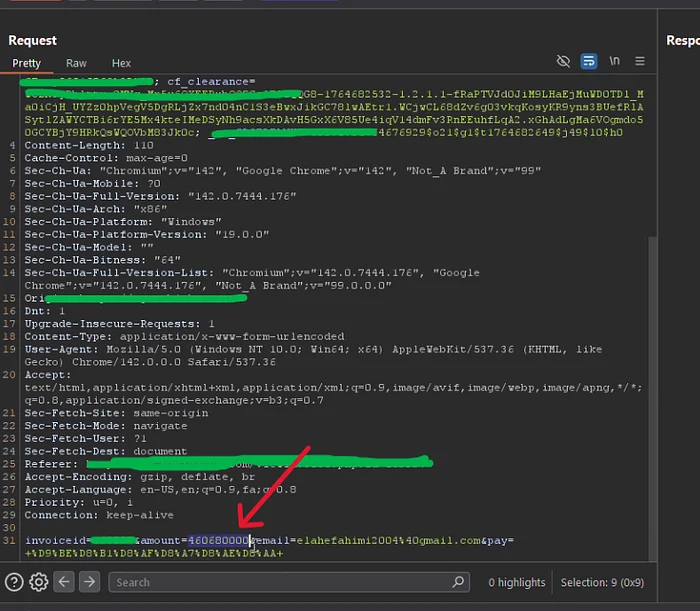
That is the whole finding: the price is an input rather than a value the server derives from its own records. Nothing in the request ties the amount to the invoice in a way the client cannot change.
Exploitation
Step 1: Intercept the payment request
The payment request was captured using Burp Suite Repeater, giving a request that could be edited and resent at will.
Step 2: Tamper with the amount
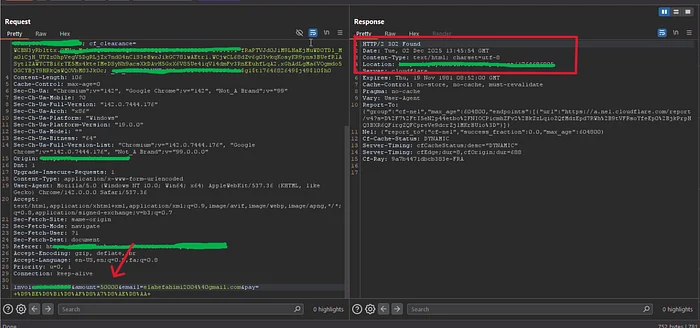
The original amount of 4,606,800,000 IRR was modified to an arbitrary lower amount of 50,000 IRR. Only the amount value changed; the invoice identifier and the rest of the body stayed as they were.
POST /gateway/process HTTP/2Host: redacted.example.comContent-Type: application/x-www-form-urlencoded
Step 3: Forward the modified request
The modified request was forwarded to the server. The backend accepted the modified payload without validating whether the amount matched the actual balance due in the database, and answered with a redirect to the payment gateway:
HTTP/2 302 FoundLocation: https://paymentgateway.example.com/payment/token_id
The redirect points at the payment gateway with a token in the path. When redirected to the payment gateway interface, the payable amount displayed was exactly 50,000 IRR. A transaction could be completed for a fraction of the real cost, leading to potential automated service delivery at an unauthorised price.
Root cause
The payment initiation endpoint trusted a client-supplied price. The server had the invoiceid in the same request but relied on the client-supplied amount instead of retrieving the verified price. Because the tampered value was accepted without a check against the database record, the gateway page displayed 50,000 IRR for an invoice worth 4,606,800,000 IRR.
Logic flaws of this kind often bypass automated vulnerability scanners because they rely on valid application functionality: every request in the sequence is well formed and the endpoint behaves as designed, only with a different number. The report does not describe any server-side control that compared the submitted amount with the stored invoice total.
Impact
- Direct financial loss: attackers could purchase high-value infrastructure or services for negligible sums.
- Inventory inconsistency: automated backend provisioning systems might trigger deployment based on successful gateway callbacks regardless of the received sum.
- Reputational damage: exploitation at scale poses severe accounting and compliance risks.
The report hedges the provisioning point with "might": whether a service is actually delivered depends on how the backend reacts to the gateway callback, not on the amount alone.
Fix
The report states the issue was triaged and patched by removing client-side parameters and enforcing backend verification. The report sets out three practices for this class of flaw:
- Never trust user input. The application should never accept the price or transaction amount directly from client requests. The payment initiation endpoint should only require an internal reference (e.g.
invoice_id). - Fetch directly from the database. The server must query the database internally to fetch the actual balance associated with the invoice ID before communicating with the payment gateway:
invoice = db.get_invoice(invoice_id)payable_amount = invoice.total_duegateway_session = create_gateway_session(invoice.id, payable_amount)
- Verify the payment callback. When the payment gateway sends a callback notification after payment completion, the backend must verify that the amount paid strictly equals the database record before marking the invoice as paid.
Variants to test
- Amount in the body of a checkout or gateway endpoint. Submit a valid invoice with a lower
amountand look for a redirect to the gateway whose session shows the reduced figure. A positive result is a gateway page quoting the tampered sum. - Price or quantity fields in a cart or order API. Change the unit price or quantity in the JSON body and re-read the order. A positive result is an order total that reflects the client value rather than the catalogue price.
- Currency or plan identifiers. Swap a currency code or plan ID for a cheaper one while keeping the same product reference. A positive result is a session or invoice created at the cheaper rate for the original product.
- Negative or zero values. Send
amount=0or a negative amount where the endpoint accepts a number. A positive result is a gateway session for zero or a credit rather than a rejection. - Callback integrity. After a legitimate low-value payment, check whether the invoice is marked paid in full. A positive result is an invoice settled for less than its total due, which shows the callback amount is not compared with the database record.
What happened, in plain words
A company sold hosting and automated services through an online shop. When a customer wanted to buy something, the shop created an invoice, showed a checkout page, and then sent the customer to an outside payment provider to actually pay. The price of the order should have come from the shop's own records. Instead, the application relied on the amount sent by the customer's browser.
That is the whole bug. A person with a little technical knowledge could open the payment request in a tool, change the price from 4,606,800,000 IRR to 50,000 IRR, and send it on. The server accepted it, and the payment provider's page showed 50,000 IRR as the amount due. The customer could then pay a tiny fraction of the real price and, potentially, still receive the service.
This kind of problem is called a business logic flaw. The software is not broken in the sense of crashing or leaking data. Every request is well formed and the server does exactly what it was programmed to do. The mistake is in the rules of the business: the server trusts a number that the customer controls.
1. Introduction
What a business logic vulnerability is
Most security bugs are technical. A SQL injection, for example, happens when a website pastes user text into a database command and the text turns into extra commands. A cross-site scripting (XSS) bug happens when a website puts user text into a page and the browser runs it as code. Those bugs are about the software mishandling data in a way that breaks the technology.
A business logic vulnerability is different. The technology works. The workflow, meaning the sequence of steps the application expects a user to follow, can be bent so that the application does something it was never meant to allow. Think of a shop where the cashier asks the customer "how much does this cost?" and writes down the answer. Nothing is broken mechanically, but the rule that the shop sets its own prices has been lost.
Because logic flaws use normal, valid features, automated vulnerability scanners often miss them. A scanner sends strange input and looks for crashes, error messages or known signatures. A request with a smaller but perfectly valid number looks completely normal, so there is nothing for the scanner to flag.
What was tested
During an authorised security assessment on an e-commerce infrastructure, meaning the owner had given permission to test it, the researcher found a critical price manipulation flaw caused by client-side parameter tampering. In plain words: the price was sent by the client (the browser) and could be changed (tampered with) before it reached the server.
The write-up covers how the flaw was found, how it was proven, and how it was fixed.
2. Reconnaissance and target behaviour
What the platform does
The target platform provides automated service provisioning and server hosting solutions. In everyday terms, it sells server space and services that are set up automatically after purchase, without a human doing the setup by hand.
The normal ordering workflow
The standard workflow for ordering a service had three steps:
- The user selects a service and generates an invoice. An invoice is a bill: a document that says what is being bought and how much is owed.
- The user proceeds to the checkout view (
viewinvoice.php). The.phpending tells you the page is generated by a program written in PHP, a common language for websites. The page shows the invoice and a payment button. - Clicking the payment button redirects the user to the third-party payment gateway. A payment gateway is an outside company that handles card or bank payments, so the shop itself never touches the money details. A redirect is the browser being told "go to this other address instead".
The flaw sits in the payment initiation step, when the browser sends the invoice identifier and the amount. An endpoint is simply a specific address on a server that accepts a particular kind of request, like a service counter in a building: you go to the right counter for the right job.
What Burp Suite is
To see and change what the browser sends, the researcher used Burp Suite. Burp Suite is a program that sits between the browser and the website, like a person standing between you and a shop counter, able to read every note you pass over and swap it for another before it arrives. It can record requests, pause them, edit them and resend them.
What an HTTP request is
When your browser asks a website for something, or sends a form, it sends an HTTP request. HTTP is the language browsers and servers use to talk. A request has a method (what kind of action), a path (which address), headers (extra information such as the format of the body), and sometimes a body (the actual data being sent).
POSTis a method used to send data to the server, for example a form submission.GETis used to ask for a page.HTTP/2is the version of the protocol used in these requests.Hostis a header that says which website the request is for.Content-Type: application/x-www-form-urlencodedis a header that says the body is formatted like a URL query string: pairs ofname=valuejoined by&.
3. Finding the flaw
While analysing the traffic in Burp Suite, the researcher inspected the HTTP POST request generated when initiating the payment. The checkout submission carried the invoice identifier and the amount in the request body:
POST /gateway/process HTTP/2Host: redacted.example.comContent-Type: application/x-www-form-urlencoded
Line by line:
POST /gateway/processmeans "send data to the address/gateway/processon this server". The wordgatewayin the path suggests this is the shop's own step that prepares the handover to the payment provider.HTTP/2is the protocol version.Host: redacted.example.comnames the website. The real hostname has been replaced with a placeholder so the report can be published.Content-Type: application/x-www-form-urlencodedtells the server how to read the body: asname=valuepairs separated by&.
The body of the request was:
invoiceid=REDACTED&amount=4606800000&email=user%40example.com&pay=Submit
Line by line, though it is all one line:
invoiceid=REDACTEDis the identifier of the invoice being paid. It is a reference number that lets the server find the right bill in its database. The real value has been hidden.amount=4606800000is the price, in IRR (Iranian rial), that the browser is claiming is owed. This is the number that matters.email=user%40example.comis the customer's email address.%40is how the@sign is written inside a URL-encoded body, so this reads[redacted]. The address has been replaced with a placeholder.pay=Submitis the value of the button that was pressed. It tells the server which action the user chose.
The invoiceid identifies which invoice is being paid, and amount states how much is owed. The problem is that both values arrive from the client. The application relied on the client to send the amount parameter directly in the request body instead of calculating or retrieving the verified price on the server side using the invoiceid.
The image shows the intercepted request with the amount parameter highlighted, the point where the price is supplied by the browser rather than looked up by the server.
That is the whole finding: the price is an input rather than a value the server derives from its own records. Nothing in the request ties the amount to the invoice in a way the client cannot change. The server had the invoice number right there in the same request, but it relied on the amount sent by the browser instead of retrieving the verified price.
4. Proof of concept
A proof of concept (PoC) is a controlled demonstration that a suspected bug really works. You do not just suspect it; you show it with a repeatable test.
Step 1: Intercept the payment request
The payment request was captured using Burp Suite Repeater. Repeater is the part of Burp Suite that lets you take one captured request, edit it, send it again, and read the response, as many times as you like. It is like holding a letter, changing a word, and posting it again to see what comes back.
This step was taken so that the request could be edited and resent at will, without going through the whole shopping process each time.
Step 2: Tamper with the amount
The original amount of 4,606,800,000 IRR was modified to an arbitrary lower amount of 50,000 IRR. Only the amount value changed; the invoice identifier and the rest of the body stayed as they were.
POST /gateway/process HTTP/2Host: redacted.example.comContent-Type: application/x-www-form-urlencoded
This is the same request header as before: same method, same path, same host, same body format. Nothing about the request looks unusual.
Line by line:
invoiceid=REDACTEDis unchanged, so the server still knows which invoice this is.amount=50000is the tampered price. It is a perfectly valid number, just far too small.email=user%40example.comis unchanged.pay=Submitis unchanged.
Keeping everything else the same is deliberate. If the request were changed in several places at once, you could not tell which change caused the result. Changing only the price isolates the variable.
Step 3: Forward the modified request
The modified request was forwarded to the server. The backend, meaning the server-side software behind the website, accepted the modified payload without validating whether the amount matched the actual balance due in the database. A payload here simply means the data being sent in the request body. Validating means checking that a value is correct and allowed.
The server answered with a redirect to the payment gateway:
HTTP/2 302 FoundLocation: https://paymentgateway.example.com/payment/token_id
Line by line:
HTTP/2 302 Foundis the response. The number 302 is a status code meaning "the thing you asked for is elsewhere, go there instead". It is the standard way a server redirects a browser.Location: https://paymentgateway.example.com/payment/token_idis the address the browser is told to go to. It points at the payment gateway. The last part,token_id, is a placeholder for a session token.
A token here is a short string that stands in for a session: a record the gateway keeps about this particular payment attempt. Think of a cloakroom ticket. The ticket itself is not your coat, but it lets the attendant find your coat. The redirect points at the payment gateway with a token in the path. The gateway page then displayed 50,000 IRR as the payable amount.
When redirected to the payment gateway interface, the payable amount displayed was exactly 50,000 IRR. A transaction could be completed for a fraction of the real cost, leading to potential automated service delivery at an unauthorised price.
The image shows the payment gateway page quoting the reduced amount, which is the visible proof that the tampered figure was accepted.
5. Root cause
The payment initiation endpoint trusted a client-supplied price. The server had the invoiceid in the same request but relied on the client-supplied amount instead of retrieving the verified price. Because the tampered value was accepted without a check against the database record, the gateway page displayed 50,000 IRR for an invoice worth 4,606,800,000 IRR.
Logic flaws of this kind often bypass automated vulnerability scanners because they rely on valid application functionality: every request in the sequence is well formed and the endpoint behaves as designed, only with a different number. The report does not describe any server-side control that compared the submitted amount with the stored invoice total.
A useful comparison is a restaurant bill. If the waiter asks you what you think you owe and writes that down, the restaurant has no way to catch a mistake or a lie. If the waiter checks the kitchen's order slip, the number is fixed by the restaurant. Here, the shop behaved like the first waiter.
6. Impact
Impact means what an attacker could actually do with the flaw, and what it costs the business.
- Direct financial loss: attackers could purchase high-value infrastructure or services for negligible sums. Infrastructure here means servers and hosting, which are expensive.
- Inventory inconsistency: automated backend provisioning systems might trigger deployment based on successful gateway callbacks regardless of the received sum. A callback is a message the payment gateway sends back to the shop to say "this payment happened". If the shop's automation starts setting up a server whenever a callback arrives, without checking the amount, it may hand over a service that was barely paid for.
- Reputational damage: exploitation at scale poses severe accounting and compliance risks. At scale means many people doing it repeatedly. Accounting is about the books balancing; compliance is about following rules and regulations.
The report hedges the provisioning point with "might": whether a service is actually delivered depends on how the backend reacts to the gateway callback, not on the amount alone.
7. Fix
The report states the issue was triaged and patched by removing client-side parameters and enforcing backend verification.
The report sets out three practices for this class of flaw:
- Never trust user input. The application should never accept the price or transaction amount directly from client requests. The payment initiation endpoint should only require an internal reference (e.g.
invoice_id). An internal reference is just an identifier the server can use to look up its own records, like an order number. - Fetch directly from the database. The server must query the database internally to fetch the actual balance associated with the invoice ID before communicating with the payment gateway. A database is the shop's organised store of records. Querying it means asking it a question, such as "what is the total on invoice 123?".
invoice = db.get_invoice(invoice_id)payable_amount = invoice.total_duegateway_session = create_gateway_session(invoice.id, payable_amount)
Line by line:
invoice = db.get_invoice(invoice_id)asks the database for the invoice record that matches the identifier. The result is stored in a variable calledinvoice.payable_amount = invoice.total_duereads the amount owed from that record. This number comes from the shop's own data, not from the browser.gateway_session = create_gateway_session(invoice.id, payable_amount)creates the payment session at the gateway using the invoice's own identifier and the amount the server looked up. The browser's number is never used.
- Verify the payment callback. When the payment gateway sends a callback notification after payment completion, the backend must verify that the amount paid strictly equals the database record before marking the invoice as paid. Strictly equals means an exact match, not "close enough".
8. Variants to test
The same idea, a value the browser controls that the server should decide, appears in many places. These are the variants worth trying when testing a shop:
- Amount in the body of a checkout or gateway endpoint. Submit a valid invoice with a lower
amountand look for a redirect to the gateway whose session shows the reduced figure. A positive result is a gateway page quoting the tampered sum. - Price or quantity fields in a cart or order API. An API is a way for programs to talk to each other, like a service window where one program hands data to another and gets data back. Change the unit price or quantity in the JSON body and re-read the order. JSON is a common text format for structured data, using curly braces and
name: valuepairs. A positive result is an order total that reflects the client value rather than the catalogue price. - Currency or plan identifiers. Swap a currency code or plan ID for a cheaper one while keeping the same product reference. A positive result is a session or invoice created at the cheaper rate for the original product.
- Negative or zero values. Send
amount=0or a negative amount where the endpoint accepts a number. A positive result is a gateway session for zero or a credit rather than a rejection. - Callback integrity. After a legitimate low-value payment, check whether the invoice is marked paid in full. A positive result is an invoice settled for less than its total due, which shows the callback amount is not compared with the database record.
9. Responsible disclosure timeline
Responsible disclosure is the practice of telling the owner about a flaw privately, giving them time to fix it, and only then publishing details.
- Discovery: identified during testing.
- Reported: vulnerability reported with PoC to the engineering team.
- Triaged and patched: validated and fixed by removing client-side parameters and enforcing backend verification. Triaged means the team reviewed the report and confirmed it was real.
- Published: documented publicly after complete remediation and anonymisation. Remediation means the fix was completed. Anonymisation means names, addresses and other identifying details were removed.
Glossary
- API: a defined way for one program to send requests to another and get answers back.
- Backend: the server-side part of an application that the user does not see, where the real work and data live.
- Burp Suite: a tool that sits between a browser and a website so requests can be captured, inspected, edited and resent.
- Burp Suite Repeater: the part of Burp Suite used to edit and resend a single captured request repeatedly.
- Business logic vulnerability: a flaw in the rules or workflow of an application rather than in its technical handling of data.
- Callback: a message a payment provider sends back to the shop to report the result of a payment.
- Client: the user's side, normally the browser.
- Client-side parameter tampering: changing a value in a request on the user's side before it reaches the server.
- Content-Type: an HTTP header that says how the body of a request is formatted.
- Database: an organised store of records that a server can query.
- Endpoint: a specific address on a server that accepts a particular kind of request.
- Gateway session: a record at the payment provider that tracks one payment attempt, identified by a token.
- GET: an HTTP method used to ask for a resource such as a page.
- Host: an HTTP header naming the website a request is for.
- HTTP: the protocol browsers and servers use to exchange requests and responses.
- HTTP/2: a version of HTTP.
- Impact: what an attacker could do with a flaw and what it costs the business.
- Infrastructure: servers, hosting and related systems that run services.
- Invoice: a bill stating what is being bought and how much is owed.
- IRR: Iranian rial, the currency used in the amounts in this report.
- JSON: a text format for structured data using curly braces and
name: valuepairs. - Parameter: a named value sent in a request, such as
amountorinvoiceid. - Payload: the data carried in the body of a request.
- Payment gateway: an outside company that processes payments on behalf of a shop.
- POST: an HTTP method used to send data to a server, such as a form submission.
- Proof of concept (PoC): a controlled, repeatable demonstration that a suspected flaw really works.
- Provisioning: automatically setting up a service, such as a server, after purchase.
- Redirect: a server response telling the browser to go to a different address instead.
- Remediation: the process of fixing a vulnerability.
- Responsible disclosure: reporting a flaw privately, allowing time to fix it, then publishing details.
- Root cause: the underlying reason a flaw exists.
- SQL injection: a flaw where user input is pasted into a database command and changes what the command does.
- Status code 302: an HTTP response meaning the requested resource is elsewhere and the browser should go there.
- Token: a short string that stands in for a session or permission, like a cloakroom ticket.
- Triaged: reviewed and confirmed as valid by the receiving team.
- URL encoding: writing special characters in a form safe for URLs, such as
%40for@. - Validation: checking that a value is correct and allowed.
- Workflow: the sequence of steps an application expects a user to follow.




