How a Simple Negative Quantity Exposed a Serious Checkout Logic Flaw
The checkout flow accepted negative quantities, which were persisted in the cart and used by the pricing engine to produce a negative subtotal and a zero payable amount. An attacker could manipulate the cart to show a zero total, though the author did not complete an order.
 Published on medium.com
Cybersecurity
The full write-up lives on its author's site
It belongs to its author, so we link to it rather than copy it. The other two tabs are our own rewrites, checked against it.
Context
This write-up describes an authorised security test of an e-commerce checkout flow. The feature under examination is the cart: the requests the application sends when products are added to or modified in a cart, and the pricing logic that runs on the resulting cart contents before an order is created.
Normally the cart accepts a product with a positive quantity, the pricing engine multiplies unit price by quantity to produce a subtotal, and the checkout presents a payable amount. The researcher's question was what happens when the server receives a quantity that is not a valid positive number.
The affected website, merchant and any reusable production identifiers are deliberately omitted from the write-up.
Setup
The testing was performed with authorisation. The researcher captured and replayed checkout requests in Burp Suite, which is also what the screenshots show. No account details, roles, product identifiers or software versions are given in the report.
The only stated precondition is access to the checkout flow and the ability to intercept and modify the requests it sends. The researcher deliberately stopped before placing an order: no goods were received and no other user's data was accessed.
Finding it
The starting point was ordinary traffic. While examining the requests sent when products were added or modified in a cart, everything looked normal at first. Then the researcher noticed a quantity parameter and asked a simple question: what happens if the server receives a negative quantity?
That question is the whole of the initial observation. The parameter appears in a JSON body, and the assumption worth challenging is that the server enforces the business rule that quantity must be positive.
Exploitation
Step 1: capture the baseline request
A simplified checkout request looked like this:
{ "items": [ { "quantity": 1 } ]}
The body contains an items array, and each item carries a quantity. The expectation is that the server should only accept valid positive quantities.
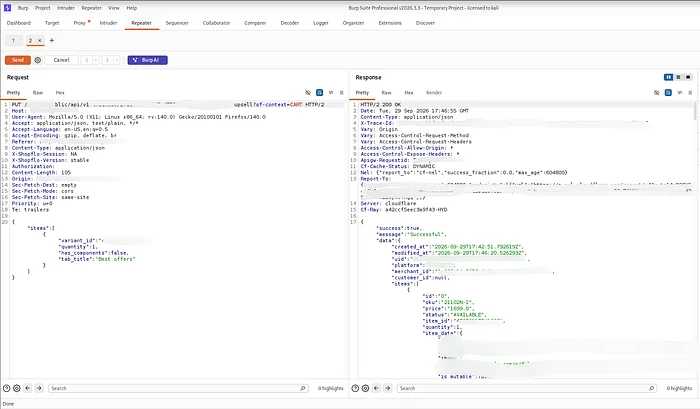
The screenshot shows the baseline checkout request captured in Burp Suite, with sensitive information blurred.
Step 2: send a negative quantity
The researcher changed the quantity to an invalid value:
{ "items": [ { "quantity": -1 } ]}
Instead of rejecting the request, the backend accepted it. More importantly, the negative quantity was persisted in the cart.
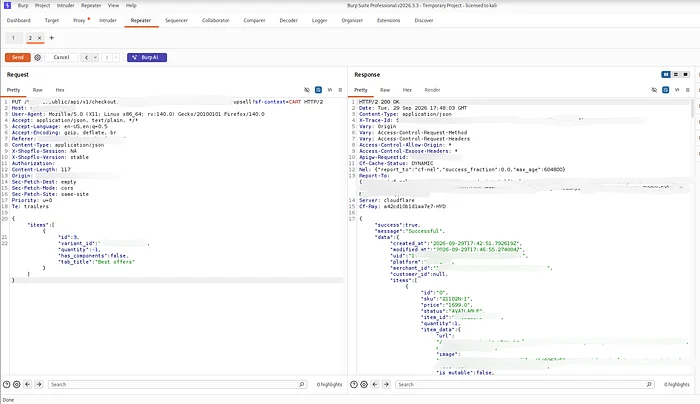
The screenshot shows the modified request and the successful server response in Burp Suite, with the target website and sensitive values blurred.
At this point the finding was no longer just about input validation, because the value had survived into stored state. The next question was what the pricing logic did with it.
Step 3: follow the value into pricing
A simplified pricing formula is:
subtotal = Σ(unit price × quantity)
With a negative quantity the calculation naturally becomes negative. During testing the server processed a large negative quantity and produced a massively negative subtotal. The documented calculation resulted in approximately:
-12,581,990,881.20
The server returned a corresponding negative subtotal, which confirmed that the malicious quantity was actually being used by the pricing engine rather than being ignored or clamped.
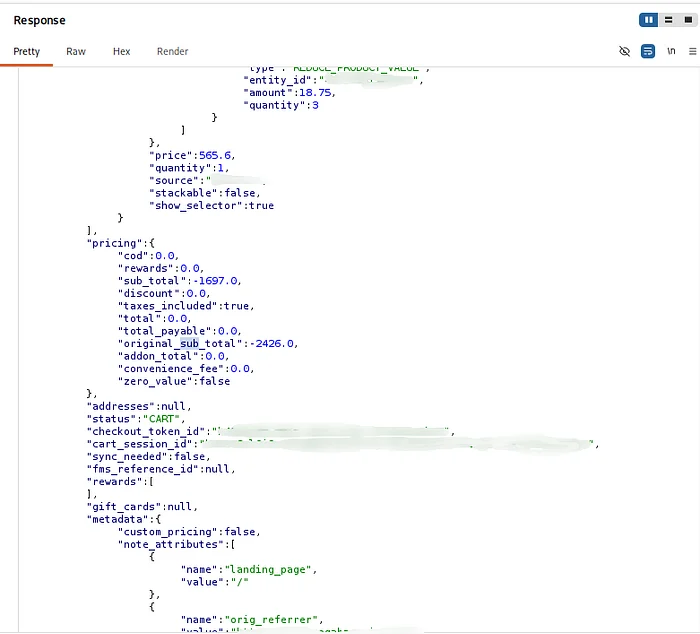
The screenshot shows the server response with the negative quantity, the negative subtotal and a zero payable amount.
Step 4: observe the payable amount
Instead of rejecting the negative subtotal, the final payable amount became:
total_payable = 0.0
The cart still remained in the normal CART state. The chain the researcher describes is:
Negative quantity ↓Negative subtotal ↓Payable amount = 0 ↓Cart remains active
The application had effectively converted an invalid cart state into a zero-payable state.
Step 5: check whether the state persists
The researcher reloaded the checkout page to determine whether the issue was temporary. It was not. The malicious quantity remained stored, and the checkout UI rendered the corrupted cart state, including an abnormal item count and a "FREE!" total.
Root cause
The main issue was a missing server-side business-rule check. The application should have enforced something like:
1 <= quantity <= MAX_PER_ITEM
It also needed to validate the resulting cart after recalculating prices. The investigation identified three weaknesses:
- Negative quantities were accepted and persisted.
- Invalid cart states were not rejected after recalculation.
- A state-changing checkout operation relied on a public session mechanism without a populated authorization header.
The testing also revealed inconsistencies in how pricing and discount logic interpreted the cart. The report does not go into the code behind any of these; the missing validation is described at the level of the business rule that should have been enforced.
Impact
The researcher confirmed that negative quantities were accepted, that the value persisted in the cart, that the pricing engine incorporated it, that the subtotal became negative, that total_payable became 0.0, and that the cart remained active.
The researcher did not complete an order using the corrupted cart, and therefore did not claim that a real zero-cost purchase was successfully achieved. That distinction is stated as important in responsible security research. The report does not quantify how many users or orders could be affected, and it does not describe any access to other users' data.
Fix
The most important fix is simple: validate quantities on the server. Invalid values should be rejected rather than passed into pricing.
The system should also reject negative subtotals, revalidate discounts after cart changes, verify cart ownership, and perform a final validation before order creation. The report also recommends using integer-based monetary calculations instead of floating-point values.
The report does not say which of these changes, if any, were actually implemented.
Variants to test
- Negative quantity on add and on update. Send a negative
quantityboth when adding an item and when modifying an existing line. A positive result is the negative value being accepted and visible in the cart on reload. - Zero and fractional quantities. Try
0,0.5and very small values. - Large negative values. Use a magnitude large enough to dominate the cart total. A positive result is a large negative subtotal returned by the server, as in this report.
- Mixed carts. Combine a negative line with normal positive lines and check the aggregate.
- Discount interaction. Apply coupons or promotions to a cart containing a negative line. A positive result is inconsistent discount behaviour, which the report notes was observed in how pricing and discount logic interpreted the cart.
- Persistence across sessions. Reload the checkout page and revisit the cart later. A positive result is the corrupted state surviving a reload, including an abnormal item count or a "FREE!" total in the UI.
- Authorisation on the state-changing call. Replay the checkout request without a populated authorization header.
What happened, in plain words
An online shop lets you put things in a shopping basket (the site calls it a cart) and then pay for them. The researcher was allowed to test that shop's checkout process. While watching the messages the shop's website sends to its own servers when you add or change an item, they noticed a field called quantity, which is simply the number of that item you want. They asked one small question: what if I send a negative number instead of a normal one?
The shop accepted it. Worse, it kept the negative number in the cart, used it in the price calculation, and ended up showing a payable amount of zero. The researcher stopped before actually placing an order, so no goods were obtained and no other customer's information was touched. The write-up deliberately leaves out the shop's name and any details that could identify it.
This is a beginner-friendly walkthrough of that test. Every technical idea is explained from scratch, and the simplified requests are followed by a plain-language explanation of each line.
Background: the pieces involved
Before the steps, a few ideas that come up constantly.
A website and its server. When you use a shop in your browser, the pages you see are only the front. Behind them sits a server, a computer somewhere that stores products, carts and orders and answers requests. Your browser and that server exchange short messages. The browser asks for something, the server replies with data and a status.
An API. Think of a restaurant. The menu and the dining room are the website you see; the kitchen is the server. The waiter who carries your order to the kitchen and brings food back is the API. It is the fixed set of requests a program can send to a server, and the replies it gets. Websites use APIs constantly, even when you never notice: clicking "add to cart" makes your browser send an API request in the background.
JSON. The format most APIs use for those messages. It looks like a set of labelled boxes: curly braces { } hold an object, square brackets [ ] hold a list, and each entry has a name, a colon, and a value. It is just structured text, readable by both people and machines.
A parameter. A named value inside a request. In "quantity": 1, quantity is the parameter name and 1 is its value. Parameters are how you tell the server what you want: which product, how many, which address.
A session and a cookie. A server has no memory of you between requests by default. To know that two requests come from the same person, it gives your browser a small piece of text called a session cookie, which your browser sends back with every later request. It works like a cloakroom ticket: the ticket itself means nothing, but it lets the attendant find your coat. A token is a similar idea, a string that proves who you are or which session you belong to.
An authorization header. A specific part of a request where a program can present proof of permission, such as a token. If a request changes something important (like creating an order) but relies only on a session cookie and carries no proper proof of permission, that is a weakness worth noting.
Business logic. The rules of the shop that are not about software plumbing but about how the business works: a quantity must be at least one, a discount cannot exceed the price, an order must belong to the person paying. A business-logic flaw is when the software follows the technical steps correctly but never checks one of these rules.
Input validation. Checking that what a user sends makes sense before using it. If a form asks for an age and you type "banana", validation is what rejects it. Server-side validation means the check happens on the server, not just in the browser, because anything the browser does can be bypassed.
Burp Suite. A tool used by security testers. It sits between your browser and the server like a recording machine on a phone line: it shows every request and reply, and lets you edit a request before sending it on. That editing is what made this test possible.
Pricing engine. The part of the server that calculates what you owe: it multiplies each item's unit price by its quantity, adds the lines together, applies discounts, and produces a subtotal and a final payable amount.
The setup
The test was authorised. The researcher used Burp Suite to capture the requests the shop sends when products are added to or changed in a cart, and to replay them with modifications. The report does not name the shop, the merchant, any account details, product identifiers or software versions. The only precondition stated is being able to reach the checkout flow and to intercept and change its requests. The researcher deliberately stopped before placing an order: no goods were received and no other user's data was accessed.
Finding it
The starting point was ordinary traffic, nothing exotic. While looking at the requests sent when items were added or modified in the cart, everything looked normal at first. Then the researcher spotted the quantity parameter and asked a simple question: what happens if the server receives a negative quantity?
That question is the whole of the initial observation. The parameter appears inside a JSON body, and the assumption being challenged is that the server actually enforces the rule that quantity must be positive. Many people assume the browser's form stops bad values; but a tester can send anything directly to the server, skipping the browser entirely.
Step by step
Step 1: capture the normal request
First, the researcher recorded what a normal checkout request looks like, so there would be a baseline to compare against later. A simplified version looked like this:
{ "items": [ { "quantity": 1 } ]}
Line by line:
- The outer
{ }is one JSON object, the whole message. "items"is the name of a field, and the[ ]after it means its value is a list. A cart can hold several products, so a list makes sense.- Inside the list is one item, itself wrapped in
{ }. - That item has one field,
"quantity": 1, meaning one of this product.
The expectation is obvious: the server should only accept valid positive quantities. The screenshot below shows this baseline request captured in Burp Suite, with sensitive information blurred.
Step 2: send a negative quantity
Next, the researcher changed the quantity to an invalid value:
{ "items": [ { "quantity": -1 } ]}
This is the same message as before with one character changed: 1 became -1. That is the entire attack. There is no clever code, no special tool beyond the ability to edit a request.
Instead of rejecting the request, the backend accepted it. More importantly, the negative quantity was persisted in the cart, meaning it was saved on the server and would still be there on the next page load. The screenshot shows the modified request and the successful server response in Burp Suite, with the target website and sensitive values blurred.
Why does persistence matter so much? A rejected value disappears and harms nothing. A saved value travels onward into every later step: the cart page, the price calculation, the checkout summary. At this point the finding was no longer just about input validation, because the bad value had survived into stored state. The natural next question was what the pricing logic would do with it.
Step 3: follow the value into pricing
A simplified pricing formula is:
subtotal = Σ(unit price × quantity)
In plain words: for each item, multiply its unit price by how many you have, then add all those results together. The symbol Σ (sigma) just means "sum of". If you buy two items at 10 each, the subtotal is 20.
With a negative quantity the calculation naturally becomes negative: two items at 10 gives 20, but minus one item at 10 gives minus 10. During testing the server processed a large negative quantity and produced a massively negative subtotal. The documented calculation resulted in approximately:
-12,581,990,881.20
The server returned a corresponding negative subtotal. That confirmed the malicious quantity was actually being used by the pricing engine, rather than being ignored or quietly corrected to zero. The screenshot shows the server response with the negative quantity, the negative subtotal and a zero payable amount.
Step 4: look at the payable amount
Instead of rejecting the negative subtotal, the final payable amount became:
total_payable = 0.0
total_payable is simply the field holding the amount the customer must pay. It came back as zero. The cart still remained in the normal CART state, meaning the shop did not flag it as broken or suspicious; as far as the system was concerned, this was a perfectly ordinary cart.
The chain the researcher describes is:
Negative quantity ↓Negative subtotal ↓Payable amount = 0 ↓Cart remains active
Read it top to bottom: a negative quantity led to a negative subtotal, which led to a payable amount of zero, while the cart stayed active. The application had effectively converted an invalid cart state into a zero-payable state. In everyday terms, it is like a till that accepts "minus three apples" and concludes you owe nothing.
Step 5: check whether it sticks
The researcher reloaded the checkout page to determine whether the issue was temporary, perhaps a display glitch that would vanish on refresh. It was not temporary. The malicious quantity remained stored, and the checkout page rendered the corrupted cart state, including an abnormal item count and a "FREE!" total. Seeing the shop's own interface announce "FREE!" is what turns a strange number in a response into a visible, user-facing problem.
Why it happened
The main issue was a missing server-side business-rule check. The application should have enforced something like:
1 <= quantity <= MAX_PER_ITEM
This reads as: quantity must be at least 1 and no more than some maximum allowed per item. MAX_PER_ITEM is a placeholder for whatever limit the shop chooses. The check belongs on the server, because the browser cannot be trusted to enforce anything.
The application also needed to validate the resulting cart after recalculating prices: even if a bad value slipped in, the recalculated cart should have been inspected and rejected.
The investigation identified three weaknesses:
- Negative quantities were accepted and persisted.
- Invalid cart states were not rejected after recalculation.
- A state-changing checkout operation relied on a public session mechanism without a populated authorization header.
The third point means an operation that changes something (the checkout step) trusted a session mechanism that is public, without a proper proof of permission attached. The testing also revealed inconsistencies in how pricing and discount logic interpreted the cart. The report does not go into the code behind any of this; the missing validation is described at the level of the business rule that should have been enforced.
What was actually proved
The researcher confirmed that negative quantities were accepted, that the value persisted in the cart, that the pricing engine incorporated it, that the subtotal became negative, that total_payable became 0.0, and that the cart remained active.
The researcher did not complete an order using the corrupted cart, and therefore did not claim that a real zero-cost purchase was successfully achieved. That distinction is stated as important in responsible security research: showing that a system reaches a dangerous state is not the same as exploiting it to obtain goods. The report does not quantify how many users or orders could be affected, and it does not describe any access to other users' data.
How to fix it
The most important fix is simple: validate quantities on the server. Invalid values should be rejected rather than passed into pricing.
The system should also reject negative subtotals, revalidate discounts after cart changes, verify cart ownership, and perform a final validation before order creation. Verifying cart ownership means checking that the cart really belongs to the person using it. The report also recommends using integer-based monetary calculations instead of floating-point values. Floating-point numbers are how computers store decimals, and they can produce tiny rounding errors; integers (whole numbers of the smallest currency unit) avoid that class of mistake.
Other things worth trying
These are variations a tester could try on a similar shop. Each lists what to send and what a positive result looks like.
- Negative quantity on add and on update. Send a negative
quantityboth when adding an item and when modifying an existing line. A positive result is the negative value being accepted and visible in the cart on reload. - Zero and fractional quantities. Try
0,0.5and very small values. - Large negative values. Use a magnitude large enough to dominate the cart total. A positive result is a large negative subtotal returned by the server, as in this report.
- Mixed carts. Combine a negative line with normal positive lines and check the aggregate.
- Discount interaction. Apply coupons or promotions to a cart containing a negative line. A positive result is inconsistent discount behaviour, which the report notes was observed in how pricing and discount logic interpreted the cart.
- Persistence across sessions. Reload the checkout page and revisit the cart later. A positive result is the corrupted state surviving a reload, including an abnormal item count or a "FREE!" total in the interface.
- Authorisation on the state-changing call. Replay the checkout request without a populated authorization header.
Glossary
- API: the fixed set of requests a program can send to a server and the replies it gets, like a waiter carrying orders between the dining room and the kitchen.
- Authorization header: a part of a request where proof of permission, such as a token, can be presented.
- Baseline request: a normal, unmodified request recorded first so later changes can be compared against it.
- Burp Suite: a tool that sits between browser and server, showing every request and reply and allowing requests to be edited before they are sent.
- Business logic: the real-world rules of a shop, such as a quantity being at least one, as opposed to technical plumbing.
- Business-logic flaw: a vulnerability where the software works technically but never checks one of those real-world rules.
- Cart: the shopping basket holding items before an order is placed.
- Checkout flow: the sequence of pages and requests from reviewing a cart to creating an order.
- Cookie: a small piece of text a server gives your browser so it can recognise you on later requests, like a cloakroom ticket.
- Floating-point: the way computers store decimal numbers, which can introduce tiny rounding errors.
- Input validation: checking that data a user sends makes sense before using it.
- Integer: a whole number, with no decimal part.
- JSON: a structured text format for messages, using
{ }for objects,[ ]for lists, andname: valuepairs. - Parameter: a named value inside a request, such as
quantity. - Persistence: whether a value is saved on the server and survives a page reload, rather than being temporary.
- Pricing engine: the part of the server that calculates subtotals and the final payable amount.
- Quantity: the number of a given product in the cart.
- Server: the computer behind a website that stores data and answers requests.
- Server-side validation: checking input on the server rather than in the browser, so it cannot be bypassed.
- Session: a server's record of a series of requests coming from the same person.
- State-changing operation: an action that alters stored data, such as creating an order.
- Subtotal: the sum of unit price times quantity across all items, before any final adjustments.
- Token: a string used to prove identity or session membership.
total_payable: the field holding the amount the customer must pay.- 2xx response: an HTTP status code in the 200s, meaning the server treated the request as successful.




