How an Integer Overflow Let Me Buy Anything for $0
The e-commerce platform's backend failed to validate the quantity field, so a value exceeding the 32-bit signed integer limit wrapped to zero. An attacker could then complete checkout for free because the total price was calculated as unit price multiplied by zero.
 Published on rohitdalal.medium.com
Bussiness Logic
The full write-up lives on its author's site
It belongs to its author, so we link to it rather than copy it. The other two tabs are our own rewrites, checked against it.
Context
During a security assessment on a popular e-commerce platform, the author found an integer overflow that bypassed the checkout logic. The feature involved is the cart's quantity field: normally you add a product to the cart, change how many units you want, and the backend multiplies the unit price by the quantity to produce the order total, which is then passed to payment processing.
By tampering with that quantity value, the author was able to break the backend's pricing calculation and complete transactions for a grand total of ₹0. The report describes the mechanics, a proof of concept, the business impact and remediation advice. It does not name the platform, the endpoint, the request format or the server-side stack.
Setup
The assessment was carried out against a live e-commerce platform with no privileged access required. The only tools mentioned are browser DevTools or an HTTP proxy such as Burp Suite, used to capture and modify the update-quantity request. No accounts, roles or software versions are described beyond that.
Finding it
The starting point is the arithmetic itself. In 32-bit signed integer architecture the maximum representable value is 2,147,483,647. When an application receives a number above that limit without proper backend boundary checks, an integer overflow or unhandled exception occurs during arithmetic processing.
The author submitted a quantity of 2147483649, two more than the 32-bit signed maximum, and the backend arithmetic engine wrapped or cast the value improperly. Rather than rejecting the input with a validation error, the system evaluated the item quantity as 0. Since the total is computed as:
Total Price = Unit Price x Quantity
multiplying any item price by 0 produced a final order total of $0.00, and payment processing was bypassed entirely.
Exploitation
Step 1: Select an item
Navigate to any product page on the platform and add the item to the cart.
Step 2: Intercept the request
Go to the cart review page and capture the update-quantity request, using browser DevTools or an HTTP proxy like Burp Suite. The report does not reproduce the raw request.
Step 3: Inject the payload
Replace the existing quantity value in the captured request with:
2147483649
This is 2,147,483,648 plus one, a value that does not fit in a 32-bit signed integer. The report does not show the parameter name or the surrounding request body.
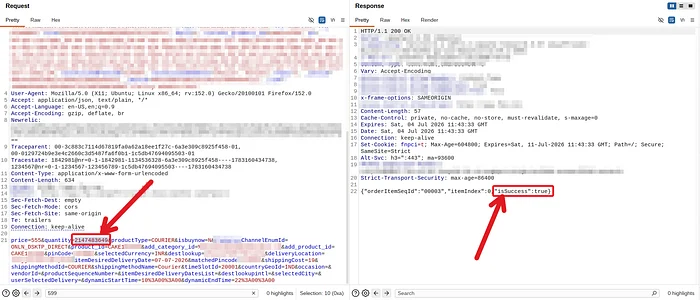
Step 4: Submit and verify
Forward the modified request to the server. The report gives no response body; the observable result is on the cart page itself.
Step 5: Exploit
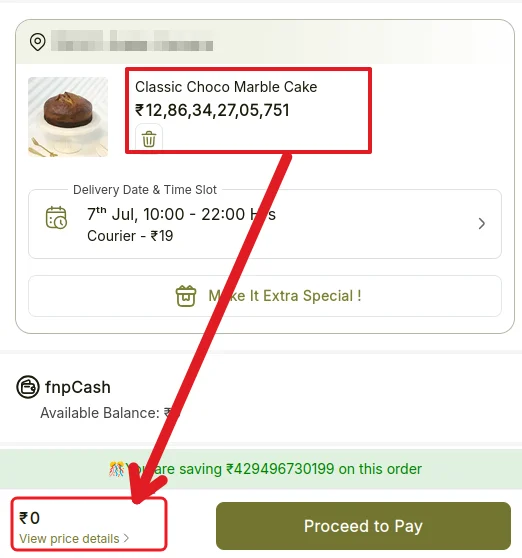
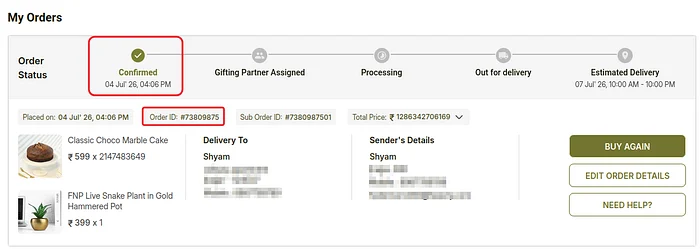
The cart total updates to ₹0.00. Completing the checkout process then generates a confirmed order without charging a payment card.
Root cause
The backend accepted a quantity outside the range its arithmetic could represent and did not enforce explicit boundaries on the value. When the oversized number reached the pricing calculation, it was wrapped or cast improperly, so the quantity was evaluated as 0 instead of raising a validation error. The total price was then computed by ordinary multiplication, and any unit price multiplied by zero is zero.
The report's remediation section points at missing boundary enforcement and unsafe math functions and data types.
Impact
Business logic flaws of this nature represent a critical risk to e-commerce platforms. Exploitation requires no privileged access, and an attacker could leverage it to:
- Acquire high-value physical or digital assets for free.
- Exhaust inventory stocks rapidly, leading to denial-of-service for legitimate customers.
- Cause significant direct financial losses and accounting discrepancies.
Fix
The report recommends defence in depth across input validation and data handling:
- Enforce explicit boundaries on quantity.
- Use safe math functions and data types.
The author states that the vulnerability was responsibly disclosed to the affected vendor before publication, that the website was notified, and that all necessary actions were taken.
Variants to test
- Other numeric fields in the cart and checkout flow. Try values just above the signed 32-bit maximum, such as
2147483648and2147483649, and values just below the signed minimum. A positive result is a total that drops to zero, goes negative, or an order that is accepted at an unexpected price. - Negative quantities. Submit a negative number where a positive one is expected. A positive result is a negative line total that reduces the cart total, or a refund-style credit.
- Very large but in-range values. Submit a quantity that fits in 32 bits but is far above any realistic stock level. A positive result is an order accepted without a stock check.
- Different encodings of the same value. Send the quantity as a string, with leading zeros, in scientific notation, or as a floating-point value. A positive result is the backend parsing it differently from the validation layer.
- Boundary values on price and discount fields. Apply the same overflow and underflow tests to coupon amounts, discount percentages and shipping costs. A positive result is a total that wraps to an unexpected figure.
What happened, in plain words
Imagine a shop where the till calculates your bill by multiplying the price of one item by how many you want. If you buy one pen for ₹10, the till does 10 × 1 = ₹10. If you buy three, it does 10 × 3 = ₹30. Simple.
Now imagine you could write a number so large on the order form that the till's little calculator, which can only hold numbers up to a certain size, gets confused and treats your number as zero. The till then does 10 × 0 = ₹0. You walk out with the pen and pay nothing.
That is essentially what happened here. A security researcher was testing a popular online shopping website. The website let customers type how many of an item they wanted into the cart. The researcher typed a very large number, one that the website's computer could not handle properly. Instead of saying "that is not a valid quantity", the website quietly treated the quantity as zero. The total price became ₹0.00, and the researcher could complete checkout and get a confirmed order without paying.
This kind of mistake is called an integer overflow. It is a business logic flaw, meaning the website's rules for how buying and selling should work were broken, rather than a technical bug in a password form or a login page. The researcher reported it responsibly to the company before writing about it.
The setup: what was being tested
The researcher was doing a security assessment on a live e-commerce platform. A security assessment is when someone tries to break a website on purpose so the owners can fix problems before criminals find them. This is often called bug bounty work.
The feature involved is the cart. When you shop online, you click "add to cart" on a product, then later you go to a cart page where you can change how many of each item you want. The website's backend (the computer servers behind the scenes, not the page you see) takes the price of one item and multiplies it by the quantity you asked for. That gives the order total, which is then sent to the payment system.
The researcher did not need any privileged access. The only tools mentioned are browser DevTools and an HTTP proxy such as Burp Suite. We will explain both below.
Finding it: the arithmetic behind the bug
To understand the bug, you need to know a little about how computers store numbers.
Computers store numbers in fixed-size chunks of memory. A common size is called a 32-bit signed integer. Think of it like a car odometer with a fixed number of digits: once it reaches the maximum, it rolls over to zero. In a 32-bit signed integer, the largest number you can store is 2,147,483,647. If you try to store a bigger number, the computer either wraps around to a negative number or throws an error, depending on how the software is written.
When a website receives a number from a user, it should check that the number is within a sensible range. For a quantity field, sensible means at least 1 and probably no more than a few hundred. If the website does not do this check on the server side (the backend), a user can send any number they like.
The researcher sent a quantity of 2147483649. That is one more than 2,147,483,648, which is itself two more than the maximum 32-bit signed value. In other words, it is a number that does not fit in a 32-bit signed integer. The backend's arithmetic engine did not reject it. Instead, it wrapped or cast the value improperly. Wrapping means the number rolls over like an odometer. Casting means the computer converts the number to a different type, often losing information in the process. Either way, the result was that the system evaluated the quantity as 0.
The total price was then calculated with ordinary multiplication:
Total Price = Unit Price x Quantity
Any price multiplied by zero is zero. So the order total became $0.00, and the payment step was bypassed entirely. The researcher did not need to hack a payment gateway or steal a card. The order total became zero rupees.
Proof of concept: step by step
A proof of concept (PoC) is a set of steps that shows a bug is real and repeatable. Here is what the researcher did.
Step 1: Select an item
Go to any product page on the platform and add the item to the cart. Think of it like a shop where the till is broken for every item, not just one brand of pen.
Step 2: Intercept the request
Go to the cart review page and capture the update-quantity request. This is the message your browser sends to the website's server when you change the quantity in your cart. Normally you never see it. To see it, you use one of two tools:
- Browser DevTools: Every modern browser has built-in developer tools. You can open them with a keyboard shortcut (usually F12 or Ctrl+Shift+I). One of the tabs, often called "Network", shows every request your browser makes. It is like a logbook of everything your browser asks the server to do.
- HTTP proxy such as Burp Suite: A proxy sits between your browser and the website. Instead of your browser talking directly to the server, it talks to the proxy, and the proxy talks to the server. This lets you pause, read and change the messages going back and forth. Burp Suite is a popular tool for this. Think of it as a mail interception service: you can open letters, read them, change them and reseal them before they reach the recipient.
The report does not show the raw request, so we do not know the exact URL, the parameter name or the format of the message. What matters is that the researcher captured the request that carries the quantity value.
Step 3: Inject the payload
A payload is the piece of data you send to try to trigger the bug. In this case, the payload is a number. Replace the existing quantity value in the captured request with:
2147483649
This is 2,147,483,648 plus one, a value that does not fit in a 32-bit signed integer. The report does not show the parameter name or the surrounding request body, so we cannot show the full request here. But the idea is simple: wherever the request says quantity=1 or quantity=2, you change it to quantity=2147483649.
Step 4: Submit and verify
Forward the modified request to the server. If you are using DevTools, you can usually right-click the request and choose "Edit and Resend" or use the "Resend" feature. If you are using Burp Suite, you change the value in the intercepted message and click "Forward". The report gives no response body, so we do not know exactly what the server replied. The observable result is on the cart page itself.
Step 5: Exploit
The cart total updates to ₹0.00. Completing the checkout process then generates a confirmed order without charging a payment card. In other words, the website accepts the order, confirms it, and never asks for money.
Why it worked: the root cause
The root cause is the underlying reason the bug exists. Here, the backend accepted a quantity outside the range its arithmetic could represent. It did not enforce explicit boundaries on the value. When the oversized number reached the pricing calculation, it was wrapped or cast improperly, so the quantity was evaluated as 0 instead of raising a validation error.
The total price was then computed by ordinary multiplication, and any unit price multiplied by zero is zero. The report's remediation section points at missing boundary enforcement and unsafe math functions and data types, which implies validation was absent or insufficient on the server side.
A useful comparison: imagine a form that asks for your age. If you type "three hundred", a good form says "please enter a number between 1 and 120". A bad form tries to do arithmetic with "three hundred" and either crashes or treats it as zero. Here, the quantity field was the bad form.
Business impact
Business impact means what the bug could cost the company in money, reputation or operations. Business logic flaws of this nature represent a critical risk to e-commerce platforms. Exploitation requires no privileged access, and an attacker could leverage it to:
- Acquire high-value physical or digital assets for free.
- Exhaust inventory stocks rapidly, leading to denial-of-service for legitimate customers.
- Cause significant direct financial losses and accounting discrepancies.
Denial-of-service means making a service unavailable to legitimate users. If someone orders all the stock at ₹0, real customers cannot buy it. Accounting discrepancies means the company's books will not match reality: stock leaves the warehouse but no money arrives.
The fix
The report recommends defence in depth across input validation and data handling. Defence in depth means using several layers of protection, so that if one fails, another catches the problem. Think of a bank with a locked door, a security guard and a safe: any one of them might fail, but together they make robbery much harder.
- Enforce explicit boundaries on quantity. The server should reject any quantity that is not a whole number between, say, 1 and 100 (or whatever the business allows). It should not rely on the browser to do this, because an attacker can bypass the browser entirely.
- Use safe math functions and data types. Instead of using a fixed-size integer that can overflow, use a data type that can hold larger numbers, or use functions that check for overflow and return an error instead of silently wrapping.
The author states that the vulnerability was responsibly disclosed to the affected vendor before publication, that the website was notified, and that all necessary actions were taken. Responsible disclosure means telling the company privately first, giving them time to fix the problem, before telling the public.
Variants to test
A variant is a slightly different version of the same attack. If you are learning, these are useful exercises to understand how the same idea can appear in different places. Here are some variants of the same idea, explained for a beginner.
- Other numeric fields in the cart and checkout flow. Try values just above the signed 32-bit maximum, such as
2147483648and2147483649, and values just below the signed minimum. A positive result is a total that drops to zero, goes negative, or an order that is accepted at an unexpected price. The signed minimum for a 32-bit integer is -2,147,483,648. Going below that can also cause a wrap. - Negative quantities. Submit a negative number where a positive one is expected. A positive result is a negative line total that reduces the cart total, or a refund-style credit. Imagine ordering -3 pens: instead of charging you for three pens, the shop owes you money for three pens.
- Very large but in-range values. Submit a quantity that fits in 32 bits but is far above any realistic stock level. A positive result is an order accepted without a stock check. For example, ordering 1,000,000 units when the warehouse has 10.
- Different encodings of the same value. Send the quantity as a string, with leading zeros, in scientific notation, or as a floating-point value. A positive result is the backend parsing it differently from the validation layer. Parsing means how the computer reads and interprets a piece of text. If the validation layer reads "1e9" as one billion but the pricing layer reads it as the letter "e", you have a mismatch.
- Boundary values on price and discount fields. Apply the same overflow and underflow tests to coupon amounts, discount percentages and shipping costs. A positive result is a total that wraps to an unexpected figure. Underflow is the opposite of overflow: going below the smallest representable number and wrapping around to a large positive one.
In other words, do not trust the shopping cart screen alone. Check the final receipt.
Glossary
- API: Application Programming Interface. A set of rules that lets one piece of software talk to another. In a website, the API is how your browser asks the server to do things like update a cart.
- Backend: The servers and software behind a website that do the actual work. You never see it directly; your browser talks to it.
- Boundary check: A check that a number falls within an allowed range, such as 1 to 100 for a quantity.
- Browser DevTools: Built-in tools in a web browser that let you inspect network requests, page code and more. Often opened with F12.
- Bug bounty: A programme where companies pay people to find and report security bugs in their systems.
- Burp Suite: A popular tool that acts as an HTTP proxy, letting you intercept and modify traffic between your browser and a website.
- Business logic: The rules a website follows to conduct its business, such as how prices are calculated, how discounts apply and how orders are processed.
- Business logic flaw: A bug where the website's rules can be abused, even though the code may be technically working as written.
- Cart: The part of an online shop where you collect items before checkout.
- Casting: Converting a value from one data type to another, often losing information in the process.
- Checkout: The final step of an online purchase where you confirm the order and pay.
- Client-side: Code that runs in your browser, on your computer. It can be changed by the user.
- Cookie: A small piece of data a website stores in your browser to remember who you are, such as keeping you logged in.
- Defence in depth: Using multiple layers of protection so that if one fails, another catches the problem.
- Denial-of-service: Making a service unavailable to legitimate users, often by exhausting its resources.
- DevTools: Short for browser developer tools.
- E-commerce platform: A website or system that lets people buy and sell goods or services online.
- Encoding: The way a value is written as text, such as
1,01,1e0or1.0. - Endpoint: A specific URL or address on a server that performs a particular function, such as updating a cart.
- Exploit: The act of using a vulnerability to achieve something, such as getting an order for free.
- Floating-point value: A number with a decimal point, such as 1.5 or 3.14. Computers store these differently from whole numbers.
- HTTP proxy: A tool that sits between your browser and a website, letting you see and change the messages going back and forth.
- Integer: A whole number, such as 1, 2, 3, with no decimal point.
- Integer overflow: When a number becomes too large for the fixed-size storage the computer uses, causing it to wrap around or behave unexpectedly.
- Inventory: The stock of goods a shop has available to sell.
- Parameter: A named value sent in a request, such as
quantity=2. - Parsing: How a computer reads and interprets a piece of text or data.
- Payload: The piece of data you send to try to trigger a bug.
- Payment gateway: The system that processes card payments between a shop and a bank.
- Proof of concept (PoC): A set of steps that demonstrates a bug is real and repeatable.
- Quantity: How many of an item you are ordering.
- Remediation: The fix for a vulnerability.
- Request: A message your browser sends to a server asking it to do something.
- Response: The message a server sends back to your browser.
- Responsible disclosure: Telling a company privately about a bug first, giving them time to fix it, before telling the public.
- Root cause: The underlying reason a bug exists.
- Security assessment: A authorised test of a system to find security weaknesses.
- Server-side: Code that runs on the website's servers, which the user cannot directly change.
- Signed integer: An integer that can be positive or negative. A 32-bit signed integer can hold values from -2,147,483,648 to 2,147,483,647.
- Token: A piece of data, often a string of characters, used to identify a user or authorise an action. Similar in purpose to a cookie.
- Underflow: When a number becomes too small for the fixed-size storage the computer uses, causing it to wrap around or behave unexpectedly.
- Unit price: The price of one single item.
- Validation: Checking that input is sensible and allowed before using it.
- Variant: A slightly different version of the same attack, applied to a different field or value.
- Vulnerability: A weakness in a system that can be exploited to cause harm.
- Wrapping: When a number rolls over from its maximum to its minimum (or vice versa) because it does not fit in the available storage, like an odometer rolling from 99999 to 00000.




