How Claude Code Landed Me a $500 Supabase Bug Bounty
A Supabase table's row-level security policy allowed anonymous users to read rows marked as public, but those rows also contained sensitive lead name and email fields. An attacker could query the REST API directly to retrieve over 1,200 records containing personal information.
 Published on yaseenzubair.medium.com
Cybersecurity
The full write-up lives on its author's site
It belongs to its author, so we link to it rather than copy it. The other two tabs are our own rewrites, checked against it.
Context
Supabase is a backend platform that teams use for authentication, databases, storage and APIs, so they can ship features without building everything from scratch. The report opens with the observation that Supabase usage is rising quickly, and that this speed is one of its biggest strengths. The security consequence is that if the underlying access controls are misunderstood, the same speed can introduce a serious gap.
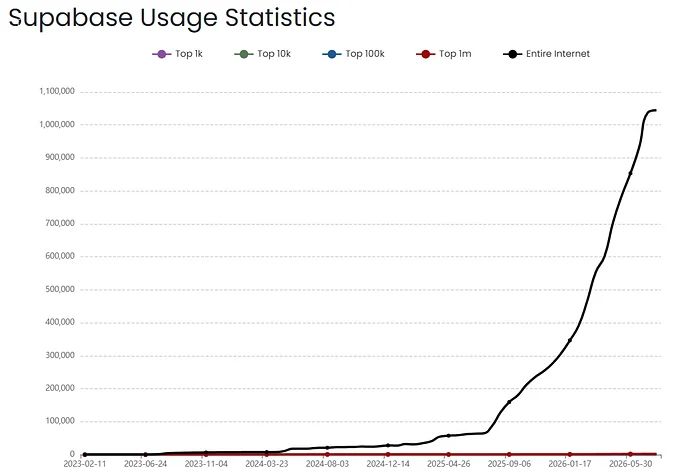
The image is captioned with a link to https://trends.builtwith.com/analytics/Supabase.
The target was an application using Supabase. The vulnerable component was not Supabase itself but the way the application had configured access to its Supabase database. Supabase applications commonly ship a public anonymous or publishable key in their frontend code, and the frontend uses that key to talk to Supabase. Its presence in a JavaScript bundle is expected and is not a vulnerability by itself. Security depends on correctly configured PostgreSQL privileges and Row Level Security policies, not on keeping the key secret.
Setup
The researcher was performing reconnaissance on a target that used Supabase. Alongside manual testing, Claude Code was spawned and a reconnaissance skill that the researcher usually uses for this target was invoked. It was left running in the background while manual testing continued. No accounts, roles or versions are described beyond the anonymous role that the application's own frontend uses.
Finding it
When the researcher looked back at the terminal, Claude Code had returned a finding with a heading along the lines of:
PII Disclosure: More Than 1,200 Records Exposed

The image is captioned "Wait, What?".
That caught the researcher's attention. The result was verified manually, the root cause was investigated further, and the finding eventually earned a $500 bounty. The report stresses that the vulnerability was not in Supabase itself but in how the application had configured access to its Supabase database.
Exploitation
Step 1: Locate the anonymous key in a JavaScript bundle
The legacy anonymous JWT could be located in a JavaScript bundle with a command similar to this:
curl -s "https://www.example.ai/_next/static/chunks/example.js" \ | grep -oE 'eyJ[A-Za-z0-9_-]+\.eyJ[A-Za-z0-9_-]+\.[A-Za-z0-9_-]+' \ | head -1

The command fetches a Next.js static chunk and pipes it through grep with a regular expression that matches a three-part JWT: a header segment starting with eyJ, a payload segment also starting with eyJ, and a signature segment, each separated by dots. head -1 keeps only the first match. This returned the anonymous key embedded in the application:
<REDACTED_DEMO_ANON_KEY>
Finding this key was not the vulnerability. The interesting question was what the database allowed this anonymous role to access.
Step 2: Count accessible records through the REST API
Supabase exposes database tables through its PostgREST API, commonly under /rest/v1/. The researcher used the anonymous key to check whether records containing an email address were accessible:
ANON_KEY="<REDACTED_DEMO_ANON_KEY>"SUPABASE_URL="https://signin.example.ai"
curl -sI \ -H "apikey: $ANON_KEY" \ -H "Authorization: Bearer $ANON_KEY" \ -H "Prefer: count=exact" \ -H "Range: 0-0" \ "$SUPABASE_URL/rest/v1/projects?lead_email=not.is.null&select=id" \ | grep -i content-range
The request sends the key twice, once in the apikey header and once as a bearer token. Prefer: count=exact asks PostgREST to return an exact total count, and Range: 0-0 limits the returned rows to a single row so that only the count matters. The filter lead_email=not.is.null restricts the query to rows that have an email address, and select=id requests only the id column. The -I flag makes it a HEAD request, and the output is filtered to the Content-Range header.
The response revealed that more than 1,200 matching records were accessible:
Content-Range: 0-0/12XX
The count showed the potential scale of the exposure, but the researcher still needed to confirm what kind of information the records contained.
Step 3: Retrieve a single record to confirm the data
The researcher requested only one record:
curl -s \ -H "apikey: $ANON_KEY" \ -H "Authorization: Bearer $ANON_KEY" \ "$SUPABASE_URL/rest/v1/projects?select=lead_name,lead_email,id,private&limit=1"

The query selects four columns, lead_name, lead_email, id and private, and limit=1 keeps the response to a single row. The response contained a project lead's name, email address, project ID and privacy status:
[ { "lead_name": "REDACTED", "lead_email": "REDACTED", "id": "00000000-0000-0000-0000-000000000000", "private": false }]
One sample was enough to demonstrate the issue, and there was no need to extract the remaining records.
Root cause
The affected table used a policy that allowed the anonymous role to read projects where private = false. Conceptually, the policy looked similar to this:
create policy "Anonymous users can view public projects"on public.projectsfor selectto anonusing (private = false);
The developer may have intended to make public project information accessible. The problem was that the allowed rows also contained sensitive fields such as lead_name and lead_email, and the anonymous role had sufficiently broad SELECT privileges to request those columns directly through the REST API.
The distinction that matters here is that RLS controls which rows a caller can access. It does not automatically decide which columns from those rows are safe to disclose. The policy filtered out projects marked as private, but the public rows still carried personal information that should not have been returned to anonymous users. The frontend did not need to display these fields, and an attacker could bypass the interface and request them directly from the Supabase API.
Impact
A party holding the public anonymous key could query the projects table through the PostgREST API and reach personal data attached to projects marked as public. In this case that meant a project lead's name and email address, plus the project ID and privacy status, across more than 1,200 matching records. The researcher demonstrated the exposure with a count and a single sample record rather than extracting the full set. The report does not describe any further use of the data.
Fix
The report frames the fix as a design decision that depends on the application's requirements, and notes that simply marking every project as private is not the complete fix. That might stop this particular query, but some projects may legitimately need to remain public, and the application should still prevent anonymous users from retrieving private lead information attached to those projects. Three options are given:
- Remove anonymous access entirely.
- Allow only public columns.
- Separate public and private data.
The report does not say which option the application adopted.
Variants to test
- Anonymous key in frontend bundles. Fetch the application's JavaScript chunks and search for JWT-shaped strings, as in the
curlandgrepcommand above. A positive result is an anonymous or publishable key that the API accepts. - Row counts on sensitive columns. Send a HEAD request with
Prefer: count=exact,Range: 0-0and a filter such aslead_email=not.is.nullagainst each table. A positive result is aContent-Rangeheader showing a non-zero total for a column that should not be publicly readable. - Column-level exposure on public rows. For tables with an RLS policy that exposes rows to
anon, request the sensitive columns directly withselect=. A positive result is a response containing personal fields that the frontend never displays. - Policy scope review. Enumerate policies that grant
selecttoanonand check whether the permitted rows carry sensitive columns. A positive result is a policy whoseusingclause filters on a flag such asprivate = falsewhile the table also holds personal data. - Interface bypass. Compare what the UI requests with what the API permits. A positive result is data reachable through the REST API that the interface never asks for.
What happened, in plain words
A security researcher was testing a website that had been built with a tool called Supabase. Supabase is a service that gives a team a ready-made database, login system, file storage and web API, so the team does not have to build those parts themselves. The researcher found that the website's database was letting anyone reach personal information, including names and email addresses, across more than 1,200 matching records. The researcher reported it, and the company paid a $500 reward, called a bug bounty.
The important part is that Supabase was not broken. The website's own settings were too generous. The database had been told, in effect, "anyone may read projects that are marked public", but the rows it handed out also contained the name and email address of the person who owned each project. The website's own pages never showed those fields, but the database would still give them to anyone who asked directly.
This article walks through the whole story in the order it happened: how the researcher found the key that the website uses to talk to its database, how that key was used to count the exposed records, how one record was pulled to prove what it contained, why the database allowed it, and how to fix it. Every command is copied exactly as it appeared in the write-up, and each one is explained line by line.
Background: what Supabase is, and why it matters
Supabase is a backend platform. "Backend" means the part of a website that runs on the server, out of sight of the visitor: the database where information is stored, the login system that checks who you are, the storage for uploaded files, and the API that the website's pages call to fetch and save data.
An API (Application Programming Interface) is a way for one piece of software to ask another piece of software for something, in a fixed format. A useful everyday comparison is a restaurant. You do not walk into the kitchen and cook; you order from a menu, and a waiter brings the dish. The menu is the API: a list of things you are allowed to ask for, and the format in which you ask. The kitchen is the database. The waiter is the server that carries your request.
Supabase's selling point is speed. A small team can add a login form, a table of data and an API in an afternoon instead of weeks. The write-up opens by noting that Supabase usage is rising quickly, and that this speed is one of its biggest strengths.
The image above is captioned with a link to https://trends.builtwith.com/analytics/Supabase.
The security consequence is simple: the same speed that lets a team ship features quickly also lets them ship a database setting they did not fully understand. If the access controls underneath are misconfigured, the convenience turns into a serious gap.
The key idea: a public key is not a secret
Before the story continues, one concept needs to be clear, because almost everything else depends on it.
When a website's pages talk to Supabase, they need to prove to Supabase which project they belong to and what they are allowed to do. Supabase does this with a key. In most Supabase applications, the key that ships in the frontend (the part of the website that runs in your browser) is a public one, called the anonymous key or publishable key. It is meant to be visible. Anyone who opens the browser's developer tools can read it.
A token is a small string of characters that a server issues and that a client presents later to prove something. A JWT (JSON Web Token) is a particular kind of token made of three parts separated by dots: a header, a payload and a signature. The anonymous key in this story is a JWT.
Finding that key in the website's code is therefore expected behaviour, not a vulnerability. The write-up is explicit about this. Security does not depend on hiding the key. It depends on what the database allows that key to do. The key is like a visitor badge at an office: everyone can see it, and it is fine that they can, as long as the badge only opens the doors it is supposed to open.
Supabase enforces those limits with two mechanisms from PostgreSQL, the database engine underneath:
- Privileges decide which operations (read, write, delete) a role may perform on a table, and on which columns.
- Row Level Security (RLS) decides which rows inside a table a role may see. It is a set of policies attached to the table, each saying, in effect, "this role may see rows that match this condition".
A role, in database terms, is a named identity that permissions are granted to. The anonymous role, usually called anon, is the identity that requests carrying the public key are treated as.
Step 1: Finding the anonymous key
The researcher was doing reconnaissance on a target that used Supabase. Reconnaissance means the early, quiet phase of a security test: looking at what a website is built from, what files it loads, and what services it talks to, before trying anything intrusive.
Alongside manual testing, the researcher started Claude Code, an AI coding assistant that runs in a terminal, and invoked a reconnaissance skill that they usually use for this target. A skill here is a saved set of instructions the assistant can follow. It was left running in the background while the researcher continued testing by hand.
When the researcher looked back at the terminal, the assistant had returned a finding with a heading along the lines of:
PII Disclosure: More Than 1,200 Records Exposed
PII stands for personally identifiable information: data that can identify a real person, such as a name, an email address or a phone number. "Disclosure" means that data was exposed to someone who should not have seen it.
That caught the researcher's attention. The result was verified by hand, the root cause was investigated further, and the finding eventually earned a $500 bounty. The write-up stresses again that the vulnerability was not in Supabase itself, but in how the application had configured access to its Supabase database.
To verify the finding, the researcher needed the anonymous key. It could be located in a JavaScript bundle, which is one of the files a website downloads to your browser to make its pages interactive. The command used was similar to this:
curl -s "https://www.example.ai/_next/static/chunks/example.js" \ | grep -oE 'eyJ[A-Za-z0-9_-]+\.eyJ[A-Za-z0-9_-]+\.[A-Za-z0-9_-]+' \ | head -1
Line by line:
curl -s "https://www.example.ai/_next/static/chunks/example.js"downloads the contents of a JavaScript file from the target website.curlis a command-line tool for fetching URLs. The-sflag means "silent": do not print progress or error chatter, just the content. The path_next/static/chunks/is typical of Next.js, a framework for building websites; it is where the site keeps its compiled JavaScript files.- The
|symbol is a pipe. It takes the output of the command on its left and feeds it as input to the command on its right, like passing a document from one person to the next. grep -oE '...'searches that input for text matching a pattern.grepis a standard search tool.-omeans "only print the matching part", not the whole line around it.-Emeans "use extended regular expressions", a richer pattern language.- The pattern
eyJ[A-Za-z0-9_-]+\.eyJ[A-Za-z0-9_-]+\.[A-Za-z0-9_-]+describes a JWT.eyJis the start of the encoded text{", which is how the header of a JWT almost always begins.[A-Za-z0-9_-]+means "one or more characters that are letters, digits, underscore or hyphen", which is the alphabet JWTs use. The\.matches a literal dot. The pattern therefore says: a header segment, a dot, a payload segment, a dot, a signature segment. head -1keeps only the first line of the result, so the output is a single key rather than every match in the file.
This returned the anonymous key embedded in the application:
<REDACTED_DEMO_ANON_KEY>
Again, finding this key was not the vulnerability. The interesting question was: what did the database allow this anonymous role to access?
Step 2: Counting how many records were exposed
Supabase exposes database tables through an API called PostgREST, commonly under the path /rest/v1/. A table is a grid of data, like a spreadsheet, with named columns and one row per record. PostgREST turns a URL into a database query, so a request to /rest/v1/projects means "give me rows from the projects table".
The researcher used the anonymous key to check whether records containing an email address were accessible. First, two shell variables were set:
ANON_KEY="<REDACTED_DEMO_ANON_KEY>"SUPABASE_URL="https://signin.example.ai"
A shell variable is a named box that holds a value for the rest of the session. Here ANON_KEY holds the key found in step 1, and SUPABASE_URL holds the base address of the target's Supabase API. Storing them once means the long key does not have to be retyped in every command, and the commands stay readable.
Then the count request:
curl -sI \ -H "apikey: $ANON_KEY" \ -H "Authorization: Bearer $ANON_KEY" \ -H "Prefer: count=exact" \ -H "Range: 0-0" \ "$SUPABASE_URL/rest/v1/projects?lead_email=not.is.null&select=id" \ | grep -i content-range
Line by line:
curl -sIsends a request to a URL.-sis silent mode again.-Imeans "send a HEAD request", which asks the server for the response headers only, not the body. Headers are the small labelled lines that come before the content of a response, carrying metadata such as the total number of matching rows.-H "apikey: $ANON_KEY"adds a header namedapikeycarrying the key. This is how Supabase identifies which project a request belongs to.-H "Authorization: Bearer $ANON_KEY"adds a second header,Authorization, with the valueBearerfollowed by the key. This is the standard way to present a token to a web API: the wordBearermeans "the holder of this token is authorised". The request sends the key in both places.-H "Prefer: count=exact"asks PostgREST to compute an exact total count of matching rows, rather than skipping the count for speed.-H "Range: 0-0"asks for only the first row. The point is not to read data yet; it is to make the server report the total while returning almost nothing.- The URL
"$SUPABASE_URL/rest/v1/projects?lead_email=not.is.null&select=id"is the query. Everything after?is a set of parameters joined by&.lead_email=not.is.nullfilters the rows to those where thelead_emailcolumn has a value ("is not null" means "is not empty").select=idasks for only theidcolumn, so no personal data is actually returned. | grep -i content-rangefilters the response headers down to the one namedContent-Range.-imakes the match case-insensitive.
The response revealed that more than 1,200 matching records were accessible:
Content-Range: 0-0/12XX
The Content-Range header has the form first-last/total. Here 0-0 means the response contains only row zero, and 12XX is the total number of matching rows, with the last digits masked in the write-up. That total is the scale of the exposure. But a count alone does not prove what kind of information the rows contain, so a second request was needed.
Step 3: Pulling one record to see what it held
The researcher requested only one record:
curl -s \ -H "apikey: $ANON_KEY" \ -H "Authorization: Bearer $ANON_KEY" \ "$SUPABASE_URL/rest/v1/projects?select=lead_name,lead_email,id,private&limit=1"
Line by line:
curl -sfetches the URL and prints the response body, silently.- The two
-Hheaders send the key in the same two places as before, so the request is authenticated as the anonymous role. select=lead_name,lead_email,id,privateasks for four specific columns: the project lead's name, the project lead's email address, the project's ID, and a flag calledprivatethat says whether the project is private.limit=1caps the response at a single row. This is a deliberate choice: one sample is enough to prove the problem, and there is no reason to download other people's data.
The response contained a project lead's name, email address, project ID and privacy status:
[ { "lead_name": "REDACTED", "lead_email": "REDACTED", "id": "00000000-0000-0000-0000-000000000000", "private": false }]
This is JSON, a common text format for structured data. The square brackets mean "a list", and the curly braces mean "one object with named fields". The values shown here are placeholders: the real name and email were removed before publication.
One sample was enough to demonstrate the issue, and there was no need to extract the remaining records. That restraint matters: a bug bounty report only needs to prove that data is reachable, not to collect it.
What actually went wrong
The affected table used a policy that allowed the anonymous role to read projects where private = false. Conceptually, the policy looked similar to this:
create policy "Anonymous users can view public projects"on public.projectsfor selectto anonusing (private = false);
This is SQL, the language used to talk to relational databases. Line by line:
create policy "Anonymous users can view public projects"creates a new RLS policy with a human-readable name.on public.projectsattaches it to theprojectstable in thepublicschema. A schema is a named group of database objects.for selectsays the policy applies to read operations.to anonsays it applies to the anonymous role, the identity used by requests carrying the public key.using (private = false)is the condition. A row is visible to that role only if itsprivatecolumn is false.
The developer may have intended to make public project information accessible. That intention is reasonable: a public project page should be readable by anyone. The problem was that the allowed rows also contained sensitive fields, lead_name and lead_email, and the anonymous role had broad enough SELECT privileges to request those columns directly through the API. SELECT is the database operation that reads data.
This is where an important distinction comes in. RLS controls which rows a caller can access. It does not automatically decide which columns from those rows are safe to disclose. A useful comparison is a filing cabinet with a rule that says "visitors may open the drawers marked public". The rule is about drawers, not about what is inside them. If a public drawer happens to contain a folder of private letters, the rule does not stop a visitor from reading them.
The policy successfully filtered out projects marked as private, but the public rows still carried personal information that should not have been returned to anonymous users. The frontend did not need to display these fields. An attacker could simply bypass the interface and request them directly from the Supabase API. The website's own pages are like a shop counter that only shows certain items; the API is the back door to the same shelf, and it does not care what the counter displays.
Why marking everything private is not the complete fix
It would be easy to look at this issue and say: "Just mark every project as private." That might stop this particular query, but it does not address the underlying design problem.
Some projects may legitimately need to remain public. The application should still prevent anonymous users from retrieving private lead information attached to those projects. The correct remediation depends on the application's requirements, which is why the write-up frames it as a design decision rather than a one-line patch.
Three options are given:
- Remove anonymous access entirely. Stop granting the anonymous role any access to the table.
- Allow only public columns. Keep the rows readable, but restrict the anonymous role to the columns that are genuinely public, so that
lead_nameandlead_emailcannot be requested at all. - Separate public and private data. Separate public and private data.
The write-up does not say which option the application adopted.
The main lesson
This was not a Supabase vulnerability. The anonymous key behaved exactly as expected, and the REST API enforced the permissions it had been given. The vulnerability existed because the database's authorisation model did not match the application's intended data exposure.
When testing a Supabase application, do not stop after confirming that login works through the interface. The interface is only one way to reach the data. The database had simply been instructed to disclose more than the application intended, and finding that gap resulted in a $500 bounty.
If Supabase appears during your next assessment, add RLS and database privileges to your testing checklist.
Variants to test
These are the same checks, phrased as things to try on other targets:
- Anonymous key in frontend bundles. Fetch the application's JavaScript files and search for JWT-shaped strings, as in the
curlandgrepcommand above. A positive result is an anonymous or publishable key that the API accepts. - Row counts on sensitive columns. Send a HEAD request with
Prefer: count=exact,Range: 0-0and a filter such aslead_email=not.is.nullagainst each table. A positive result is aContent-Rangeheader showing a non-zero total for a column that should not be publicly readable. - Column-level exposure on public rows. For tables with an RLS policy that exposes rows to
anon, request the sensitive columns directly withselect=. A positive result is a response containing personal fields that the frontend never displays. - Policy scope review. List the policies that grant
selecttoanonand check whether the permitted rows carry sensitive columns. A positive result is a policy whoseusingclause filters on a flag such asprivate = falsewhile the table also holds personal data. - Interface bypass. Compare what the UI requests with what the API permits. A positive result is data reachable through the REST API that the interface never asks for.
Glossary
- Anonymous key (publishable key): the public key that a Supabase frontend ships in its code so it can talk to the database; it is meant to be visible.
- API (Application Programming Interface): a fixed way for one piece of software to ask another for data or actions, like a menu you order from.
anonrole: the database identity that requests carrying the anonymous key are treated as.- Backend: the server-side part of a website: database, login, storage and API, out of sight of the visitor.
- Bug bounty: a programme that pays researchers for reporting security problems responsibly.
- Claude Code: an AI coding assistant that runs in a terminal and can follow saved sets of instructions called skills.
- Column: a named field in a database table, such as
lead_email. Content-Rangeheader: a response header of the formfirst-last/totalthat reports which rows were returned and how many match in total.curl: a command-line tool for fetching URLs.- Frontend: the part of a website that runs in your browser.
grep: a command-line search tool that finds text matching a pattern.- HEAD request: an HTTP request that asks for response headers only, not the body.
- Header: a labelled line of metadata sent with a web request or response.
- JavaScript bundle: a file of compiled JavaScript that a website downloads to make its pages interactive.
- JSON: a text format for structured data, using lists in square brackets and objects in curly braces.
- JWT (JSON Web Token): a token made of three dot-separated parts (header, payload, signature).
- Next.js: a framework for building websites, which stores compiled files under
_next/static/chunks/. - PII (personally identifiable information): data that can identify a real person, such as a name or email address.
- Policy (RLS policy): a rule attached to a database table saying which rows a given role may see.
- PostgREST: the component that turns URLs under
/rest/v1/into database queries. - PostgreSQL: the relational database engine that Supabase is built on.
- Privileges: the permissions that decide which operations and columns a role may use.
- Reconnaissance: the early, quiet phase of a security test, looking at what a site is built from before trying anything intrusive.
- Role: a named database identity that permissions are granted to.
- Row: one record in a database table.
- Row Level Security (RLS): a PostgreSQL feature that restricts which rows a role can see, based on policies.
- Schema: a named group of database objects, such as
public. - SELECT: the database operation that reads data.
- Shell variable: a named box in a terminal session that holds a value for reuse.
- SQL: the language used to talk to relational databases.
- Supabase: a backend platform offering database, authentication, storage and APIs on top of PostgreSQL.
- Table: a grid of data with named columns and one row per record.
- Token: a string a server issues and a client presents later to prove something.
- Vulnerability: a weakness that lets someone do something the system's owner did not intend.




