Bypassing custom Token Authentication in a Mobile App
The Android app used a custom native-code token to protect the login endpoint from brute force, but the token could be generated on demand by hooking the app with Frida. An attacker could then send valid-looking login attempts and keep guessing passwords without the server's rate-limit protection kicking in.

In this article, I am going to talk about how I bypass rate-limit protection of the ACME corporation (a hypothetical name to maintain the non-disclosure agreement) with a custom implementation in native code for token generation. Later I will mention why this is not the best solution and I will recommend a better one.
The full write-up lives on its author's site
It belongs to its author, so we link to it rather than copy it. The other two tabs are our own rewrites, checked against it.
Context
ACME (a hypothetical name used to keep the client under an NDA) ships an Android application whose login flow is protected against brute force by a custom token scheme. The token is generated inside a native .so library, placed in a request header and validated per request on the server side. The client's assumption was that the library is compiled and therefore unreadable, so nobody could produce valid tokens outside the app.
The article covers two things: how the token generation was bypassed, and why a token-based scheme of this kind is a poor substitute for a real anti-automation control, with SafetyNET reCAPTCHA proposed as the alternative.
Setup
The research was black-box: no source code and no information about the application were provided. The tooling used was:
- JADX, to decompile the APK.
- ADB, against an emulated Android device, to pull the native library.
xxd,fileandstringsfor basic binary triage.- IDA, to read the assembler of the library.
- FRIDA (driven from Python with frida-tools) to instrument the running app.
- Burp Suite Intruder to run the brute force with the generated tokens.
The application does not obfuscate its code, which made the decompiled Java readable.
Finding it
The first observation is how the server treats the token. If the token is valid the server returns 200; if it is invalid the server returns 401.
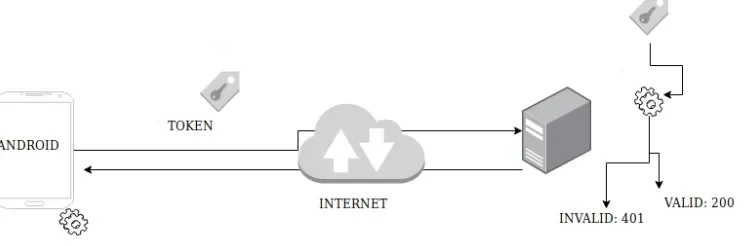
Figure 1 shows that validation flow. The token travels in the X-ACME-Token header and is validated on every request; it is used during the login process.
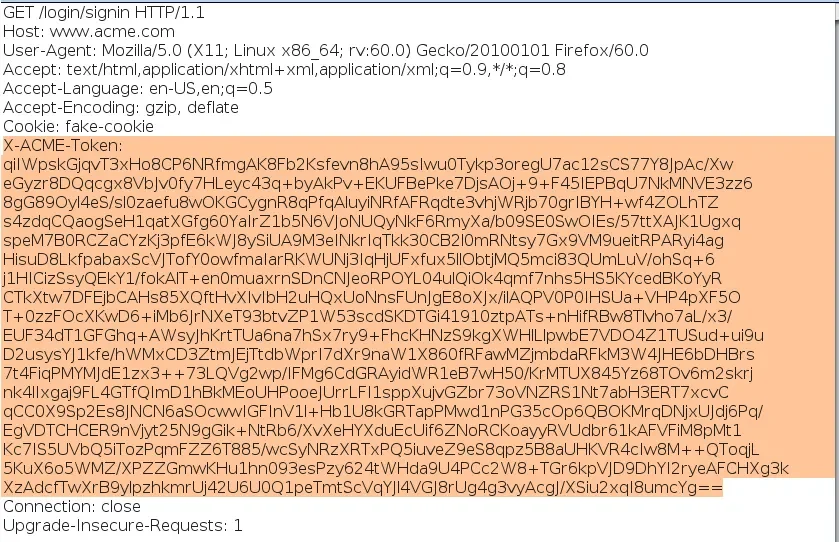
Figure 2 shows an example request carrying that header.
Decompiling the APK with JADX led to the Sec class, which declares a static segment that loads the native library. Because the code is not obfuscated, the decompiled source was easy to read.
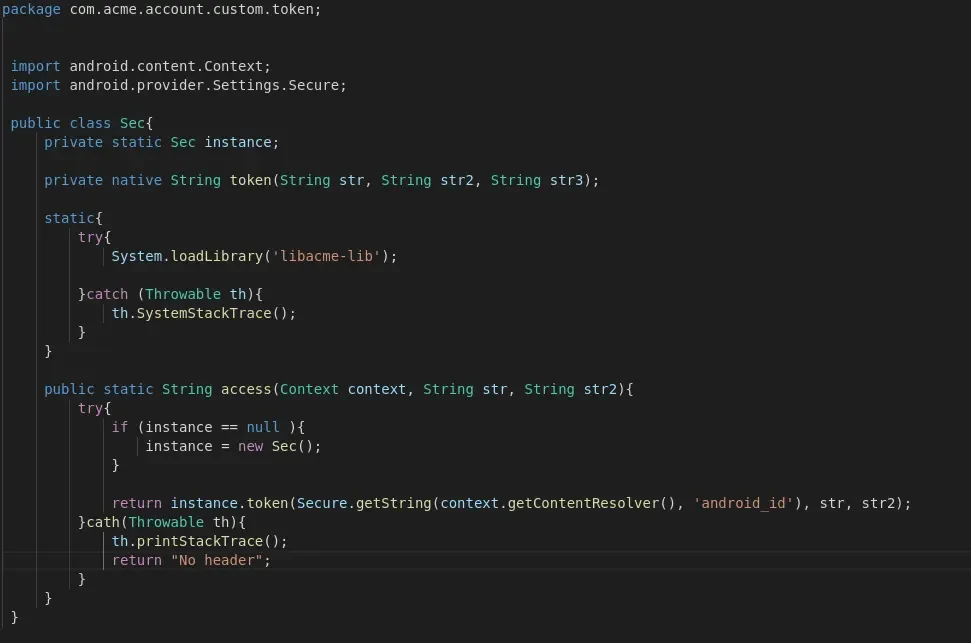
Figure 3 shows that class. Knowing the library name, the .so was pulled from the emulated device:
adb pull /data/data/com.acme.app/lib/libacme-lib.so .
Basic triage followed with xxd and file.
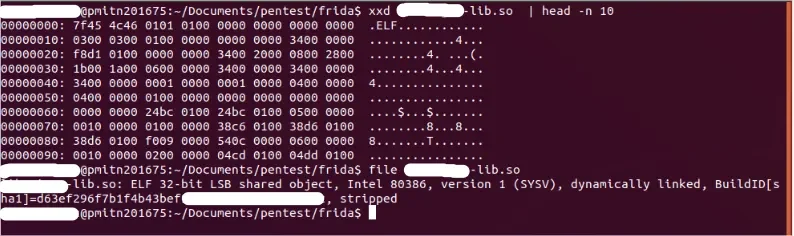
Figure 4 shows that output. The ELF header and the file result confirm the artefact is a shared library. The next step was strings.
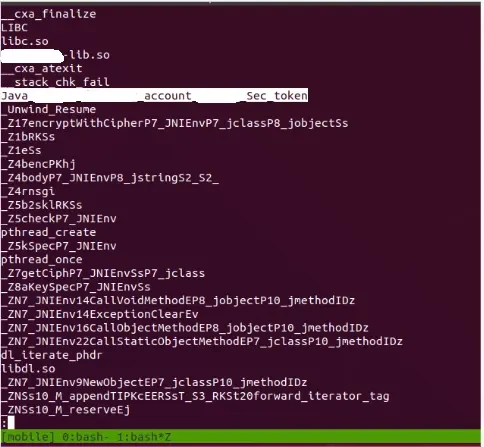
Figure 5 shows the strings output, where one exported symbol stands out:
Java_com_acme_account_Sec_token
The library was then opened in IDA to examine that method.
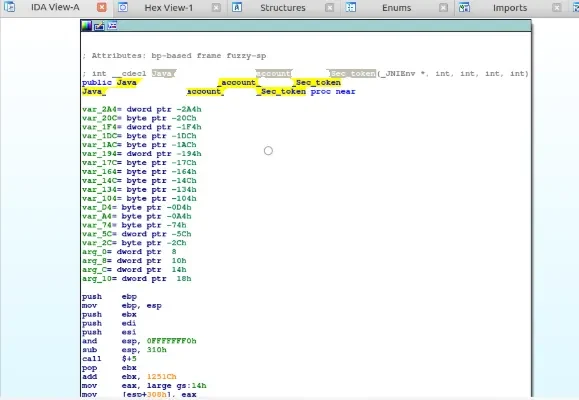
Figure 6 shows the method in IDA. After a couple of hours of reading assembler, the researcher decided to look for a simpler and cheaper route: perhaps a weakness in the login process would allow generating tokens directly.

Exploitation
Step 1: locate the token generation in Java
FRIDA is a dynamic code instrumentation toolkit that injects JavaScript snippets or your own library into native apps on Windows, macOS, GNU/Linux, iOS, Android and QNX. The plan was to hook the Java side, where the token is generated, instead of reversing the assembler.
A couple of hours were spent learning the FRIDA API first, to understand how it works and what its limitations are. Reading the decompiled classes again revealed the client class that builds the request.

Figure 7 shows that class. In the newBuilder.addHeader() instruction the X-ACME-Token header is added and Sec.access is called. According to the code, Sec.access takes three parameters: a Context object, a unique ID, and a URL.
Step 2: build the FRIDA harness
A basic Python skeleton drives frida-tools.
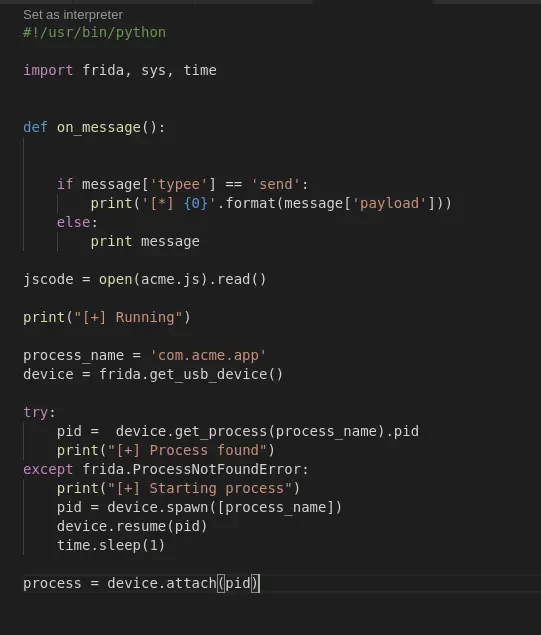
Figure 8 shows that wrapper. The next piece is a JavaScript snippet.
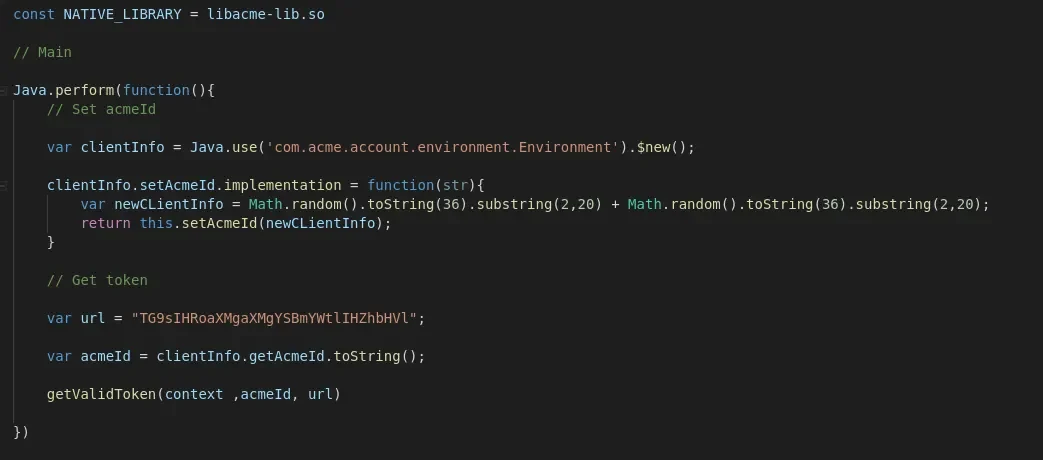
Figure 9 shows the snippet; the article only reproduces the part that generates the token. The code hooks the Environment class, creates a new instance of it, calls the setter method and defines a new value using a random string. The next part is the getValidToken function.

Figure 10 shows getValidToken(). The code overloads the token function of com.acme.account.Sec. With the function overloaded, an acmeID can be created and passed as an argument to the function that generates the token.
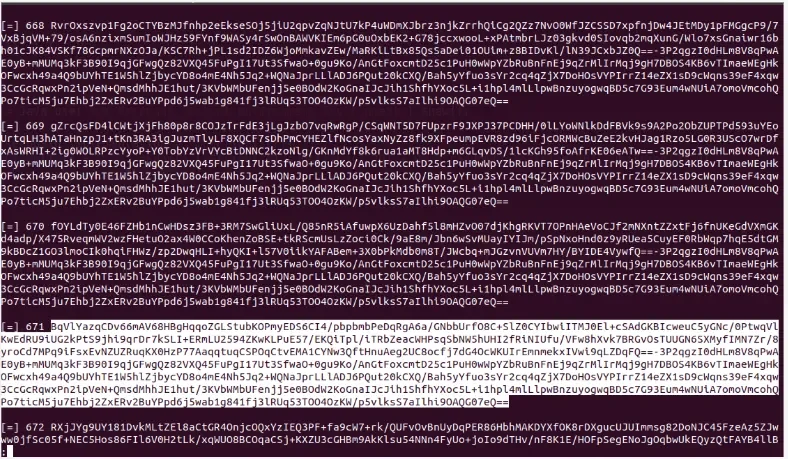
Figure 11 shows a list of tokens generated with FRIDA.
Step 3: first brute force attempt
The token list was loaded into Burp Suite Intruder and used against a valid ACME user.
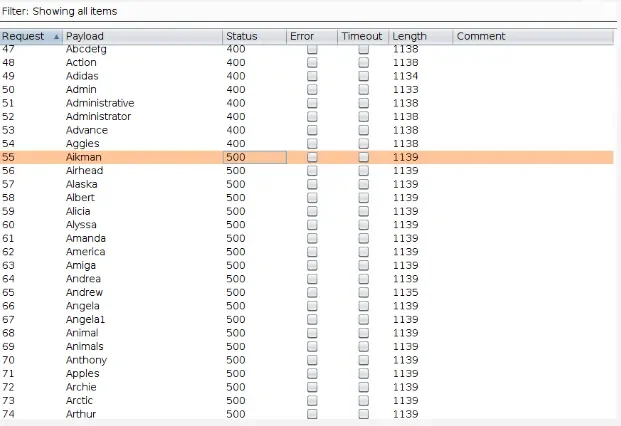
Figure 12 shows the Intruder configuration. The attempt failed: after 54 requests the server returned code 500 (server error), while status code 400 means an invalid password. After a series of requests the server detected the brute force attack.

Step 4: overload the token function with three strings
One of the parameters of the token.access function is a Context object. The idea was to overload the token function again, this time defining it with three string parameters.
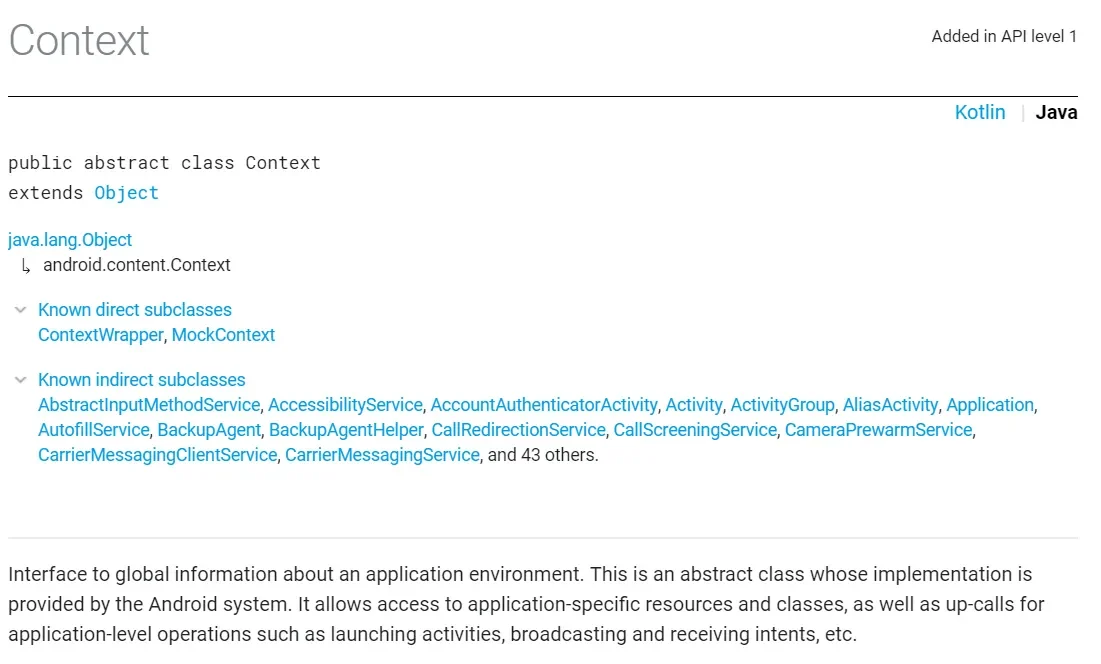
Figure 13 shows the context information that prompted this. The function was overloaded and the payload configured with the list of tokens.

Figure 14 shows the overloaded token method.
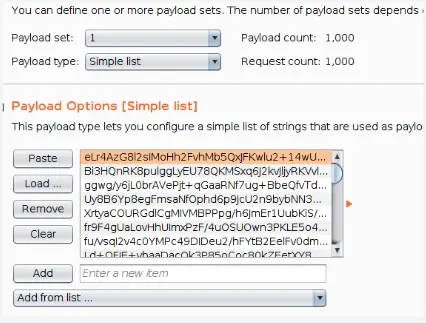
Figure 15 shows the payload configuration.
Step 5: the attack succeeds
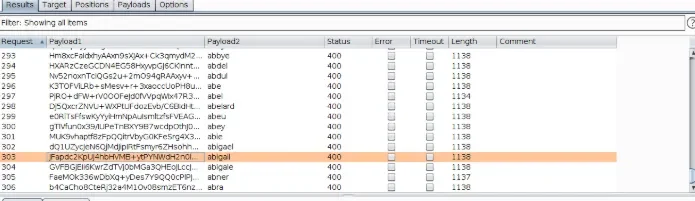
Figure 16 shows the Intruder run. After 303 requests the server still returned 400, indicating an invalid password, and no longer blocked the attack.

What happened: with FRIDA the Token.access function is overloaded, so at run time, when the Python script (which uses the JavaScript snippets) launches an instance of com.acme.app on the emulated device, the method definition is replaced. When getValidToken() is called it does not invoke the default method but the overloaded one, which takes three strings, so no Context object is needed. The three arguments are under the attacker's control and can be random values passed to the token function. Each request then appears valid to the backend, which does not detect the brute force.
Root cause
The protection is a token generated in the app's native library, and the server checks whether the token is valid. The server only checks that the token is valid, and the generation routine can be invoked with attacker-chosen inputs. Once the generation routine can be invoked with attacker-chosen inputs, every request carries a token the server accepts, so the per-request check passes while the password guessing continues. The lack of code obfuscation made the Java side easy to read, and the native library, despite being compiled, was not a barrier: the exported symbol was visible in strings and the method could be examined in IDA. The first attempt was stopped by the server's own detection after 54 requests; with the overloaded three-string variant, 303 requests went through without the server detecting the attack.
Impact
An attacker with the APK and a device or emulator can generate valid tokens at will and run password guessing against ACME accounts while the backend treats each request as legitimate. The researcher notes that no memory-corruption, CSRF or SSRF issue was involved: the vulnerability is the token implementation itself.
Fix
The recommendation is to replace the custom token scheme with SafetyNET reCAPTCHA API.
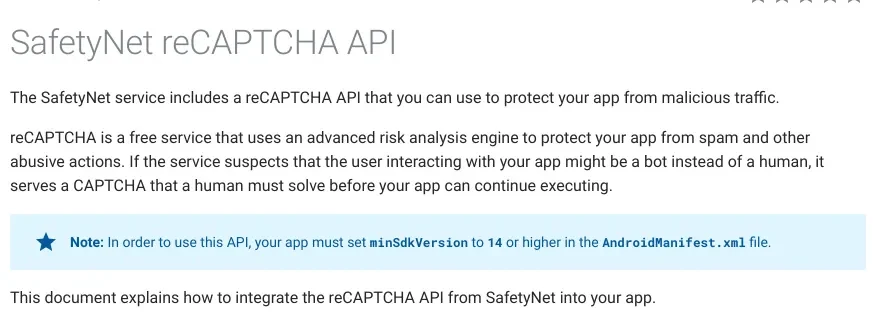
Figure 17 gives the definition of SafetyNET.
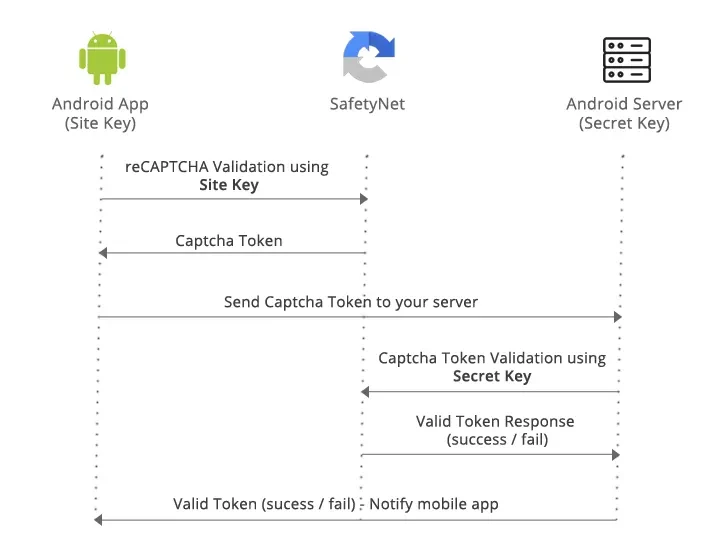
Figure 18 shows the basic architecture with three actors: the Android app, SafetyNET and the Android server. The app holds a Site Key (like a public key) used to talk to the SafetyNET server, which returns the captcha challenge to the user and then sends the token to the server for validation. The server holds the secret key and validates the token against SafetyNET, whose analysis engine checks it; the response goes back to the server, which handles the token as valid or invalid.
The report was filed with a detailed explanation of the vulnerability and this fix. The researcher notes that adding SafetyNET in production is not trivial: it requires planning and may need sign-off from the product team, because a CAPTCHA affects the user experience.
Variants to test
- Hook the token generation function with FRIDA and call it directly with arbitrary arguments. A positive result is a stream of tokens the server accepts (200 instead of 401).
- Overload the method with a different signature than the original, for example replacing an object parameter with primitive strings. A positive result is that the app still runs and the server accepts the resulting tokens, showing the server does not bind the token to the expected call shape.
- Run
stringson any bundled.soand look for exportedJava_...symbols that reveal token or crypto routines. A positive result is a named method that can be located in a disassembler. - Replay a valid token across many requests and watch for a change in status codes or a block. A positive result is that the server keeps returning 400 for wrong passwords instead of detecting the attack.

What happened, in plain words
ACME is a made-up name for a real company that asked to stay anonymous. ACME makes an Android app, and that app has a login screen where you type a username and a password. Like every login screen, it can be attacked by guessing passwords over and over: try "password1", then "password2", then "123456", and so on, until one works. This is called a brute force attack, and it is the digital equivalent of standing at a door trying every key on a big ring until one turns.
To stop that, ACME added a guard: before the app sends a login attempt, it attaches a special short code, called a token, to the request. The server checks the token first. If the token is good, the server looks at the password. If the token is bad, the server refuses immediately. The idea is that only the real app can produce good tokens, so an attacker who writes a script to hammer the login page will be refused because their script cannot make tokens.
The token is produced by a piece of compiled code inside the app, a file ending in .so. The client believed that compiled code is unreadable, so nobody outside the company could work out how to make tokens. That belief was wrong. The researcher took the app apart, found the code that makes tokens, and used a tool called FRIDA to make the app produce as many valid tokens as needed. With those tokens, the password guessing went through, and the server stopped noticing the attack.
The article then explains why this kind of token is a weak defence, and recommends a different service, SafetyNET reCAPTCHA, which asks the user to prove they are human.
Background: what a brute force attack is
A brute force attack is the simplest way to guess something secret. You try one combination after another. It is noisy, meaning it produces lots of failed attempts that a watchful server can notice, but it is also cheap and needs no cleverness.
In this case the secret is a user's password. The attacker writes a script that sends a login request with a guessed password, reads the answer, and moves to the next guess. If the server answers "wrong password" every time, the script just keeps going. The only thing that stops it is a defence: a limit on how many tries are allowed, or a check that each try comes from a real human using the real app.
ACME chose the second kind of defence, a token, and implemented it themselves in compiled code.
About the app
The application is built for Android. It uses its own token implementation to prevent brute force attacks. A token here is a short string of characters, generated by the app, that the server can check. Think of it as a cloakroom ticket: the app shows the ticket, the server checks it is genuine, and only then serves the request.
Figure 1 shows the token validation process. The server receives a request, looks at the token, and decides. If the token is valid, the server returns status code 200. If the token is invalid, the server returns status code 401.
Status codes are short numbers that every web server sends back with its answer, so the client knows what happened. 200 means "fine, here is your result". 401 means "you are not allowed, you are not authenticated". You have probably seen 404, which means "page not found"; 200 and 401 are the same kind of signal.
The token is put in the header of the request and is validated on every request. A header is a small labelled line that travels with a web request, separate from the main content. When your browser asks for a page, it sends headers like User-Agent (which browser you use) and Accept-Language (which language you prefer). Here the app adds its own header carrying the token.
Figure 2 shows an example request. In the X-ACME-Token header the application places the generated token. This token is used during the login process. The name X-ACME-Token is just a label the company chose; the X- prefix is a common convention for custom headers that are not part of the official web standards.
The research
The test was done without access to the source code or any information about the application. This is called black-box testing: you only have the finished product, like a locked box, and you learn how it works by poking at it from outside.
The researcher downloaded the APK of the application. An APK is the installable file of an Android app, the equivalent of an .exe on Windows or a .dmg on a Mac. It is really a zip archive containing the app's code and resources.
The APK was opened with JADX. JADX is a free tool that takes the compiled code inside an Android app and turns it back into readable Java source code, roughly the way the programmer wrote it. This process is called decompilation.
After a lot of source code review, the researcher found the Sec class. In programming, a class is a named bundle of code that does one job; here, Sec is the bundle responsible for security, including the token. This class defines a static segment to load the library with native code. "Native code" means code written in another language (usually C or C++) and compiled into a separate file, rather than written in Java. The app loads that file at run time and calls functions inside it.
It is also important to note that the application does not obfuscate the code. Obfuscation is a technique where programmers deliberately rename everything to nonsense, so that generateToken becomes a, b or c, making decompiled code hard to follow. Because ACME did not do this, JADX produced readable code.
Figure 3 shows the Sec class from ACME. Reading it tells you the name of the native library the app loads.
At this point the researcher knew the name of the library, so the next step was to extract the .so file from the Android emulated device. An emulator is a program that pretends to be a phone on your computer; the researcher ran the app inside one. The .so file is the compiled native library, the file that actually contains the token-making code.
The extraction was done with the ADB command:
adb pull /data/data/com.acme.app/lib/libacme-lib.so .
Line by line:
adbis the Android Debug Bridge, a command-line tool that lets a computer talk to an Android phone or emulator. It can install apps, run commands and copy files.pullmeans "copy this file from the phone to my computer"./data/data/com.acme.app/lib/libacme-lib.sois the full path of the file on the phone./data/data/is where Android keeps each app's private files,com.acme.appis the app's package name (its unique identifier, like a domain name in reverse),lib/is the folder for native libraries, andlibacme-lib.sois the library itself. The.soending stands for "shared object", the Linux and Android equivalent of a Windows.dll.- The final
.means "put the copy in the current folder on my computer".
This is the fun part. The researcher now had to do binary research to understand what the file does, because the source code of the library was not available. Binary research means studying a compiled file directly, without source code, by looking at its structure and its machine instructions.
The first step was basic: the xxd and file commands were used to learn more about the file.
Figure 4 shows that basic research. file is a command that looks at the first bytes of a file and tells you what kind of file it is. xxd prints the raw contents of a file as hexadecimal numbers, which is how you inspect a binary when you cannot read it as text.
At this point the researcher knew what the file was: the ELF header and the output of the file command confirmed that the file is a shared library. ELF stands for Executable and Linkable Format, the standard layout for compiled programs on Linux and Android. The first bytes of every ELF file spell out a signature, so file can recognise it instantly.
The next thing was to open the file using the strings command.
Figure 5 shows the strings output. strings is a simple but powerful tool: it scans a binary file and prints every run of readable text it can find. Compiled programs are full of text, such as error messages, file names and, crucially, the names of functions that other code is allowed to call. Those exported names are a map of what the library offers.
One very interesting method appeared in that output:
Java_com_acme_account_Sec_token
This is a naming convention. When Java code wants to call a function written in native code, the native function must have a name that follows a fixed pattern: Java_, then the package name with dots replaced by underscores, then the class name, then the method name. So this name tells you that the Java class com.acme.account.Sec has a native method called token. In other words, this is the function that makes the token.
The library was then opened in IDA to examine that method. IDA is a disassembler: a program that takes compiled machine code and shows it as assembly language, the low-level list of instructions the processor actually executes. It is readable to a trained eye but far from friendly.
Figure 6 shows the library opened in IDA, with the Java_com_acme_account_Sec_token method on screen.
After a couple of hours reading assembler code to try to understand what the library does, the researcher decided to move forward with another option, one that was more simplistic and cheaper for the client. The idea: maybe if a weakness is found in the login process, the researcher could generate their own token without fully understanding the library. Then something came to mind, and it was like a revelation.
FRIDA to the rescue
FRIDA is an awesome tool. According to its website, it is a dynamic code instrumentation toolkit. It lets you inject snippets of JavaScript or your own library into native apps on Windows, macOS, GNU/Linux, iOS, Android and QNX. FRIDA also provides some simple tools built on top of the FRIDA API, which can be used as-is, tweaked to your needs, or serve as examples of how to use the API.
Unpacking that definition for a beginner:
- Dynamic means "while the program is running", as opposed to static analysis, which means studying a file while it sits on disk. Dynamic instrumentation is like watching a machine work and reaching in to adjust a lever, instead of reading its blueprint.
- Instrumentation means adding measurement or control code to a program you did not write.
- A toolkit is a collection of tools that work together.
- JavaScript is a programming language mostly known for running in web pages, but it can also be used as a scripting language in many other contexts, including FRIDA.
- An API, short for Application Programming Interface, is a set of functions that one program offers to another so they can talk. Think of a restaurant menu: you do not walk into the kitchen, you order from the menu, and the kitchen does the work. The FRIDA API is the menu of things your script can ask FRIDA to do.
The plan from that point: in theory, according to the definition, JavaScript snippets could be injected into the native apps, in this case Java. So the researcher needed to find in the code where the Sec class is used, understand how the token is generated by reading Java code rather than assembler, and maybe generate a token directly.
The steps, as the researcher put it, quoting Abraham Lincoln: give me six hours to chop down a tree and I will spend the first four sharpening the ax. In other words, preparation pays off.
Before diving into the code, a couple of hours were spent understanding the FRIDA API. This is a very important step because it gives a better idea of how FRIDA works and what limitations it has. Learning the tool before using it saves time later.
After a while, confidence was there. The APK file was opened again, some classes were read, and the thing being looked for was found.
Figure 7 shows the client example class. Again, the lack of code obfuscation made the work easy.
In the newBuilder.addHeader() instruction you can see how the X-ACME-Token header is added and how Sec.access is called. An instruction here means a line of Java code. newBuilder.addHeader() is a call that adds a header to an outgoing web request; the name is built from newBuilder (an object that builds requests) and addHeader (the action of adding a header). Sec.access is a call into the Sec class, specifically its access method.
According to the code, three parameters are needed: the first is a Context object, the second is a unique ID, and the last one is a URL. A parameter is an input you hand to a function, like the ingredients you give a cook. A Context object in Android is a bundle of information about the app's surroundings (which screen is open, what resources are available); it is a complex object, not a simple piece of text. A URL is a web address, like https://example.com/login.
At this point, FRIDA could be used.
The proof of concept
FRIDA uses Python code to enable frida-tools. Python is a popular programming language, often used for scripting; frida-tools is the package that installs the FRIDA command-line programs and libraries. A basic skeleton of code in Python was created.
Figure 8 shows that Python wrapper code. A wrapper is a small program that drives a bigger one: here, the Python script starts the app under FRIDA's control and loads the JavaScript that does the real work.
The next step was to create a JavaScript snippet.
Figure 9 shows an example of the JavaScript snippet. There is a lot more code in Figure 9, but the interesting part is the function used to generate the token.
In this code, the script hooks the Environment class, creates a new instance of it, calls the setter method, and defines a new value using a random string. To hook means to intercept: FRIDA replaces or wraps a function so that when the app calls it, your code runs instead, or first. A setter method is a function whose job is to set a value inside an object, as opposed to a getter, which reads a value. The script hooks the Environment class, creates a new instance, calls the setter method and defines a new value using a random string.
The next part is the getValidToken function.
Figure 10 shows the getValidToken() method. In this code, the token function of com.acme.account.Sec is overloaded. Overloading is a programming feature where several functions share one name but take different inputs; the program picks the right one based on what you pass. Here, FRIDA replaces the original token function with a version the researcher controls. With this function overloaded, an acmeID can be created and passed as an argument to the function which generates the token. An argument is the actual value you pass for a parameter: the parameter is the slot, the argument is what goes in it.
Figure 11 shows token generation. It worked: Figure 11 shows a list of tokens generated with FRIDA.
First brute force attempt
Burp Suite Intruder was configured with the list of tokens, and then a brute force was attempted against a valid user of ACME. Burp Suite is a well-known tool for testing web applications; Intruder is one of its components that sends the same request many times, each time substituting a different value from a list. It is the standard way to automate password guessing in a test.
Figure 12 shows the Intruder configuration.
Oh no. After 54 requests the server returned code 500, which means server error. Status code 400 is for an invalid password. After a series of requests the server detected the brute force attack.
So the first attempt failed. After 54 requests the server returned code 500, and after a series of requests it detected the brute force attack. A 500 is a generic "something went wrong on my side" answer, and here it was the server's way of pushing back. The attack was stopped.
The exploit
The researcher never gives up, so after resting, the battle was rejoined, and this was found.
Figure 13 shows context information. The Context object: if one of the parameters of the token.access function is a Context object, what happens if the token function is overloaded again and defined with three string parameters instead?
This is the key insight. The original function expects a Context object, a unique ID and a URL. A Context object is complicated to build from outside the app. But if the function is replaced with a version that takes three plain strings, then no Context object is needed at all: three pieces of text are enough, and text is trivial to make up.
Figure 14 shows the token method overload. The function was overloaded and the payload was configured with the list of tokens. A payload, in this context, is the piece of data that gets inserted into each request; here, each payload is one token from the list.
Come on, this has to work.
Figure 15 shows the payload configuration.
And it worked.
Figure 16 shows the brute force attack succeeding using Intruder. After 303 requests the server still returned 400, indicating that the password is invalid, and it did not block the attack. That is the success: 303 attempts went through without the server noticing.
What happened here
With FRIDA, the function of Token.access is overloaded, so at run time, when the Python script (which inside uses the JavaScript snippets) launches an instance of com.acme.app in the emulated Android device, the method definition is replaced. When getValidToken() is called, it is not calling the default method (token); it is calling the overloaded method, passing three strings as arguments. So there is no need to pass a Context object. The three arguments are under the attacker's control, and random values can be passed to the token function.
Those valid tokens were used to launch the attack. In the backend, each request appears valid, and the server does not detect the brute force attack.
In plain terms: the server was checking "is this token genuine?" and the answer was always yes, because the app itself was making the tokens. The server had no way to tell a token made for a real login from a token made by a script. The first attempt was stopped by the server's own detection after 54 requests; with the overloaded three-string version, 303 requests went through without the server detecting the attack.
The root cause
The protection is a token generated in the app, and the server checks whether the token is valid. The server only checks that the token is valid, and the generation routine can be invoked with attacker-chosen inputs. Once the generation routine can be invoked with attacker-chosen inputs, every request carries a token the server accepts, so the per-request check passes while the password guessing continues.
Unpacking that: a client-side check is one that happens on the user's device, which the user controls. A server-issued challenge would be a random question the server sends and expects back, so the token cannot be prepared in advance. Device attestation would be a signed statement from the phone's operating system that the app is genuine and unmodified. A rate limit is a cap on how many requests are allowed in a period. None of these were present.
The lack of code obfuscation made the Java side easy to read, and the native library, despite being compiled, was not a barrier: the exported symbol was visible in strings and the method could be examined in IDA.
Impact
An attacker with the APK and a device or emulator can generate valid tokens at will and run password guessing against ACME accounts while the backend treats each request as legitimate.
The researcher notes that no memory-corruption, CSRF or SSRF issue was involved: the vulnerability is the token implementation itself. Memory corruption is a class of bug where a program writes outside the memory it was given, often leading to crashes or code execution. CSRF, Cross-Site Request Forgery, is when a malicious website tricks your browser into sending a request to another site where you are logged in. SSRF, Server-Side Request Forgery, is when an attacker makes a server fetch a URL of the attacker's choosing. None of those applied here.
The fix
The recommendation is to replace the custom token scheme with SafetyNET reCAPTCHA API. reCAPTCHA is the familiar "I am not a robot" check you see on websites; SafetyNET is Google's version of it for Android apps.
Figure 17 gives the definition of SafetyNET.
Figure 18 shows the basic architecture with three actors: the Android app, SafetyNET and the Android server. The app holds a Site Key, something like a public key, which is used to communicate with the SafetyNET server. The SafetyNET server returns the captcha challenge to the user and then sends the token to the server for validation. The server has the secret key and validates the token against SafetyNET, whose analysis engine checks it. The response is sent back to the server, and the server handles the token depending on whether it is valid or invalid.
A public key and a secret key are a matched pair used in cryptography: the public one can be shared freely, the secret one must stay private. Here, the Site Key identifies the app to Google, and the secret key lets the app's own server prove to Google that it is the real server asking.
The report was filed with a detailed explanation of the vulnerability and this fix. The researcher notes that adding SafetyNET in production is not trivial: it requires planning and may need sign-off from the product team, because a CAPTCHA affects the user experience. A CAPTCHA is friction: every real user has to solve a puzzle, so the team has to decide whether the extra security is worth the annoyance.
Variants to test
If you want to look for the same kind of weakness in another app, these are the angles the article suggests.
- Hook the token generation function with FRIDA and call it directly with arbitrary arguments. A positive result is a stream of tokens the server accepts (200 instead of 401).
- Overload the method with a different signature than the original, for example replacing an object parameter with primitive strings. A positive result is that the app still runs and the server accepts the resulting tokens, showing the server does not bind the token to the expected call shape. A signature is the list of input types a function expects.
- Run
stringson any bundled.soand look for exportedJava_...symbols that reveal token or crypto routines. A positive result is a named method that can be located in a disassembler. - Replay a valid token across many requests and watch for a change in status codes or a block. A positive result is that the server keeps returning 400 for wrong passwords instead of detecting the attack. To replay means to send the same captured request again.
Glossary
- ADB (Android Debug Bridge): a command-line tool that lets a computer talk to an Android phone or emulator, install apps and copy files.
- APK: the installable file of an Android app, a zip archive containing the app's code and resources.
- API (Application Programming Interface): a set of functions one program offers to another so they can talk, like a restaurant menu.
- Argument: the actual value you pass to a function, as opposed to the parameter, which is the slot it goes into.
- Assembly language: the low-level list of instructions a processor executes, shown as text by a disassembler.
- Black-box testing: testing a product without access to its source code or internal information, learning only from the outside.
- Brute force attack: trying one combination after another (for example, passwords) until one works.
- Burp Suite: a well-known tool for testing web applications; its Intruder component sends the same request many times with different values from a list.
- CAPTCHA: a puzzle a user must solve to prove they are human, such as "I am not a robot".
- Class: a named bundle of code that does one job in a program.
- Client-side: happening on the user's device, which the user controls, rather than on the server.
- Context (Android): a bundle of information about the app's surroundings, such as which screen is open and what resources are available.
- CSRF (Cross-Site Request Forgery): an attack where a malicious website tricks your browser into sending a request to another site where you are logged in.
- Decompilation: turning compiled code back into readable source code, roughly as the programmer wrote it.
- Disassembler: a program that shows compiled machine code as assembly language, such as IDA.
- Dynamic instrumentation: adding measurement or control code to a program while it is running, as opposed to studying it on disk.
- ELF (Executable and Linkable Format): the standard layout for compiled programs on Linux and Android; the first bytes of every ELF file spell out a signature.
- Emulator: a program that pretends to be a phone on your computer.
- FRIDA: a dynamic code instrumentation toolkit that injects JavaScript snippets or your own library into native apps on many platforms.
- frida-tools: the package that installs the FRIDA command-line programs and libraries.
- Getter / setter: a function that reads a value from an object (getter) or sets a value inside it (setter).
- Header: a small labelled line that travels with a web request, separate from the main content, such as
User-Agent. - Hook: to intercept a function so that your code runs instead, or first, when the app calls it.
- IDA: a disassembler used to examine compiled code as assembly language.
- JADX: a free tool that decompiles an Android APK back into readable Java source code.
- JavaScript: a programming language mostly known for running in web pages, also usable as a scripting language in other contexts, including FRIDA.
- Memory corruption: a class of bug where a program writes outside the memory it was given, often leading to crashes or code execution.
- Native code: code written in another language (usually C or C++) and compiled into a separate file, rather than written in Java.
- Obfuscation: deliberately renaming code to nonsense so that decompiled code is hard to follow.
- Overloading: a programming feature where several functions share one name but take different inputs; the program picks the right one based on what you pass.
- Parameter: an input a function expects, like an ingredient given to a cook.
- Payload: in this context, the piece of data inserted into each request; here, each payload is one token from the list.
- Public key / secret key: a matched pair used in cryptography; the public one can be shared freely, the secret one must stay private.
- Python: a popular programming language, often used for scripting.
- Rate limit: a cap on how many requests are allowed in a period.
- reCAPTCHA: the familiar "I am not a robot" check; SafetyNET is Google's version for Android apps.
- Replay: to send the same captured request again.
- Signature (of a function): the list of input types a function expects.
- Site Key: the public identifier an app uses to talk to the SafetyNET server.
.sofile (shared object): the Linux and Android equivalent of a Windows.dll, a compiled library loaded by a program at run time.- SSRF (Server-Side Request Forgery): an attack where the attacker makes a server fetch a URL of the attacker's choosing.
- Status code: a short number a web server sends back with its answer, such as 200 (fine), 400 (bad request), 401 (not allowed) or 500 (server error).
strings: a tool that scans a binary file and prints every run of readable text it can find, including exported function names.- Token: a short string of characters, generated by an app, that a server can check before serving a request, like a cloakroom ticket.
- URL: a web address, such as
https://example.com/login. - Wrapper: a small program that drives a bigger one.
xxd: a command that prints the raw contents of a file as hexadecimal numbers, used to inspect binaries.




