Issue 1: Bypassing input validation via null value
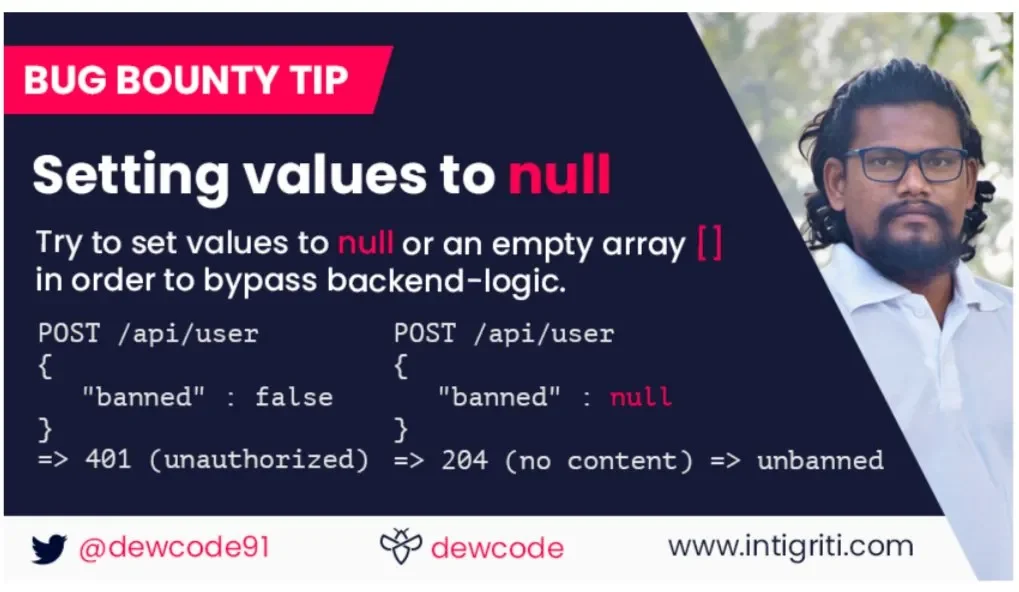
The customer portal's booking creation endpoint accepted null values for required fields like email and phone number, bypassing backend validation. A separate bookings endpoint returned no data normally but disclosed booking data when an empty array was supplied in a date parameter.
 Published on dewcode.medium.com
Hello bug hunters! I am back with another blog.
The full write-up lives on its author's site
It belongs to its author, so we link to it rather than copy it. The other two tabs are our own rewrites, checked against it.
Context
The target was a self-developed customer portal for a hotel company, referred to in the write-up as Hotels High. Customers use the portal to book visits. The program was a private one on Intigriti, so the researcher replaced the real domain with example.com throughout. Testing was done against the staging environment, where data can safely be created and modified. Normally a customer is given a customer registration code, and that code is what allows them to make a booking.
Two separate issues were found in the same application: a validation bypass on the booking creation endpoint, and an information disclosure on the bookings listing endpoint. Both were reported to Intigriti, confirmed as valid, and paid a bounty.
Setup
The traffic was captured in a proxy so that requests could be inspected in the proxy history and replayed from the repeater. The second issue was tested as a low-privilege user. The report does not name the proxy tool or any version numbers. The payload below carries a registration code, CS1337.
Finding it
While going through the registration workflow, the researcher noticed that the application would not let a customer create a booking without phoneNumber, email and the other required parameters. That is the expected behaviour. The suspicious part was an endpoint that appeared to allow a booking to be created with null values in those same fields, which suggested the back-end validation could be bypassed rather than simply being enforced in the browser.
Separately, while testing as a low-privilege user, the researcher found an endpoint that returns bookings data. A plain GET to it returned a null response, which is the kind of dead end that is worth poking at rather than walking away from.
Exploitation
Step 1: Bypass input validation with null
In the proxy history, look for the path API/v1/rest/customer/booking/create/, send that request to the repeater, and replace the email, gdprConfirmed and phoneNumber parameters with null. The body used was:
{ "registerCode": "CS1337", "gender": "male", "booking_date": "2021-10-03", "email": null, "firstName": "first_name", "lastName": "Last_name", "gdprConfirmed": null, "phoneNumber": null, "booking_time": "14:50" }
registerCode carries the customer registration code that normally authorises a booking. booking_date and booking_time set the slot. The three fields that the UI treats as mandatory, email, gdprConfirmed and phoneNumber, are all sent as JSON null instead of being omitted or filled in. The back-end validation accepted the request and the booking was created.
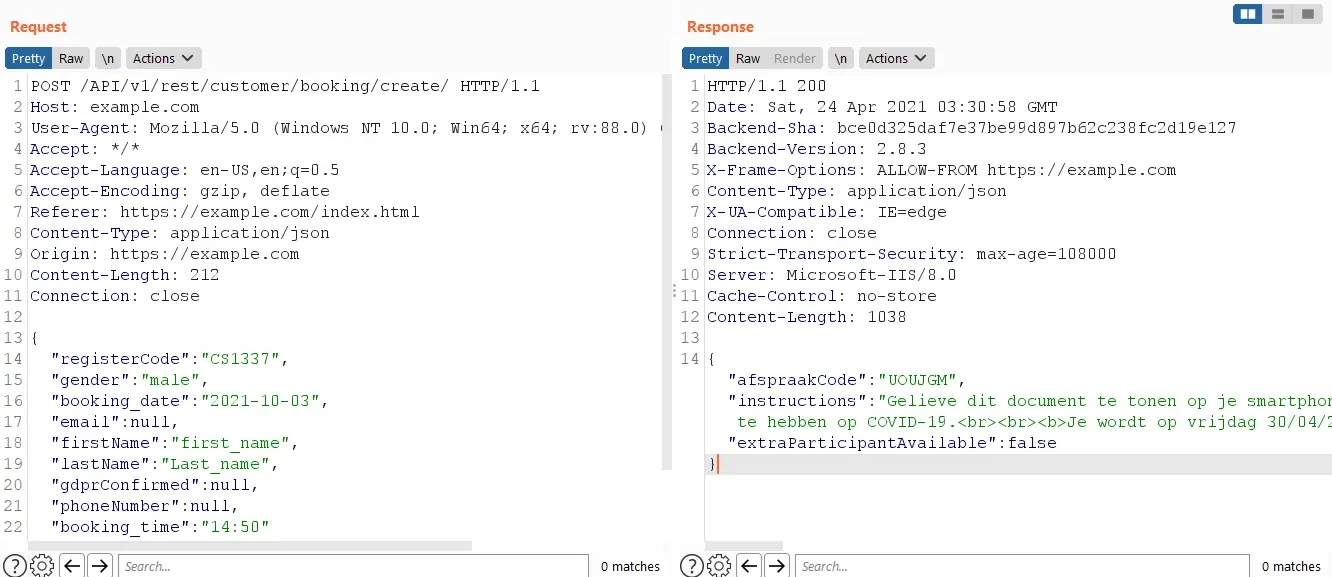
The screenshot shows the request with the null values in place.
This was submitted to Intigriti, confirmed as a valid security issue, accepted two days later, and paid a bounty.
Step 2: Information disclosure with an empty array
The second endpoint was:
event/api/v1/bookings?page=0&perpage=25&pagesize=25&sort=%2BbookingDate&sortby=bookingDate&ascending=true&bookingdatefrom=<DATE>&visitdatefrom=<DATE>
The query string is a paginated, sorted listing: page, perpage and pagesize control paging, sort=%2BbookingDate and sortby=bookingDate with ascending=true control ordering, and bookingdatefrom and visitdatefrom are date filters. A GET request to this endpoint as a low-privilege user returned a null response.
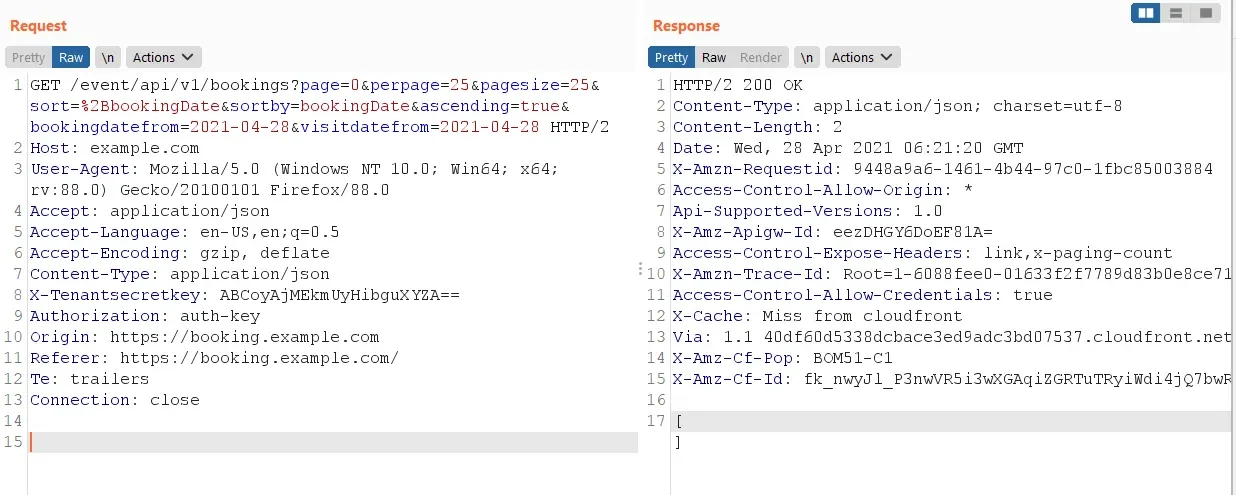
Appending an empty array [] to the bookingdatefrom parameter changed the outcome: the same GET request then returned the booking data.
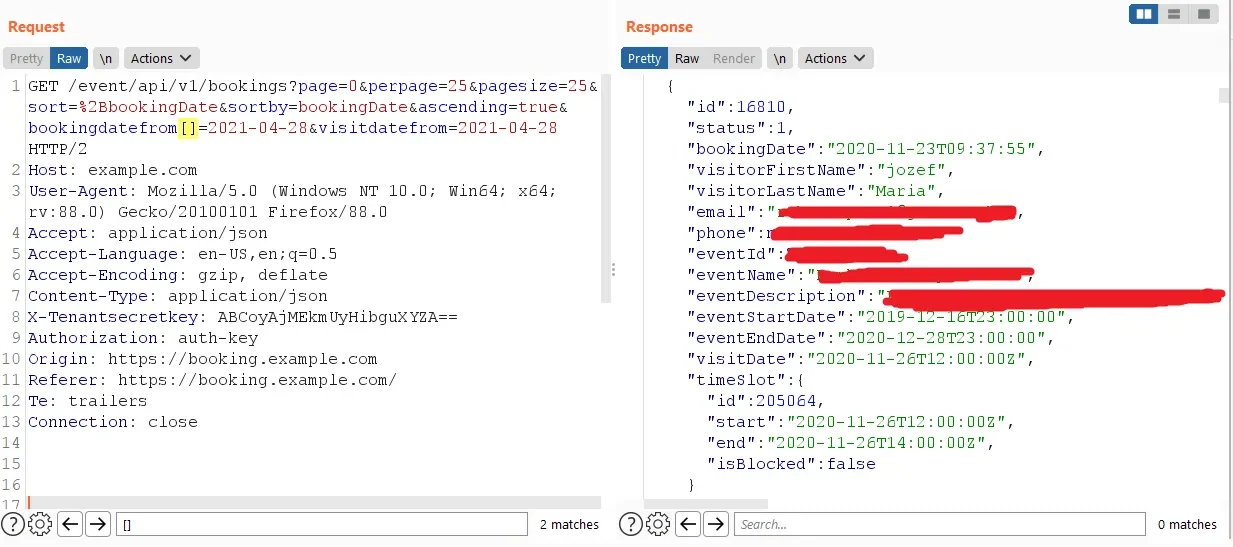
This was also submitted to Intigriti, confirmed as a valid security issue, accepted, and paid a bounty.
Root cause
Both issues come from the back-end trusting the shape of the input rather than validating it.
On the booking creation endpoint, the required-field check likely tests for the presence of a key rather than for a usable value, so a key whose value is null passes. The client-side restriction that stops a customer submitting the form without those fields is not a defence at all, because the request can be edited in the proxy.
On the bookings endpoint, the date filter likely expects a scalar and mishandles an array. Sending [] instead of a date appears to make the filter evaluate in a way that skips the restriction that produced the null response, and the listing is returned. The report does not include the server-side code, so the exact mechanism is inferred from behaviour.
Impact
With the first issue, a user holding a registration code can create bookings with the contact and GDPR confirmation fields set to null. The report frames this as bypassing back-end validation on a staging environment where data can safely be created and modified.
With the second issue, a low-privilege user can reach bookings data that the endpoint otherwise refuses to return. The report does not state whose bookings are exposed or how many records were returned.
Fix
Neither fix is described in the report. The changes that would address the two behaviours are: on the booking creation endpoint, validate that email, gdprConfirmed and phoneNumber contain acceptable values and reject null explicitly, rather than checking only that the keys are present; and on the bookings endpoint, reject array values for scalar query parameters such as bookingdatefrom and enforce the authorisation check independently of how the filter parses.
Variants to test
- Send
nullfor each mandatory field of any JSON create or update endpoint, one field at a time, and check whether the record is still created. A positive result is a successful response with the field stored empty. - Send
[]in place of a scalar in date, ID and filter parameters on listing endpoints. A positive result is data returned where a plain value gave an empty or null response. - Compare the response of a listing endpoint with and without the filter parameters, as a low-privilege user, to see whether the filter is what stands between the user and the data.
- Replay the same requests with the mandatory fields omitted entirely, to see whether the check is on key presence or on value.
References cited in the report: https://owasp.org/www-community/attacks/Full_Path_Disclosure
What happened, in plain words
A security researcher found two bugs in a hotel booking website. The website lets customers book visits, and it is a private program on Intigriti, a platform where companies invite researchers to test their systems. Because the program is private, the researcher hides the real domain and calls it example.com. The testing was done on a staging environment, which is a copy of the website used for testing, where it is safe to create and change data. Normally, a customer needs a registration code to make a booking.
The first bug let someone create a booking without providing an email address, a phone number, or a confirmation that they agree to data protection rules (GDPR). The website's form normally requires these, but by sending a special value called null directly to the server, the check was bypassed.
The second bug let a low-privilege user (someone with a basic account) see booking data that they should not have been able to see. The endpoint that lists bookings returned nothing when used normally, but by adding an empty array [] to one of the parameters, the data was returned.
Both bugs were reported to Intigriti, confirmed as valid, and paid a bounty (a reward).
Understanding the basics
Before diving into the details, let's explain some terms that will come up.
- API: An API (Application Programming Interface) is a way for two software programs to talk to each other. Think of it as a waiter in a restaurant: you (the client) tell the waiter what you want, the waiter goes to the kitchen (the server), and brings back your order. In a web application, the browser sends requests to the server's API, and the server sends back responses.
- Endpoint: An endpoint is a specific URL where an API can be accessed. It's like a specific window at a service counter: each window handles a different type of request. For example,
API/v1/rest/customer/booking/create/is an endpoint for creating a booking. - Request: When your browser (or a tool) asks the server for something, it sends a request. This includes the URL, the method (like GET or POST), headers (extra information), and sometimes a body (data).
- GET request: A type of request used to retrieve data from a server. When you visit a web page, your browser makes a GET request.
- POST request: A type of request used to send data to a server, often to create or update something.
- Parameter: A piece of information sent with a request. It can be in the URL (query parameter) or in the body (body parameter). For example,
emailis a parameter. - JSON: A format for structuring data as text, often used in API requests and responses. It looks like
{"key": "value"}. - null: In JSON,
nullrepresents the absence of a value. It's like an empty field, but explicitly marked as empty. - Proxy: A tool that sits between your browser and the server, letting you see and modify the requests and responses. Think of it as a middleman who can read and change the messages.
- Repeater: A feature in some proxy tools that lets you take a request and send it again and again, with modifications, to see how the server responds.
- Validation: The process of checking that data meets certain rules. For example, checking that an email address is present and correctly formatted.
- Back-end: The part of the application that runs on the server, as opposed to the front-end (the part in your browser).
- Information disclosure: A vulnerability where sensitive information is exposed to someone who should not have access to it.
- Low-privilege user: A user account with limited permissions, like a regular customer, as opposed to an administrator.
- Staging environment: A copy of the production website used for testing, where changes can be made without affecting real users.
- Bounty: A reward, often money, given to a researcher for finding and reporting a security bug.
Setup
For the second issue, the researcher tested as a low-privilege user. They captured the traffic between the browser and the server using a proxy, so they could inspect the requests in the proxy history and replay them from the repeater. The report does not name the proxy tool or any version numbers. The payload below carries a registration code, CS1337. In the payload below, the code CS1337 appears.
Finding the first bug: bypassing input validation with null
While going through the registration workflow, the researcher noticed that the application would not let a customer create a booking without phoneNumber, email, and the other required parameters. That is the expected behaviour: the form checks that these fields are filled in. But the researcher found an endpoint that seemed to allow a booking to be created with null values in those same fields. This suggested that the back-end validation could be bypassed, rather than simply being enforced in the browser.
Step 1: Bypass input validation with null
In the proxy history, look for the path API/v1/rest/customer/booking/create/, send that request to the repeater, and replace the email, gdprConfirmed, and phoneNumber parameters with null. The body used was:
{ "registerCode": "CS1337", "gender": "male", "booking_date": "2021-10-03", "email": null, "firstName": "first_name", "lastName": "Last_name", "gdprConfirmed": null, "phoneNumber": null, "booking_time": "14:50" }
Let's break down this JSON body line by line:
registerCode: This carries the customer registration code that normally authorises a booking. It's like a ticket that proves you are allowed to book.gender: The customer's gender, here "male".booking_date: The date of the booking, here "2021-10-03".email: The customer's email address. Here it is set tonull, meaning no email is provided.firstName: The customer's first name, here "first_name" (a placeholder).lastName: The customer's last name, here "Last_name" (a placeholder).gdprConfirmed: A flag indicating whether the customer has confirmed consent to data processing under GDPR (General Data Protection Regulation). Here it isnull, meaning no confirmation.phoneNumber: The customer's phone number. Here it isnull, meaning no phone number.booking_time: The time of the booking, here "14:50".
The three fields that the UI treats as mandatory, email, gdprConfirmed, and phoneNumber, are all sent as JSON null instead of being omitted or filled in. The back-end validation accepted the request and the booking was created.
The screenshot shows the request with the null values in place.
This was submitted to Intigriti, confirmed as a valid security issue, accepted two days later, and paid a bounty.
Finding the second bug: information disclosure with an empty array
Separately, while testing as a low-privilege user, the researcher found an endpoint that returns bookings data. A plain GET request to it returned a null response, which is the kind of dead end that is worth poking at rather than walking away from.
Step 2: Information disclosure with an empty array
The second endpoint was:
event/api/v1/bookings?page=0&perpage=25&pagesize=25&sort=%2BbookingDate&sortby=bookingDate&ascending=true&bookingdatefrom=<DATE>&visitdatefrom=<DATE>
This is a URL with a query string. Let's break it down:
event/api/v1/bookings: The path to the endpoint.?: Separates the path from the query parameters.page=0: The page number to retrieve (starting from 0).perpage=25: The number of items per page.pagesize=25: The size of the page (similar to perpage).sort=%2BbookingDate: The field to sort by.%2Bis the URL-encoded form of+, which often indicates ascending order.sortby=bookingDate: Another parameter specifying the sort field.ascending=true: Indicates ascending order.bookingdatefrom=<DATE>: A filter for bookings from a certain date.<DATE>is a placeholder for an actual date.visitdatefrom=<DATE>: A filter for visits from a certain date.
A GET request to this endpoint as a low-privilege user returned a null response.
Appending an empty array [] to the bookingdatefrom parameter changed the outcome: the same GET request then returned the booking data.
This was also submitted to Intigriti, confirmed as a valid security issue, accepted, and paid a bounty.
Why these bugs happen
Both issues come from the back-end trusting the shape of the input rather than validating it.
On the booking creation endpoint, the required-field check likely tests for the presence of a key rather than for a usable value, so a key whose value is null passes. The client-side restriction that stops a customer submitting the form without those fields is not a defence at all, because the request can be edited in the proxy.
On the bookings endpoint, the date filter likely expects a scalar (a single value) and mishandles an array. Sending [] instead of a date appears to make the filter evaluate in a way that skips the restriction that produced the null response, and the listing is returned. The report does not include the server-side code, so the exact mechanism is inferred from behaviour.
What could go wrong
With the first issue, a user holding a registration code can create bookings with the contact and GDPR confirmation fields set to null. The report frames this as bypassing back-end validation on a staging environment where data can safely be created and modified.
With the second issue, a low-privilege user can reach bookings data that the endpoint otherwise refuses to return. The report does not state whose bookings are exposed or how many records were returned.
How to fix
Neither fix is described in the report. The changes that would address the two behaviours are: on the booking creation endpoint, validate that email, gdprConfirmed, and phoneNumber contain acceptable values and reject null explicitly, rather than checking only that the keys are present; and on the bookings endpoint, reject array values for scalar query parameters such as bookingdatefrom and enforce the authorisation check independently of how the filter parses.
Variants to test
- Send
nullfor each mandatory field of any JSON create or update endpoint, one field at a time, and check whether the record is still created. A positive result is a successful response with the field stored empty. - Send
[]in place of a scalar in date, ID, and filter parameters on listing endpoints. A positive result is data returned where a plain value gave an empty or null response. - Compare the response of a listing endpoint with and without the filter parameters, as a low-privilege user, to see whether the filter is what stands between the user and the data.
- Replay the same requests with the mandatory fields omitted entirely, to see whether the check is on key presence or on value.
References cited in the report: https://owasp.org/www-community/attacks/Full_Path_Disclosure
Glossary
- API: Application Programming Interface; a way for software programs to communicate, like a waiter taking orders to the kitchen.
- Endpoint: A specific URL where an API can be accessed, like a specific window at a service counter.
- Request: A message sent from a client (like a browser) to a server asking for something.
- Parameter: A piece of information sent with a request, either in the URL or in the body.
- JSON: A text format for structuring data as key-value pairs, commonly used in APIs.
- null: A special value in JSON representing the absence of a value.
- Proxy: A tool that sits between the browser and the server, allowing inspection and modification of requests and responses.
- Repeater: A feature in proxy tools that lets you resend a request multiple times with modifications.
- Back-end: The server-side part of an application, as opposed to the client-side (front-end).
- Information disclosure: A vulnerability where sensitive information is exposed to unauthorised users.
- Low-privilege user: A user account with limited permissions, like a regular customer.
- Staging environment: A copy of the production website used for testing.
- Bounty: A reward given to a researcher for finding and reporting a security bug.
- GDPR: General Data Protection Regulation, a regulation in the EU on data protection and privacy.
- Scalar: A single value, as opposed to an array or object.
- Array: A list of values, denoted by square brackets
[]in JSON. - Query string: The part of a URL after the
?, containing parameters as key-value pairs. - URL-encoded: A way to represent special characters in a URL, like
%2Bfor+. - Intigriti: A platform for bug bounty and vulnerability disclosure programs.
- OWASP: Open Web Application Security Project, a nonprofit foundation that works to improve software security.




