How Did I Find a Subdomain Takeover in a HackerOne Program?
A subdomain's DNS record pointed to a Heroku application that no longer existed, allowing the author to claim the application name. An attacker could potentially serve content under the trusted company subdomain, though full deployment was blocked by Heroku's verification.

medium.com
Published on medium.com
Cybersecurity
The full write-up lives on its author's site
It belongs to its author, so we link to it rather than copy it. The other two tabs are our own rewrites, checked against it.
Context
This is a subdomain takeover found during reconnaissance on a HackerOne program. The affected asset was a subdomain of the target whose DNS record pointed at a third-party service, in this case Heroku. The subdomain itself looked ordinary; the interesting part was not the website but the DNS record behind it.
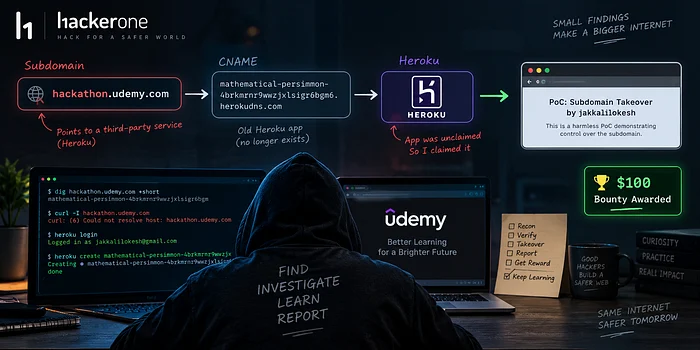
A subdomain takeover happens when a DNS record (typically a CNAME) still points at a third-party resource that the organisation no longer controls, and that resource can be claimed by someone else. The DNS chain in the report is drawn roughly like this:
target.example.com | | CNAME vHeroku DNS | vHeroku Application
If the application is deleted while the DNS record stays, the chain becomes:
target.example.com | | CNAME vDeleted Heroku Application | vPotentially claimable
That is the classic scenario the researcher went looking for.
Setup
The work was done on May 24, 2025, using the Heroku CLI. The researcher checked the CLI version first:
heroku --version
and then authenticated:
heroku login
Git was used to prepare a deployment, and the Heroku static buildpack was selected for the application.
Finding it
During reconnaissance the researcher came across a subdomain that looked completely ordinary. The approach was not to judge a subdomain by how it looks but to find out what sits behind it, so the first step was DNS.
A simple lookup was run:
dig target.example.com +short
The result pointed to a Heroku DNS endpoint. That alone is not a vulnerability: a CNAME to a third-party service could simply be a working application hosted on Heroku. The question that mattered was whether the Heroku application behind the record still existed.
The subdomain was then checked with a HEAD request:
curl -I http://target.example.com
The hostname was not resolving normally. Even at this point the researcher did not treat it as a confirmed vulnerability: a website being unavailable does not mean it is vulnerable to takeover. The real question was whether the third-party resource behind the DNS record was still owned by the target.
Exploitation
Step 1: Follow the DNS record to the third-party resource
The dig output identified a CNAME to a Heroku DNS endpoint, and the curl -I showed the hostname was not resolving normally. Together these gave a candidate: a dangling record pointing at a Heroku application that might no longer exist.
Step 2: Try to claim the Heroku application
Instead of stopping at the DNS lookup, the researcher moved to Heroku and attempted to create the application corresponding to the resource referenced by the DNS record:
heroku create <application-name>
The application name could be claimed. That was the evidence that the resource was no longer exclusively controlled by the original owner, which is much stronger than a simple broken DNS record. The original HackerOne report documented the DNS resolution and the application claim as part of the reproduction steps.
Step 3: Build a harmless proof of concept
No malicious action was needed to prove the issue. A simple HTML page was prepared:
<!DOCTYPE html><html><head> <title>Subdomain Takeover PoC</title></head><body> <h1>Proof of Concept</h1> <p>This is a harmless demonstration of application control.</p></body></html>
The reasoning was straightforward: if the third-party application referenced by the company's DNS record is under the researcher's control, then the content served from that application is under the researcher's control too. There was no need to collect credentials, steal cookies or perform any destructive action. For a bug bounty PoC, proving control is enough.
Step 4: Prepare the application for deployment
The Heroku static buildpack was set:
heroku buildpacks:set heroku/static
Git was initialised:
git init
The Heroku remote was added:
heroku git:remote -a <application-name>
and the page was staged and committed:
git add index.htmlgit commit -m "PoC takeover"
Git could not determine the researcher's identity, so it was configured:
git config --global user.email "[redacted]"git config --global user.name "Your Name"
This was a normal tooling problem, not a security issue.
Step 5: Account verification blocked full deployment
Heroku's account verification policy prevented unrestricted deployment and required additional account verification. The researcher separated two things clearly:
Application/resource control ↓Demonstrated
from:
Full deployment ↓Blocked by provider verification
The finding was not exaggerated: there was no claim that a malicious website had been hosted through the target's subdomain, because the evidence did not support that. What was documented was exactly what could be proven: the DNS record pointed to a third-party resource that could be claimed by another account.
Step 6: Report
The report was submitted through HackerOne on May 24, 2025 at 7:39 AM UTC. It included:
- DNS resolution
- The Heroku CNAME
- Evidence that the resource was no longer controlled by the original owner
- The application claim
- PoC information
- Screenshots
- Impact and remediation recommendations
Root cause
If the Heroku application referenced by the record had been deleted while the DNS record stayed, the CNAME would still point at the Heroku DNS endpoint with nothing on the Heroku side tied to the organisation. The CNAME still pointed at the Heroku DNS endpoint, but nothing on the Heroku side was tied to the organisation any more, and the researcher was able to claim the application name with a new account..
Impact
A subdomain takeover matters because the attacker is not operating under a random domain but potentially under a trusted company domain. Depending on how the affected subdomain is used, the report lists possible consequences as:
- Phishing
- Brand impersonation
- Hosting malicious content
- Abuse of trusted-domain reputation
- Potential interaction with security mechanisms that trust the subdomain
The researcher is explicit that maximum impact should not be claimed automatically: a takeover of an unused subdomain is not necessarily equivalent to compromising the company's main application. The actual impact depends on what the subdomain is used for and what other systems trust it. In this case, control of the application was demonstrated, but full deployment was blocked by Heroku's account verification, so the demonstrated impact stops at the claim.
Fix
The recommended remediation was straightforward: remove the dangling CNAME record or reclaim the Heroku application internally.
Result
The report was initially rated High (7.5) and later changed to Low (2.6). On May 27, 2025 the program awarded a $100 bounty, and the report was subsequently marked Resolved.
The researcher's summary of the process:
Recon ↓DNS discovery ↓CNAME identification ↓Third-party resource investigation ↓Ownership verification ↓PoC ↓HackerOne report ↓Bounty ↓Resolved
The lesson drawn is that a DNS record can become a security vulnerability when the resource it points to is no longer controlled by the organisation. Companies create and delete cloud resources constantly: applications get retired, campaigns end, developers remove infrastructure, but DNS records are often forgotten:
Application deleted +DNS record remains =Dangling infrastructure
and if that infrastructure can be claimed by someone else:
Dangling DNS ↓Claimable resource ↓Attacker control ↓Subdomain takeover
Variants to test
The same pattern applies to any third-party service that lets an application or bucket name be registered on a first-come basis while DNS still points at it. Concrete things to try:
- Enumerate subdomains and resolve each one, looking for CNAMEs to third-party endpoints. A positive result is a CNAME whose target service reports the resource as unclaimed or not found.
- For each candidate, request the hostname and note whether it fails to resolve or returns a provider error page. A positive result is a provider-specific "no such app" or "not found" response rather than a normal application response.
- Attempt to register the exact resource name at the provider, as was done here with
heroku create <application-name>. A positive result is that the name is available and can be claimed by a new account. - Check whether the provider requires account verification before deployment, as Heroku did here. A positive result is that control of the resource is demonstrated even if full deployment is blocked; document the limit rather than overstating it.
- Look at what the subdomain is used for and what trusts it, since the real impact depends on that rather than on the takeover alone.
What happened, in plain words
A security researcher was looking around the internet on behalf of a company that runs a bug bounty programme on HackerOne. A bug bounty programme is a scheme where a company invites outside people to test its systems and pays them for finding problems, instead of asking them to keep quiet or threatening them with lawyers.
While exploring, the researcher found a subdomain that looked completely ordinary. A subdomain is a smaller address that sits under a company's main address. If the main address is example.com, then shop.example.com or blog.example.com are subdomains. Companies use them for separate services: a help centre, a marketing campaign, an old app, a test environment.
The subdomain looked fine, but the researcher did not stop at how it looked. He asked a different question: what is actually behind this address? To answer it, he looked at the DNS record for the subdomain.
DNS stands for Domain Name System. It is the internet's address book. Humans type names like example.com; computers need numeric addresses to find servers. DNS translates one into the other. A DNS record is a single entry in that address book, and one common type is a CNAME, short for Canonical Name. A CNAME is a forwarding note: it says "this name is really just another name for that other name over there". Think of a mail forwarding sticker on a letter: the letter is addressed to you, but the sticker says "actually, send this to the new address".
In this case the CNAME pointed at Heroku. Heroku is a cloud platform where developers can run applications without managing their own servers. You give your application a name, and Heroku makes it reachable on the internet under that name.
The researcher then checked whether the Heroku application behind that DNS record still existed. The hostname was not resolving normally, and the application name could be claimed, which suggested the resource was no longer controlled by the company. That left a gap: the DNS record still pointed at a Heroku application name, and that name was now free for anyone to register.
The researcher claimed the application name himself, using the Heroku CLI. That proved the resource was no longer controlled by the company. He then prepared a harmless web page as a proof of concept, a small demonstration that shows a problem is real without doing any damage. Heroku's account verification stopped him from fully deploying the page, so he reported exactly what he could prove and no more.
He submitted the report on HackerOne on May 24, 2025 at 7:39 AM UTC. It was first rated High (7.5), later changed to Low (2.6). On May 27, 2025 the programme paid a $100 bounty and marked the report Resolved.
This kind of problem is called a subdomain takeover. It happens when a company's DNS record still points at a third-party resource that the company no longer owns, and somebody else can claim that resource. The rest of this article walks through the same steps the researcher took, explaining each concept from scratch.
The starting point: a subdomain that looked boring
On May 24, 2025, the researcher was doing reconnaissance on a HackerOne programme. Reconnaissance, or recon, is the information-gathering phase: before attacking anything, you map out what exists. It is like walking around a building and noting the doors, windows and signs before trying any of them.
He came across a subdomain that looked completely ordinary. Nothing interesting at first. But his habit is not to judge a subdomain by how it looks. A subdomain can look dull and still be wired to something fragile behind the scenes. So he wanted to know what was actually sitting behind it.
That is why he started with DNS rather than with the website itself. The website is what a visitor sees; DNS is the plumbing that decides where the visitor is sent. If the plumbing is wrong, the website can look fine or be completely absent, and neither tells you the whole story.
Finding the dangling DNS record
He ran a simple DNS lookup:
dig target.example.com +short
Line by line:
digis a command-line tool for asking DNS questions. It is available on most Linux and macOS systems. You type a name, and it tells you what the DNS system says about it.target.example.comis the subdomain being looked up. In the published report the real name is replaced with a placeholder so the company is not exposed.+shorttellsdigto print only the answer, without the long explanatory output. It is the difference between asking "what is the phone number for this shop?" and receiving the number plus the shop's opening hours, manager's name and a history of the building.
The result pointed to a Heroku DNS endpoint. In other words, the DNS answer was a CNAME saying that this subdomain is an alias for a name on Heroku's side.
That immediately caught his attention, but he was careful: a CNAME pointing to a third-party service is not automatically vulnerable. It could simply be a perfectly working application hosted on Heroku. Plenty of companies run real services on Heroku, and a CNAME to Heroku is then completely normal.
So the question that mattered was: does the Heroku application behind this DNS record still exist?
To get a first impression, he checked the subdomain with a request:
curl -I http://target.example.com
Line by line:
curlis a command-line tool for making web requests. A browser does the same thing behind the scenes when you type an address, butcurlshows you the raw answer instead of rendering a page.-Imeans "only fetch the headers". Every web response has two parts: headers, which are short metadata lines such as the status code and content type, and a body, which is the actual page content.-Iasks for the metadata only, which is quick and tells you whether the server is answering at all.http://target.example.comis the address being requested. Thehttp://part says which protocol to speak.
The hostname was not resolving normally. In plain terms, the request did not reach a working application.
Even at this point he did not call it a confirmed vulnerability. A website being unavailable does not mean it is vulnerable to takeover. Sites go down for maintenance, for network reasons, for misconfiguration. The real question was whether the third-party resource behind the DNS record was still owned by the target.
Understanding the DNS chain
The situation looked roughly like this:
target.example.com | | CNAME vHeroku DNS | vHeroku Application
Read it from top to bottom. The subdomain target.example.com has a CNAME record. That record points at a name on Heroku's DNS. Heroku's DNS in turn points at a Heroku application. So a visitor typing the company's subdomain is forwarded, step by step, to an application running on Heroku's platform.
If the original application had been deleted while the DNS record remained, the situation could become:
target.example.com | | CNAME vDeleted Heroku Application | vPotentially claimable
The first two steps are unchanged: the subdomain still has its CNAME, and that CNAME still points at Heroku's DNS. But the application at the end no longer exists. The name is now unoccupied, and on a platform where names are handed out on a first-come basis, an unoccupied name can potentially be claimed by anyone.
That is the classic subdomain takeover scenario. The company's own address book still forwards visitors to a destination the company no longer owns.
So instead of stopping at the DNS lookup, he moved to Heroku to test whether the name could really be claimed.
Checking the Heroku resource
He started by checking his Heroku command-line tool:
heroku --version
Line by line:
herokuis the Heroku command-line interface, usually shortened to CLI. A CLI is a program you operate by typing commands in a terminal instead of clicking buttons in a window. Heroku's CLI lets you create applications, deploy code and change settings from the terminal.--versionis a flag that asks the program to print its version number and exit. It is a quick sanity check: is the tool installed, and which version is it? Doing this first avoids confusing a missing tool with a failed command later.
Then he authenticated:
heroku login
Line by line:
heroku loginstarts the sign-in process for the Heroku CLI. It typically opens a browser window where you sign in to your Heroku account, and then hands the resulting credentials back to the command-line tool.- Authentication means proving who you are. It is the difference between walking into an office building and walking in with a badge that the reception desk has checked. Without it, Heroku would not know whose account is making the requests, and it would refuse to create anything.
After logging in, he attempted to create the application corresponding to the resource referenced by the DNS record:
heroku create <application-name>
Line by line:
heroku createasks Heroku to make a new application.<application-name>is a placeholder for the exact name that the DNS record pointed at. The angle brackets are not typed literally; they mark a spot where the real value goes. The name matters because Heroku application names are unique across the whole platform: if the name is free, you can take it, and if it is taken, you cannot.
And this was the interesting part. He was able to claim the corresponding Heroku application name. That gave him evidence that the resource was no longer exclusively controlled by the original owner.
Why is this stronger than a broken DNS record? A broken record only shows that something is missing. Claiming the name shows that the missing thing can be taken by someone else, which is the actual danger. It is the difference between noticing that a shop unit is empty and being handed the keys to it.
The original HackerOne report documented the DNS resolution and the application claim as part of the reproduction steps. Reproduction steps are the instructions that let someone else repeat what you did and see the same result, which is what makes a report verifiable rather than a story.
Creating a harmless proof of concept
He did not need to do anything malicious to prove the issue. He prepared a simple HTML page:
<!DOCTYPE html><html><head> <title>Subdomain Takeover PoC</title></head><body> <h1>Proof of Concept</h1> <p>This is a harmless demonstration of application control.</p></body></html>
Line by line:
<!DOCTYPE html>tells the browser that this is an HTML document, the standard language of web pages.<html>opens the document and</html>closes it. Everything in between is the page.<head>is the section for information about the page rather than visible content, and</head>closes it.<title>Subdomain Takeover PoC</title>sets the title shown in the browser tab. PoC stands for proof of concept.<body>starts the visible part of the page, and</body>ends it.<h1>Proof of Concept</h1>is a large heading.<p>This is a harmless demonstration of application control.</p>is a paragraph of ordinary text.
The idea was simple: if he controls the third-party application referenced by the company's DNS record, he should be able to control the content served from that application. The page itself is deliberately boring. Its only job is to show that the content comes from him and not from the company.
There was no need to collect credentials, steal cookies, or perform any destructive action. A cookie is a small piece of data a website stores in your browser so it can recognise you on later requests, for example to keep you logged in. Stealing one can let an attacker act as you. A credential is a username and password, or a similar secret used to log in. A proof of concept that grabs either of those would cause real harm to real people, and it is not needed to demonstrate the flaw.
For a bug bounty PoC, proving control is enough.
Preparing the application
He then prepared the application for deployment. Deployment means putting the files on the platform so they are actually served to visitors.
The setup included the Heroku static buildpack:
heroku buildpacks:set heroku/static
Line by line:
heroku buildpacks:setchanges which buildpack the application uses. A buildpack is a recipe that tells the platform how to prepare your code to run. Different kinds of applications need different recipes: one for a Python app, one for a Node.js app, and so on.heroku/staticis the buildpack for static sites. A static site is one made of plain files, such as HTML, CSS and images, that are served as they are, without a program running on the server to generate pages. Since the PoC is a single HTML file, this is the right recipe.
He initialised Git:
git init
Line by line:
gitis a version control tool. It records changes to files over time, so you can see what changed and when, and it is also how many deployment systems receive code.initcreates a new, empty repository in the current folder. A repository is the tracked history of a project. Think of it as opening a new ledger for a project that has no entries yet.
He added the Heroku remote:
heroku git:remote -a <application-name>
Line by line:
heroku git:remoteconnects a local Git repository to an application on Heroku.-a <application-name>names the Heroku application to connect to. Again, the angle brackets mark a placeholder for the real name.- A remote is a saved address for another copy of the repository, usually on a server. Adding it tells Git where to send the code when you push.
Then:
git add index.htmlgit commit -m "PoC takeover"
Line by line:
git add index.htmlstages the file calledindex.html. Staging means marking a file to be included in the next recorded change.index.htmlis the conventional name for the first page a web server shows when someone visits the site.git commit -m "PoC takeover"records the staged files as one change, with the messagePoC takeover. A commit is a snapshot in the project's history, and the message is a short note explaining what the snapshot contains.
He did run into a small Git issue during the process. Git could not determine his identity, so he configured it:
git config --global user.email "[redacted]"git config --global user.name "Your Name"
Line by line:
git config --global user.email "[redacted]"sets the email address that Git records on commits. The--globalpart means the setting applies to all repositories for the current user, not just this one. The address shown is a placeholder.git config --global user.name "Your Name"sets the name recorded on commits, also as a placeholder.- Git needs both because every commit is stamped with who made it. Without them, Git refuses to commit, because it cannot fill in that stamp.
Nothing security-related, just one of those normal problems you run into while testing.
Heroku verification got in the way
There was another important detail. Heroku's account verification policy prevented him from continuing with unrestricted deployment and required additional account verification.
Account verification is a check a platform runs to confirm that a new account belongs to a real person or organisation, often by asking for a payment method or a phone number. It exists to limit abuse. In this case it meant that although the application name was claimed, unrestricted deployment was blocked.
So he had to separate two things:
Application/resource control ↓Demonstrated
from:
Full deployment ↓Blocked by provider verification
The first line says: control of the application and the resource was demonstrated. The second says: full deployment was blocked by the provider's verification. Keeping these apart matters because they are different claims, and only the first one was proven.
He did not want to exaggerate the finding. He was not going to claim that he successfully hosted a malicious website through the target's subdomain when the evidence did not support that. Overstating a finding damages trust with the programme and can lead to a report being dismissed.
Instead, he documented exactly what he could prove: the DNS record pointed to a third-party resource that could be claimed by another account. That was the important security issue.
Reporting the vulnerability
Once he had the evidence, he submitted the report through HackerOne on May 24, 2025 at 7:39 AM UTC. UTC is Coordinated Universal Time, a common time standard used so that timestamps are unambiguous across time zones.
The report included:
- DNS resolution
- The Heroku CNAME
- Evidence that the resource was no longer controlled by the original owner
- The application claim
- PoC information
- Screenshots
- Impact and remediation recommendations
A few of those terms are worth unpacking. DNS resolution is the act of looking up a name and getting an answer, which is what the dig command did. Impact is what an attacker could actually do with the flaw, and how bad it would be. Remediation is the fix: what the company should change to close the issue.
The recommended remediation was straightforward: remove the dangling CNAME record or reclaim the Heroku application internally. Either the DNS entry goes away, or the company takes the application name back under its own account so nobody else can.
What could an attacker do with this?
A subdomain takeover can be dangerous because the attacker is not using some random domain. They are potentially operating under a trusted company domain.
That trust is the whole point. People, and automated systems, treat a company's own address as more trustworthy than a lookalike. If a link points at the company's real subdomain, a visitor has less reason to be suspicious, and security tools that keep lists of trusted domains may treat it as safe.
Depending on how the affected subdomain is used, possible consequences could include:
- Phishing
- Brand impersonation
- Hosting malicious content
- Abuse of trusted-domain reputation
- Potential interaction with security mechanisms that trust the subdomain
Phishing is tricking people into handing over information or clicking something harmful, usually by pretending to be someone they trust. Brand impersonation is using a company's name or look to appear legitimate. Hosting malicious content means serving harmful files or pages from the address. Abuse of trusted-domain reputation means borrowing the good name of the domain to get past people's suspicions. Security mechanisms that trust the subdomain could include email protections or allowlists that treat anything under the company's domain as safe.
But there is an important lesson here: do not automatically claim maximum impact. A takeover of an unused subdomain is not necessarily equivalent to compromising the company's main application. The actual impact depends on what the subdomain is used for and what other systems trust it. In this case, control of the application was demonstrated, but full deployment was blocked by Heroku's account verification, so the demonstrated impact stops at the claim.
The result
The report was initially rated High (7.5), but the severity was later changed to Low (2.6). Severity ratings are scores that programmes use to prioritise issues; a higher score means a more serious problem. The initial rating and the final rating can differ once the programme has reviewed the details.
On May 27, 2025, the programme awarded a $100 bounty, and the report was subsequently marked Resolved. A bounty is the payment a programme makes for a valid report. Resolved means the programme considers the issue dealt with.
For him, the most valuable part was not the bounty. It was seeing the entire process work from beginning to end:
Recon ↓DNS discovery ↓CNAME identification ↓Third-party resource investigation ↓Ownership verification ↓PoC ↓HackerOne report ↓Bounty ↓Resolved
Read the chain from top to bottom. Recon produced the subdomain. DNS discovery showed where it pointed. CNAME identification named the kind of record and the third-party service. Third-party resource investigation checked whether the resource still existed. Ownership verification tested whether it could be claimed by someone else. The PoC demonstrated control. The HackerOne report documented it. The bounty and the Resolved status closed the loop.
What he learned
The biggest lesson was simple: a DNS record can become a security vulnerability when the resource it points to is no longer controlled by the organisation.
Companies constantly create and delete cloud resources. Applications get retired. Marketing campaigns end. Developers remove infrastructure. But DNS records are often forgotten.
That creates situations like:
Application deleted +DNS record remains =Dangling infrastructure
Dangling here means left pointing at nothing that belongs to you. The application is gone, but the record still forwards visitors to where it used to be.
And if that infrastructure can be claimed by someone else:
Dangling DNS ↓Claimable resource ↓Attacker control ↓Subdomain takeover
Each arrow is a step. A dangling DNS record leads to a resource that can be claimed. Claiming it gives an attacker control. Control of a resource that the company's domain points at is a subdomain takeover.
That is why he now pays much more attention to where a subdomain points, rather than simply whether the website loads.
Final thoughts
This was not a sophisticated exploit. There was no zero-day, meaning no previously unknown flaw in software that nobody has fixed yet. No complicated payload, meaning no crafted piece of data designed to trigger a bug. No advanced reverse engineering, meaning no taking software apart to understand how it works.
It started with one simple command:
dig target.example.com +short
The interesting part was what came after it. He followed the DNS record, identified the third-party infrastructure, investigated the resource, verified that it could be claimed, created a harmless PoC, and reported the issue responsibly.
And that is probably the biggest lesson he took from this finding: do not just look at the website. Look at what the website depends on. Sometimes the most interesting vulnerability is not inside the application. It is sitting quietly in the DNS.
Glossary
- Subdomain: a smaller address under a company's main domain, such as
shop.example.comunderexample.com. - Bug bounty programme: a scheme where a company invites outside researchers to test its systems and pays for valid findings.
- HackerOne: a platform where bug bounty programmes are run and reports are submitted and tracked.
- Reconnaissance (recon): the information-gathering phase before testing, mapping out what exists.
- DNS (Domain Name System): the internet's address book, translating names into the addresses computers use.
- DNS record: a single entry in DNS, such as an address or a forwarding note.
- CNAME (Canonical Name): a DNS record that says one name is an alias for another name.
- DNS resolution: the act of looking up a name and getting an answer.
- Dangling DNS record: a record that still points at a resource the organisation no longer controls.
- Heroku: a cloud platform where applications can be run without managing servers.
- Heroku CLI: the command-line tool for creating and managing Heroku applications.
- CLI (command-line interface): a program operated by typing commands in a terminal instead of clicking in a window.
dig: a command-line tool for asking DNS questions.curl: a command-line tool for making web requests and showing the raw response.- Headers: the short metadata lines in a web response, such as status and content type.
- Authentication: proving who you are, for example by signing in to an account.
- Account verification: a platform check confirming a new account belongs to a real person or organisation, often to limit abuse.
- Deployment: putting files on a platform so they are actually served to visitors.
- Buildpack: a recipe telling a platform how to prepare an application to run.
- Static site: a site made of plain files served as they are, without a program generating pages on the server.
- Git: a version control tool that records changes to files over time.
- Repository: the tracked history of a project in Git.
- Remote: a saved address for another copy of a repository, usually on a server.
- Staging: marking files to be included in the next Git commit.
- Commit: a recorded snapshot of changes in Git, with a message describing it.
- HTML: the standard language for writing web pages.
- Proof of concept (PoC): a small, harmless demonstration showing that a problem is real.
- Cookie: a small piece of data a website stores in your browser so it can recognise you on later requests.
- Credential: a username and password, or a similar secret used to log in.
- Subdomain takeover: a flaw where a DNS record points at a third-party resource the organisation no longer controls and someone else can claim.
- Impact: what an attacker could actually do with a flaw, and how bad it would be.
- Remediation: the fix that closes an issue.
- Phishing: tricking people into handing over information or clicking something harmful by pretending to be trusted.
- Brand impersonation: using a company's name or look to appear legitimate.
- Severity rating: a score programmes use to prioritise issues, where higher means more serious.
- Bounty: the payment a programme makes for a valid report.
- Resolved: the status meaning the programme considers the issue dealt with.
- UTC (Coordinated Universal Time): a common time standard used so timestamps are unambiguous across time zones.
- Zero-day: a previously unknown flaw in software that nobody has fixed yet.
- Payload: a crafted piece of data designed to trigger a bug.
- Reverse engineering: taking software apart to understand how it works.



