How do I take over another user subdomain name worth $$$$
 Published on parkerzanta.medium.com
I would like to write down a finding regarding the takeover of another user’s Subdomain name. Previously I explained a little about how this website works.
The full write-up lives on its author's site
It belongs to its author, so we link to it rather than copy it. The other two tabs are our own rewrites, checked against it.
Context
The target is a website that lets each user choose their own subdomain name, in the same way Shopify does. A user picks a name and the platform serves their page at https://<name>.redacted.com. The platform enforces uniqueness: you cannot take a subdomain name that already exists or is already used by another user. The researcher's own subdomain was attacker, served at https://attacker.redacted.com.
The feature under test is the settings page where the subdomain name is changed. The write-up describes the finding as a subdomain takeover: taking over another user's subdomain name.
Setup
The researcher tested the subdomain name setting with an account whose subdomain was attacker, and used Burp Suite to capture and modify the request. The request's User-Agent header identifies Firefox 110, and the account's campaign is identified as 1232 in the URL path. No other tooling or preconditions are described.
Finding it
After testing several features without result, the researcher focused on the subdomain name setting. The settings page lets a user change the subdomain name as shown below.
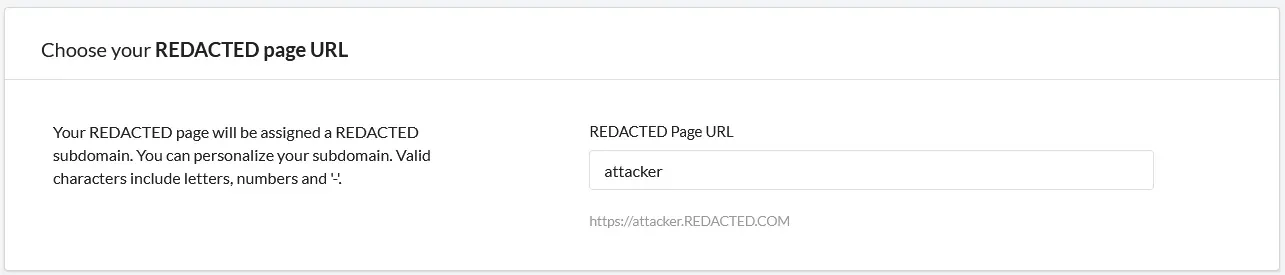
Trying to set the subdomain to another user's name is rejected. The response says the name is already taken:
REDACTED Page URL has already been taken

That rejection is the expected behaviour. The interesting part is how the uniqueness check treats the submitted value.
Exploitation
Step 1: append a space to the victim's name
The researcher added a SPACE at the end of the subdomain name. The change was accepted, and the account's subdomain became the victim's subdomain name. In the captured request this is the URL-encoded space, %20, appended to the victim's name.
Step 2: send the modified request
The request in Burp Suite looks like this:
POST /xxx/campaigns/1232/settings HTTP/2Host: redacted.comCookie: cokiedsfsdUser-Agent: Mozilla/5.0 (Windows NT 10.0; Win64; x64; rv:109.0) Gecko/20100101 Firefox/110.0Accept: */*;q=0.5, text/javascript, application/javascriptAccept-Language: en-US,en;q=0.5Accept-Encoding: gzip, deflateReferer: https://redacted.com/xxx/campaigns/1232/settingsX-Csrf-Token: KOFXStxcsdfcsdfVZ6WZsKJRGPg==Content-Type: application/x-www-form-urlencoded; charset=UTF-8X-Requested-With: XMLHttpRequestContent-Length: 602[....]utf8=%E2%9C%93&_method=patch&authenticity_token=KOFXStcWdGPg%3D%3D&campaign[redacted_slug]=victim%20&commit=Save+and+Continue
The important parts are the parameter campaign[redacted_slug], which carries the new subdomain name, and its value victim%20, which is the victim's subdomain name with a URL-encoded space appended. The request also carries the CSRF token in X-Csrf-Token and authenticity_token, and uses _method=patch to reach the update action.
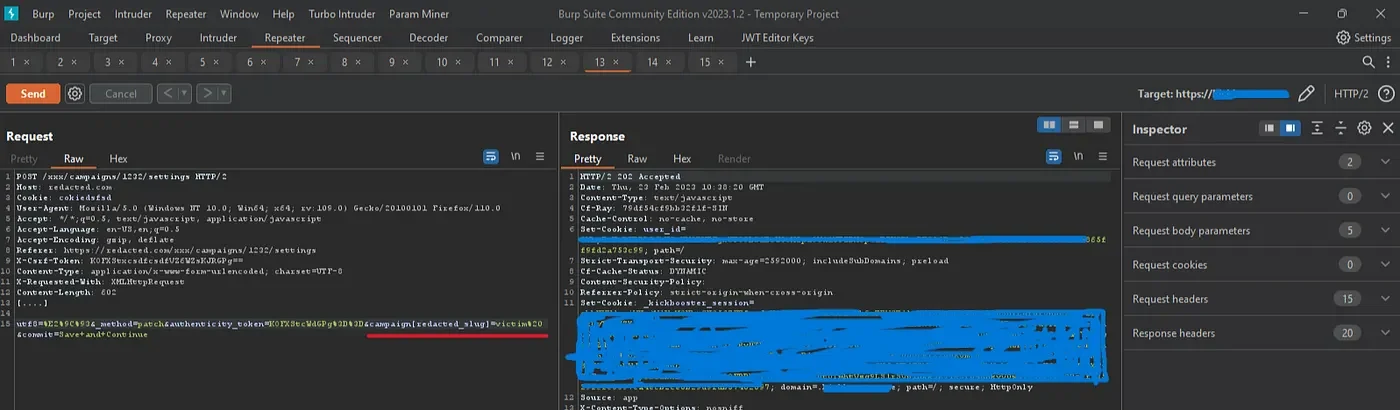
Step 3: observe the result
The response was 202 Accepted. The account's subdomain changed from https://attacker.redacted.com to the victim's subdomain name, https://victim.redacted.com.
Root cause
The report does not explain why the trailing space bypassed the uniqueness check. The check evidently did not treat victim%20 as equal to victim, and the account's subdomain became the victim's name.
Impact
An authenticated user can take over another user's subdomain name by appending a space to it. The researcher demonstrated the change from https://attacker.redacted.com to https://victim.redacted.com. The write-up does not describe what content is served afterwards, whether the original owner loses access, or how the platform resolves the collision between the two accounts.
Fix
Variants to test
- Other whitespace and control characters: try
%09(tab),%0a(newline),%0d(carriage return) and a trailing%00in place of%20, and see whether the name is accepted and resolves to the victim's subdomain. - Leading whitespace: try
%20victiminstead ofvictim%20, and check whether the same bypass works. - Case variation: try
VictimorVICTIMwhere the victim's name is lowercase, and see whether the uniqueness check is case-sensitive while DNS is not. - Unicode lookalikes: try characters that normalise to the victim's name, such as a full-width or compatibility form, and check whether the stored name resolves to the victim's subdomain.
- Trailing dot: try
victim.and see whether it is accepted and resolves to the same host.
These variants are untested; the report only shows the trailing %20 case.
Disclosure
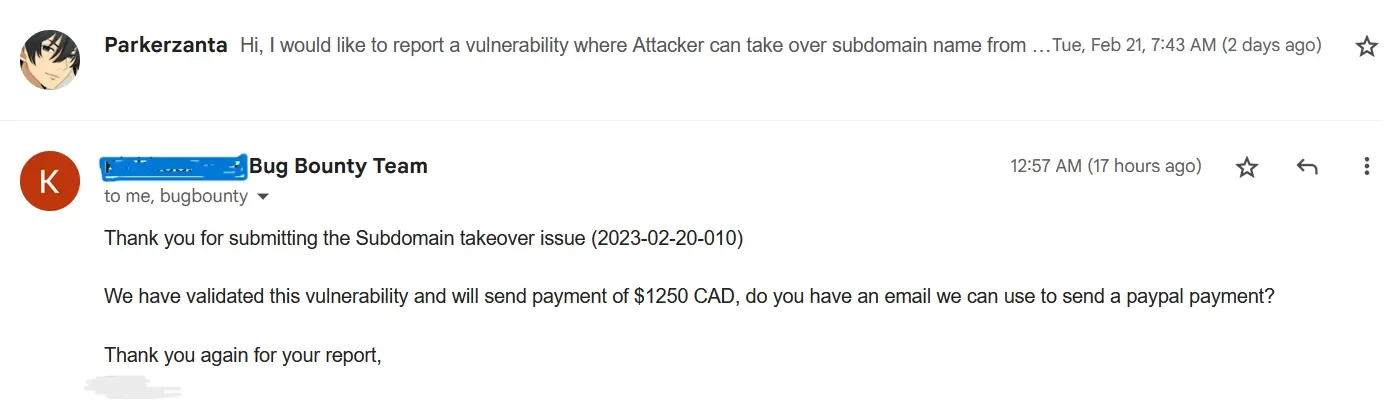
The researcher reported the finding to the platform's team. After two days of waiting for a reply, the team confirmed the finding was valid and awarded a bounty of $1250.
A video proof of concept accompanies the write-up.
What happened, in plain words
A website let every user pick their own subdomain name, the part in front of the main domain, so that a user called attacker got a page at https://attacker.redacted.com. The site promised that no two users could have the same name: if you tried to take a name that was already in use, it refused. The researcher found that adding a single space to the end of someone else's name slipped past that refusal, and the account's subdomain ended up on the other person's name. The platform confirmed the finding and paid a bounty of $1250.
This is a beginner's walkthrough of the whole thing, from what a subdomain is to the exact request that was sent. Every technical word is explained where it first appears, and there is a glossary at the end.
Background: what the site does
The target is a website where each user chooses their own subdomain name, in the same way Shopify does. A user picks a name and the platform serves their page at https://<name>.redacted.com. The platform enforces uniqueness: you cannot take a subdomain name that already exists or is already used by another user. The researcher's own subdomain was attacker, served at https://attacker.redacted.com.
A few words before we go further:
- Domain: the main address of a site, here
redacted.com. Think of it as a street. - Subdomain: a name placed in front of the domain, separated by a dot, like
attacker.redacted.com. Think of it as a house number on that street. The platform gives each user their own house number. - Uniqueness check: the rule that stops two users getting the same house number. When you ask for a name, the site looks it up and says no if it is taken.
The feature under test is the settings page where the subdomain name is changed. The write-up describes the finding as a subdomain takeover: taking over another user's subdomain name. In security terms, a takeover means one person ends up controlling an address that should belong to someone else.
Setting up
The researcher tested the subdomain name setting with an account whose subdomain was attacker, and used a tool called Burp Suite to capture and modify the request. Burp Suite is a program that sits between your browser and the website: your browser sends its request to Burp, Burp shows it to you, lets you edit it, and then forwards it on. It is the standard way to look at and change what a browser sends.
The request's User-Agent header identifies Firefox 110, and the account's campaign is identified as 1232 in the URL path. No other tooling or preconditions are described.
A request is simply the message your browser sends to a server when you do something on a site, such as clicking Save. It contains the address you are asking for, some headers (extra information about the browser and the request), and often a body with the data you are submitting.
Finding it
After testing several features without result, the researcher focused on the subdomain name setting. The settings page lets a user change the subdomain name as shown below.
The image is captioned 'Settings subdomain name'.
Trying to set the subdomain to another user's name is rejected. The response says the name is already taken:
REDACTED Page URL has already been taken
The image is captioned 'Subdomain already been taken'. This is the expected behaviour: the uniqueness check is doing its job. The interesting part is how that check treats the submitted value, which is what the researcher went on to test.
Exploitation
Step 1: append a space to the victim's name
The researcher added a SPACE at the end of the subdomain name. The change was accepted, and the account's subdomain became the victim's subdomain name. In the captured request this is the URL-encoded space, %20, appended to the victim's name.
Why a space? Because a space is invisible and easy to overlook. The uniqueness check compares the name you typed with the names already taken. If it compares victim (with a space) against victim (without one) and treats them as different strings, the check passes. But if the site later trims the space off before storing the name or building the address, the stored name becomes the victim's name. Two parts of the site disagree about what the name is, and that disagreement is the bug.
URL encoding is how special characters travel inside a web address or a form. A space cannot appear literally in a URL, so it is written as %20. The server decodes %20 back into a space when it reads the value. So victim%20 means victim followed by a space.
Step 2: send the modified request
The request in Burp Suite looks like this:
POST /xxx/campaigns/1232/settings HTTP/2Host: redacted.comCookie: cokiedsfsdUser-Agent: Mozilla/5.0 (Windows NT 10.0; Win64; x64; rv:109.0) Gecko/20100101 Firefox/110.0Accept: */*;q=0.5, text/javascript, application/javascriptAccept-Language: en-US,en;q=0.5Accept-Encoding: gzip, deflateReferer: https://redacted.com/xxx/campaigns/1232/settingsX-Csrf-Token: KOFXStxcsdfcsdfVZ6WZsKJRGPg==Content-Type: application/x-www-form-urlencoded; charset=UTF-8X-Requested-With: XMLHttpRequestContent-Length: 602[....]utf8=%E2%9C%93&_method=patch&authenticity_token=KOFXStcWdGPg%3D%3D&campaign[redacted_slug]=victim%20&commit=Save+and+Continue
Line by line, in plain words:
POST /xxx/campaigns/1232/settings HTTP/2: this is the request line.POSTis the method used when you send data to a server to change something. The path/xxx/campaigns/1232/settingsis the settings page for campaign1232.HTTP/2is the version of the language the browser and server speak.Host: redacted.com: which site the request is for. One server can host many sites, so the request says which one it wants.Cookie: cokiedsfsd: a cookie is a small piece of data the site stored in your browser earlier, and the browser sends it back with every request. It is how the site recognises that the request comes from your logged-in session. Think of it as the wristband you get at an event: show it and you are let back in.User-Agent: Mozilla/5.0 (Windows NT 10.0; Win64; x64; rv:109.0) Gecko/20100101 Firefox/110.0: tells the server which browser and operating system sent the request.Accept: */*;q=0.5, text/javascript, application/javascript: tells the server which kinds of response the browser can handle.Accept-Language: en-US,en;q=0.5: the language the browser prefers.Accept-Encoding: gzip, deflate: the compression formats the browser can unpack.Referer: https://redacted.com/xxx/campaigns/1232/settings: the page the request was sent from.X-Csrf-Token: KOFXStxcsdfcsdfVZ6WZsKJRGPg==: a CSRF token is a random value the site puts into its pages and expects back with any change request. It proves the request came from the site's own page and not from some other site trying to make your browser do things. CSRF stands for Cross-Site Request Forgery, an attack where another site tricks your browser into sending a request you did not intend.Content-Type: application/x-www-form-urlencoded; charset=UTF-8: says the body is form data, encoded the way a web form is encoded, using UTF-8 characters.X-Requested-With: XMLHttpRequest: a marker many sites use to tell that the request came from their own page's JavaScript rather than a plain page load.Content-Length: 602: the size of the body in bytes.[....]: the write-up elides part of the body here.utf8=%E2%9C%93: a form field that marks the form as submitted in UTF-8.%E2%9C%93is the encoded check mark character._method=patch: a trick used by web frameworks. The real HTTP method isPOST, but this field tells the server to treat the request as aPATCH, which is the method for updating part of an existing record. It is how the request reaches the update action.authenticity_token=KOFXStcWdGPg%3D%3D: another CSRF token, this time in the body.%3Dis the encoded equals sign.campaign[redacted_slug]=victim%20: the important part. This is the parameter that carries the new subdomain name. The name of the parameter iscampaign[redacted_slug], and its value isvictim%20, the victim's subdomain name with a URL-encoded space appended.commit=Save+and+Continue: the button that was pressed. In form encoding, a space is written as+, so this readsSave and Continue.
The important parts are the parameter campaign[redacted_slug], which carries the new subdomain name, and its value victim%20, which is the victim's subdomain name with a URL-encoded space appended. The request also carries the CSRF token in X-Csrf-Token and authenticity_token, and uses _method=patch to reach the update action.
The image is captioned 'Request & respons'.
Step 3: observe the result
The response was 202 Accepted. The account's subdomain changed from https://attacker.redacted.com to the victim's subdomain name, https://victim.redacted.com.
A status code is a three-digit number the server sends back to say how it handled the request. 200 means fine, 404 means not found, and 202 means accepted: the server took the request and will act on it. Here it means the change went through.
Root cause
The report does not explain why the trailing space bypassed the uniqueness check. The check evidently did not treat victim%20 as equal to victim, and the account's subdomain became the victim's name.
Normalisation means cleaning a value into a standard form, for example removing spaces at the start and end. If one part of the site cleans the value and another does not, the two parts see different values, and that gap is what the researcher exploited.
Impact
An authenticated user can take over another user's subdomain name by appending a space to it. The researcher demonstrated the change from https://attacker.redacted.com to https://victim.redacted.com. The write-up does not describe what content is served afterwards, whether the original owner loses access, or how the platform resolves the collision between the two accounts.
Fix
Variants to test
These are other inputs worth trying, in the same spirit as the original. Each one asks the same question: does the uniqueness check see one value while the stored name becomes another?
- Other whitespace and control characters: try
%09(tab),%0a(newline),%0d(carriage return) and a trailing%00in place of%20, and see whether the name is accepted and resolves to the victim's subdomain. - Leading whitespace: try
%20victiminstead ofvictim%20, and check whether the same bypass works. - Case variation: try
VictimorVICTIMwhere the victim's name is lowercase, and see whether the uniqueness check is case-sensitive while DNS is not. - Unicode lookalikes: try characters that normalise to the victim's name, such as a full-width or compatibility form, and check whether the stored name resolves to the victim's subdomain.
- Trailing dot: try
victim.and see whether it is accepted and resolves to the same host.
These variants are untested; the report only shows the trailing %20 case.
Disclosure
The researcher reported the finding to the platform's team. After two days of waiting for a reply, the team confirmed the finding was valid and awarded a bounty of $1250.
The image is captioned 'Bounty awarded'.
A video proof of concept accompanies the write-up.
Glossary
- API: a way for one program to talk to another, here the set of addresses and rules the website uses to receive changes from the browser.
- Bounty: a reward a company pays to someone who reports a security problem to it.
- Burp Suite: a tool that sits between your browser and a website so you can see and edit the requests being sent.
- Cookie: a small piece of data a site stores in your browser and gets back with each request, used to recognise your session.
- CSRF (Cross-Site Request Forgery): an attack where another site tricks your browser into sending a request you did not intend.
- CSRF token: a random value the site puts in its pages and expects back with change requests, proving the request came from its own page.
- Domain: the main address of a site, such as
redacted.com. - Header: an extra line of information attached to a request or response, such as the browser type or the content type.
- HTTP: the language browsers and servers use to exchange requests and responses.
- Normalisation: cleaning a value into a standard form, for example trimming spaces, so that different spellings of the same thing compare as equal.
- Parameter: a named value sent with a request, such as
campaign[redacted_slug]=victim%20. - PATCH: an HTTP method for updating part of an existing record.
- POST: an HTTP method for sending data to a server to create or change something.
- Request: the message your browser sends to a server when you do something on a site.
- Response: the message the server sends back, including a status code and usually some content.
- Session: the period during which a site remembers you as logged in, usually tracked by a cookie.
- Status code: a three-digit number in a response saying how the request was handled, such as
202 Accepted. - Subdomain: a name placed in front of a domain, separated by a dot, such as
attacker.redacted.com. - Subdomain takeover: taking control of a subdomain that should belong to someone else.
- Uniqueness check: the rule that stops two users getting the same name.
- URL encoding: writing special characters in a web address or form in a safe form, such as
%20for a space. - UTF-8: a standard way of encoding characters as bytes.
- Vulnerability: a weakness in a system that someone can use to make it behave in a way its owner did not intend.




