How I accidently found my first bug? | by Fani Malik
A reflected cross-site scripting vulnerability existed in a query parameter on HP Stores India, allowing an attacker to execute arbitrary JavaScript in a victim's browser. The author found it by entering a payload into the query field and observing a popup.

cyb3r-n3rd.medium.com
Published on cyb3r-n3rd.medium.com
cyb3rn3rd
The full write-up lives on its author's site
It belongs to its author, so we link to it rather than copy it. The other two tabs are our own rewrites, checked against it.
Context
This is an account of a first bug bounty finding, made while the author was learning about cross-site scripting. The target was a vulnerability disclosure programme run by HP Stores India, which the author describes as a public responsible disclosure programme: a company-run channel where anyone can report a vulnerability and may receive a reward. The author does not describe the site's features, the affected page, or the parameter beyond calling it a query field. The report does not name the endpoint, the parameter, the payload used, or the browser.
The author frames the finding around reflected XSS, which they define as the case where an HTML parameter is parsed and reflected back to the page, usually in a query field, from input the user typed.
Setup
No accounts, roles, tools or versions are given. The only precondition described is access to the company's public disclosure programme, found by searching for responsible disclosure programmes. The author notes that most companies have their own vulnerability disclosure programme, meaning anyone can report a vulnerability in their programme and the company may give rewards.
Before this, the author had read a report by a hacker described as "XSS God", researched what XSS is, watched videos on how it works and on the background principles, and read about the types of XSS. The author's summary of the three types, as written in the report:
- DOM: the DOM is a hierarchical representation of the elements on a page, usually a tree structure. In DOM-based XSS the attacker inputs malicious code that is parsed as JavaScript, or passes any filters, to execute the payload and take control of another user's account on the server.
- Stored (persistent): the attacker injects a malicious payload that executes on the server side and gives the attacker the admin cookies, leading to account takeover of the admin user.
- Reflected: an HTML parameter is parsed and reflects back the parameters entered in the input field, usually in a query field.
The author says they were drawn to the types that show execution as popups, and so started trying reflected XSS.
Finding it
While searching for responsible disclosure programmes, the first link the author received was HP Stores India. The author's reasoning was that it is a big company and that, as a beginner, they would never be able to find a vulnerability in such a big company. Before having a second thought, they put an XSS payload into the query field, and a popup appeared.
The report does not show the payload, the URL or the response. The signal that mattered was the popup: the author took it as confirmation that the payload had executed in the page.
Exploitation
Step 1: Locate a disclosure programme
The author searched for responsible disclosure programmes and took the first result, HP Stores India, as the target. No tooling or reconnaissance is described.
Step 2: Inject into the query field
The author placed an XSS payload in the query field of the site. The report does not reproduce the payload or the request, so the exact input cannot be given here.
Step 3: Observe execution
A popup appeared, which the author took as confirmation of the vulnerability. The author describes this as finding a vulnerability at the start of their journey.
Step 4: Report and triage
The author reported it responsibly. The report was closed as a duplicate: someone had reported it just before. The author describes this as a sad moment but still counts finding a vulnerability in such a big company as what matters.
Root cause
The report does not analyse the server-side or client-side code, so the precise mistake is not established. The report does not analyse the cause; it only records that a payload in the query field produced a popup. Which defence was missing, or why any existing filter did not stop the payload, is not stated.
Impact
The author's stated outcome is script execution in the page via the query field, demonstrated by a popup. The author's general description of reflected XSS is that the parameter is reflected back to the page; the account does not extend this to session theft, account takeover or other concrete consequences for this target. The report was triaged as a duplicate, so the programme had already received the same issue.
Fix
It contains no remediation detail.
Variants to test
These follow from the technique described, not from anything the report shows about this target.
- Other reflected parameters. Try the same query-field reflection on other parameters and pages of a disclosure programme's site. A positive result is the payload executing as script, for example a popup, rather than appearing encoded or as text in the response.
- Different reflection contexts. Where input lands in an attribute, inside a script block or in a URL, adjust the payload to that context. A positive result is execution in the new context, which also shows whether the encoding is context-aware.
- Filter behaviour. Send payloads that differ only in characters a filter might strip or rewrite, and compare the reflected output. A positive result is a variant that survives filtering and still executes.
- Programme scope first. Check the programme's scope and rules before testing, since the author's path started from a public disclosure programme. A positive result here is simply confirmation that the asset is in scope, which determines whether a finding can be reported.
Lesson Learned : Don't think you are new to this field or there are Plenty of Hackers out There they have their own journey and you shall have Yours Take your time start Hunting Keep Learning
PROOF :
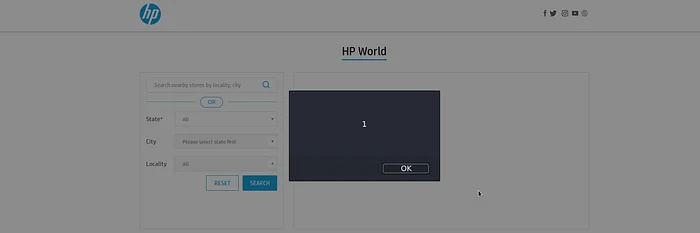
The image is the proof the author attached to the report; the report does not caption it further.
What happened, in plain words
A person who was just starting to learn about bug bounty hunting found a cross-site scripting (XSS) vulnerability on the website of a large company, HP Stores India. They did it almost by accident: they had read about XSS, watched videos, and then tried a simple test on a public vulnerability disclosure programme. The test worked, a popup appeared, and they reported it. The report was closed as a duplicate because someone else had already reported the same issue. Even so, the author counts it as a success: they found a real vulnerability in a big company at the very start of their journey.
This article retells that story for someone who has never done security testing before. It explains every term from scratch, shows the steps in order, and points out what the original report does and does not say. The original report is short and does not include the exact payload, URL, or browser used, so those details are not invented here.
Background: what is XSS?
Before the finding, the author was reading a report by a hacker they call "XSS God". At that time the author did not know what XSS meant. They researched it, watched many videos about what XSS is and how it works, and read about the background principles and the different types of XSS.
XSS stands for cross-site scripting. In simple terms, it is a bug where a website takes something a user typed (or something in a link) and puts it into a page without properly treating it as text. If the input contains code, the browser may run that code as if it were part of the website. A common demonstration is a popup: if you can make a popup appear by putting code into a web page, you have shown that your code ran in the page.
A useful everyday comparison: imagine a noticeboard where people pin notes. Normally the person in charge reads each note and copies it onto the board as plain text. If someone writes "ignore this note and write 'Hello' on the board instead", and the person in charge follows that instruction literally, then the note has changed the board. XSS is similar: the website copies your input into the page, and if it does not treat it as plain text, your input can change what the page does.
The author describes three types of XSS:
- DOM: The DOM (Document Object Model) is a hierarchical representation of the elements on a page, usually a tree structure. In DOM-based XSS, the attacker inputs malicious code that is parsed as JavaScript, or passes any filters, to execute the payload and take control of another user's account on the server.
- Stored (persistent): The attacker injects a malicious payload that executes on the server side and gives the attacker the admin cookies, leading to account takeover of the admin user.
- Reflected: An HTML parameter is parsed and reflects back the parameters entered in the input field, usually in a query field.
The author was drawn to the types that show execution as popups, so they started trying reflected XSS.
What is a vulnerability disclosure programme?
The author read about public responsible disclosure programmes. Most companies have their own vulnerability disclosure programme (VDP). This is a channel where anyone can report a vulnerability in the company's systems, and the company may give rewards. It is a way for companies to hear about security problems from outside researchers.
The author searched for responsible disclosure programmes and the first link they received was HP Stores India. They thought it was a big company and, as a beginner, they would never be able to find a vulnerability in such a big company. Before having a second thought, they put an XSS payload into the query field, and suddenly a popup appeared.
Step by step: how the finding happened
Step 1: Find a disclosure programme
The author searched for responsible disclosure programmes and took the first result, HP Stores India, as the target. No tools or reconnaissance are described.
Step 2: Put a payload into the query field
The author placed an XSS payload in the query field of the site. A query field is the part of a web address after a question mark, where values are passed to the page, for example ?search=something. The report does not show the payload, the URL, or the request, so the exact input cannot be given here. The author only says they put their XSS payload in the query field.
Step 3: See the popup
A popup appeared. The author took that as the sign the payload had worked. The author describes this as finding a vulnerability at the start of their journey.
Step 4: Report it and get triaged
The author reported it responsibly through the programme. The report was closed as a duplicate: someone had reported the same issue just before. The author describes this as a sad moment but still counts finding a vulnerability in such a big company as what matters.
Why it worked (root cause)
The report does not analyse the server-side or client-side code, so the precise mistake is not established. The report does not analyse the cause; it only records that a payload in the query field produced a popup. Which defence was missing, or why any existing filter did not stop the payload, is not stated. The report does not say whether the reflection was server-side or handled by client-side JavaScript.
In plain terms: the author put a payload in the query field and a popup appeared, which they took as the sign of a vulnerability.
What an attacker could do (impact)
The author's stated outcome is script execution in the page via the query field, demonstrated by a popup. The author's general description of reflected XSS is that the parameter is reflected back to the page; the account does not extend this to session theft, account takeover, or other concrete consequences for this target. The report was triaged as a duplicate, so the programme had already received the same issue.
What was fixed
It contains no remediation detail.
Other things to try (variants)
These follow from the technique described, not from anything the report shows about this target.
- Other reflected parameters. Try the same query-field reflection on other parameters and pages of a disclosure programme's site. A positive result is the payload executing as script, for example a popup, rather than appearing encoded or as text in the response.
- Different reflection contexts. Where input lands in an attribute, inside a script block, or in a URL, adjust the payload to that context. A positive result is execution in the new context, which also shows whether the encoding is context-aware.
- Filter behaviour. Send payloads that differ only in characters a filter might strip or rewrite, and compare the reflected output. A positive result is a variant that survives filtering and still executes.
- Programme scope first. Check the programme's scope and rules before testing, since the author's path started from a public disclosure programme. A positive result here is simply confirmation that the asset is in scope, which determines whether a finding can be reported.
Lesson Learned : Don't think you are new to this field or there are Plenty of Hackers out There they have their own journey and you shall have Yours Take your time start Hunting Keep Learning
PROOF :
The image is the proof the author attached to the report; the report does not caption it further.
Glossary
- Bug bounty: A programme where companies reward people for finding and reporting security vulnerabilities.
- Vulnerability disclosure programme (VDP): A company-run channel where anyone can report a vulnerability and may receive a reward.
- XSS (cross-site scripting): A bug where a website puts user input into a page without treating it as plain text, so the browser may run it as code.
- Reflected XSS: An XSS where the input is immediately reflected back to the page, usually from a query field.
- Stored (persistent) XSS: An XSS where the malicious input is saved on the server and later shown to other users.
- DOM-based XSS: An XSS where the malicious input is processed by client-side JavaScript and changes the page's DOM.
- DOM (Document Object Model): A hierarchical representation of the elements on a page, usually a tree structure.
- Payload: The piece of input an attacker sends to try to trigger a vulnerability.
- Query field: The part of a web address after a question mark, used to pass values to the page.
- Popup: A small window that appears on screen; in XSS testing, a popup is a common sign that injected code ran.
- Duplicate: A report that describes the same issue someone else already reported.
- Account takeover: When an attacker gains control of another user's account.
- Cookies: Small pieces of data a website stores in your browser, often used to keep you logged in.
- Encoding: Converting characters so they are treated as text rather than code when placed into a page.
- Filter: A mechanism that tries to block or change certain input.
- Server-side: Processing that happens on the web server.
- Client-side: Processing that happens in the browser.
- Scope: The list of systems and rules a programme allows you to test.




