# What is Dependency Confusion?
The author describes a method for finding dependency confusion vulnerabilities, where an internal package name is not registered on the public npm registry, allowing an attacker to claim it. The text does not present a specific vulnerable target or exploitation details, only a general approach and tooling.
 Published on hetroublemakr.medium.com
Hope you are doing good, I know I took a little longer to publish this blog, so apologies there.
The full write-up lives on its author's site
It belongs to its author, so we link to it rather than copy it. The other two tabs are our own rewrites, checked against it.
Context
Dependency confusion (also called a supply chain substitution attack) is the class of bug this write-up is about. As the author puts it: a software installer script is tricked into pulling a malicious code file from a public repository instead of the intended file of the same name from an internal repository. The write-up is a methodology piece rather than a single-target report: it describes how the author hunted for packages that are referenced by an organisation's code but are not registered in the public package directory, and which therefore can be taken over. The author says the major bugs reported were npm-based dependencies, and that the same class can be found in python, ruby and other ecosystems.
The approach was inspired by Alex Birsan's original dependency confusion research. The author also credits Dhiyanesh for the write-up on receiving a callback for a valid proof of concept, and TomNomNom for the tooling used throughout.
Setup
The workflow needs a list of targets (subdomains) and access to the organisation's source code, either through exposed files or through cloned repositories. The tools used are:
- nuclei, with the
package-jsontemplate from the nuclei-templates repository, to look for exposedpackage.jsonfiles on subdomains. - fff by TomNomNom, to save the header and body of each URL to a file.
- webpaste, jq and httpx.
- The
ghclonescript from TomNomNom's dotfiles, to clone repositories. - ghorg as an alternative for cloning an entire organisation's repositories.
- dustilock from Checkmarx as a tool that performs the same dependency check.
Finding it
The signal is simple: a package name that appears under dependencies or devDependencies in a package.json file, but that does not exist in the public registry. If the name is unclaimed publicly, anyone can register it, and the installer will fetch the attacker's package instead of the intended internal one.

To identify a vulnerable package, look at the package names under dependencies or devDependencies in the package.json file.
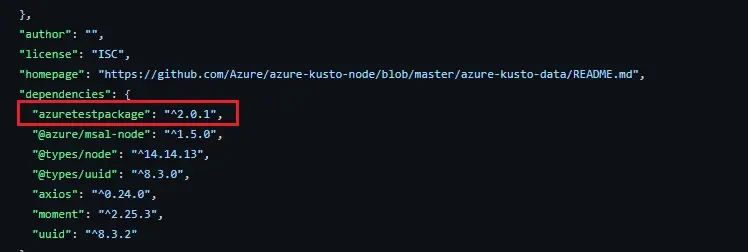
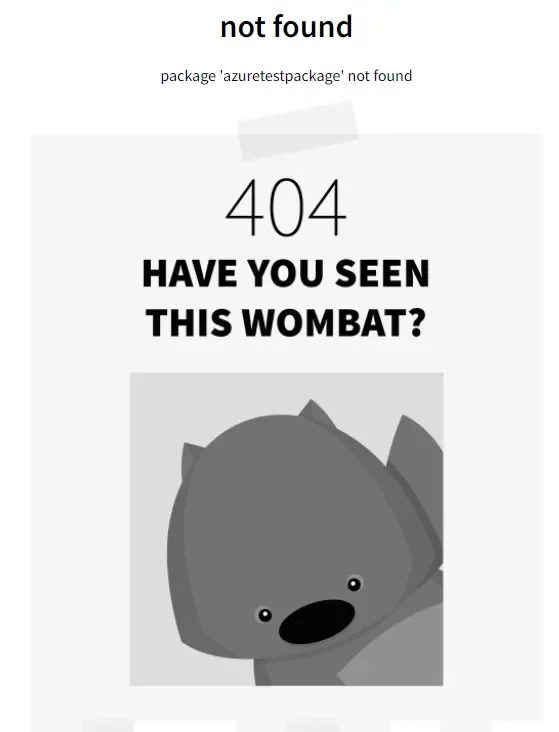
In the example, the package name is azuretestpackage. Navigating to https://www.npmjs.com/package/azuretestpackage shows that the package is not present in the npmjs directory, which makes it available to take over.
Exploitation
Step 1: find exposed package.json files on subdomains
The author used nuclei with the package-json template, which was already present in the nuclei-templates repository, and ran it against all targets. The template as shown in the write-up:
id: package-jsoninfo: name: npm package.json disclosure author: geeknik,afaq severity: info description: All npm packages contain a file, usually in the project root, called package.json - this file holds various metadata relevant to the project. tags: config,exposurerequests: - method: GET path: - "{{BaseURL}}/package.json" //removed line 14 from original tempalte matchers-condition: and matchers: - type: word words: - "name" - "version" condition: and - type: word words: - "application/json" part: header - type: status status: - 200
The template issues a GET to {{BaseURL}}/package.json and matches only when the body contains both name and version, the response header contains application/json, and the status is 200. The author notes that line 14 was removed from the original template.
The scan was run as:
nuclei -l hosts.txt -t "/home/user/package.yaml" -o packages.txt
-l hosts.txt supplies the list of hosts, -t points at the local copy of the template, and -o packages.txt writes the results to a file.
Step 2: download the package.json files
Once the nuclei scan is complete, the package.json files have to be downloaded from the matching subdomains. The author does this with a one-liner:
cat packages.txt | awk '{print $6}' | fff -s 200 -o roots
awk extracts the sixth field of each result line (the URL), and fff saves the header and body of each URL into the roots directory, keeping only responses with status 200 (-s 200). The body part is the important one, because it is used later in the workflow.
Step 3: collect package.json from GitHub
There are two ways. The manual one uses GitHub dorks from the search bar:
org:Organization filename:"package.json"
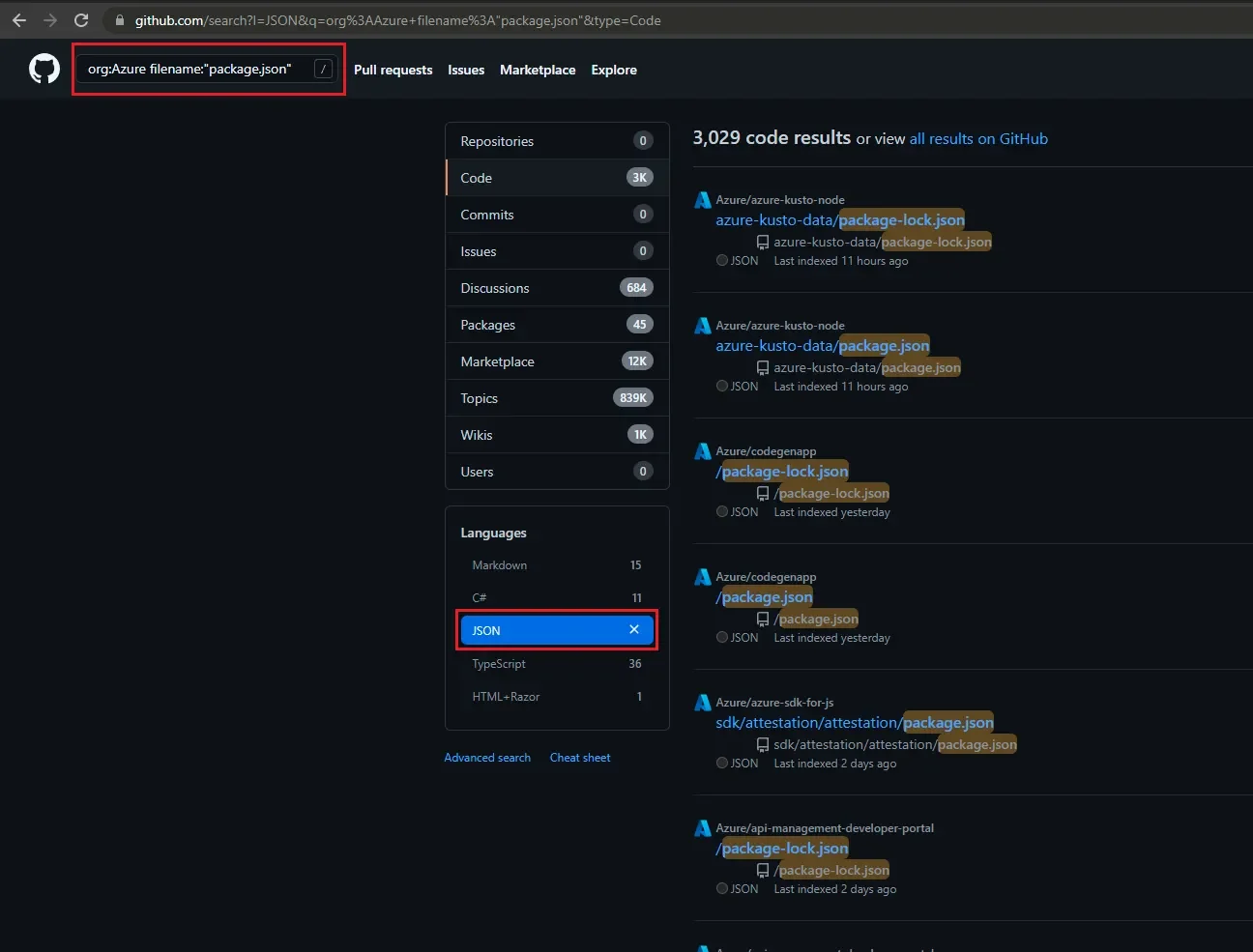
The automated way requires webpaste, jq and httpx. The author points to TomNomNom's own explanation of webpaste rather than repeating it:
After installation, the author created a new snippet so that all repositories of an organisation can be git cloned, and combined it with the ghclone script to save the repositories on a VPS.
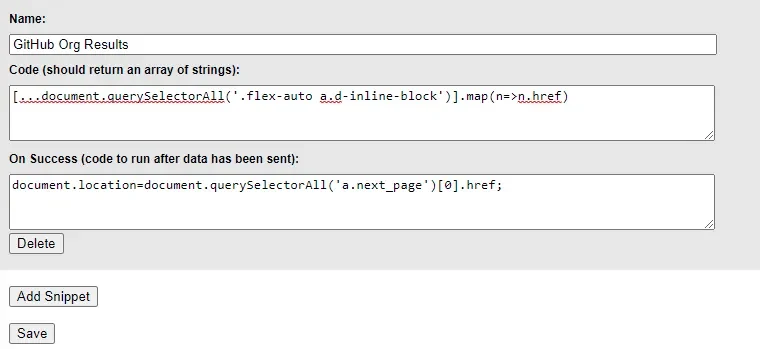
The snippet is saved in the Chrome extension, and the following command is run on the command line:
webpaste -p 8843 | xargs -n1 -P15 ghclone
webpaste listens on port 8843 and emits the URLs pasted into it; xargs -n1 -P15 runs ghclone once per URL with up to 15 in parallel. To start cloning, visit the repository page of the organisation and click "Github Org Results" in the webpaste extension with the saved snippet. It starts cloning the repositories and moves to the next page; the process is repeated until the last page of the organisation is reached.
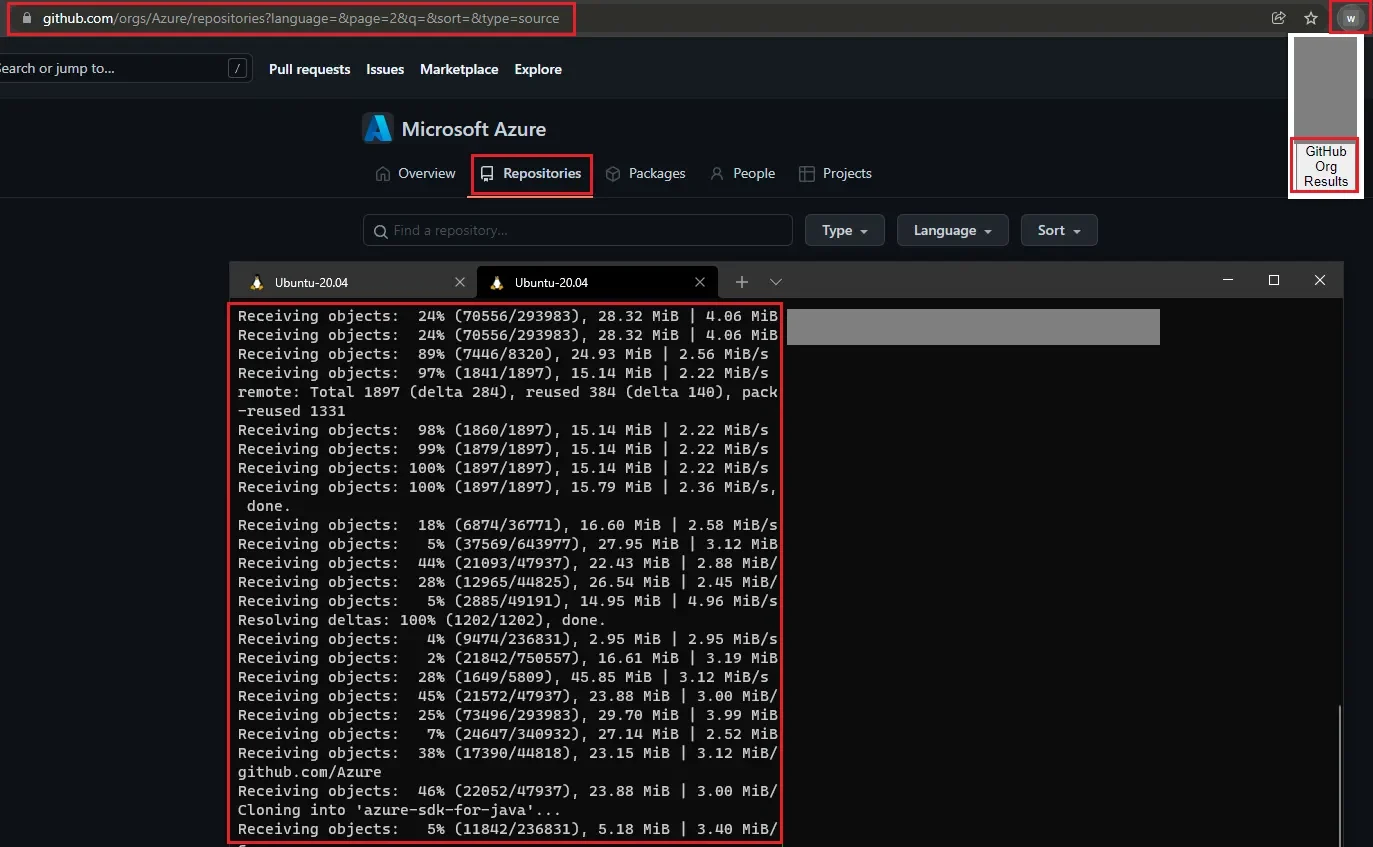
As an alternative, the author found ghorg, which clones all repositories of an organisation or user into one directory:
syntax: ghorg clone someorg — concurrency=50 — token=
Step 4: extract package names and check the registry
After cloning, the author wrote a one-liner to find every package.json in the cloned repositories, grep the package names with grep, cut, awk, tr and other Linux tools, and then use httpx to check whether each package is available. The one-liner is published as a gist:
https://gist.github.com/hetroublemaker/[redacted]
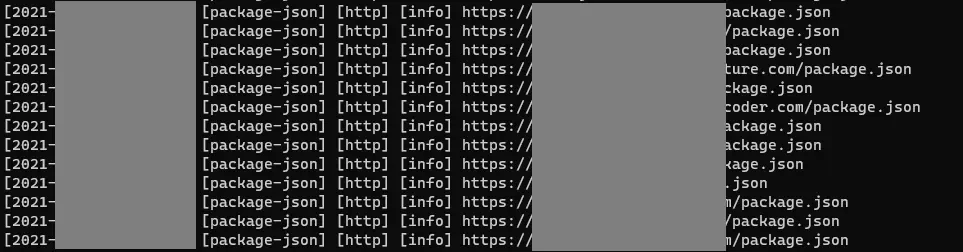
The author's explanation: the find command locates all package.json files from the current directory, and jq extracts the packages under dependencies and devDependencies from the JSON file. registry.npmjs.org was used because appending the package name to https://www.npmjs.com/package/<package> hit the rate limit almost immediately. httpx is used with -status-code and -mc 404 to show the URLs that return a 404 status code.
A successful run produces output like this:
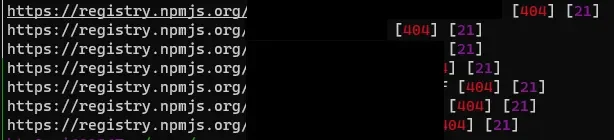
The same one-liner can be run against the roots folders where the package.json files were collected with fff in step 1.
Checkmarx's dustilock performs the same job:
syntax: dustilock -p /tmp/code -r
/tmp/code is the location where the repositories were cloned.
Step 5: take over the package and prove the callback
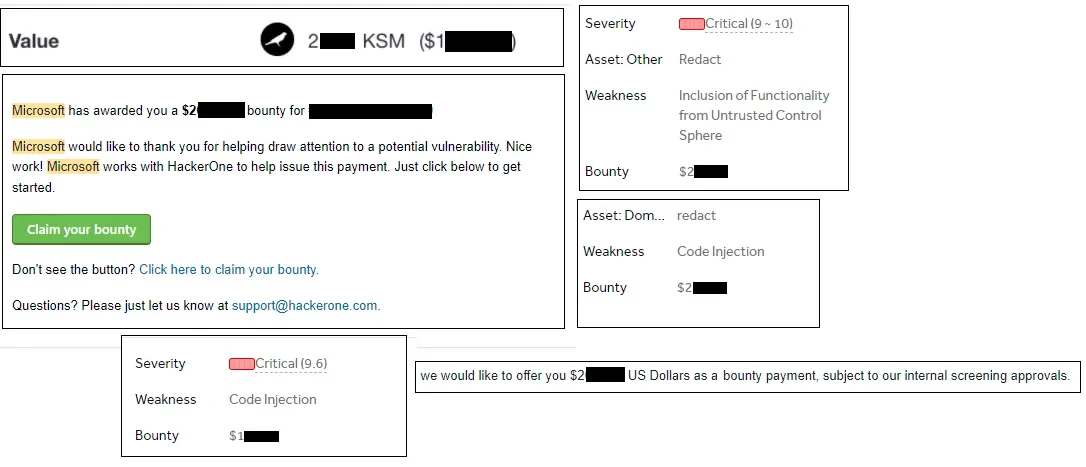
To take over a package that is not present, the author points to Dhiyanesh's blog, which shares the code and explains in detail how to receive a callback for a valid proof of concept. The author reports receiving bounties after successful validation of the dependency confusion bug.
Root cause
A build or install process resolves a dependency name against a public registry, and the same name is either not published there or is published by someone else. When the internal package is not pinned to a private registry or scoped to an owner, the installer has no way to tell the intended internal package from a public one with the same name, so whoever registers the name first controls what gets installed. The write-up does not describe the server-side configuration of any specific target, so the exact resolution order on the affected projects is not stated.
Impact
The author frames the impact as supply chain substitution: code from a public repository is pulled in place of the intended internal file. The practical consequence depends on where the dependency is installed, which the write-up does not analyse per target.
Fix
The write-up does not describe a fix applied by any target. The measure it implies is to claim the missing names in the public registry, or to configure installs so that internal names resolve only against the private registry.
Variants to test
- Run the
package-jsonnuclei template against every subdomain in scope and download the hits withfff, then check each dependency name againstregistry.npmjs.orgwithhttpx -status-code -mc 404. A positive result is a 404 for a name that appears in apackage.jsonunderdependenciesordevDependencies. - Use the GitHub dork
org:Organization filename:"package.json"for each organisation in scope, or clone the organisation withghcloneorghorgand run the extraction one-liner over the clones. A positive result is the same 404 on a name listed in a package.json under dependencies or devDependencies. - Run
dustilock -p /tmp/code -rover cloned repositories as a second opinion. Run dustilock over cloned repositories as a second opinion. - Repeat the same check for python and ruby dependencies, since the author names those ecosystems as also affected. The author names python and ruby as ecosystems where this vulnerability can be found.
References
- Alex Birsan, Dependency Confusion
- Dhiyanesh, Dependency Confusion
- https://www.youtube.com/watch?v=P13xrz0EgNw
- https://www.youtube.com/watch?v=4ggqsJeSu04
- ghorg
What happened, in plain words
This write-up is not about one single website. It is a walkthrough of a technique called dependency confusion, and of how the author went looking for it across many organisations at once. The author says the bugs he reported were mostly npm-based dependencies, and that the same kind of problem can appear in python, ruby and other languages.
To understand the idea, you need one everyday comparison. Imagine a company canteen that orders its coffee from a small local roaster called "House Blend". The canteen staff do not write down the roaster's address; they just ask for "House Blend" and trust that the name is unique. Now imagine someone else registers the name "House Blend" with a big public delivery service that the canteen also uses. The next time the canteen orders "House Blend", the delivery service hands over the stranger's coffee, because that is the only "House Blend" it knows about. Nobody at the canteen did anything obviously wrong; the name was simply not protected.
Software works the same way. A program is rarely written from scratch; it pulls in pieces of ready-made code called packages (also called libraries or dependencies). Each package has a name, and the program keeps a list of the names it needs. When someone installs the program, a tool called an installer reads that list and fetches each package by name. Usually it fetches from a public registry, a giant online catalogue where anyone in the world can publish a package under any name that is still free. Companies also keep their own internal registry, a private catalogue only their own machines can reach, for packages they wrote themselves.
The bug appears when a company's list mentions a package name that exists only in their private catalogue and was never claimed in the public one. The installer may pull the package from the public catalogue instead of the internal one. Since the name is free, an attacker can publish a package under that exact name. The next install pulls the attacker's code instead of the company's own. That is the whole trick: no password is stolen, no server is broken into. The attacker simply registers a name before the rightful owner does.
The author's quote of the definition, in his own words:
A Dependency Confusion attack or supply chain substitution attack occurs when a software installer script is tricked into pulling a malicious code file from a public repository instead of the intended file of the same name from an internal repository.
The write-up was inspired by Alex Birsan's original research on dependency confusion. The author also credits Dhiyanesh for a separate write-up explaining how to receive a callback (a signal sent back to you when your test code actually runs somewhere), and TomNomNom for most of the tools used.
The idea in one sentence
You can report a dependency confusion bug when you find a package name that a company's code asks for, that is not listed in the public package directory, and that is still being installed. Because the name is unclaimed publicly, it is available for anyone to take over.
How to spot a vulnerable package by hand
Everything starts with a file called package.json. In the npm world (npm is the package manager for JavaScript, and npmjs.com is its public catalogue), every project has one of these files in its root folder. It is a plain text file in JSON format, which just means a structured list of labelled values, a bit like a very rigid shopping list. Among other things it records the project's name and version, and two lists of package names it depends on:
dependencies: packages the program needs in order to run.devDependencies: packages needed only while developing or testing.
So the first job is to read those two lists and note every package name in them.
In the example shown, the package name is azuretestpackage. The next step is to open a browser and visit the public catalogue page for that name:
https://www.npmjs.com/package/azuretestpackage
This is an ordinary web address. The part after /package/ is the package name. If the package does not exist, the site answers with a 404 status code. If it does not exist, the site answers with a 404 status code, which is the standard web signal for "not found". A 404 here means the name is free, and free means anyone, including an attacker, can register it.
That is the entire detection logic done manually. The rest of the write-up is about doing it at scale, because a large company may have hundreds of projects and thousands of package names, and checking them one browser tab at a time is not practical.
The approach, step by step
The author splits the hunt into two sources of package.json files: files accidentally left reachable on the company's own web servers, and files stored in the company's code repositories on GitHub. Both paths end in the same check: does this name exist publicly or not?
Step 1: find exposed package.json files on subdomains
A subdomain is a named section of a company's main domain, for example shop.example.com or api.example.com. Companies often have many, and some are forgotten, test systems that were never meant to be public. Sometimes a web server is configured to serve files from a folder directly, and a package.json sitting in that folder becomes downloadable by anyone who guesses the address.
To look for this file across many subdomains, the author used nuclei. Nuclei is a free command-line scanner: you give it a list of addresses and a template, which is a small recipe describing what to request and what a positive answer looks like. A template for this exact file already existed in the public nuclei-templates collection, so the author did not write one himself. The template, as shown in the write-up:
id: package-jsoninfo: name: npm package.json disclosure author: geeknik,afaq severity: info description: All npm packages contain a file, usually in the project root, called package.json - this file holds various metadata relevant to the project. tags: config,exposurerequests: - method: GET path: - "{{BaseURL}}/package.json" //removed line 14 from original tempalte matchers-condition: and matchers: - type: word words: - "name" - "version" condition: and - type: word words: - "application/json" part: header - type: status status: - 200
Line by line, in plain words:
id: package-jsongives the template a name so results can be traced back to it.info:is a block of descriptive metadata: a human-readable name (npm package.json disclosure), the template authors (geeknik,afaq), a severity ofinfo(meaning this is informational, not an exploit by itself), a description explaining whatpackage.jsonis, and tags (config,exposure) used for sorting templates into categories.requests:starts the actual instructions. There is one request.method: GETmeans a simple read request, the same kind your browser sends when you open a page. It asks the server to return something without changing anything.path: "{{BaseURL}}/package.json"is the address to request.{{BaseURL}}is a placeholder that nuclei replaces with each host from your list, so the scanner trieshttps://host1/package.json, thenhttps://host2/package.json, and so on.- The comment
//removed line 14 from original tempalterecords that the author deleted one line from the published template. The write-up does not say what that line was. matchers-condition: andsays every matcher below must succeed for the result to count. This is what stops the scanner reporting every page on the internet.- The first matcher looks for the words
nameandversionin the response body, withcondition: and, so both must appear. A realpackage.jsonalways contains both keys. - The second matcher requires the response header to contain
application/json. Headers are the small lines of metadata a server sends before the page content, andapplication/jsonis the standard label saying "what follows is JSON data". This filters out ordinary HTML pages that happen to contain the words name and version. - The third matcher requires status
200, the standard code for "here is the page, successfully delivered".
Together, the three matchers mean: only report a host if it returned a real JSON file with a name and a version, successfully. That is a strong signal that a genuine package.json is publicly downloadable.
The scan itself was run like this:
nuclei -l hosts.txt -t "/home/user/package.yaml" -o packages.txt
nucleistarts the scanner.-l hosts.txtgives it the list of hosts to test, one per line, stored in a file calledhosts.txt.-t "/home/user/package.yaml"points at the local copy of the template file on the author's machine.-o packages.txtwrites the results into a file calledpackages.txtinstead of only printing them on screen.
Step 2: download the package.json files
Knowing which subdomains expose the file is not enough; the author needs the file contents to read the package names. The scan output lines contain more than just the address, so the next one-liner picks out the address and downloads each file:
cat packages.txt | awk '{print $6}' | fff -s 200 -o roots
cat packages.txtprints the contents of the results file.- The vertical bar
|is a pipe: it passes the output of one command as input to the next, like handing a sheet of paper to the next person in a line. awk '{print $6}'is a small text-processing tool.$6means "the sixth space-separated word on each line", which in nuclei's output is the URL. So this keeps only the addresses.fffis a downloader by TomNomNom.-s 200tells it to keep only responses with status 200, and-o rootstells it to save everything into a folder calledroots.- The author notes that
fffsaves both the header and the body of each response, and that the body is the part that matters later, because that is where the package names live.
Step 3: collect package.json files from GitHub
Many companies keep their source code on GitHub, a website where code repositories are stored and shared. A repository (repo) is simply a project folder with its full history. If a company's repositories are public, or if a search engine has indexed them, their package.json files can be read without touching the company's servers at all.
There are two ways to collect them. The manual way uses GitHub dorks: special search phrases typed into GitHub's search bar that narrow results down. The dork used here is:
org:Organization filename:"package.json"
org:Organizationrestricts the search to repositories belonging to one GitHub organisation.Organizationis a placeholder for the real organisation name.filename:"package.json"asks GitHub to return only files with that exact name.
The automated way needs three tools: webpaste, jq and httpx. The author links to TomNomNom's own explanation of webpaste rather than repeating it:
Webpaste is a small helper that lets a browser page send text to a program running on your own computer. The author set up a snippet, which in this context is a saved piece of browser-extension configuration that runs a chosen action on a page. The snippet's job was to collect the addresses of all repositories in an organisation so they could be cloned. Cloning means making a full local copy of a repository, including its history, onto your own machine. The author combined the snippet with a script called ghclone, which does the cloning, and saved the copies on a VPS, a rented server in the cloud that stays online.
With the snippet saved in the Chrome extension, this command is run in a terminal:
webpaste -p 8843 | xargs -n1 -P15 ghclone
webpaste -p 8843starts webpaste listening on port 8843. A port is a numbered channel on a computer, so other programs know where to send data. Webpaste prints each address it receives.xargstakes a list of items and runs a command once per item.-n1means one item per run, soghcloneis called separately for each repository address.-P15means up to 15 of those runs happen in parallel, which saves a lot of time when there are many repositories.ghcloneis the script that performs the actual clone.
To start, the author visits the organisation's repository page in the browser and clicks "Github Org Results" in the webpaste extension, using the saved snippet. Cloning begins, the page moves to the next set of results, and the process is repeated until the last page of the organisation is reached.
As an alternative, the author found ghorg, a tool that clones every repository of an organisation or user into a single folder:
syntax: ghorg clone someorg — concurrency=50 — token=
ghorg clone someorgclones everything belonging to the organisation namedsomeorg.concurrency=50allows up to 50 operations at once.token=is where an access token would go. A token is a long secret string that acts like a password for a service, letting a tool act on your behalf without your actual password. The write-up shows the option but no value, and any real token must be kept private.
Step 4: extract package names and check the registry
Now the author has many cloned repositories on disk. The next one-liner finds every package.json inside them, pulls out the package names, and asks the public registry whether each name exists. The one-liner is published as a gist (a small public code snippet on GitHub):
https://gist.github.com/hetroublemaker/[redacted]
The author's own explanation of what it does:
- The
findcommand locates allpackage.jsonfiles starting from the current directory. jqreads the JSON and extracts the package names listed underdependenciesanddevDependencies.registry.npmjs.orgis the machine-readable public registry, as opposed to the human-facing website. The author switched to it because appending package names tohttps://www.npmjs.com/package/<package>hit a rate limit almost immediately. A rate limit is a cap on how many requests a service accepts in a period; exceed it and it starts refusing you.httpxis used with-status-codeand-mc 404.-status-codemakes it print the HTTP status code for each address, and-mc 404means "match code 404", so only addresses answering "not found" are shown. In other words, the output is a list of package names that the code asks for but the public registry does not have.
A successful run produces output like this:
The same one-liner can be run against the roots folder from step 1, where the package.json files downloaded with fff were saved.
Checkmarx's dustilock does the same job as a ready-made tool:
syntax: dustilock -p /tmp/code -r
-p /tmp/codetells dustilock where the cloned repositories are stored.
Step 5: take over the package and prove the callback
Finding a free name is only half the work. To show that the bug is real, you have to demonstrate that the company's installer actually fetches your package. For that, the author points to Dhiyanesh's blog, which shares the code and explains in detail how to receive a callback for a valid proof of concept. A proof of concept (PoC) is a minimal demonstration that a vulnerability can really be triggered, as opposed to a theoretical claim. A callback is the signal your test package sends back to a server you control when it is installed or run, which proves the company pulled your code.
The author reports receiving bounties after successful validation of the dependency confusion bug. A bounty is a reward a company pays to someone who reports a valid security issue through its programme.
Why it works
A build or install process looks up a dependency name in a public registry, and that same name is either not published there at all or is published by someone else. When the internal package is not pinned to a private registry, or not scoped to an owner, the installer has no way to tell the intended internal package from a public one with the same name. Whoever registers the name first controls what gets installed. The write-up does not describe the server-side configuration of any specific target, so the exact order in which each affected project resolves names is not stated.
What the impact is
The author frames the impact as supply chain substitution: code from a public repository is pulled in place of the intended internal file. What that means in practice depends on where the dependency gets installed, which the write-up does not analyse per target.
How to fix it
The measure it implies is to claim the missing names in the public registry, or to configure installs so that internal names resolve only against the private registry.
Variants to test
- Run the
package-jsonnuclei template against every subdomain in scope and download the hits withfff, then check each dependency name againstregistry.npmjs.orgwithhttpx -status-code -mc 404. A positive result is a 404 for a name that appears in apackage.jsonunderdependenciesordevDependencies. - Use the GitHub dork
org:Organization filename:"package.json"for each organisation in scope, or clone the organisation withghcloneorghorgand run the extraction one-liner over the clones. A positive result is the same 404 on a name listed in a package.json under dependencies or devDependencies. - Run
dustilock -p /tmp/code -rover cloned repositories as a second opinion. Run dustilock over cloned repositories as a second opinion. - Repeat the same check for python and ruby dependencies, since the author names those ecosystems as also affected. The author names python and ruby as ecosystems where this vulnerability can be found.
References
- Alex Birsan, Dependency Confusion
- Dhiyanesh, Dependency Confusion
- https://www.youtube.com/watch?v=P13xrz0EgNw
- https://www.youtube.com/watch?v=4ggqsJeSu04
- ghorg
Glossary
- Package: a reusable piece of software that a project pulls in instead of writing that functionality itself.
- Dependency: a package that a project needs; listed by name in its configuration file.
- devDependency: a package needed only during development or testing, not when the program runs for real.
- Installer: the tool that reads a project's dependency list and fetches each package.
- Package manager: software that installs, updates and tracks packages; npm is the one for JavaScript.
- Registry: an online catalogue of packages. A public registry is open to anyone; an internal registry is private to a company.
- npm: the package manager for JavaScript, and the name of its public registry at npmjs.com.
- package.json: the plain text file in a JavaScript project that lists its name, version and dependencies.
- JSON: a structured text format made of labelled values, used for configuration and data exchange.
- Dependency confusion: a bug where an installer fetches a package from a public registry because the intended internal package of the same name is not protected there.
- Supply chain substitution: another name for the same idea: one link in the software supply chain is swapped for a malicious one.
- Subdomain: a named section of a domain, such as
shop.example.comunderexample.com. - Status code: a three-digit number a web server returns with every response; 200 means success, 404 means not found.
- Header: metadata sent alongside a web response, such as the content type.
- Content type: the label saying what kind of data a response contains, for example
application/json. - GET request: a read-only request for a web resource, the kind a browser makes when you open a page.
- nuclei: a command-line scanner that sends requests described by templates and reports matches.
- Template: a small recipe file telling a scanner what to request and what a positive result looks like.
- Pipe: the
|symbol, which passes one command's output as input to the next. - One-liner: a short chain of commands written on a single line to automate a small job.
- awk: a text tool that picks fields (space-separated words) out of lines.
- jq: a tool for reading and extracting values from JSON.
- fff: a downloader that saves web responses, headers and bodies, into files.
- httpx: a command-line tool that sends web requests to many hosts and prints details such as status codes.
- Rate limit: a cap on how many requests a service accepts in a given period.
- GitHub: a website that hosts code repositories.
- Repository (repo): a project folder with its full change history.
- Clone: to make a full local copy of a repository.
- GitHub dork: a search phrase using GitHub's special filters to find specific files or repositories.
- Organisation: a GitHub account type that groups many repositories under one company or team.
- Snippet: here, a saved piece of browser-extension configuration that performs an action on a page.
- webpaste: a helper that lets a browser page send text to a program on your own computer.
- ghclone: a script that clones repositories from a list of addresses.
- ghorg: a tool that clones every repository of an organisation or user into one folder.
- dustilock: a Checkmarx tool that flags dependencies susceptible to dependency confusion.
- VPS: a rented server in the cloud that stays online.
- Port: a numbered channel on a computer that programs use to send and receive data.
- Token: a long secret string that acts like a password for a service, letting a tool act on your behalf.
- Proof of concept (PoC): a minimal demonstration that a vulnerability can really be triggered.
- Callback: a signal sent back to a server you control when your test code runs, proving it executed.
- Bounty: a reward paid by a company for a valid security report.
- Ecosystem: a language's package manager and registry taken together, such as npm for JavaScript or pip for python.