How I Bypassed a KYC Verification Flow by Manipulating Client-Side State
The onboarding flow trusted verification-status flags sent to the browser, so an attacker could modify the response to mark KYC steps as complete and reach the payment stage. However, a later backend KYC check detected the incomplete verification and refunded the payment.
 Published on infosecwriteups.com
Bug Bounty
The full write-up lives on its author's site
It belongs to its author, so we link to it rather than copy it. The other two tabs are our own rewrites, checked against it.
Context
KYC is one of the most important security and compliance controls in financial applications. Before a customer can access certain financial services, the application may need to verify several things:
- Mobile number
- Government identity documents
- Tax identification
- Personal information
- Video verification
- Customer/account status
The target here was a financial onboarding application, assessed during an authorised security test. The application received a set of verification-status flags from the backend and used them to decide which parts of the onboarding flow to display. The workflow in question was a fixed deposit (FD) purchase, and the researcher was able to continue it after skipping the KYC steps.
The write-up is sanitised. The real target, organisation name, private URLs, identifiers, customer information, tokens, credentials and sensitive screenshots have been removed, and the values shown below are simplified or invented examples rather than the real ones.
Setup
The testing was done in an authorised environment with a controlled test account. The only tool described is an intercepting proxy, used to inspect and modify responses in the browser. No versions, endpoints, hostnames or account details are given. The researcher limited the investigation to controlled onboarding data and did not attempt to access another customer's account or perform an unauthorised financial transaction.
Finding it
While going through the onboarding flow, the researcher observed a response containing several Boolean values representing the customer's verification state. A simplified and sanitised version looked like this:
{ "mobileVerified": false, "identityVerified": false, "taxIdValidated": false, "videoVerificationRequired": true, "personalDetailsCaptured": false, "customerExists": false}
At this point nothing was necessarily vulnerable: applications commonly return state information to the frontend. The question was whether these values were used only to control the UI, or whether they were influencing an actual security decision.
The reasoning that followed is the core of the finding. If the frontend receives:
{ "mobileVerified": false}
it might display:
Mobile verification required
Changing the value to:
{ "mobileVerified": true}
might only change the screen, which is not necessarily a security vulnerability. The situation becomes much more interesting if changing the response causes the application to skip a security requirement and continue into a sensitive workflow.
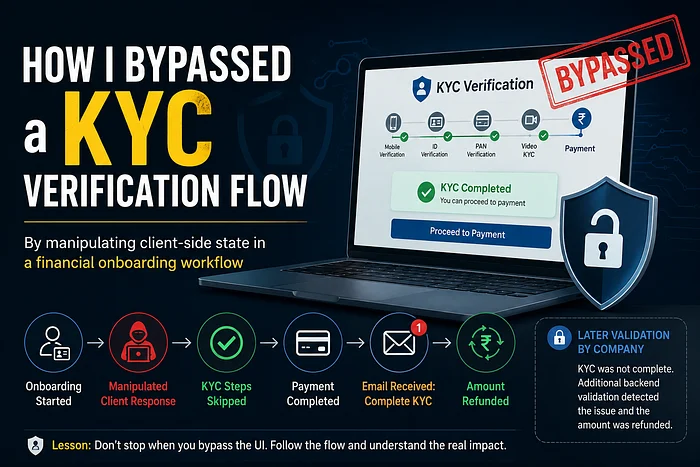
The image sits at the top of the write-up, under the subtitle describing how a simple response-manipulation test exposed a trust issue in a financial onboarding workflow.
Exploitation
Step 1: Inspect the onboarding response
Using an intercepting proxy in the authorised test environment, the researcher inspected the response returned during onboarding and identified the verification-state flags shown above.
Step 2: Manipulate only the response
Instead of using real values, the researcher substituted a completely sanitised example:
{ "mobileVerified": true, "identityVerified": true, "taxIdValidated": true, "videoVerificationRequired": false, "personalDetailsCaptured": true, "customerExists": true}
The request itself was not modified. Only the response visible to the browser was manipulated. That distinction mattered: the goal was to determine whether the application trusted information coming from the client-side workflow.
Step 3: Observe the workflow
After forwarding the modified response, the onboarding interface behaved differently. Verification steps that were normally presented based on the original state were treated as completed, and the workflow progressed significantly further.
The normal state:
Unverified ↓Verification required ↓Onboarding restricted
Compared with the manipulated client state:
"Verified" ↓Verification screens skipped ↓Onboarding continues
The application was effectively allowing the browser to influence how it interpreted the customer's verification state. The manipulated state allowed the workflow to progress to the payment/investment stage, which is where the issue became more interesting than a simple frontend bug.
Step 4: Complete the payment
After changing the verification status, the researcher was able to skip the normal KYC steps and continue with the FD purchase. Crucially, it was not just possible to reach the next page: the researcher reached the payment page and completed the payment for the FD being purchased. At that moment it looked like a complete KYC bypass.
Step 5: Watch what happens afterwards
The company had another KYC check later in the process. Around 1 to 2 days after the payment, the researcher received an email asking them to complete the required KYC. The company had detected that the KYC had not actually been completed, and the amount paid was refunded.
The normal flow:
Normal KYC process ↓KYC required ↓KYC not completed ↓Payment should not be reached
After changing the verification state:
KYC status changed ↓KYC steps skipped ↓FD purchase continued ↓Payment page reached ↓Payment completed ↓Later KYC check ↓KYC found incomplete ↓Email asking me to complete KYC ↓Amount refunded
This is why the researcher explicitly does not describe the finding as "I created an FD without KYC". The accurate description is that the KYC checks in the onboarding flow were bypassed, the FD payment stage was reached and the payment completed, but a later KYC check by the company detected that verification was incomplete and the amount was eventually refunded.
Root cause
The onboarding process trusted verification information shown to the browser. By changing that information, the researcher could make the website believe the required KYC steps had already been completed. The frontend was allowed to influence how the application interpreted the customer's verification state, rather than the backend independently establishing it.
The browser is controlled by the user, so anything delivered to it should be considered potentially modifiable. A secure design has the backend make the final decision:
Browser │ │ "I believe the user is verified" ▼Backend │ │ Check authoritative verification records ▼Verified? ┌─┴─┐Yes No │ │ ▼ ▼Allow Reject
An insecure implementation looks more like:
Browser │ │ "User is verified" ▼Backend │ │ Trust client-visible state ▼Sensitive operation
That second design creates a dangerous trust boundary. The defence that did work was the company's later KYC check, which caught the incomplete verification after payment; the amount was later refunded. The report does not describe the internal implementation of either check, so the exact mechanism by which the first check was bypassed is not stated.
Impact
The issue allowed the researcher to:
- Skip the normal KYC steps
- Continue with the FD purchase
- Reach the payment page
- Complete the payment
In other words, the KYC screens in the onboarding flow could be bypassed and a payment completed without the verification having actually been done. However, the later KYC check still worked: the transaction did not remain as a valid completed purchase without KYC, the customer was asked to complete KYC, and the money was refunded.
So there is a big difference between bypassing the KYC screen and completely bypassing KYC. The first happened; the second did not. Reaching the payment page does not automatically mean the whole security system has been bypassed, and the impact of this finding is bounded by the later check that the company operated. The report gives no bounty, severity or CVSS information.
Fix
The recommendation is simple: never trust the client to prove that a security requirement has been completed. Instead of relying on values such as:
{ "mobileVerified": true, "identityVerified": true}
the backend should independently determine whether those requirements are actually satisfied. For sensitive operations, the backend should verify the authoritative state for:
- Identity verification
- Mobile verification
- Tax-ID validation
- Video verification
- Personal details
- Customer/account status
- Eligibility for the requested operation
The original security report recommended independent server-side validation before security-sensitive onboarding operations. The write-up does not say whether the company changed anything in response.
Variants to test
- Flip individual flags rather than all of them. Change one Boolean at a time (for example only
identityVerified) and see whether the workflow advances past the corresponding step. - Change
videoVerificationRequiredfromtruetofalse. - Set
customerExiststotrueon a fresh account. - Manipulate the response on later requests in the flow, not just the first one. Intercept each response that carries state and modify it in turn.
- Follow the flow to the end after any successful skip. Complete the sensitive action and then watch for out-of-band checks, emails, reversals or refunds over the following days.
- Test the same pattern on other state-bearing responses. Look for security-sensitive Booleans or status strings in any API response that drives a multi-step workflow (onboarding, checkout, account upgrade, limit increases) and try modifying them.
What happened, in plain words
A security researcher was testing a financial website where people sign up to buy a fixed deposit (FD). Before you are allowed to buy one, the site is supposed to check who you are. That check is called KYC, short for Know Your Customer. It is a legal requirement in most countries: banks and financial companies must confirm that a customer is a real person, with a real identity, before letting them use money-related services.
The researcher found that the website let the browser influence which verification steps were treated as completed. The browser was told things like "this person's mobile number is not verified yet" and "this person's identity is not verified yet", and it showed the matching screens. The researcher changed those answers on the way from the server to the browser, so the browser believed everything was already verified. The verification screens disappeared, the flow moved on, and the researcher was able to reach the payment page and actually pay for a fixed deposit.
It looked at first like the whole KYC process had been defeated. But it had not. One or two days later the company sent an email asking for the missing KYC, because a second check on the company's side noticed the verification had never really happened. The money was refunded. So the screens could be skipped, but the company's later check still worked.
The lesson is about trust. A website should never let the browser decide something as important as "is this person verified?". The browser belongs to the user, and the user can change what it sees. The server, which the user does not control, must make that decision.
This article walks through the same steps the researcher took, explaining every term along the way. No security background is needed: if you can use a browser, you can follow it.
Background: what KYC is and what the site does
KYC stands for Know Your Customer. It is a set of checks that financial companies must perform before they let someone use their services. Think of it like a bank clerk asking for your passport before opening an account: the clerk is not being nosy, the law requires it.
In this application, before a customer could access certain financial services, the site might need to verify several things:
- Mobile number
- Government identity documents
- Tax identification
- Personal information
- Video verification
- Customer/account status
Each of those is a separate check. "Mobile number" means proving you control a phone number, usually by receiving a code. "Government identity documents" means uploading a passport or ID card. "Tax identification" means a tax number. "Personal information" means your name, address and similar details. "Video verification" means recording a short video, often saying a phrase, so the company can compare your face with your ID. "Customer/account status" means whether your account is in good standing.
The product in question was a fixed deposit, or FD, which involves paying money to the company. The important part for this story is that buying an FD involves paying money.
The researcher was testing this site during an authorised security test. "Authorised" means the company had given permission for the testing, within agreed limits. That matters legally and ethically: testing a website you do not own or have permission to test is not allowed.
The write-up has been sanitised. That means the real company name, the real web addresses, account identifiers, customer information, login tokens, passwords and sensitive screenshots have been removed. The values shown in the examples are simplified or made-up examples, not the real ones. This is normal practice: the goal is to teach the technique without exposing anyone.
The tools and the setup
The testing was done in an authorised environment with a controlled test account. A test account is an account the company sets up for testing, so the researcher is not touching a real customer's money or data. The researcher limited the investigation to controlled onboarding data and did not try to access another customer's account or make an unauthorised financial transaction.
The only tool described is an intercepting proxy. That sounds technical, so here is the everyday version. Normally, when your browser asks a website for something, the request goes straight to the server and the answer comes straight back. An intercepting proxy is a program that sits in the middle, like a postal worker who opens every letter, reads it, and can rewrite it before delivering it. The researcher used it to look at the answers coming back from the server and to change them before the browser saw them.
No versions, endpoints, hostnames or account details are given in the write-up. That is deliberate: those details could help someone attack the real site.
Finding it: the response with the flags
While going through the onboarding flow (the sequence of screens a new customer sees), the researcher observed a response containing several Boolean values representing the customer's verification state.
Two terms to unpack. A "response" is the answer a server sends back to the browser. When you load a page or click a button, your browser sends a request, and the server sends a response. An API is the part of a website that exchanges this kind of data rather than whole web pages: think of it as a waiter who takes your order to the kitchen and brings back a plate, without you going into the kitchen yourself. The browser talks to the API, and the API talks to the company's systems.
A "Boolean" is simply a value that is either true or false. The name comes from George Boole, a mathematician. In code, true and false are written exactly like that.
A simplified and sanitised version of the response looked like this:
{ "mobileVerified": false, "identityVerified": false, "taxIdValidated": false, "videoVerificationRequired": true, "personalDetailsCaptured": false, "customerExists": false}
This is JSON, which stands for JavaScript Object Notation. It is a common way for computers to exchange data as text. The curly braces { } hold a group of labelled values, and each label is in double quotes followed by a colon and then the value. Here is what each line means:
"mobileVerified": falsemeans the mobile number has not been verified."identityVerified": falsemeans the identity documents have not been verified."taxIdValidated": falsemeans the tax identification has not been validated."videoVerificationRequired": truemeans a video verification is still needed."personalDetailsCaptured": falsemeans the personal details have not been collected yet."customerExists": falsemeans the system does not yet treat this person as an existing customer.
At this point nothing was necessarily vulnerable. Applications commonly return state information to the frontend. "Frontend" means the part of the application that runs in your browser: the screens, buttons and text you see. "Backend" means the part that runs on the company's servers, which you cannot see or touch. Sending information from backend to frontend is normal and necessary; the frontend needs to know what to display.
The real question was whether these values were used only to control the UI, or whether they were influencing an actual security decision. "UI" stands for user interface: the visible screens. There is a huge difference between "the screen changes" and "the security rule is broken". If a value only changes what you see, that is cosmetic. If a value changes what the system allows you to do, that is a security problem.
Thinking like an attacker: why the question matters
The reasoning that followed is the core of the finding. It is worth slowing down here, because this is the mental habit that turns a curious observation into a real test.
If the frontend receives:
{ "mobileVerified": false}
it might display:
Mobile verification required
The first block is the data: the mobile number is not verified. The second block is what the user sees on screen: a message telling them to verify their mobile number. The frontend read the false and chose to show the message. That is normal.
Changing the value to:
{ "mobileVerified": true}
might only change the screen, which is not necessarily a security vulnerability. If the only effect is that the message disappears, then the user has hidden a message from themselves. Nothing has actually been bypassed, because the server would still refuse to do anything sensitive.
The situation becomes much more interesting if changing the response causes the application to skip a security requirement and continue into a sensitive workflow. A "sensitive workflow" is a sequence of steps that involves something valuable or risky: paying money, changing account settings, accessing personal data. If changing a value in the browser makes the site skip a required check and let you into that sensitive area, then the browser is being trusted with a security decision, and that is a real problem.
The image sits at the top of the write-up, under the subtitle describing how a simple response-manipulation test exposed a trust issue in a financial onboarding workflow.
Exploitation: the steps, one by one
Step 1: Inspect the onboarding response
Using an intercepting proxy in the authorised test environment, the researcher inspected the response returned during onboarding and identified the verification-state flags shown above. "Flags" here just means the true/false values, like little switches that are either on or off.
Why this step? Because you cannot test what you cannot see. Before changing anything, the researcher needed to know exactly what the server was sending and which values looked security-relevant. The flags with names like identityVerified are obvious candidates: they sound like they decide whether the identity check is done.
Step 2: Manipulate only the response
Instead of using real values, the researcher substituted a completely sanitised example:
{ "mobileVerified": true, "identityVerified": true, "taxIdValidated": true, "videoVerificationRequired": false, "personalDetailsCaptured": true, "customerExists": true}
This is the same JSON as before, with every value flipped. Line by line:
"mobileVerified": truenow claims the mobile number is verified."identityVerified": truenow claims the identity is verified."taxIdValidated": truenow claims the tax identification is validated."videoVerificationRequired": falsenow claims no video verification is needed."personalDetailsCaptured": truenow claims the personal details have been collected."customerExists": truenow claims the person is already an existing customer.
The request itself was not modified. Only the response visible to the browser was manipulated. That distinction mattered: the goal was to determine whether the application trusted information coming from the client-side workflow.
Why does the distinction matter? Because a request and a response travel in opposite directions. The request is what your browser sends to the server: "please give me the next screen". The response is what the server sends back: "here is the data, and by the way, here is the verification state". By changing only the response, the researcher was not pretending to be a different user or forging a login. They were simply changing what the browser was told, to see whether the browser's belief would be treated as fact by the server. "Client-side" means on the user's side, in the browser; "server-side" means on the company's side.
Step 3: Observe the workflow
After forwarding the modified response, the onboarding interface behaved differently. Verification steps that were normally presented based on the original state were treated as completed, and the workflow progressed significantly further.
The normal state:
Unverified ↓Verification required ↓Onboarding restricted
Compared with the manipulated client state:
"Verified" ↓Verification screens skipped ↓Onboarding continues
These two blocks are flow diagrams, read top to bottom. The first shows the intended path: the user is unverified, so the site asks for verification, and onboarding is restricted until that is done. The second shows what happened after the change: the browser believed the user was verified (the quotes around "Verified" are the researcher's way of saying it was only a claim, not the truth), the verification screens were skipped, and onboarding carried on.
The application was effectively allowing the browser to influence how it interpreted the customer's verification state. The manipulated state allowed the workflow to progress to the payment/investment stage, which is where the issue became more interesting than a simple frontend bug. A "frontend bug" is a mistake in the visible part of the site, often cosmetic or low impact. Reaching a payment stage is not cosmetic.
Step 4: Complete the payment
After changing the verification status, the researcher was able to skip the normal KYC steps and continue with the FD purchase. Crucially, it was not just possible to reach the next page: the researcher reached the payment page and completed the payment for the FD being purchased. At that moment it looked like a complete KYC bypass.
Why does completing the payment matter so much? Because reaching a page and actually doing the thing are different levels of proof. Many sites will show you a page and then refuse the action when you press the final button, because the server checks again at that moment. If the payment actually went through, the server accepted the action. That is much stronger evidence that the trust problem is real.
Step 5: Watch what happens afterwards
The company had another KYC check later in the process. Around 1 to 2 days after the payment, the researcher received an email asking them to complete the required KYC. The company had detected that the KYC had not actually been completed, and the amount paid was refunded.
This is the part many people would skip. The researcher did not stop at "I got to the payment page". They waited to see what the company's systems did next. The answer was: a second, later check caught the problem, asked for the missing KYC, and returned the money.
The normal flow:
Normal KYC process ↓KYC required ↓KYC not completed ↓Payment should not be reached
After changing the verification state:
KYC status changed ↓KYC steps skipped ↓FD purchase continued ↓Payment page reached ↓Payment completed ↓Later KYC check ↓KYC found incomplete ↓Email asking me to complete KYC ↓Amount refunded
The first diagram is the intended behaviour: KYC is required, and if it is not completed, payment should never be reachable. The second diagram is what actually happened, step by step: the status was changed, the KYC steps were skipped, the FD purchase continued, the payment page was reached, the payment was completed, then a later KYC check ran, found the verification incomplete, an email asked for the missing KYC, and the amount was refunded.
This is why the researcher explicitly does not describe the finding as "I created an FD without KYC". That would be an incorrect statement. The accurate description is that the KYC checks in the onboarding flow were bypassed, the FD payment stage was reached and the payment completed, but a later KYC check by the company detected that verification was incomplete and the amount was eventually refunded.
Root cause: why it worked
The onboarding process trusted verification information shown to the browser. By changing that information, the researcher could make the website believe the required KYC steps had already been completed. The frontend was allowed to influence how the application interpreted the customer's verification state, rather than the backend independently establishing it.
"Root cause" means the underlying reason the problem exists, as opposed to the symptom you see. The symptom was "the verification screens disappeared". The root cause was "the site believed what the browser said about verification".
The browser is controlled by the user, so anything delivered to it should be considered potentially modifiable. This is a basic principle. If a value arrives in your browser, you can change it: with developer tools, with an extension, with a proxy. So a website must never treat a value in the browser as proof of anything important.
A secure design has the backend make the final decision:
Browser │ │ "I believe the user is verified" ▼Backend │ │ Check authoritative verification records ▼Verified? ┌─┴─┐Yes No │ │ ▼ ▼Allow Reject
This diagram is read top to bottom. The browser says "I believe the user is verified". The arrow points down to the backend, which checks its own authoritative verification records. "Authoritative" means the official source of truth: the company's own database, not the browser's opinion. Then the backend asks "Verified?" and branches: if yes, allow; if no, reject. The little fork ┌─┴─┐ is just a drawing of a decision point with two outcomes.
An insecure implementation looks more like:
Browser │ │ "User is verified" ▼Backend │ │ Trust client-visible state ▼Sensitive operation
Here the browser says "User is verified", the backend trusts the client-visible state (what the browser shows), and goes straight to the sensitive operation. There is no independent check. That second design creates a dangerous trust boundary. A "trust boundary" is the line between two areas that trust each other differently: inside the boundary, things are trusted; outside, they are not. The browser is outside the trusted area, because the user controls it. Treating it as inside is the mistake.
The defence that did work was the company's later KYC check, which caught the incomplete verification after payment; the amount was later refunded. The report does not describe the internal implementation of either check, so the exact mechanism by which the first check was bypassed is not stated.
Impact: what it actually meant
The issue allowed the researcher to:
- Skip the normal KYC steps
- Continue with the FD purchase
- Reach the payment page
- Complete the payment
In other words, the KYC screens in the onboarding flow could be bypassed and a payment completed without the verification having actually been done. However, the later KYC check still worked: the transaction did not remain as a valid completed purchase without KYC, the customer was asked to complete KYC, and the money was refunded.
So there is a big difference between bypassing the KYC screen and completely bypassing KYC. The first happened; the second did not. Reaching the payment page does not automatically mean the whole security system has been bypassed, and the impact of this finding is bounded by the later check that the company operated. The report gives no bounty, severity or CVSS information. "Bounty" is a reward a company pays a researcher for finding a bug. "Severity" is how serious a bug is rated. "CVSS" is a standard scoring system for severity. None of those are given here.
Fix: what the company should change
The recommendation is simple: never trust the client to prove that a security requirement has been completed. Instead of relying on values such as:
{ "mobileVerified": true, "identityVerified": true}
the backend should independently determine whether those requirements are actually satisfied. In this JSON, the browser is claiming that the mobile number and identity are verified. The fix is that the backend should not take that claim at face value; it should look up its own records and decide for itself.
For sensitive operations, the backend should verify the authoritative state for:
- Identity verification
- Mobile verification
- Tax-ID validation
- Video verification
- Personal details
- Customer/account status
- Eligibility for the requested operation
"Eligibility" means whether this particular person is allowed to do this particular thing, for example whether they meet the requirements to buy an FD. The original security report recommended independent server-side validation before security-sensitive onboarding operations. "Server-side validation" means the server checks the facts itself, rather than accepting what the browser says. The write-up does not say whether the company changed anything in response.
Variants to test
The technical write-up lists further tests a researcher could try. Here they are, explained for someone new to this.
- Flip individual flags rather than all of them. Change one Boolean at a time (for example only
identityVerified) and see whether the workflow advances past the corresponding step. In plain words: if you flip everything at once and it works, you do not know which switch mattered. Flipping one at a time tells you exactly which value the site is trusting. - Change
videoVerificationRequiredfromtruetofalse. This tests one specific switch: the one that says a video check is needed. - Set
customerExiststotrueon a fresh account. "Onboarded" means the customer has already completed the sign-up checks. If a brand-new account can pretend to be an old one, that is a serious trust problem. - Manipulate the response on later requests in the flow, not just the first one. Intercept each response that carries state and modify it in turn. The point is that a flow has many steps, and the first response is not the only one that might carry a security-relevant value.
- Follow the flow to the end after any successful skip. Complete the sensitive action and then watch for out-of-band checks, emails, reversals or refunds over the following days. "Out-of-band" means happening through a different channel, such as an email rather than the website itself. "Compensating control" means another safeguard that catches the problem when the first one fails.
- Test the same pattern on other state-bearing responses. Look for security-sensitive Booleans or status strings in any API response that drives a multi-step workflow (onboarding, checkout, account upgrade, limit increases) and try modifying them. "Client-supplied" means the value came from the browser, which the user controls.
Glossary
- API: the part of a website that exchanges data with the browser, rather than sending whole web pages. Think of a waiter carrying orders between you and the kitchen.
- Authorised: done with the owner's permission, within agreed limits. Testing without permission is not allowed.
- Authoritative records: the company's own official source of truth, such as its database, as opposed to what the browser claims.
- Backend: the part of an application that runs on the company's servers and that the user cannot see or change.
- Boolean: a value that is either true or false.
- Bounty: a reward a company pays a researcher for finding and reporting a bug.
- Bypass: getting past a check or restriction that is supposed to stop you.
- Client-side: happening on the user's side, in the browser.
- Compensating control: an extra safeguard that catches a problem when another control fails.
- CVSS: a standard scoring system for rating how serious a security vulnerability is.
- Eligibility: whether a particular person is allowed to perform a particular action.
- Endpoint: a specific address on a server that a request can be sent to. The write-up gives none.
- FD (fixed deposit): a savings product where you deposit a sum for an agreed period and get it back with interest.
- Flags: true/false values used as switches, here representing verification state.
- Frontend: the part of an application that runs in the browser: the screens, buttons and text the user sees.
- Intercepting proxy: a program that sits between the browser and the server, letting you read and change requests and responses as they pass.
- JSON: a common text format for exchanging data, using curly braces, quoted labels and values.
- KYC (Know Your Customer): legally required checks that confirm a customer's identity before they use financial services.
- Onboarding: the sequence of steps a new customer goes through to sign up and become active.
- Out-of-band: happening through a different channel, such as email, rather than through the website itself.
- Request: what the browser sends to the server, for example asking for a page or an action.
- Response: what the server sends back to the browser.
- Root cause: the underlying reason a problem exists, as opposed to the visible symptom.
- Sanitised: cleaned of real names, addresses, identifiers and other sensitive details before publication.
- Sensitive workflow: a sequence of steps involving something valuable or risky, such as paying money or accessing personal data.
- Server-side validation: the server checking the facts itself instead of accepting what the browser says.
- Severity: how serious a security issue is rated to be.
- Test account: an account set up for testing, so real customers' money and data are not touched.
- Trust boundary: the line between areas that are trusted and areas that are not.
- UI (user interface): the visible screens, buttons and text of an application.
- Vulnerability: a weakness in a system that can be used to make it behave in a way its owners did not intend.




