How I Bypassed Incapsula WAF By Imperva
The cart update endpoint did not validate the 'courses' input, allowing SQL injection. The attacker bypassed the Incapsula WAF using a partially URL-encoded payload with a hex value to execute a time-based blind SQL injection and retrieve the current database user.
 Published on medium.com
Hi All, I’m Dawood, having more than 7 years of experience in cyber security, especially in web application security, a passionate developer and always a learner.
The full write-up lives on its author's site
It belongs to its author, so we link to it rather than copy it. The other two tabs are our own rewrites, checked against it.
Context
I was testing the REST API of a web application for security vulnerabilities. The endpoint that caught my attention was used to add or update items within a cart. In this write-up the target name, usernames and passwords have been replaced with "redacted" for privacy reasons.
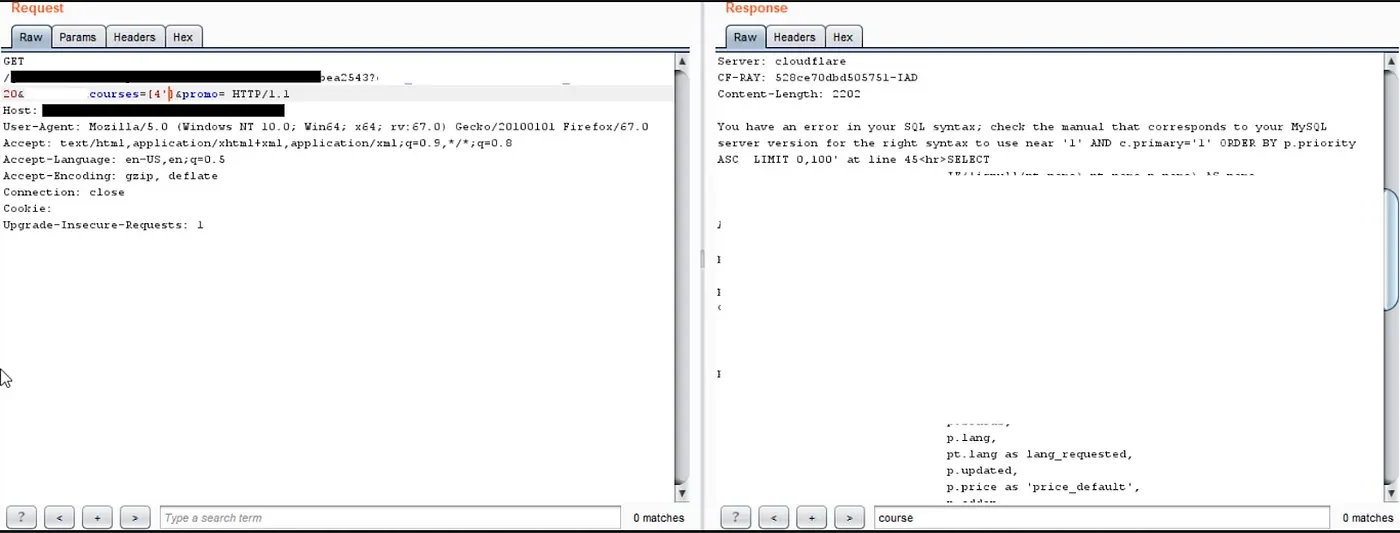
The endpoint did not validate an input called courses. While testing against different vulnerability classes I found that the endpoint was vulnerable to SQL injection. During different tests I found that the application was using Incapsula WAF by Imperva to protect itself from cyber attacks, and this was making the testing difficult.
Setup
The report does not describe any accounts, roles or tooling beyond the fact that the target was a REST API endpoint for adding or updating cart items, and that the input parameter of interest was called courses. The application was using the Incapsula WAF by Imperva.
Finding it
The endpoint was not validating the courses input, and testing against different vulnerability classes showed that the endpoint was vulnerable to SQL injection. The presence of the WAF became the main obstacle: it was blocking almost all of the complex queries, including all of the SQL special keywords such as insert, update, sleep, onto, and so on.
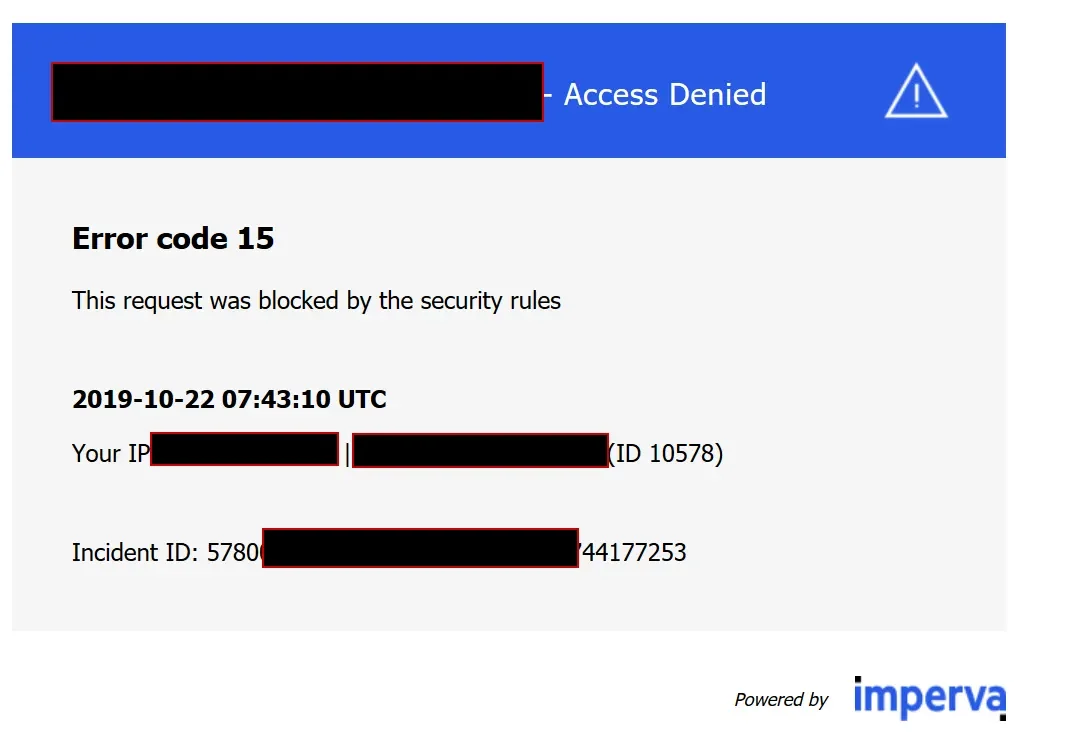
As the screenshot shows, the WAF was completely blocking the special keywords, including the keyword sleep. I tried different ways such as sleep(1+1), sleep (5), sleep(/**/2), and none of them worked: all requests were being blocked by the WAF.
I chose a sleep statement deliberately, to demonstrate the SQL injection vulnerability without harming the database and without accessing any confidential data.
Exploitation
Step 1: partial URL encoding of the keyword
I decided to use partial URL encoding, sle%25p(5), which is equivalent to sleep(5). This was blocked as well.
Step 2: hex value inside the parentheses
I then put a random hex value within the parentheses with URL encoding, and the following payload bypassed the WAF:
sle%25p%28'0x12'%2b1)
If you decode the payload using URL decoding, it is simply sleep('0x12'+1), which is a completely valid SQL statement, and this bypasses the WAF.
Step 3: boolean-based extraction of the current user
Using boolean-based SQL injection I was able to fetch the current user of the database. For the sake of simplicity and security I use the word redacted instead of the real username value.
The payload I used was:
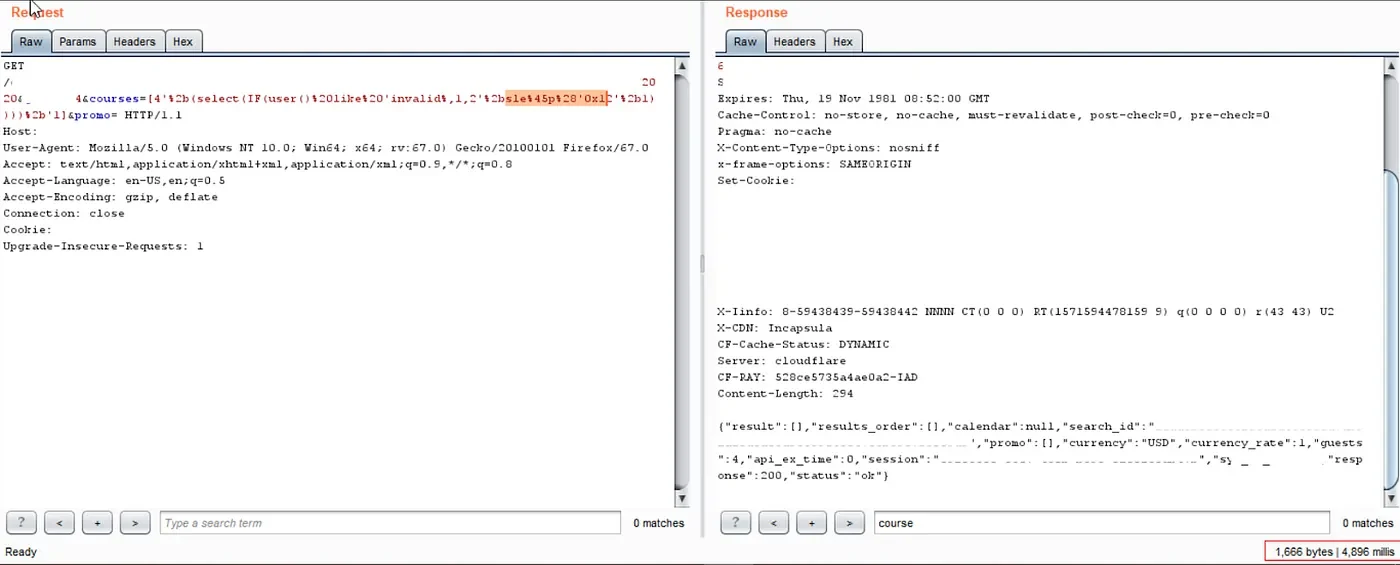
'%2b12%2bif(user()+like+redacted%',2,sle%45p%28'0x12'%2b1))+ — +s
This payload tells MySQL that if the current user is redacted then it returns 2 and the rest of the query will be executed.
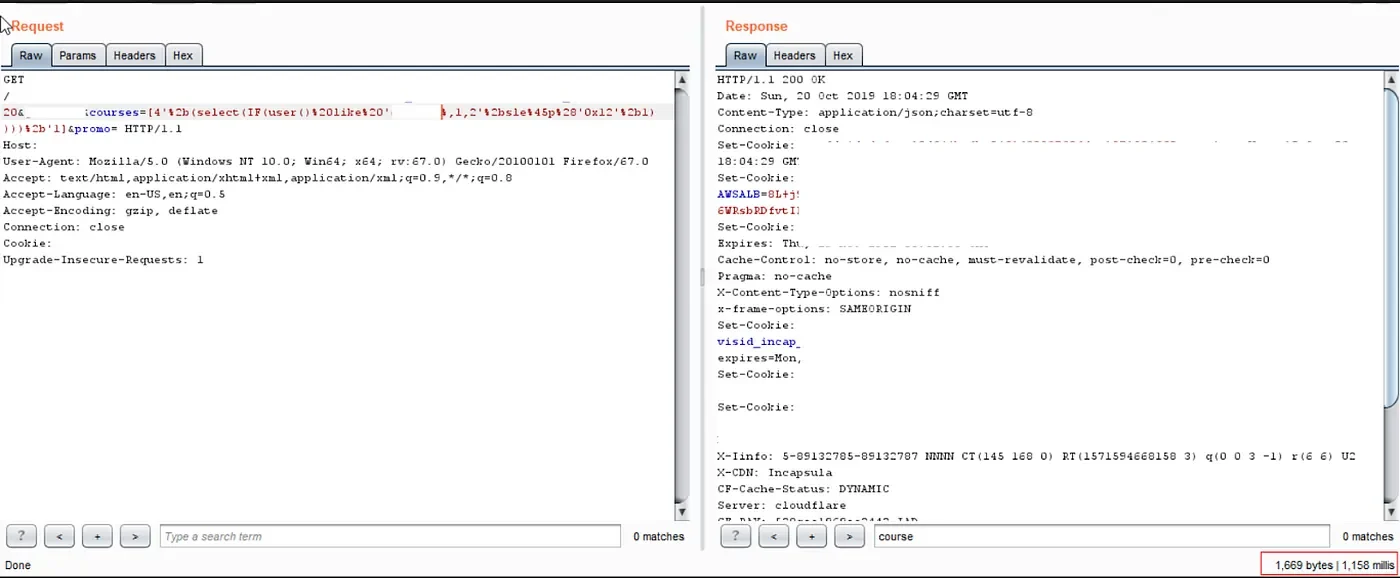
Otherwise it causes MySQL to sleep, and it seemed to be sleeping for 4 to 5 seconds.
Root cause
The input called courses was not validated by the endpoint, which is what allowed SQL to be injected in the first place. The WAF was blocking almost all complex queries, including SQL keywords such as insert, update, sleep and onto. Putting a random hex value inside the parentheses with URL encoding produced a payload that bypassed the WAF.
Impact
With boolean-based SQL injection an attacker can extract data from the database, for example the current database user, as demonstrated here. The researcher deliberately limited the demonstration to a sleep-based proof and to the current user, without harming the database or accessing confidential data. The report does not describe any other impact.
Fix
Its conclusion is that web application firewalls help avoid security incidents in the beginning but never guarantee the security of the application, and that application security should be handled at the application end. Manual security testing (penetration testing) should be conducted rather than relying on a WAF alone.
Variants to test
- Keyword obfuscation with partial URL encoding. Try encoding one character of a blocked keyword, as in
sle%25p(5). A positive result is that the request reaches the application instead of being blocked by the WAF. - Hex literals inside function parentheses. Try
sleep('0x12'+1)and similar expressions where a blocked function takes a hex value plus an arithmetic operation. A positive result is a measurable delay of several seconds in the response. - Boolean-based conditionals. Try an
if(user() like ..., 2, sleep(...))style payload to confirm that the injected condition controls the response. A positive result is a delay only when the condition is true. - Other blocked keywords. The report lists
insert,update,sleepandontoas blocked; the same encoding and hex-literal tricks are worth trying on other keywords the WAF rejects.
Best Regards,
Dawood Ikhlaq
What happened, in plain words
A security researcher was testing a shopping website. The site had a feature that lets you add items to a shopping cart, and that feature was powered by a small piece of software on the server that the website's own pages talk to. This kind of server-side software is called an API (application programming interface): think of it as a waiter in a restaurant. Your browser is the customer, the kitchen is the database, and the API is the waiter who carries your order to the kitchen and brings the answer back. You never walk into the kitchen yourself; you just tell the waiter what you want.
The researcher noticed that one of the things the browser sends to this waiter, a field called courses, was not being checked properly. When you type something into a form, a careful website checks that what you typed makes sense before using it. This one did not. Because of that, the researcher could sneak database instructions into that field, a class of bug called SQL injection. SQL is the language used to talk to databases, and injection means slipping your own commands into a place where the site expected ordinary data.
There was a guard at the door, though. The site was protected by a product called Incapsula WAF by Imperva. A WAF (web application firewall) is like a bouncer at a club who reads a list of banned words and turns away anyone who says them. It inspects incoming requests and blocks ones that look like attacks. The bouncer was doing its job: it blocked the researcher's attempts because they contained obvious database words. The researcher then found a way to disguise one of those words so the bouncer did not recognise it, and the request got through. That is the bypass in the title.
The researcher used a harmless trick to prove the bug: instead of stealing data, they asked the database to pause for a few seconds. If the page took noticeably longer to answer, that proved their instructions were really being run. This is called a time-based or sleep-based proof, and it avoids damaging anything.
The target and the input
The researcher was testing the REST API of a web application. REST is just a style of building APIs where each thing (a cart, a user, an order) has its own address, and you send requests to those addresses to read or change it. The endpoint that caught their attention was the one used to add or update items within a cart. An endpoint is simply a specific address on the server that does one job, like a particular counter in a post office.
In the write-up, the target name, usernames and passwords have been replaced with "redacted" for privacy reasons. So wherever you see redacted below, a real value stood there in the original.
The endpoint did not validate an input called courses. Validating an input means checking it before use: is it the right type, the right length, does it contain only expected characters? Skipping that check is what opened the door.
While testing against different vulnerability classes, the researcher found that the endpoint was vulnerable to SQL injection. During different tests they also found that the application was using Incapsula WAF by Imperva to protect itself from cyber attacks, and this was making the testing difficult.
Setup
The report does not describe any accounts, roles or tooling beyond the fact that the target was a REST API endpoint for adding or updating cart items, and that the input parameter of interest was called courses. The application was using the Incapsula WAF by Imperva.
A parameter is just a named slot in a request, like a field on a form. When your browser sends courses=something, courses is the parameter name and something is its value. The researcher's whole attack lived inside that value.
Finding it
The endpoint was not validating the courses input, and testing against different vulnerability classes showed that the endpoint was vulnerable to SQL injection. The presence of the WAF became the main obstacle: it was blocking almost all of the complex queries, including all of the SQL special keywords such as insert, update, sleep, onto, and so on.
The screenshot shows the WAF blocking the requests. As it shows, the WAF was completely blocking the special keywords, including the keyword sleep. The researcher tried different ways such as sleep(1+1), sleep (5), sleep(/**/2), and none of them worked: all requests were being blocked by the WAF.
Why those particular attempts? Each one is a small variation on the same word, and each variation is a guess about how the bouncer reads the list:
sleep(1+1)keeps the wordsleepintact but changes what is inside the brackets, in case the WAF only matches exact strings.sleep (5)adds a space between the word and the opening bracket, in case the WAF expects them glued together.sleep(/**/2)inserts a comment,/**/, which databases ignore, in case the WAF's pattern does not allow for comments in the middle.
All three were blocked by the WAF.
I chose a sleep statement deliberately, to demonstrate the SQL injection vulnerability without harming the database and without accessing any confidential data. A sleep statement tells the database to wait a given number of seconds before answering. It changes nothing and reveals nothing; it only makes the response slower. If the page is slow only when the researcher's condition is true, that difference is proof the injected instruction ran.
Exploitation
Step 1: partial URL encoding of the keyword
URL encoding is a way of writing characters in a web address or request so they survive the trip. Some characters have special meanings in a URL, so they are written as a percent sign followed by two characters, for example a space becomes %20. Browsers and servers decode these automatically, turning %20 back into a space before using the value.
The researcher decided to use partial URL encoding, sle%25p(5), which is equivalent to sleep(5). The idea: the WAF reads the raw text and sees sle%25p, not sleep, so its banned-word list does not fire. The application, however, decodes the value first and ends up running sleep(5). This was blocked as well.
This was blocked as well.
Step 2: hex value inside the parentheses
I then put a random hex value within the parentheses with URL encoding, and the following payload bypassed the WAF:
sle%25p%28'0x12'%2b1)
Line by line, in plain words:
sle%25pis the wordsleepwith one character disguised, as in step 1.%28is the URL encoding of an opening bracket(.'0x12'is a hexadecimal number written as text. Hexadecimal is just another way of writing numbers, using 0 to 9 and a to f;0x12is the number 18 in decimal. The quotes make it a piece of text that the database will convert to a number when it does arithmetic.%2bis the URL encoding of a plus sign+.1is the number one.)is the closing bracket.
If you decode the payload using URL decoding, it is simply sleep('0x12'+1), which is a completely valid SQL statement, and this bypasses the WAF. Decoded, it is simply sleep('0x12'+1), a valid SQL statement.
Step 3: boolean-based extraction of the current user
Using boolean-based SQL injection I was able to fetch the current user of the database. Boolean means true or false. In a boolean-based attack you do not ask the database to print data; you ask it a yes or no question and watch how it behaves. If the answer is yes, the page behaves one way; if no, another. By asking many such questions you can work out a value one bit at a time, like playing twenty questions.
For the sake of simplicity and security I use the word redacted instead of the real username value. The payload I used was:
'%2b12%2bif(user()+like+redacted%',2,sle%45p%28'0x12'%2b1))+ — +s
Line by line, in plain words:
'is a single quote. In SQL, text values are wrapped in single quotes, so a stray quote can end the text the application intended and start the researcher's own SQL. This is the actual injection point.%2bis an encoded plus sign, used here to join pieces of the query together.12is a number.%2banother encoded plus sign.if(...)is a SQL function that takes three parts: a condition, what to do if it is true, and what to do if it is false.user()is a SQL function that returns the name of the database account currently running the query.likecompares text against a pattern.redactedstands in for the real username value.%',2,closes the pattern, then supplies the true branch2and moves to the false branch.sle%45p%28'0x12'%2b1)is the disguised sleep from step 2, with%45encoding the lettere, so the false branch makes the database wait.+ — +sis trailing text that comments out whatever the application appends after the injected value, so the rest of the original query does not cause a syntax error. The—here is how the dash sequence appears in the write-up.
This payload tells MySQL that if the current user is redacted then it returns 2 and the rest of the query will be executed.
Otherwise it causes MySQL to sleep, and it seemed to be sleeping for 4 to 5 seconds.
The report says it seemed to be sleeping for 4 to 5 seconds.
Root cause
The input called courses was not validated by the endpoint, which is what allowed SQL to be injected in the first place. The WAF was blocking almost all complex queries, including SQL keywords such as insert, update, sleep and onto. Putting a random hex value inside the parentheses with URL encoding produced a payload that bypassed the WAF.
In everyday terms: the bouncer had a list of banned words, but no understanding of what a sentence means. Change one letter, or wrap a number in quotes, and the sentence still means the same thing to the listener while the bouncer shrugs and lets it through.
Impact
With boolean-based SQL injection an attacker can extract data from the database, for example the current database user, as demonstrated here. The researcher deliberately limited the demonstration to a sleep-based proof and to the current user, without harming the database or accessing confidential data. The report does not describe any other impact.
Fix
Its conclusion is that web application firewalls help avoid security incidents in the beginning but never guarantee the security of the application, and that application security should be handled at the application end. Manual security testing (penetration testing) should be conducted rather than relying on a WAF alone.
Variants to test
- Keyword obfuscation with partial URL encoding. Try encoding one character of a blocked keyword, as in
sle%25p(5). A positive result is that the request reaches the application instead of being blocked by the WAF. - Hex literals inside function parentheses. Try
sleep('0x12'+1)and similar expressions where a blocked function takes a hex value plus an arithmetic operation. A positive result is a measurable delay of several seconds in the response. - Boolean-based conditionals. Try an
if(user() like ..., 2, sleep(...))style payload to confirm that the injected condition controls the response. A positive result is a delay only when the condition is true. - Other blocked keywords. The report lists
insert,update,sleepandontoas blocked; the same encoding and hex-literal tricks are worth trying on other keywords the WAF rejects.
Glossary
- API: a defined way for one piece of software to ask another for something, like a waiter taking your order to the kitchen.
- Endpoint: a specific address on a server that performs one job, such as adding an item to a cart.
- REST: a common style of designing APIs where each thing has its own address and you send requests to it.
- Parameter: a named slot in a request, such as
courses, whose value the server reads. - Input validation: checking that data sent by a user is the right type, length and shape before using it.
- SQL: the language used to ask a database questions and tell it to change data.
- Database: the organised store where a website keeps its data.
- WAF (web application firewall): a filter in front of a website that inspects incoming requests and blocks ones that look like attacks, usually by matching known patterns.
- Incapsula WAF by Imperva: the commercial WAF product that was protecting the target application.
- Bypass: getting past a protection without the protection noticing, here by disguising a blocked word.
- URL encoding: writing characters as a percent sign plus two characters so they survive transport in a web request, for example
%20for a space. - Hexadecimal: a way of writing numbers using 0 to 9 and a to f, where
0x12means 18 in decimal. - Sleep statement: an instruction that makes the database wait a number of seconds, used here to prove injection without touching data.
- Boolean: true or false; a boolean-based attack asks the database yes or no questions and watches how the page responds.
if(): a SQL function that runs one branch when a condition is true and another when it is false.user(): a SQL function that returns the name of the database account running the query.like: a SQL comparison that matches text against a pattern.- Comment: text in a query that the database ignores, used here to neutralise the rest of the original query.
- Penetration testing: manual security testing by a person who tries to break in, as opposed to relying only on automated filters.
- Redacted: a placeholder used in the write-up in place of a real name, username or password to protect privacy.



